


AlphaBridge MCP – WordPress MCP Server: Connect Claude, ChatGPT and AI Agents
Connect Claude, ChatGPT and other AI agents to WordPress. Free MCP server for posts, media, comments and SEO. No account, up to 10 sites in one chat.

Choix solide
AlphaBridge MCP is a solid plugin choice in 2026, with a few things worth checking first. It runs on 100+ sites, is rated 5/5 and was last updated 7 days ago, and scores 74/100 on our health check.
- Actively developed — last update 7 days ago
- Testé avec le dernier WordPress (7.1)
- Momentum — downloads up 49.2% vs the previous 30 days
- Petite base d'utilisateurs (plus de 100 installations actives)
- Très peu de critiques jusqu'à présent
Comment s'accumule-t-il ?
Côte à côte sur les installations, les mises à jour, les évaluations et le support



Téléchargements quotidiens
Les pics de téléchargement suivent généralement une nouvelle version - chaque site qui met à jour automatiquement compte comme un téléchargement.
Classements
Where AlphaBridge MCP stands todayWordPress.org Classements de recherche
Position en direct dans la recherche de plugins, Top 100| Mot-clé | Position |
|---|---|
| ai assistant | >100 |
| ChatGPT | #42 |
| Claude | #30 |
| mcp | #25 |
| mcp-server | #17 |
Adoption de version
Part de sites actifs par version.
Répartition des notes
★★★★★ ★★★★★ 5 sur 1 avis
About AlphaBridge MCP
From the official readme · v4.10.1Description
Connect Claude, ChatGPT and other AI agents to WordPress with a free WordPress MCP server. Say it in plain words, and the AI does it on your site.
AlphaBridge MCP lets the Claude or ChatGPT you already use work directly on your WordPress site: write and schedule posts, upload images, answer comments, edit menus and widgets, check and fix SEO fields, change prices and stock in WooCommerce, manage user accounts, read pending updates and site health, and undo a change with one sentence. No account, no API key, no credits, connected in about two minutes. Rated A by Glama, with the highest score of all WordPress MCP servers with 40 or more tools.
Try it:
- “Write a post from these notes and schedule it for Friday.”
- “Approve the new comments and answer the question about opening hours.”
- “Write a meta description for every post that has none.”
- “Add alt texts to the images in the media library that have none.”
- “Which of my sites have updates waiting?”
- “Show me the texts and buttons on the home page, in page order.”
- “Put the About page back the way it was before your last change.”
Watch the whole setup in one minute: Connect Claude to WordPress in five steps. Or click Live Preview on this page and look around the plugin on a test site.
What is a WordPress MCP server?
MCP, the Model Context Protocol, is the open standard AI assistants use to work with other software. An MCP server offers tools that an assistant can call. AlphaBridge MCP turns your WordPress site into such a server. Claude, ChatGPT, Claude Code, Cursor and other MCP clients see its tools, and when you ask for something, the assistant picks the right tool and runs it on your site, with the rights of your WordPress user.
You need nothing else for it: no WordPress MCP Adapter, no extra plugin, no service to sign up for. AlphaBridge speaks MCP itself, in plain PHP inside WordPress. It manages widgets and site settings, changes the texts of pages built with blocks or a common page builder, and works in the SEO fields of Yoast SEO and Rank Math.
82 tools. No license key, no registration, no quotas. The free plugin is complete, not a trial.
Why AlphaBridge MCP
- Free and complete. Every free tool works without payment, registration or license key, and the plugin does not expire. No usage quotas and no credits: you use Claude or ChatGPT as you do today.
- Connect straight from Claude’s directory. In Claude, pick AlphaBridge from its connector directory, enter your site’s address and approve on your own site.
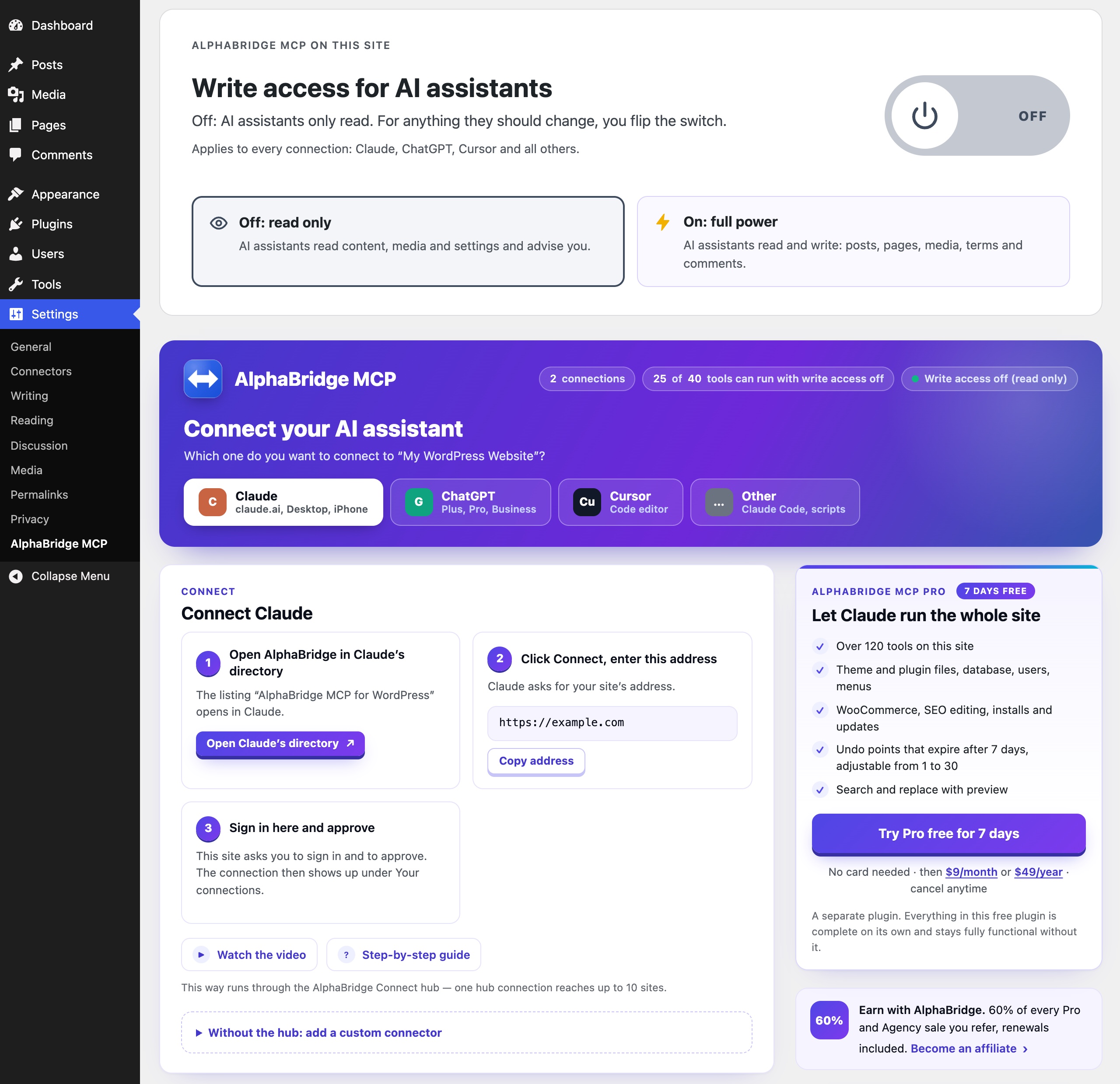
- It reads until you allow more. Out of the box the AI only reads. One switch lets it write, one click turns writing off again.
- Undo included. Edits of posts and pages, page-builder elements, status changes in bulk, the site settings and the options a search and replace changed leave an undo point that expires after 7 days. One sentence brings back what was there before.
- Your WordPress rights apply. Every connection acts as a real WordPress user. What that user may not do, the AI cannot do.
- Edits Elementor and 14 more page builders. The AI changes texts, links and images right in the builder, with a preview first and an undo point.
- Up to 10 sites in one chat. The free hub, the service of AlphaBridge MCP that links your sites to Claude and ChatGPT, brings up to 10 WordPress sites into one chat, in every edition.
- Runs on shared hosting. Plain PHP over the WordPress REST API, with nothing else to install on the server.
Who it is for
- Site owners. You look after the site of your practice, shop, club or blog yourself. Now you tell Claude or ChatGPT what should change, and it happens on your site, without copying texts between tabs.
- Freelancers and agencies. Bring up to 10 client sites into one chat and hand routine changes to the AI, while every site keeps its own login and rights. Agency adds Site Deploy for relaunches.
- Developers. Work from Claude Code, Cursor or Codex on a live site, inside the WordPress rights model you already know.
Connect Claude to WordPress
- Install AlphaBridge MCP from Plugins → Add New Plugin and activate it.
- Open AlphaBridge MCP for WordPress in Claude’s connector directory and click Connect.
- Enter your site’s address and approve on your own site’s login-protected consent screen.
Claude asks only for your site’s address. It then works on your site in the browser, in the desktop app and on the phone. To connect without the hub, add your site’s MCP address as a custom connector instead.
Connect ChatGPT to WordPress
ChatGPT on Plus, Pro, Business, Enterprise and Edu adds your site as a plugin:
- In ChatGPT, open Plugins, choose Add, then add a custom MCP server.
- Paste your site’s MCP address from Settings → AlphaBridge MCP as the server URL and choose OAuth.
- Approve on your own site.
The plugin’s settings page walks you through the same steps and checks that ChatGPT can sign in.
Connect Claude Code, Cursor, Codex and other MCP clients
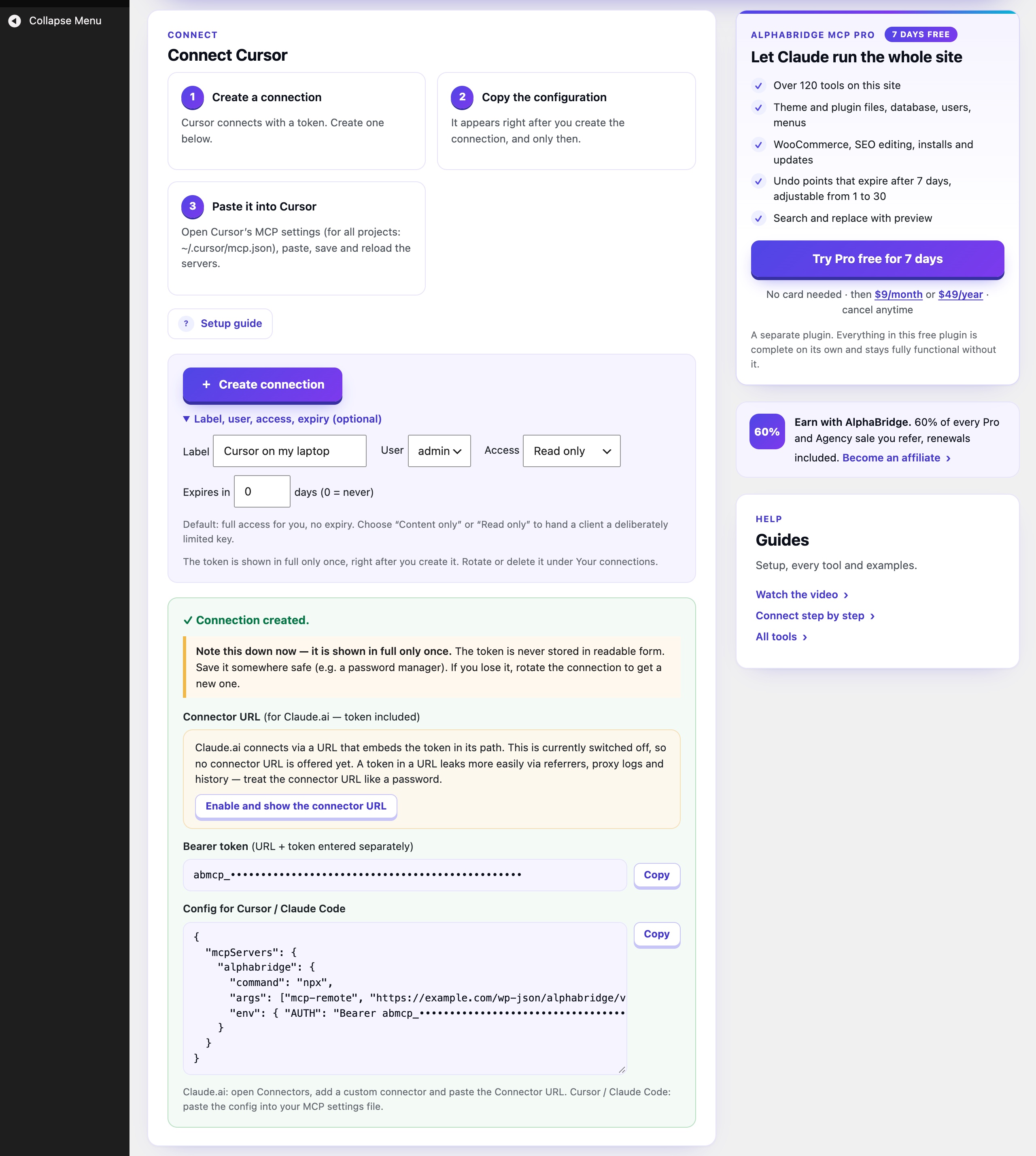
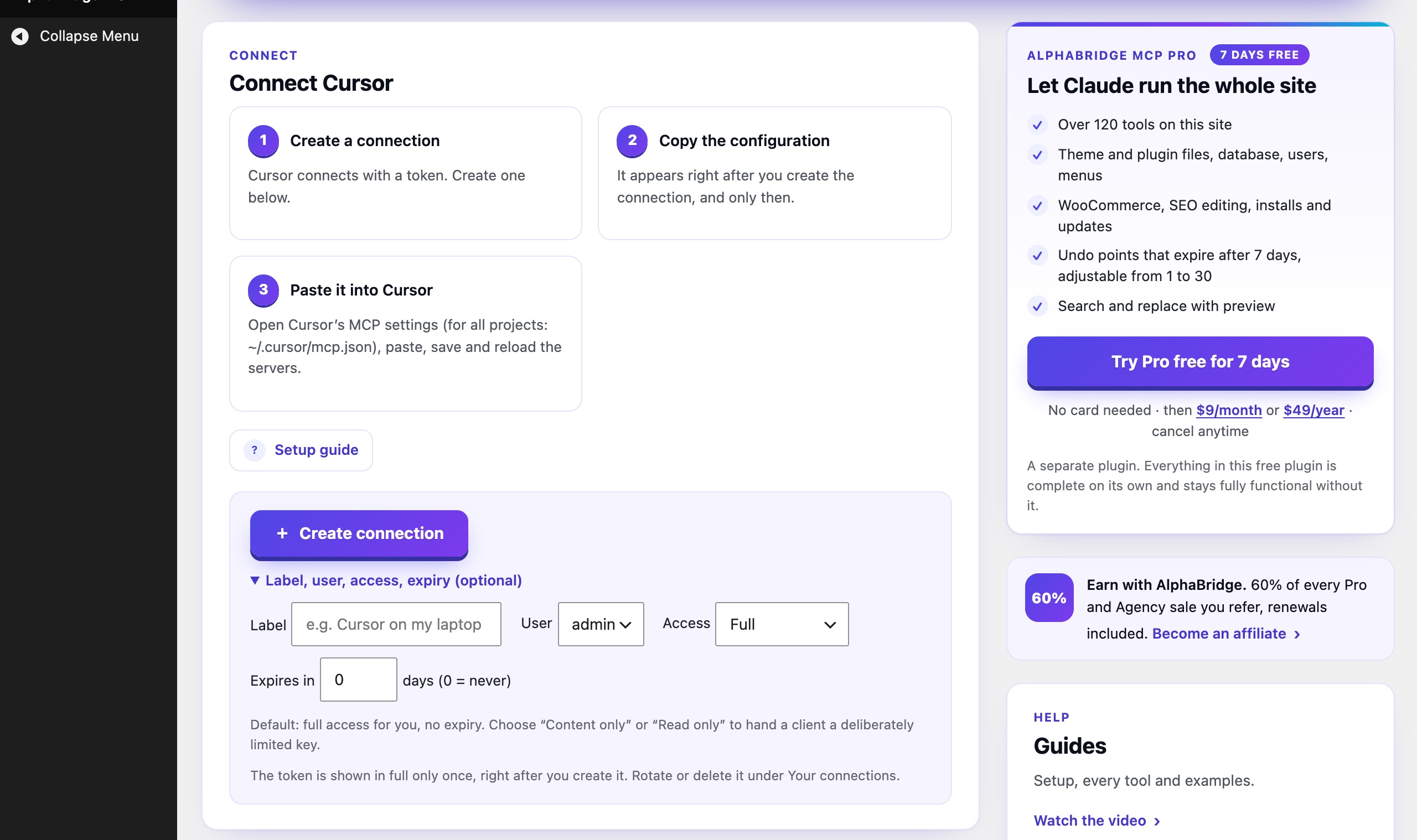
Clients that sign in with OAuth need only your site’s MCP address. For the others, create a connection under Settings → AlphaBridge MCP: Cursor gets a ready-made config, Claude Code a ready-made command, and every other client the address and a key for this one connection. This works for Claude Code, Cursor, Codex, VS Code, Windsurf and your own scripts. Each connection gets full access, content only or read only, and a connection you create in the plugin can also get an expiry.
What your AI can do with the free plugin
- Posts and pages. Write, edit, schedule, duplicate and delete posts and pages, set their custom fields and bring back an earlier revision. Publish, unpublish or trash up to 500 at once. Search the whole site.
- Undo. Changes to the title, content, excerpt, status, slug, parent, author or date of a post, page-builder elements, status changes in bulk, changes of the site settings and the option rows a search and replace changed leave an undo point that expires after 7 days. Ask the AI what it changed, and one sentence puts the previous values back. Custom fields and terms are not part of it.
- Media. Add JPEG, PNG, GIF, WebP and PDF files from the chat or from a web address. Change titles, captions and alt texts, and delete files.
- Categories and tags. Create, rename and delete the terms of any taxonomy.
- Comments. Read, approve, answer and delete comments, and move spam out of the way.
- SEO. Read and set the SEO title, meta description and focus keyword that Yoast SEO or Rank Math keep for each post, and find what is missing.
- Updates and site health. See which plugins, themes and WordPress versions wait for an update, and how the site is doing.
- Page builders. Read the pages of supported builders as an outline, and change the text, link or image of one element right in the builder, with a preview first and an undo point.
- Search and replace. Replace a text across posts, custom fields, options and terms, safe for serialized and JSON data: a dry run first, then apply. On page-builder pages only the fields the builder’s writer may change are touched (
scopetext); matches in code or other locked places are counted inlocked_matches.post_idskeeps a run to the posts you name,expected_countwrites only if the preview still fits, and changed options get an undo point. - Menus. Read the navigation menus, create a menu, and add or remove its items.
- Shop. Read WooCommerce orders, products, coupons and customers. Change prices, sale prices, stock and order status, and create coupons.
- Users. Create, change and delete user accounts and give them roles, within the rights of your own account; the last administrator always stays. Set user and term meta.
- Plugins and themes. See which plugins and themes are installed and active.
- Maintenance. Clear the object cache and the page cache of common caching plugins, refresh the permalinks, optimise the database tables and remove expired transients. See the scheduled WP-Cron events, and with write access on read the latest lines of debug.log.
- Widgets and settings. Add, change and remove widgets, and set the site title, tagline, admin email, timezone and posts per page.
- Site audits. Ask for a check of all posts: thin content, missing meta descriptions, images without alt text. The AI works through the list with you.
- Many sites. Bring up to 10 sites into one chat and work on whichever you name.
Page builders it reads
It reads a page as an outline: its elements in page order, with their visible texts, links and images. Elements it cannot read safely, such as code or forms, are listed as locked, without their content.
- Read: WordPress blocks, Elementor, Beaver Builder, SiteOrigin Page Builder, SeedProd, GenerateBlocks, Kadence Blocks, Spectra, Stackable, Pagelayer, Otter Blocks and CoBlocks (both as plain blocks), WPBakery Page Builder, Divi 4, Avada (Fusion Builder), Flatsome (UX Builder) and Enfold (Avia Layout Builder).
- Read according to the vendors’ documentation: WPBakery Page Builder, Divi 4, Avada, Flatsome and Enfold.
- Recognised, not read: Brizy, Themify Builder, Zion Builder, Live Composer, Cornerstone, Thrive Architect, Bricks, Breakdance, Oxygen 6, Oxygen Classic, BeTheme (BeBuilder), Visual Composer Website Builder, Divi 5 and Etch.
Where a builder shows its own data and the WordPress content is only a copy, as with Elementor, Beaver Builder, SiteOrigin Page Builder and Enfold, the plugin leaves that copy alone while the builder is active, because a change there would not show, and says how to change the page instead. The AI changes texts, links and images right in the builder, with a preview first and an undo point, on pages of the WordPress blocks, GenerateBlocks, Kadence Blocks, Spectra, Stackable, Pagelayer, Elementor, Beaver Builder, SiteOrigin Page Builder, SeedProd, WPBakery Page Builder, Divi 4, Avada, Flatsome and Enfold.
You stay in control
- Read-only until you switch it on. Out of the box the AI can only read. One switch, “Write access for AI assistants”, lets it create, change and delete. One click turns it off again.
- Your WordPress rights apply. Every connection acts as a real WordPress user. What that user may not do, the AI cannot do.
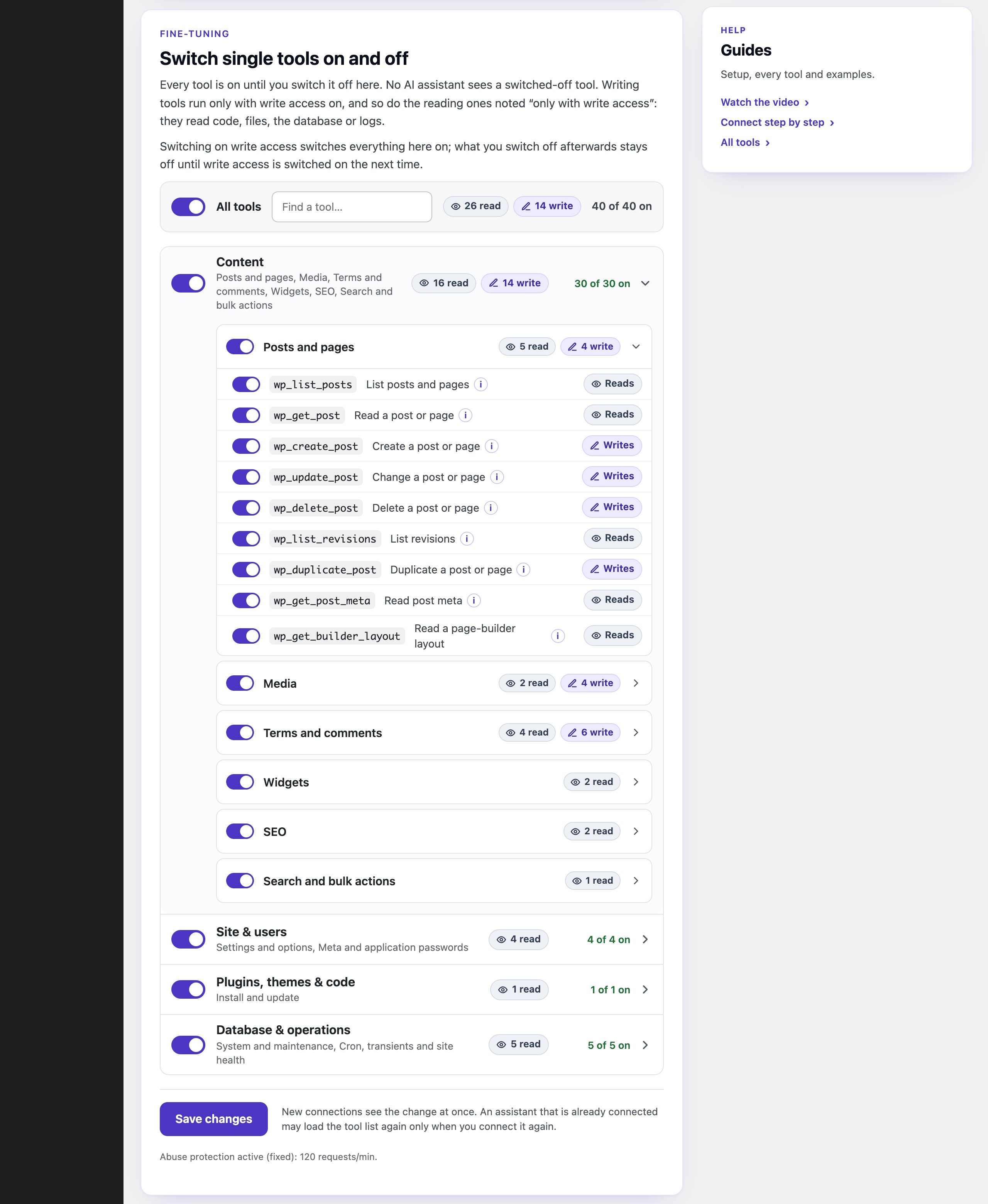
- Rules per connection. Give each app full access, content only or read only. A connection you create in the plugin can also get an expiry. Switching write access on turns every tool on. Each connection keeps its access level. Single tools or whole groups can be switched off.
- A clear log. The plugin keeps the latest 200 tool calls with time and status, and the settings page shows the newest. A limit of 120 requests a minute stops runaway request bursts.
- Answers that help. When AlphaBridge refuses a request, it says why and what to do next.
- No telemetry. The plugin sends no telemetry and contacts no outside service on its own.
Works with
- AI apps: Claude in the browser, the desktop app and on the phone, ChatGPT from Plus upwards, Claude Code, Cursor, Codex, VS Code, Windsurf and other MCP clients.
- SEO plugins: Yoast SEO and Rank Math. All in One SEO is recognised.
- Page builders: Elementor, Beaver Builder, SiteOrigin Page Builder, SeedProd, the block editor and the others listed above.
- Hosting: any WordPress host with PHP 8.0 or newer, shared hosting included. HTTPS is recommended.
More with Pro
AlphaBridge MCP Pro is a separate add-on. Everything in the free plugin plus the Pro tools, 135 tools on your site:
- Code with a safety net. Edit theme and plugin files and PHP snippets. After each edit of active PHP code, Pro tests the site and puts the old version back if the test finds a fatal PHP error.
- Undo for files and code. Theme and plugin files, PHP snippets, options and theme switches come back with one sentence too; undo points expire after 7 days by default, adjustable from 1 to 30 days.
- Plugins, themes and WordPress itself. Install, update, activate and delete plugins and themes, and update WordPress. Test requests check the site before and after an update or a switch-on, and a version that breaks it is put back in the same call.
- Database and options. Query the database, change rows of plugin tables with structured statements, and write options, with guards for what must stay protected.
- Your other plugins. Run the abilities your other plugins offer the AI.
The Agency plan adds Site Deploy: the AI publishes files, themes and whole builds over SFTP onto the server the site runs on. Agency covers up to 10 sites.
Pro can be tried free for 7 days, no card needed. The free plugin stays complete without it. Editions, guides and a comparison with other WordPress MCP plugins: alphabridge-mcp.com
Claude, ChatGPT and the other names mentioned belong to their respective owners. Naming them does not mean they partner with, sponsor or endorse AlphaBridge.
External services
AlphaBridge MCP sends no telemetry and calls no outside service on its own. Three things reach beyond your site, each only when you start them:
- The hub, optional. If you connect through the hub at connect.alphabridge-mcp.com, the free service of AlphaBridge MCP that links your sites to Claude and ChatGPT, it calls your site to set up the connection and to pass on the tool calls you make. It keeps your site’s access key encrypted and passes content through without storing it. Terms and privacy notice.
- The app you connect. Some apps, such as ChatGPT, identify themselves with a small public file. While you approve such an app on your site, your site fetches that file from the app’s address. The request carries no content, cookies or tokens from your site. You can switch this off under ChatGPT → “Switch the direct sign-in off” on the plugin’s settings page.
- A file you name. The tool wp_upload_media_from_url downloads the file at the URL you give it.
Installation
- In WordPress, go to Plugins → Add New Plugin, search for “AlphaBridge MCP”, install and activate it.
- Claude: open AlphaBridge MCP for WordPress in Claude’s directory and click Connect. Enter your site’s address and approve on your own site’s login-protected consent screen. There is no endpoint or token to copy. To connect without the hub, add your endpoint as a custom connector instead.
- ChatGPT: open Plugins, choose Add, then add a custom MCP server. Paste your site’s MCP address from Settings → AlphaBridge MCP as the server URL, choose OAuth and approve on your site.
- Cursor, Claude Code and other clients: under Settings → AlphaBridge MCP, create a connection. Cursor gets a ready-made config and Claude Code a ready-made command.
- Assistants only read until you allow more. To let them create, change and delete, and read user profile fields and the error log, switch on “Write access for AI assistants” at the top of Settings → AlphaBridge MCP. Changes then take effect immediately and not everything can be undone. You switch it on at your own risk, so keep a current backup. Switching it on asks you to agree to the Terms of Use.
Journal de modifications
Sites installed in a subfolder (up to four levels deep) of a domain where AlphaBridge also runs at the root, for example staging copies, can connect to AI clients over OAuth when AlphaBridge on the main site is updated and the subfolder site lies in its web directory and can be reached from it.
4.10.1
- The main site now answers OAuth discovery requests for a site in a subfolder of the same domain (up to four levels deep, for example a staging copy) with that site’s own metadata, fetched from it, so the subfolder site can connect to AI clients over OAuth when AlphaBridge on the main site is updated and the subfolder site lies in the main site’s web directory and can be reached from it.
4.10.0
- Page-builder texts and search and replace in the free plugin, 82 tools in all.
wp_update_builder_elementandwp_search_replacecame with AlphaBridge MCP Pro only; they work as they did there, with the same checks, and their messages come in the plugin’s languages. wp_update_builder_elementchanges the text, link or image of one element on pages of the WordPress blocks, GenerateBlocks, Kadence Blocks, Spectra, Stackable, Pagelayer, Elementor, Beaver Builder, SiteOrigin Page Builder, SeedProd, WPBakery Page Builder, Divi 4, Avada, Flatsome and Enfold. It previews by default; applied, it records an undo point first, saves through the builder and reads the page back.wp_search_replacereplaces across posts, postmeta, options and terms, safe for serialized and JSON values, with a dry run per table first. On page-builder pages (scopetext) only the fields the builder’s writer may change are touched, and matches in locked places are counted inlocked_matches;scoperaw replaces the stored data as text.- New:
post_idsandexpected_count.post_idskeeps a replace to the posts it names; withexpected_count, apply=true writes only when the call still finds as many matching rows as its dry run did. - New: undo for option rows. The option rows a replace changes get an undo point of their own (
options_undo_token), recorded before the first of them is written. - Undo for page-builder pages.
wp_undoputs every stored copy of a page back byte for byte and leaves a page changed since as it is, unlessforce=true. - Protected options (the site address, active plugins and theme, roles and registration, the mail server, keys, AlphaBridge’s own settings) stay out of every replace.
4.9.0
- 22 more tools in the free plugin, 80 in all, undo included. Until now they came with AlphaBridge MCP Pro only; they work as they did there, with the same rights checks, and their messages come in the plugin’s languages.
wp_update_user_metaandwp_update_term_metakeep the backslashes in a value. - Undo.
wp_update_post(the post fields it changes, not custom fields or terms),wp_bulk_update_statusandwp_update_site_settingskeep an undo point with the previous values;wp_undo_listlists your own points,wp_undoputs one back (withdry_run=trueit only shows what it would do),wp_undo_discardthrows one away. If only part comes back, the undo point is replaced by one with just the rest (rest_token, same expiry), so trying again never writes back what already came back. Putting back a file’s former parent needs the right to edit that post now. Undo points expire after 7 days; the newest 50 and 100 MB at most are kept, as copies in a protected folder in the uploads. A restore asks again for the right to the post or the setting, as the original change did. Undo points that Pro recorded on this site stay where they are: Pro reverses them, and without Pro they expire. - Posts. Bring back an earlier revision (
wp_restore_revision), set one custom field (wp_update_post_meta; page-builder data takes the unfiltered_html capability), and publish, unpublish or trash up to 500 posts at once (wp_bulk_update_status). - Users. Create, change and delete user accounts (
wp_create_user,wp_update_user,wp_delete_user), within the roles your own account may give; the last administrator cannot be deleted or demoted. Set user and term meta (wp_update_user_meta,wp_update_term_meta). - WooCommerce. Change the price, sale price, stock and status of a product, the status of an order, and create coupons (
wp_wc_update_product,wp_wc_update_order_status,wp_wc_create_coupon), with the right to the one product or order. - Widgets and settings. Add, change and remove widgets (
wp_add_widget,wp_update_widget,wp_delete_widget); set the site title, tagline, admin email, timezone and posts per page (wp_update_site_settings), each read back. - Maintenance. Clear the object cache, OPcache and the page cache of supported caching plugins (
wp_clear_cache), refresh the rewrite rules (wp_flush_rewrite_rules), optimise the site’s database tables (wp_db_optimize) and remove expired transients (wp_cleanup_transients). - All of them write only with write access on, as every writing tool does. Deleting the plugin also removes the undo points, unless AlphaBridge MCP Pro is still installed.
4.8.1
- The request for a review comes sooner and where administrators look. It appears once the plugin has been in use for 3 days with at least 25 successful tool calls (before: 14 days and 50 calls), as before as a strip in the header of Settings → AlphaBridge MCP and now also as a notice on the Dashboard and the Plugins screen, for administrators only. One answer ends it everywhere: «Write a review» or «Don’t show again». It never comes back, also not after an update, and nothing is sent anywhere.
4.8.0
- SEO fields in the free plugin, 58 tools in all.
wp_seo_setsets the SEO title, meta description and focus keyword of a post in Yoast SEO or Rank Math: only the fields given, tags and line breaks stripped, with the right to edit the post and each of its SEO fields. Until now it came with AlphaBridge MCP Pro only. A backslash in a value is stored as written, and so are the variables the SEO plugin fills in, such as %%category%% or %date%. With All in One SEO or without a supported SEO plugin the call is refused, and the answer says why and what to do. - Wording: the hub. The free service at connect.alphabridge-mcp.com that links your sites to Claude and ChatGPT is called the hub, explained where the readme first names it.
4.7.0
- 17 more tools in the free plugin, 57 in all. Menus: list them, read one with its items, create one, add and remove items (
wp_list_menus,wp_get_menu,wp_create_menu,wp_add_menu_item,wp_delete_menu_item). WooCommerce, read only: orders, one order, products, one product, coupons and customers (wp_wc_list_orders,wp_wc_get_order,wp_wc_list_products,wp_wc_get_product,wp_wc_list_coupons,wp_wc_list_customers). User accounts, read only (wp_list_users,wp_get_user), the installed plugins and themes (wp_list_plugins,wp_list_themes), the scheduled WP-Cron events (wp_get_cron) and the last lines of debug.log (wp_get_error_log, only with write access on, like the reader of user profile fields). Until now they came with AlphaBridge MCP Pro only; they work as they did there, with the same rights checks, and their messages come in the plugin’s languages. Changing prices, stock and order status, creating coupons and creating, changing or deleting user accounts stay in Pro.
Captures d'écran


Pour les développeurs
Est-ce votre plugin ? Montrez les chiffres.
Ajoutez un badge en direct à votre site, docs ou github readme. Il se met à jour par lui-même - aucun compte n'est nécessaire.
Best AlphaBridge MCP alternatives
All ai assistant plugins →





FAQ
AlphaBridge MCP: quick answers
Réponses directes, extraites des données en direct WordPress.org.
Source : WordPress.org
Is AlphaBridge MCP free?
Yes. AlphaBridge MCP is free to download and use from the official WordPress.org plugin directory.
Is AlphaBridge MCP safe to use in 2026?
AlphaBridge MCP is a solid plugin choice in 2026, with a few things worth checking first. It runs on 100+ sites, is rated 5/5 and was last updated 7 days ago, and scores 74/100 on our health check.
How many websites use AlphaBridge MCP?
AlphaBridge MCP is active on 100+ WordPress websites and has been downloaded 3,618 times since it launched in July 2026. It was downloaded 1,941 times in the last 30 days.
Does AlphaBridge MCP work with WordPress 7.1?
Yes. The developer has tested AlphaBridge MCP up to WordPress 7.1.5, the latest release. It requires WordPress 6.5 or newer.
What PHP version does AlphaBridge MCP need?
AlphaBridge MCP requires PHP 8.0 or higher. Most hosts run PHP 8.x today, so it works on any modern WordPress hosting.
When was AlphaBridge MCP last updated?
The latest version, 4.10.1, was released on November 12, 2026 (7 days ago).
Who makes AlphaBridge MCP?
AlphaBridge MCP is developed and maintained by cultureclub.
What are the best alternatives to AlphaBridge MCP?
The most popular alternatives to AlphaBridge MCP are WPVibe (100K+ installs), Hyve Lite (7K+ installs) and YLabs AI Site Manager with… (6K+ installs).
Propulsé par PageForge
Un modèle et une feuille de calcul. Une vraie page pour chaque recherche.
PageForge transforme chaque ligne d'un CSV en une page WordPress avec son propre titre, URL, SEO et schéma, construit sur la mise en page que vous Déjà conçu. Gratuit sur WordPress.org.
- CSV et XLSX, plus Google Sheets sur les professionnels et les entreprises
- Son propre titre, URL, SEO champs et schéma pour chaque page
- Fonctionne avec l'éditeur de blocs, Elementor, Divi et Avada
- Gratuit sur WordPress.org, pas de carte de crédit