

DiveWP – Boost Site Performance with Clear, Actionable Steps
AI-assisted WordPress diagnostics, performance checks, security insights, logs, cron monitoring, database health, and more.

Choix solide
DiveWP is a solid plugin choice in 2026, with a few things worth checking first. It runs on 200+ sites, is rated 5/5 and was last updated 1 month ago, and scores 77/100 on our health check.
- Testé avec le dernier WordPress (7.1)
- Petite base d'utilisateurs (plus de 200 installations actives)
Comment s'accumule-t-il ?
Côte à côte sur les installations, les mises à jour, les évaluations et le support



Téléchargements quotidiens
Les pics de téléchargement suivent généralement une nouvelle version - chaque site qui met à jour automatiquement compte comme un téléchargement.
Classements
Where DiveWP stands todayWordPress.org Classements de recherche
Position en direct dans la recherche de plugins, Top 100| Mot-clé | Position |
|---|---|
| ai assistant | >100 |
| performance | #47 |
| security | >100 |
| site health | #17 |
| wordpress logs | >100 |
Adoption de version
Part de sites actifs par version.
Répartition des notes
★★★★★★★★★★ 5 from 6 reviews
About DiveWP
À partir du Lisezmoi officiel · v3.0.1Description
DiveWP is a WordPress AI assistant and site health toolkit for evidence-based troubleshooting, logs, scheduled tasks, hosting tests, performance, security, database health, plugins, WooCommerce, SEO, email, server settings, themes, and administrator activity.
WordPress 7.1 support: Tested with WordPress 7.1. Standard tools support WordPress 6.0+, Abilities API integrations require WordPress 6.9+, and AI Agent chat requires WordPress 7.0+, the WordPress AI Client, and a compatible provider in Settings > Connectors.
DiveWP AI Agent: a WordPress AI assistant grounded in your site
DiveWP AI Agent lets administrators ask questions about the current site using DiveWP’s read-only checks and optional page context.
- Resizable chat throughout wp-admin and on the logged-in frontend after consent.
- Evidence from the current screen, DiveWP diagnostics, bounded browser errors, failed-request summaries, selected elements, and short reproduction traces.
- Site-health answers grounded in DiveWP’s existing diagnostics, without requiring a separate investigation scan.
- Administrator-owned conversation search, rename, archive, restore, delete, export, model selection, and configurable retention.
- Optional public WordPress research, configurable email site-health reports (every 30 days by default), redacted case handoff, and verified plugin/theme maintenance from chat. Single, plugin-wide, theme-wide, and combined update requests show live per-item progress. Approval mode is the default; administrators can deliberately choose automatic mode, which still rechecks permissions, current state, and the final result.
AI Agent is opt-in and each feature can be disabled. On older WordPress versions, its launcher shows update instructions while non-AI DiveWP tools continue to work.
WordPress system logs and error diagnostics
Review wp-content/debug.log, WooCommerce file/database logs, and WooCommerce fatal errors when available. Use Latest, By Source, WP Debug, WooCommerce, Fatal Errors, and access-help views with severity labels, source detection, adjustable limits, entry details, stack context, and copy controls.
WordPress plugin management, updates, and rollback
Search and filter installed plugins by active, inactive, or update status. View WordPress.org descriptions, changelogs, reviews, ratings, and versions; activate, deactivate, update, or roll back eligible plugins. Rollback replaces files, not database changes or options.
WP-Cron and Action Scheduler monitoring
Monitor WP-Cron events and Action Scheduler queues. Search tasks, review recurrence and source, find overdue jobs and potential orphan hooks, and inspect execution status, duration, peak memory, trigger source, and errors.
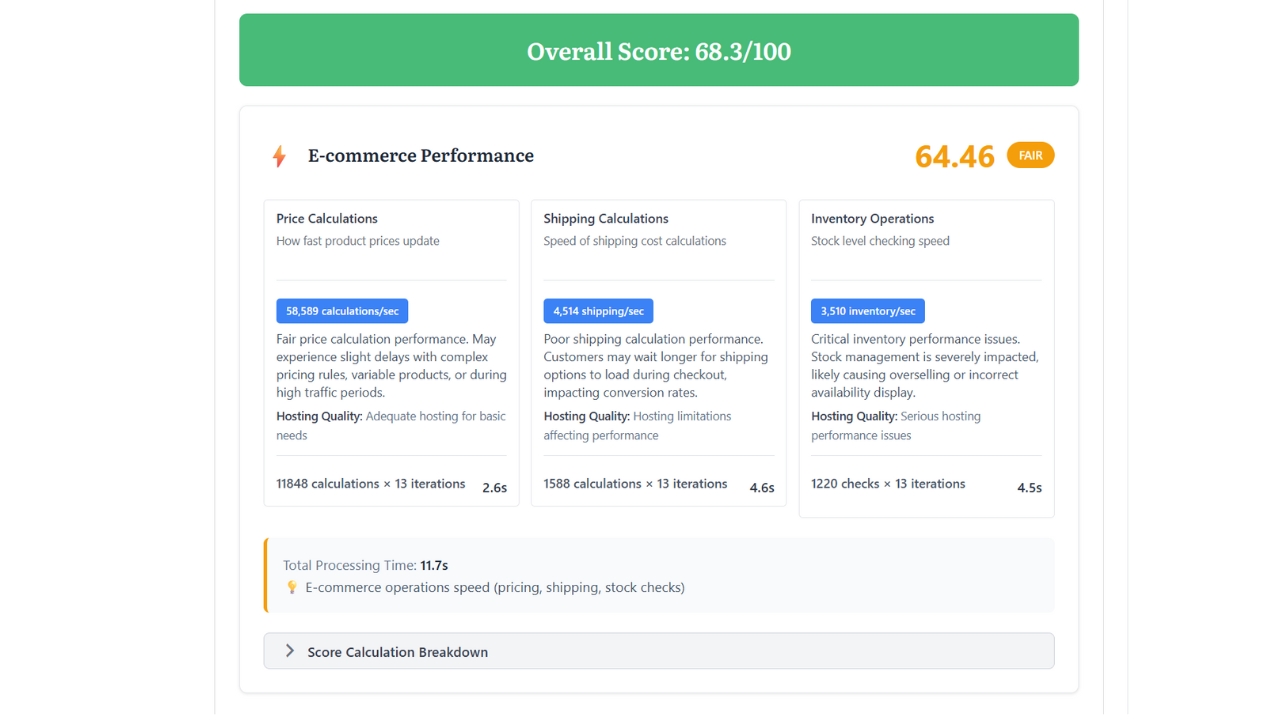
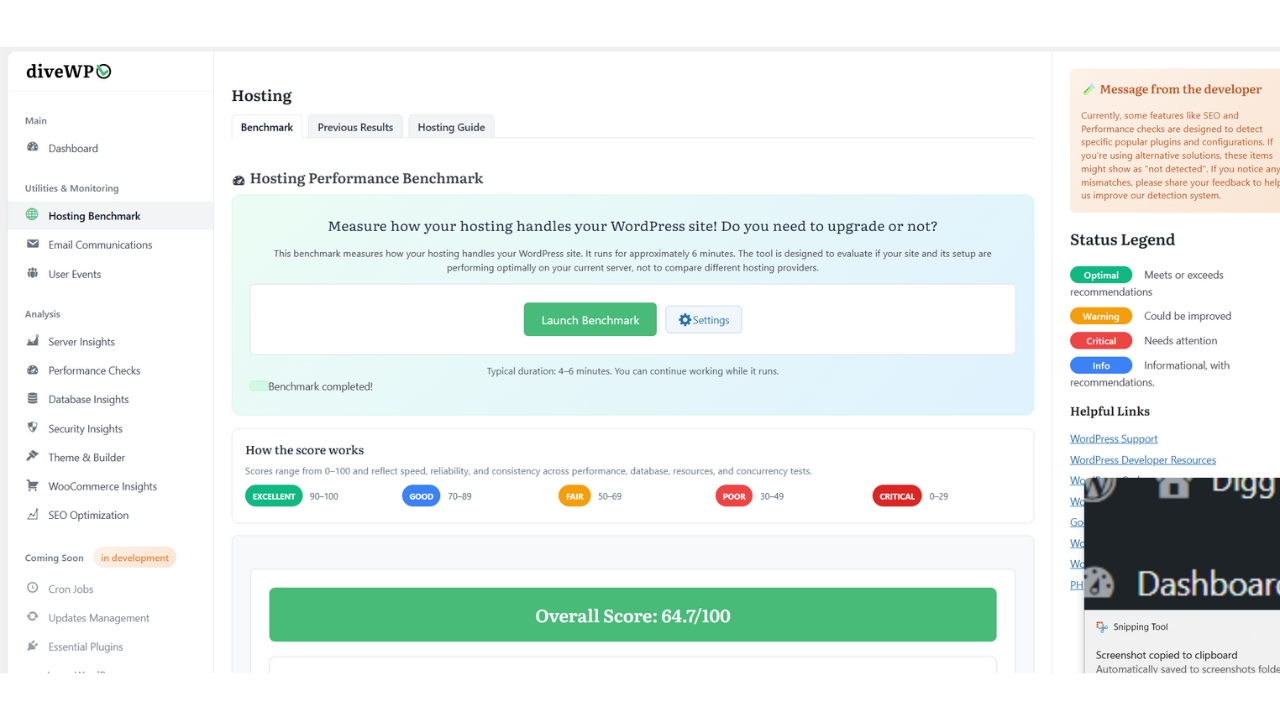
Hosting performance benchmark
Benchmark database operations, CPU, memory, file I/O, network checks, concurrent requests, and WooCommerce-style price, shipping, and inventory calculations. Review scores, previous runs, details, and the hosting guide.
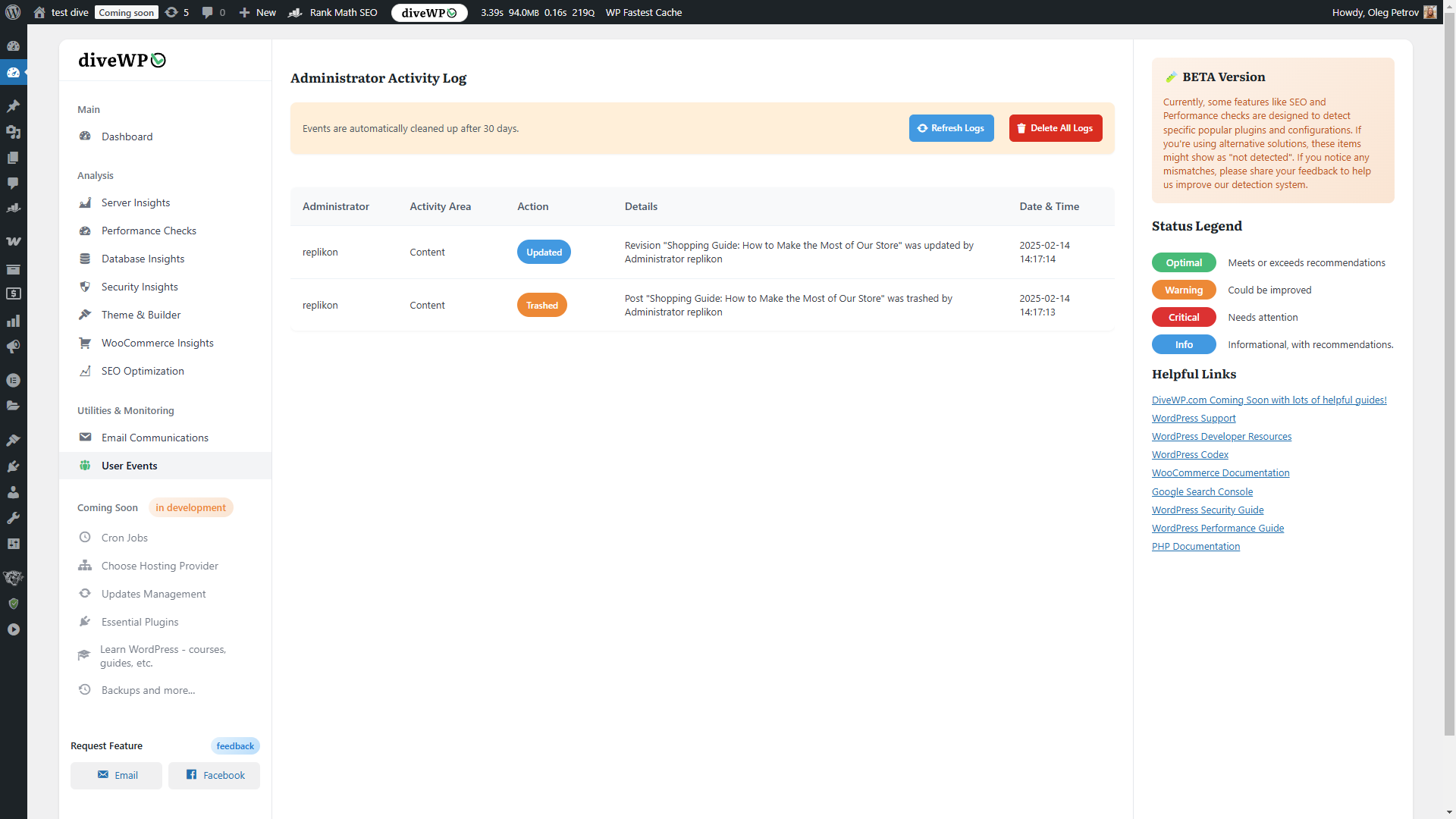
User activity log
Record administrator logins, failed logins, content, media, comments, users, roles, plugins, themes, settings, core updates, file edits, and Application Password REST access. Events include details, pagination, administrator clearing, and default 30-day retention.
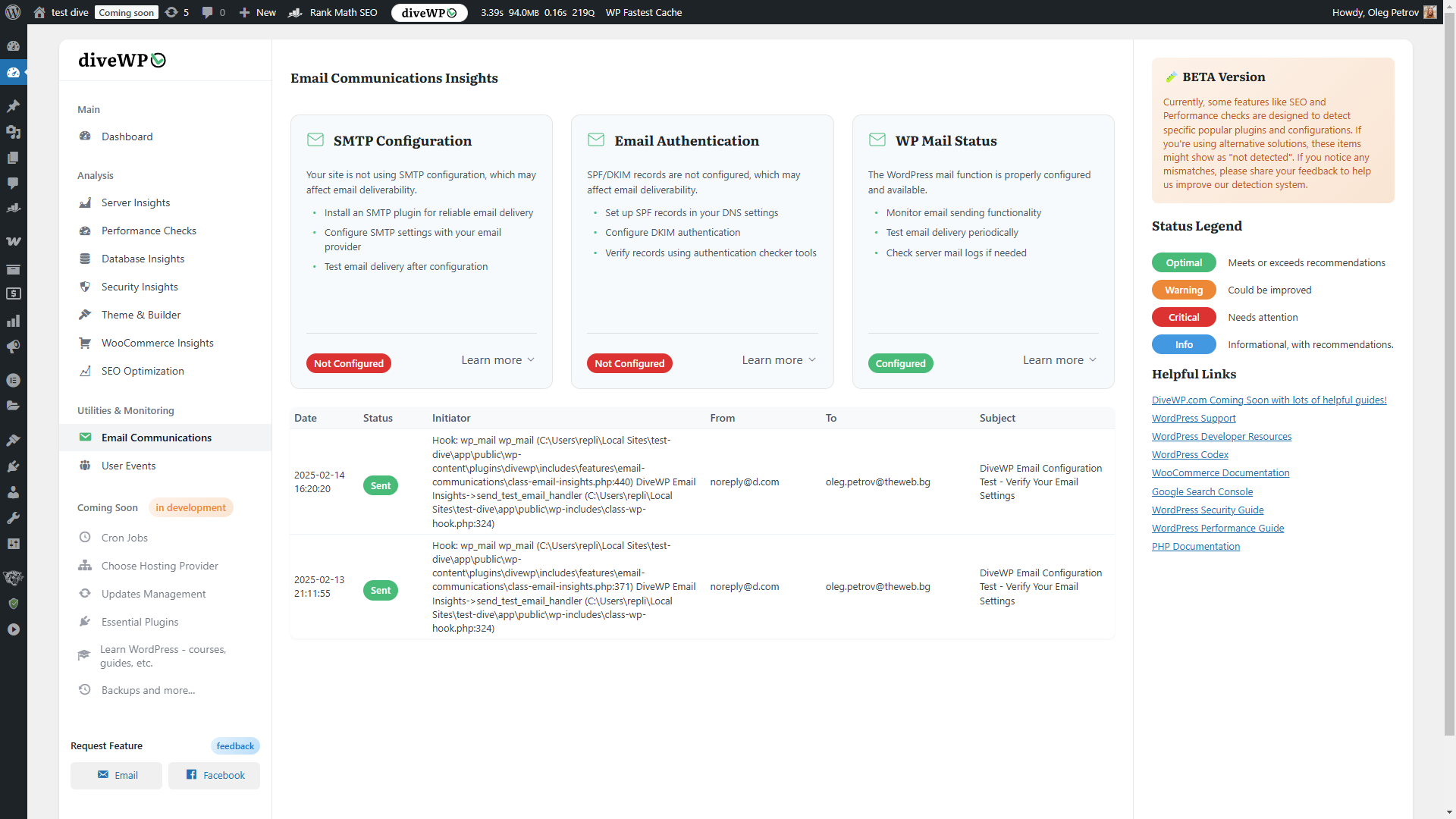
Email log and SMTP checks
Detect supported SMTP plugins and email-authentication indicators, check wp_mail(), and send a rate-limited test. Log sent and failed email status, subject, time, initiator, and errors with refresh and delete controls.
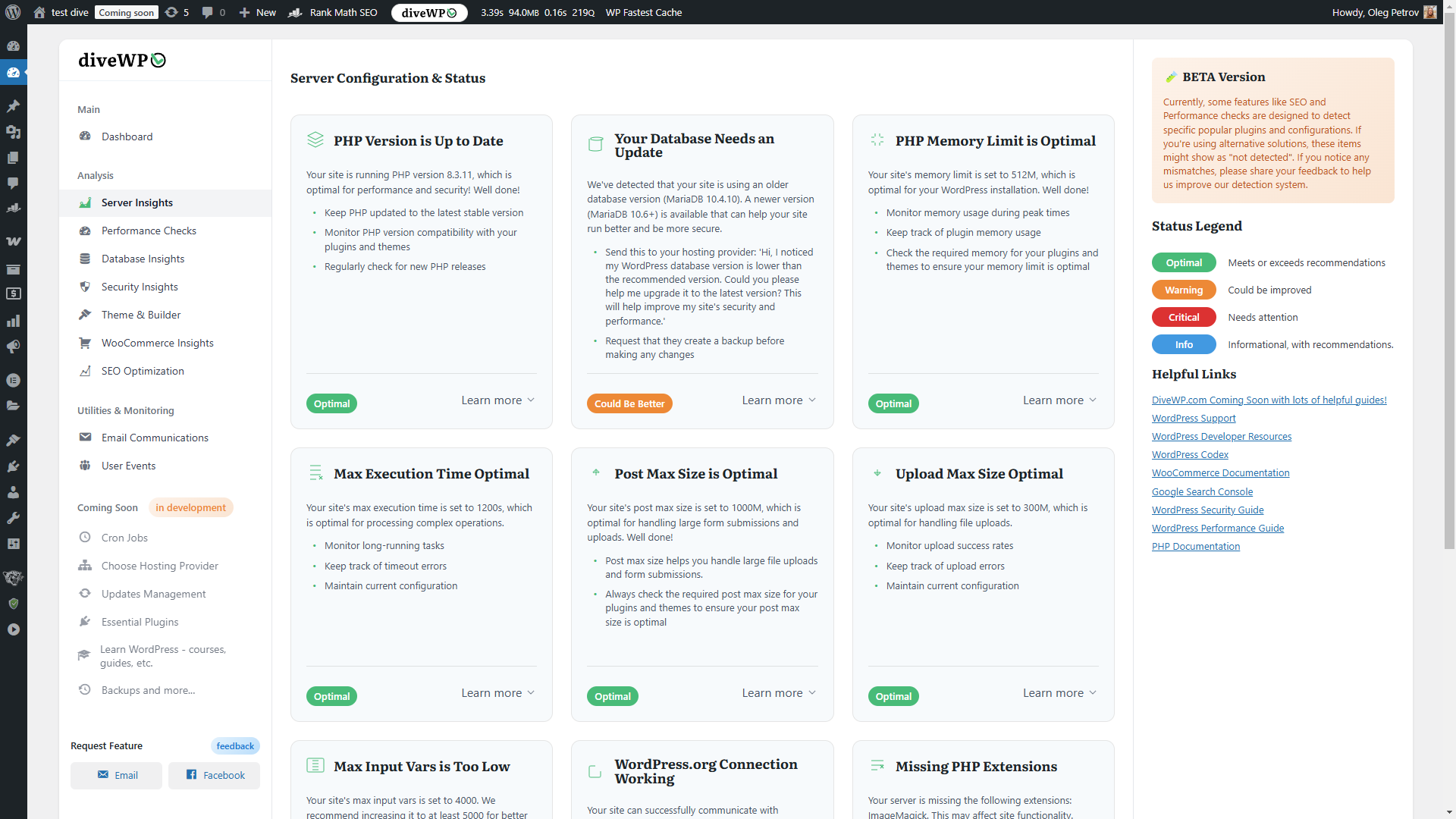
Server configuration checks
Check PHP and database versions, memory, execution time, post/upload limits, input variables, PHP extensions, and WordPress.org connections, with plain-language recommendations.
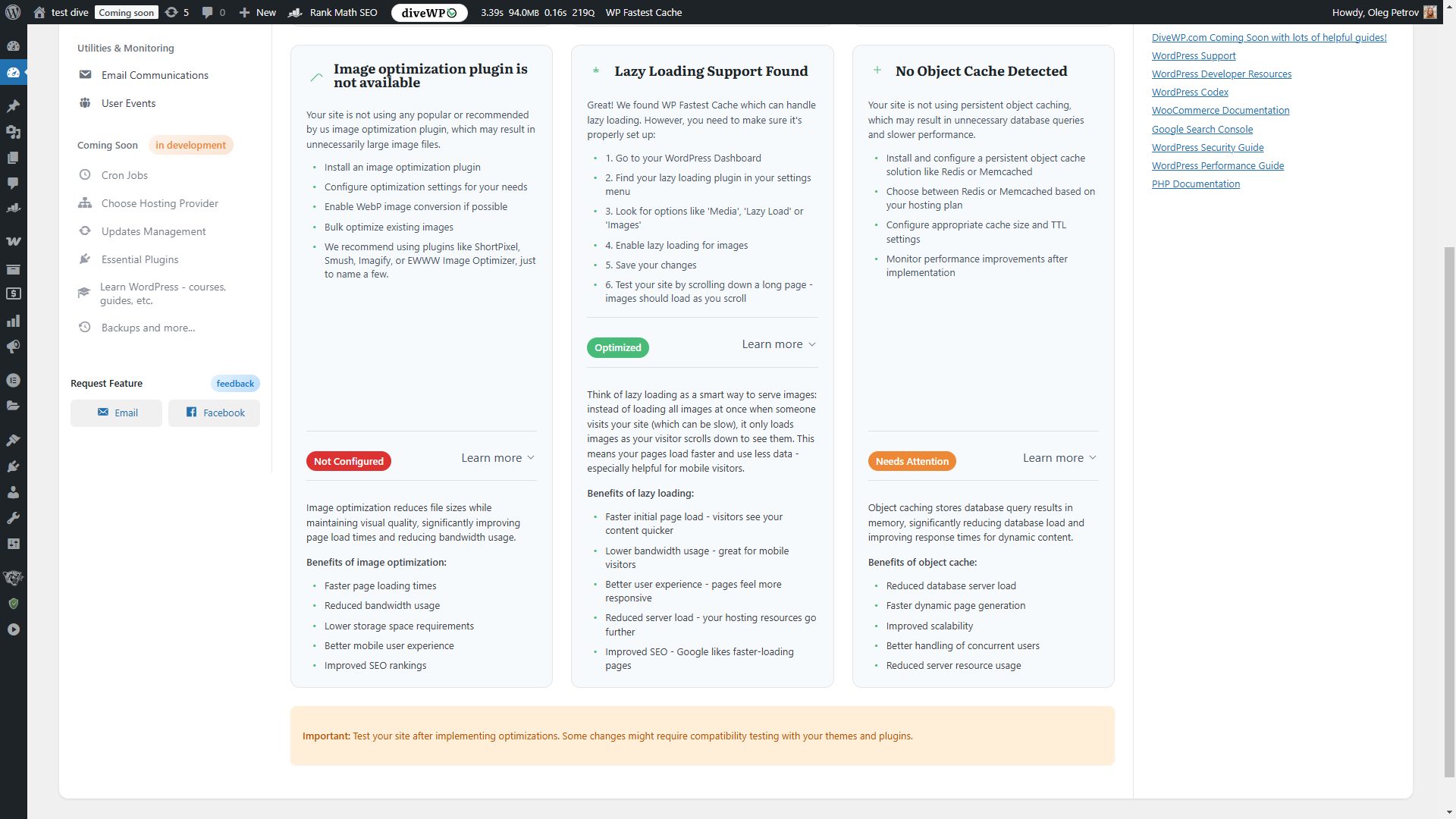
Performance optimization checks
Detect page caching, CSS/JavaScript minification, deferred JavaScript, image optimization, lazy loading, and persistent object-cache configurations, with guidance when manual confirmation is needed.
Database health
Inspect database size, table overhead, post revisions, spam comments, expired transients, and non-core tables. DiveWP recommends cleanup but does not perform it automatically; always back up first.
Security checks
Audit HTTPS, file permissions, the default admin username, database prefix, file editor, debug mode, and security plugins. These are configuration checks, not malware scanning or a firewall.
Theme and page builder insights
Check the active theme version, child theme, translation readiness, inactive themes, page builders, and translation plugins without changing the design.
WooCommerce performance and maintenance insights
When WooCommerce is active, check cart fragments, session handling, old order volume, and product revisions. DiveWP provides recommendations without changing store data.
SEO configuration audit
Review SEO plugins, homepage meta description, XML sitemap, robots.txt, permalinks, and search visibility. DiveWP identifies configuration gaps but does not promise rankings or rewrite content.
WordPress Abilities API and MCP integration
On supported versions, 14 canonical abilities expose server, performance, database, security, theme, WooCommerce, SEO, email, hosting, cron, plugins, logs, User Events, and AI Agent reports. The setup screen covers the Abilities API, MCP adapter, Application Passwords, and client configuration.
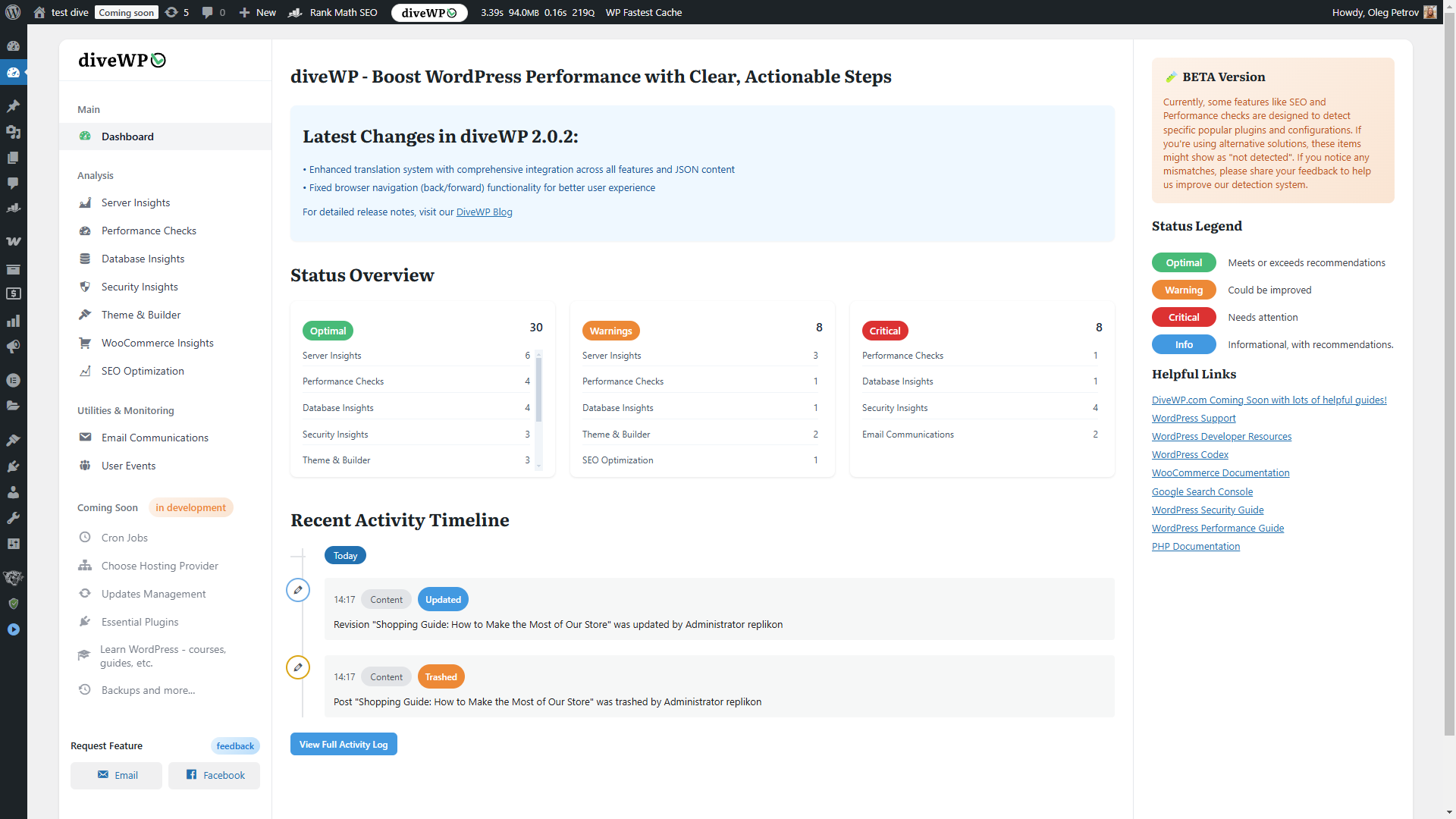
Dashboard overview
Summarize diagnostic status, plugin updates, cron totals, overdue tasks, recent activity, and logs by source.
Privacy and safety
Standard diagnostics do not use an AI provider. AI Agent is opt-in and sends generation requests through the provider configured in Settings > Connectors; public research may query approved WordPress.org documentation. DiveWP bounds evidence and redacts common credentials, salts, database values, authorization data, cookies, sessions, email/IP addresses, paths, and URL queries. It does not read passwords, form values, browser storage, network bodies, or cross-origin iframe content.
Raw context snapshots are not saved with conversation history. Conversations are isolated by site and administrator, default to 90-day retention, and support WordPress privacy tools. Review the provider’s privacy, terms, and billing.
Soutien
Use the WordPress.org support forum for help: https://wordpress.org/support/plugin/divewp-boost-site-performance/
Documentation and contact options are available at https://divewp.com/documentation/
Installation
- In WordPress, go to Plugins > Add New.
- Search for “DiveWP” and select Install Now.
- Activate the plugin.
- Open DiveWP from the WordPress admin menu.
- For AI Agent on WordPress 7.0+, configure a compatible provider in Settings > Connectors, then review and accept the AI Agent notice.
For manual installation, upload the plugin ZIP through Plugins > Add New > Upload Plugin, activate it, and open DiveWP.
Journal de modifications
Fixes model discovery and requests for newer AI models that do not support temperature overrides.
3.0.1
- Fixed newer AI models being omitted from the model selector when they do not support temperature overrides.
- Chat and structured AI requests now use provider sampling defaults, retaining dynamic model discovery without hard-coded model lists.
- Added visible issue-recording controls above the chat composer, with Stop & attach, Cancel, and a countdown.
- Removed misleading page-mutation counts from recordings and clarified the limits of recorded click and navigation evidence.
3.0.0
- Added the opt-in DiveWP AI Agent for conversational help grounded in existing site diagnostics and current-page context; no separate investigation scan is needed to answer site-health questions.
- Added a resizable chat workspace across wp-admin and the logged-in frontend, with streaming responses, model selection, answer style and length controls, and clear setup guidance for supported AI providers.
- Added Context Lens for bounded page evidence, browser errors, failed-request summaries, selected elements, and short reproduction traces, with user controls and sensitive-data redaction.
- Added administrator-owned conversation history with search, rename, archive, restore, delete, export, configurable retention, and WordPress privacy-tool support.
- Added browser-based Read Aloud with adjustable speed and improved chat accessibility, responsive layout, settings modal, and branded confirmation dialogs.
- Added structured @ mentions for plugins, themes, updates, and DiveWP logs so chat can identify specific site items and use relevant diagnostic evidence.
- Added optional public WordPress research and redacted diagnostic handoff while keeping private site data out of public search queries.
- Added verified plugin and theme maintenance from chat, including individual and bulk updates, plugin activation/deactivation, and theme activation. Per-user Approval mode is the default; optional Automatic mode retains permission, current-state, result-verification, and audit checks.
- Added live per-item progress for plugin-wide, theme-wide, and combined update requests.
- Added an optional DiveWP-branded HTML site-health email report based on existing diagnostics, enabled after AI Agent consent and scheduled every 30 days by default. Administrators can turn it off or choose 7, 90, or 365 days.
- Expanded Plugins Management with WordPress.org ratings, reviews, version history, updates, and guarded rollback for eligible plugins.
- Exposed the expanded set of DiveWP abilities through WordPress REST and MCP integrations, and improved System Logs loading.
- Improved dashboard diagnostic totals, scheduled-task and log summaries, chat reliability, and provider compatibility.
- Tested with WordPress 7.1; standard non-AI tools remain available on WordPress 6.0+, while AI chat requires WordPress 7.0+ and a compatible AI setup.
Captures d'écran
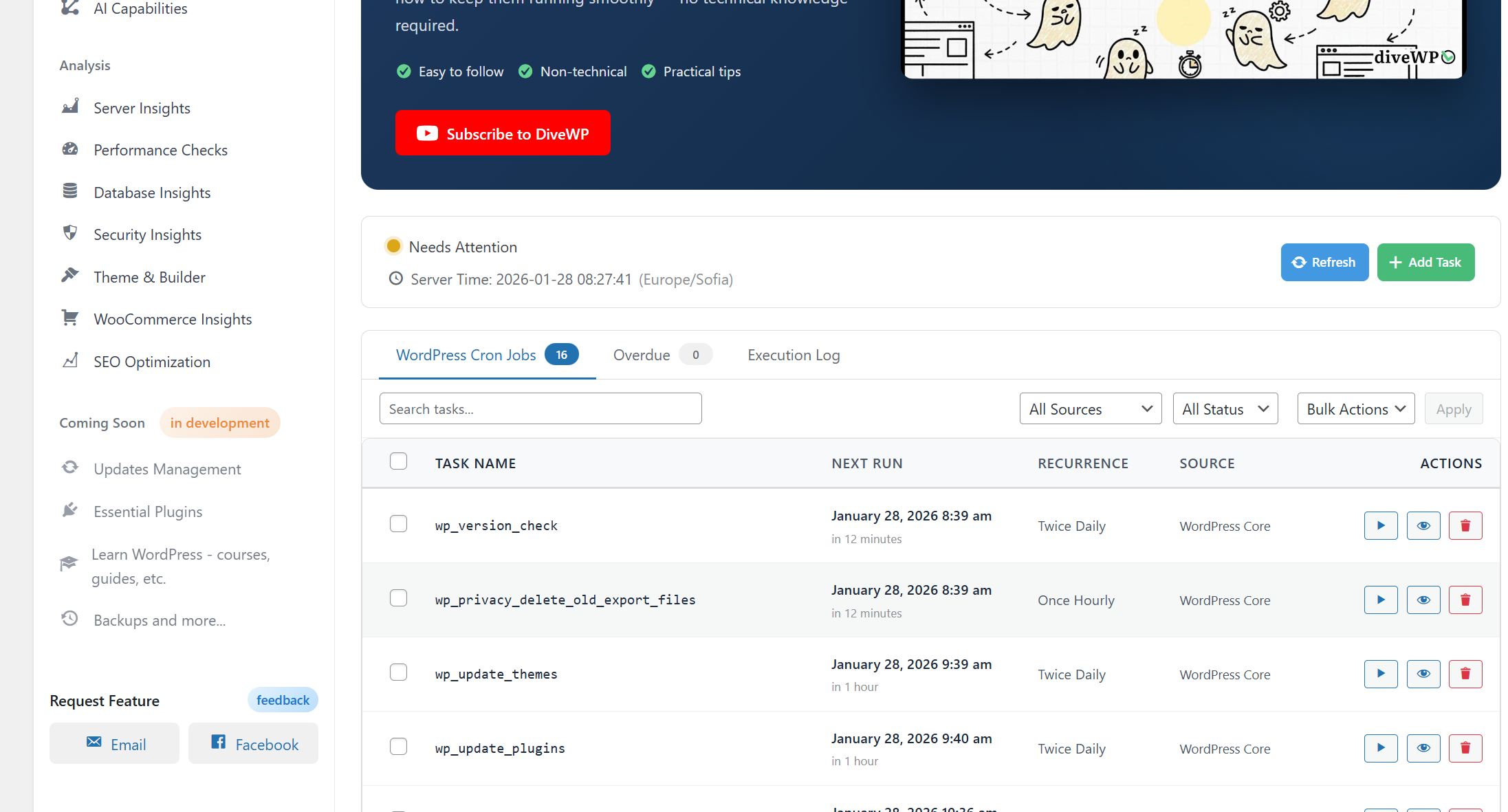
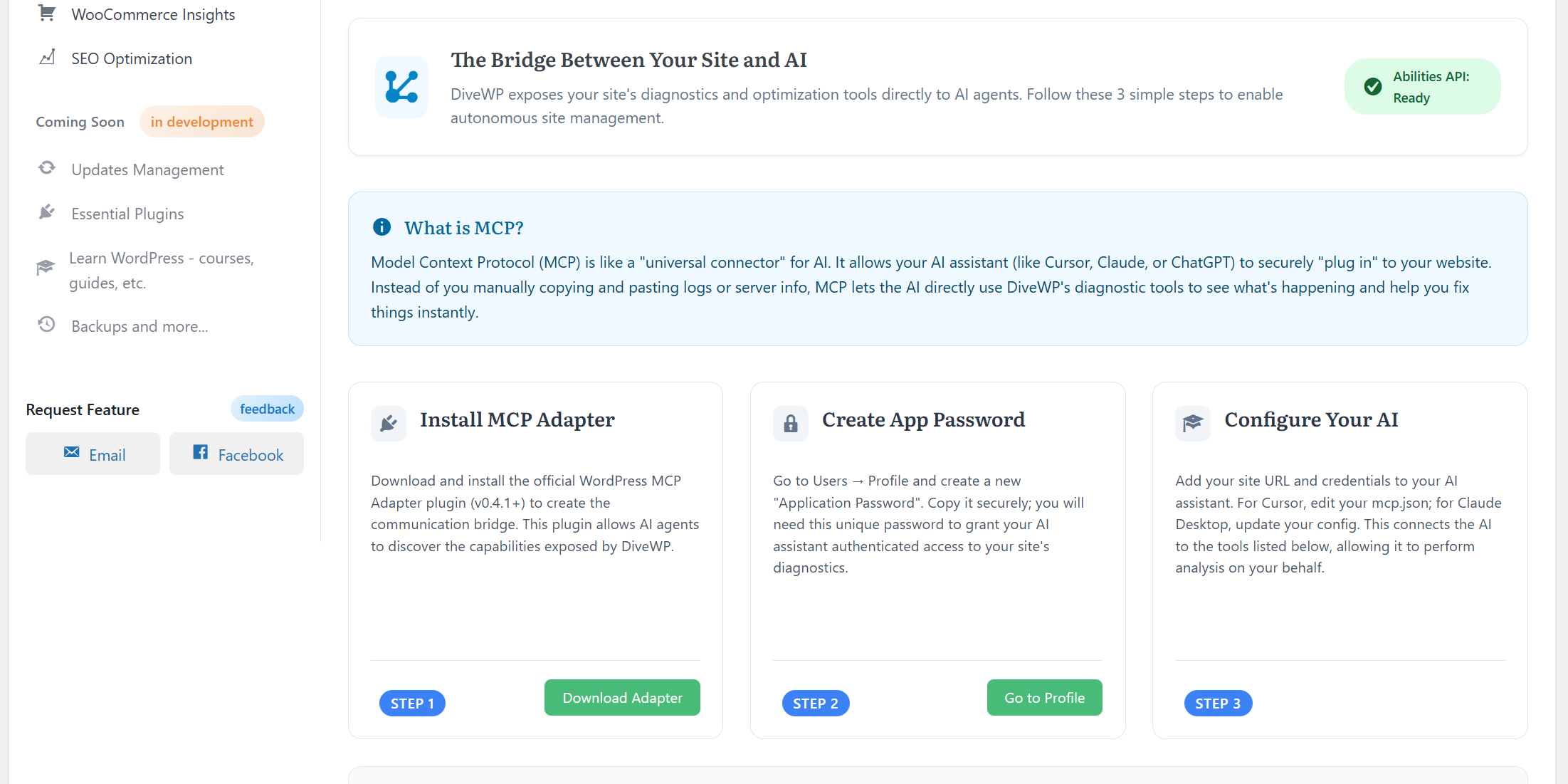
Pour les développeurs
Est-ce votre plugin ? Montrez les chiffres.
Ajoutez un badge en direct à votre site, docs ou github readme. Il se met à jour par lui-même - aucun compte n'est nécessaire.
Best DiveWP alternatives
All ai assistant plugins →





FAQ
DiveWP: quick answers
Réponses directes, extraites des données en direct WordPress.org.
Source : WordPress.org
Is DiveWP free?
Yes. DiveWP is free to download and use from the official WordPress.org plugin directory.
Is DiveWP safe to use in 2026?
DiveWP is a solid plugin choice in 2026, with a few things worth checking first. It runs on 200+ sites, is rated 5/5 and was last updated 1 month ago, and scores 77/100 on our health check.
How many websites use DiveWP?
DiveWP is active on 200+ WordPress websites and has been downloaded 5,330 times since it launched in April 2025. It was downloaded 544 times in the last 30 days.
Does DiveWP work with WordPress 7.1?
Yes. The developer has tested DiveWP up to WordPress 7.1.5, the latest release. It requires WordPress 6.0 or newer.
What PHP version does DiveWP need?
DiveWP requires PHP 7.4 or higher. Most hosts run PHP 8.x today, so it works on any modern WordPress hosting.
When was DiveWP last updated?
The latest version, 3.0.1, was released on October 9, 2026 (1 month ago).
Who makes DiveWP?
DiveWP is developed and maintained by Oleg Petrov.
What are the best alternatives to DiveWP?
The most popular alternatives to DiveWP are WPVibe (100K+ installs), Hyve Lite (7K+ installs) and YLabs AI Site Manager with… (6K+ installs).
Propulsé par PageForge
Un modèle et une feuille de calcul. Une vraie page pour chaque recherche.
PageForge transforme chaque ligne d'un CSV en une page WordPress avec son propre titre, URL, SEO et schéma, construit sur la mise en page que vous Déjà conçu. Gratuit sur WordPress.org.
- CSV et XLSX, plus Google Sheets sur les professionnels et les entreprises
- Son propre titre, URL, SEO champs et schéma pour chaque page
- Fonctionne avec l'éditeur de blocs, Elementor, Divi et Avada
- Gratuit sur WordPress.org, pas de carte de crédit