


Magical Posts Display
Show your site posts, pages, custom post types & theme builder templates with advanced Elementor widgets.

Choix
Yes — Magical Posts Display is a safe, well-maintained plugin to use in 2026. It runs on 3K+ sites, is rated 4.4/5 and was last updated 7 days ago, and scores 85/100 on our health check.
- Développé activement — Dernière mise à jour il y a 7 jours
- Testé avec le dernier WordPress (7.1)
Comment s'accumule-t-il ?
Côte à côte sur les installations, les mises à jour, les évaluations et le support



Téléchargements quotidiens
Les pics de téléchargement suivent généralement une nouvelle version - chaque site qui met à jour automatiquement compte comme un téléchargement.
Classements
Where Magical Posts Display stands todayWordPress.org Classements de recherche
Position en direct dans la recherche de plugins, Top 100| Mot-clé | Position |
|---|---|
| custom post | >100 |
| Widget Elementor | >100 |
| post display | #2 |
| post slider | #72 |
| Créateur de thèmes | >100 |
Adoption de version
Part de sites actifs par version.
Répartition des notes
★★★★★ ★★★★★ 4.4 sur 10 avis
About Magical Posts Display
From the official readme · v1.3.4Description
With just one click, you can easily generate posts Slider, posts carousels, posts Grids, posts accordions, posts tabs, posts tickers, and Categories & Tags Filters for Posts, Pages, and Custom Post Types. This addon helps you showcase your content in various formats, providing an engaging user experience for your visitors. Magical Posts Display is an Elementor addon that simplifies the creation of interactive content displays. Magical Posts Display is compatible with all custom post types.
✨ – Your All-in-One Tool for News, Magazines, and Blogs
Magical Posts Display is your ultimate solution for creating amazing News, Magazine, and Blog websites. Think of it as a supercharged plugin that does it all, whether you’re building a blog or a news and magazine site.
With Magical Posts Display, you get fantastic features like the Dynamic Site Builder, Popular Posts, Related Posts, Ajax Filter and Pagination, Post Carousel, Post slider, and much more. Now, with added support for Pages and Custom Post Types, it’s your secret weapon for unlocking your website’s full potential.
See live preview
Live preview Magical Posts Display
See Short video
🎨 Theme Builder Widgets (Build Custom Single Post & Archive Templates)
Magical Posts Display powers your Elementor Theme Builder with a dedicated suite of dynamic widgets for single posts and archive templates. Design custom single post layouts, blog archives, category pages, author pages, search results, and custom post type templates with complete design freedom:
📄 Post Single Template Widgets:
- Post Title — Dynamically output the title of the current post, page, or custom post type with HTML tag selection (H1-H6, p, span), alignment, custom colors, typography, and optional link.
- Post Content — Renders the complete post or page content with full typography styling, text color, link color, blockquote styles, and complete Elementor inner-layout support.
- Post Excerpt — Display custom excerpts or auto-generated post summaries with custom word/character limits and customizable “Read More” button/text.
- Featured Image — Display the current post’s featured image with size controls (thumbnail, medium, large, full), custom aspect ratio, border radius, box shadow, overlay, and click-to-link options.
- Post Meta — Display author (with avatar), date (published/modified), categories, tags, comments count, and reading time. Includes customizable icons, badges, dividers, and inline or stacked layouts.
- Author Box — Showcase author biographical info, profile picture/avatar, social links, author role/name, and a direct link to the author’s post archive.
- Post Comments — Embed a fully styled WordPress comments section including comment list, avatar styling, comment reply form, submit button styling, and threaded comments.
- Post Navigation — Add previous and next post pagination links with customizable arrows/icons, post title preview, and taxonomy-restricted filtering (same category/tag).
🗂️ Post Archive Template Widgets:
- Archive Title — Dynamically display the title of the current archive (Category, Tag, Author, Date, or Search Results) with optional prefix inclusion/removal (“Category:”, “Tag:”), custom prefix text, and responsive typography.
- Archive Posts — A powerful, dynamic archive loop query widget that automatically displays the posts belonging to the current archive query. Features multiple layout modes (Grid, List, Magazine), column settings, thumbnail sizes, excerpt length, meta tags, and read more buttons.
- Post Pagination — Add numeric, Prev/Next, or Ajax-powered pagination to your archive templates, ensuring seamless browsing across multiple pages of posts.
Magical Posts Display comes with a range of awesome Elementor widgets that make it easy to display your posts in unique and visually appealing ways. The latest addition includes the powerful News/Magazine Image Grid widget, featuring 5 distinct layout styles perfect for news, magazine, and blog websites.
Magical Posts Display is a user-friendly addon that offers many different ways to display your site posts. Our Elementor widgets allow you to customize and set new options for each Magical Posts item, giving you complete control over your content display. In addition, our addon supports post meta, categories, tags, comments, timestamps, and more, making it easy to create a personalized and engaging user experience for your visitors.
Most powerful features:
- Easily display posts, pages, and custom posts anywhere.
- Drag & Drop Elementor page builder Widgets.
- You can edit every single item
- Posts Group Grid
- Posts Categories Filter Live preview
- Posts Tags Filter Live preview
- Posts Slider Live preview
- Posts Ticker (Latest News) Live preview
- Posts carousel. Live preview | Video Tutorial
- Posts grid card. Live preview | Video Tutorial
- News/Magazine Image Grid – Modern magazine-style layouts with image overlays and 5 unique styles (Classic Magazine, Grid Layout, Compact Grid, Featured Focus, Equal Heights)
- News/Magazine Grid – Modern News-style layouts with image and 4 unique styles
- Posts Accordion. Live preview | Video Tutorial
- Posts Tab. Live preview | Video Tutorial
- Awesome Posts list. Live preview | Video Tutorial
- Posts list card. Live preview | Video Tutorial
- Categories gird.
- Popular posts widget with image.
- Elementor Widgets Manager – Toggle any of the 25 widgets on/off to maximize site speed.
- Conditional Asset Loading – Fast PageSpeed; scripts & styles only load when widgets are used.
- Presets & Layout Recipes – Step-by-step blueprints for 8 blog & magazine layouts.
- Posts time show.
- Posts category show.
- Posts tag show.
- All options show hide features.
- User-friendly Editor.
- Ajax Loadmore button.
- Ajax Categories filter.
- Post Position Control – Select specific posts (1st, 2nd, 3rd, 4th) or offset from any position for grid layouts.
Traduction
- Anglais
Installation
Cette section décrit comment installer le plugin et le faire fonctionner.
ex.
First things first, thank you for choosing our Magical Posts Display plugin!
You can install the plugin one of two ways:
Install using FTP
- Unzip the magical-posts-display.zip file locally to your machine
- Connect to your FTP area using your preferred FTP package
- Upload the magical-posts-display.zip folder that you extracted from the zip file to the plugin folder of your WordPress installation (wp-content -> plugin)
- Go to plugin and activate Magical Posts Display.
Install by WordPress (recommended)
- Login to your WordPress admin area.
- Navigate to plugin and click the Add New button at the top.
- Click the Upload plugin button at the top.
- Click the Choose File button and locate the magical-posts-display.zip file on your machine and click the Install Now button.
- On the basis the plugin installs correctly, click the Activate link.
Journal de modifications
1.3.4
- Security: Comprehensive late-escaping audit across all echoed variables, options, translations, and HTML attributes.
- Security: Replaced all unescaped () and _n() translation calls with esc_html() and esc_html(_n()).
- Security: Sanitized and escaped rich HTML and dynamic container tags using wp_kses_post().
- Compliance: Standardized global namespace with unique, unified ‘mgpd_’ prefix (4+ characters) across all functions, classes, traits, and options.
- Compliance: Prefixed traits to MGPD_Query_Controls_Trait and MGPD_SVG_Icons_Trait.
- Compliance: Removed obsolete external services declaration and resolved 404 URL references.
1.3.3
- Compliance: Complete architectural refactoring to strictly comply with WordPress.org Plugin Directory Guidelines.
- Compliance: Removed all license checks and pro-gating mechanisms from the free plugin codebase.
- Unlocked: Author avatar, modified date, reading time, aspect ratio, fallback images, card layouts, social links, drop cap, and masonry layouts now work freely for all users.
- Compliance: Updated 1-click install button to explicitly disclose both installation and activation before user click.
- Compliance: Updated review link to show all community reviews instead of pre-filtering by rating.
- Compliance: Synchronized stable tag with plugin version 1.3.3.
- Compliance: Replaced deprecated get_terms() argument signature with current WordPress standard.
- Compliance: Upgraded Appsero SDK to v2.0.7 and Swiper library to v11.2.10; removed dev-only dependencies from production bundle.
- Compliance: Removed abandoned and unused weDevs Settings API wrapper class.
- Compliance: Fully documented external Appsero telemetry service in readme.
- Compliance: Fixed all gettext internationalization calls and missing text domains.
- Compliance: Adjusted admin dashboard menu position to respect core WordPress hierarchy.
- Security: Added direct file access ABSPATH guards across all PHP files.
1.3.2
- Fix: Purged legacy Select2 CSS overrides in admin-style.css and added strict admin screen isolation to prevent conflicts with WooCommerce settings and third-party plugins.
- Feature: Added Equal Height Cards control for Posts Grid, Posts Carousel, and Archive Posts widgets (aligns cards and buttons cleanly across all rows).
- Feature: Added modern Image Aspect Ratio options (16:9 Landscape, 4:3 Standard, 1:1 Square, 3:2 Photo) with responsive cover fit.
- Feature: Added interactive Image Hover Effects (Zoom In, Zoom Out, Grayscale to Color, Brightness Boost).
- Feature: Added Floating Category Badge on image thumbnail with modern pill styling.
- Feature: Added Show Author Avatar option in post meta for enhanced author presentation.
- Enhanced: Added Sticky Posts control across widgets (Ignore, Include at Top, Only Sticky Posts).
- Enhanced: Added “Last Modified” and “Most Commented / Popular” orderby sorting options.
1.3.1
- Enhanced: Redesigned admin dashboard with modern UI, instant dismissal, and clean state persistence.
- Security: Hardened admin notice dismissal with CSRF nonce verification and capability checks.
- Compliance: Removed unsolicited promotional notice on themes screen, adhering strictly to WordPress.org repository guidelines.
- Compliance: Fixed 29 mismatched text domains across all widgets for 100% WordPress translation readiness.
- Robustness: Added exception handling for Elementor category registration to prevent Reflection errors in future Elementor updates.
- Enhanced UX: Added zero-friction drag-and-drop auto-fallbacks for Posts Accordion, Posts Tab, and Posts Categories widgets so widgets immediately display content upon insertion.
- Unlocked: “Exclude Current Post” feature in Posts Grid now freely available for building seamless Related Posts sections on single post templates.
- Performance: Capped unbounded post query selectors in editor helpers to 100 posts, eliminating memory exhaustion on large sites.
- Bugfix: Resolved PHP 8.2 and 8.3 null term property warnings across Posts Categories, Posts Slider, and Posts Tab widgets.
1.3.0
- Added: Performance – Complete Conditional Asset Loading system (assets only enqueue when widgets are active on the page)
- Added: Admin Elements Manager – Enable/disable any of the 25 Showcase and Theme Builder widgets individually with instant live counter
- Added: Presets Showcase & Blueprint Guide – 8 layout recipes and complete guide for building custom Single and Archive templates
- Added: Elementor Editor Live Preview hooks for seamless Masonry and Swiper re-initialization during real-time layout adjustments
- Added: Dedicated Theme Builder widgets suite for Single Post/Page and Archive templates (Post Title, Content, Excerpt, Featured Image, Meta, Author Box, Comments, Navigation, Archive Title, Archive Posts, Pagination)
- Removed: Outdated shortcode mentions from documentation in favor of pure Elementor and upcoming Gutenberg blocks
- Fixed: Replaced brittle inline script in Posts Grid with standard Elementor frontend JS hooks
- Fixed: Function fallback in Trait
- Updated: Compatibility checks, asset managers, and nonces security
1.2.59
- Fixed: AJAX nonce failure now returns proper JSON error instead of HTML
- Fixed: AJAX settings array sanitized with sanitize_text_field before merge
- Fixed: mpd_get_option() now correctly retrieves stored options via get_option()
- Fixed: Removed duplicate post view counter that counted views twice per page load
- Fixed: Instagram share button removed (platform discontinued web sharing endpoint)
- Fixed: Production JavaScript no longer exposes server config to browser console
- Fixed: Bootstrap tab shim no longer throws TypeError on .tab(‘show’) call
- Fixed: Corrupted emoji characters in admin banner replaced with proper Unicode
- Fixed: Duplicate wp_reset_postdata() calls removed across 9 widget files
- Fixed: esc_attr() replaced with sanitize_text_field() for WP_Query arguments
- Fixed: Added isset() guards on dynamic settings keys to prevent PHP 8.x warnings
- Fixed: XSS-safe error message rendering in premium features JavaScript
- Removed: Empty magical-loop-grid.php widget stub file
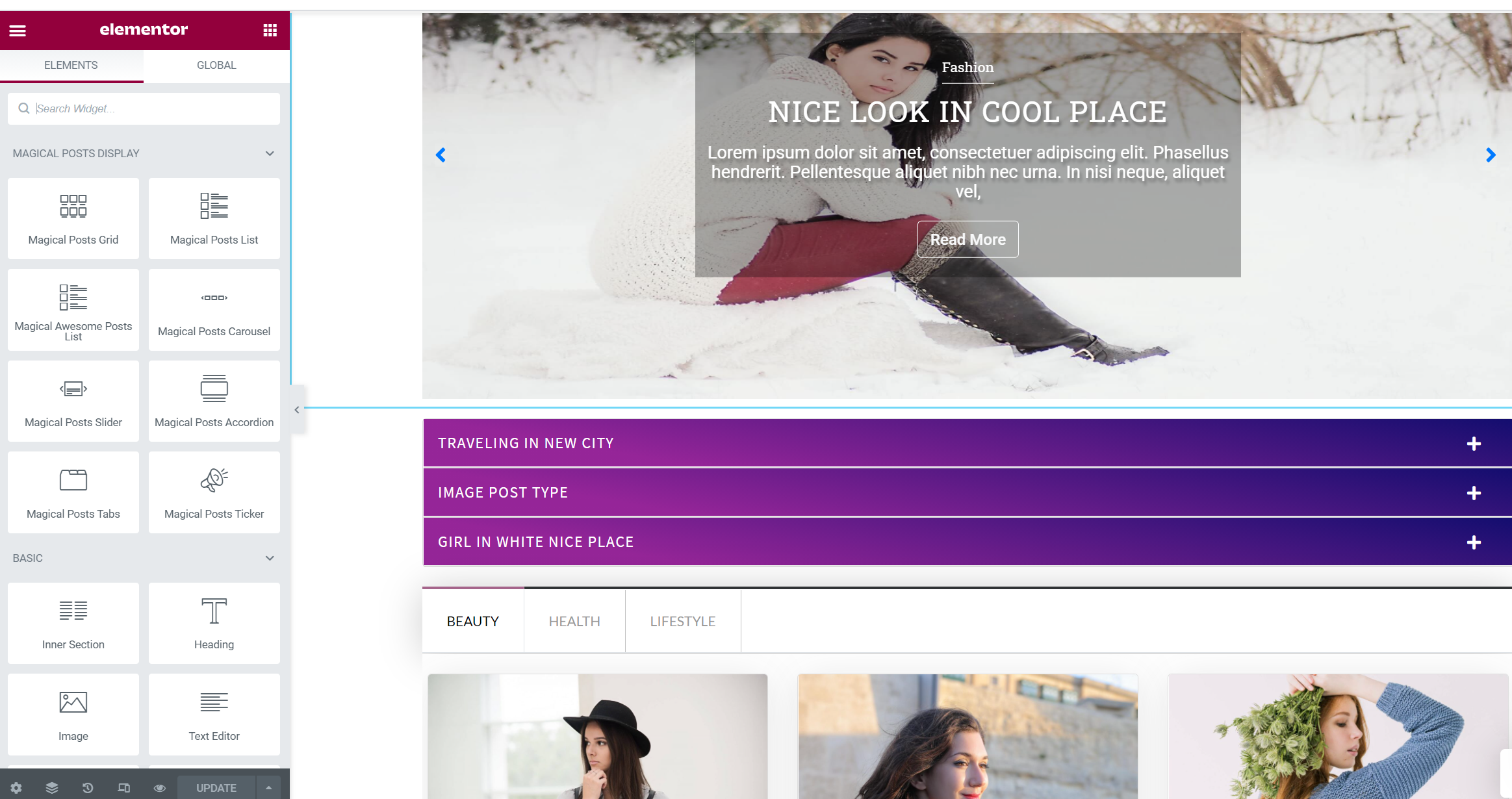
Captures d'écran


Pour les développeurs
Est-ce votre plugin ? Montrez les chiffres.
Ajoutez un badge en direct à votre site, docs ou github readme. Il se met à jour par lui-même - aucun compte n'est nécessaire.
Best Magical Posts Display alternatives
All custom post plugins →





FAQ
Magical Posts Display: quick answers
Réponses directes, extraites des données en direct WordPress.org.
Source : WordPress.org
Is Magical Posts Display free?
Yes. Magical Posts Display is free to download and use from the official WordPress.org plugin directory. The developer also sells premium add-ons or a Pro version with extra features.
Is Magical Posts Display safe to use in 2026?
Yes — Magical Posts Display is a safe, well-maintained plugin to use in 2026. It runs on 3K+ sites, is rated 4.4/5 and was last updated 7 days ago, and scores 85/100 on our health check.
How many websites use Magical Posts Display?
Magical Posts Display is active on 3K+ WordPress websites and has been downloaded 228,568 times since it launched in May 2019. It was downloaded 2,219 times in the last 30 days.
Does Magical Posts Display work with WordPress 7.1?
Yes. The developer has tested Magical Posts Display up to WordPress 7.1.5, the latest release. It requires WordPress 6.0 or newer.
What PHP version does Magical Posts Display need?
Magical Posts Display requires PHP 7.4 or higher. Most hosts run PHP 8.x today, so it works on any modern WordPress hosting.
When was Magical Posts Display last updated?
The latest version, 1.3.4, was released on November 23, 2026 (7 days ago).
Who makes Magical Posts Display?
Magical Posts Display is developed and maintained by Noor Alam.
What are the best alternatives to Magical Posts Display?
The most popular alternatives to Magical Posts Display are Content Blocks (Custom Post… (10K+ installs), Advanced Post Manager (4K+ installs) and CSV Import and Exporter (1K+ installs).
Propulsé par PageForge
Un modèle et une feuille de calcul. Une vraie page pour chaque recherche.
PageForge transforme chaque ligne d'un CSV en une page WordPress avec son propre titre, URL, SEO et schéma, construit sur la mise en page que vous Déjà conçu. Gratuit sur WordPress.org.
- CSV et XLSX, plus Google Sheets sur les professionnels et les entreprises
- Son propre titre, URL, SEO champs et schéma pour chaque page
- Fonctionne avec l'éditeur de blocs, Elementor, Divi et Avada
- Gratuit sur WordPress.org, pas de carte de crédit