


Content Blocks (Custom Post Widget)
This plugin enables you to edit and display Content Blocks in a sidebar widget or using a shortcode.

Choix
Yes — Content Blocks (Custom Post Wid… is a safe, well-maintained plugin to use in 2026. It runs on 10K+ sites, is rated 4.9/5 and was last updated 2 months ago, and scores 86/100 on our health check.
- Prouvé à grande échelle sur plus de 10 000 sites actifs
- Loved by users — 4.9/5 from 80 reviews
- Testé avec le dernier WordPress (7.1)
Comment s'accumule-t-il ?
Côte à côte sur les installations, les mises à jour, les évaluations et le support



Téléchargements quotidiens
Les pics de téléchargement suivent généralement une nouvelle version - chaque site qui met à jour automatiquement compte comme un téléchargement.
Classements
Where Content Blocks (Custom Post… stands todayWordPress.org Classements de recherche
Position en direct dans la recherche de plugins, Top 100| Mot-clé | Position |
|---|---|
| bloc | >100 |
| content block | #10 |
| custom post | #12 |
| shortcode | >100 |
| widget | #36 |
Adoption de version
Part de sites actifs par version.
Répartition des notes
★★★★★★★★★★ 4.9 from 80 reviews
About Content Blocks (Custom Post Widget)
From the official readme · v3.4.4Description
The Content Blocks allows you to display the contents of a custom post type in a sidebar widget or using a shortcode.
Even though you could use the text widget that comes with the default WordPress install, this plugin has some major benefits:
- The Content Blocks plugin enables users to use the WYSIWYG editor for editing the content and adding images.
- If you are using the standard WordPress text widgets to display content on various areas of your template, this content can only be edited by users with administrator access. If you would like to give content editors access without exposing them to the whole WordPress admin, this plugin solves that problem.
- You can even use the featured image functionality to display them in a widget.
- The Content Blocks plugin is compatible with the WPML Multi-Language plugin and automatically shows the correct language in the widget area.
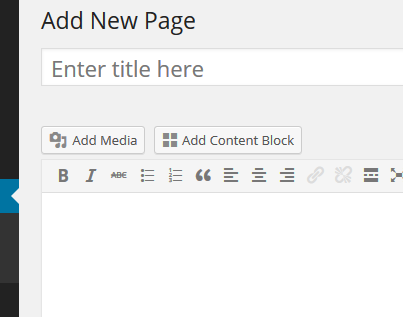
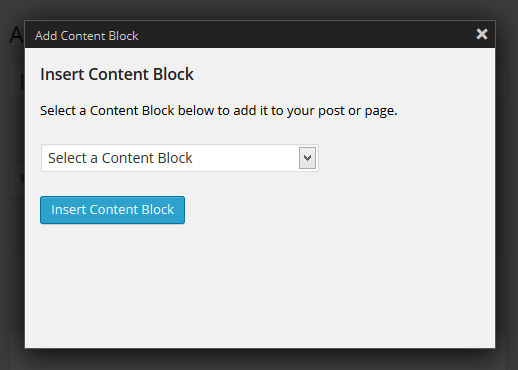
- The Content Blocks can be included in posts and pages using the built-in shortcode functionality.
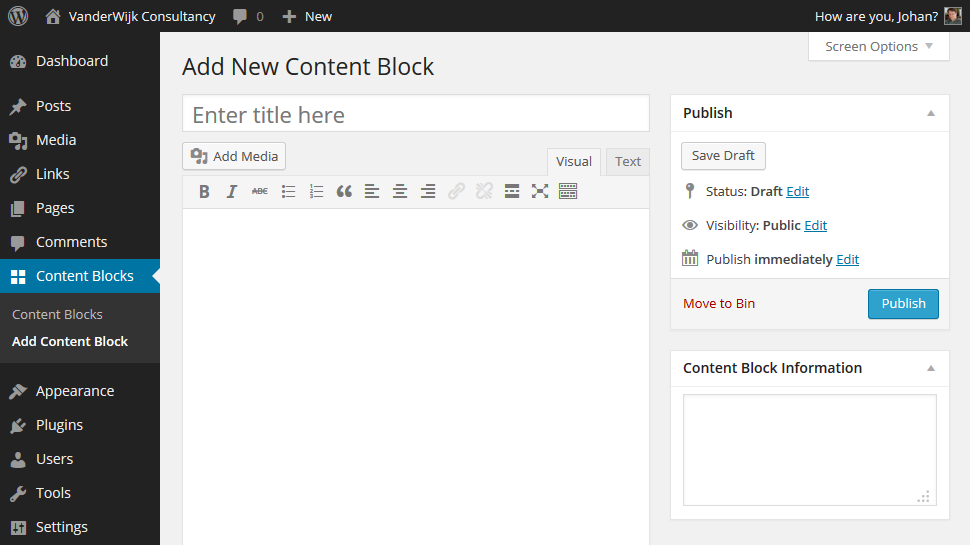
This plugin creates a ‘content_block’ custom post type. You can choose to either display the title on the page or use it to describe the contents and widget position of the content block. Note that you can easily hide the title if you want a cleaner layout.
To add content to a widget, drag it to the required position in the sidebar and select the title of the custom post in the widget configuration.
Includes the following translations:
- Swedish (sv_SE) by Andreas Larsson
- Spanish (es_ES) by IBIDEM GROUP
- Portuguese (pt_BR) by Ronaldo Chevalier
- Polish (pl_PL) by Kuba Skublicki
- Dutch (nl_NL) by Johan van der Wijk
- Czech (cs_CZ) by Martin Kucera
Installation
- First you will have to upload the plugin to the
/wp-content/plugins/folder. - Then activate the plugin in the plugin panel.
You will see that a new custom post type has been added called Content Block. - Type some content for the widget. You can choose to either use the title to describe the content on the page, or to display it. Check ‘Show Post Title’ to display the title on the page.
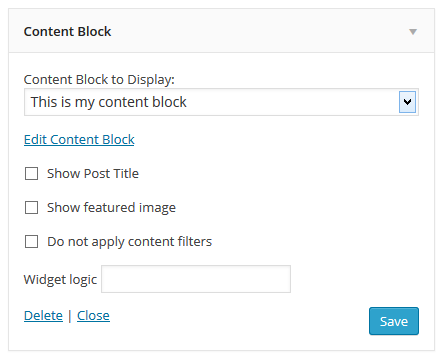
- Go to ‘Appearance’ > ‘Widgets’ and drag the Content Block widget to the required position in the sidebar.
- Select a Content Block from the drop-down list.
- Check the ‘Show Post Title’ checkbox if you would like to display the title of your Content Block
- If you are experiencing issues with content being added automatically to your posts (Social media sharing buttons for instance), check the ‘Do not apply content filters’ checkbox. Use this with caution as it disables WordPress content filtering for this block.
- Click save.
Journal de modifications
3.4.4
WordPress 7.1 compatibility tested and confirmed
3.4.3
Fixed PHP 8+ fatal errors when a widget references a deleted content block or a shortcode references a missing template. Missing templates now fall back to the standard shortcode output.
3.4.2
WP 7.0 compatibility tested and confirmed
3.4.1
Security fix: Added allowlist validation for the shortcode markup attribute to prevent XSS attacks (CVE-2026-0894).
3.3.9
WP 6.9 compatibility tested and confirmed
3.3.8
WP 6.8 compatibility tested and confirmed
Captures d'écran
Pour les développeurs
Est-ce votre plugin ? Montrez les chiffres.
Ajoutez un badge en direct à votre site, docs ou github readme. Il se met à jour par lui-même - aucun compte n'est nécessaire.
Best Content Blocks (Custom Post W… alternatives
Tous les plugins de blocs →





FAQ
Content Blocks (Custom Post Widget): quick answers
Réponses directes, extraites des données en direct WordPress.org.
Source : WordPress.org
Is Content Blocks (Custom Post Wid… free?
Yes. Content Blocks (Custom Post Wid… is free to download and use from the official WordPress.org plugin directory.
Is Content Blocks (Custom Post Wid… safe to use in 2026?
Yes — Content Blocks (Custom Post Wid… is a safe, well-maintained plugin to use in 2026. It runs on 10K+ sites, is rated 4.9/5 and was last updated 2 months ago, and scores 86/100 on our health check.
How many websites use Content Blocks (Custom Post Wid…?
Content Blocks (Custom Post Wid… is active on 10K+ WordPress websites and has been downloaded 770,484 times since it launched in November 2010. It was downloaded 2,667 times in the last 30 days.
Does Content Blocks (Custom Post Wid… work with WordPress 7.1?
Yes. The developer has tested Content Blocks (Custom Post Wid… up to WordPress 7.1.5, the latest release. It requires WordPress 4.6 or newer.
When was Content Blocks (Custom Post Wid… last updated?
The latest version, 3.4.4, was released on September 21, 2026 (2 months ago).
Who makes Content Blocks (Custom Post Wid…?
Content Blocks (Custom Post Wid… is developed and maintained by Johan van der Wijk.
What are the best alternatives to Content Blocks (Custom Post Wid…?
The most popular alternatives to Content Blocks (Custom Post Wid… are Spectra Legacy (1M+ installs), Breadcrumb NavXT (700K+ installs) and PDF Embedder (300K+ installs).
Propulsé par PageForge
Un modèle et une feuille de calcul. Une vraie page pour chaque recherche.
PageForge transforme chaque ligne d'un CSV en une page WordPress avec son propre titre, URL, SEO et schéma, construit sur la mise en page que vous Déjà conçu. Gratuit sur WordPress.org.
- CSV et XLSX, plus Google Sheets sur les professionnels et les entreprises
- Son propre titre, URL, SEO champs et schéma pour chaque page
- Fonctionne avec l'éditeur de blocs, Elementor, Divi et Avada
- Gratuit sur WordPress.org, pas de carte de crédit