


LoftBuilder
Create stunning and responsive pages with LoftBuilder. An intuitive front-end looking, drag & drop page builder.

Envisager une alternative
LoftBuilder shows warning signs in 2026 — compare the alternatives below before installing. It runs on 10+ sites, is rated 5/5 and was last updated 11 years ago, and scores 30/100 on our health check.
- Petite base d'utilisateurs (plus de 10 installations actives)
- Très peu de critiques jusqu'à présent
- Pas de mise à jour dans 10 ans
- Uniquement testé jusqu'à WordPress 4,5 (le dernier est de 7,1)
Comment s'accumule-t-il ?
Côte à côte sur les installations, les mises à jour, les évaluations et le support



Téléchargements quotidiens
Les pics de téléchargement suivent généralement une nouvelle version - chaque site qui met à jour automatiquement compte comme un téléchargement.
Classements
Where LoftBuilder stands todayWordPress.org Classements de recherche
Position en direct dans la recherche de plugins, Top 100| Mot-clé | Position |
|---|---|
| builder | >100 |
| drag and drop builder | >100 |
| éditeur | >100 |
| front-end looking | >100 |
| intuitive | >100 |
Adoption de version
Part de sites actifs par version.
Répartition des notes
★★★★★ ★★★★★ 5 sur 4 avis
About LoftBuilder
À partir du Lisezmoi officiel · v1.1.2Description
LoftBuilder is a drag & drop WordPress page builder. You can build responsive layouts, add text and media, and create engaging animations and interactions. Build your site page in minutes. Without coding.
Intuitive
You can edit every element on the page directly. Type text, change column width, drag and drop to change everything’s position… You know what’s going on your page while working.
It’s not a front-end editor. It’s an editor with front-end looking. That makes your published front-end pages always keep clean, without any extra codes.
Works with any theme
LoftBuilder is a flexible plugin, and it works with almost any theme. You will not lose the content when you switch themes.
BTW, our team is working on some themes for our LoftBuilder.
Switch published content
You can choose which content to publish for each page: the content created in LoftBuilder editor, or the content written in WordPress default editor. So you can publish some essential/summary content while working on more details of a page.
Unlimited Colors
Each element and background can be set to any color you want. And to keep the look consistent throughout your site, you can set a primary accent color and apply it to element – buttons, icons, charts, maps, color overlays, and etc.
Trending & Modern
Compatible with modern browsers: Chrome, Safari, Firefox, Opera, Edge.
Features & Options
- 16 modules: Text, Media, Button, Icon, Accordion, and etc.
- 2 special sections: Posts and Tabs.
- 12 predefined sections with pre-designed layouts and sample content.
- Font Awesome icons are included.
- Custom background color/image for page header, sections and columns.
- Background parallax scroll effect for page header and section.
- Color overlay on top of the background image.
- Page content entrance animation.
- Individual custom CSS for each page.
- Responsive & retina ready.
- Ready for translation (.pot file included).
For more details please visit our site.
PS: LoftBuilder currently only works with pages.
Any Problem?
Please feel free to contact us if you encounter any issue. We are very pleased when our users find bugs we missed! And we are always ready to support you, and will continue improving LoftBuilder.
When you need our support, or would love to report a bug, or request new features, or want to ask any question, please:
- Post a new topic in the support forum
- Email us: general@loftocean.com
- Check online documentation
Installation
- Install the plugin either via the WordPress.org plugin directory, or by uploading the files to your server (in the /wp-content/plugins/ directory).
- Activate the LoftBuilder plugin through the ‘Plugins’ menu in WordPress.
- In the WordPress administration screen, go to Settings > LoftBuilder, check the settings there.
Journal de modifications
Emergency update for version 1.1.0 released earlier today: file 'inc/editor/htmls/editor-tools.php' missed in version 1.1.0. We have fixed the issue without changing the version number. However, there are a few users have downloaded that version already. So if the v1.1.0 doesn't work on your site, please update to v1.1.1 to fix the bug. We are very sorry for our mistake.
1.1.2
Release date: April 25th, 2016 Changelog
1.1.1
Release date: Mar 18th, 2016
- Updated the version number in plugin settings panel.
1.1.0
Release date: Mar 18th, 2016
- Fixed problem caused by asp_tags enabled on php.ini. Thanks to @thendrluca.
- Improved editor tools structure.
- Minor bugs fixes.
1.0.0
- Initial Public Release
Captures d'écran
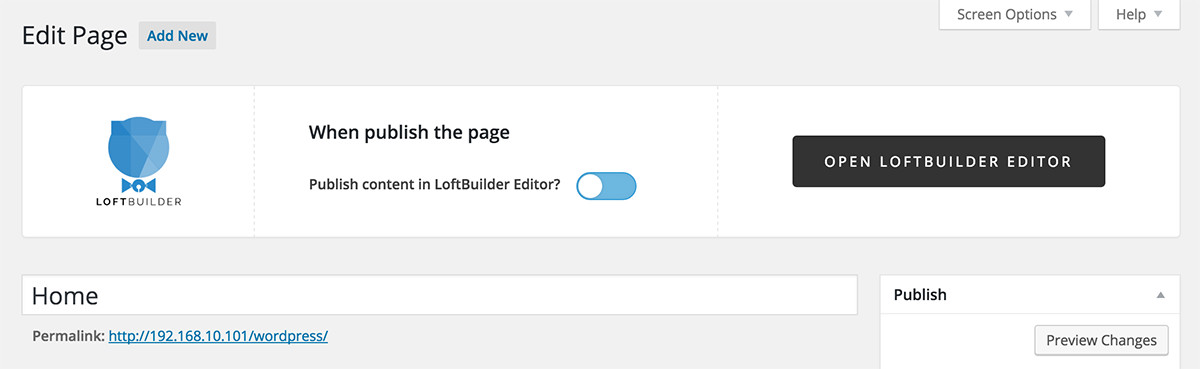


Pour les développeurs
Est-ce votre plugin ? Montrez les chiffres.
Ajoutez un badge en direct à votre site, docs ou github readme. Il se met à jour par lui-même - aucun compte n'est nécessaire.
Best LoftBuilder alternatives
All builder plugins →



FAQ
LoftBuilder: quick answers
Réponses directes, extraites des données en direct WordPress.org.
Source : WordPress.org
Is LoftBuilder free?
Yes. LoftBuilder is free to download and use from the official WordPress.org plugin directory.
Is LoftBuilder safe to use in 2026?
LoftBuilder shows warning signs in 2026 — compare the alternatives below before installing. It runs on 10+ sites, is rated 5/5 and was last updated 11 years ago, and scores 30/100 on our health check.
How many websites use LoftBuilder?
LoftBuilder is active on 10+ WordPress websites and has been downloaded 18,046 times since it launched in March 2016. It was downloaded 314 times in the last 30 days.
Does LoftBuilder work with WordPress 7.1?
LoftBuilder is officially tested up to WordPress 4.5.33, while the latest release is 7.1.5. It may still work, but try it on a staging site first.
When was LoftBuilder last updated?
The latest version, 1.1.2, was released on April 25, 2016 (11 years ago).
Who makes LoftBuilder?
LoftBuilder is developed and maintained by loftocean.
What are the best alternatives to LoftBuilder?
The most popular alternatives to LoftBuilder are Mesmerize Companion (50K+ installs), PixTypes (9K+ installs) and Gantry 5 Framework (7K+ installs).
Propulsé par PageForge
Un modèle et une feuille de calcul. Une vraie page pour chaque recherche.
PageForge transforme chaque ligne d'un CSV en une page WordPress avec son propre titre, URL, SEO et schéma, construit sur la mise en page que vous Déjà conçu. Gratuit sur WordPress.org.
- CSV et XLSX, plus Google Sheets sur les professionnels et les entreprises
- Son propre titre, URL, SEO champs et schéma pour chaque page
- Fonctionne avec l'éditeur de blocs, Elementor, Divi et Avada
- Gratuit sur WordPress.org, pas de carte de crédit