

SKT Page Builder
SKT Page Builder has been designed and developed to assist anyone in creating pages using a drag and drop page builder interface.

Choix solide
SKT Page Builder is a solid plugin choice in 2026, with a few things worth checking first. It runs on 2K+ sites, is rated 2.7/5 and was last updated 1 month ago, and scores 70/100 on our health check.
- Testé avec le dernier WordPress (7.1)
- Low rating so far — 2.7/5 from only 7 reviews
Comment s'accumule-t-il ?
Côte à côte sur les installations, les mises à jour, les évaluations et le support



Téléchargements quotidiens
Les pics de téléchargement suivent généralement une nouvelle version - chaque site qui met à jour automatiquement compte comme un téléchargement.
Classements
Where SKT Page Builder stands todayWordPress.org Classements de recherche
Position en direct dans la recherche de plugins, Top 100| Mot-clé | Position |
|---|---|
| builder | #98 |
| drag-and-drop | >100 |
| éditeur | >100 |
| page de destination | #61 |
| Générateur de pages | #51 |
Adoption de version
Part de sites actifs par version.
Répartition des notes
★★★★★★★★★★ 2.7 from 7 reviews
About SKT Page Builder
From the official readme · v5.1Description
SKT Page Builder has been designed and developed to assist anyone in creating pages using a drag and drop page builder interface. Hence it will help in creating exciting websites easily for FREE without knowing any coding and managing your content easily. Also check our offerings of WordPress themes free at SKT Themes. Download them and make use of these ready to use templates for your next website.
Modèle de démonstration
Documentation
Introduction
SKT Page Builder is an intuitive page builder created in order to save time and efforts of creating landing pages and for adding your content the way you like it or love it.
In case you want sidebar friendly pages and yet want to use page builder the SKT Page Builder is so intuitive that adding blocks into the page can become super easy and idle. One can create pages without any problems.
One can make use of the variety of elements which we have added into this page builder which can be made to use for easier creation of websites.
One can have a look at the elements below which should be sufficient to create one landing page.
Éléments
-
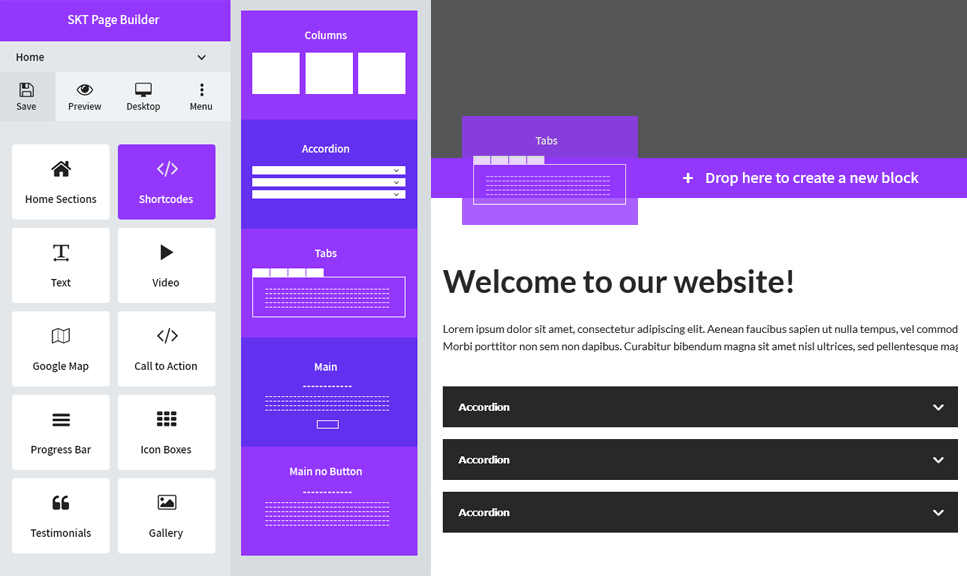
Columns — Any type of columns can be added from one column to six columns. Controlling every aspect of the column
-
Accordion — Accordion to help you add any type of FAQs or any type of accordion based content on pages
-
Tabs — Tabs can be helpful to showcase important and several information properly set up in a small area in tabs
-
Text with or without button — Text with button or without button whereby text can be arranged and set up properly
-
Video with or without background — Video section to have nice video playing feature
-
Image Gallery — Gallery with simple images in grid format and on click enlarged view is available
-
Logo/Image Carousel/Slider — Logo or image carousel is provided which can be used for logos or as a image slider too
-
Testimonial Carousel and Grid — Testimonials can be nicely set up in a carousel format with all options as well as grid view
-
Icon Boxes of varied types — Icon boxes of various styles provided for adding any type of service, team or information boxes
-
Shortcode — Adding more shortcodes using plugins or additional theme shortcodes can help developers enhance the plugin more
-
Spacer — Adding space between 2 sections is very cumbersome free
-
Google Map — Adding location map becomes super easy
-
Call to action — Call to action block to add button with text or image
-
Icons — More than 900+ font based icons are available for use
Some common elements are having parallax background for any part of the sections and each section can have different background of its own.
Having background from media library is as easy as possible.
Installation
INSTALLING THROUGH THE WORDPRESS ADMIN PANEL
- Head over to Plugins >> Add New in WP admin panel
- Search for SKT Page Builder
- Install & activate the plugin
- Visit any page in your frontend
- Click Edit with SKT Page Builder at the top of the page and start building your page!
INSTALLING THROUGH FTP
- Download a ZIP plugin file and unpack it
- Upload SKT Page Builder plugin to the /wp-content/plugins/ directory
- Activate the plugin on the Plugins menu in WordPress
- Now you are ready to use SKT Page builder by going to any page and clicking on SKT Page Builder
Journal de modifications
null
5.1
- Fixed: Saving got stuck (spinner kept rotating) and data was not saved after adding an image in the text editor.
- Fixed: Text editor image button now uploads images to the Media Library instead of embedding them in the page data.
- Fixed: Pasted or dragged images in the text editor are now moved to the Media Library automatically on save.
- Improved: Images of any size can be uploaded; large images are resized automatically to fit the server upload limit.
- Improved: Smaller save requests for faster and more reliable saving.
- Improved: Clear error messages when a save or upload fails.
- Security: Added nonce and permission checks to image and video uploads.
5.0
- Resolved Broken Access Control issue.
4.9
- Resolved Plugin Check (PCP) issue.
4.8
- Changed the capability check and accessible to administrators.
4.7
- Compatibility with WordPress 6.7
- Resolved Vulnerability’s issue provided by Wordfence Vulnerability Researcher(s).
4.6
- Compatibility with WordPress 6.5
Captures d'écran


Pour les développeurs
Est-ce votre plugin ? Montrez les chiffres.
Ajoutez un badge en direct à votre site, docs ou github readme. Il se met à jour par lui-même - aucun compte n'est nécessaire.
Best SKT Page Builder alternatives
All builder plugins →




FAQ
SKT Page Builder: quick answers
Réponses directes, extraites des données en direct WordPress.org.
Source : WordPress.org
Is SKT Page Builder free?
Yes. SKT Page Builder is free to download and use from the official WordPress.org plugin directory.
Is SKT Page Builder safe to use in 2026?
SKT Page Builder is a solid plugin choice in 2026, with a few things worth checking first. It runs on 2K+ sites, is rated 2.7/5 and was last updated 1 month ago, and scores 70/100 on our health check.
How many websites use SKT Page Builder?
SKT Page Builder is active on 2K+ WordPress websites and has been downloaded 85,294 times since it launched in October 2018. It was downloaded 1,165 times in the last 30 days.
Does SKT Page Builder work with WordPress 7.1?
Yes. The developer has tested SKT Page Builder up to WordPress 7.1.5, the latest release. It requires WordPress 5.0 or newer.
What PHP version does SKT Page Builder need?
SKT Page Builder requires PHP 7.4 or higher. Most hosts run PHP 8.x today, so it works on any modern WordPress hosting.
When was SKT Page Builder last updated?
The latest version, 5.1, was released on October 13, 2026 (1 month ago).
Who makes SKT Page Builder?
SKT Page Builder is developed and maintained by Sonal S Sinha.
What are the best alternatives to SKT Page Builder?
The most popular alternatives to SKT Page Builder are Mesmerize Companion (50K+ installs), PixTypes (9K+ installs) and Gantry 5 Framework (7K+ installs).
Propulsé par PageForge
Un modèle et une feuille de calcul. Une vraie page pour chaque recherche.
PageForge transforme chaque ligne d'un CSV en une page WordPress avec son propre titre, URL, SEO et schéma, construit sur la mise en page que vous Déjà conçu. Gratuit sur WordPress.org.
- CSV et XLSX, plus Google Sheets sur les professionnels et les entreprises
- Son propre titre, URL, SEO champs et schéma pour chaque page
- Fonctionne avec l'éditeur de blocs, Elementor, Divi et Avada
- Gratuit sur WordPress.org, pas de carte de crédit