

Organic Builder Widgets – Simple WordPress Page Builder
A simple WordPress page builder, Organic Builder Widgets provides a collection of 12 custom widgets to be used in the Customizer as content sections.

Utiliser avec prudence
Organic Builder Widgets works, but test it on a staging site before relying on it in 2026. It runs on 3K+ sites, is rated 4.8/5 and was last updated 4 years ago, and scores 44/100 on our health check.
- Loved by users — 4.8/5 from 85 reviews
- Momentum — downloads up 79% vs the previous 30 days
- Pas de mise à jour dans 4 ans
- Uniquement testé jusqu'à WordPress 6,0 (le dernier est de 7,1)
Comment s'accumule-t-il ?
Côte à côte sur les installations, les mises à jour, les évaluations et le support



Téléchargements quotidiens
Les pics de téléchargement suivent généralement une nouvelle version - chaque site qui met à jour automatiquement compte comme un téléchargement.
Classements
Where Organic Builder Widgets stands todayWordPress.org Classements de recherche
Position en direct dans la recherche de plugins, Top 100| Mot-clé | Position |
|---|---|
| builder | >100 |
| customizer | >100 |
| slideshows | >100 |
| témoignages | >100 |
| widgets | >100 |
Adoption de version
Part de sites actifs par version.
Répartition des notes
★★★★★★★★★★ 4.8 from 85 reviews
About Organic Builder Widgets
From the official readme · v1.4.17Description
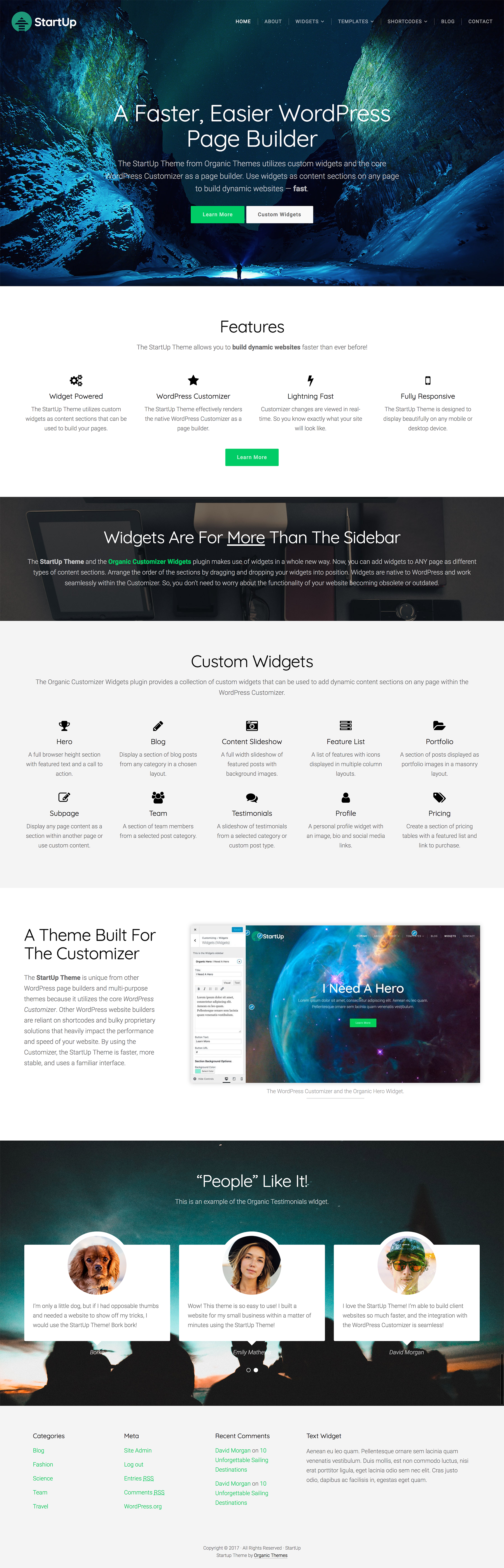
Organic Builder Widgets is a simple WordPress page builder plugin that provides a collection of 12 custom widgets to be used within the Customizer. The widgets are displayed as full-width content sections on any page. It transforms the native WordPress customizer into a free and easy page building solution. Unlike other page builders, our solution uses the familiar interface of the customizer and native functionality of widgets. Therefore, it’s a fast, intuitive, easy and secure. There are no shortcodes, no excessive options, no confusing interfaces, and no vendor lock-in. Additionally, the plugin is designed to work with virtually any theme! It’s an easy WordPress page building solution, as it was meant to be.
Display and arrange the custom widgets as content sections on any page — such as featured content slideshows, hero sections with background videos, testimonial sliders, team members, portfolios, feature icon lists, pricing tables, products, and more! Each widget features a variety of options for changing the background color, background image, display style and more! Use multiple of the same widgets, or as many different widgets as you like!
Additionally, the Builder Widgets plugin includes the Widget Area Block for the Gutenberg block editor. This custom block allows you to register multiple widget areas within any page or post using the block editor. As a result, blocks and traditional widgets can be used together to create dynamic page content!
Upgrade to Organic Builder Widgets Pro for only $39/yr and receive 12 additional widgets and many more options for existing widgets, including options for changing fonts, layouts, custom heights and widths, adding filterable portfolios, blog pagination, and much more!
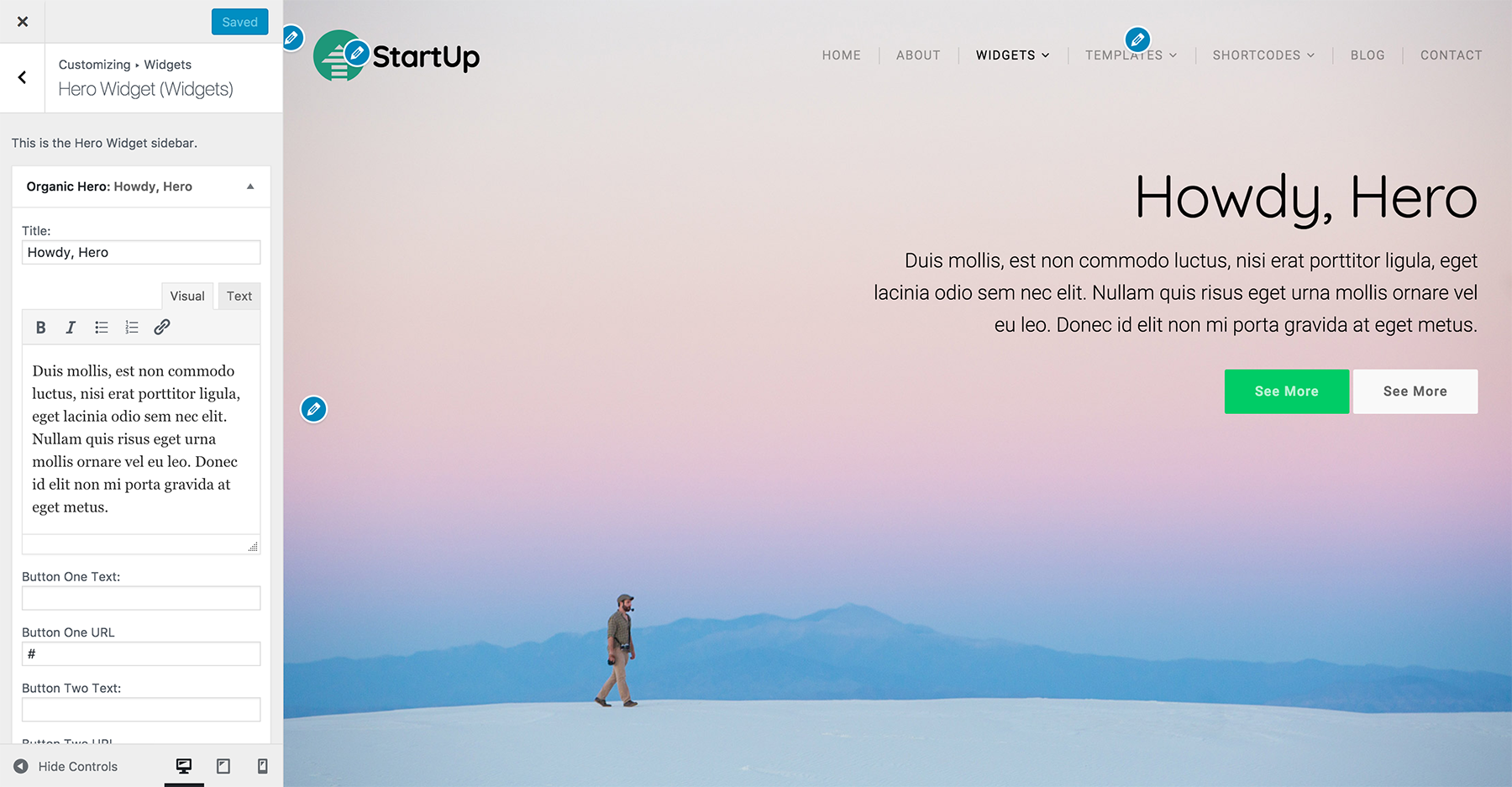
Organic Builder Widgets includes a new page template, that when applied, creates a new widget area on that page. This allows the WordPress Customizer to be used as a page builder by adding widgets as content sections to any page using the “Organic Custom” page template. Drag and drop the widgets into your desired order, and the Customizer will update in real-time to reflect your changes. Each widget includes basic styles and options, but will otherwise inherit styles from the active theme.
Widgets Included
- Hero Widget View Example – A full browser height section with a background image, featured text and a call to action.
- Blog Posts Widget View Example – Display a section of blog posts from any category in a chosen layout.
- Content Slideshow Widget View Example – A full width slideshow of featured posts with background images.
- Feature List Widget View Example – A list of features with icons displayed in multiple column layouts.
- Portfolio Widget View Example – A section of posts displayed as portfolio images in a masonry layout.
- Subpage Widget View Example – Display existing page content as a section within another page or use custom content.
- Team Members Widget View Example – A section of team members from a selected post category.
- Testimonials Widget View Example – A slideshow of testimonials from a selected category or custom post type.
- Profile Widget View Example – A personal profile widget with an image, bio and social media links.
- Pricing Table Widget View Example – Create a pricing table with a list of features and link to purchase.
- Featured Product Widget View Example – Display a product image with content and purchase link on the left or right.
- Featured Content Widget View Example – Custom content that can be grouped together with other featured content widgets.
Blocks Included
- Widget Area Block View Block – A Gutenberg block for creating custom widget areas within the block editor. As a result, blocks and widgets can be used together!
In need of more blocks? Consider the Organic Blocks Bundle plugin. It provides a growing collection of premium blocks for the Gutenberg editor.
Pro Widgets
The following widgets are only available by upgrading to the Pro Version:
- Event Widget View Example – Display and manage a page section of upcoming events, perfect for musicians, speakers, entertainers, venues, and more.
- Business Info Widget View Example – A page section for displaying your business information including business hours, location, map, social links, and contact information.
- Image Slideshow Widget View Example – An image slideshow section with optional slide content and link.
- Split Content Widget View Example – Display a featured image and title on one side, and content on the other. Optionally flip tiles for variation.
- Toggle & Tabs Widget View Example – Create toggle and tab sections, perfect for displaying FAQ’s, features, and documentation.
- Advanced Search Widget View Example – Display a featured search section, and choose to search within specific custom post types — great for listing sites.
- Food & Drink Menu Widget View Example – Create as many food and drink menus as you want on any page — an excellent solution for restaurant and cafe websites.
- Client Login Widget View Example – Add a login form to any page, perfect for membership sites, client login sections, or landing pages.
- Audio Playlist Widget View Example – Display a beautifully styled audio playlist section on any page, a great solution for musician and podcast websites.
- Featured Video Widget View Example – Now you can easily showcase a promotional video section on any page of your website.
- Image Gallery Widget View Example – An improved image gallery widget that displays images within a beautiful masonry grid layout.
- Video Gallery Widget View Example – Display a gallery of multiple featured videos in a seamless masonry grid — perfect for vloggers and entertainers.
Reasons To Upgrade
- 12 Additional Widgets
- Event Widget
- Image Slideshow Widget
- Business Info Widget
- Split Content Widget
- Toggle & Tabs Widget
- Advanced Search Widget
- Food & Drink Menu Widget
- Client Login Widget
- Audio Playlist Widget
- Featured Video Widget
- Image Gallery Widget
- Video Gallery Widget
- Many More Options For Existing Widgets
- Google Font Options
- Additional Style Choices
- Additional Background Options
- Custom Widget Height And Width Options
- Filterable Option For Portfolio Widget
- Pagination Option For Blog Widget
- Many More Options
- Support For Widgets From Popular Third Party Plugins – WooCommerce, Gravity Forms, Give, Easy Digital Downloads, MailChimp
- Premium Customer Support From A Trusted Brand
Commencer
Follow the simple steps below to begin building a page with Organic Builder Widgets:
- Add a new page under Pages > Add New.
- Apply the ‘Organic Custom’ page template within the Page Attributes.
- Click the ‘Customize Page’ button.
- Within the Customizer, Click the ‘Add a Widget’ button.
- Begin adding Organic widgets to the page.
Installation
Note: This plugin relies on new WordPress features, so it requires WordPress version 4.8+ and PHP 5.3.29+
- Upload ‘organic-customizer-widgets’ to the ‘/wp-content/plugins/’ directory
- Activez le plugin via le menu « Plugins » dans WordPress
- Apply the ‘Organic Custom’ template to the desired page
- Click ‘Customize Page’ in the page editor, navigate to the Customizer (‘Appearance > Widgets’), or the widgets page (‘Appearance > Widgets’) to add widgets to the page.
Journal de modifications
1.4.17
- Fixed Masonry load issues in mobile
1.4.16
- Removed additional stylesheets and related functions
- Updated plugin activation script
1.4.15
- Added remove_theme_support( ‘widgets-block-editor’ ) function in favor of recommending Classic Widgets plugin
- Ensures classic widgets are not replaced by block widgets during WP 5.8 update
1.4.14.1
- Fixed misspelling of Classic Widgets extension
1.4.14
- Added TGM required plugin scripts
- Required Classic Widgets plugin in preparation for next WP update
- Added text alignment options to TinyMCE for all widgets
- Fixed class for textarea fields in widgets
- Enqueued YouTube API for Hero Widget only if active
- Removed one admin notice
1.4.13
- Updated deprecated jQuery window load function
- Added accessibility screen reader styles
- Updated slideshow arrow icons for accessibility
- General cleanup
Captures d'écran



Pour les développeurs
Est-ce votre plugin ? Montrez les chiffres.
Ajoutez un badge en direct à votre site, docs ou github readme. Il se met à jour par lui-même - aucun compte n'est nécessaire.
Best Organic Builder Widgets alternatives
All builder plugins →




FAQ
Organic Builder Widgets: quick answers
Réponses directes, extraites des données en direct WordPress.org.
Source : WordPress.org
Is Organic Builder Widgets free?
Yes. Organic Builder Widgets is free to download and use from the official WordPress.org plugin directory.
Is Organic Builder Widgets safe to use in 2026?
Organic Builder Widgets works, but test it on a staging site before relying on it in 2026. It runs on 3K+ sites, is rated 4.8/5 and was last updated 4 years ago, and scores 44/100 on our health check.
How many websites use Organic Builder Widgets?
Organic Builder Widgets is active on 3K+ WordPress websites and has been downloaded 286,234 times since it launched in August 2017. It was downloaded 614 times in the last 30 days.
Does Organic Builder Widgets work with WordPress 7.1?
Organic Builder Widgets is officially tested up to WordPress 6.0.19, while the latest release is 7.1.5. It may still work, but try it on a staging site first.
When was Organic Builder Widgets last updated?
The latest version, 1.4.17, was released on July 6, 2022 (4 years ago).
Who makes Organic Builder Widgets?
Organic Builder Widgets is developed and maintained by Organic Themes.
What are the best alternatives to Organic Builder Widgets?
The most popular alternatives to Organic Builder Widgets are Mesmerize Companion (50K+ installs), PixTypes (9K+ installs) and Gantry 5 Framework (7K+ installs).
Propulsé par PageForge
Un modèle et une feuille de calcul. Une vraie page pour chaque recherche.
PageForge transforme chaque ligne d'un CSV en une page WordPress avec son propre titre, URL, SEO et schéma, construit sur la mise en page que vous Déjà conçu. Gratuit sur WordPress.org.
- CSV et XLSX, plus Google Sheets sur les professionnels et les entreprises
- Son propre titre, URL, SEO champs et schéma pour chaque page
- Fonctionne avec l'éditeur de blocs, Elementor, Divi et Avada
- Gratuit sur WordPress.org, pas de carte de crédit