


JWT Selector Authenticator
This add-on allows the administrator to select which publications will only be accessible by providing a JWT per URL.

Utiliser avec prudence
JWT Selector Authenticator works, but test it on a staging site before relying on it in 2026. Was last updated 2 months ago, and scores 60/100 on our health check.
- Testé avec le dernier WordPress (7.1)
- Petite base d'utilisateurs (<10 installations actives)
- Très peu de critiques jusqu'à présent
Comment s'accumule-t-il ?
Côte à côte sur les installations, les mises à jour, les évaluations et le support



Téléchargements quotidiens
Les pics de téléchargement suivent généralement une nouvelle version - chaque site qui met à jour automatiquement compte comme un téléchargement.
Classements
Where JWT Selector Authenticator stands todayWordPress.org Classements de recherche
Position en direct dans la recherche de plugins, Top 100| Mot-clé | Position |
|---|---|
| authentication | >100 |
| HMAC | >100 |
| jwt | #44 |
| RSA | #21 |
| token | >100 |
About JWT Selector Authenticator
À partir du Lisezmoi officiel · v1.4.1Description
With this add-on, you will have the opportunity to enhance the security of your website.
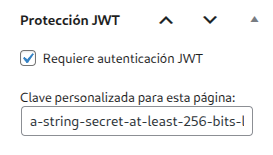
It will allow you to decide which pages can receive a special level of security, authenticating access to your content with JWT and limiting access to the posts you want.
You can also select a different token signature for each of the pages you want to have high security, giving your website an extra layer of protection.
Installation
You can install this plugin follow two diferents methods:
The first its simple, you could install it in “Plugins section” on your wp-back.
Or if yu want, you want you can install it manualy following the next steps:
1. Upload the plugin folder to the /wp-content/plugins/ directory.
2. Activate it from the WordPress ‘Plugins’ menu.
3. Configure the options from the Plugin’s ‘Settings’ page.
Journal de modifications
We are currently working on various improvements to further enhance the security of your website, such as: * Access with RSA signatures. * Selection of enabled roles per page.
1.4
- Second version of the plugin. Remember configure correctly the JWT’ signatures. Must be the shame used to sign the token.
1.4.1
- Compatibility with WordPress 7.1.
- Fixed warnings about deprecated functions.
- Security improvements to JWT validation.
Captures d'écran



Pour les développeurs
Est-ce votre plugin ? Montrez les chiffres.
Ajoutez un badge en direct à votre site, docs ou github readme. Il se met à jour par lui-même - aucun compte n'est nécessaire.
Best JWT Selector Authenticator alternatives
All authentication plugins →




FAQ
JWT Selector Authenticator: quick answers
Réponses directes, extraites des données en direct WordPress.org.
Source : WordPress.org
Is JWT Selector Authenticator free?
Yes. JWT Selector Authenticator is free to download and use from the official WordPress.org plugin directory.
Is JWT Selector Authenticator safe to use in 2026?
JWT Selector Authenticator works, but test it on a staging site before relying on it in 2026. Was last updated 2 months ago, and scores 60/100 on our health check.
How many websites use JWT Selector Authenticator?
JWT Selector Authenticator is active on <10 WordPress websites and has been downloaded 667 times since it launched in September 2025. It was downloaded 84 times in the last 30 days.
Does JWT Selector Authenticator work with WordPress 7.1?
Yes. The developer has tested JWT Selector Authenticator up to WordPress 7.1.5, the latest release. It requires WordPress a recent version or newer.
When was JWT Selector Authenticator last updated?
The latest version, 1.4.1, was released on October 7, 2026 (2 months ago).
Who makes JWT Selector Authenticator?
JWT Selector Authenticator is developed and maintained by Miguel Acedo Marfil.
What are the best alternatives to JWT Selector Authenticator?
The most popular alternatives to JWT Selector Authenticator are Limit Login Attempts (200K+ installs), Two Factor (100K+ installs) and WPS Limit Login (100K+ installs).
Propulsé par PageForge
Un modèle et une feuille de calcul. Une vraie page pour chaque recherche.
PageForge transforme chaque ligne d'un CSV en une page WordPress avec son propre titre, URL, SEO et schéma, construit sur la mise en page que vous Déjà conçu. Gratuit sur WordPress.org.
- CSV et XLSX, plus Google Sheets sur les professionnels et les entreprises
- Son propre titre, URL, SEO champs et schéma pour chaque page
- Fonctionne avec l'éditeur de blocs, Elementor, Divi et Avada
- Gratuit sur WordPress.org, pas de carte de crédit