


AnnoVisio
Create a clear year view from Calendly and public iCalendar/ICS feeds in WordPress.

Utiliser avec prudence
AnnoVisio works, but test it on a staging site before relying on it in 2026. Was last updated 3 months ago, and scores 54/100 on our health check.
- Testé avec le dernier WordPress (7.1)
- Petite base d'utilisateurs (<10 installations actives)
- Très peu de critiques jusqu'à présent
Comment s'accumule-t-il ?
Côte à côte sur les installations, les mises à jour, les évaluations et le support



Téléchargements quotidiens
Les pics de téléchargement suivent généralement une nouvelle version - chaque site qui met à jour automatiquement compte comme un téléchargement.
Classements
Where AnnoVisio stands todayWordPress.org Classements de recherche
Position en direct dans la recherche de plugins, Top 100| Mot-clé | Position |
|---|---|
| calendrier | >100 |
| Calendly | #52 |
| Calendrier des événements | >100 |
| iCalendar | #31 |
| ics | #73 |
About AnnoVisio
À partir du Lisezmoi officiel · v2.1.0Description
AnnoVisio displays events from Calendly or a public iCalendar/ICS feed in a compact yearly calendar and list view through the shortcode [annovisio].
The fixed standard configuration uses exactly one source:
- one Calendly account connected with a Personal Access Token, or
- one public iCalendar/ICS feed from Google Calendar, Microsoft Outlook, Apple Calendar, or another compatible calendar system.
For Calendly sources, AnnoVisio synchronizes event types and occurrences, supports multi-day Calendly events, checks availability before booking, and opens the official Calendly booking popup when a bookable event is selected.
For iCalendar/ICS sources, the configured public feed is fetched server-side with the WordPress HTTP API and normalized into a WordPress transient. The configured calendar name and color are applied when the overview is rendered, so changing these display settings does not require a new feed fetch. No external frontend assets are loaded for iCalendar output.
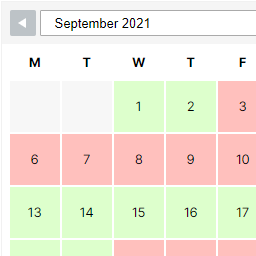
The year grid is the default view. Event bars open a local detail dialog with title, date, calendar name, description, event URL when available, and the calendar page URL. The plugin displays the shortcode page itself as the event archive. It does not create event posts, standalone event detail pages, Google OAuth connections, or write access to any calendar.
Principales caractéristiques :
- Yearly calendar with event detail dialog
- Calendar and list views
- Public iCalendar/ICS feed support
- Support for public feeds from Google Calendar, Microsoft Outlook, Apple Calendar, and other compatible calendar systems
- Configurable calendar name and color for the iCalendar/ICS feed
- Server-side iCalendar/ICS fetching and transient-based caching
- Manual iCalendar/ICS refresh and display-cache update
- Recurring iCalendar/ICS events with RDATE and EXDATE support
- Visible frontend errors for unavailable configurations, feed fetch errors, or parser errors
- Calendly event type and occurrence synchronization
- Manual or optional automatic Calendly synchronization
- Multi-day Calendly events
- Direct Calendly booking popup
- Availability and sold-out checks before booking
- Manual display-cache update without starting a Calendly synchronization
Services externes
The plugin contacts external services only when the corresponding source is configured.
Public iCalendar/ICS feed
When an iCalendar source is selected, the plugin sends a server-side HTTP GET request to the public ICS URL entered by the site administrator. The feed can come from any calendar provider that offers a public iCalendar/ICS feed URL, for example Google Calendar, Microsoft Outlook, Apple Calendar, or another compatible calendar system.
The request is made from the WordPress server using the WordPress HTTP API when the cache is empty or when an administrator uses the manual refresh action. The request is used only to retrieve and parse the calendar data.
The requested calendar provider receives the server request, including normal HTTP request metadata such as IP address and user agent. The plugin does not send visitor data to the feed URL from the browser and does not load external frontend assets for iCalendar output.
Administrators should only configure a public iCalendar/ICS feed URL whose provider, terms of service, and privacy policy are acceptable for their website. The destination and its terms and privacy policy depend on the service chosen by the administrator.
Calendly
When Calendly is selected, the plugin uses Calendly to synchronize event data, check availability, and open the official booking popup.
External Calendly resources:
- Service: https://calendly.com
- API: https://api.calendly.com
- Widget script: https://calendly.com/assets/external/widget.js
- Widget stylesheet: https://calendly.com/assets/external/widget.css
Qu'est-ce qui est envoyé et quand :
- During manual or automatic synchronization, authenticated server-side GET requests are sent to the Calendly API with the Personal Access Token configured by the administrator.
- The plugin requests the connected user, active event types, occurrences, and available times required by the existing synchronization and availability logic.
- When a visitor clicks a Calendly event, the browser first calls this plugin’s REST endpoint on the same WordPress site. The plugin then checks the relevant event type, date, or UTC slot against Calendly.
- The Calendly widget script and stylesheet are loaded only on calendar output that contains a Calendly source. Booking interactions inside the popup are handled by Calendly.
Calendly legal information:
- Terms: https://calendly.com/legal/customer-terms-conditions
- Privacy: https://calendly.com/legal/privacy-notice
Installation
- Install and activate AnnoVisio.
- Open AnnoVisio in the WordPress administration.
- Select iCalendar or Calendly for the standard configuration.
- For iCalendar, enter one public ICS feed URL, a calendar name, and a calendar color.
- For Calendly, open the Calendly management page, save one Personal Access Token, and run the synchronization.
- Add
[annovisio]to a page or post.
Journal de modifications
2.1.0
- Added the calendar and list view switcher to the free plugin.
2.0.2
- Improved backend layout.
- Added links to video tutorials
2.0.0
- Integrated the iCalendar/ICS functionality from AnnoVisio Event Overview into AnnoVisio.
- Added public iCalendar/ICS feed support from compatible calendar systems such as Google Calendar, Microsoft Outlook, and Apple Calendar.
- Added configurable calendar name and color settings for the iCalendar/ICS source.
- Added server-side iCalendar/ICS fetching, transient-based caching, manual refresh, and visible frontend errors for feed or parser failures.
- Added recurring iCalendar/ICS event expansion with RDATE and EXDATE support.
- Added local iCalendar/ICS event detail dialogs with event metadata and available event links.
- Improved the backend layout.
- Moved the Save shortcode button below the cache settings.
1.1.5
- Removed bundled non-German language files from the ZIP package.
- Hardened scalar request handling in merged admin and frontend refresh actions.
1.1.4
- Restored the standard WordPress plugin language-pack loading behavior.
1.1.3
- Updated bundled German admin translations on manually installed ZIP builds.
Captures d'écran


Pour les développeurs
Est-ce votre plugin ? Montrez les chiffres.
Ajoutez un badge en direct à votre site, docs ou github readme. Il se met à jour par lui-même - aucun compte n'est nécessaire.
Best AnnoVisio alternatives
All calendar plugins →




FAQ
AnnoVisio: quick answers
Réponses directes, extraites des données en direct WordPress.org.
Source : WordPress.org
Is AnnoVisio free?
Yes. AnnoVisio is free to download and use from the official WordPress.org plugin directory.
Is AnnoVisio safe to use in 2026?
AnnoVisio works, but test it on a staging site before relying on it in 2026. Was last updated 3 months ago, and scores 54/100 on our health check.
How many websites use AnnoVisio?
AnnoVisio is active on <10 WordPress websites and has been downloaded 745 times since it launched in May 2026. It was downloaded 81 times in the last 30 days.
Does AnnoVisio work with WordPress 7.1?
Yes. The developer has tested AnnoVisio up to WordPress 7.1.5, the latest release. It requires WordPress 6.2 or newer.
What PHP version does AnnoVisio need?
AnnoVisio requires PHP 7.4 or higher. Most hosts run PHP 8.x today, so it works on any modern WordPress hosting.
When was AnnoVisio last updated?
The latest version, 2.1.0, was released on August 20, 2026 (3 months ago).
Who makes AnnoVisio?
AnnoVisio is developed and maintained by Annovisio.
What are the best alternatives to AnnoVisio?
The most popular alternatives to AnnoVisio are The Events Calendar (600K+ installs), Events Manager (60K+ installs) and SimplyBook.me (30K+ installs).
Propulsé par PageForge
Un modèle et une feuille de calcul. Une vraie page pour chaque recherche.
PageForge transforme chaque ligne d'un CSV en une page WordPress avec son propre titre, URL, SEO et schéma, construit sur la mise en page que vous Déjà conçu. Gratuit sur WordPress.org.
- CSV et XLSX, plus Google Sheets sur les professionnels et les entreprises
- Son propre titre, URL, SEO champs et schéma pour chaque page
- Fonctionne avec l'éditeur de blocs, Elementor, Divi et Avada
- Gratuit sur WordPress.org, pas de carte de crédit