


YARPP – Yet Another Related Posts Plugin
The best WordPress plugin for displaying related posts. Simple and flexible, with a powerful proven algorithm and inbuilt caching.

Betrachten Sie eine Alternative
YARPP shows warning signs in 2026 — compare the alternatives below before installing. It runs on 100K+ sites, is rated 4.8/5 and was last updated 2 years ago, and scores 37/100 on our health check.
- Bewährt im Maßstab auf 100k+ aktiven Standorten
- Loved by users — 4.8/5 from 1,166 reviews
- Momentum — downloads up 54.6% vs the previous 30 days
- Kein Update in 2 Jahren
- Nur getestet bis WordPress 6.7 (letzt ist 7.1)
Wie stapelt es sich?
Side-by-side bei Installationen, Updates, Bewertungen und Support



Tägliche Downloads
Download-Spitzen folgen normalerweise einer neuen Version - jede Website, die automatisch aktualisiert wird, gilt als Download.
Ranglisten
Where YARPP stands todayWordPress.org Ranglisten suchen
Live-Position in der Plugin-Suche, Top 100| Stichwort | Position |
|---|---|
| contextual related posts | #7 |
| Beiträge | >100 |
| related posts | #27 |
| SEO | >100 |
| similar posts | #30 |
Versionsübernahme
Anteil aktiver Sites pro Release.
Bewertungsaufschlüsselung
★★★★★★★★★★ 4.8 from 1,166 reviews
About YARPP – Yet Another Related Posts Plugin
From the official readme · v5.30.11Beschreibung
Related Posts Plugin for WordPress
Yet Another Related Posts Plugin (YARPP) is a professionally maintained, highly customizable, performant and feature rich plugin that displays pages, posts, and custom post types related to the current entry. YARPP introduces your visitors to other relevant content on your site — boosting visitor engagement, time on site and SEO. Related Posts can increase your pageviews up to 10%. Simply install, activate and watch your sessions and pageviews increase.
Hauptmerkmale
- An advanced and versatile algorithm: Using a customizable algorithm considering post titles, content, tags, categories, and custom taxonomies, YARPP finds related content from across your site
- Caching: Inbuilt cache makes subsequent queries super efficient and fast
- Custom Templates and Styles: Use a pre-built list or thumbnail template, or use the YARPP custom templating system for 100% control of how results are styles and displayed
- Flexible with a full range of placement options, including:
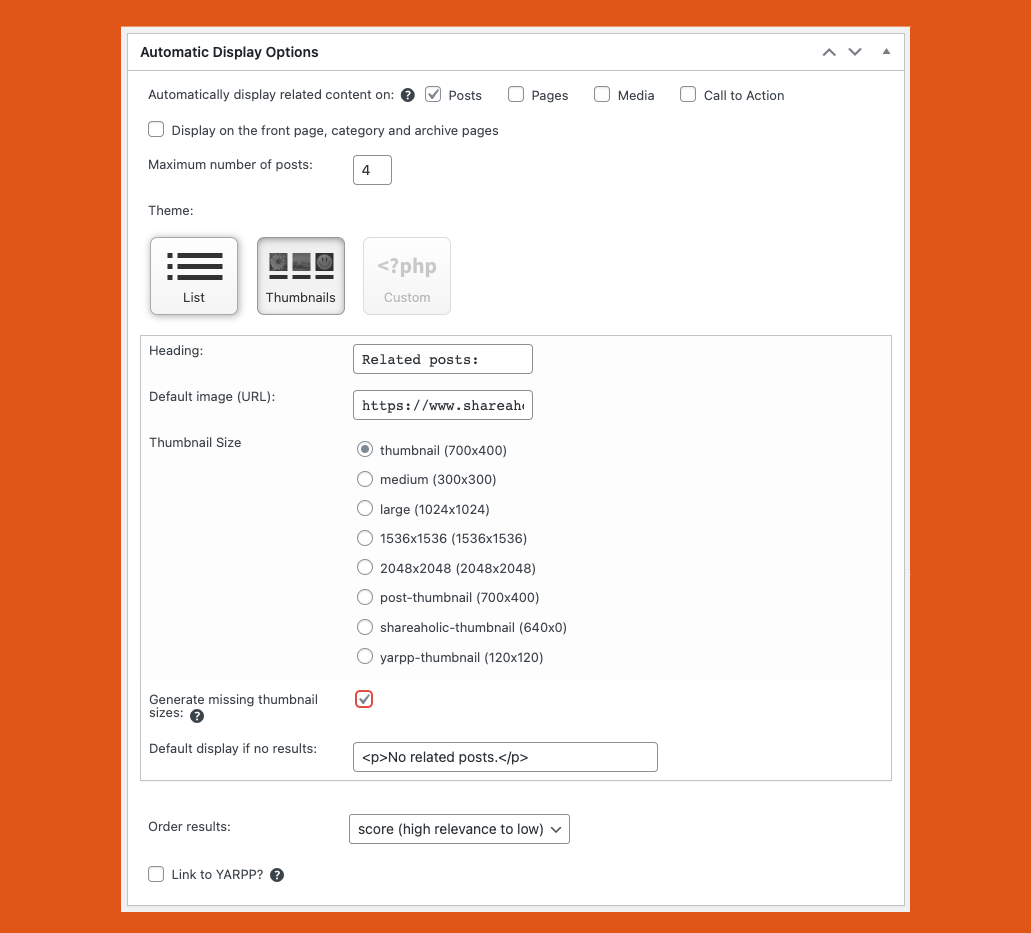
- Automatic Display Options (pick where to show YARPP from the YARPP settings page)
- RSS/Feed Options
- Blockeditor (Gutenberg)
- [yarpp] Shortcode
- Widget
- YARPP functions()
- REST API
- Works with all languages, including those with full-width (double-byte) characters and those that don’t use spaces between words
- Custom post type and taxonomy support
- WordPress Multisite support
- bbPress forums support
- WooCommerce support
- Professionally maintained and supported with regular updates
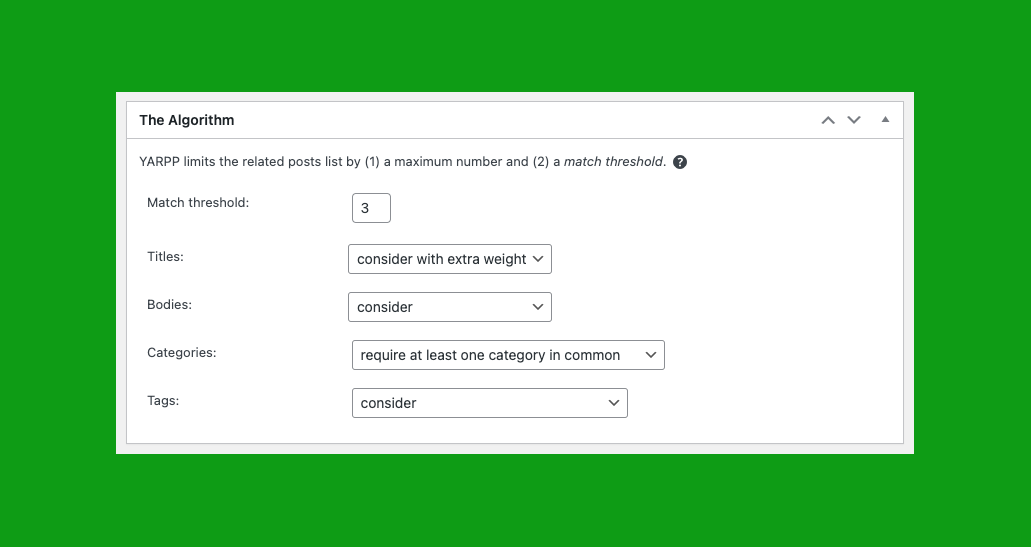
YARPP Algorithm Explained
Contribute: Translate YARPP
YARPP is available for translation directly on WordPress.org. Please check out the official Translator Handbook.
Wide Support
YARPP is the most popular and the highest rated Related Posts Plugin for WordPress. With your support, this plugin always strives to be the best WordPress plugin for Content Discovery and Related Posts.
✔ Over 10 years of development
✔ Over 6 million downloads
✔ Translated into more than a dozen languages
✔ Professionally maintained and actively supported with regular updates
✔ Works with all languages
YARPP works best with PHP 5.3 or greater, MySQL 5.6 or greater OR MariaDB 10.1 or greater, and WordPress 3.7 or greater. See the FAQ for answers to common questions.
Installation
Install YARPP from within WordPress
- Visit the plugins page within your WordPress dashboard and select
Add New - Suche nach
YARPP - Press “Install Now” for the
YARPPplugin - Activate YARPP from your Plugins page
- Go to the “YARPP” settings page to customize YARPP
- [optional] copy the sample YARPP Custom Template files inside the
yarpp-templatesfolder into your active theme folder.
Install YARPP Manually
- Laden Sie den Ordner
yet-another-related-posts-pluginin das/wp-content/plugins/-Verzeichnis hoch - Activate YARPP from your Plugins page
- Go to the “YARPP” settings page to customize YARPP
- [optional] copy the sample YARPP Custom Template files inside the
yarpp-templatesfolder into your active theme folder.
Install YARPP with the WP-CLI
wp plugin install yet-another-related-posts-plugin --activate- Go to the “YARPP” settings page to customize YARPP
- [optional] copy the sample YARPP Custom Template files inside the
yarpp-templatesfolder into your active theme folder.
The YARPP custom template feature allows you to easily customize look and feel using the same coding conventions and Template Tags as in WordPress themes.
Your YARPP Custom Template file must be in the active theme’s main directory in order to be recognized by YARPP. If your theme did not ship with a YARPP templates, move the files in the yarpp-templates directory which ships with YARPP into your active theme’s main directory. Be sure to move the files (which must be named yarpp-template-….php) to your theme, not the entire directory. There is no limit restriction on custom templates.
After Activation
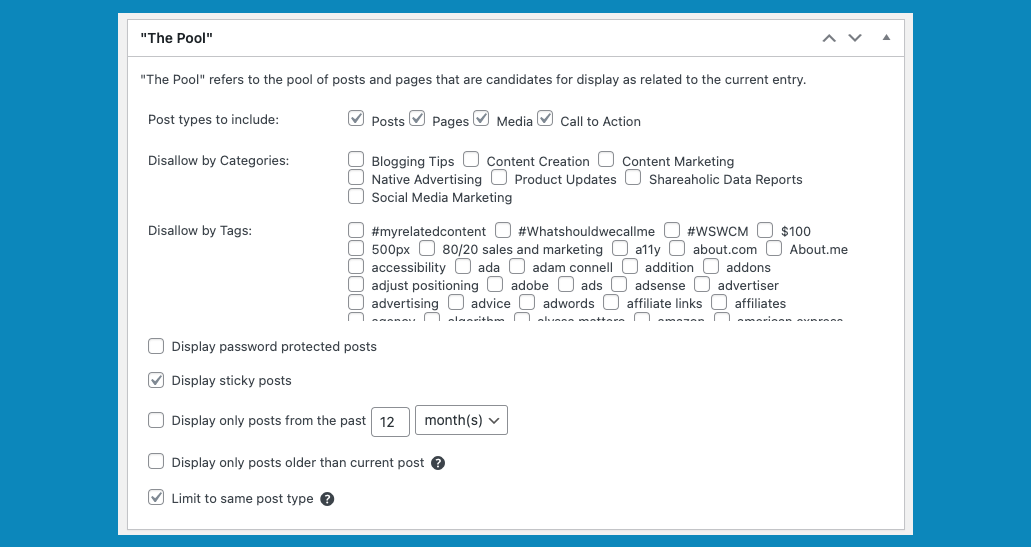
You should customize your Pool, Algorithm and Automatic Display Options settings from the YARPP settings page. YARPP supports a full range of placement options, including Automatic Display Options (pick where to show YARPP from the YARPP settings page), Block, Shortcode, Widget, YARPP functions() and REST API support. Details below.
Automatic Display Options
Configurable from the YARPP settings page, the Automatic Display Option automatically displays YARPP right below post content. You can configure which posts types to display YARPP on from the YARPP settings page.
If you do not want to show the Related Posts display in its default position (right below the post content), first go to YARPP options and turn off the “Automatic Display Options”.
If you would like to instead display it in your sidebar and you have a widget-aware theme, YARPP provides a Related Posts widget which you can add under “Appearance” > “Widgets.”
If you would like to add Related Posts elsewhere (such as inline related posts), edit your relevant theme file (most likely something like single.php) and add the shortcode code [yarpp] or PHP function yarpp_related(); within The Loop where you want to display the related posts. Make sure you don’t add echo yarpp_related(); or you may end up with duplicates in your related posts section. The YARPP Block is also an option.
Automatic Display in Feed Options
Make sure the “display related posts in feeds” option is turned on if you would like to show related posts in your RSS and Atom feeds. The “display related posts in feeds” option can be used regardless of whether you auto display them on your website (and vice versa).
Block
YARPP ships with full support for Gutenberg Blocks. You can place YARPP’s Block manually wherever you’d like in post content.
Shortcode
You can place YARPP’s related posts manually wherever you’d like in post content or theme files.
To add to post content, use the shortcode:
[yarpp] to show content related to the current post. You may use more than one YARPP shortcode in a given post or template.
All the parameters accepted by yarpp_related() (see below) can also be used in the shortcode. Here are some examples…
If you know the reference Post ID that you want to show content related to, use:
[yarpp reference_id=123] to show content related to post 123
To specify which YARPP template to use, use the “template” attribute like so:
[yarpp template="yarpp-template-photoblog"] - where `yarpp-template-photoblog.php` is the file name of the custom template
[yarpp template="list"] - built-in "List" template
[yarpp template="thumbnails"] - built-in "Thumbnails" template
To specify maximum number of posts to show, use the “limit” attribute like so:
[yarpp template="list" limit=3]
To only show recent posts, use the “recent” attribute (provide it with a number, a space, and then either “day”, “week” or “month”)
[yarpp recent="6 month"]
To show another post type, use the “post_type” parameter.
[yarpp post_type="page"]
If you need to provide multiple values (eg posts and pages, or a list of categorires of posts to exlude), separate them with a comma but no space.
[yarpp post_type="post,page"] - include both posts and pages in results
[yarpp exclude="1,2,3"] - exclude posts with categories with IDs 1,2 and 3
To adjust the weights and taxonomy requirements, provide the value as JSON (using the same structure as for yarpp_related() below). Eg
[yarpp weight='{"body":1}'] - only consider body content
[yarpp weight='{"body":2,"title":2,"tax":{"category":0, "post_tag":0}}'] - give extra weight to bodies and titles, but none to categories
[yarpp require_tax='{"category": 2, "post_tag": 0}'] - require at least one category in common
To order results:
[yarpp order="score DESC"] - high relevance score to low
[yarpp order="rand"] - random
To add YARPP shortcode to your theme files (eg. single.php), use:
<?php echo do_shortcode('[yarpp]'); ?>
<?php echo do_shortcode('[yarpp reference_id=123]'); ?>
If you’re adding the shortcode outside the loop, you must provide the reference_id.
Widget
Related posts can also be displayed as a widget. Go to the Appearance > Widgets options page and add the “Related Posts (YARPP)” widget. Choose to display content from YARPP Basic. The widget will only be displayed on single entry (permalink) pages.
The YARPP widget can be used even if the “auto display” option is turned off.
REST API
Add related posts to your JavaScript driven app!
YARPP adds a REST API endpoint for fetching related posts. The JSON results from the REST API query are the same as you would see if you were visiting a post on your website (the same quantity and order). It is possible to override the quantity at the time of making the REST API request.
YARPP functions()
Developers can call YARPP’s powerful relatedness algorithm from anywhere in their own code. Some examples and more details are in this WordCamp Birmingham talk.
You may use the functions defined in includes/related_functions.php in your own code, notably:
yarpp_related()– gets the HTML for related posts and displays ityarpp_related_exist()– checks whether any related posts existsyarpp_get_related()– returns the list of related posts (WP_Postobjects)
Beispiele:
Show related posts, using all the settings set on the YARPP settings page:
<?php yarpp_related(); ?>
Each of these functions will default to using the settings set on the YARPP settings page, but can be customized. For example:
yarpp_related(
  array(
    // Pool options: these determine the "pool" of entities which are considered
    'post_type' => array('post', 'page', 'wc_product', ...), //  post types to include in results
    'show_pass_post' => true, // show password-protected posts
    'show_sticky_posts' => true, // show sticky posts
    'past_only' => true, // show only posts which were published before the reference post
    'exclude' => array(), // a list of term_taxonomy_ids. entities with any of these terms will be excluded from consideration.
    'recent' => false, // to limit to entries published recently, set to like '15 day', '20 week', or '12 month' (https://www.mysqltutorial.org/mysql-interval/)

    // Relatedness algorithm options: these determine how "relatedness" is computed
    // Weights are used to construct the "match score" between candidates and the reference post
    'weight' => array(
      'body' => 1,
      'title' => 2, // larger weights mean this criteria will be weighted more heavily
      'tax' => array(
        'post_tag' => 1,
        ... // put any taxonomies you want to consider here with their weights
      )
    ),
    // Specify taxonomies and a number here to require that a certain number be shared:
    'require_tax' => array(
      'post_tag' => 1 // for example, this requires all results to have at least one 'post_tag' in common
    ),
    // The threshold which must be met by the "match score" to be considered related
    'threshold' => 5,

    // Display options:
    'template' => 'thumbnails', // which theme/custom template to use. Built-in ones include "list" and "thumbnails", or the name of a YARPP template file in your active theme folder starting with "yarpp-template-". Example: yarpp-template-videos or yarpp-template-videos.php
    'limit' => 5, // maximum number of results
    'order' => 'score DESC', // column on "wp_posts" to order by, then a space, and whether to order in ascending ("ASC") or descending ("DESC") order
    'promote_yarpp' => true, // boolean indicating whether to add 'Powered by YARPP' below related posts
    'generate_missing_thumbnails' => true, // automatically generate missing thumbnail sizes on the fly
    'extra_css_class' => 'class_1 class_2', // add CSS classes to YARPP's parent div
  ),
 $reference_ID, // second argument: (optional) the post ID. If not included, will use the current post.
 true // third argument: (optional) true to echo the HTML block; false to return it
);
Options which are not specified will default to those specified on the YARPP settings page. Additionally, if you are using a builtin template rather than specifying a custom template file in template, the following arguments can be used to override the various parts of the builtin template: before_title, after_title, before_post, after_post, before_related, after_related, no_results, excerpt_length.
If you need to implement related entries programmatically or to know whether they exist, you can use the functions:
yarpp_get_related( $args, $reference_ID )
Returns an array ofpostobjects, just like the WordPress functionget_posts.yarpp_related_exist( $args, $reference_ID )
Returns a boolean for whether any such related entries exist.
For each of these functions, $args takes the same arguments as those detailed for yarpp_related() above, except for the various display and template options.
Note that at this time custom YARPP queries using the functions mentioned here are not cached in the built-in YARPP caching system. Thus, if you notice any performance hits, you may need to write your own code to cache the results.
Example of how to use a custom YARPP query and cache the results for a day:
$result = get_transient('yarpp_custom_results_for_' . $post->ID);
if(! $result){
  $result = yarpp_related(['post_type' => 'reply'],null,false);
  set_transient('yarpp_custom_results_for_' . $post->ID, $result, DAY_IN_SECONDS);
}
echo $result;
Show at most 4 related WooCommerce products based on their title and especially on their categories, assuming custom YARPP template
yarpp-related-wc-products.php has been added to the active theme folder:
yarpp_related(
  array(
    'limit' => 4,
    'weight' => array(
      'title' => 1,
      'tax' => array(
        'category' => 2
      )
    ),
    'post_type' => 'wc_product',
    'template' => 'yarpp-related-wc-products.php'
  )
);
Check for posts related to post with ID 123, and loop through them in order to do some more custom logic:
$related_posts = yarpp_get_related(array(), 123);
if(! $related_posts){
  echo 'No related posts';
} else {
  foreach($related_posts as $post){
    // $post is a WP_Post object.
    echo $post->post_title;
  }
}
Show results ordered by score (high relevance to low):
yarpp_related(
  array(
    'order' => 'score DESC',
  )
);
Show results ordered by post publish date (new to old):
yarpp_related(
  array(
    'order' => 'post_date DESC',
  )
);
Show results ordered randomly:
yarpp_related(
  array(
    'order' => 'rand',
  )
);
YARPP Filters
Documentation: https://support.shareaholic.com/hc/en-us/articles/4408775687060
Änderungsprotokoll
We update YARPP regularly so we can keep making it better for you. Update to the latest version for the latest features and improvements. Thank you for using YARPP!
5.30.11 (11-November-2024)
- Bugfix: Resolves minor Unauthenticated Broken Access Control bug
- Tested on WordPress 6.7
5.30.10 (17-February-2024)
- Bugfix: Resolves stored Cross-Site Scripting bug
5.30.9 (22-November-2023)
- Enhancement: Better input sanitization for a more predictable output
- Enhancement: Misc performance improvements
5.30.8 (21-November-2023)
- Enhancement: Adds ability to set sort order to Random from the YARPP Admin UI
5.30.7 (20-November-2023)
- Tested on WordPress 6.4
- Bugfix: Fixes PHP 8.2 warnings that were filling up server logs
5.30.6 (09-August-2023)
- Tested on WordPress 6.3
Screenshots



Für Entwickler
Ist das dein Plugin? Zeigen Sie die Zahlen.
Fügen Sie Ihrer Website, Docs oder GitHub Readme ein Live-Badge hinzu. Es wird von selbst aktualisiert - kein Konto erforderlich.
Best YARPP alternatives
All contextual related posts plugins →
Fragen und Antworten
YARPP: quick answers
Gerade Antworten, gezogen von Live WordPress.org Daten.
Quelle: WordPress.org
Is YARPP free?
Yes. YARPP is free to download and use from the official WordPress.org plugin directory.
Is YARPP safe to use in 2026?
YARPP shows warning signs in 2026 — compare the alternatives below before installing. It runs on 100K+ sites, is rated 4.8/5 and was last updated 2 years ago, and scores 37/100 on our health check.
How many websites use YARPP?
YARPP is active on 100K+ WordPress websites and has been downloaded 8,018,965 times since it launched in January 2008. It was downloaded 14,437 times in the last 30 days.
Does YARPP work with WordPress 7.1?
YARPP is officially tested up to WordPress 6.7.12, while the latest release is 7.1.5. It may still work, but try it on a staging site first.
What PHP version does YARPP need?
YARPP requires PHP 5.3 or higher. Most hosts run PHP 8.x today, so it works on any modern WordPress hosting.
When was YARPP last updated?
The latest version, 5.30.11, was released on November 11, 2024 (2 years ago).
Who makes YARPP?
YARPP is developed and maintained by YARPP.
What are the best alternatives to YARPP?
The most popular alternatives to YARPP are Contextual Related Posts (50K+ installs), Super Related Posts (50+ installs) and VL Related Posts by Taxonomy (<10 installs).
Angetrieben von PageForge
Eine Vorlage und eine Tabelle. Eine echte Seite für jede Suche.
PageForge Verwandelt jede Zeile eines CSV in eine WordPress-Seite mit eigenem Titel, URL, SEO Felder und Schema entworfen. Kostenlos auf WordPress.org.
- CSV und XLSX, plus Google Sheets auf Beruf und Unternehmen
- seinen eigenen Titel, URL, SEO Felder und Schema für jede Seite
- Arbeitet mit dem Blockeditor, Elementor, Divi und Avada
- Kostenlos auf WordPress.org, keine Kreditkarte