


Widget Context
Show and hide widgets on specific posts, pages and sections of your site.

Sichere Auswahl
Yes — Widget Context is a safe, well-maintained plugin to use in 2026. It runs on 30K+ sites, is rated 4.5/5 and was last updated 2 months ago, and scores 82/100 on our health check.
- Bewährt auf 30.000 aktiven Standorten
- Loved by users — 4.5/5 from 98 reviews
- Getestet mit dem neuesten WordPress (7.1)
Wie stapelt es sich?
Side-by-side bei Installationen, Updates, Bewertungen und Support


Tägliche Downloads
Download-Spitzen folgen normalerweise einer neuen Version - jede Website, die automatisch aktualisiert wird, gilt als Download.
Ranglisten
Where Widget Context stands todayWordPress.org Ranglisten suchen
Live-Position in der Plugin-Suche, Top 100| Stichwort | Position |
|---|---|
| Kontext | #1 |
| logic | #16 |
| visibility | #27 |
| widget | #7 |
| Widgets | #30 |
Versionsübernahme
Anteil aktiver Sites pro Release.
Bewertungsaufschlüsselung
★★★★★★★★★★ 4.5 from 98 reviews
About Widget Context
Aus der offiziellen Readme · V1.5.0Beschreibung
Use Widget Context to show and hide widgets on certain sections of your site — front page, posts, pages, archives, search, etc. Use targeting by URLs (with wildcard support) for maximum flexibility.
Premium Support
Subscribe to our Premium Support service and get the PRO 🚀 version of the plugin for free when it’s launched! Your support enables consistent maintenance and new feature development, and is greatly appreciated.
Beitragen
- Suggest code improvements on GitHub.
- Report bugs and suggestions on WordPress.org forums.
- Help translate to your language.
Dokumentation
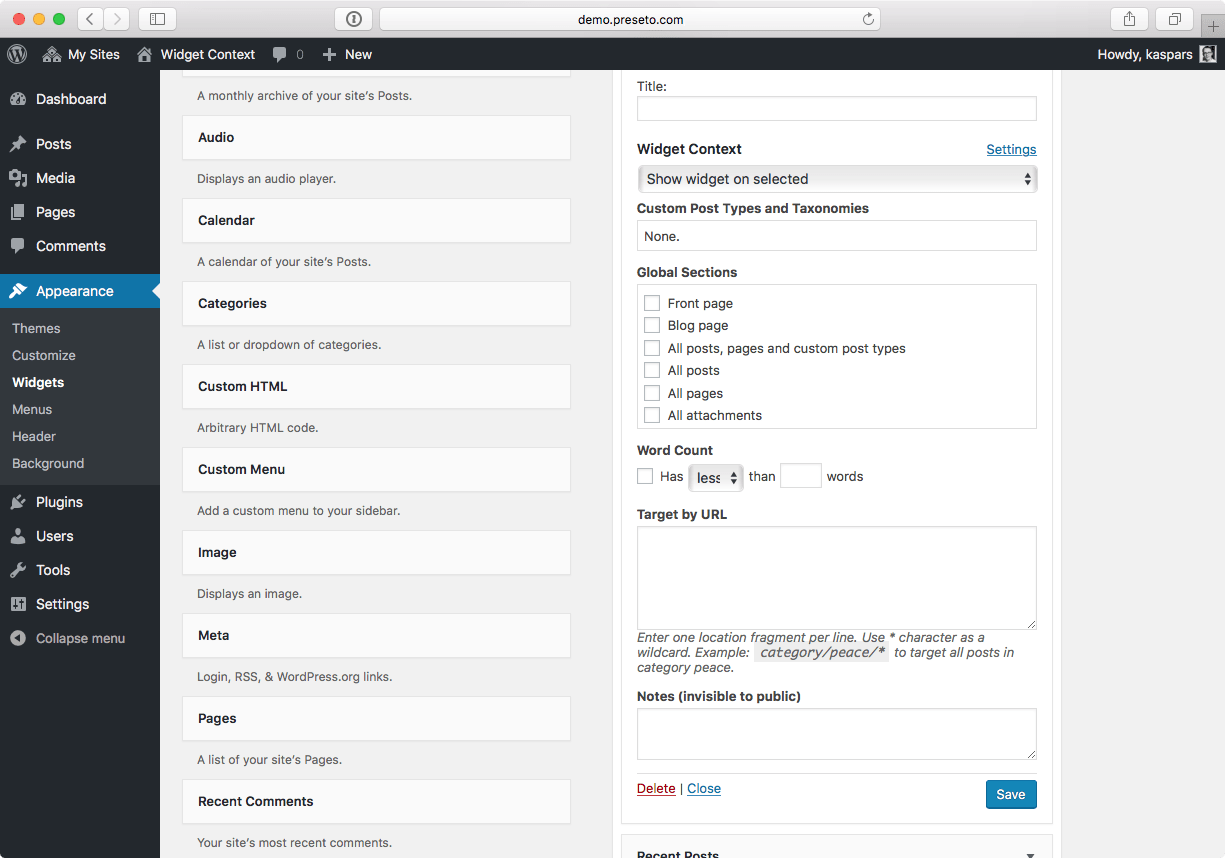
Widget visibility can be configured under individual widget settings under “Appearance → Widgets” in your WordPress administration area or through the widget editing interface in the Customizer.
Target by URL
The “Target by URL” is a powerful feature for targeting sections of your website based on the request URLs. It was inspired by a similar feature in the Drupal CMS.
Use relative URLs such as page/sub-page instead of absolute URLs https://example.com/page/sub-page because relative URLs are more flexible and make the logic portable between different domains and server environments.
Wildcards
Use the wildcard symbol * for matching dynamic parts of the URL. For example:
-
topic/widgets/*to match all posts in the widgets category, if your permalink structure is set to/topic/%category%/%postname%. -
page-slug/*to match all child pages of the page-slug parent page. -
Use a trailing
?*to capture URL with all query arguments such asutm_source, etc. For example, for everyblog/post-slugalso includeblog/post-slug?*.
Exclude by URL
Specify URLs to ignore even if they’re matched by any of the other context rules. For example, enter example/sub-page to hide a widget on this page even when “All Posts” is selected under “Global Sections”.
Installation
- Search for Widget Context under “Plugins → Add New” in your WordPress dashboard.
- Widget Context settings will appear automatically under each widget under “Appearance → Widgets”.
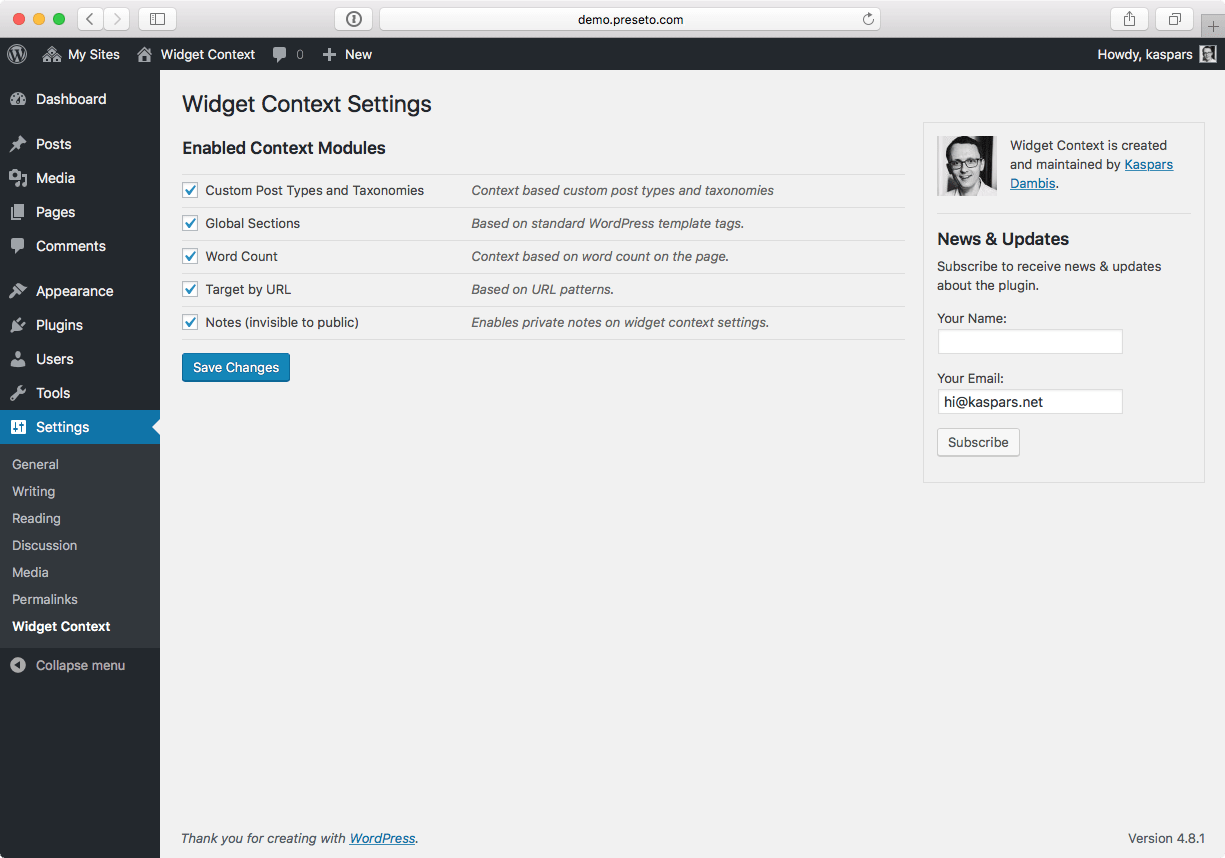
- Visit “Settings → Widget Context” to configure the available widget visibility contexts.
Änderungsprotokoll
PHP 5.6 is now the minimum supported version of PHP. Also included is developer tooling update and improved PHP unit tests.
1.5.0 (October 9, 2026)
- Declare param, return and property types across the codebase where types are known, and refine lazy loading of the plugin option stores.
- Feature: All context rules are now enabled by default, including those added by other plugins.
- Plugin now verifies that WordPress is loading it before bootstrapping.
1.4.2 (October 8, 2026)
- Bugfix: avoid an undefined variable warning when rendering checkbox controls.
- Mark as tested with WordPress 7.1 and PHP 8.5.
- Update the developer tooling dependencies.
1.4.0 (May 18, 2026)
- Security: Ensure widget context settings can only be changed by logged-in administrators intentionally (CVE-2026-7615).
- Require PHP 7.4 to match the WordPress core requirements.
- Feature: Add a toggle to enable the legacy widget interface (non-block).
1.3.3 (August 31, 2024)
- Mark as tested with WordPress 6.6 and PHP 8.2, see #72.
1.3.2 (April 27, 2020)
- Bugfix: Fix the Widget Context settings link in the widget controls after moving the settings under the “Appearance” menu for usability (closer to the widget settings).
- Feature: Add a link to the plugin settings in the plugin admin list, too.
1.3.1 (April 24, 2020)
- Bugfix: better support for URL rules with query parameters.
Screenshots
Für Entwickler
Ist das dein Plugin? Zeigen Sie die Zahlen.
Fügen Sie Ihrer Website, Docs oder GitHub Readme ein Live-Badge hinzu. Es wird von selbst aktualisiert - kein Konto erforderlich.
Best Widget Context alternatives
All context plugins →


Fragen und Antworten
Widget Context: quick answers
Gerade Antworten, gezogen von Live WordPress.org Daten.
Quelle: WordPress.org
Is Widget Context free?
Yes. Widget Context is free to download and use from the official WordPress.org plugin directory.
Is Widget Context safe to use in 2026?
Yes — Widget Context is a safe, well-maintained plugin to use in 2026. It runs on 30K+ sites, is rated 4.5/5 and was last updated 2 months ago, and scores 82/100 on our health check.
How many websites use Widget Context?
Widget Context is active on 30K+ WordPress websites and has been downloaded 1,046,113 times since it launched in July 2009. It was downloaded 6,935 times in the last 30 days.
Does Widget Context work with WordPress 7.1?
Yes. The developer has tested Widget Context up to WordPress 7.1.5, the latest release. It requires WordPress 3.0 or newer.
What PHP version does Widget Context need?
Widget Context requires PHP 7.4 or higher. Most hosts run PHP 8.x today, so it works on any modern WordPress hosting.
When was Widget Context last updated?
The latest version, 1.5.0, was released on October 9, 2026 (2 months ago).
Who makes Widget Context?
Widget Context is developed and maintained by Kaspars.
What are the best alternatives to Widget Context?
The most popular alternatives to Widget Context are Conditional Menus (60K+ installs), Widgets Control (800+ installs) and Conditional Tags Shortcode (100+ installs).
Angetrieben von PageForge
Eine Vorlage und eine Tabelle. Eine echte Seite für jede Suche.
PageForge Verwandelt jede Zeile eines CSV in eine WordPress-Seite mit eigenem Titel, URL, SEO Felder und Schema entworfen. Kostenlos auf WordPress.org.
- CSV und XLSX, plus Google Sheets auf Beruf und Unternehmen
- seinen eigenen Titel, URL, SEO Felder und Schema für jede Seite
- Arbeitet mit dem Blockeditor, Elementor, Divi und Avada
- Kostenlos auf WordPress.org, keine Kreditkarte