


Smart COD for WooCommerce
Retiring during December. Existing features keep working in Classic Checkout and Cart & Checkout Blocks. Explore Smart COD PRO.

Solide Wahl
Smart COD for WooCommerce is a solid plugin choice in 2026, with a few things worth checking first. It runs on 30K+ sites, is rated 4.6/5 and was last updated 1 day ago, and scores 78/100 on our health check.
- Bewährt auf 30.000 aktiven Standorten
- Loved by users — 4.6/5 from 53 reviews
- Aktiv entwickelt - letztes Update vor 1 Tag
- Getestet mit dem neuesten WordPress (7.1)
- Momentum — downloads up 44.1% vs the previous 30 days
Wie stapelt es sich?
Side-by-side bei Installationen, Updates, Bewertungen und Support



Tägliche Downloads
Download-Spitzen folgen normalerweise einer neuen Version - jede Website, die automatisch aktualisiert wird, gilt als Download.
Ranglisten
Where Smart COD for WooCommerce stands todayWordPress.org Ranglisten suchen
Live-Position in der Plugin-Suche, Top 100| Stichwort | Position |
|---|---|
| cash on delivery | #3 |
| cod | #1 |
| COD Extra Fee | #1 |
| Smart COD | #1 |
| WooCommerce | >100 |
Versionsübernahme
Anteil aktiver Sites pro Release.
Bewertungsaufschlüsselung
★★★★★★★★★★ 4.6 from 53 reviews
About Smart COD for WooCommerce
From the official readme · v1.9.12Beschreibung
Smart COD for WooCommerce extends the WooCommerce Cash on Delivery (COD) Gateway with an optional extra fee and restrictions based on customer conditions such as location and selected shipping method.
Supports both Classic Checkout and WooCommerce Cart & Checkout Blocks (WooCommerce 9.9+ for Blocks). The same COD restrictions and extra fees apply to both checkout types.
Retirement of the free edition
Thank you for using Smart COD for WooCommerce in your store. The free edition will be retired during December. We’re focusing on Smart COD PRO to bring you more COD features and better support.
Your installed version will continue working with its current features and settings, but will no longer receive updates, including compatibility updates for WordPress and WooCommerce. Once the directory entry closes, new installations through WordPress.org will no longer be available. You do not need to buy PRO to keep using the version you already have installed.
See what changes, compare your current plugin with PRO and automatically import your settings.
Take full control of COD with Smart COD PRO
Create multiple rules for when COD appears, when a fee applies and how much to charge. Protect your store from non-collection using delivery history from your own store and other participating stores in your country.
- Different COD fees for different orders: combine cart value, products, customer details and shipping conditions to build the pricing that fits your store.
- More control before accepting COD: hide COD or request email verification when your checkout conditions match.
- Delivery history beyond your own store: use history from participating stores in your country alongside your own, with clear reasons for each decision.
- Partial COD with an upfront deposit: collect a fixed amount or percentage online and leave the balance payable on delivery.
Already using Free? Keep your setup. PRO automatically detects your saved Free settings for review and import, so you do not have to rebuild your rules. Premium ticket support is there when you need help.
The free edition described below retains its existing features on installed stores. Future development and new features will focus on Smart COD PRO.
Restrictions
Each restriction can be easily toggled between Enable and Disable. When set to Enable, the restriction will allow the Cash on Delivery (COD) payment option only for the specified selections. On the other hand, when set to Disable, the restriction will disable the COD option for the specified selections, making it unavailable for them.
- Shipping Zone
- Shipping Method inside Shipping Zone
- Land
- Zustand
- Postal Code (Supports Ranges)
- City
- User Role
- Products in cart (Supports Variations)
- Categories of the products in cart
- Shipping Class
You can define an informational message to display before the payment methods, when the COD method is not available for a customer.
You can define different messages per restrict reason.
Extra Fees
You can configure a standard extra fee and a separate fee for local pickup.
You can use a fixed price or a percentage of the customer’s cart amount.
You also have a nice rounding option.
You can enable tax for this fee. Set a custom label for the fee in COD settings. The label appears in both Classic Checkout and Checkout Blocks.
Settings Backup
Export your Free settings as a JSON file and restore them on the same store from WooCommerce > Smart COD: Settings backup. Review the current and saved values before confirming. No paid account is required.
Backups include COD availability, fees, restriction selections and messages. Sharing consent, credentials and order/customer data are excluded and remain unchanged during restoration. Files from another store are not accepted because product, shipping and category identifiers are store-specific. A preview expires after ten minutes; changing settings after preview requires a new preview.
Entwicklerfreundlich
The plugin integrates seamlessly with WooCommerce and uses a clean, object-oriented codebase. It also provides the following filters for easy customization:
wc_smart_cod_fee: Alter the extra fee.wc_smart_cod_available: Alter the current COD restriction.wc_smart_cod_fee_title: Change the COD fee title.
Since the plugin extends the existing WooCommerce Cash on Delivery Gateway, there’s no need to enable or disable gateways manually.
Externe Dienste
COD Protection and data sharing are optional and off by default. If enabled in the Cash on Delivery settings, the plugin registers with api.woosmartcod.com using an installation ID, shop domain, country and public signing key. The existing choice carries forward after updates without a separate activation or upgrade notice. Switching it off stops future collection, transmission and checkout lookups.
The plugin sends new physical COD orders and their outcomes in signed batches. It sends eligible past cancellations and a capped prior-completion count for the shopper at the same store. Events include pseudonymized contact and postcode tokens, an order reference, timestamps, totals and currency, shipping method, item count, guest status and tracking details where available. The plugin never sends raw customer names, email addresses or phone numbers. The service uses these data for same-store COD Protection and may use eligible events to train cross-store models. Free checkout uses only same-store history.
Checkout sends hashed contact tokens, the installation ID and country. The service returns an allow or disable decision with a reference and policy details, not customer-history counts. It keeps aggregate decision statistics and pseudonymized evidence for denials. If the service is unavailable, COD stays available.
Service information: cancelled COD service privacy details, Terms and Conditions and Privacy Policy.
Promotional links
The retirement notice, settings card and Installed Plugins information link directly to woosmartcod.com without campaign tags, store identifiers or customer identifiers. The plugin does not send promotional requests or track notice impressions or clicks.
COD Protection, successful history and order lifecycle
Classic shortcode checkout remains supported. Cart and Checkout Blocks are also supported on WooCommerce 9.9 or newer through the native Store API and Blocks extension APIs. The same COD rules, fees and optional order-lifecycle collection apply to both checkouts. Third-party gateways and checkout fields require their own Blocks support.
With sharing enabled, new physical COD orders and their outcomes can be recorded immediately. For a cancellation to affect COD availability, it must meet fulfilment checks. An untracked fallback applies after at least 24 hours where there is no recognized tracking integration and any supplied source status indicates fulfilment.
The successful-history allowance uses matching email or phone history from the same store. The minimum success rate is configurable from 50% to 100% and defaults to 100%. For example, nine completed orders and one qualifying cancellation meet a 90% threshold. Pending orders are excluded.
Installation
- Upload plugin to your website and activate it
- Go as always to WooCommerce / Settings / Checkout / Cash On Delivery
- Setup your desired settings, click ‘Save Changes’, and you are ready to go!
Änderungsprotokoll
1.9.12
- Explain the retirement of the free edition during December in a new dismissible admin notice, the settings page and the plugin’s own Installed Plugins row.
- Clarify in the readme that existing installations keep their features and settings without requiring a PRO purchase.
- Link to a transition guide using the familiar Smart COD for WooCommerce identity.
- Keep existing COD features, settings, checkout behaviour and optional data-sharing choices unchanged.
1.9.11
- Updated – Show the standard Smart COD PRO benefits notice after the Black Friday offer ends. Each notice can be dismissed separately.
1.9.10
- Added – Set the name customers see for the COD fee in Classic Checkout and Checkout Blocks. The setting is included in Free settings backups.
- Updated – Show a dismissible Black Friday offer in WordPress admin through November 30, 2026.
- Compatibility – Tested with WordPress 7.1.4 and WooCommerce 11.3.0.
1.9.9
- Improvement: Settings restore preview now separates changed and unchanged fields, counts changes and avoids offering a restore when nothing has changed.
- Improvement: Refreshed PRO notices and the settings card with a more compact, responsive layout and clearer feature explanations.
- Update: Replaces Smart COD AI upgrade links with the new Smart COD PRO on woosmartcod.com, preserving country-specific destinations.
- Update: Adds the launch offer deadline and automatically removes discount messaging when the offer expires.
- Localization: Updates Greek, Italian, Czech, Slovak and Spanish translations.
1.9.8
- Fix – Refresh COD restrictions and fees when country, region, city, postcode or registered address fields change in Checkout Blocks.
- Fix – Preserve typed address values while checkout updates are pending and apply the latest changes without duplicate manual cart updates.
- Reliability – Preserve the original order-creation metadata when delivering lifecycle updates and retries.
- Compatibility – Tested with WordPress 7.1.3 and WooCommerce 11.2.1.
- Added – Make the dismissible Smart COD AI announcement and detailed settings card available for the public launch.
1.9.7
- Reliability – Synchronize plugin version and the explicitly enabled or disabled sharing preference in signed background updates, with revision acknowledgments and retries. Existing sharing choices remain unchanged.
-
Fix – Preserve empty checkout payment fragments when the WooCommerce session expires, avoiding a fatal HTML parsing error.
-
Added – Free settings export and same-store restore with preview, explicit confirmation and protection against expired previews or intervening changes.
- Security – Exclude sharing consent, credentials, PRO-only options and order/customer data from settings backups.
- Tests – Add backup validation and restore safety contracts to the mandatory release checks. Classic and Blocks checkout behavior is unchanged.
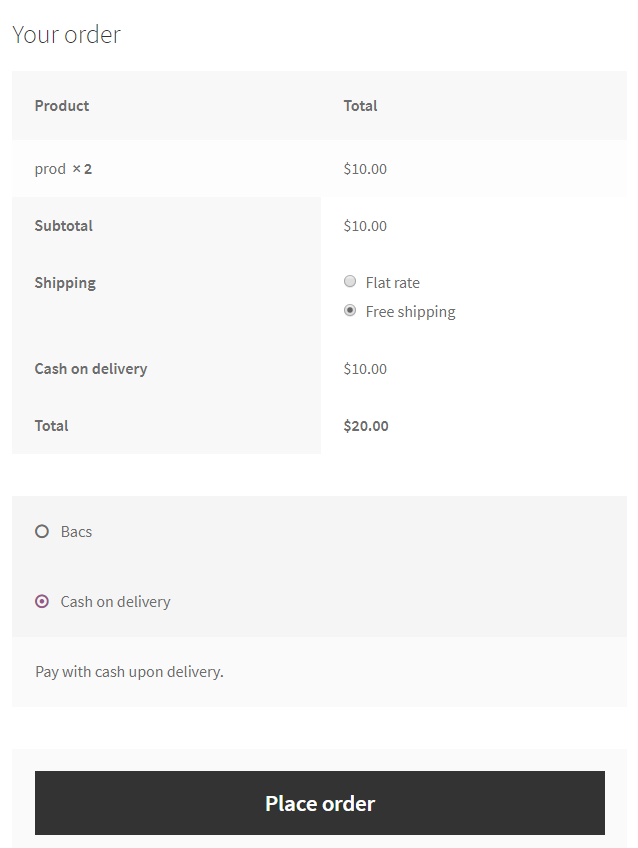
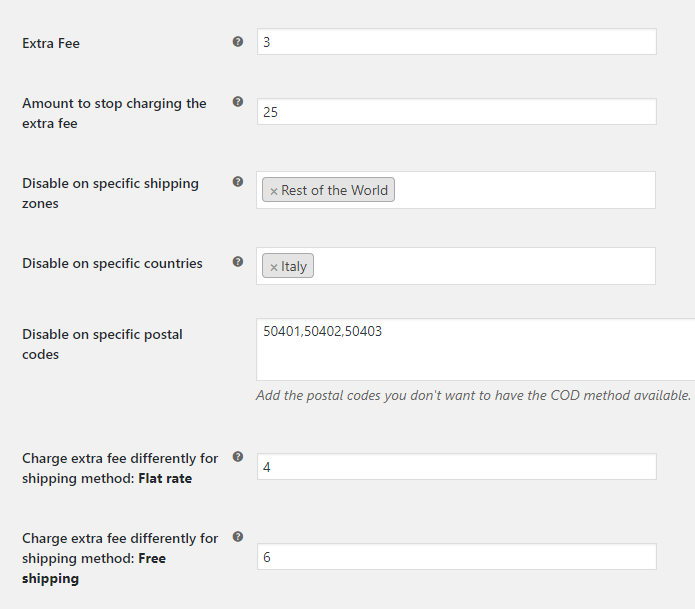
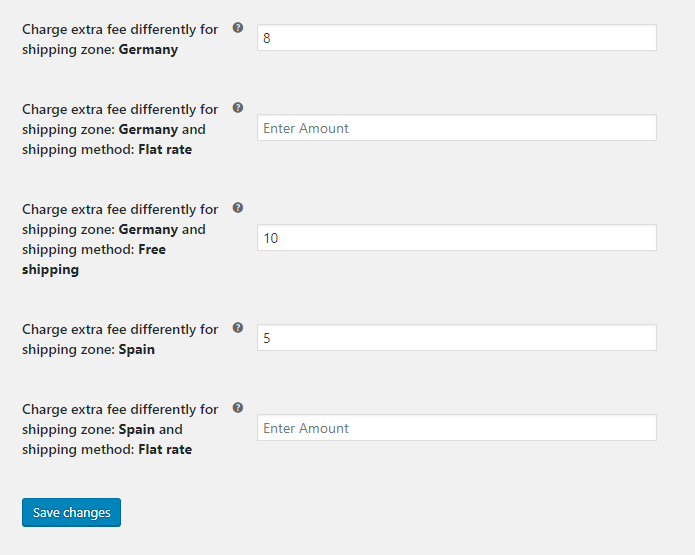
Screenshots
Für Entwickler
Ist das dein Plugin? Zeigen Sie die Zahlen.
Fügen Sie Ihrer Website, Docs oder GitHub Readme ein Live-Badge hinzu. Es wird von selbst aktualisiert - kein Konto erforderlich.
Best Smart COD for WooCommerce alternatives
All cash on delivery plugins →





Fragen und Antworten
Smart COD for WooCommerce: quick answers
Gerade Antworten, gezogen von Live WordPress.org Daten.
Quelle: WordPress.org
Is Smart COD for WooCommerce free?
Yes. Smart COD for WooCommerce is free to download and use from the official WordPress.org plugin directory.
Is Smart COD for WooCommerce safe to use in 2026?
Smart COD for WooCommerce is a solid plugin choice in 2026, with a few things worth checking first. It runs on 30K+ sites, is rated 4.6/5 and was last updated 1 day ago, and scores 78/100 on our health check.
How many websites use Smart COD for WooCommerce?
Smart COD for WooCommerce is active on 30K+ WordPress websites and has been downloaded 399,653 times since it launched in June 2017. It was downloaded 27,361 times in the last 30 days.
Does Smart COD for WooCommerce work with WordPress 7.1?
Yes. The developer has tested Smart COD for WooCommerce up to WordPress 7.1.5, the latest release. It requires WordPress 4.5 or newer.
What PHP version does Smart COD for WooCommerce need?
Smart COD for WooCommerce requires PHP 5.6 or higher. Most hosts run PHP 8.x today, so it works on any modern WordPress hosting.
When was Smart COD for WooCommerce last updated?
The latest version, 1.9.12, was released on November 23, 2026 (1 day ago).
Who makes Smart COD for WooCommerce?
Smart COD for WooCommerce is developed and maintained by FullStack-ing.
What are the best alternatives to Smart COD for WooCommerce?
The most popular alternatives to Smart COD for WooCommerce are Shiprocket (10K+ installs), PiWeb Disable payment metho… (4K+ installs) and Risk Free Cash On Delivery… (400+ installs).
Angetrieben von PageForge
Eine Vorlage und eine Tabelle. Eine echte Seite für jede Suche.
PageForge Verwandelt jede Zeile eines CSV in eine WordPress-Seite mit eigenem Titel, URL, SEO Felder und Schema entworfen. Kostenlos auf WordPress.org.
- CSV und XLSX, plus Google Sheets auf Beruf und Unternehmen
- seinen eigenen Titel, URL, SEO Felder und Schema für jede Seite
- Arbeitet mit dem Blockeditor, Elementor, Divi und Avada
- Kostenlos auf WordPress.org, keine Kreditkarte