


OrderGuard
Stop risky uncollected orders and serial returners before you ship.

Solide Wahl
OrderGuard is a solid plugin choice in 2026, with a few things worth checking first. It runs on 300+ sites and was last updated 4 weeks ago, and scores 69/100 on our health check.
- Aktiv entwickelt — letztes Update vor 4 Wochen
- Getestet mit dem neuesten WordPress (7.1)
- Kleine Benutzerbasis (300+ aktive Installationen)
- Bisher sehr wenige Bewertungen
- Benötigt PHP 8.2 oder neuer
Wie stapelt es sich?
Side-by-side bei Installationen, Updates, Bewertungen und Support



Tägliche Downloads
Download-Spitzen folgen normalerweise einer neuen Version - jede Website, die automatisch aktualisiert wird, gilt als Download.
Ranglisten
Where OrderGuard stands todayWordPress.org Ranglisten suchen
Live-Position in der Plugin-Suche, Top 100| Stichwort | Position |
|---|---|
| cash on delivery | #75 |
| fraud prevention | #40 |
| returns | >100 |
| Versand | >100 |
| WooCommerce | >100 |
About OrderGuard
From the official readme · v0.3.2Beschreibung
Stop risky uncollected orders and serial returners before you ship.
OrderGuard relies on an external cloud service (api.orderguard.net) to work — the risk scores come from a network shared between merchants. Full details of what is sent and when are in the External services section below.
Powered by a shared merchant network, OrderGuard shows collection and return risk before you ship. Built-in automations save time and protect your margins — without slowing down reliable customers.
Cash on delivery loses money two ways: parcels that are never collected, and orders that come straight back as returns. OrderGuard scores both — so you can spot the no-shows and the serial returners before a parcel goes out.
When an order arrives, OrderGuard shows two numbers right inside the WooCommerce order: a collection risk and a return risk. Every order with a usable phone number or email is checked, not only cash-on-delivery ones — except for customers on your exclusion list, who are never checked and never sent — the scores matter most for COD, but a serial returner is worth knowing about whatever they paid with. You decide what to do — ship as normal, confirm by phone, or offer prepayment instead. OrderGuard never cancels or holds an order by itself.
Privacy-first by design
Phone numbers and email addresses are converted into SHA-256 hashes inside your own website, before anything is transmitted — these contact fields leave your site only as hashes, and the raw values never reach OrderGuard’s servers. The service also receives the order facts listed below, such as status, outcome, billing country and references; those facts may be sent even when no usable contact hash can be produced. Names, customer IP addresses, street addresses, cities or regions, postal codes, order amounts and payment-card or payment-credential details are never transmitted.
Two things we would rather state plainly than gloss over. Those hashes are pseudonymous data, not anonymous data. And if you flag or block a customer, their name, email and phone are stored locally, on your own site, so that your blocked-clients list is readable by you — that data stays on your server and is not sent to OrderGuard.
Was du bekommst
When WordPress completes a customer erasure, OrderGuard deliberately keeps any matching entry in the store’s exclusion list. That minimal local suppression record is retained so the store continues to honour the person’s request and does not send their later data back to the network. An administrator may remove the exclusion separately after considering the store’s legal obligations.
- Collection risk and return risk on every COD order, from a shared merchant network.
- Serial-returner detection — a first-time buyer with a poor return record shows up before you ship.
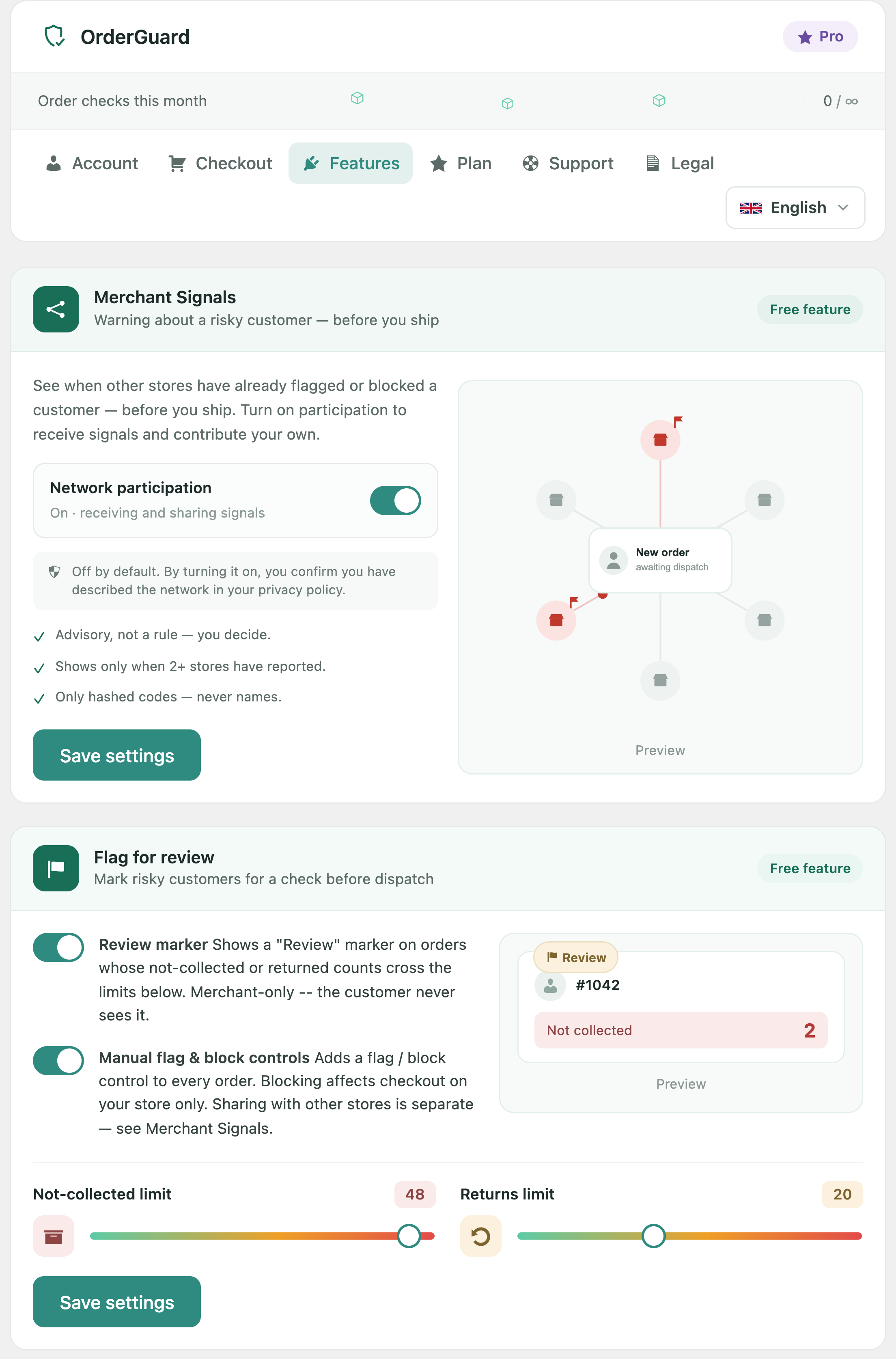
- Report or block a customer at three levels: report (a private record on your own site — and a signal to the network too, but only if you switch Merchant Signals on, which is off by default), block cash on delivery only (they can still order, but prepaid), or block entirely.
- Automatic COD hiding (optional, off by default) — hide cash on delivery at checkout when a customer crosses the limits. On the free plan the limits are fixed defaults (5 not-collected parcels or 12 returns); setting your own limits is a Pro feature. Works on both the classic and the block-based checkout.
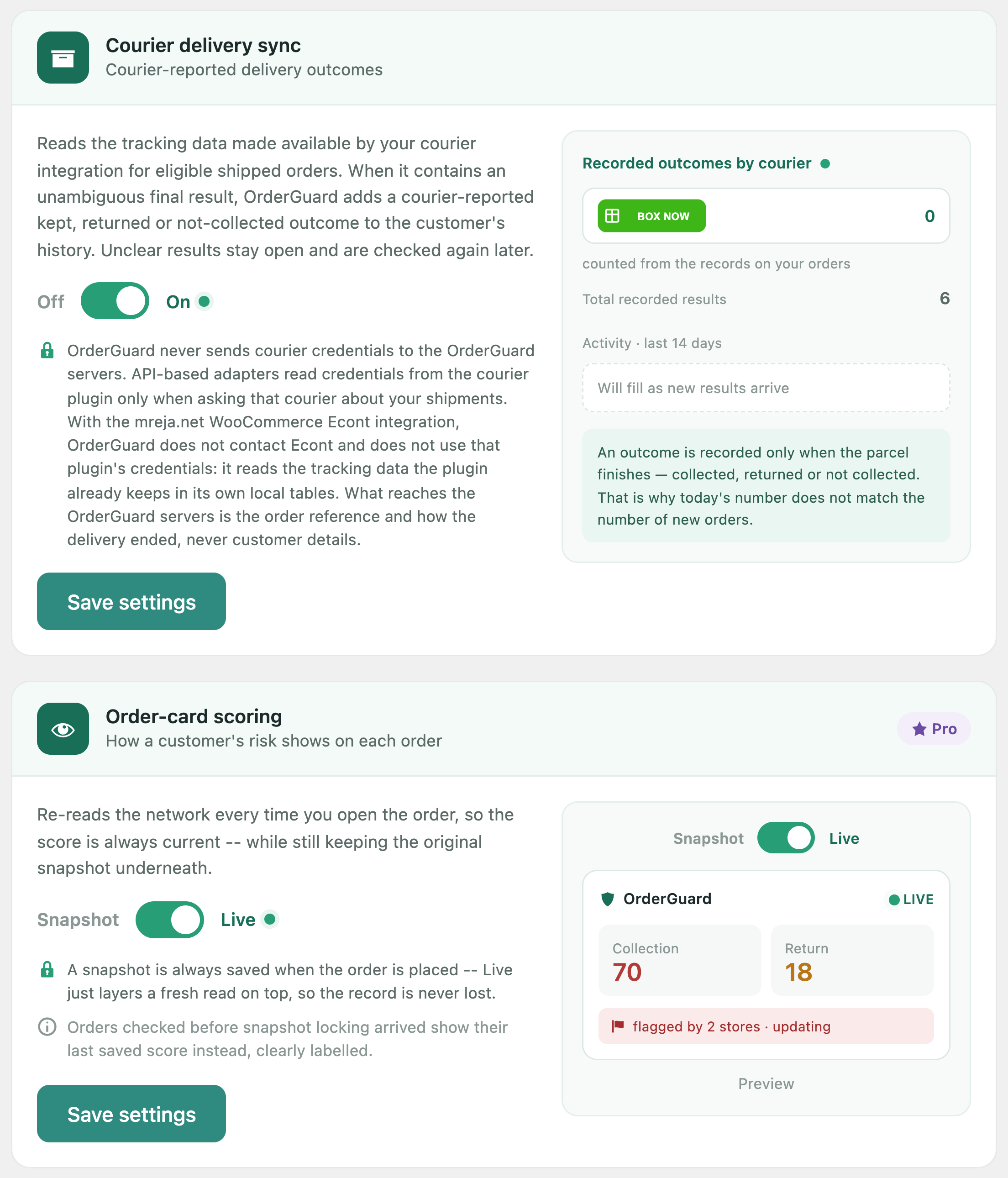
- Courier delivery sync — reads tracking data made available by courier integrations. Courier adapters are included for Econt, Speedy, BOX NOW and Pigeon Express. Live-store verification has covered Econt through mreja.net’s WooCommerce Econt plugin, Speedy through Extensa’s woocommerce-speedy plugin, and BOX NOW. Econt’s official plugin, Econt and Speedy through Bulgarisation, and Pigeon Express have not yet been verified on a live store. API-based adapters query the courier directly; the mreja.net WooCommerce Econt adapter reads that plugin’s local tracking tables. When the available data gives an unambiguous final result, OrderGuard records the shipment as kept, returned or not collected instead of inferring the outcome from order statuses alone. Anything unclear is left open and re-checked later.
- Order history import — checks your last 24 months of orders in the background, so the scoring is useful from day one.
- Insights — local activity counts showing what the plugin checked, flagged or blocked.
How the network decides
Only resolved order records feed the risk scores: kept, returned or not collected. Their age, the fraction refunded and the amount of resolved history affect the numerical result. A courier-reported result can settle what an order’s outcome was, but it feeds that same order record — it is not a separate scoring input. Merchant reports never change the risk score at all: they are shown alongside it as a separate advisory count, and in the order panel, reports from other stores are shown only after at least two independent stores agree — so a single mistaken report can never follow a shopper elsewhere.
Cross-store sharing of flag/block marks (“Merchant Signals”) is free, off by default, and requires the merchant’s deliberate opt-in.
Kostenlos und pro
The Free plan includes the core features above, including automatic COD hiding with fixed limits. OrderGuard Pro is a separate add-on (installed from orderguard.net) that adds live re-scoring on the order screen and custom risk thresholds. The free plugin contains no locked code.
Externe Dienste
This plugin connects to the OrderGuard API at https://api.orderguard.net, operated by Fregata Group Ltd (Bulgaria, EU). This is required for the plugin to function: the reliability scores come from a shared network that no single store could build alone.
When data is sent:
- At activation, to verify that you control the store domain: your store domain and the fact that you accepted the Terms, Privacy Policy and DPA. Nothing about any customer is sent before this is complete. If your key is ever reissued, the same domain-control verification runs again (only your store domain is sent then — the acceptance was already recorded at activation).
- When a non-excluded order is created, except for a checkout attempt that OrderGuard itself rejects. This is not limited to cash-on-delivery orders. If a usable phone number or email exists, its hash is sent; even without a usable contact hash, the order’s billing country, order reference and item references may still be sent.
- At checkout, if you have switched on automatic COD protection: the plugin asks the server whether to offer cash on delivery. This happens before an order exists.
- Whenever an order’s WooCommerce status changes — including statuses such as
processing,on-hold,completed,cancelledorfailed— when a refund is recorded, and when the plugin records a kept, returned or not-collected result from your courier. - When you open an order in the admin: with the Pro add-on and live scoring switched on, to refresh the score; on any plan, if Merchant Signals is enabled, to count how many other stores have flagged that customer; and on any plan, if automatic COD protection is on, to show whether cash on delivery is currently hidden for that customer — the same decision request the checkout makes.
- During the automatic history import — each imported order is sent with its original creation date, so past orders are weighed by their real age — and during the hourly reconciliation sweep that retries anything the server has not acknowledged.
- When you flag or block a customer from one of their orders, if you have switched Merchant Signals on. A blocked-client record you type in by hand stays on your site and sends nothing. Removing a flag withdraws the signal your store sent earlier — and that withdrawal is sent even if you have since switched Merchant Signals off, so a signal you retract does not linger on the network.
- When you exclude someone by phone or email: their hashes are sent so the matching records your store contributed can be erased from the server. An exclusion by name only stays on your site — names are never transmitted, so there are no name records on the server to erase; to erase past signals, exclude their phone or email too.
- When you look up or erase a customer’s data from the Legal tab.
- When the plugin checks which plan your store is on or shows your subscription details on the Plan tab; open the billing portal, switch your billing interval, or open an invoice; and, if the Pro add-on is installed, when it checks for updates. Each of these sends your store’s API key and nothing about any customer.
- If you join the waiting list from inside the plugin, your own email address is sent.
What is sent:
- SHA-256 hashes of the customer’s phone number and email address — computed on your server, before transmission. The raw values are never sent.
- The order outcome (kept, returned, not collected), an internal order/item reference, and the order’s billing country — the country is used to format the phone number correctly before hashing, and it is also transmitted and stored with the order’s record on the server.
- The order’s WooCommerce status as it changes, in WooCommerce’s own words (for example
processing,completed,cancelled), whether the order was cash on delivery, and — for a refund — what proportion of the order was refunded. - When a courier reports an outcome: which courier it was and that the outcome came from a courier rather than from you.
- Your store domain and API key, so the request can be authenticated.
- When automatic COD protection is on: the not-collected and returned limits in effect on your site. On the free plan these are the fixed defaults; custom limits require the Pro add-on, and the server — which knows your plan — honours custom values only for Pro accounts.
- Where you use them: a flag or block signal type, and a plan check so the plugin knows whether this store is on Free or Pro.
- If you join the waiting list: your own email address, your store domain and your country.
- If you open a Pro invoice from the Plan tab: the identifier of that payment transaction, so the invoice can be fetched.
What is never sent about your customers: names, customer IP addresses, street addresses, cities or regions, postal codes, order amounts, or payment-card data — nothing readable that identifies a shopper. The billing country is the only address field sent, as disclosed above. (Your own email address is sent if you choose to join the waiting list, and your store domain identifies your shop. Those are yours, not your customers’.)
Data is processed and stored within the EU. Your use of the service is subject to:
- Terms of Service: https://www.orderguard.net/terms/
- Privacy Policy: https://www.orderguard.net/privacy/
- Data Processing Agreement: https://www.orderguard.net/dpa/
No third-party payment or checkout script is embedded in your site. The Pro upgrade button simply links out to orderguard.net, and no card data ever touches your WordPress admin. OrderGuard does run its own code during checkout when you switch on automatic COD protection — that call is described above; it sends the customer’s identity hashes, your store’s API key, and the applicable not-collected and returned limits.
The Plan tab links to https://www.orderguard.net/downloads/, where Pro customers obtain the Pro add-on. The plugin sends nothing for this link: the customer identifies themselves on that page, downloads the add-on zip there and installs it manually. The plugin never downloads, installs, activates or updates the add-on.
Courier delivery sync (optional)
If you switch on courier sync, most adapters ask that courier directly what happened to your own shipments. They read the API credentials already saved by the courier’s own WordPress plugin and use them to make that call on your behalf. Those credentials are never sent to OrderGuard’s servers and are never stored by OrderGuard. Apart from those authentication fields, the only shipment-specific value sent to the courier is your shipment’s tracking or order reference. The courier’s reply may contain more than the delivery status; OrderGuard uses only the response fields needed to identify the matching shipment, handle the API result and derive its delivery outcome. It does not store or forward the full response.
The mreja.net WooCommerce Econt variant is different: OrderGuard does not use its credentials and does not contact Econt. It reads tracking already present in that plugin’s local database tables. That courier plugin refreshes those tables only when an unsettled order is opened in the WordPress admin, so automatic coverage can remain incomplete if orders are not opened there.
Each courier is contacted only if you enable and configure it:
- Econt — the official Econt plugin uses https://delivery.econt.com (https://delivery-demo.econt.com in demo mode); the Bulgarisation integration uses https://ee.econt.com/services/ (https://demo.econt.com/ee/services/ in demo mode). With the mreja.net WooCommerce Econt plugin, OrderGuard makes no Econt request and reads only that plugin’s local tracking tables, as described above.
Terms: https://www.econt.com/econt-express/common-terms — Privacy: https://www.econt.com/econt-express/privacy-policy - Speedy — https://api.speedy.bg
Terms: https://www.speedy.bg/bg/terms-and-conditions — Privacy: https://www.speedy.bg/bg/gdpr - BOX NOW — https://api-production.boxnow.bg
Terms: https://boxnow.bg/terms-of-use-for-shipping-services — Privacy: https://boxnow.bg/personal-data-processing-notice - Pigeon Express — https://api.pigeonexpress.com (https://api-demo.pigeonexpress.com in sandbox mode)
Terms: https://pigeonexpress.com/terms — Privacy: https://pigeonexpress.com/privacy
Your use of each courier’s API is governed by your own agreement with that courier.
Installation
- Install and activate the plugin (WooCommerce must be active).
- Go to OrderGuard in the admin menu and complete activation for your store.
- Your last 24 months of orders are imported automatically once activation completes, so scoring is useful straight away. Progress is shown in OrderGuard → Settings → Account. All payment methods are included, not only cash on delivery.
- Review the settings in OrderGuard → Features. The privacy-sensitive options — automatic COD hiding and cross-store Merchant Signals — ship switched off; enable them only if you want them.
Änderungsprotokoll
Pro customers now get the Pro add-on from the downloads page on orderguard.net; the Plan tab links there.
0.3.2
- Changed: the Plan tab’s Pro add-on button is now a plain link to the downloads page on orderguard.net, where Pro customers request a download link by e-mail and install the add-on manually. The plugin no longer requests a download link from OrderGuard’s server.
0.3.1
- Fixed: on phones the settings tab bar ran off the screen, so Support, Legal and the language menu could not be reached. The tabs now wrap onto a second line at any width.
- Features cards now appear in the order Merchant Signals, Flag for review, Courier delivery sync, Order-card scoring.
- Fixed: the empty Blocked and Flagged lists now show a full sentence in both languages.
- Bulgarian legal-document links now use the site’s /bg/ addresses.
- Fixed: Manage subscription, Cancel and Update payment method open Paddle’s customer portal again; invoices now download as a PDF through OrderGuard’s server instead of opening a provider link.
- The Plan tab shows changes made in the billing portal sooner, and an issued but unpaid invoice is labelled Issued instead of Paid.
- New: OrderGuard → Legal builds the text for your store’s privacy notice from the features you have switched on, with a Copy text button. The same text appears in Settings → Privacy → Policy Guide. One dismissible reminder on OrderGuard screens stays until an admin marks the text as added. OrderGuard never edits your privacy page.
- Redesigned the Plan tab for Free stores: choose monthly (€8) or yearly (€46) billing, then continue to the secure checkout on orderguard.net, with a Free and Pro comparison. The exact amount, including any VAT, is shown at checkout.
- Redesigned the Support tab: the community forum and Pro priority support side by side, with what support covers. If support cannot be opened, the Support tab now shows a message instead of an error page.
- Fixed: the Download OrderGuard Pro button now keeps its white text on hover, and the Courier delivery sync switch is now grey when off.
0.3.0
- Moves OrderGuard personal-data erasure onto the reviewed owned-storage engine. Existing stores require a supervised cutover after their workers are stopped; fresh stores activate the new engine during plugin activation.
- Exclusion checks now fail closed, signal changes use a durable outbox, and uninstall refuses while protected privacy work is unfinished or its authority records are damaged.
- New Support tab for contacting OrderGuard support in Bulgarian or English, Monday to Friday. No system data is sent automatically. Pro includes priority support.
- Start an upgrade to Pro from the Plan tab.
- Guided recovery for eligible interrupted customer erasures, with owner approval handled by OrderGuard and an attention page under Tools.
- Clearer erasure screens and messages, with Bulgarian translations.
0.2.23
- WordPress.org resubmission hardening: stored-data, scheduled-work and configuration identifiers now use the full OrderGuard namespace throughout the public plugin.
- The public package contains no private migration code. Existing private pilot stores use a separately controlled compatibility build to copy and verify their earlier rows before that schema is retired.
- Clarified that customer contact hashes leave the store in pseudonymous, non-readable form rather than implying that no customer-derived data is transmitted.
0.2.22
- Admin scripts and styles are now loaded through WordPress’s enqueue APIs instead of being printed inline.
- Existing Free-plugin settings are carried forward automatically to the renamed storage keys during the update.
- Renamed scheduled tasks are repaired during the update. If an older history import was left running without a pending batch, OrderGuard may restart it after a safety delay of at least five minutes, using its saved position when one exists or starting from the beginning otherwise.
- Courier identifiers are now normalized consistently. Stores that previously recorded courier health or resume state under a non-standard identifier may rebuild those local counters once after updating; recorded order outcomes and customer data are unaffected.
0.2.21
- The order panel now shows what your own records say about a customer — imported order history included — alongside the network view. Your own evidence no longer hides behind withheld network counts.
- When your own records show enough not-collected or returned orders, that now surfaces where you already look: as a badge in the orders list, in the Review queue, and — on a new cash-on-delivery order — as a private order note. These are your own numbers, read from your own records — nothing new is sent anywhere.
- The “detailed counts stay locked” note now says what actually lifts the lock, instead of promising that a customer’s first order will unlock the counts when your imported history already holds their completed orders.
Screenshots



Für Entwickler
Ist das dein Plugin? Zeigen Sie die Zahlen.
Fügen Sie Ihrer Website, Docs oder GitHub Readme ein Live-Badge hinzu. Es wird von selbst aktualisiert - kein Konto erforderlich.
Best OrderGuard alternatives
All cash on delivery plugins →





Fragen und Antworten
OrderGuard: quick answers
Gerade Antworten, gezogen von Live WordPress.org Daten.
Quelle: WordPress.org
Is OrderGuard free?
Yes. OrderGuard is free to download and use from the official WordPress.org plugin directory.
Is OrderGuard safe to use in 2026?
OrderGuard is a solid plugin choice in 2026, with a few things worth checking first. It runs on 300+ sites and was last updated 4 weeks ago, and scores 69/100 on our health check.
How many websites use OrderGuard?
OrderGuard is active on 300+ WordPress websites and has been downloaded 693 times since it launched in October 2026. It was downloaded 432 times in the last 30 days.
Does OrderGuard work with WordPress 7.1?
Yes. The developer has tested OrderGuard up to WordPress 7.1.5, the latest release. It requires WordPress 6.5 or newer.
What PHP version does OrderGuard need?
OrderGuard requires PHP 8.2 or higher. Most hosts run PHP 8.x today, so it works on any modern WordPress hosting.
When was OrderGuard last updated?
The latest version, 0.3.2, was released on October 31, 2026 (4 weeks ago).
Who makes OrderGuard?
OrderGuard is developed and maintained by orderguard.
What are the best alternatives to OrderGuard?
The most popular alternatives to OrderGuard are Smart COD for WooCommerce (30K+ installs), Shiprocket (10K+ installs) and PiWeb Disable payment metho… (4K+ installs).
Angetrieben von PageForge
Eine Vorlage und eine Tabelle. Eine echte Seite für jede Suche.
PageForge Verwandelt jede Zeile eines CSV in eine WordPress-Seite mit eigenem Titel, URL, SEO Felder und Schema entworfen. Kostenlos auf WordPress.org.
- CSV und XLSX, plus Google Sheets auf Beruf und Unternehmen
- seinen eigenen Titel, URL, SEO Felder und Schema für jede Seite
- Arbeitet mit dem Blockeditor, Elementor, Divi und Avada
- Kostenlos auf WordPress.org, keine Kreditkarte