


VK Blocks
This is a plugin that extends Gutenberg's blocks.

Sichere Auswahl
Yes — VK Blocks is a safe, well-maintained plugin to use in 2026. It runs on 100K+ sites, is rated 4.8/5 and was last updated 15 hours ago, and scores 90/100 on our health check.
- Bewährt im Maßstab auf 100k+ aktiven Standorten
- Actively developed — last update 15 hours ago
- Getestet mit dem neuesten WordPress (7.1)
- Momentum — downloads up 116.7% vs the previous 30 days
Wie stapelt es sich?
Side-by-side bei Installationen, Updates, Bewertungen und Support


Tägliche Downloads
Download-Spitzen folgen normalerweise einer neuen Version - jede Website, die automatisch aktualisiert wird, gilt als Download.
Ranglisten
Where VK Blocks stands todayWordPress.org Ranglisten suchen
Live-Position in der Plugin-Suche, Top 100| Stichwort | Position |
|---|---|
| alert | #16 |
| faq | #40 |
| Gutenberg | >100 |
Versionsübernahme
Anteil aktiver Sites pro Release.
Bewertungsaufschlüsselung
★★★★★★★★★★ 4.8 from 6 reviews
About VK Blocks
From the official readme · v1.132.0Beschreibung
This is a plugin that extends Gutenberg’s blocks.
[Blocks]
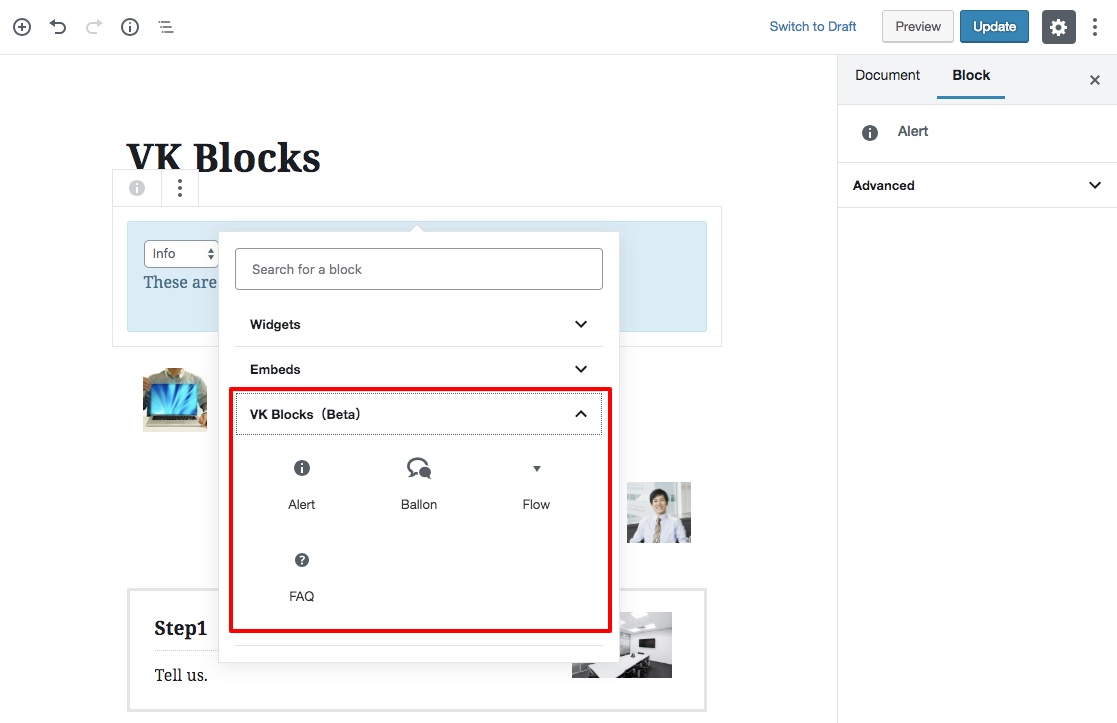
* Alert
* Balloon
* Border Box
* Button
* Classic FAQ
* New FAQ
* Flow
* Heading (not recommended)
* Icon
* Icon Outer
* Page Content
* PR Blocks (not recommended)
* PR Content (not recommended)
* Responsive Spacer
* Staff (not recommended)
* Page list from ancestor
* Slider
* Visual Embed
* Accordion [ Pro ]
* Animation [ Pro ]
* Archive list [ Pro ]
* Blog Card [ Pro ]
* Breadcrumb [ Pro ]
* Button Outer [ Pro ]
* Card [ Pro ] (not recommended)
* Category Badge [ Pro ]
* Child page list [ Pro ]
* Dynamic Text ( Post Type name / Ancestor Page name ) [ Pro ]
* Fixed Display [ Pro ]
* Icon Card [ Pro ] (not recommended)
* Post list [ Pro ]
* Post list Slider [ Pro ]
* New Badge [ Pro ]
* Selected Post List [ Pro ]
* Step [ Pro ]
* Tab [ Pro ]
* Table of Contents [ Pro ]
* Taxonomy [ Pro ]
* Timeline [ Pro ]
* Grid Column [ Pro ]
* Grid Column Card [ Pro ]
* Outer [ Pro ]
[Extensions]
* Hidden extension
* Highlighter
* Inline Font Size
* Margin extension
* Nowrap
* Responsive BR
* Columns direction
* Custom CSS [ Pro ]
* Link toolbar
[ Settings ]
* Balloon
* Custom Format [ Pro ]
* Custom Block Style [ Pro ]
* Common Margin
* Load Separate
* FAQ Block [ Pro ]
* Custom CSS [ Pro ]
* Block Manager
* Block Style Manager
[ Tools ]
* Import Export
[ Editing and correction ]
The source code of this plugin is below.
https://github.com/vektor-inc/vk-blocks
Installation
In diesem Abschnitt wird beschrieben, wie Sie das Plugin installieren und zum Laufen bringen.
z.B.
- Upload
plugin-name.phpin das/wp-content/plugins/-Verzeichnis - Aktivieren Sie das Plugin über das „Plugins“-Menü in WordPress
Änderungsprotokoll
1.132.0
[ New Feature ][ Heading Block ][ Paragraph Block ] Added a “Trim text top and bottom” toggle to the Typography panel to remove the space above and below the text created by the line height.
[ Security Fix ][ Blog Card (Pro) ][ Select Post List Block (Pro) ] Added conditions for the posts that can be referenced by URL
1.131.0
[ Spec Change ][ Visual Embed ] The embed is now output by the plugin when the page is displayed, so it is no longer shown while the plugin is inactive. The allowed URL check is also applied when saving and displaying, not only in the editor.
[ Spec Change ][ Visual Embed ] Position and z-index styles added to an embed, and characters other than letters, numbers, hyphens and underscores in its ID and CSS class, are no longer kept.
[ Spec Change ] Update vektor-inc/vk-component from 1.7.2 to 1.7.3.
[ Bug Fix ][ Visual Embed ] Fixed the embed disappearing and a block validation error being shown when a user without the unfiltered HTML permission (such as an Author) saves and reopens the post.
[ Security Fix ][ Blog Card Site Logo (Pro) ] Fixed the output escaping of site logo URLs.
[ Security Fix ][ Category Badge Block (Pro) ] Fixed the output processing of the gap between badges so that only a valid length is output. Values that are not a valid length are now replaced with the default (0.5em) on the front end.
[ Security Fix ][ Blog Card (Pro) ] Fixed the URL validation and output escaping.
[ Security Fix ][ Post List Slider Block (Pro) ][ Select Post List Block (Pro) ] Added output escaping for display settings.
1.130.1
[ Bug Fix ][ Custom CSS (Pro) ] Custom CSS that did not take effect on the public page (such as a rule without the last semicolon or CSS nesting) now works the same way as in the editor.
[ Bug Fix ][ Button Block ][ Outer (Pro) ][ Slider Block ][ Tab (Pro) ] Fixed a block validation error shown when reopening in the editor a block saved by a user other than an administrator.
[ Security Fix ][ Custom CSS (Pro) ] Fixed the output processing of custom CSS.
[ Security Fix ][ List Block ] Fixed the output processing of the list color.
[ Security Fix ] Limited the HTML tags added to the allowed HTML list to post content only.
1.130.0
[ New Feature ][ Group Block ] Added a “Mark up as a heading group (<hgroup>)” switch to the Advanced settings, so a group can be output as an <hgroup> element.
[ Spec Change ][ Highlighter ] Markers now follow later changes to the palette color they were drawn with. Markers drawn before this update, and markers drawn with a color picked outside the palette, keep the color they were drawn with. To make a marker drawn before this update with a palette color follow the palette, select its text, choose a different palette color, and then choose the original color again.
[ Spec Change ] Updated the WordPress icon library (@wordpress/icons) bundled into the block editor screens from 17.0.0 to 19.0.0.
[ Bug Fix ][ Animation (Pro) ] Fixed the content staying invisible when JavaScript is disabled. It is now displayed from the start.
[ Bug Fix ][ Animation (Pro) ] Fixed the animation still playing on devices that request reduced motion (prefers-reduced-motion). The content is now displayed from the start without moving.
[ Security Fix ] Enabled SSL certificate verification for HTTPS requests.
[ Other ] Reduced the number of file existence checks run on every page load when blocks are registered, which made page loading slow on servers with slow file access.
1.129.0
[ New Feature ][ Post List Block (Pro) ][ Post List Slider Block (Pro) ] Added fixed keyword search and parent filters for displaying matching posts or direct child pages.
[ Spec Change ][ Post List Block (Pro) / Post List Slider Block (Pro) / Select Post List Block (Pro) / Child Page List Block (Pro) ] Updated the vk-term-color library used for category colors from 0.7.1 to 0.7.4, also adding a permission check when saving a term color and hardening the library against invalid input (fatal errors / PHP warnings in a few edge cases). The text on a colored category label is now black or white depending on how light the category color is, instead of always being white. On existing sites, labels with a light category color (yellow or yellow-green, for example) change from white text to black text and become easier to read; labels with a darker color look the same as before. To keep the labels white, add .vk_post_imgOuter_singleTermLabel, .postListText_singleTermLabel_inner { color: #fff !important; } to Additional CSS.
[ Spec Change ] A category color that is not a valid color code is now discarded, and that category falls back to the default gray (#999999). Colors picked with the color picker are not affected.
[ Spec Change ][ Fixed Display (Pro) ] When the keyboard focus is inside a fixed display that has a close button, pressing Esc now closes it the same way as the close button.
[ Bug Fix ][ Category Badge Block (Pro) ] Fixed the display of multiple categories using the hard-coded default gray instead of the color set with the term_color_default_custom filter, which the display of a single category already used.
[ Bug Fix ] Fixed an issue where highlighter colors disappeared in the free version when Authors or Contributors saved posts.
[ Bug Fix ][ Fixed Display (Pro) ] Fixed an issue where, when “Specify the time until display and hide” was combined with “Do not display again until the browser is closed”, the banner disappeared right after it appeared if the page took a long time to load.
[ Bug Fix ][ Fixed Display (Pro) ] Fixed an issue where the name and description of the close button read out by screen readers were always in English, even on a Japanese site. They now follow the site language.
[ Bug Fix ][ Slider Block ] Fixed the slide behind the current one showing through faintly with the fade effect on themes that do not set box-sizing: border-box globally (e.g. Twenty Twenty-Five).
[ Security Fix ][ Dynamic Text (Pro) ][ Category Badge Block (Pro) ] Fixed an issue where ancestor/parent page titles, the logged-in user’s display name, and category names/links were output without HTML escaping, which could allow arbitrary HTML/attribute injection.
[ Security Fix ] Hardened the inline CSS safety check used for the highlighter color against a crafted-input edge case.
1.128.0
[ New Feature ][ Slider Block ][ Post List Slider Block (Pro) ] Added a “Show actual slide count” option for the “Number of slides” pagination. When it is off, Swiper shows the number of positions it can stop at as the total, which can look smaller than the actual number of slides when loop is off and multiple slides are shown per view; turning this on shows the real slide count and the currently visible range instead (“1–3 / 6” visually, and “Showing 1 to 3 of 6” for screen readers).
[ New Feature ][ Icon Block ] Added “Copy styles” / “Paste styles” to the block settings menu, letting the icon type, color, size, margin and corner radius be copied to other Icon blocks.
[ New Feature ][ Slider Block ] Added a “Continuous loop” playback mode that keeps the slides flowing at a constant speed (marquee style) without custom CSS, with a pause / play button that is always shown and support for reduced motion.
[ Spec Change ][ Slider Block ] Changed the editor preview so that, when “Number of items to change in a transition” is set to “Same as the number of items to display” and “Number of Items to display per view” is a decimal, the preview now advances by that number truncated to a whole number instead of one slide, matching the front end.
[ Bug Fix ][ Slider Block ] Fixed the background zoom animation playing even on devices that request reduced motion (prefers-reduced-motion). The background now stays at its initial scale and remains visible.
[ Design Bug Fix ] Fixed the Font Awesome icon input field having no margin below it, making it look stuck to the “Select Icon” button underneath.
Screenshots

Für Entwickler
Ist das dein Plugin? Zeigen Sie die Zahlen.
Fügen Sie Ihrer Website, Docs oder GitHub Readme ein Live-Badge hinzu. Es wird von selbst aktualisiert - kein Konto erforderlich.
Best VK Blocks alternatives
All alert plugins →





Fragen und Antworten
VK Blocks: quick answers
Gerade Antworten, gezogen von Live WordPress.org Daten.
Quelle: WordPress.org
Is VK Blocks free?
Yes. VK Blocks is free to download and use from the official WordPress.org plugin directory.
Is VK Blocks safe to use in 2026?
Yes — VK Blocks is a safe, well-maintained plugin to use in 2026. It runs on 100K+ sites, is rated 4.8/5 and was last updated 15 hours ago, and scores 90/100 on our health check.
How many websites use VK Blocks?
VK Blocks is active on 100K+ WordPress websites and has been downloaded 5,627,820 times since it launched in November 2018. It was downloaded 191,994 times in the last 30 days.
Does VK Blocks work with WordPress 7.1?
Yes. The developer has tested VK Blocks up to WordPress 7.1.5, the latest release. It requires WordPress 6.6 or newer.
What PHP version does VK Blocks need?
VK Blocks requires PHP 7.4 or higher. Most hosts run PHP 8.x today, so it works on any modern WordPress hosting.
When was VK Blocks last updated?
The latest version, 1.132.0, was released on November 20, 2026 (15 hours ago).
Who makes VK Blocks?
VK Blocks is developed and maintained by Vektor,Inc..
What are the best alternatives to VK Blocks?
The most popular alternatives to VK Blocks are Customize WordPress Emails… (30K+ installs), WP Notification Bars (10K+ installs) and Notification (10K+ installs).
Angetrieben von PageForge
Eine Vorlage und eine Tabelle. Eine echte Seite für jede Suche.
PageForge Verwandelt jede Zeile eines CSV in eine WordPress-Seite mit eigenem Titel, URL, SEO Felder und Schema entworfen. Kostenlos auf WordPress.org.
- CSV und XLSX, plus Google Sheets auf Beruf und Unternehmen
- seinen eigenen Titel, URL, SEO Felder und Schema für jede Seite
- Arbeitet mit dem Blockeditor, Elementor, Divi und Avada
- Kostenlos auf WordPress.org, keine Kreditkarte