


Vigilant – 100% Free Security Suite: Firewall, 2FA, Login, Headers, Scanner…
FREE WordPress Security: firewall, two factor authentication (2FA), security headers, login, malware and password protection, scanner, activity log

Sichere Auswahl
Yes — Vigilant is a safe, well-maintained plugin to use in 2026. It runs on 4K+ sites, is rated 5/5 and was last updated 2 days ago, and scores 93/100 on our health check.
- Loved by users — 5/5 from 26 reviews
- Aktiv entwickelt — Letztes Update vor 2 Tagen
- Getestet mit dem neuesten WordPress (7.1)
- Responsive Support – 100 % der letzten Threads wurden behoben
Wie stapelt es sich?
Side-by-side bei Installationen, Updates, Bewertungen und Support


Tägliche Downloads
Download-Spitzen folgen normalerweise einer neuen Version - jede Website, die automatisch aktualisiert wird, gilt als Download.
Ranglisten
Where Vigilant stands todayWordPress.org Ranglisten suchen
Live-Position in der Plugin-Suche, Top 100| Stichwort | Position |
|---|---|
| 2FA | #4 |
| firewall | #7 |
| malware | #14 |
| scanner | #4 |
| Sicherheit | #13 |
Versionsübernahme
Anteil aktiver Sites pro Release.
Bewertungsaufschlüsselung
★★★★★★★★★★ 5 from 26 reviews
About Vigilant
From the official readme · v3.0.14Beschreibung
Premium Security. Zero Cost.
Vigilant provides enterprise-level WordPress security features completely free. No premium version, no upsells, no hidden features behind paywalls.
Protect your site with a complete security suite: firewall, two-factor authentication, brute force protection, security headers, file integrity monitoring, closed plugin detection, malware detection, user management, security audit logging, under attack mode, verification of its own files and much more.
Once activated, Vigilant immediately applies firewall rules against common attacks (SQL injection, XSS, file inclusion), security headers, login attempt monitoring, XML-RPC blocking, WordPress version hiding and sensitive file protection (.htaccess, wp-config.php).
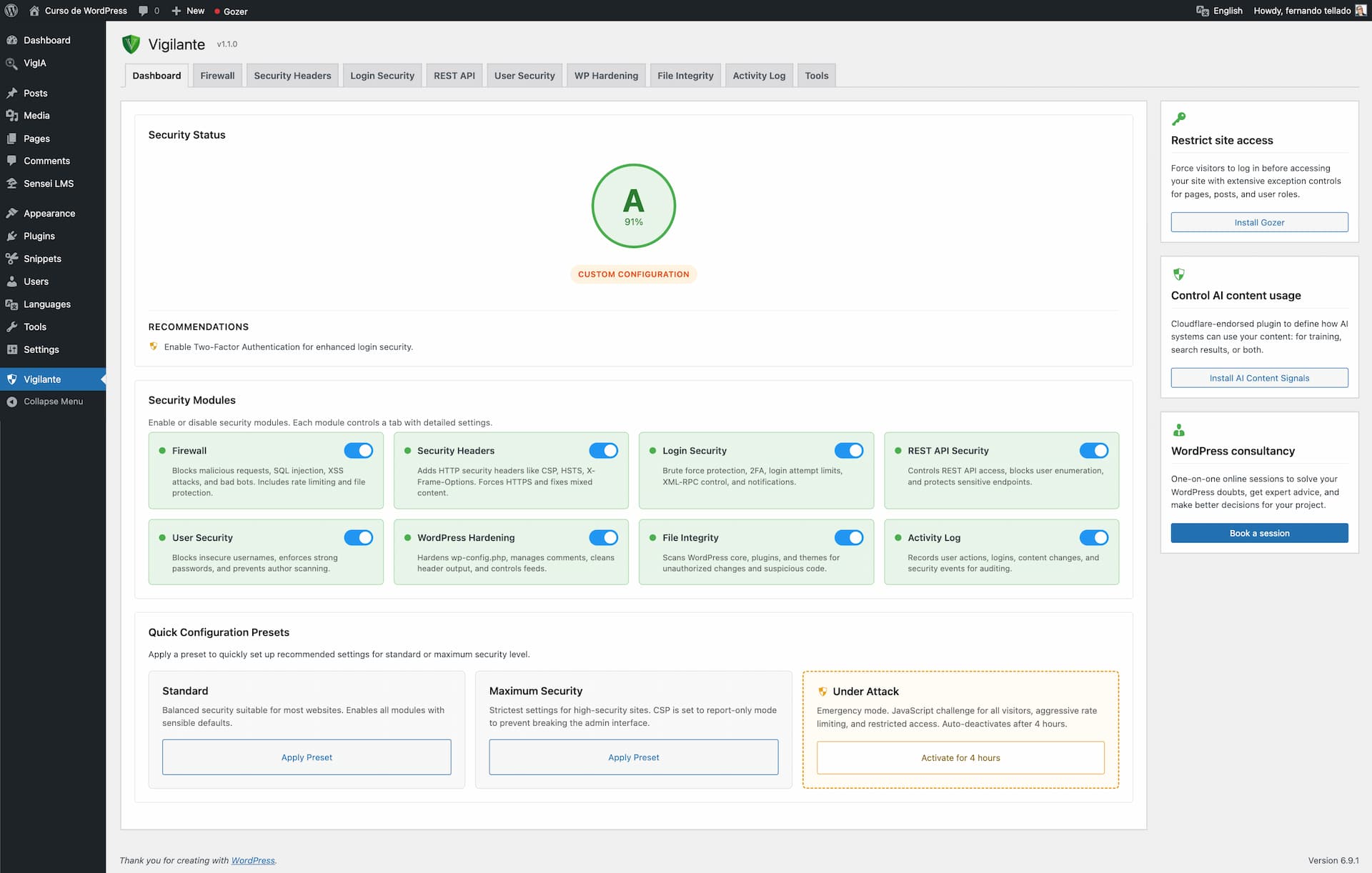
One-Click Security Presets
Choose a preset and get protected instantly:
Standard – Balanced security suitable for most websites. Enables all modules with sensible defaults that won’t interfere with normal site operation.
Maximum Security – Strictest settings for high-security sites. Tighter rate limits, stronger CSP rules, mandatory admin notifications. May require fine-tuning for some setups.
You can always customize individual settings after applying a preset.
Under Attack Mode
Is your site under active attack? Activate Under Attack mode with one click and stop malicious traffic instantly:
- JavaScript challenge – Every visitor must pass an automatic browser verification before accessing your site. Real browsers solve it in seconds, bots get blocked completely
- Aggressive rate limiting – Requests limited to 30 per minute with 15-minute blocks for offenders
- HTTP method restriction – Only GET, POST and HEAD allowed; PUT, DELETE, PATCH and OPTIONS are blocked
- Empty user agent blocking – Requests without a user agent header are rejected
- Full XML-RPC lockdown during the attack
- REST API restriction – Only authenticated users can access the REST API
- Auto-deactivation – Mode turns off after 4 hours so you never forget it’s on
- Email notifications when the mode activates and deactivates
- HMAC-signed cookies – Verified visitors get a signed cookie so they only see the challenge once
Under Attack mode works independently from your preset configuration. Your regular settings are preserved and restored when the mode deactivates.
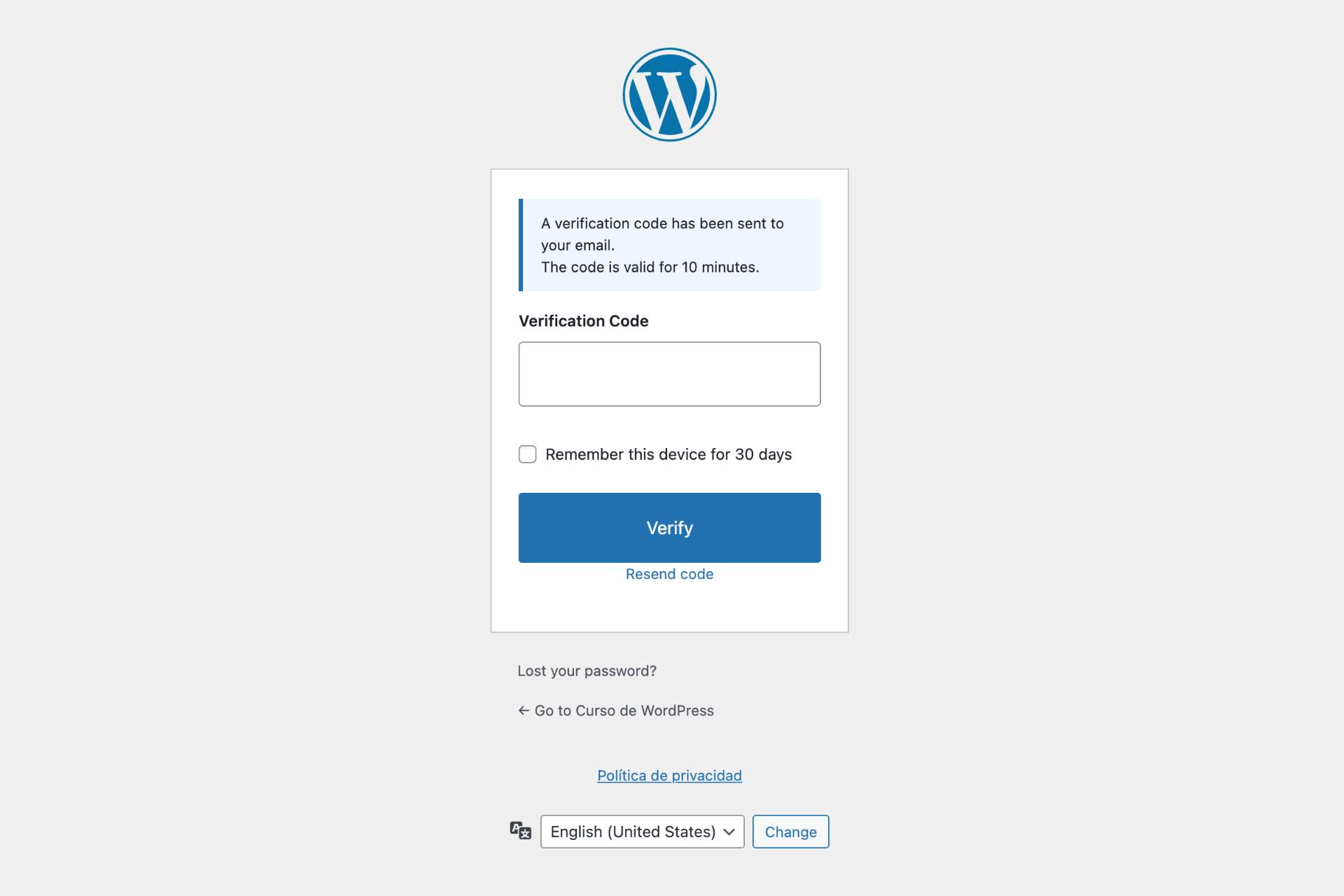
Two-Factor Authentication (2FA)
Add a second verification step to your WordPress login:
- Authenticator app (TOTP) – Google Authenticator, Authy, Microsoft Authenticator or any TOTP-compatible app
- Email codes – One-time 6-digit verification codes sent via email
- QR code setup directly in user profiles
- 10 backup codes for emergency access if you lose your device
- Configurable grace period for users to set up their authenticator app
- Trusted devices – optionally let users skip 2FA on recognized devices for 30 days
- Role-based enforcement – require 2FA for administrators, editors or any role
- Exclude specific users from 2FA requirements
- Admin tool to reset TOTP for users who lost their authenticator
- Configurable code expiry, attempt limits and email sender name
- User notification emails when 2FA is enabled or the method changes
Firewall Protection
Block malicious requests before they reach WordPress:
- SQL injection blocking
- XSS (Cross-Site Scripting) attack prevention
- File inclusion protection (LFI/RFI)
- Directory traversal blocking
- Bad query string filtering (catches generic suspicious patterns the specific blockers miss)
- Bad bot detection and blocking
- Block requests with empty user agent
- Rate limiting against DDoS and brute force, with optional progressive lockouts
- IP whitelist and blacklist management (IPv4 and IPv6, with CIDR ranges and wildcards)
- User-Agent whitelist and blacklist with partial matching
- Visitor IP detection: from the connection by default, which cannot be spoofed, or from a proxy header behind Cloudflare, a reverse proxy or a load balancer, with a notice when a proxy is detected but not set up
- HTTP method restriction
- Server-level file protection via .htaccess: block direct access to wp-config.php, .htaccess, wp-includes/ and sensitive files (.log, .sql, .bak, .ini, debug.log, readme.html, etc.)
- Block PHP execution in /uploads (one of the most common post-exploit vectors)
- Block web access to the folders where WordPress unpacks updates
- Disable directory browsing
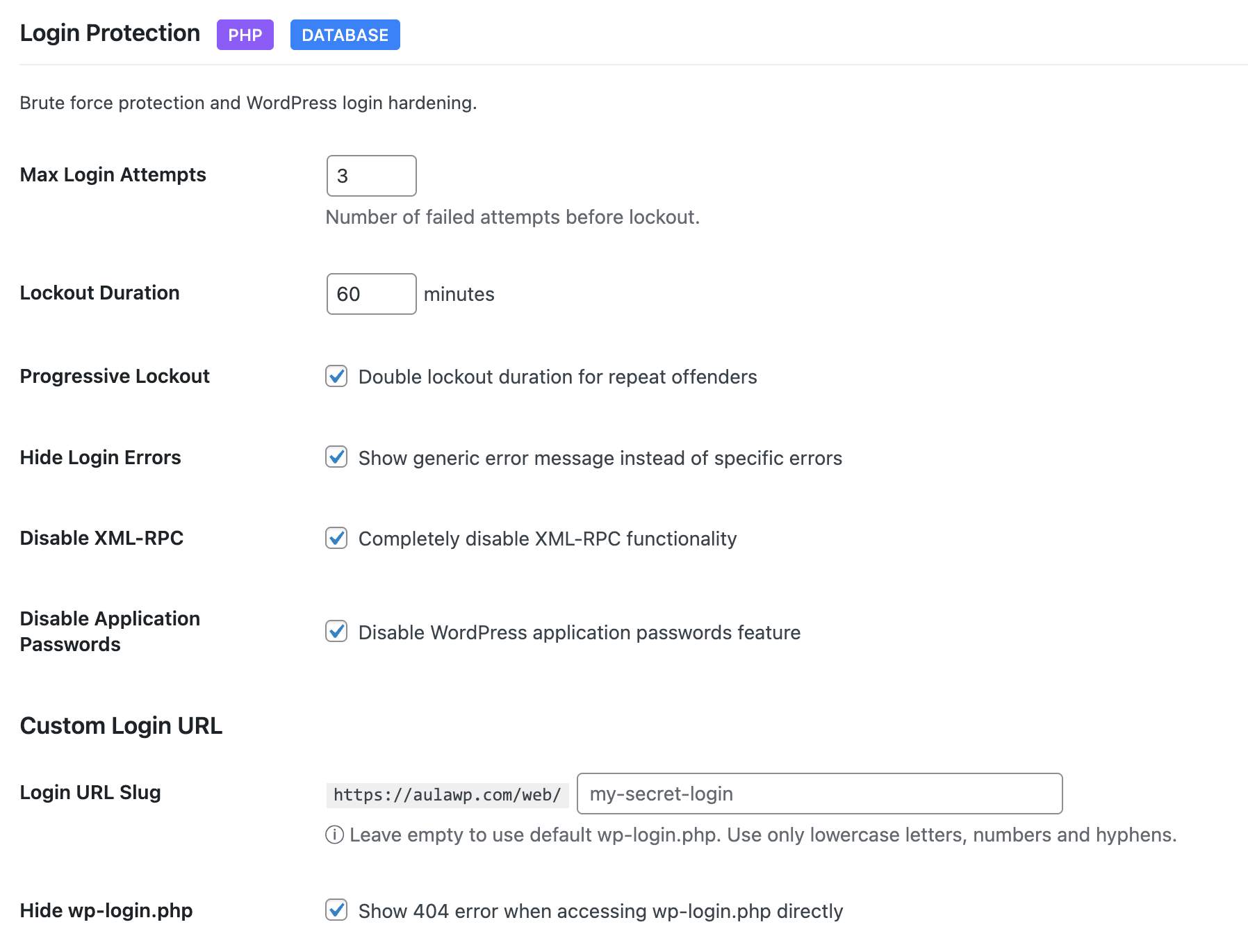
Login Security
Stop unauthorized access attempts:
- Limit login attempts with configurable thresholds
- Progressive lockouts – longer blocks for repeat offenders
- Custom login URL – hide wp-login.php from bots
- Login URL change notifications to all admin-area users
- Hide login error messages – don’t reveal valid usernames
- XML-RPC control: leave it on, block only the pingback methods (recommended, it closes the amplification vector while the mobile app and Jetpack keep working), or disable it completely
- Application passwords control
- Email notification when an IP is blocked for exceeding login attempts
- Admin login notifications via email
- IP whitelist for trusted locations
User Security
Comprehensive user account protection:
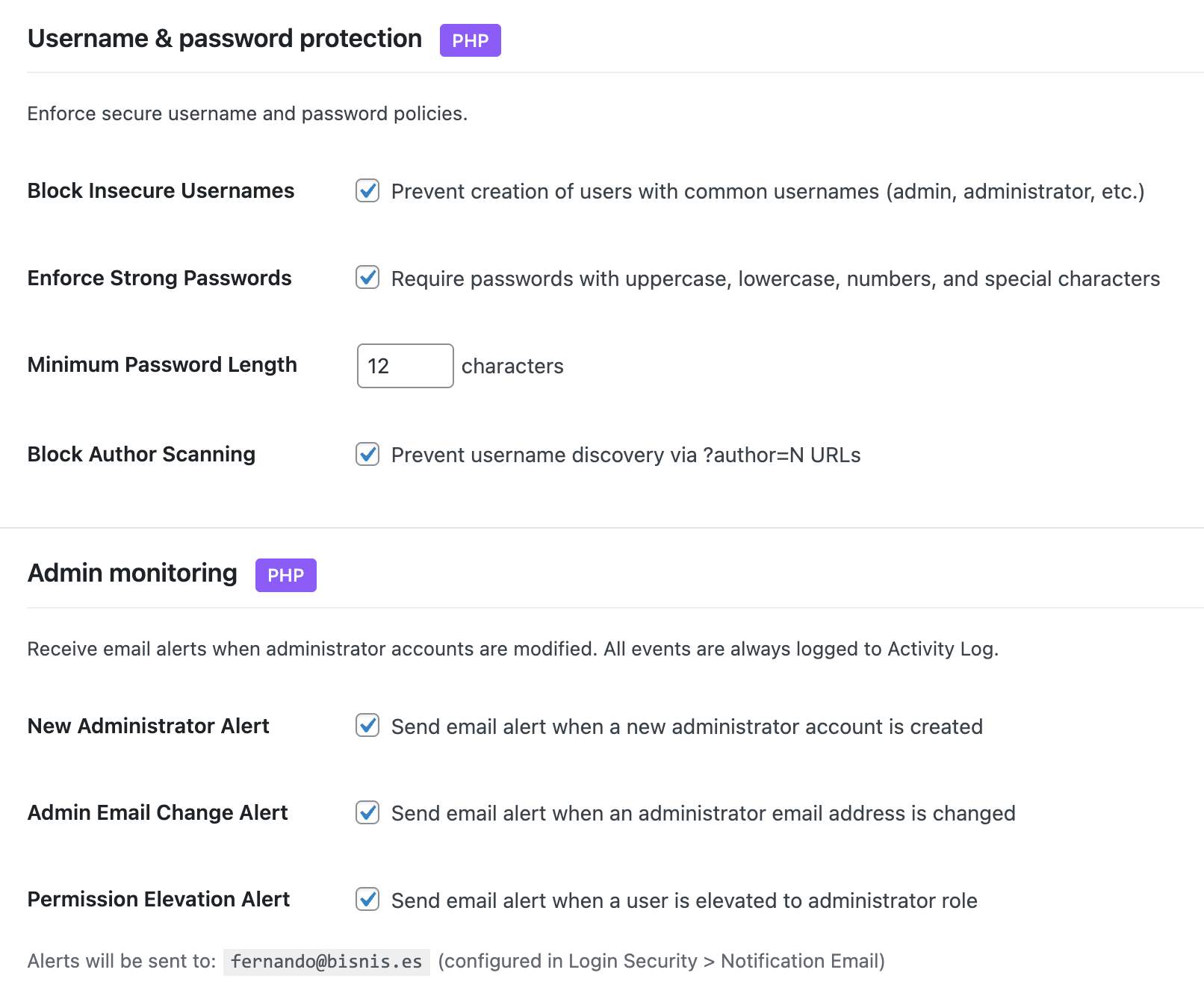
- Block insecure usernames (admin, test, root, etc.) on new registrations
- Warn about existing users with insecure usernames so you can rename or remove them
- Block author scanning – intercept
?author=NURLs so WordPress doesn’t redirect them to/author/USERNAME/and leak the login slug - Force strong passwords with minimum length
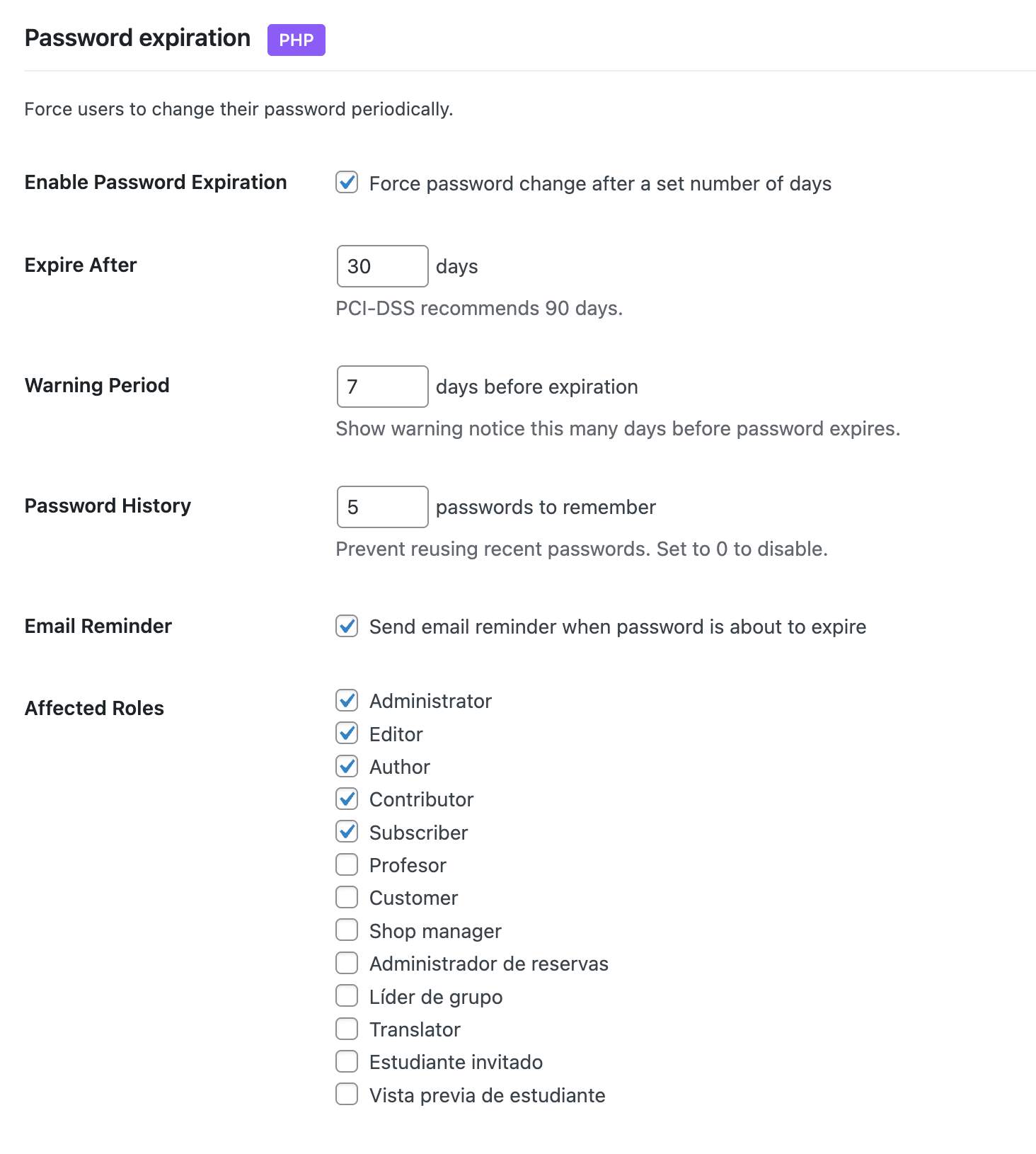
- Password expiration with configurable intervals
- Password history – prevent reusing old passwords
- Force password reset – by specific users, by role, or all users (post-hack recovery)
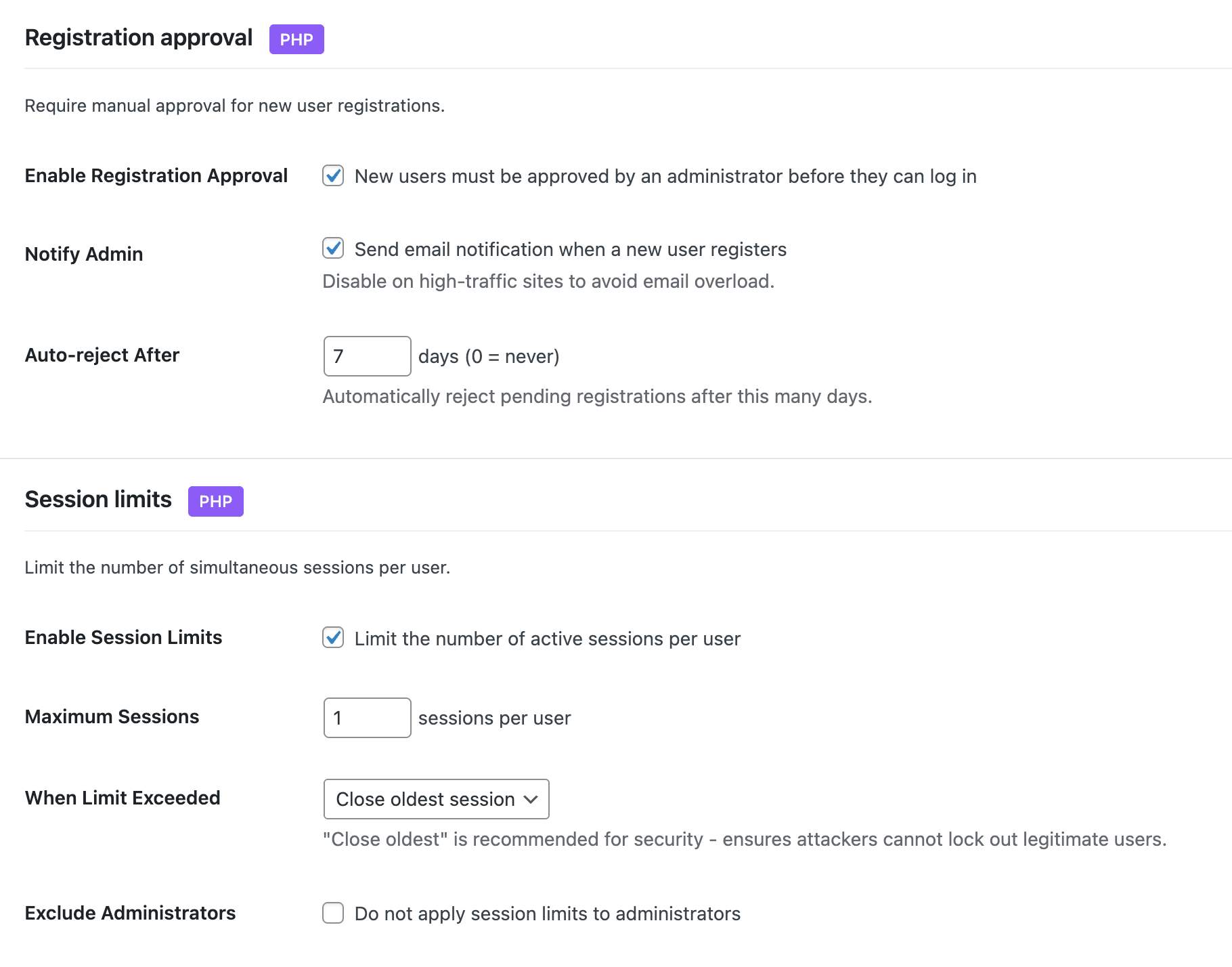
- Session limits – control concurrent logins per user
- Session management – view and revoke active sessions
- Email verification for new registrations
- Registration approval workflow – manually approve new users
- Admin account monitoring – alerts for new admins, email changes, password changes, privilege escalation
- Display name protection – prevent exposing login username publicly
Security Headers
Achieve Grade A security ratings:
- Content Security Policy (CSP) with a WordPress-compatible default policy and Report-Only mode for safe testing before enforcing
- HSTS (HTTP Strict Transport Security) with includeSubdomains and preload options
- X-Frame-Options – prevent clickjacking
- X-Content-Type-Options – prevent MIME sniffing
- Referrer Policy control
- Permissions Policy (camera, microphone, geolocation, payment, USB)
- Cross-Origin policies (COEP, COOP, CORP)
- HTTPS enforcer with automatic mixed content fix
- Server fingerprint hiding – the
Server:header is neutralized andX-Powered-Byand other fingerprinting headers are stripped from responses
File Integrity Monitoring
Detect unauthorized changes to your files and compromised plugins:
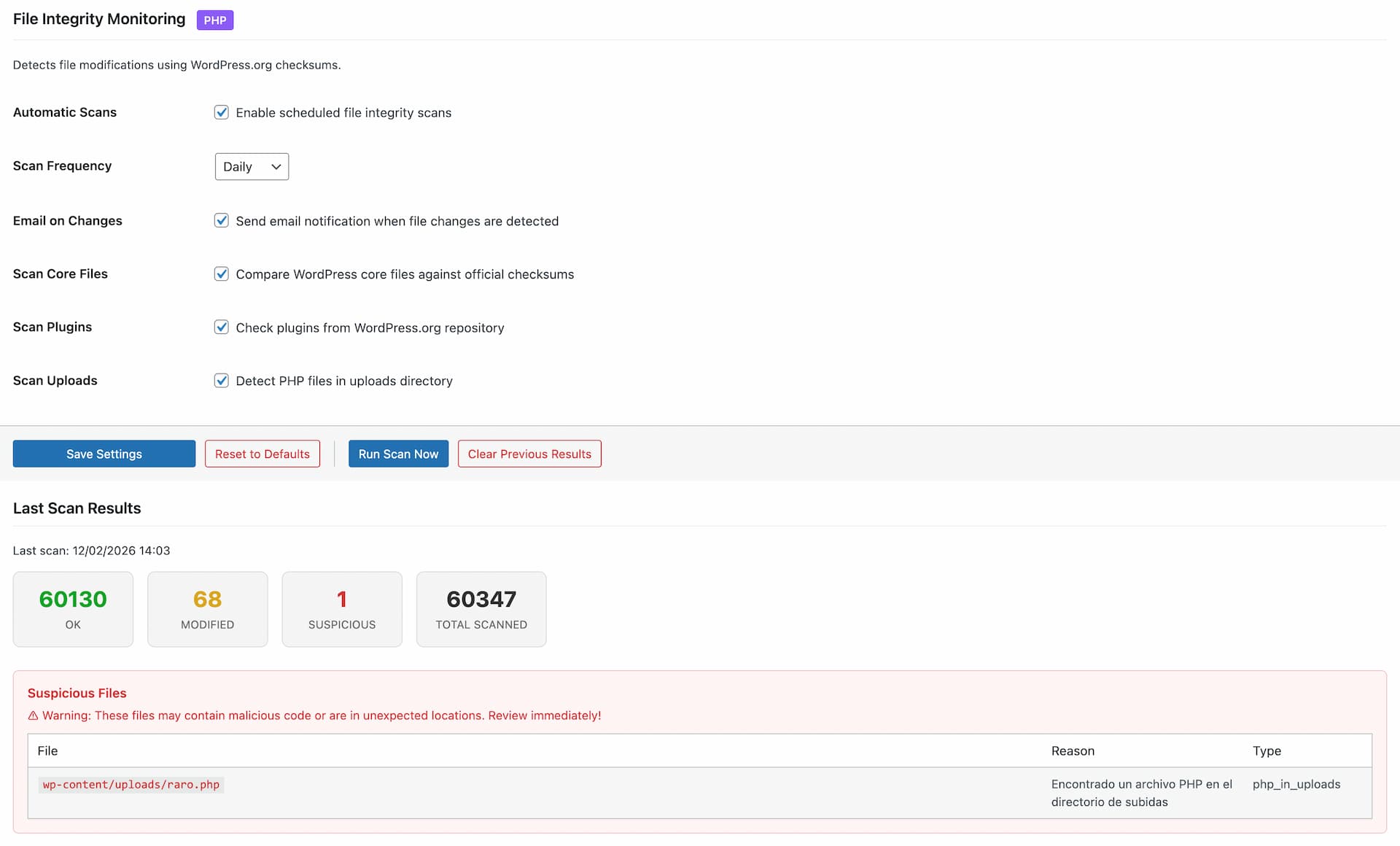
- WordPress core against official checksums, plus files added to wp-admin and wp-includes
- Plugins against WordPress.org checksums, themes against their WordPress.org package
- Whatever has no official copy (other plugins and themes, must-use plugins, drop-ins, the rest of wp-content) searched for hidden code
- Critical config files (wp-config.php, .htaccess, the secrets.php drop-in) monitored against baseline, detecting code injection even in files with no official checksum
- Closed and removed plugins detection: a daily check against WordPress.org flags any installed plugin that was closed or silently removed, with per-plugin Ignore
- Line-level diff view of changes, with per-file approval workflow
- Extra file detection in plugins and themes (files not in original distribution)
- Uploads scanning for PHP, double extensions and .htaccess files
- What each finding usually is and what to do about it
- Root directory scanning for non-core PHP files (common attack vector)
- String concatenation obfuscation detection
- Configurable notification levels and an ignore list to dismiss known files
- Excluded paths and file extensions
- Scheduled automatic scans (daily, weekly)
- HTML formatted email alerts with severity sections, including a dedicated section for closed plugins
Self-Protection
A tampered security plugin is worse than none, because it keeps reporting that everything is fine. Vigilant verifies its own files against the checksums WordPress.org publishes, a SHA-256 manifest shipped with the plugin and a fingerprint of that manifest stored in the database:
- At the start of every integrity scan, right after every update, and when the version on disk changes outside the WordPress updater
- Modified, missing and added files, symbolic links and a replaced or deleted manifest are reported, by email with the default settings
- Its own scheduled tasks are watched and scheduled again if something removes them
- Its own block in File Integrity and a check in Security Check, with what each finding means and how to fix it, and no way to switch it off
- One click repair that reinstalls Vigilant from WordPress.org, keeping your settings, tables and log
It detects tampering, not vulnerabilities in Vigilant itself. SECURITY.md explains what it covers, what it does not, and how to verify your installation from outside the server.
Security Audit
Track everything happening on your site:
- Successful and failed login attempts
- Two-factor authentication events
- User account changes (creation, deletion, role changes)
- Content modifications (posts, pages)
- Plugin and theme activations/deactivations
- Security events and blocked threats
- Secrets API changes, by name, never by value
- HTTP request method tracking and filtering (GET, POST, PUT, DELETE)
- Enhanced log detail popup with grouped sections and quick actions
- One-click add IP or User-Agent to firewall whitelist/blacklist from log entries
- Direct IP lookup links to AbuseIPDB
- Configurable retention period, CSV export, and filtering by event type, severity, request method or date
Audit Alerts – get an email when the audit log points to something worth your attention, off by default and configured under Security Audit:
- Immediate alerts the moment a serious event is logged, by minimum severity (a new administrator, a closed plugin or a privilege escalation are all logged as Critical)
- Threshold alerts when a category of events spikes within 30 minutes, or 1, 6 or 24 hours, counting only warning and critical events so routine activity never trips them
- A single anti-repeat cooldown keeps a storm of events down to one notice instead of flooding your inbox
- Active alerts surface in Settings & Tools, the Dashboard, the configuration level and the Security Check
- “Send test email” button to confirm delivery
Security Check
On-demand security audit built into the Dashboard. No external services, no accounts, no API keys – everything runs on your server:
- More than 50 checks across 6 categories: SSL/TLS, HTTP Headers, WP Exposure, Access & Auth, Sensitive Files and Internal Checks
- Single 0-100 score with A-E grade, plus per-category breakdown and explanatory details for every check
- 17 exclusive internal checks impossible from the outside: PHP end-of-life status, PHP security fixes, pending updates, inactive plugins, closed or removed plugins, Vigilant self-protection, file permissions, default salts detection,
wp_table prefix,adminusername, administrators without 2FA enrolled, module status, recent audit errors, last File Integrity scan result and whether audit alerts are configured - DNS-only reputation lookup against Spamhaus ZEN, Barracuda BRBL and SpamCop SCBL (informational – listings are flagged but don’t deduct from the score)
- Two-phase scan: fast local checks appear in under a second, remote checks stream in as they complete
- Weekly automatic scan with opt-in email alert if the score drops by 10+ points or a new critical check starts failing
- 30-scan history with sparkline trend and delta chip
- “Go to setting” fix link on every failing check, jumping straight to the exact Vigilant field that resolves it
- Smart header diagnostics that report “configured but not being served” when a cache/CDN overrides your headers
WordPress Hardening
Layered protection at the WordPress level – admin, content, head, feeds and database:
- Lock down the admin: disable the built-in plugin and theme file editor, block installations and updates from the admin area, and force HTTPS for the admin area. Compatible with any hosting layout, respecting values already in place and never overriding them
- Disable WordPress’s internal page-view cron when you already have a real server-side cron job configured
- Dashboard warning when debug mode is left enabled in production, so error output never leaks to visitors
- Hide your WordPress version everywhere it can leak: from the HTML head, from RSS and Atom feeds, and optionally from every script and style URL on the front-end (stripping only the WordPress version itself, leaving plugin and theme cache busting intact)
- Automatic daily removal of readme.html, license.txt and licencia.txt from the WordPress root, which otherwise expose your version
- HTML head cleanup – remove the RSD link, Windows Live Writer manifest, shortlink header and REST API discovery link
- Database hardening – check for the default
wp_table prefix and one-click rename tool with full backup before the change - Comment security – honeypot field against spam bots, force moderation on every new comment, close comments on old posts, disable pingbacks and trackbacks
- Feed management – completely disable RSS and Atom feeds, or only disable them when the site has no published content
REST API Security
Control API access to your site:
- Three access modes: public (default WordPress behavior), authenticated only (closes the API to anonymous visitors), or selective (custom allow/block lists)
- Block user enumeration via
/wp-json/wp/v2/users - Protect any list of sensitive endpoints from anonymous access
- Per-plugin compatibility toggles so authenticated mode doesn’t break the front-end: WooCommerce, Contact Form 7, Gravity Forms, WPForms, Elementor, Jetpack. oEmbed and Site Health endpoints stay accessible by default
Security Tools
Utilities included:
- Database Backup – Download a full or partial database backup as ZIP with table selection
- Database Prefix Change – Change the default wp_ prefix to a random secure prefix
- Export/Import Settings – Transfer your configuration between sites
- Configuration Backup – Download wp-config.php, .htaccess and robots.txt as a ZIP
- Reset to Defaults – Start fresh with one click
Safe by Design
Vigilant validates .htaccess and wp-config.php before writing to them, and keeps no copy of them, because they hold your database password: download a backup from Settings & Tools first.
Deactivating removes its blocks from both files and brings back the lines it had commented out. Switch Under Attack mode off before deactivating.
Vigilant checks its own files too, and tells you how to check them yourself: every release ships a MANIFEST.sha256 that sha256sum can verify, and WordPress.org publishes the same checksums for comparison.
Why Vigilant?
Most WordPress security plugins reserve their best features for paid plans. Vigilant gives you everything upfront – no premium tier, no feature locks, no upsells. Firewall, 2FA with authenticator app, security headers, file integrity scanner, security audit, on-demand Security Check with weekly regression alerts, and more. All free, all maintained, all following WordPress coding standards.
We maintain a detailed feature comparison between Vigilant and other popular security plugins (Wordfence, Solid Security, AIOS, Sucuri, SG Security). See what each offers in its free version and where Vigilant fills the gaps.
Unterstützen
Need private support or custom development?
Do you need one-on-one help, priority troubleshooting, or a custom feature, integration, or tweak built specifically for your site? I offer private support and custom development. Just contact me and tell me what you need.
Need help or have suggestions?
Love the plugin? Please leave us a 5-star review and help spread the word!
About AyudaWP
We are specialists in WordPress security, SEO, AI and performance optimization plugins. We create tools that solve real problems for WordPress site owners while maintaining the highest coding standards and accessibility requirements.
Installation
- Upload the plugin files to
/wp-content/plugins/vigilante/or install directly from the WordPress plugin repository - Aktivieren Sie das Plugin über das „Plugins“-Menü in WordPress
- Go to ‘Vigilant’ in the admin menu
- Apply a security preset or customize individual module settings
Requirements:
- WordPress 6.2 or higher
- PHP 7.4 oder höher
- Apache or LiteSpeed server (for .htaccess features)
- SSL certificate recommended for HSTS
Änderungsprotokoll
Accounts that must use an authenticator app and have not set it up now get a code by email at login, instead of logging in with the password alone. Also adds buttons to copy and whitelist your IP, and the hex rule no longer blocks tokens.
3.0.14
Accounts that must use an authenticator app and have not set it up now get a code by email at login, instead of logging in with the password alone. Also adds buttons to copy and whitelist your IP, and the hex rule no longer blocks tokens.
- Improved: the Firewall tab has two small buttons next to your current IP address. One copies it, and the other writes it into the IP Whitelist, after a confirmation that explains what a whitelisted address skips. It is only offered when the address can be yours: not a private or local address, not the server itself, not Cloudflare or a trusted proxy, and not an address seen through a proxy header the firewall does not trust. The address applies once you save, and a notice says so until then.
- Improved: the two factor section lists the accounts that have to use the authenticator app and have not set it up, with their role and when their grace period ends, and a button to email one of them the setup instructions again. An administrator in that situation is told so on the same screen. Suggested by Marco in the support forum.
- Improved: a new vigilante_firewall_excluded_fields filter leaves a form field out of the SQL injection rules by its exact name. The FAQ has an example.
- Fix: an account that had to use an authenticator app and had not set it up yet could log in with its password alone, during the grace period and after it, also from other login forms such as the WooCommerce account page, and could then set up an app of its own. Until it sets up its app, that account is now asked for a code sent by email, and once the grace period ends the dashboard still sends it to its profile to set the app up. Setting up the app removes the devices it trusted meanwhile, and on the update the sessions those accounts had, which could have been opened with the password alone, are closed once (the administrator running the update keeps the one in use); review their application passwords. Logins with its main password over XML-RPC are refused, as for any account with two factor; application passwords keep working. If the site cannot send email, such an account cannot log in until the site sends email again, another administrator adds it to the excluded users, or the plugin folder is renamed by FTP as the FAQ explains.
- Fix: the hex encoding rule of the firewall blocked every 0x followed by 16 hexadecimal digits, so a form with a captcha token such as the one of Prosopo Procaptcha, a wallet address or a transaction hash was refused with Hex encoding detected. It now decodes each value the way MySQL reads it and blocks it only when it decodes to plain text. An uppercase 0X, which MySQL does not read as hexadecimal, is no longer looked at, and very large requests no longer take several times their size in memory.
- Fix: each run of Security Check, from the button or the weekly scan, left an Author enumeration attempt blocked warning in the activity log with the address of the server, because Security Check asks the site for ?author=1 to test the block. That request now carries a single-use token and is blocked the same way, but it is no longer logged as an attack. Any other ?author request is logged as before.
- Fix: when Run Scan Now could not finish, because a server firewall refused the request, the request timed out or another scan was running, the error went away after five seconds and the previous results came back, so it looked like a finished scan. The error now stays and says that the results below are from the previous scan, with its date.
- Fix: the File integrity scan row of Security Check said a different thing for one modified file than for several.
3.0.13
Closes wp-content/upgrade, where WordPress unpacks updates, to web requests and checks it in Security Check. Watches the secrets.php drop-in, logs changes to WordPress secrets and explains two factor errors after new security keys.
- Improved: a new Update Folders setting in Firewall, Server Protection, on by default, closes wp-content/upgrade and wp-content/upgrade-temp-backup to web requests. WordPress unpacks every update there before moving it into place, and CVE-2026-119977 was exploited by calling a file of a WordPress update while it was being unpacked; the update to the version that fixes it is still unpacked by the code it replaces, so a firewall inside WordPress cannot see that request. Vigilant writes two rules, so the block holds when a .htaccess further down switches rewriting on, ignores case and repeated slashes, and follows a content folder renamed inside the WordPress folder. Existing sites with the Firewall module on get it when they update, without saving anything. Nginx does not read .htaccess, and a server that hands PHP files to PHP-FPM with ProxyPassMatch does not read it for them: there, block those two folders in the server configuration. The new Security Check row says which case a site is in.
- Improved: Security Check has a new row in Sensitive files that asks the server for a PHP file that does not exist inside wp-content/upgrade and for one outside it, and passes only when the first is refused and the second is not. A server that refuses both is not scored, because it cannot be told apart. Sensitive files now scores out of 10.
- Improved: File Integrity watches wp-content/secrets.php, the drop-in WordPress loads on every request where it has the Secrets API, as it watches wp-config.php and .htaccess: it says when the file appears, changes or goes, and asks you to approve it. Its lines are never stored, only a fingerprint keyed with the security keys of wp-config.php and its size, because it can hold the credentials of a secrets store. A site that already has one is asked once, and so is a site whose security keys are replaced, because the fingerprint is keyed with them. Approving takes the file as the scan saw it: if it changed since, scan again. On a network, approving or ignoring it takes a network administrator.
- Improved: the activity log records every change to a secret of the WordPress Secrets API, with its name and never its value. A secret that goes back within a day to a value it had and that was replaced by another is logged as critical, so the audit alerts can send it: putting back a key that was rotated is what somebody who knew the old one would do. Deleting a secret and creating it again with the same value is not.
- Improved: when the codes of an authenticator app can no longer be checked because the security keys of wp-config.php were replaced, the two factor screen says so and points to the backup codes, and the activity log says why. It used to say Authentication error.
- Fix: after ignoring a file in File Integrity, the list of ignored files shows it right away. Until now the count above the list said one more than the table until the page was reloaded. Reported by Juan Díez.
- Fix: after approving a change to wp-config.php or .htaccess in File Integrity, its line changes no longer stay open on screen until the page is reloaded.
3.0.12
Fixes the IP login lockout and the activity log on servers that report table names in lower case, adds a daily limit to wrong two factor codes, saves old browser versions in the User-Agent blacklist again and uses SAMEORIGIN in the Maximum preset.
- Improved: an account now also stops for up to a day after 20 wrong two-factor codes in 24 hours, besides 10 in 15 minutes, so someone who has the password can no longer keep sending codes just under the limit: 600 in a month at most, where 28,800 got through before. A correct code ends the stop, and a new password starts the day again. The login screen and the email say how long the wait is. Reported by @calzbert.
- Improved: the Maximum Security preset now sets X-Frame-Options to SAMEORIGIN instead of DENY, and frame-ancestors to self. DENY also blocked the frames of the dashboard itself, such as plugin details, the progress of updates and the Customizer preview, and SAMEORIGIN protects from clickjacking just the same. Sites that applied the preset keep what they have: choose SAMEORIGIN in Security Headers to change it.
- Improved: User-Agent blacklist lines with an old browser or system version, such as Chrome/49.0.2623, Firefox/3.6 or Android 4.4, are saved again and no longer flagged: they only block that old version, a common sign of a bot. A version cut short that matches browsers in use, such as Chrome/15, is still left out. Reported by @calzbert.
- Improved: code that writes the settings, such as a network sync, can now learn which blacklist lines were left out through the vigilante_firewall_lines_dropped action. Requested by @calzbert.
- Fix: on servers that report table names in lower case, such as MySQL with lower_case_table_names set to 1, and with a table prefix in capitals, Vigilant took its own tables for missing. Failed logins were not counted, so the login lockout by IP never started, and the activity log and the file hashes stayed empty. Reported by @calzbert.
- Fix: some lines that normal browsers send could still be saved to the User-Agent blacklist and blocked the people using them: a piece cut in the middle of a browser name, such as rome/120.0.0.0, or of the Android device or the Linux processor, the whole User-Agent of a newer Firefox for Android, and lines of browsers Vigilant had no example of: Edge and Opera on Mac, Opera on Android and Opera Mini, Yandex, Huawei, UC, Xiaomi, Amazon Silk, DuckDuckGo, the browsers inside the Facebook, Messenger, Instagram, Google, WeChat, TikTok, LinkedIn, Pinterest, Telegram, Snapchat and LINE apps, including the fields they fill with the language or the network of each person, KaiOS phones, LG and Samsung TVs, PlayStation and Xbox. Windows 7 and 8.1 lines, such as Windows NT 6.1, are no longer saved either, because Chrome 109, Firefox ESR and newer Chromium forks still run there; Windows XP and Vista lines still are. A line that names a bot or a testing tool, such as LinkedInBot, Lighthouse or GTmetrix, is still saved, and so is a combination no browser sends, such as a current Chrome on an old macOS. A very long line no longer slows down the Dashboard and the Firewall tab.
- Fix: on a network, the email about a two-factor stop could be sent again from each subsite for the same run of wrong codes. It is now sent once a day at most for the whole network while the codes keep coming, and again after a new password. Reported by @calzbert.
- Fix: on a network, deleting a user could leave their authenticator secret and backup codes in the table kept from a deleted subsite. Reported by @calzbert.
3.0.11
The User-Agent blacklist no longer saves lines that normal browsers or WordPress also send, which locked people out; saved ones keep working and are flagged. Sections now fold, with summaries and an index. Also fixes the author scan block with NextGEN Gallery and a percent sign in headers.
- Improved: the User-Agent blacklist no longer saves a line that normal browsers, your own browser or WordPress itself also send, because it blocks the people who use them or stops the site from reaching itself. Chrome and Safari send the same User-Agent to everybody on the same version and system, and bots copy it, so a line taken from such a bot blocked every visitor with that browser. The notice says what each line would block and suggests blocking the IP instead. A line that blocks Googlebot or Bingbot is saved with a warning.
- Improved: lines of that kind saved with an earlier version keep applying, and the Dashboard and the Firewall tab now point them out. They are left out the next time the Firewall tab is saved.
- Improved: importing settings leaves out those User-Agent lines too, and IP blacklist entries that are an address of the site, and says which ones.
- Improved: the activity log popup no longer offers to blacklist a User-Agent. It checks the lists as the firewall does, IP ranges and part of a User-Agent included, says which line matches, and a request blocked by the User-Agent blacklist now records the line that blocked it.
- Improved: adding an IP or a User-Agent to a list from the activity log now leaves an entry in the log.
- Improved: the User-Agent whitelist is now called User-Agents not treated as bots, and its description says what it does: it exempts them from Block Bad Bots and nothing else.
- Improved: settings sections, and the groups inside them, fold from their heading, and the heading says what they hold even when folded: how many options are enabled, how many entries a list has, the mode chosen, or what the block shows, such as notifications active, IPs blocked or the date of the last scan. The browser remembers what you folded.
- Improved: an error is marked on the heading of the section that holds it and in the section index, and opens that section on every load. A warning is marked on the folded heading that hides it.
- Improved: tabs with three or more sections get an index on the left with Open all and Close all, which marks the section you are reading. Links to a setting, from the settings search, Security Check or the Dashboard, open a folded section first.
- Improved: in File Integrity, Run Scan Now and Clear Previous Results are now in the results block, which always shows, also before the first scan. Save buttons that only save one section fold with it.
- Improved: the rows of the self-protection box and of the Security Check breakdown remember whether you left them open, except a critical self-protection row, which always opens. Pending registrations show their count in the heading instead of an orange badge.
- Improved: File Integrity keeps the Ignored Files section on screen when the list is empty, and says so. Ignoring files, taking them off the list and emptying it are now recorded in the activity log, with how many files and which ones. The confirmations say how many files they take, selections on other pages of the table included, and the button that empties the whole list says how many it removes.
- Fix: in .htaccess, a User-Agent whitelist entry also exempted requests from the rules against malicious query strings and unused HTTP methods. Any client can send any User-Agent, so it now only exempts from the bad bots rule, as it already did in PHP.
- Fix: a percent sign in a security header value reached .htaccess as a format of the server, which could stop the whole site with an error or put a server variable in a public header. It is now written as a plain percent sign.
- Fix: with NextGEN Gallery active, ?author=N still redirected to the author page and showed the username, with nothing in the log. The block now runs before any plugin can redirect.
- Fix: when ?author=N still showed the username with the protection on, Security Check blamed a cache without checking. It now asks again past any page cache, tells a cache from something on the site that redirects first, and says so when it cannot tell.
- Fix: Security Check missed generator meta tags with their attributes in another order, such as the one Divi prints, and now names the tag it finds.
- Fix: unchecking User changes in the activity log also stopped logging blocked author scans, blocked insecure usernames and the session limit, and their audit alerts.
- Fix: deleting a user left their two-factor data, the authenticator secret and backup codes included, in the tables of Vigilant.
3.0.10
Two factor now stops an account after 10 wrong codes in 15 minutes and emails its holder, Ignore applies to the file as it is when ignored, and the visitor IP is read right behind proxies that add the port, such as Azure.
- Improved: Ignore in File Integrity now applies to a file as it is when it is ignored: if it changes, goes away or comes back, its finding shows again and the file leaves the ignored list. Excluded Paths is still the way to stop watching a file or a folder for good. Files ignored with an earlier version of Vigilant show once more, to be ignored again.
- Improved: only one File Integrity scan runs at a time. Run Scan Now says when another scan is already running and since when, the scheduled scan leaves it to the one that is running, and a scan the server stops is always the one reported.
- Improved: Security Check asks for the home page once per scan also when it does not answer or answers with a verification screen, instead of once per check that reads it.
- Fix: two-factor verification had no limit per account. The tries of each verification session started again with every correct password, and the lockout of Login Security counts per address and does not run on a site of a network where that module is off. Each account now has 10 wrong codes in 15 minutes, by app or by email, counted across sessions and addresses; then verification stops until that time passes, and the account holder and the site recipients get an email, because every one of those codes came with the right password.
- Fix: behind a proxy that writes the port in X-Forwarded-For or X-Real-IP, as Azure App Service does, every visitor was read as the proxy, for the firewall, the rate limit, the login lockout and the IP lists, and the notice that detects a proxy did not show. The port is now set aside, and the IP whitelist rules of .htaccess accept it too.
- Fix: on a site whose WordPress lives on a host of its own, the redirect to set up the authenticator app once the grace period ended went to the dashboard, which redirected again, in a loop. The Activity Log and File Integrity menu shortcuts landed on the dashboard there too.
- Fix: Remove X-Powered-By and Server headers now also removes an X-Powered-By header added by the server configuration, such as PleskLin on Plesk. Security Check no longer calls a value without a version number version information, and when the header still arrives with the rules of Vigilant applied, it says that the server adds it outside .htaccess.
- Fix: on a network, deleting a site now also removes Vigilant’s tables for that site, its activity log included. The two factor table stays while it holds an enrolment, because accounts belong to the network.
- Fix: the IP blocklist of Comment Security, which only code can fill, compared the connection address as text. It now reads the visitor IP and matches the list as the firewall does.
3.0.9
Security Check now says when the PHP of the server lacks the fixes of PHP2Shell, the critical flaws of October 2026, and the firewall blacklist no longer accepts an address of the site itself, which stopped WP-Cron.
- Improved: Security Check has a new row in Internal Checks, PHP security fixes, that compares the release of PHP, and not only its branch, with the critical security releases of PHP that Vigilant knows about. The first one is PHP2Shell (CVE-2026-109618 and CVE-2026-109619, October 2026), fixed in PHP 8.5.12, 8.4.27, 8.3.36 and 8.2.35. An older release of those branches fails, and so does a branch that no longer gets fixes. A release marked by a Linux distribution, which can carry fixes without changing its number, also on a branch PHP no longer fixes, and a test release are a warning, because the number cannot tell. Until now a site on PHP 8.5.3 passed, so a site with an older PHP gets a lower score until PHP is updated, and the weekly scan, where its email is switched on, reports the row as a new failing check.
- Improved: the hidden login answers wp-login.php, wp-admin and the login shortcuts with one same page, the 404 page of the theme, as an address that does not exist gets it, so they cannot be told apart from a missing page. Until now wp-login.php showed the theme and wp-admin a plain page, and comparing them showed that something was there. Vigilant keeps a copy of that page, taken by asking the site for a missing address and renewed every day, after a theme switch and after updates; while there is none, every path gets the same plain page.
- Fix: with a custom login URL, /login.php answered with a redirect to the hidden login address, because WordPress sends that address to the login page and Vigilant only blocked /login and /wp-login.php. It now gets the same not found page as the rest.
- Fix: an address of the site itself could be put in the firewall blacklist: a loopback address, the address of the server or the one its domain points to. The requests WordPress sends to itself come from one of them, so WP-Cron stopped and the REST API test of Site Health failed with nothing on screen to say why. Saving the Firewall tab now leaves such an entry out, also one saved before, and says so in a second notice; the button of the Security Audit refuses it; and the Dashboard recommends removing one that is already saved.
- Fix: on a hosting that disables gethostbynamel() or gethostbyname(), the blacklist checks of Security Check stopped it with a fatal error, and its weekly run with it. They now say that the hosting disabled that function of PHP and are skipped.
- Fix: the password expiry setting could be saved at 0 days through an import or a request that skipped the limits of the field, and then every password with a date had expired. It can no longer be saved below 7 days, the minimum on screen, and a 0 saved before is read as 7.
- Fix: where PHP counts its time limit in clock time, as on Windows, a File Integrity scan fitted to a short limit could start a request for checksums that waited longer than the time left, and the server stopped the scan before it saved its result. That wait now shrinks to the time left. Where PHP counts processor time, the time used by other tasks of the same scheduled run now counts too, so the closed plugins check does not start with less time ahead than it needs.
- Fix: with the wp-includes folder linked from another place on the server, the alert about self-protection switched off by a filter could name a file of WordPress itself again.
- Fix: with Content-Security-Policy in report-only mode, the Test Headers button said so twice.
For older changelog entries, please check the changelog.txt file
Screenshots

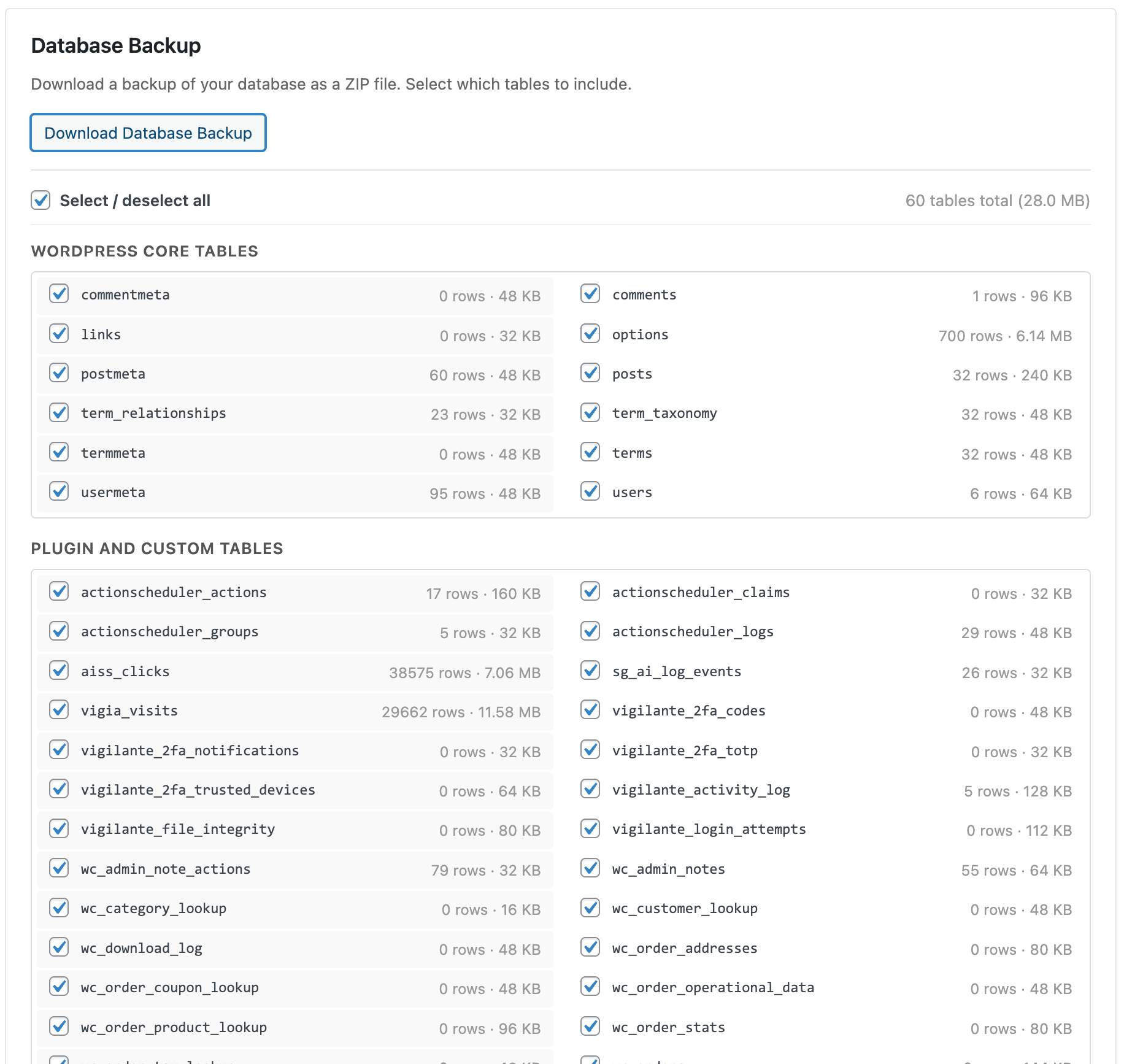
Für Entwickler
Ist das dein Plugin? Zeigen Sie die Zahlen.
Fügen Sie Ihrer Website, Docs oder GitHub Readme ein Live-Badge hinzu. Es wird von selbst aktualisiert - kein Konto erforderlich.
Best Vigilant alternatives
All 2FA plugins →





Fragen und Antworten
Vigilant: quick answers
Gerade Antworten, gezogen von Live WordPress.org Daten.
Quelle: WordPress.org
Is Vigilant free?
Yes. Vigilant is free to download and use from the official WordPress.org plugin directory.
Is Vigilant safe to use in 2026?
Yes — Vigilant is a safe, well-maintained plugin to use in 2026. It runs on 4K+ sites, is rated 5/5 and was last updated 2 days ago, and scores 93/100 on our health check.
How many websites use Vigilant?
Vigilant is active on 4K+ WordPress websites and has been downloaded 69,418 times since it launched in February 2026. It was downloaded 15,100 times in the last 30 days.
Does Vigilant work with WordPress 7.1?
Yes. The developer has tested Vigilant up to WordPress 7.1.5, the latest release. It requires WordPress 6.2 or newer.
What PHP version does Vigilant need?
Vigilant requires PHP 7.4 or higher. Most hosts run PHP 8.x today, so it works on any modern WordPress hosting.
When was Vigilant last updated?
The latest version, 3.0.14, was released on November 18, 2026 (2 days ago).
Who makes Vigilant?
Vigilant is developed and maintained by Fernando Tellado.
What are the best alternatives to Vigilant?
The most popular alternatives to Vigilant are Wordfence Security (5M+ installs), Really Simple Security (3M+ installs) and Limit Login Attempts Securi… (1M+ installs).
Angetrieben von PageForge
Eine Vorlage und eine Tabelle. Eine echte Seite für jede Suche.
PageForge Verwandelt jede Zeile eines CSV in eine WordPress-Seite mit eigenem Titel, URL, SEO Felder und Schema entworfen. Kostenlos auf WordPress.org.
- CSV und XLSX, plus Google Sheets auf Beruf und Unternehmen
- seinen eigenen Titel, URL, SEO Felder und Schema für jede Seite
- Arbeitet mit dem Blockeditor, Elementor, Divi und Avada
- Kostenlos auf WordPress.org, keine Kreditkarte