


Syncific Vault — API Key Protection & Security
Encrypt your AI API keys and keep them out of the WordPress database — one secure vault for WordPress 7.0 Connectors and every AI plugin.

Mit Vorsicht verwenden
Syncific Vault works, but test it on a staging site before relying on it in 2026. Was last updated 6 months ago, and scores 43/100 on our health check.
- Kleine Benutzerbasis (<10 aktive Installationen)
- Bisher sehr wenige Bewertungen
Wie stapelt es sich?
Side-by-side bei Installationen, Updates, Bewertungen und Support


Tägliche Downloads
Download-Spitzen folgen normalerweise einer neuen Version - jede Website, die automatisch aktualisiert wird, gilt als Download.
Ranglisten
Where Syncific Vault stands todayWordPress.org Ranglisten suchen
Live-Position in der Plugin-Suche, Top 100| Stichwort | Position |
|---|---|
| Ai | >100 |
| api keys | >100 |
| connectors | >100 |
| encryption | >100 |
| Sicherheit | >100 |
About Syncific Vault
Aus der offiziellen Readme · V1.0.1Beschreibung
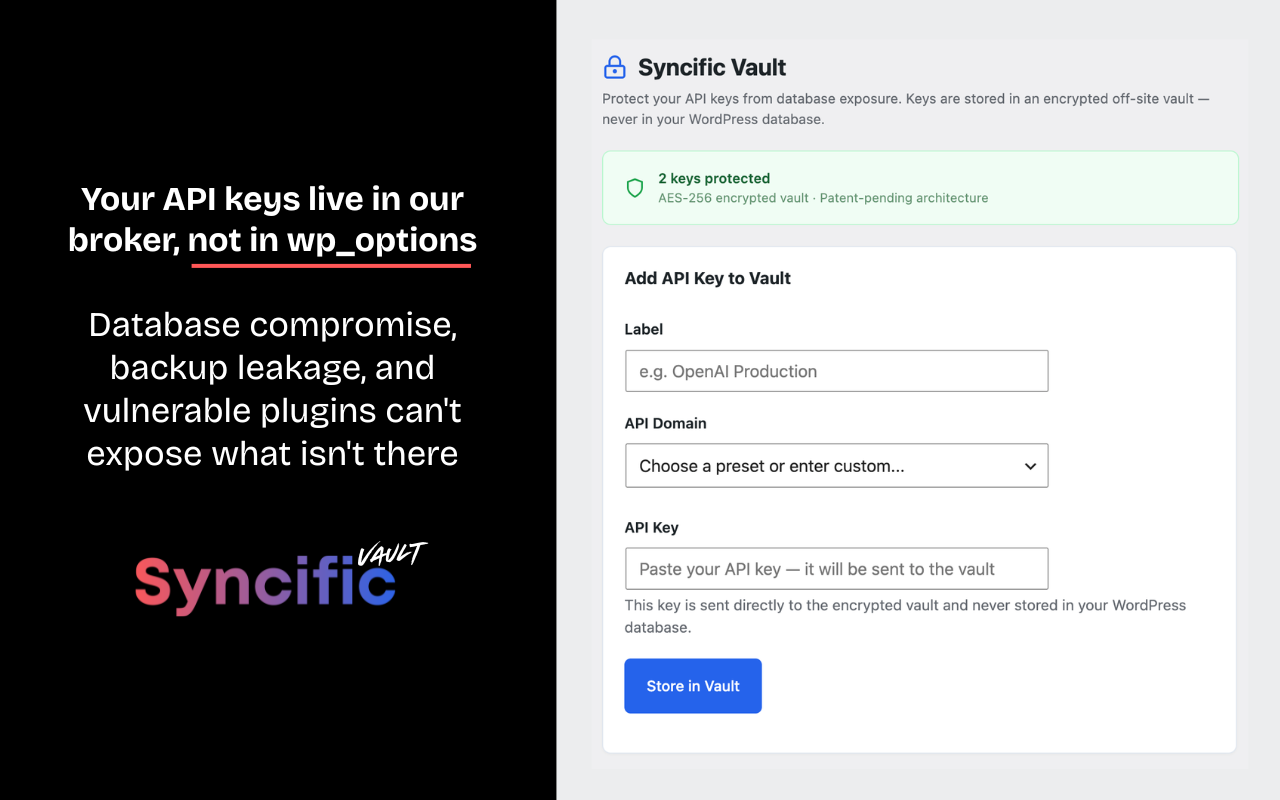
WordPress stores API keys in your database in plain text by default. If your database is compromised through SQL injection, a backup leak, or a vulnerable plugin, every API key is exposed. WordPress 7.0’s new Connectors API stores AI provider keys the same way (core ticket #64789).
Syncific Vault fixes this. Your API keys are moved to an encrypted vault hosted off-site. Your WordPress database stores only a reference — the real key is injected at request time and never persists locally.
One vault for all your AI plugins. Store your API keys in Syncific Vault — not in your database. Paste the secure placeholder into AI Engine, ClassifAI, Elementor AI, or any plugin that needs it. When you rotate a key with your provider, update it once in Syncific Vault — every plugin gets the new key instantly.
Wie es funktioniert
- Paste your API key in the Syncific Vault settings page
- The key is encrypted and sent to the Syncific Vault (AES-256, never in your database)
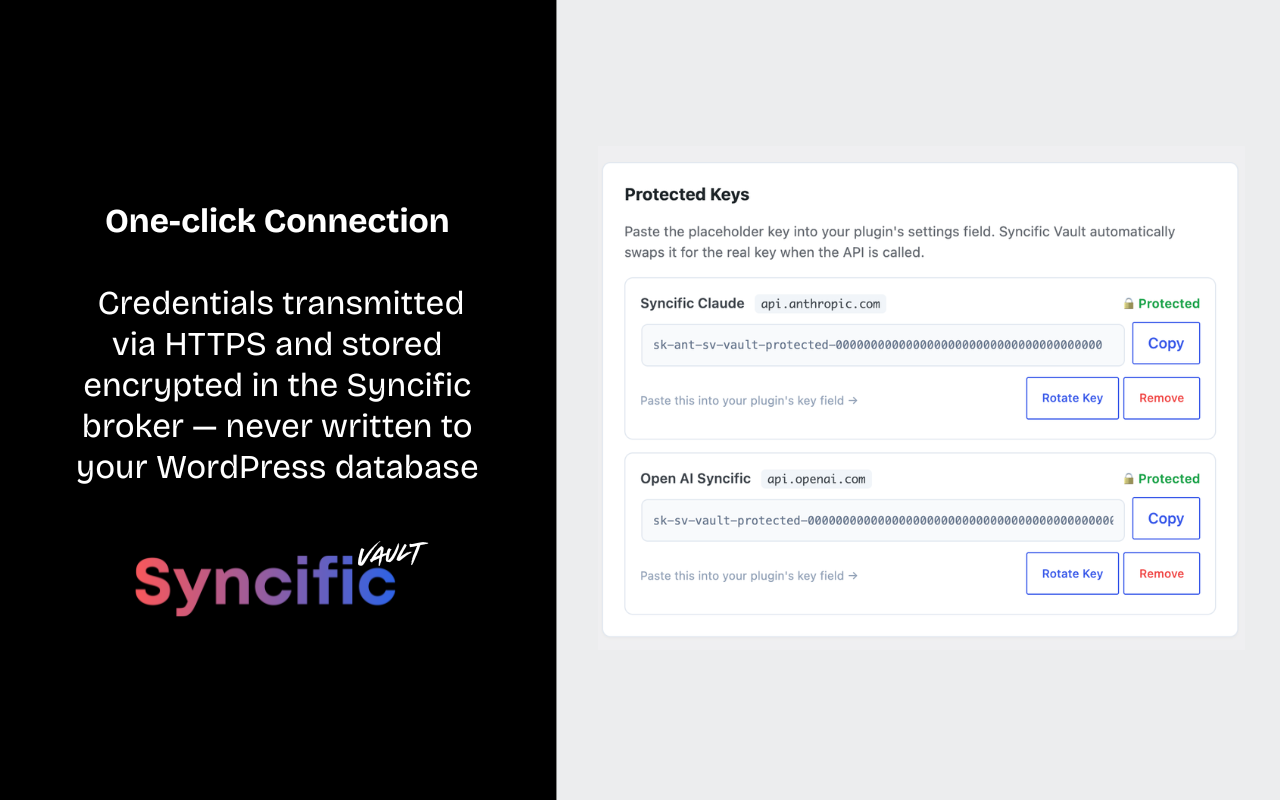
- A secure placeholder key is generated — paste it into your other plugins’ settings
- When any plugin makes an API call, Syncific Vault intercepts it and injects the real key
- Other plugins work normally — they don’t know the key was swapped
- If your database is dumped or compromised, no API keys are exposed
Supports any AI API key
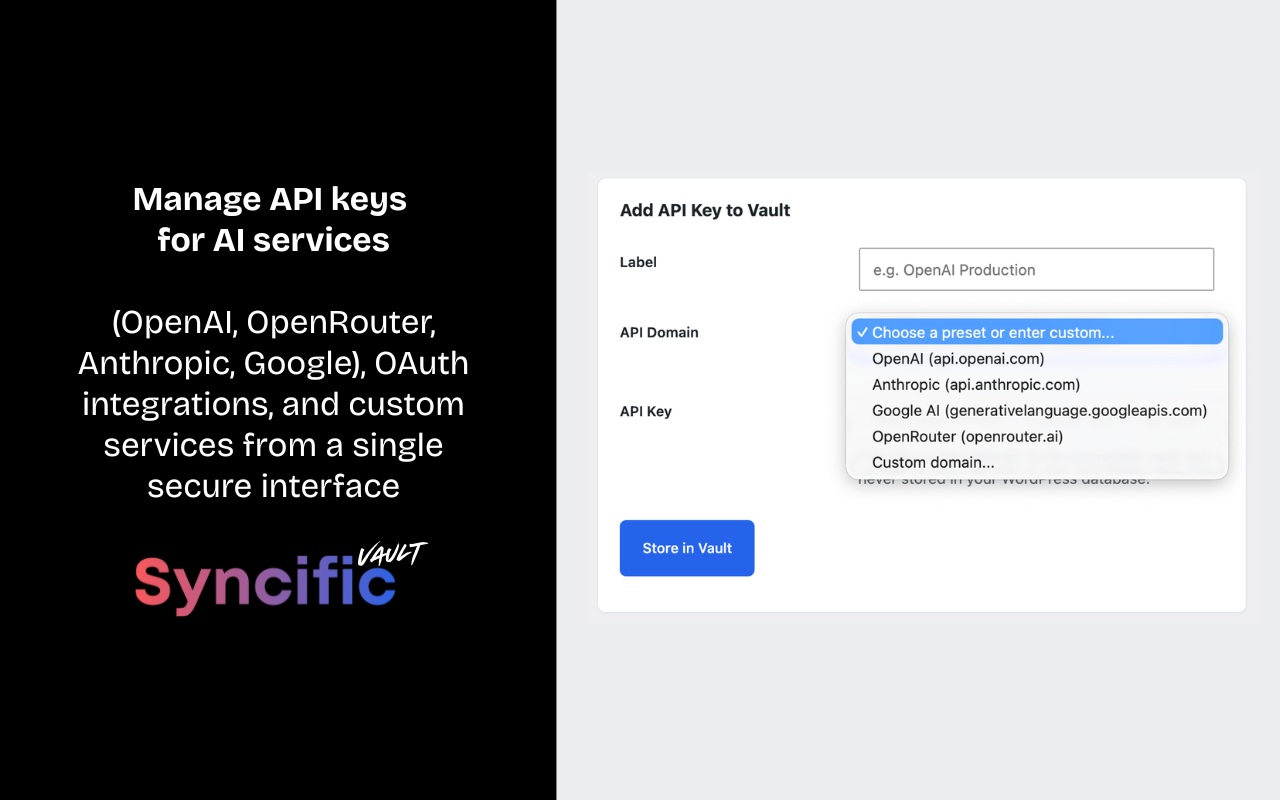
- AI providers: OpenAI, Anthropic, Google AI, OpenRouter
- Any API that uses header-based authentication (custom domain support included)
Sicherheit
- Keys encrypted with AES-256 in an isolated vault file — not a database
- Vault file stored outside the web root with strict file permissions
- Patent-pending broker architecture (US App. No. 19/440,404)
- Keys never stored in wp_options, wp_postmeta, or any WordPress table
- In-memory key retrieval only — credentials are not persisted in any WordPress storage layer (database, transients, or options)
- One-click key rotation — update a key once, every plugin gets the new key instantly
- Rate-limited vault access (60 requests/minute per site)
- Fails open by design — vault outages never break your WordPress site, though AI features dependent on protected keys will fail authentication until the vault is reachable again
Protects against
- Database dumps and backup file exposure
- SQL injection attacks
- Compromised plugins that read wp_options
- Unauthorized phpMyAdmin or database client access
- Hosting provider data breaches
External Service
This plugin relies on the Syncific Vault API, an external broker service operated by Syncific, to store and retrieve encrypted API keys. All requests are sent to the broker endpoint at https://lightsyncpro.com/wp-json/lsp-broker/v1/ — the broker host that Syncific operates for this service.
What the service does: Syncific Vault provides encrypted off-site storage for API keys. Keys are encrypted with AES-256 and stored in an isolated vault file on the Syncific broker server (lightsyncpro.com) — not in your WordPress database.
Welche Daten werden gesendet und wann:
- When you store a key: Your site URL, a hash of your site URL, a per-site authentication token, a single-use verification nonce, the API domain, the API key, a label, and the authentication header name are sent to the broker (
lightsyncpro.com) via HTTPS. The broker then calls your site back once at/wp-json/svault/v1/verifyto confirm site ownership before binding the key. - When a plugin makes an API call to a protected domain: Your site URL hash, per-site token, and the API domain are sent to the broker (
lightsyncpro.com) to retrieve the real key. The key is held in PHP memory only for the duration of the request and is never written to your database. - When you remove a key (or uninstall the plugin): Your site URL hash, per-site token, and the API domain are sent to the broker (
lightsyncpro.com) to remove the key from the vault.
No other user data, site content, or visitor information is ever transmitted.
Service links:
Supported AI Providers
Syncific Vault includes preset support for the following AI provider APIs. This plugin does not connect to these services directly. They are the destination domains whose API keys are protected by Vault. When another plugin on your site makes a request to one of these domains, Syncific Vault intercepts the request and injects the protected key. The traffic to these providers originates from your other plugins (such as AI Engine, ClassifAI, or any plugin you’ve configured), not from Syncific Vault itself.
- OpenAI (api.openai.com) — Terms of Use | Privacy Policy
- Anthropic (api.anthropic.com) — Consumer Terms | Privacy Policy
- Google AI / Gemini (generativelanguage.googleapis.com) — API Terms | Privacy Policy
- OpenRouter (openrouter.ai) — Terms | Privacy
You may also add any other domain through the “Add Custom Domain” option in the plugin settings. Whatever domain you add becomes a protected destination — your other plugins continue to send requests to that domain as they normally would, and Syncific Vault transparently provides the credentials.
Free and open source
Syncific Vault is completely free. No limits on the number of keys you can protect.
Made by Syncific
Syncific Vault is built by the team behind Syncific — the creative asset sync platform. The same patent-pending broker architecture that protects OAuth credentials for Lightroom, Figma, Canva, and Dropbox now protects your API keys.
Installation
- Upload the
syncific-vaultfolder to/wp-content/plugins/ - Aktivieren Sie das Plugin über das „Plugins“-Menü in WordPress
- Go to Settings → Syncific Vault
- Select a preset (OpenAI, Anthropic, etc.) or enter a custom domain
- Paste your API key and click “Store in Vault”
- Copy the placeholder key and paste it into your other plugins’ key fields
- Done — your key is now protected and every plugin works through the vault
Änderungsprotokoll
Adds per-site token binding and broker callback verification, expands the credential scanner to 20 patterns across three tables, and hardens admin input validation. Recommended for all users.
1.0.1
- Added per-site token binding — every vault operation is authenticated by a site-specific secret stored locally, HMAC-verified on the broker
- Added broker-to-site callback verification on first registration — proves site ownership before binding (DNS-pinned, SSRF-protected on the broker)
- Expanded credential scanner from 5 to 20 patterns across wp_options, wp_postmeta, and wp_usermeta — now detects OpenAI, Anthropic, Google AI, OpenRouter, xAI, Replicate, HuggingFace, Stripe, GitHub, AWS, DigitalOcean, Slack, and SendGrid credential shapes
- Hardened input validation across admin AJAX handlers
- Normalized site URL handling to match broker canonical form (lowercase scheme/host, default ports stripped)
- Expanded preset AI provider documentation with provider terms and privacy policy links
- Clarified that the plugin does not connect to AI provider APIs directly — it protects keys for other plugins that do
1.0.0
- Erste Freigabe
- Support for AI API keys (OpenAI, Anthropic, Google AI, OpenRouter) and any custom API
- AES-256 encrypted off-site vault
- Automatic key injection via WordPress http_request_args filter
- Secure placeholder keys for cross-plugin compatibility
- One-click key rotation
- Built-in database scanner to verify protection
- Admin UI with domain presets and custom domain support
- Rate-limited vault access (60 requests/minute per site)
Screenshots
Für Entwickler
Ist das dein Plugin? Zeigen Sie die Zahlen.
Fügen Sie Ihrer Website, Docs oder GitHub Readme ein Live-Badge hinzu. Es wird von selbst aktualisiert - kein Konto erforderlich.
Best Syncific Vault alternatives
Alle AI-Plugins →





Fragen und Antworten
Syncific Vault: quick answers
Gerade Antworten, gezogen von Live WordPress.org Daten.
Quelle: WordPress.org
Is Syncific Vault free?
Yes. Syncific Vault is free to download and use from the official WordPress.org plugin directory.
Is Syncific Vault safe to use in 2026?
Syncific Vault works, but test it on a staging site before relying on it in 2026. Was last updated 6 months ago, and scores 43/100 on our health check.
How many websites use Syncific Vault?
Syncific Vault is active on <10 WordPress websites and has been downloaded 524 times since it launched in May 2026. It was downloaded 112 times in the last 30 days.
Does Syncific Vault work with WordPress 7.1?
Syncific Vault is officially tested up to WordPress 7.0.9, while the latest release is 7.1.5. It may still work, but try it on a staging site first.
What PHP version does Syncific Vault need?
Syncific Vault requires PHP 7.4 or higher. Most hosts run PHP 8.x today, so it works on any modern WordPress hosting.
When was Syncific Vault last updated?
The latest version, 1.0.1, was released on June 1, 2026 (6 months ago).
Who makes Syncific Vault?
Syncific Vault is developed and maintained by lightsyncpro.
What are the best alternatives to Syncific Vault?
The most popular alternatives to Syncific Vault are Elementor Agent Ready Websi… (10M+ installs), Jetpack (3M+ installs) and All in One SEO (2M+ installs).
Angetrieben von PageForge
Eine Vorlage und eine Tabelle. Eine echte Seite für jede Suche.
PageForge Verwandelt jede Zeile eines CSV in eine WordPress-Seite mit eigenem Titel, URL, SEO Felder und Schema entworfen. Kostenlos auf WordPress.org.
- CSV und XLSX, plus Google Sheets auf Beruf und Unternehmen
- seinen eigenen Titel, URL, SEO Felder und Schema für jede Seite
- Arbeitet mit dem Blockeditor, Elementor, Divi und Avada
- Kostenlos auf WordPress.org, keine Kreditkarte