


SQLite Object Cache
A fast persistent object cache backend for the rest of us, powered by SQLite and accelerated by APCu

Sichere Auswahl
Yes — SQLite Object Cache is a safe, well-maintained plugin to use in 2026. It runs on 10K+ sites, is rated 5/5 and was last updated 1 month ago, and scores 90/100 on our health check.
- Bewährt im Maßstab auf 10k + aktiven Standorten
- Loved by users — 5/5 from 51 reviews
- Getestet mit dem neuesten WordPress (7.1)
Wie stapelt es sich?
Side-by-side bei Installationen, Updates, Bewertungen und Support



Tägliche Downloads
Download-Spitzen folgen normalerweise einer neuen Version - jede Website, die automatisch aktualisiert wird, gilt als Download.
Ranglisten
Where SQLite Object Cache stands todayWordPress.org Ranglisten suchen
Live-Position in der Plugin-Suche, Top 100| Stichwort | Position |
|---|---|
| apcu | #3 |
| Zwischenspeicher | #10 |
| Objekt-Cache | #3 |
| Performance | #92 |
| SQLite | #1 |
Versionsübernahme
Anteil aktiver Sites pro Release.
Bewertungsaufschlüsselung
★★★★★★★★★★ 5 from 51 reviews
About SQLite Object Cache
From the official readme · v1.6.6Beschreibung
A persistent object cache helps your site perform well. This one uses the widely available SQLite3 extension, and optionally the igbinary and APCu extensions to php. Many hosting services offer those extensions, and they are easy to install on a server you control.
What is this about?
It’s about making your site’s web server perform better. An object cache does that by reducing the workload on your MariaDB or MySQL database. This is not a page cache; these persistent objects go into a different kind of cache. These objects aren’t chunks of web pages ready for people to view in their browsers, they are data objects for use by the WordPress software.
Caches are ubiquitous in computing, and WordPress has its own caching subsystem. Caches contain short-term copies of the results of expensive database lookups or computations, and allow software to use the copy rather than repeating the expensive operation. This plugin (like other object-caching plugins) extends WordPress’s caching subsystem to save those short-term copies from page view to page view. WordPress’s cache happens to be a memoization cache.
Without a persistent object cache, every WordPress page view must use your MariaDB or MySQL database server to retrieve everything about your site. When a user requests a page, WordPress starts from scratch and loads everything it needs from your database server. Only then can it deliver content to your user. With a persistent object cache, WordPress immediately loads much of the information it needs. This lightens the load on your database server and delivers content to your users faster.
Who should use this?
If your site runs on a single web server machine, and that server provides the SQLite3 and igbinary extensions to php, this plugin will almost certainly make your site work faster. And if that server provides the APCu extension, this plugin uses it too.
Some hosting providers offer redis cache servers. If your provider offers redis, it may be a good choice. You can use it via the Redis Object Cache plugin. Sites using redis have one SQL database and another non-SQL storage server: redis. Other hosting providers offer memcached, which has the Memcached Object Cache plugin. And some large multipurpose cache plugins, such as the LiteSpeed Cache, also offer object caching based on one of those cache server software packages.
The cache-server approach to object caching comes into its own when you have multiple load-balanced web server machines handling your site. SQLite doesn’t work correctly in a multiple-web-server environment.
But, for single-server site configurations, SQLite, possibly assisted by APCu, performs well. And the vast majority of sites are single-server.
APCu
APCu is an in-memory storage medium. It lets php programs, like WordPress, store data in shared memory so it’s very fast to retrieve when needed. If APCu is available on your host server, you can configure this plugin to use it. It reduces the typical cache lookup time to one-fifth or less of the SQLite lookup time, which is itself a few tens of microseconds. Performance counts, especially on busy web sites.
Please look at Installation to learn how to configure this plugin to use APCu. The plugin works fast without it, and faster with it.
WP-CLI: Even if APCu is in use, caching with SQLite is necessary when your web site uses WP-CLI, because WP-CLI programs do not have access to the APCu cache. This plugin writes all cached data both to APCu and to SQLite and makes sure the two are synchronized.
WP-CLI
You can control this plugin via WP-CLI once you activate it. Please type this command into your shell for details.
wp help sqlite-object-cache
Credits
Thanks to Till Krüss. His Redis Object Cache plugin serves as a model for this one. And thanks to Ari Stathopoulos and Jonny Harris for reviewing this. Props to Matt Jones for finding and fixing a bug that appeared on a heavily loaded system. Thanks to Massimo Villa for testing help, and to nickchomey for a comprehensive code review. All defects are, of course, entirely the author’s responsibility.
And thanks to JetBrains for the use of their software development tools, especially PhpStorm. It’s hard to imagine how a plugin like this one could be developed without PhpStorm’s tools for exploring epic code bases like WordPress’s.
How can I learn more about making my WordPress site more efficient?
We offer several plugins to help with your site’s database efficiency. You can read about them here.
Installation
For this plugin to work for you, your server must have the SQLite3 extension to php installed.
If you have the igbinary and APCu extensions, this plugin uses them to work more efficiently. But it works without them.
Installing “SQLite Object Cache” can be done either by searching for “SQLite Object Cache” via the “Plugins > Add New” screen in your WordPress dashboard, or by using the following steps:
- Download the plugin via WordPress.org
- Upload the ZIP file through the ‘Plugins > Add New > Upload’ screen in your WordPress dashboard
- Aktivieren Sie das Plugin über das „Plugins“-Menü in WordPress
Or, use these WP-CLI commands to install the plugin, secure it, activate it, and set the cache size to 32MiB.
wp plugin install sqlite-object-cache
wp config set WP_CACHE_KEY_SALT $(openssl rand -base64 12)
wp plugin activate sqlite-object-cache
wp sqlite-object-cache size 32
The plugin offers a few optional settings for your wp-config.php file. Do not change them while the plugin is activated. If you change them, deactivate the plugin first, then change them, then reactivate the plugin.
- WP_SQLITE_OBJECT_CACHE_SERIALIZE. When true, this forces the plugin to use ‘s serialize() scheme to store cached data in SQLite. If this is not set, the plugin uses the more efficient igbinary scheme if it is available.
- WP_SQLITE_OBJECT_CACHE_DB_FILE. This is the SQLite file pathname. The default is
…/wp-content/.ht.object_cache.sqlite. Use this if you want to place the SQLite cache file outside your document root. - WP_SQLITE_OBJECT_CACHE_TIMEOUT. This is the SQLite timeout in milliseconds. Default: 5000. (Notice that the times shown in the Statistics tab are in microseconds if you compare them to this timeout setting.)
- WP_SQLITE_OBJECT_CACHE_JOURNAL_MODE. This is the SQLite journal mode. Default: ‘WAL’. Possible values DELETE | TRUNCATE | PERSIST | MEMORY | WAL | WAL2 | NONE. (Not all SQLite3 implementations handle WAL2.)
- WP_SQLITE_OBJECT_CACHE_APCU. If true enables cache acceleration with APCu RAM. This setting can be updated from the plugin’s Settings page.
- WP_SQLITE_OBJECT_CACHE_CHECKPOINT_FREQ. How often, probabilistically, to force checkpointing SQLite3. Make this number smaller on busy sites if your WAL file gets too long. Default 2000.
- WP_CACHE_KEY_SALT. Set this to a hard-to-guess random value to make your cache keys harder to guess. This setting works for other cache plugins as well.
Configuring the cache key salt
When multiple sites share the same server hardware and software, they can sometimes share the same cache data. Setting WP_CACHE_KEY_SALT to a hard-to-guess random value for each site makes it much harder for one site to get another site’s data. This works for other cache plugins too. Notice that this WP_CACHE_KEY_SALT value must be set, in your site’s wp-config.php file, before activating any cache plugin, including page caches and persistent object caches.
To set the value put a line like this in wp-config.php.
define( 'WP_CACHE_KEY_SALT', 'Random_t6xJix' );
Of course, use your own random value, not the one in this example. You can get one from your Linux command line shell with the openssl rand -base64 12. Or, if you use WP-CLI you can set the value directly with
wp config set WP_CACHE_KEY_SALT $(openssl rand -base64 12)
Configuring and Using APCu
APCu is an in-memory storage medium. If APCu is available on your host server, you can configure this plugin to use it. There is an option to enable it on the plugin’s Settings page. Or you can do it manually. Put a WP_SQLITE_OBJECT_CACHE_APCU value of true into your wp-config.php file. You can use this WP-CLI command to do that.
wp config set --raw WP_SQLITE_OBJECT_CACHE_APCU true
Or, you can edit your wp-config.php file to add this line.
define( 'WP_SQLITE_OBJECT_CACHE_APCU', true );
Änderungsprotokoll
Avoid functions requiring WordPress to be initialized when handling cache initialization errors.
1.6.6
Avoid functions requiring WordPress to be initialized when handling cache initialization errors. Props to @etermed.
1.6.5
- Support plugins that use set_transient or other cache operations in their destructors.
1.6.4
- Set the permissions of SQLite’s files (including the -wal and -shm files) to group-writeable to make WL-CLI more convenient.
- Handle incrementing and decrementing expiring cache entries correctly, and handle expiration around runtime flush correctly.
- Selectively flush the APCu cache upon wp_flush_cache_group.
- Improve the cache key display on the statistics tab.
1.6.3
A race condition caused expired cache entries to be copied to APCu incorrectly sometimes. This is corrected. Props to @pobrehablador for finding this defect.
1.6.2
- Use PRAGMA wal_checkpoint(TRUNCATE) sometimes to avoid excessively large re-used WAL files.
- Checkpoint more frequently.
- Health check for OPcache (not APCu) saturation.
1.6.1
- Add an optional Flush Object Cache button to the admin bar. Props to Nick Chomey.
- Fix a defect in testing for writability of the .sqlite files. Props to @powerkiki: Adrien Crivelli.
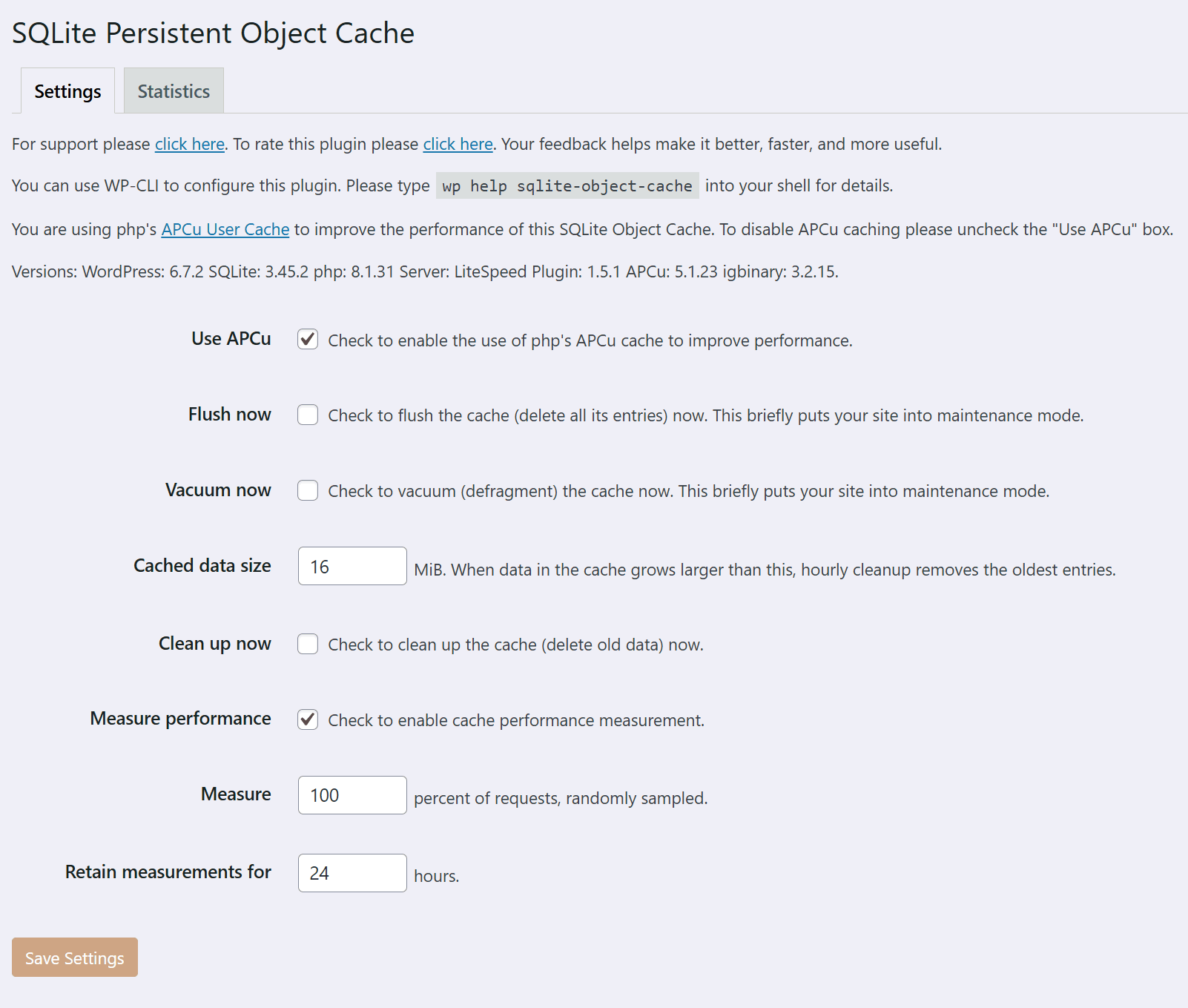
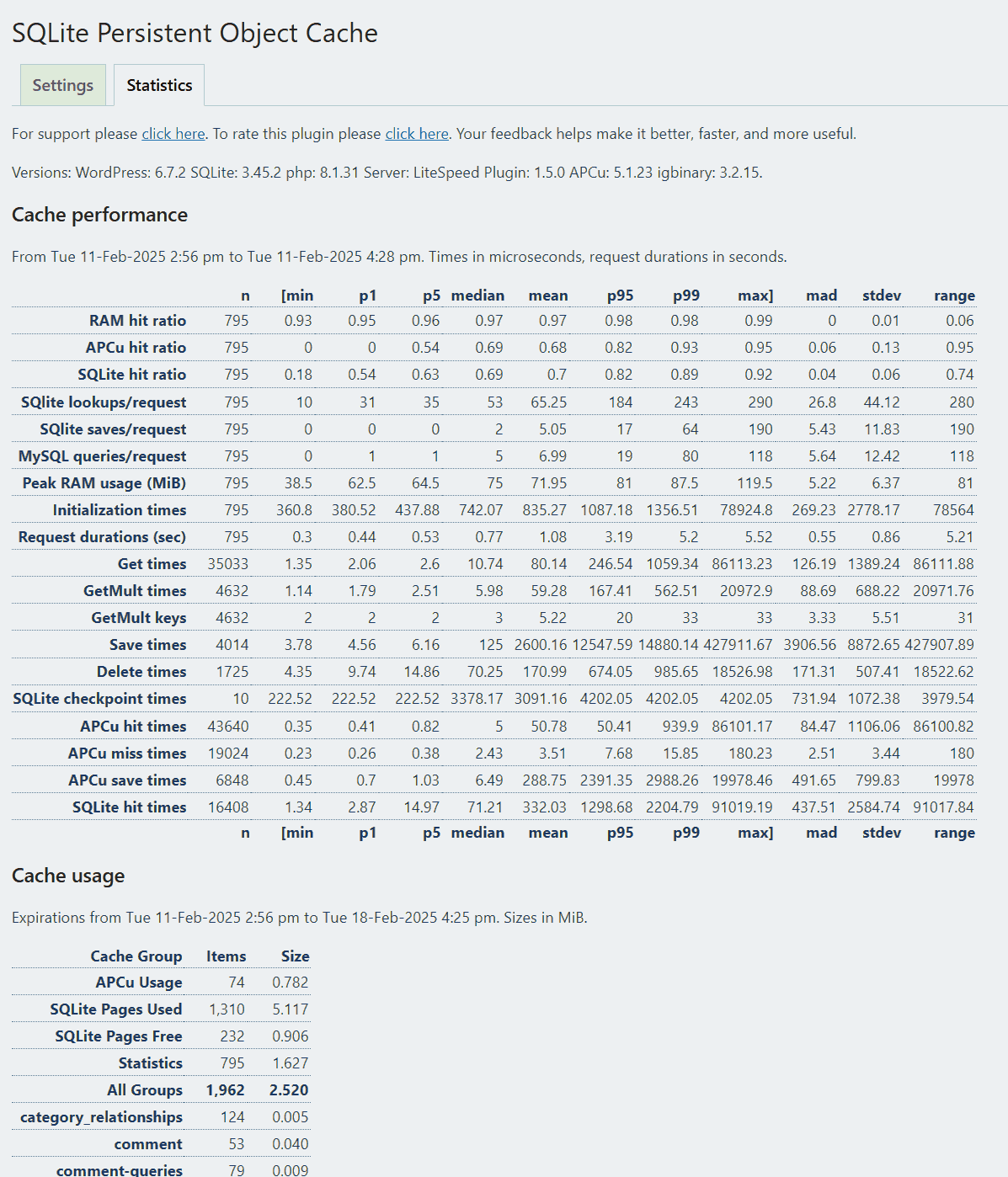
Screenshots
Für Entwickler
Ist das dein Plugin? Zeigen Sie die Zahlen.
Fügen Sie Ihrer Website, Docs oder GitHub Readme ein Live-Badge hinzu. Es wird von selbst aktualisiert - kein Konto erforderlich.
Best SQLite Object Cache alternatives
All apcu plugins →

Fragen und Antworten
SQLite Object Cache: quick answers
Gerade Antworten, gezogen von Live WordPress.org Daten.
Quelle: WordPress.org
Is SQLite Object Cache free?
Yes. SQLite Object Cache is free to download and use from the official WordPress.org plugin directory.
Is SQLite Object Cache safe to use in 2026?
Yes — SQLite Object Cache is a safe, well-maintained plugin to use in 2026. It runs on 10K+ sites, is rated 5/5 and was last updated 1 month ago, and scores 90/100 on our health check.
How many websites use SQLite Object Cache?
SQLite Object Cache is active on 10K+ WordPress websites and has been downloaded 205,370 times since it launched in December 2022. It was downloaded 12,374 times in the last 30 days.
Does SQLite Object Cache work with WordPress 7.1?
Yes. The developer has tested SQLite Object Cache up to WordPress 7.1.5, the latest release. It requires WordPress 5.9 or newer.
What PHP version does SQLite Object Cache need?
SQLite Object Cache requires PHP 5.6 or higher. Most hosts run PHP 8.x today, so it works on any modern WordPress hosting.
When was SQLite Object Cache last updated?
The latest version, 1.6.6, was released on October 21, 2026 (1 month ago).
Who makes SQLite Object Cache?
SQLite Object Cache is developed and maintained by OllieJones.
What are the best alternatives to SQLite Object Cache?
The most popular alternatives to SQLite Object Cache are APCu Manager (10K+ installs), atec Cache APCu (3K+ installs) and atec Cache Info (1K+ installs).
Angetrieben von PageForge
Eine Vorlage und eine Tabelle. Eine echte Seite für jede Suche.
PageForge Verwandelt jede Zeile eines CSV in eine WordPress-Seite mit eigenem Titel, URL, SEO Felder und Schema entworfen. Kostenlos auf WordPress.org.
- CSV und XLSX, plus Google Sheets auf Beruf und Unternehmen
- seinen eigenen Titel, URL, SEO Felder und Schema für jede Seite
- Arbeitet mit dem Blockeditor, Elementor, Divi und Avada
- Kostenlos auf WordPress.org, keine Kreditkarte