


Smart Passworded Pages
Create central "Enter your password" page and the password entered determine which page the user sees next.

Mit Vorsicht verwenden
Smart Passworded Pages works, but test it on a staging site before relying on it in 2026. It runs on 2K+ sites, is rated 4.8/5 and was last updated 9 years ago, and scores 44/100 on our health check.
- Loved by users — 4.8/5 from 21 reviews
- Kein Update in 8 Jahren
- Nur getestet bis WordPress 4.2 (letzt ist 7.1)
Wie stapelt es sich?
Side-by-side bei Installationen, Updates, Bewertungen und Support



Tägliche Downloads
Download-Spitzen folgen normalerweise einer neuen Version - jede Website, die automatisch aktualisiert wird, gilt als Download.
Ranglisten
Where Smart Passworded Pages stands todayWordPress.org Ranglisten suchen
Live-Position in der Plugin-Suche, Top 100| Stichwort | Position |
|---|---|
| login | >100 |
| member | >100 |
| Seite | >100 |
| password | >100 |
| Sicherheit | >100 |
Versionsübernahme
Anteil aktiver Sites pro Release.
Bewertungsaufschlüsselung
★★★★★★★★★★ 4.8 from 21 reviews
About Smart Passworded Pages
Aus der offiziellen Readme · V2.0.0Beschreibung
The Smart Passworded Pages plugin enhances WordPress by allowing the creation of central login pages that grant access to any number of passworded child pages. In this fashion you can give each client/member/organization a central place to enter a password and they will be taken to the page that has only their information.
The password field is displayed as a field followed by a button with customizable text. The form is can be uniquely stylized with CSS. The child pages can in turn link to other pages protected with the same password and the password will not need to be re-entered.
To add the password field to a parent page, simply enter the short code
[smartpwpages]
If you wish to assign a unique label to the submit button or give the form a unique ID for CSS identification, the attributes in the following example can be used:
[smartpwpages label=\”Login\” ID=\”sppForm1\”]
This plugin doesn’t add the ability to add passwords to pages. WordPress has that built in. On the right hand side of the page editing screen in WordPress, you can change the visibility to Password protected and enter in a password. If you are unfamiliar with using passwords in WordPress, you might want to read this page first: https://codex.wordpress.org/Using_Password_Protection
This plugin does make the password handling smarter and enhances it so that you can enter one password on a parent page and gain access to all the children pages using that password. If you don’t know what children pages or sub-pages are, you might want to read about it here: https://codex.wordpress.org/Pages#Creating_Pages
You can find out more about the Smart Passworded Pages plugin here: http://thecodecave.com/smart-passworded-pages-plugin/
Installation
Extract the zip file and just drop the contents in the wp-content/plugins/ directory of your WordPress installation and then activate the Plugin from Plugins page.
Änderungsprotokoll
2.0
- Updated to current version of WordPress
- Addressed FAQs
- Added ability to specify the parent form in the short code
- Escaped some variables to make the shortcode more secure
1.1.7
- Fixed another warning.
1.1.6
- Fixed several warnings and possible version compatibility issues.
1.1.5
- Fixed an error on the Invalid Password response
1.1.4
- Updated header to 3.8.1 compatibility
- Improved documentation
- NOTE: Released on the same day 1.1.3 was publicly checked in. This made 3.6+ compatibility universally available.
1.1.3
- Added 3.6 compatiblity
- Improved internationalization
- Added support for plugins that replace the default hashing protocol
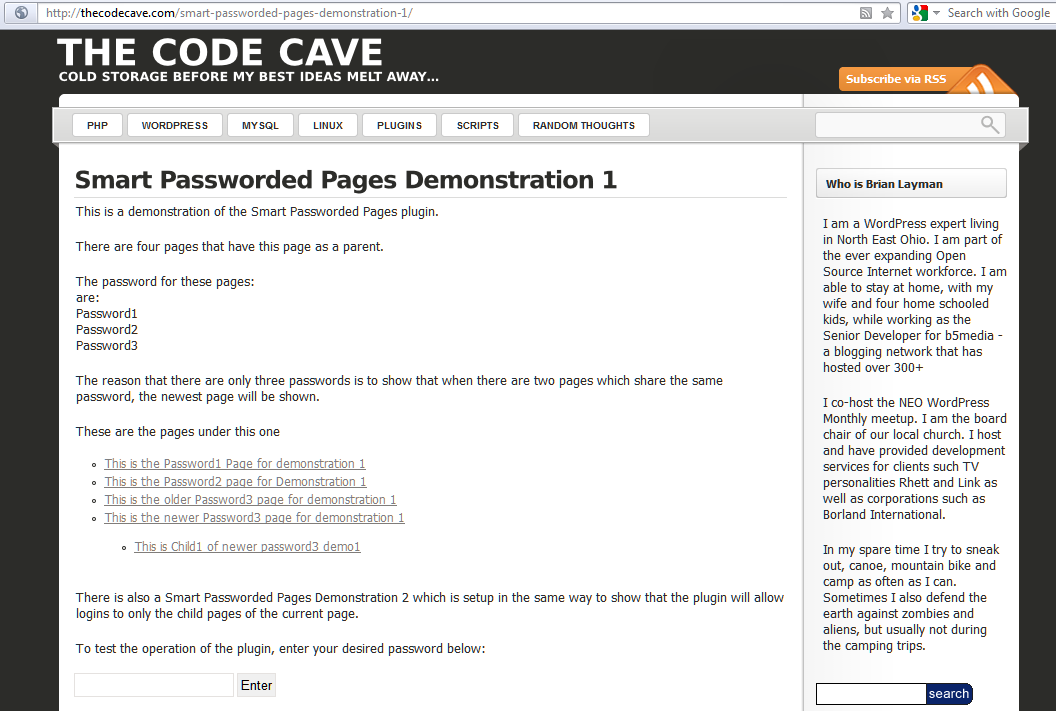
Screenshots


Für Entwickler
Ist das dein Plugin? Zeigen Sie die Zahlen.
Fügen Sie Ihrer Website, Docs oder GitHub Readme ein Live-Badge hinzu. Es wird von selbst aktualisiert - kein Konto erforderlich.
Best Smart Passworded Pages alternatives
All login plugins →





Fragen und Antworten
Smart Passworded Pages: quick answers
Gerade Antworten, gezogen von Live WordPress.org Daten.
Quelle: WordPress.org
Is Smart Passworded Pages free?
Yes. Smart Passworded Pages is free to download and use from the official WordPress.org plugin directory.
Is Smart Passworded Pages safe to use in 2026?
Smart Passworded Pages works, but test it on a staging site before relying on it in 2026. It runs on 2K+ sites, is rated 4.8/5 and was last updated 9 years ago, and scores 44/100 on our health check.
How many websites use Smart Passworded Pages?
Smart Passworded Pages is active on 2K+ WordPress websites and has been downloaded 67,371 times since it launched in June 2012. It was downloaded 466 times in the last 30 days.
Does Smart Passworded Pages work with WordPress 7.1?
Smart Passworded Pages is officially tested up to WordPress 4.2.39, while the latest release is 7.1.5. It may still work, but try it on a staging site first.
When was Smart Passworded Pages last updated?
The latest version, 2.0.0, was released on November 28, 2017 (9 years ago).
Who makes Smart Passworded Pages?
Smart Passworded Pages is developed and maintained by Brian Layman.
What are the best alternatives to Smart Passworded Pages?
The most popular alternatives to Smart Passworded Pages are WPS Hide Login (2M+ installs), Loginizer (1M+ installs) and Security Optimizer (1M+ installs).
Angetrieben von PageForge
Eine Vorlage und eine Tabelle. Eine echte Seite für jede Suche.
PageForge Verwandelt jede Zeile eines CSV in eine WordPress-Seite mit eigenem Titel, URL, SEO Felder und Schema entworfen. Kostenlos auf WordPress.org.
- CSV und XLSX, plus Google Sheets auf Beruf und Unternehmen
- seinen eigenen Titel, URL, SEO Felder und Schema für jede Seite
- Arbeitet mit dem Blockeditor, Elementor, Divi und Avada
- Kostenlos auf WordPress.org, keine Kreditkarte