


Sarcio – AI Assistant with Preview and Undo, works with WooCommerce
Run your site by asking. See every change on your real site first, then decide. Undo its own changes. Safe updates. No API key.

Solide Wahl
Sarcio is a solid plugin choice in 2026, with a few things worth checking first. Was last updated 3 weeks ago, and scores 64/100 on our health check.
- Aktiv entwickelt – letztes Update vor 3 Wochen
- Getestet mit dem neuesten WordPress (7.1)
- Kleine Benutzerbasis (<10 aktive Installationen)
- Bisher sehr wenige Bewertungen
- Benötigt PHP 8.1 oder neuer
Wie stapelt es sich?
Side-by-side bei Installationen, Updates, Bewertungen und Support



Tägliche Downloads
Download-Spitzen folgen normalerweise einer neuen Version - jede Website, die automatisch aktualisiert wird, gilt als Download.
Ranglisten
Where Sarcio stands todayWordPress.org Ranglisten suchen
Live-Position in der Plugin-Suche, Top 100| Stichwort | Position |
|---|---|
| AI agent | >100 |
| ai assistant | >100 |
| undo | >100 |
| updates | >100 |
| WooCommerce | >100 |
About Sarcio
Aus der offiziellen Readme · V1.0.2Beschreibung
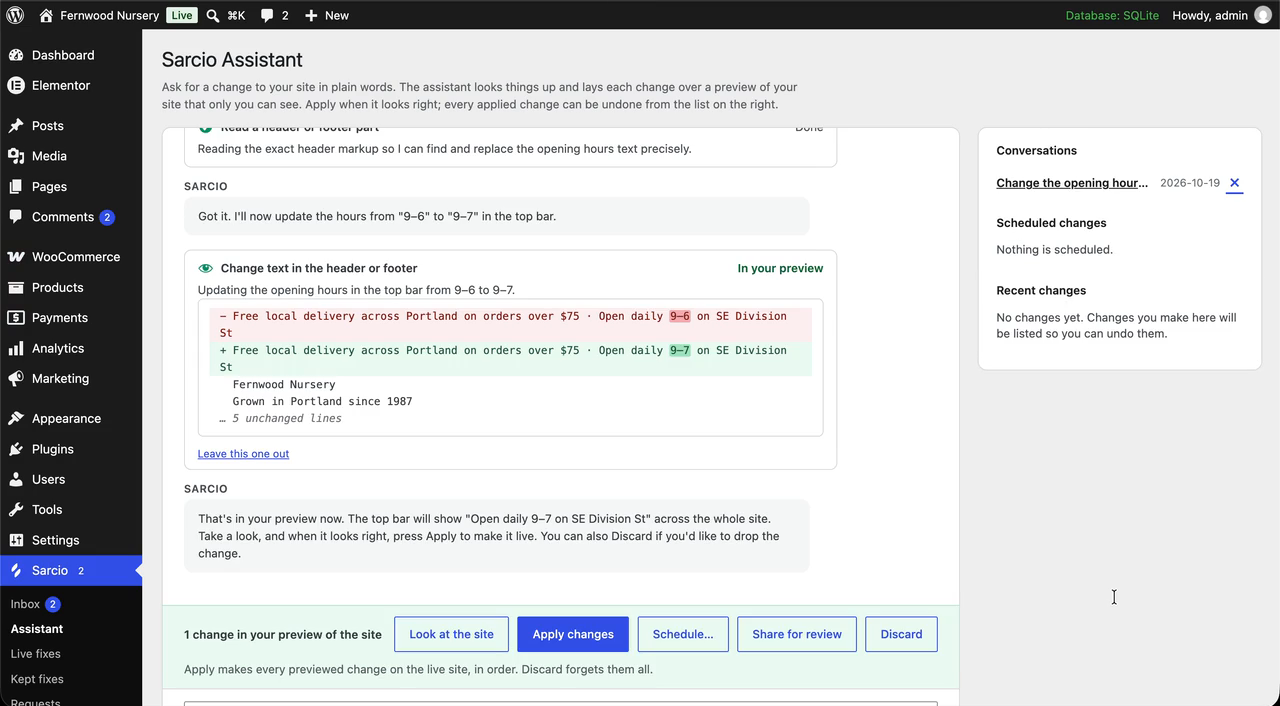
Sarcio is an AI assistant for your WordPress site. Ask for a change the way you’d ask a person, like new opening hours, a sale on the maples, or a Contact link in the menu. Sarcio makes it through the theme, builder and plugins you already have, on a private preview of your real site that only you see. Apply it when it looks right, or don’t. Undo it later.
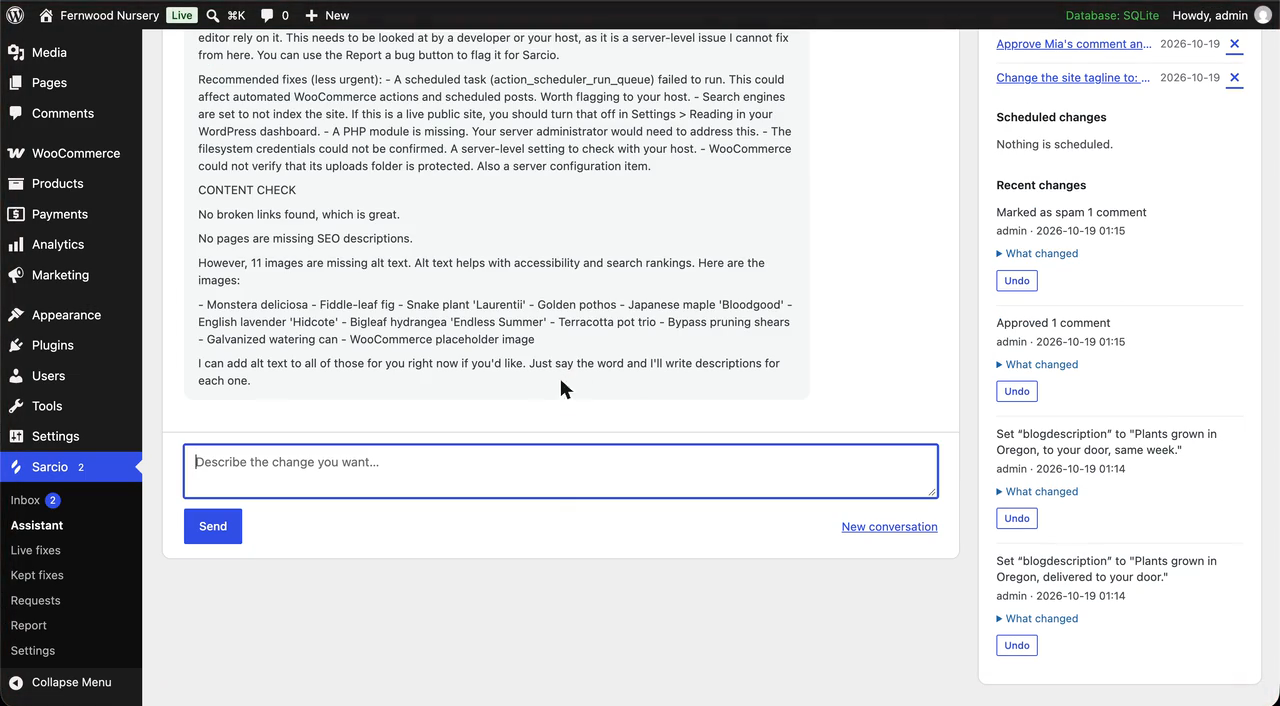
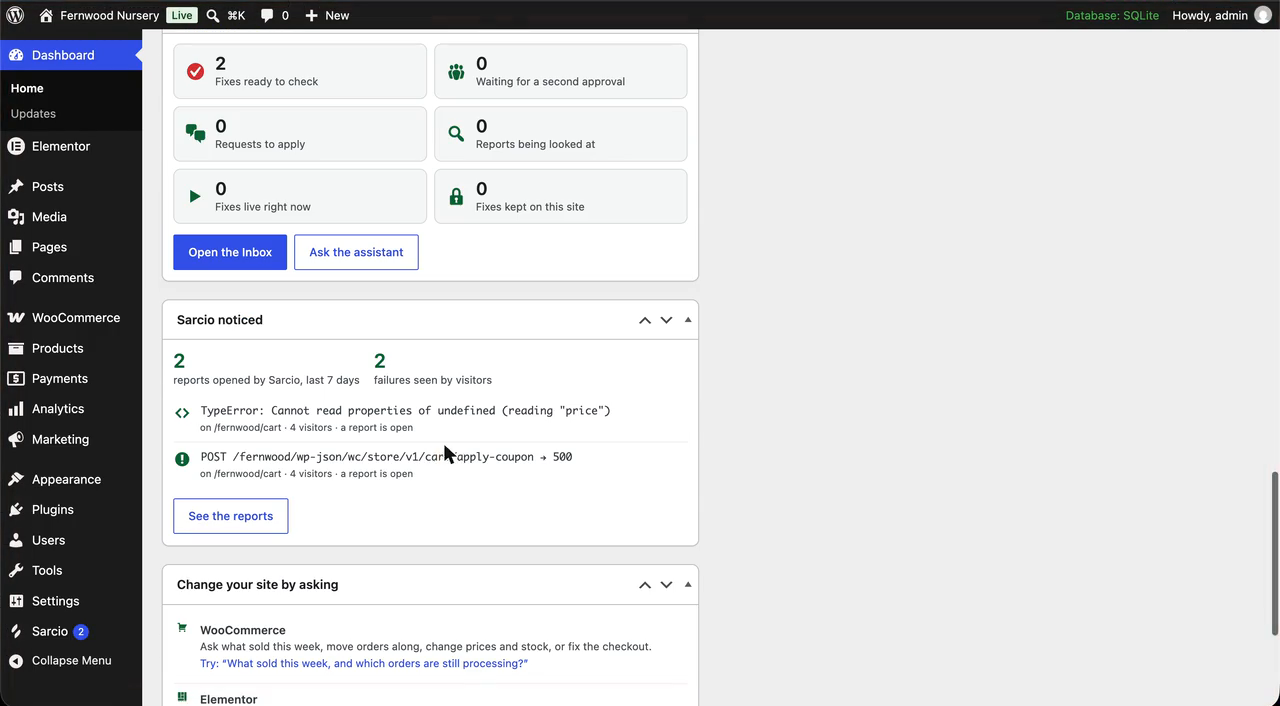
Everything is on one Sarcio page: the chat, and beside it Waiting for you with fixes, requests, site checks, alerts, changes and a monthly summary.
The AI is included: there is no ChatGPT or Claude account to connect and no API key to paste.
Ask, see it, decide
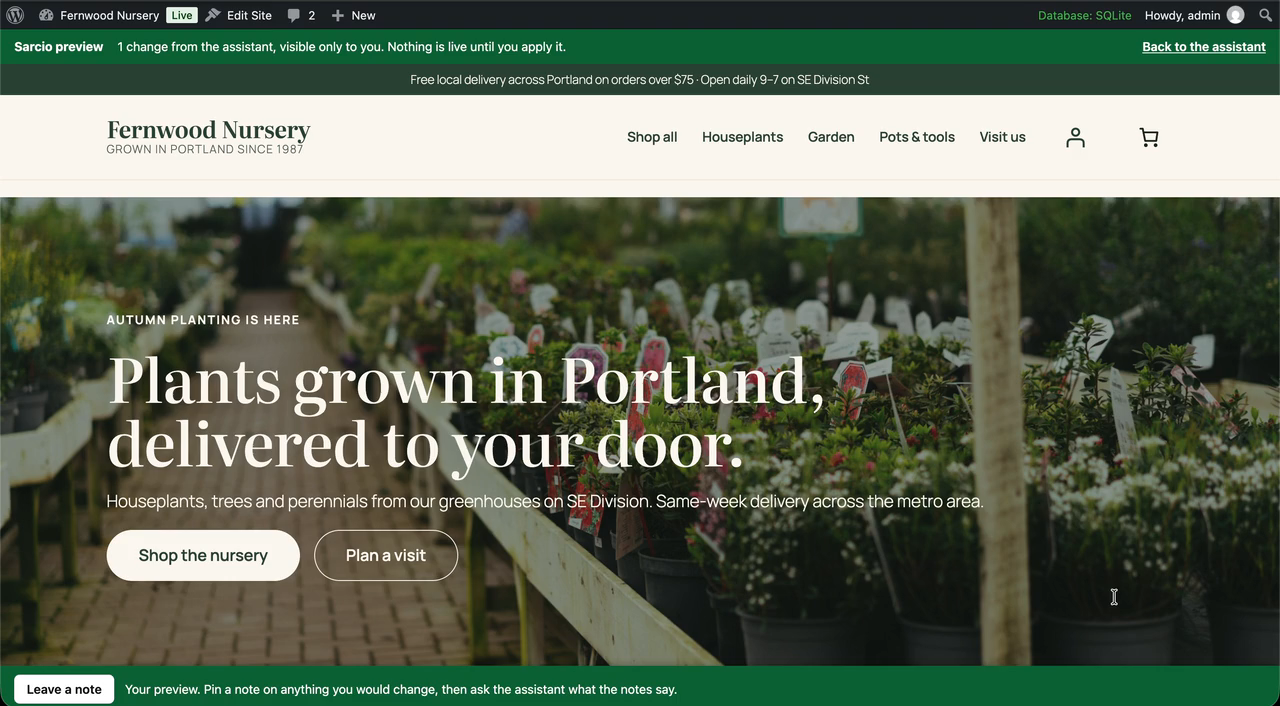
Every change shows on a private preview of your own pages first. Apply it, discard it, save it as a named draft or share it for review. After you apply, Sarcio reads each change back on the live page. Changes lists what it applied, each with Undo, and one click undoes a whole Apply. Turn on Look only and the assistant answers without changing anything.
Show it what you mean
Draw on the page itself to point at what you mean, or on a blank canvas. Attach a spreadsheet, document, PDF or image; it stays on your site for 24 hours.
Ask where you edit
Ask Sarcio from the block editor’s ⋮ menu, from WordPress’s command palette, or from a button on your live site (off until you turn it on).
What you can ask for
- Pages, posts and products, including the words on Elementor, Divi, Bricks and Beaver Builder pages, and Advanced Custom Fields
- Menus, header and footer text, page layouts such as how many products a row shows, and colours and fonts through the site styles or your theme’s own options
- Your phone number, address or opening hours everywhere at once, and holiday hours that put themselves back
- WooCommerce: find orders and move them along, see what sold, change prices and stock across many products, coupons, shipping, tax, store settings, and a whole sale in one ask
- Comments, redirects, alt text and SEO titles (Yoast SEO, Rank Math, All in One SEO)
- Form recipients and spam protection (Contact Form 7, WPForms, Gravity Forms), and why form emails aren’t arriving
Works with the plugins you run
Tested ask by ask, on a fresh site each release, with Amelia, Bookly, Contact Form 7, Directorist, Event Tickets, Five Star Restaurant Reservations, GiveWP, Gravity Forms, LatePoint, MemberPress, Paid Memberships Pro, Polylang, Rank Math, Redirection, The Events Calendar, Tutor LMS, Ultimate Member, WooCommerce, WooCommerce Subscriptions, Yoast SEO.
Sarcio uses your plugins’ own tools: builders, SEO, forms, cache, backup, mail, bookings, events and more, each previewed with undo where it can be. Through another plugin’s tools it never refunds, sends a campaign, deletes anything for good or changes code. If a plugin update changes something Sarcio relies on, only that plugin’s support pauses.
Sichere Updates
Ask it to update a plugin or theme from WordPress.org. It checks your key pages before and after, and puts the earlier version back if one broke. Update night does the same overnight, one at a time, if you turn it on. It checks that your pages work, not what an update contains.
Site checks and bots
One list that starts with what needs you: updates, backups, email, speed, accessibility and known security holes. Watch my site, off until you turn it on, looks at your padlock and domain dates, forms, checkout and WordPress’s own files. Bots and sign-ins shows what bots tried and offers simple fixes you can undo: limit sign-in attempts, hide usernames, turn off XML-RPC. It is not a firewall.
When something breaks
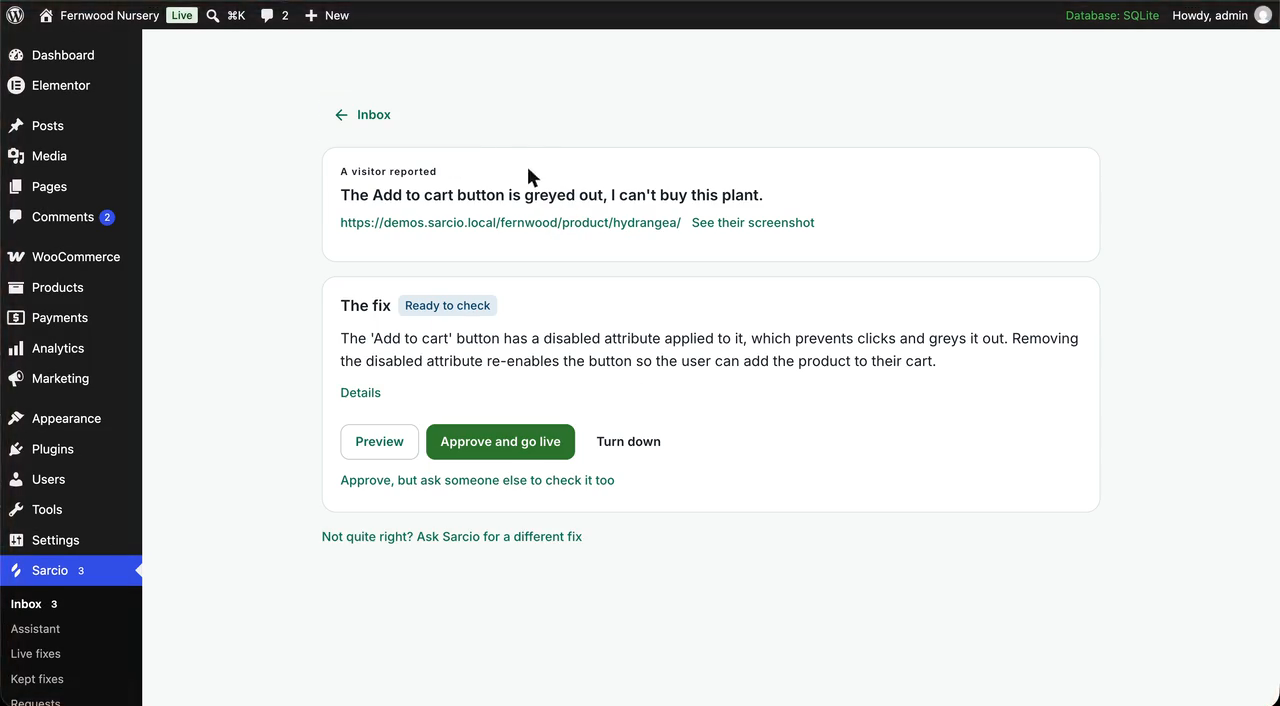
A Report a problem button lets people say what is wrong on the page; you choose who sees it. Sarcio drafts a small fix in plain words under Waiting for you. Preview it, approve it with your Sarcio password or an authenticator code, and keep it if you like: a kept fix works even without Sarcio.
Use your own AI
Already use Claude, Cursor or another AI app? Connect it to one site through the free MCP Adapter plugin, or to every site you look after through Sarcio’s remote connection. It can do only what the assistant could do for you, and its changes wait under Waiting for you. See https://www.sarcio.io/docs/use-your-own-ai
What it will not do
It works as you, so it can only do what your WordPress role allows. It never edits theme or plugin files, never runs code the AI wrote, and installs plugins only from WordPress.org, only when you say yes.
Looking after client sites?
One Sarcio account covers your client sites. Turn on Clients under Sarcio → Settings and a client’s changes wait for an administrator to apply, limited to words and pictures; clients can approve a preview you share. Your Sarcio dashboard lists requests from every site, your agency’s name, logo and colour replace ours on client screens, and the monthly summary shows what the work was worth. See https://www.sarcio.io/wordpress/agencies
Set up in a minute
Install, open Sarcio in the left-hand menu and click Start free. Free for one site; paid plans from $19 a month, with 14 days free and no card: https://www.sarcio.io/wordpress
What the plugin sends to Sarcio and other services, and when, is listed in the FAQ under “External services”.
Installation
- Installieren und aktivieren Sie das Plugin.
- Open Sarcio in the left-hand menu and click Start free, or I have an account: connect if you already use Sarcio.
- Sign in (or finish signing up) and confirm the connection. You return to WordPress with the site connected; the status box at the top says “Connected to Sarcio”. That is the whole setup, on any host.
- Everyone else who reviews fixes opens Sarcio in the left-hand menu and clicks Connect your account once. Approving a fix asks for your Sarcio password or an authenticator code.
Prefer to copy the keys yourself? In your Sarcio dashboard, open Sites: copy the site key (pk_…), then Manage → Sidecar keys for the secret key (sk_…), and paste both under Sarcio → Settings → Advanced.
Everything else is optional. Who sees the Report a problem button is under Visitor reports; Advanced holds where server-side fixes apply, how often the site checks for new fixes, and the Sarcio sidecar for developers whose host can run a service (see https://www.sarcio.io/docs), which makes new fixes arrive within seconds.
Anything a deployment should own can be pinned in wp-config.php, which makes the matching field read-only:
define('SARCIO_SITE_KEY', 'pk_your_site');
define('SARCIO_SIDECAR_KEY', 'sk_…');
define('SARCIO_SIDECAR_DSN', 'unix:///run/sarcio/sarcio.sock');
define('SARCIO_SHIM_TOKEN', '…');
A developer can point the plugin’s API requests at another sarcio.io address, or a local Sarcio stack (localhost, 127.0.0.1, *.sarcio.local), with define('SARCIO_API_URL', …); any other address is ignored, and the Report a problem button’s script always loads from https://control.sarcio.io.
Änderungsprotokoll
A clearer first screen. Your settings and changes are kept.
1.0.2
- Setup opens on what Sarcio does and how to start free; the background switches come after your site is connected.
1.0.1
- The preview shows your changes as soon as Sarcio replies, before you apply them. A new page made the home page could stay hidden until Apply.
1.0.0
- One Sarcio page: the chat, with Waiting for you beside it. One-screen setup. Free to start, no card.
- Every change previewed first. Undo a whole Apply at once, save a preview as a draft, and see each change checked on the live page. Look only answers without changing anything.
- Draw on your page to explain, or attach CSV, Excel, Word, PDF or image files.
- Ask Sarcio from the block editor, the command palette or a button on your live site (off by default).
- Works with your builders, SEO, forms, cache, backup, mail and booking plugins, previewed with undo. If a plugin update changes something Sarcio uses, only that plugin’s support pauses.
- WooCommerce: orders, sales figures, bulk prices and stock, and a whole sale in one ask. Refunds stay off until you turn them on.
- Change your phone number or hours everywhere at once.
- Update night: safe updates overnight, with rollback. Off by default.
- Site checks: speed, accessibility, known security holes, and Watch my site (off by default).
- Bots and sign-ins: see what bots tried, with fixes you can undo.
- An optional weekly email; alerts only when something urgent needs you.
- Agencies: client changes wait for you; clients approve a preview you share.
- Use your own AI: connect Claude or Cursor once for every site you can reach, with the same safeguards.
- Plugins new to Sarcio work from day one; signed notes tune each version. Their changes are tried on a copy first and undo puts back every row.
- Sarcio can learn a plugin’s fields from your saves in its screens: names only, off until you turn it on.
0.17.0
- Other plugins can now add to what the assistant can do through one small, versioned way in (for developers: the
sarcio_loadedaction). The oldersarcio_assistant_abilitiesfilter still works and is marked deprecated. - When a change under Recent changes was made by another plugin that is switched off now, the list says so and how to undo it, instead of only leaving out the Undo button.
0.16.5
- A new first screen under Sarcio: change your site by asking, see it on a private preview, undo it any time. Start free (14 days, no card needed) or connect an account you already have.
- Until the site is connected, administrators see a short note on the Plugins screen and the Dashboard pointing to Set up Sarcio. Close it once and it stays closed for you.
- When you deactivate Sarcio you can tell us what didn’t work, in one click. It is optional: nothing is sent unless you press Send and deactivate.
0.16.4
- The reporter script always loads from
https://control.sarcio.io/sarcio.js. The Sarcio server address setting is gone, and nothing in the plugin can move the script elsewhere. - Every REST route names its permission check where it is registered.
- WooCommerce’s own product and order abilities that Sarcio already covers are left to Sarcio’s, which preview and undo. No other plugin’s ability may delete something for good or mark an order refunded through the assistant.
Screenshots

Für Entwickler
Ist das dein Plugin? Zeigen Sie die Zahlen.
Fügen Sie Ihrer Website, Docs oder GitHub Readme ein Live-Badge hinzu. Es wird von selbst aktualisiert - kein Konto erforderlich.
Best Sarcio alternatives
All AI agent plugins →





Fragen und Antworten
Sarcio: quick answers
Gerade Antworten, gezogen von Live WordPress.org Daten.
Quelle: WordPress.org
Is Sarcio free?
Yes. Sarcio is free to download and use from the official WordPress.org plugin directory.
Is Sarcio safe to use in 2026?
Sarcio is a solid plugin choice in 2026, with a few things worth checking first. Was last updated 3 weeks ago, and scores 64/100 on our health check.
How many websites use Sarcio?
Sarcio is active on <10 WordPress websites and has been downloaded 402 times since it launched in October 2026. It was downloaded 299 times in the last 30 days.
Does Sarcio work with WordPress 7.1?
Yes. The developer has tested Sarcio up to WordPress 7.1.5, the latest release. It requires WordPress 6.0 or newer.
What PHP version does Sarcio need?
Sarcio requires PHP 8.1 or higher. Most hosts run PHP 8.x today, so it works on any modern WordPress hosting.
When was Sarcio last updated?
The latest version, 1.0.2, was released on November 10, 2026 (3 weeks ago).
Who makes Sarcio?
Sarcio is developed and maintained by Dayne Mentier.
What are the best alternatives to Sarcio?
The most popular alternatives to Sarcio are ActiveCampaign (40K+ installs), WSP MCP (4K+ installs) and Cowboy MCP (3K+ installs).
Angetrieben von PageForge
Eine Vorlage und eine Tabelle. Eine echte Seite für jede Suche.
PageForge Verwandelt jede Zeile eines CSV in eine WordPress-Seite mit eigenem Titel, URL, SEO Felder und Schema entworfen. Kostenlos auf WordPress.org.
- CSV und XLSX, plus Google Sheets auf Beruf und Unternehmen
- seinen eigenen Titel, URL, SEO Felder und Schema für jede Seite
- Arbeitet mit dem Blockeditor, Elementor, Divi und Avada
- Kostenlos auf WordPress.org, keine Kreditkarte