


PuntoMappa
Create interactive image maps with editable hotspots, custom text and photos, or existing WordPress posts. Free, with no external service required.

Solide Wahl
PuntoMappa is a solid plugin choice in 2026, with a few things worth checking first. Was last updated 1 month ago, and scores 64/100 on our health check.
- Actively developed — last update 1 month ago
- Getestet mit dem neuesten WordPress (7.1)
- Kleine Benutzerbasis (<10 aktive Installationen)
- Bisher sehr wenige Bewertungen
Wie stapelt es sich?
Side-by-side bei Installationen, Updates, Bewertungen und Support



Tägliche Downloads
Download-Spitzen folgen normalerweise einer neuen Version - jede Website, die automatisch aktualisiert wird, gilt als Download.
Ranglisten
Where PuntoMappa stands todayWordPress.org Ranglisten suchen
Live-Position in der Plugin-Suche, Top 100| Stichwort | Position |
|---|---|
| hotspots | >100 |
| Image Map | >100 |
| interactive map | >100 |
| polygons | #79 |
About PuntoMappa
From the official readme · v0.3.2Beschreibung
PuntoMappa turns an image from your WordPress Media Library into an interactive map. Draw points, rectangles or polygons and give each area its own popup.
- Draw and edit hotspots directly over your image.
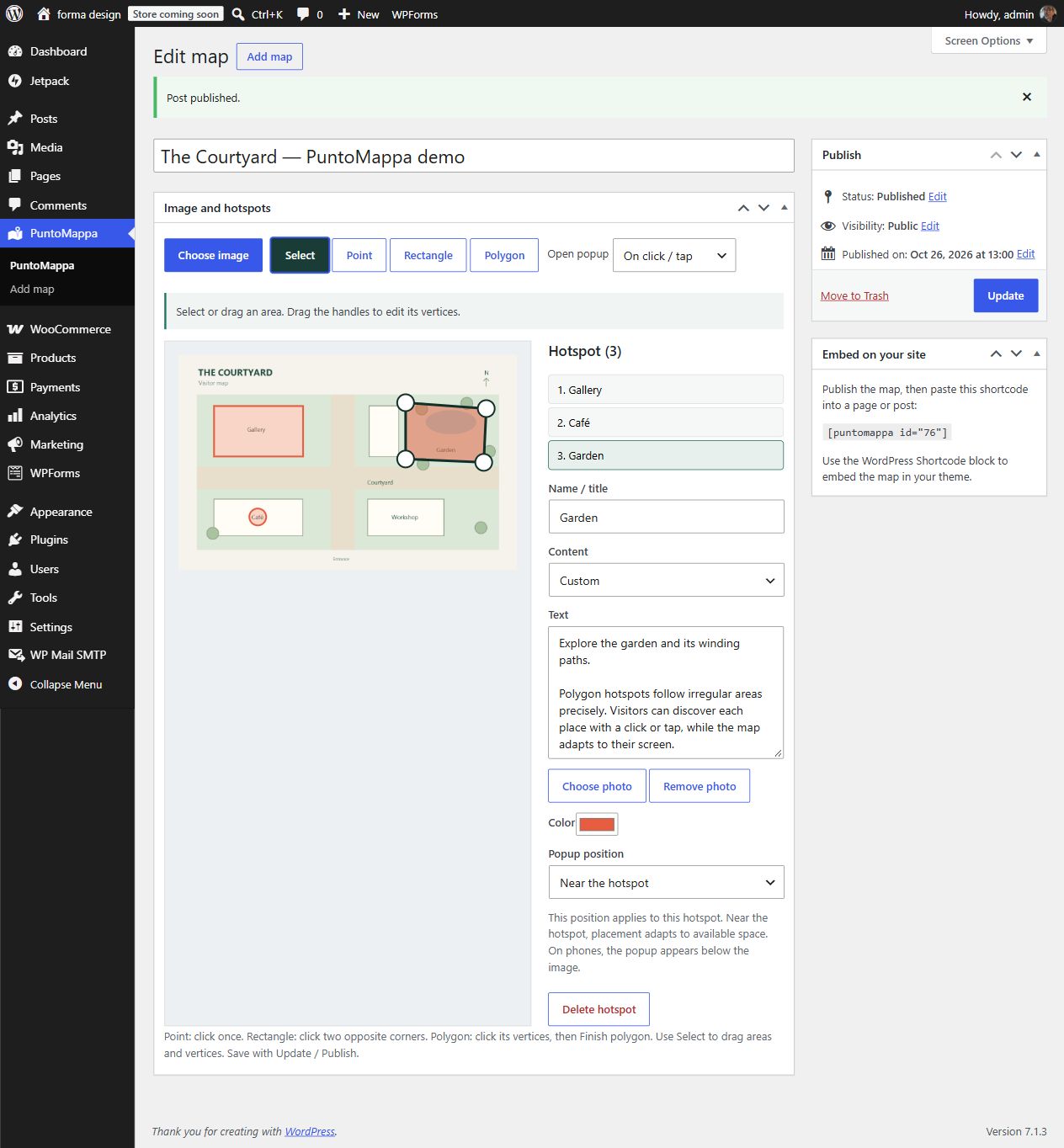
- Move areas or drag vertices to adjust the shape.
- Add a title, plain text and a photo, or link an existing published post.
- Linked posts display their featured image, excerpt and a link to the full article.
- Choose a popup position for each hotspot: any corner, map center or near the area.
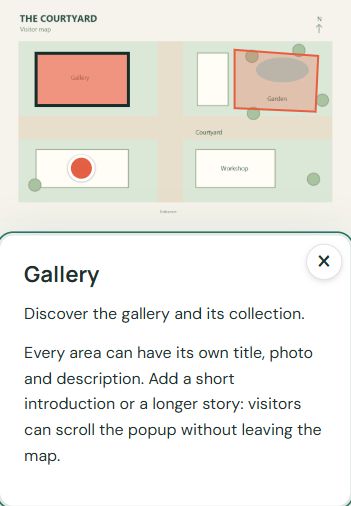
- Open by click or hover. Hover previews close after leaving the area or popup; clicking keeps them open.
- Long content scrolls. On phones, popups appear below the image and open by tap.
- Hotspot coordinates follow the image as it resizes.
- Embed with [puntomappa id=”123″] in the Shortcode block.
- Translation-ready interface, with language packs managed through translate.wordpress.org.
No account, subscription, tracking or third-party service is required. Map data is stored in your WordPress database and images remain in your Media Library.
Installation
- Upload the puntomappa folder to /wp-content/plugins/, or upload the ZIP through Plugins > Add New > Upload Plugin.
- Activate PuntoMappa.
- Go to PuntoMappa > Add map, give it a title and choose an image.
- Select Point, Rectangle or Polygon and draw an area. Fill in its content in the side panel.
- Publish and copy its shortcode into a Shortcode block on any page or post.
Änderungsprotokoll
Translation files are now managed through WordPress.org. Translations depend on the available language packs; existing maps and content are preserved.
0.3.2
- Remove bundled translation catalogues and use WordPress.org language packs.
- Keep PHP and JavaScript strings internationalized under the puntomappa text domain.
- Use the standard WordPress script translation lookup without a custom language directory.
0.3.1
- Remove the discouraged manual translation loader and use WordPress automatic loading.
- Escape formatted popup output at the point of rendering.
- Document schema-based validation of JSON input without altering its structure.
- Declare the tested WordPress release series in the readme.
0.3.0
- Add English source strings, translation support and bundled Italian translations.
- Update author and contributor metadata for distribution.
- Harden malformed hotspot payload handling and hide inaccessible password-protected maps.
0.2.1
- Automatically close hover previews after 300 ms when leaving the hotspot or popup.
- Keep popups open after click, tap, keyboard activation or focusing popup controls.
0.2.0
- Add per-hotspot popup placement and responsive positioning.
0.1.0
- Visual editor, three shapes, custom content, linked posts and shortcode.
Screenshots

Für Entwickler
Ist das dein Plugin? Zeigen Sie die Zahlen.
Fügen Sie Ihrer Website, Docs oder GitHub Readme ein Live-Badge hinzu. Es wird von selbst aktualisiert - kein Konto erforderlich.
Best PuntoMappa alternatives
All hotspots plugins →





Fragen und Antworten
PuntoMappa: quick answers
Gerade Antworten, gezogen von Live WordPress.org Daten.
Quelle: WordPress.org
Is PuntoMappa free?
Yes. PuntoMappa is free to download and use from the official WordPress.org plugin directory.
Is PuntoMappa safe to use in 2026?
PuntoMappa is a solid plugin choice in 2026, with a few things worth checking first. Was last updated 1 month ago, and scores 64/100 on our health check.
How many websites use PuntoMappa?
PuntoMappa is active on <10 WordPress websites and has been downloaded 282 times since it launched in October 2026. It was downloaded 281 times in the last 30 days.
Does PuntoMappa work with WordPress 7.1?
Yes. The developer has tested PuntoMappa up to WordPress 7.1.5, the latest release. It requires WordPress 6.3 or newer.
What PHP version does PuntoMappa need?
PuntoMappa requires PHP 7.4 or higher. Most hosts run PHP 8.x today, so it works on any modern WordPress hosting.
When was PuntoMappa last updated?
The latest version, 0.3.2, was released on October 30, 2026 (1 month ago).
Who makes PuntoMappa?
PuntoMappa is developed and maintained by leviath.
What are the best alternatives to PuntoMappa?
The most popular alternatives to PuntoMappa are Shoppable Images (Lookbook)… (5K+ installs), Vision (2K+ installs) and Image Hotspots Field for ACF (100+ installs).
Angetrieben von PageForge
Eine Vorlage und eine Tabelle. Eine echte Seite für jede Suche.
PageForge Verwandelt jede Zeile eines CSV in eine WordPress-Seite mit eigenem Titel, URL, SEO Felder und Schema entworfen. Kostenlos auf WordPress.org.
- CSV und XLSX, plus Google Sheets auf Beruf und Unternehmen
- seinen eigenen Titel, URL, SEO Felder und Schema für jede Seite
- Arbeitet mit dem Blockeditor, Elementor, Divi und Avada
- Kostenlos auf WordPress.org, keine Kreditkarte