


Plugin Notes Plus
Adds a column to the Plugins page where you can add, edit, or delete notes about a plugin.

Solide Wahl
Plugin Notes Plus is a solid plugin choice in 2026, with a few things worth checking first. It runs on 9K+ sites, is rated 5/5 and was last updated 4 weeks ago, and scores 78/100 on our health check.
- Loved by users — 5/5 from 62 reviews
- Aktiv entwickelt — letztes Update vor 4 Wochen
- Getestet mit dem neuesten WordPress (7.1)
- Momentum — downloads up 1082.5% vs the previous 30 days
Wie stapelt es sich?
Side-by-side bei Installationen, Updates, Bewertungen und Support



Tägliche Downloads
Download-Spitzen folgen normalerweise einer neuen Version - jede Website, die automatisch aktualisiert wird, gilt als Download.
Ranglisten
Where Plugin Notes Plus stands todayWordPress.org Ranglisten suchen
Live-Position in der Plugin-Suche, Top 100| Stichwort | Position |
|---|---|
| memo | #2 |
| plugin notes | #1 |
| Plugins | #40 |
Versionsübernahme
Anteil aktiver Sites pro Release.
Bewertungsaufschlüsselung
★★★★★★★★★★ 5 from 62 reviews
About Plugin Notes Plus
From the official readme · v1.2.11Beschreibung
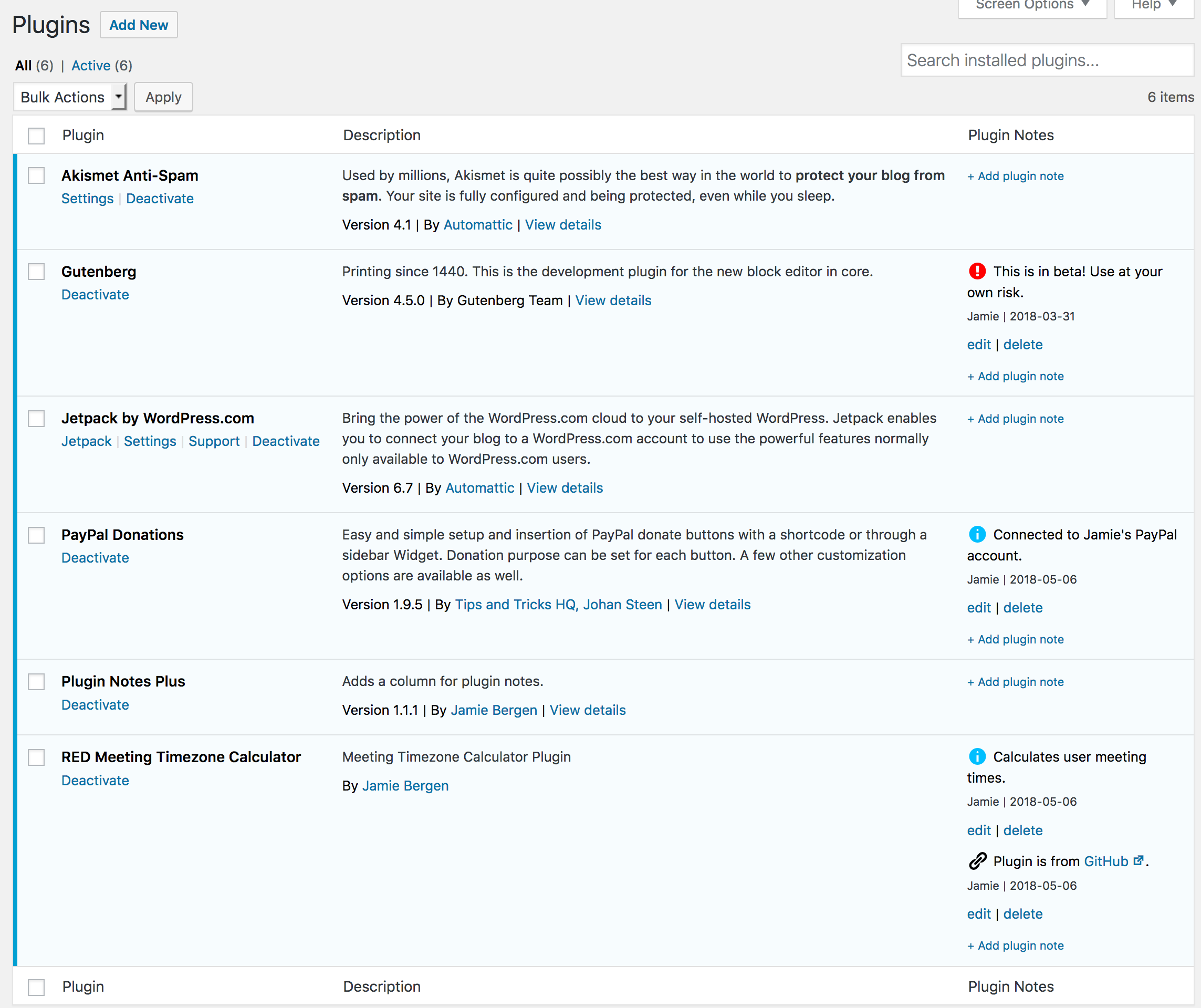
Have you ever returned to a site that you built a while back and asked, “Why did I install this plugin?” This plugin provides an extra column on the Plugins page that enables you to add, edit, or delete notes about the plugins you have installed on a particular site. These notes are intended to provide documentation regarding why a particular plugin was installed and how or where it’s being used.
Merkmale
- Add as many or as few notes as you need for each plugin.
- Edit or delete notes as desired.
- Select an icon to go with each note to quickly convey what type of content it contains (e.g., info, warning, link, etc.)
- Format notes using basic HTML tags if desired.
- Any links included in the note will be automatically converted to
target="_blank" - Notes are added and updated via Ajax, avoiding slow page reloads.
- Notes also display on the WordPress Updates page for any plugins that need to be updated.
- A filter is provided if you would like to display notes beneath the plugin description instead of in a separate column.
- A filter is available to selectively hide or display plugin notes in the admin.
Installation
- You can either install the plugin via the Plugins directory from within your WordPress install, or you can upload the files manually to your server by extracting the .zip file and placing its contents in the /wp-content/plugins/ directory.
- Aktivieren Sie das Plugin über das Plugin-Menü in WordPress.
- Add, edit, or delete notes in the Plugin Notes column on the Installed Plugins page.
Änderungsprotokoll
This version fixes a missing "not authorized" message.
1.2.11
- Fixed: “Not authorized” message was not displayed to users without permission to manage plugins. Thanks to @DAnn2012.
1.2.10
- Fixed: Ajax conflict with WPML version 4.7.0 and up. Thanks to @ericmuc for bringing this to my attention.
1.2.9
- Fixed: PHP warnings related to I18n.
1.2.8
- Fixed: Checking for user permission on ajax requests.
1.2.7
- Fixed: Cross site scripting (XSS) vulnerability related to icon rendering.
1.2.6
- Added: Option to selectively hide or display plugin notes. Thanks to @garconis for the suggestion.
Screenshots
Für Entwickler
Ist das dein Plugin? Zeigen Sie die Zahlen.
Fügen Sie Ihrer Website, Docs oder GitHub Readme ein Live-Badge hinzu. Es wird von selbst aktualisiert - kein Konto erforderlich.
Best Plugin Notes Plus alternatives
All memo plugins →





Fragen und Antworten
Plugin Notes Plus: quick answers
Gerade Antworten, gezogen von Live WordPress.org Daten.
Quelle: WordPress.org
Is Plugin Notes Plus free?
Yes. Plugin Notes Plus is free to download and use from the official WordPress.org plugin directory.
Is Plugin Notes Plus safe to use in 2026?
Plugin Notes Plus is a solid plugin choice in 2026, with a few things worth checking first. It runs on 9K+ sites, is rated 5/5 and was last updated 4 weeks ago, and scores 78/100 on our health check.
How many websites use Plugin Notes Plus?
Plugin Notes Plus is active on 9K+ WordPress websites and has been downloaded 85,459 times since it launched in February 2018. It was downloaded 7,142 times in the last 30 days.
Does Plugin Notes Plus work with WordPress 7.1?
Yes. The developer has tested Plugin Notes Plus up to WordPress 7.1.5, the latest release. It requires WordPress 6.2 or newer.
What PHP version does Plugin Notes Plus need?
Plugin Notes Plus requires PHP 5.6 or higher. Most hosts run PHP 8.x today, so it works on any modern WordPress hosting.
When was Plugin Notes Plus last updated?
The latest version, 1.2.11, was released on November 1, 2026 (4 weeks ago).
Who makes Plugin Notes Plus?
Plugin Notes Plus is developed and maintained by jamiebergen.
What are the best alternatives to Plugin Notes Plus?
The most popular alternatives to Plugin Notes Plus are Page & Post Notes (1K+ installs), Notely (600+ installs) and Plugin Notes (400+ installs).
Angetrieben von PageForge
Eine Vorlage und eine Tabelle. Eine echte Seite für jede Suche.
PageForge Verwandelt jede Zeile eines CSV in eine WordPress-Seite mit eigenem Titel, URL, SEO Felder und Schema entworfen. Kostenlos auf WordPress.org.
- CSV und XLSX, plus Google Sheets auf Beruf und Unternehmen
- seinen eigenen Titel, URL, SEO Felder und Schema für jede Seite
- Arbeitet mit dem Blockeditor, Elementor, Divi und Avada
- Kostenlos auf WordPress.org, keine Kreditkarte