


Plugin Memory Usage
Measures changes in WordPress memory usage. This tool helps you to reveal plugins that are poorly programmed and do not release memory properly.

Solide Wahl
Plugin Memory Usage is a solid plugin choice in 2026, with a few things worth checking first. It runs on 600+ sites, is rated 5/5 and was last updated 5 days ago, and scores 77/100 on our health check.
- Aktiv entwickelt – letztes Update vor 5 Tagen
- Getestet mit dem neuesten WordPress (7.1)
- Momentum — downloads up 26.3% vs the previous 30 days
- Kleine Benutzerbasis (600+ aktive Installationen)
- Bisher sehr wenige Bewertungen
Wie stapelt es sich?
Side-by-side bei Installationen, Updates, Bewertungen und Support


Tägliche Downloads
Download-Spitzen folgen normalerweise einer neuen Version - jede Website, die automatisch aktualisiert wird, gilt als Download.
Ranglisten
Where Plugin Memory Usage stands todayWordPress.org Ranglisten suchen
Live-Position in der Plugin-Suche, Top 100| Stichwort | Position |
|---|---|
| memory | #3 |
| memory limit | #3 |
| memory usage | #3 |
| php version | #37 |
| ram | #6 |
Versionsübernahme
Anteil aktiver Sites pro Release.
Bewertungsaufschlüsselung
★★★★★★★★★★ 5 from 1 reviews
About Plugin Memory Usage
From the official readme · v1.3.7Beschreibung
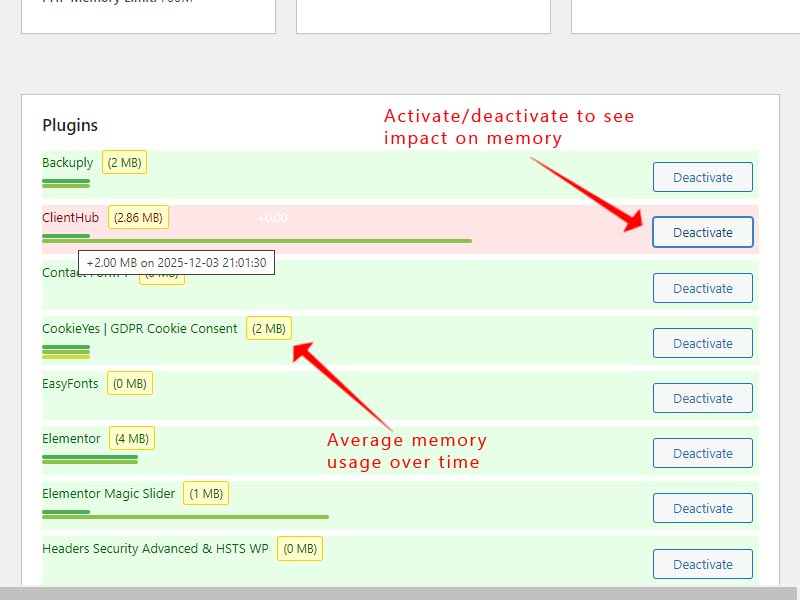
This plugin try to measure and record the memory usage of different WordPress plugins. When you activate or deactivate a plugin, it measures the memory usage. The difference between these measurements gives an estimate of each plugin’s memory impact. These measurements are estimates and may vary. Factors like caching, other active plugins, and WordPress itself can influence memory usage.
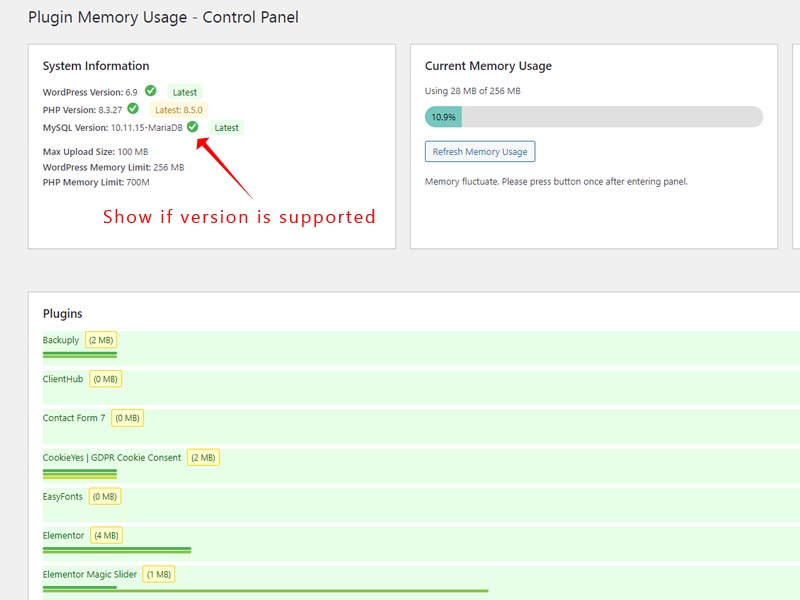
This plugin also show the current memory usage of your wordpress site. If you use more than 80% of memory limit this plugin gives you the option to increase the memory limit, while providing comprehensive system monitoring and version checking capabilities for both PHP and MySQL.
Hauptmerkmale
- Monitors and displays memory usage for individual plugins
- Shows memory usage history for each plugin
- Calculates average memory usage based on historical data
- Detects when memory usage exceeds 80% of the allocated limit
- Provides an option to increase the memory limit when high usage is detected
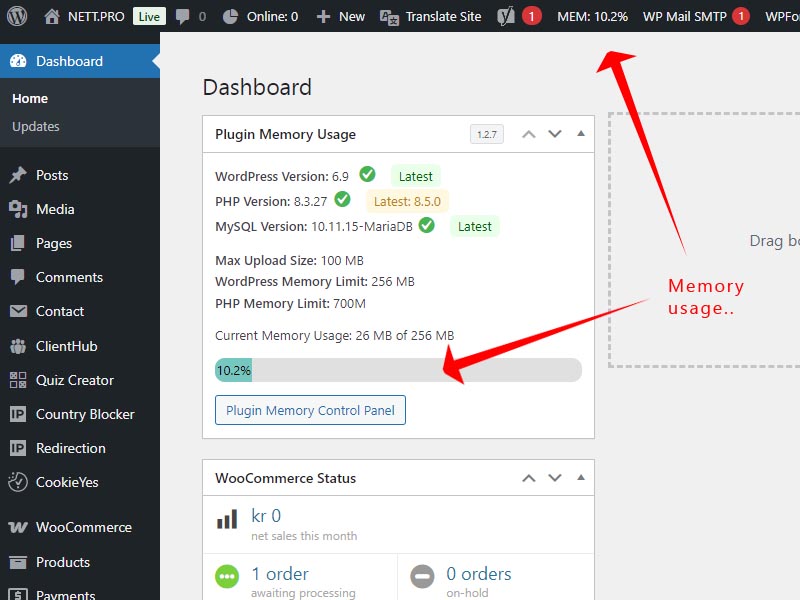
- Displays current memory usage percentage in the WordPress admin bar for quick reference
- Optimizing Memory Usage for Better Performance
Memory Management Features:
– Monitors and tracks plugin memory usage
– Detects high memory consumption and offers memory limit increases
– Provides memory usage history and performance analytics
– Shows current WordPress memory usage with visual indicators
Performance & Security Benefits:
– Identifies memory-hungry plugins affecting site performance
– Monitors server compatibility and system requirements
– Helps maintain WordPress security by alerting to unsupported software versions
– Prevents compatibility issues before they impact your website
– Supports both MySQL and MariaDB database systems alerts
Why Use Plugin-Memory-Usage?
Excessive memory consumption can result in sluggish performance, website crashes, and an unsatisfactory user experience. This plugin offers valuable insights to help you maintain your site’s efficiency, allowing you to tackle potential issues before they become significant problems.
With the added ability to increase memory limits when needed and the convenient admin bar display, you can now proactively manage your WordPress site’s memory usage, ensuring optimal performance and preventing memory-related issues before they impact your users.
Installation
Upload the plugin folder to the /wp-content/plugins/ directory or download from WordPress. Activate plugin. You can now access the control panel from the widget in the dashboard.
Änderungsprotokoll
1.3.7 – 2026-03-16
- Added: Peak memory shown alongside current usage with separate bars vs WordPress and PHP memory limits (same mini-bar style as disk/CPU)
1.3.6 – 2026-10-16
- Fixed: PHP version and support checks after php.net updated their supported-versions page layout
- Fixed: Latest PHP version detection using releases JSON metadata (supported_versions list)
1.3.5 – 2026-10-15
- Fixed: Replace str_starts_with() for WordPress 5.3+ compatibility (Plugin Check)
1.3.4 – 2026-10-14
- Improved: Dashboard widget prefers top-left placement (high priority); order updated for user on activation
1.3.3 – 2026-10-14
- Added: Redirect to the control panel after activation with a welcome dialog (version, overview, quick tips)
1.3.2 – 2026-10-14
- Fixed: False “outdated MySQL” warning for SQLite MySQL compatibility layers (WordPress Studio, mysql-on-sqlite)
Screenshots
Für Entwickler
Ist das dein Plugin? Zeigen Sie die Zahlen.
Fügen Sie Ihrer Website, Docs oder GitHub Readme ein Live-Badge hinzu. Es wird von selbst aktualisiert - kein Konto erforderlich.
Best Plugin Memory Usage alternatives
All memory plugins →





Fragen und Antworten
Plugin Memory Usage: quick answers
Gerade Antworten, gezogen von Live WordPress.org Daten.
Quelle: WordPress.org
Is Plugin Memory Usage free?
Yes. Plugin Memory Usage is free to download and use from the official WordPress.org plugin directory.
Is Plugin Memory Usage safe to use in 2026?
Plugin Memory Usage is a solid plugin choice in 2026, with a few things worth checking first. It runs on 600+ sites, is rated 5/5 and was last updated 5 days ago, and scores 77/100 on our health check.
How many websites use Plugin Memory Usage?
Plugin Memory Usage is active on 600+ WordPress websites and has been downloaded 11,258 times since it launched in November 2024. It was downloaded 2,470 times in the last 30 days.
Does Plugin Memory Usage work with WordPress 7.1?
Yes. The developer has tested Plugin Memory Usage up to WordPress 7.1.5, the latest release. It requires WordPress 5.3 or newer.
What PHP version does Plugin Memory Usage need?
Plugin Memory Usage requires PHP 7.0 or higher. Most hosts run PHP 8.x today, so it works on any modern WordPress hosting.
When was Plugin Memory Usage last updated?
The latest version, 1.3.7, was released on November 16, 2026 (5 days ago).
Who makes Plugin Memory Usage?
Plugin Memory Usage is developed and maintained by NETT.PRO.
What are the best alternatives to Plugin Memory Usage?
The most popular alternatives to Plugin Memory Usage are Server IP & Memory Usage Di… (20K+ installs), WP-Memory-Usage (10K+ installs) and UsageDD (1K+ installs).
Angetrieben von PageForge
Eine Vorlage und eine Tabelle. Eine echte Seite für jede Suche.
PageForge Verwandelt jede Zeile eines CSV in eine WordPress-Seite mit eigenem Titel, URL, SEO Felder und Schema entworfen. Kostenlos auf WordPress.org.
- CSV und XLSX, plus Google Sheets auf Beruf und Unternehmen
- seinen eigenen Titel, URL, SEO Felder und Schema für jede Seite
- Arbeitet mit dem Blockeditor, Elementor, Divi und Avada
- Kostenlos auf WordPress.org, keine Kreditkarte