


OPcache Manager
OPcache statistics and management right in the WordPress admin dashboard.

Sichere Auswahl
Yes — OPcache Manager is a safe, well-maintained plugin to use in 2026. It runs on 2K+ sites, is rated 5/5 and was last updated 5 days ago, and scores 83/100 on our health check.
- Aktiv entwickelt – letztes Update vor 5 Tagen
- Getestet mit dem neuesten WordPress (7.1)
- Momentum — downloads up 100% vs the previous 30 days
- Benötigt PHP 8.2 oder neuer
Wie stapelt es sich?
Side-by-side bei Installationen, Updates, Bewertungen und Support



Tägliche Downloads
Download-Spitzen folgen normalerweise einer neuen Version - jede Website, die automatisch aktualisiert wird, gilt als Download.
Ranglisten
Where OPcache Manager stands todayWordPress.org Ranglisten suchen
Live-Position in der Plugin-Suche, Top 100| Stichwort | Position |
|---|---|
| analytics | >100 |
| Zwischenspeicher | >100 |
| monitor | #62 |
| OPcache | #2 |
| Zend | #2 |
Versionsübernahme
Anteil aktiver Sites pro Release.
Bewertungsaufschlüsselung
★★★★★★★★★★ 5 from 5 reviews
About OPcache Manager
From the official readme · v3.6.0Beschreibung
OPcache statistics and management right in the WordPress admin dashboard.
OPcache Manager is a full featured OPcache management and analytics reporting tool. It allows you to monitor and optimize OPcache operations on your WordPress site or network.
OPcache Manager works on dedicated or shared servers. In shared environments, its use has no influence on other hosted sites than yours. Its main management features are:
- individual script invalidation, forced invalidation and recompilation;
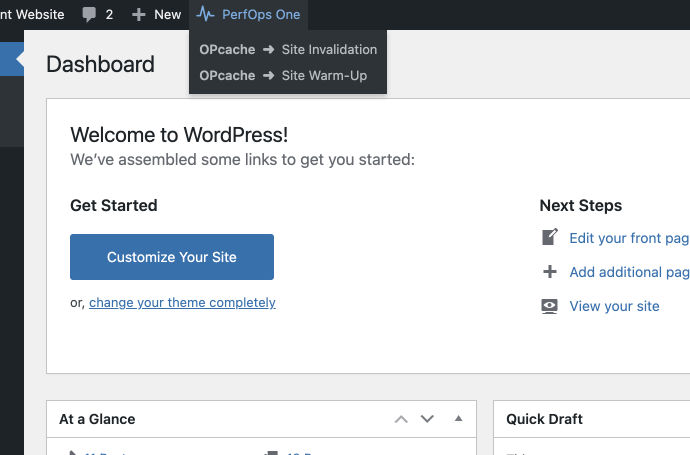
- manual site invalidation – a sort of ‘smart’ OPcache reset only for your site;
- manual site warm-up – to pre-compile all of you site files;
- optional scheduled site invalidation and/or warm-up.
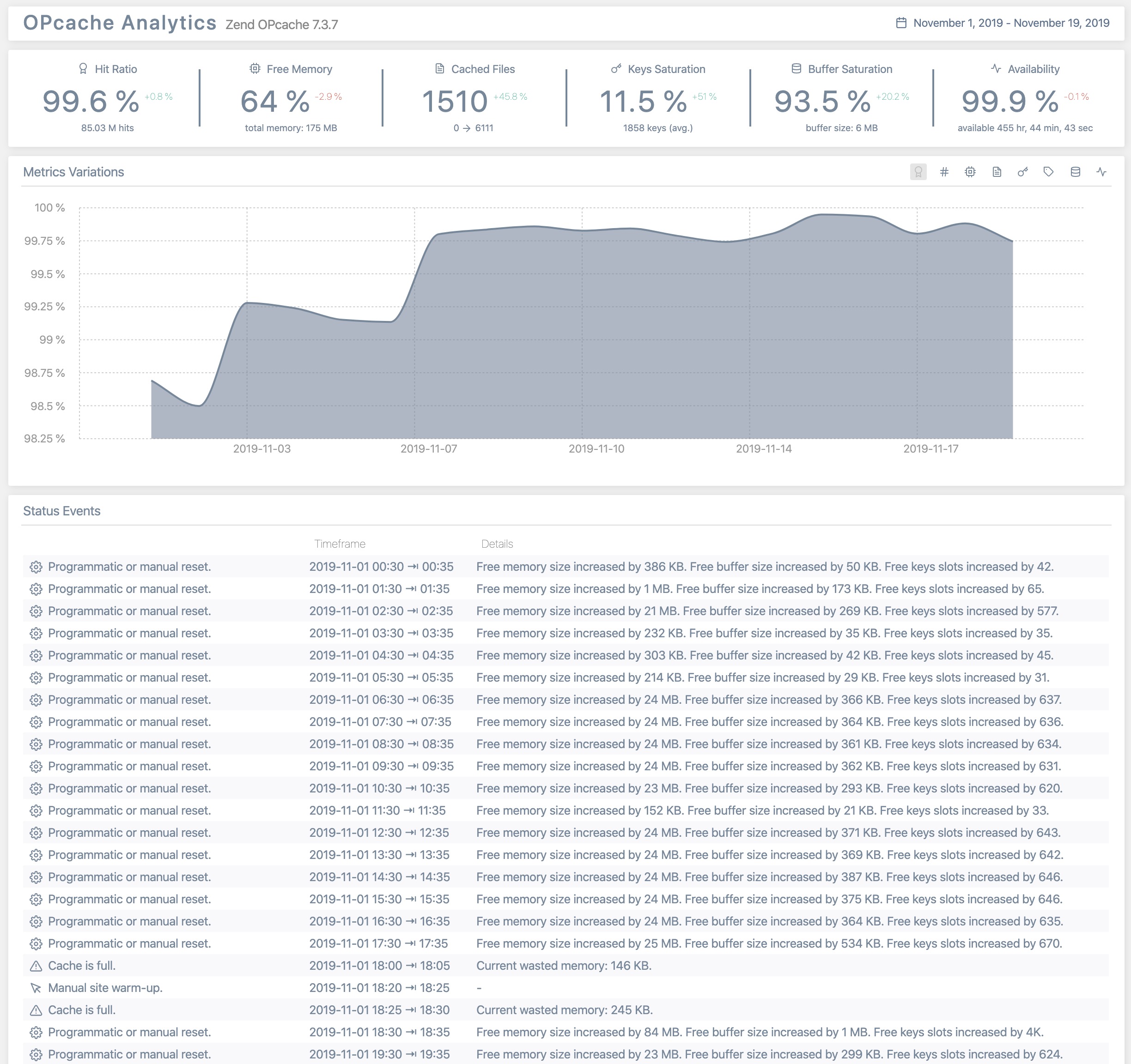
OPcache Manager is also a full featured analytics reporting tool that analyzes all OPcache operations on your site. It can report:
- KPIs: hit ratio, free memory, cached files, keys saturation, buffer saturation and availability;
- metrics variations;
- metrics distributions;
- OPcache related events.
OPcache Manager supports multisite report delegation (see FAQ).
OPcache Manager supports a set of WP-CLI commands to:
- invalidate or warmup cache – see
wp help opcache invalidateandwp help opcache warmupfor details; - toggle on/off main settings – see
wp help opcache settingsfor details; - obtain operational statistics – see
wp help opcache analyticsfor details.
For a full help on WP-CLI commands in OPcache Manager, please read this guide.
OPcache Manager is part of PerfOps One, a suite of free and open source WordPress plugins dedicated to observability and operations performance.
OPcache Manager is a free and open source plugin for WordPress. It integrates many other free and open source works (as-is or modified). Please, see ‘about’ tab in the plugin settings to see the details.
Unterstützen
This plugin is free and provided without warranty of any kind. Use it at your own risk, I’m not responsible for any improper use of this plugin, nor for any damage it might cause to your site. Always backup all your data before installing a new plugin.
Anyway, I’ll be glad to help you if you encounter issues when using this plugin. Please read carefully the FAQ at the bottom of this page before requesting support.
Privatsphäre
This plugin, as any piece of software, is neither compliant nor non-compliant with privacy laws and regulations. It is your responsibility to use it with respect for the personal data of your users and applicable laws.
This plugin doesn’t set any cookie in the user’s browser.
This plugin doesn’t handle personally identifiable information (PII).
Donation
If you like this plugin or find it useful and want to thank me for the work done, please consider making a donation to La Quadrature Du Net or the Electronic Frontier Foundation which are advocacy groups defending the rights and freedoms of citizens on the Internet. By supporting them, you help the daily actions they perform to defend our fundamental freedoms!
Installation
Aus Ihrem WordPress-Dashboard
- Visit ‘Plugins > Add New’.
- Search for ‘OPcache Manager’.
- Click on the ‘Install Now’ button.
- Activate OPcache Manager.
Von WordPress.org
- Download OPcache Manager.
- Upload the
opcache-managerdirectory to your/wp-content/plugins/directory, using your favorite method (ftp, sftp, scp, etc…). - Activate OPcache Manager from your Plugins page.
Once Activated
- Visit ‘PerfOps One > Control Center > OPcache Manager’ in the left-hand menu of your WP Admin to adjust settings.
- Enjoy!
Screenshots


Für Entwickler
Ist das dein Plugin? Zeigen Sie die Zahlen.
Fügen Sie Ihrer Website, Docs oder GitHub Readme ein Live-Badge hinzu. Es wird von selbst aktualisiert - kein Konto erforderlich.
Best OPcache Manager alternatives
All analytics plugins →





Fragen und Antworten
OPcache Manager: quick answers
Gerade Antworten, gezogen von Live WordPress.org Daten.
Quelle: WordPress.org
Is OPcache Manager free?
Yes. OPcache Manager is free to download and use from the official WordPress.org plugin directory.
Is OPcache Manager safe to use in 2026?
Yes — OPcache Manager is a safe, well-maintained plugin to use in 2026. It runs on 2K+ sites, is rated 5/5 and was last updated 5 days ago, and scores 83/100 on our health check.
How many websites use OPcache Manager?
OPcache Manager is active on 2K+ WordPress websites and has been downloaded 39,481 times since it launched in November 2019. It was downloaded 1,728 times in the last 30 days.
Does OPcache Manager work with WordPress 7.1?
Yes. The developer has tested OPcache Manager up to WordPress 7.2, the latest release. It requires WordPress 6.4 or newer.
What PHP version does OPcache Manager need?
OPcache Manager requires PHP 8.2 or higher. Most hosts run PHP 8.x today, so it works on any modern WordPress hosting.
When was OPcache Manager last updated?
The latest version, 3.6.0, was released on November 24, 2026 (5 days ago).
Who makes OPcache Manager?
OPcache Manager is developed and maintained by Pierre Lannoy.
What are the best alternatives to OPcache Manager?
The most popular alternatives to OPcache Manager are Site Kit by Google (5M+ installs), MonsterInsights (2M+ installs) and WP Statistics (500K+ installs).
Angetrieben von PageForge
Eine Vorlage und eine Tabelle. Eine echte Seite für jede Suche.
PageForge Verwandelt jede Zeile eines CSV in eine WordPress-Seite mit eigenem Titel, URL, SEO Felder und Schema entworfen. Kostenlos auf WordPress.org.
- CSV und XLSX, plus Google Sheets auf Beruf und Unternehmen
- seinen eigenen Titel, URL, SEO Felder und Schema für jede Seite
- Arbeitet mit dem Blockeditor, Elementor, Divi und Avada
- Kostenlos auf WordPress.org, keine Kreditkarte