


myRepono WordPress Backup Plugin
Automate your WordPress, website & database backups using the myRepono remote website backup service.

Betrachten Sie eine Alternative
myRepono WordPress Backup Plugin shows warning signs in 2026 — compare the alternatives below before installing. It runs on 100+ sites, is rated 3.4/5 and was last updated 10 years ago, and scores 31/100 on our health check.
- Kleine Benutzerbasis (100+ aktive Installationen)
- Mixed reviews — 3.4/5 from 11 ratings
- Kein Update in 10 Jahren
- Nur getestet bis WordPress 4.6 (letzt ist 7.1)
Wie stapelt es sich?
Side-by-side bei Installationen, Updates, Bewertungen und Support



Tägliche Downloads
Download-Spitzen folgen normalerweise einer neuen Version - jede Website, die automatisch aktualisiert wird, gilt als Download.
Ranglisten
Where myRepono WordPress Backup P… stands todayWordPress.org Ranglisten suchen
Live-Position in der Plugin-Suche, Top 100| Stichwort | Position |
|---|---|
| Sicherungskopie | >100 |
| mysql backup | >100 |
| website backup | >100 |
| WordPress-Backup | >100 |
| wp backup | >100 |
Versionsübernahme
Anteil aktiver Sites pro Release.
Bewertungsaufschlüsselung
★★★★★★★★★★ 3.4 from 11 reviews
About myRepono WordPress Backup Plugin
From the official readme · v2.0.12Beschreibung
Automate your WordPress, website & database backups using the myRepono WordPress Backup Plugin & Service.
myRepono is an online website backup service which enables you to securely backup your WordPress web site files and mySQL database tables using an online and web-based management system. The myRepono online website backup service allows you to automate the process of backing up your entire WordPress web site and database, including all post, comments and user data, and your WordPress PHP, template and plugin files.
We provide an easy-to-install WordPress plugin which automates the myRepono API set-up and configuration process, enabling you to setup automated and remote website backups in a matter of minutes. Comprehensive backup management and restoration tools are provided via myRepono.com, giving you an independent backup management and restoration system if your WordPress installation is unavailable.
myRepono is a commercial backup service which uses a pay-as-you-go balance system. Users receive $5 USD free credit to help them get started, and with prices starting at 2 cents per day that’s enough free credit to backup most WordPress installations for several months!
Features & Benefits:
- Backup unlimited WordPress installations, including all files and database data.
- Backup unlimited individual files or complete folders using web-based file management tools.
- Backup individual mySQL tables or complete mySQL databases.
- Files are encrypted, transmitted and stored securely using up to 256-Bit encryption.
- Restore files individually or on mass from your backups at any time.
- Backups are compressed to as little as 10% of their original size.
- All management is controlled with web-based tool which can be accessed with any web-enabled device.
- Backup your site every hour, day, week, month, it’s up to you.
- Store as many or as few backups as you like at competitive data storage rates.
- View or download backups online using simple file management tools.
- With a single account you can backup an unlimited number of websites.
- Pay-as-you-go pricing from $0.02 USD per day, with $5 USD free trial!
- Fast and friendly online technical support available to assist you with all your questions.
- Compatible with 99% of web servers and hosting companies, and WordPress Multisite/Network compatible.
Installation
Automatische Installation
You can install the myRepono WordPress Backup Plugin using the WordPress plugin installation tool.
Simply log-in to your WordPress administration panel and go to the ‘Plugins’ section. When viewing the ‘Plugins’ section select the ‘Add New’ option to add a new plugin.
The ‘Add New Plugin’ section allows you to search for plugins, simply search for ‘myRepono’ and the ‘myRepono WordPress Backup Plugin’ will be shown along with an ‘Install’ option. Simply select the ‘Install’ option and WordPress will automatically install the plugin.
Once installed, a ‘myRepono’ option will be shown under your WordPress administration panel menu, just below the ‘Settings’ option. Select the ‘myRepono’ option and follow the on-screen instructions to complete the setup process.
Manuelle Installation
-
Create a directory called
myrepono-wordpress-backup-pluginin your/wp-content/plugins/directory. -
Upload ‘readme.txt’ file and all
*.phpfiles to the/wp-content/plugins/myrepono-wordpress-backup-plugin/directory. -
Upload
img,cssandjsdirectories to the/wp-content/plugins/myrepono-wordpress-backup-plugin/directory. -
Upload
apidirectory to the/wp-content/plugins/myrepono-wordpress-backup-plugin/directory. -
Ensure
datadirectory exists in/wp-content/plugins/myrepono-wordpress-backup-plugin/api/directory. -
If using a Unix/Linux web server, ensure
/wp-content/plugins/myrepono-wordpress-backup-plugin/api/data/directory is writable (e.g. permissions/chmod to755or777). -
Activate the myRepono WordPress Backup Plugin through the ‘Plugins’ menu in WordPress.
-
Go to ‘myRepono’ section listed in your WordPress administration panel menu.
Änderungsprotokoll
Minor code changes to address PHP 7 compatibility issues.
2.0.12
Minor code changes to address PHP 7 compatibility issues.
2.0.11
The plugin will now detect if a connection to the myRepono system has failed and will automatically disable connection attempts for 3 minutes – this is to protect against disruption to the WordPress administration panel if the myRepono system becomes unavailable. A ‘Create .htaccess File’ option has been added to the ‘Plugin’ section to allow for easy creation of a ‘.htaccess’ file to override restrictions which may be affecting access to the API file. Header tags have been updated to aid screenreader usage. Minor changes have been made to data tables to improve appearance in WordPress 4.3+.
2.0.10
Minor code adjustments.
2.0.9
Backup notes may now be added and edited via the ‘Backups’ section of the plugin when the ‘Manage Backups’ permission is enabled.
2.0.8
Support for new ‘Backup Notes’ feature has been added to the plugin enabling you to view any backup notes you have added. Minor adjustments to data table styles have been applied.
2.0.7
Minor adjustment to URL detection.
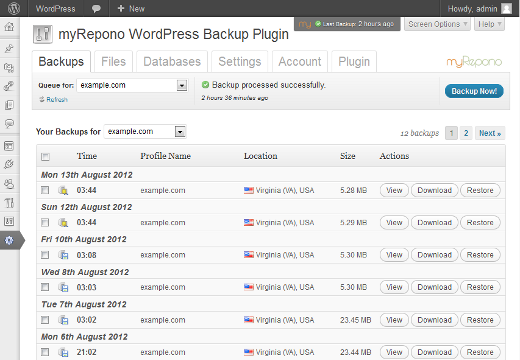
Screenshots


Für Entwickler
Ist das dein Plugin? Zeigen Sie die Zahlen.
Fügen Sie Ihrer Website, Docs oder GitHub Readme ein Live-Badge hinzu. Es wird von selbst aktualisiert - kein Konto erforderlich.
Best myRepono WordPress Backup Plu… alternatives
Alle Backup-Plugins →





Fragen und Antworten
myRepono WordPress Backup Plugin: quick answers
Gerade Antworten, gezogen von Live WordPress.org Daten.
Quelle: WordPress.org
Is myRepono WordPress Backup Plugin free?
Yes. myRepono WordPress Backup Plugin is free to download and use from the official WordPress.org plugin directory.
Is myRepono WordPress Backup Plugin safe to use in 2026?
myRepono WordPress Backup Plugin shows warning signs in 2026 — compare the alternatives below before installing. It runs on 100+ sites, is rated 3.4/5 and was last updated 10 years ago, and scores 31/100 on our health check.
How many websites use myRepono WordPress Backup Plugin?
myRepono WordPress Backup Plugin is active on 100+ WordPress websites and has been downloaded 69,400 times since it launched in January 2011. It was downloaded 236 times in the last 30 days.
Does myRepono WordPress Backup Plugin work with WordPress 7.1?
myRepono WordPress Backup Plugin is officially tested up to WordPress 4.6.30, while the latest release is 7.1.5. It may still work, but try it on a staging site first.
When was myRepono WordPress Backup Plugin last updated?
The latest version, 2.0.12, was released on August 24, 2016 (10 years ago).
Who makes myRepono WordPress Backup Plugin?
myRepono WordPress Backup Plugin is developed and maintained by myRepono.
What are the best alternatives to myRepono WordPress Backup Plugin?
The most popular alternatives to myRepono WordPress Backup Plugin are All-in-One WP Migration and… (5M+ installs), UpdraftPlus: WP Backup & Mi… (4M+ installs) and Jetpack (3M+ installs).
Angetrieben von PageForge
Eine Vorlage und eine Tabelle. Eine echte Seite für jede Suche.
PageForge Verwandelt jede Zeile eines CSV in eine WordPress-Seite mit eigenem Titel, URL, SEO Felder und Schema entworfen. Kostenlos auf WordPress.org.
- CSV und XLSX, plus Google Sheets auf Beruf und Unternehmen
- seinen eigenen Titel, URL, SEO Felder und Schema für jede Seite
- Arbeitet mit dem Blockeditor, Elementor, Divi und Avada
- Kostenlos auf WordPress.org, keine Kreditkarte