


Moradas — Portuguese Address Autocomplete for WooCommerce
Address autocomplete for Portugal in the WooCommerce checkout: street, locality and the exact seven-digit postal code (CP7). Free, no API key.

Solide Wahl
Moradas is a solid plugin choice in 2026, with a few things worth checking first. Was last updated 3 weeks ago, and scores 64/100 on our health check.
- Aktiv entwickelt – letztes Update vor 3 Wochen
- Getestet mit dem neuesten WordPress (7.1)
- Kleine Benutzerbasis (<10 aktive Installationen)
- Bisher sehr wenige Bewertungen
Wie stapelt es sich?
Side-by-side bei Installationen, Updates, Bewertungen und Support


Tägliche Downloads
Download-Spitzen folgen normalerweise einer neuen Version - jede Website, die automatisch aktualisiert wird, gilt als Download.
Ranglisten
Where Moradas stands todayWordPress.org Ranglisten suchen
Live-Position in der Plugin-Suche, Top 100| Stichwort | Position |
|---|---|
| Address AutoComplete | #82 |
| portugal | #92 |
| postal code | >100 |
| postcode | >100 |
| WooCommerce checkout | >100 |
About Moradas
From the official readme · v0.3.1Beschreibung
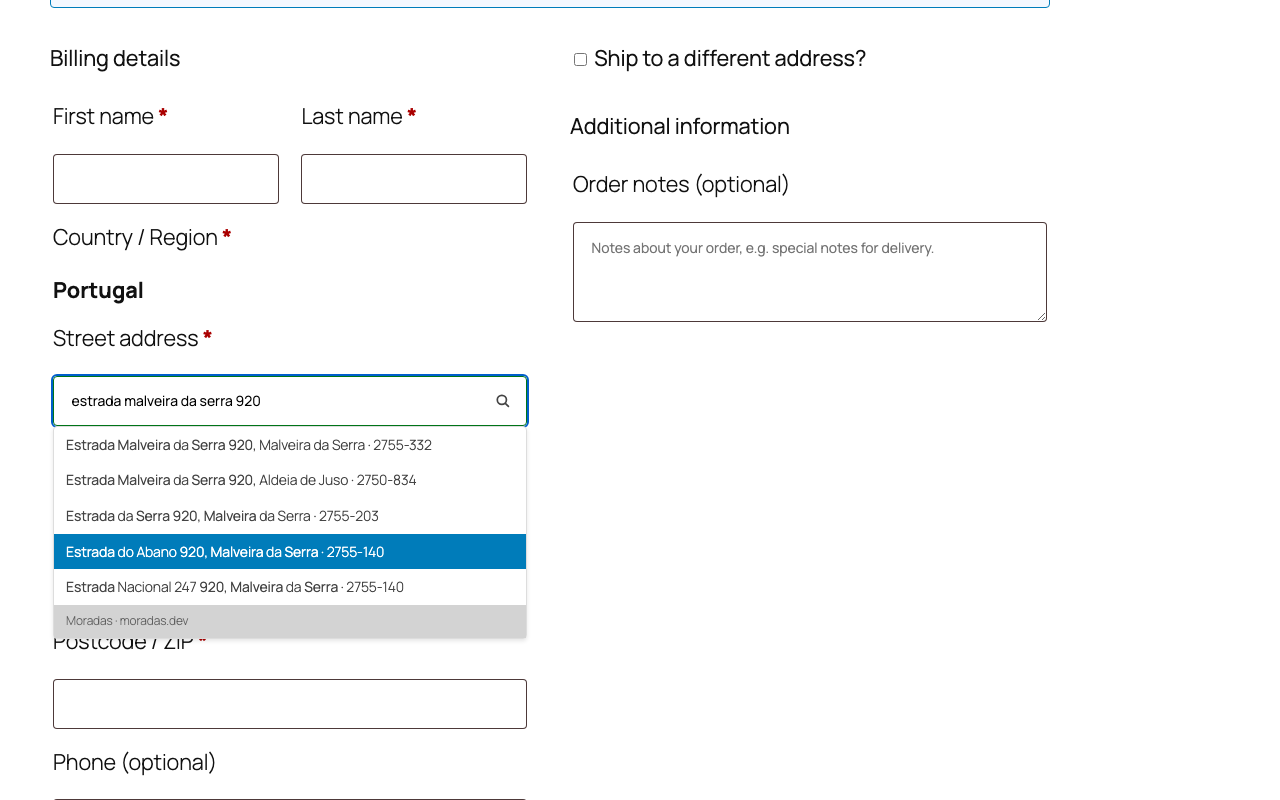
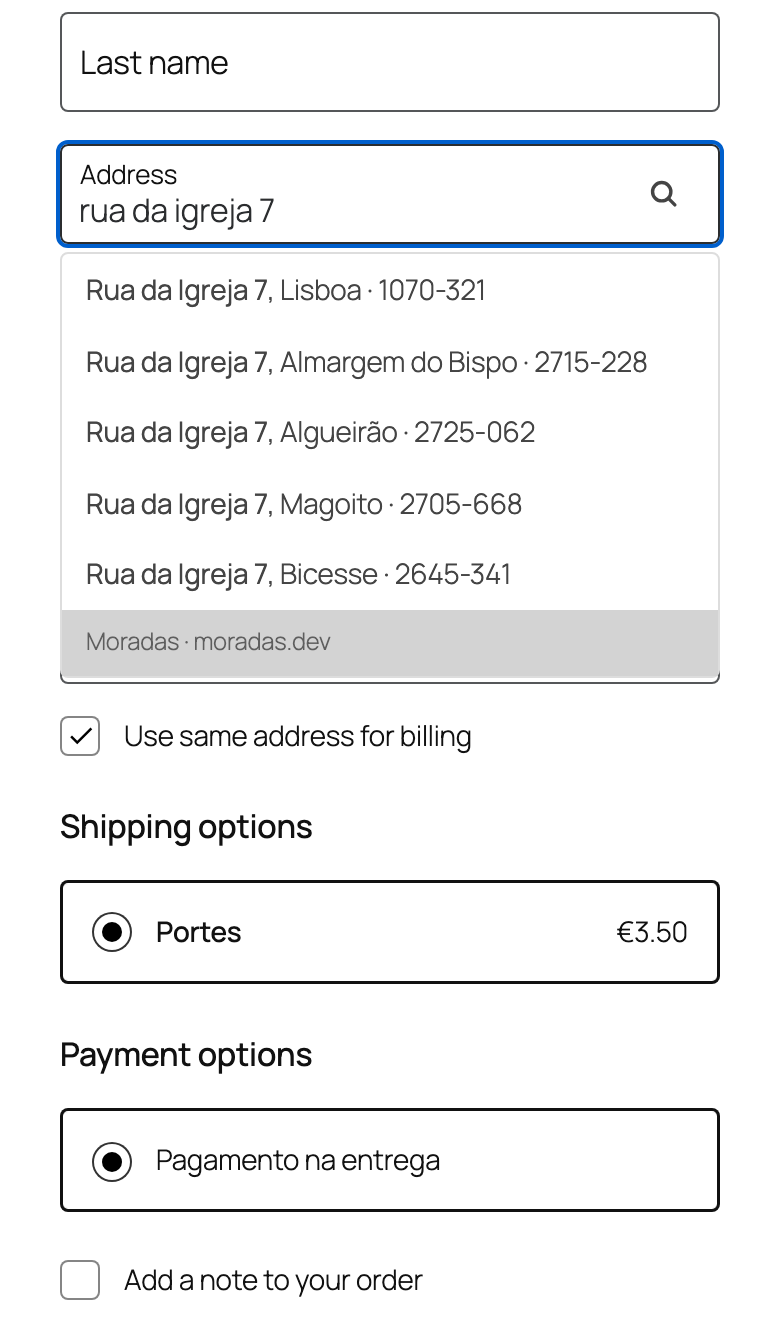
Customers type their address once, in one line, and pick it from a list. The
plugin fills in the street, the postal locality and the exact seven-digit
Portuguese postal code (código postal, CP7): the code carriers need on the
shipping label, chosen by door number. Moradas is Portuguese for “addresses”.
It is built for stores that ship to Portugal. Missing accents, abbreviations and
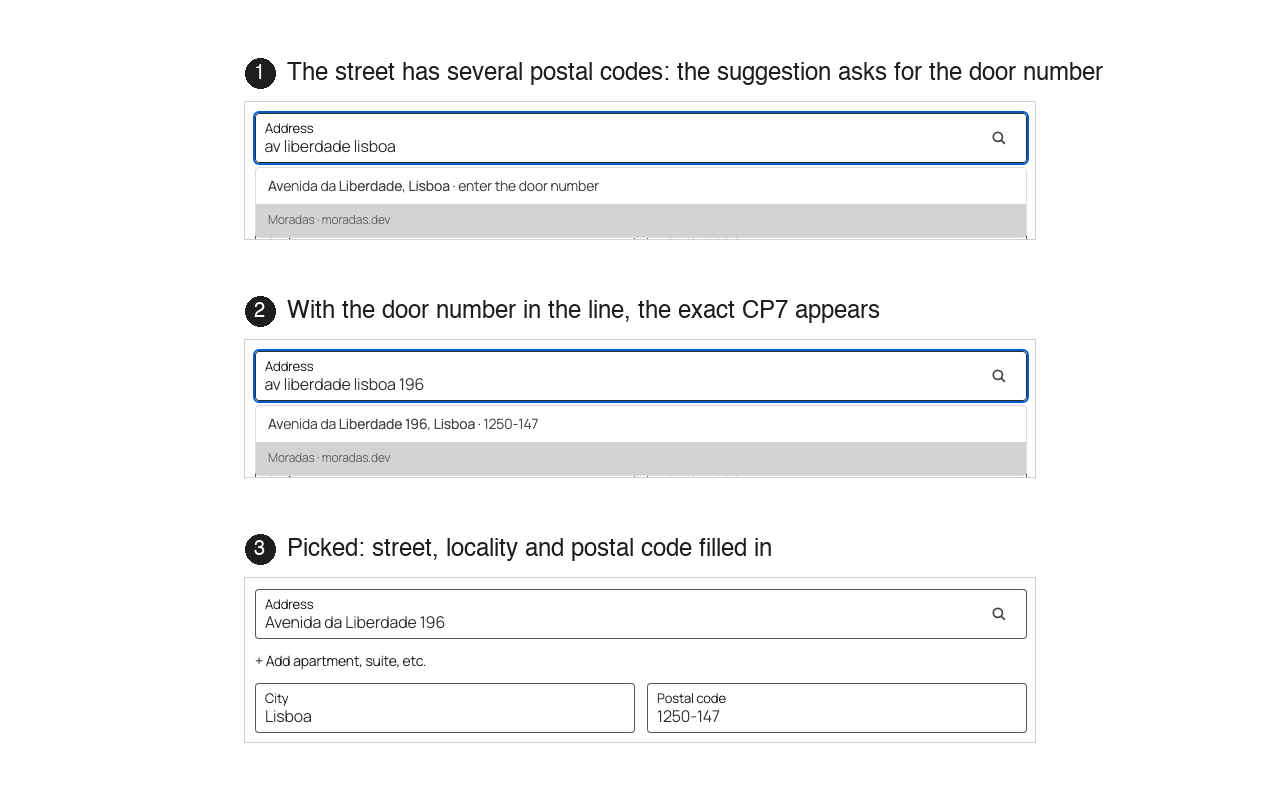
small typos are understood (“av liberdade lisboa 196” becomes Avenida da
Liberdade, Lisboa, 1250-147), and a postal code typed on its own fills in the
street and the locality. The service behind the plugin is free and public: no
API key, no account, and the typed text is not stored.
Wie es funktioniert
- The customer starts typing in the address field of the checkout: street,
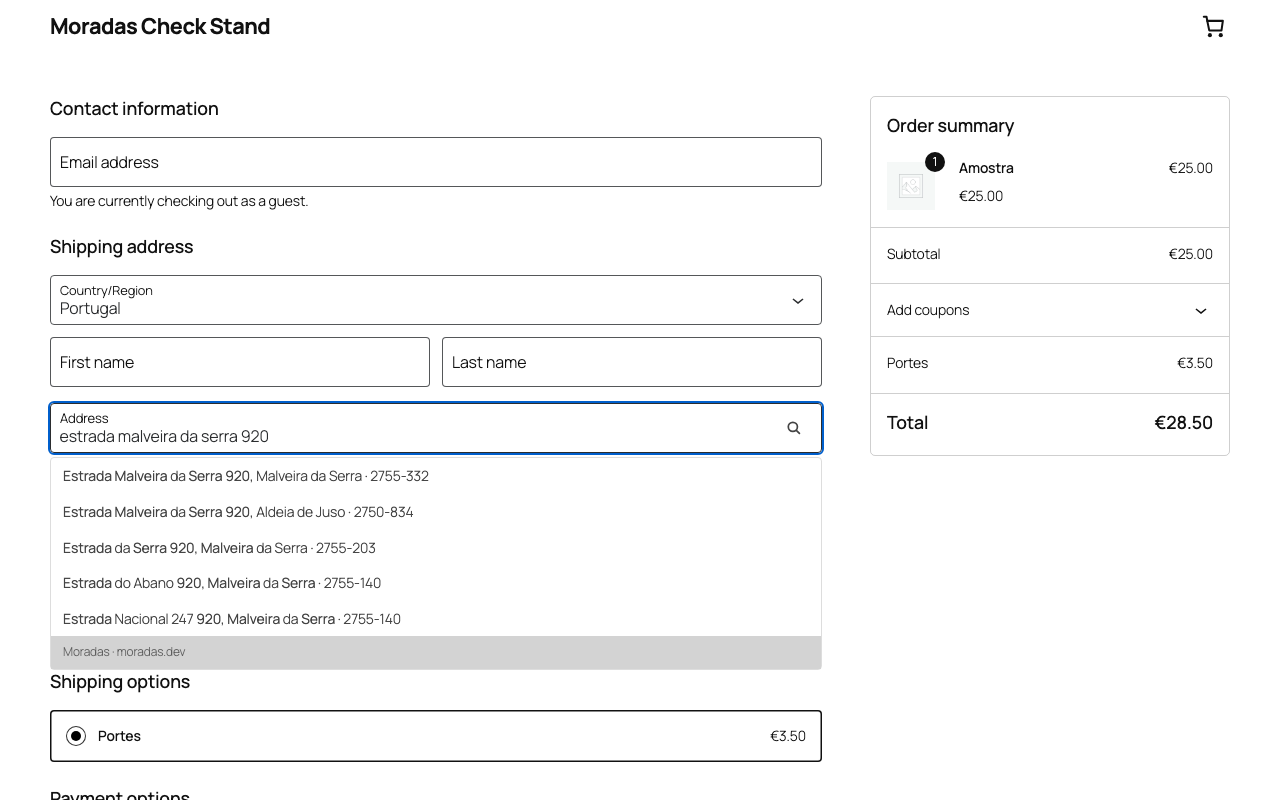
locality and door number, all in one line. - Suggestions appear under the field as they type, each with its postal code.
When a street has several postal codes and the door number is still missing,
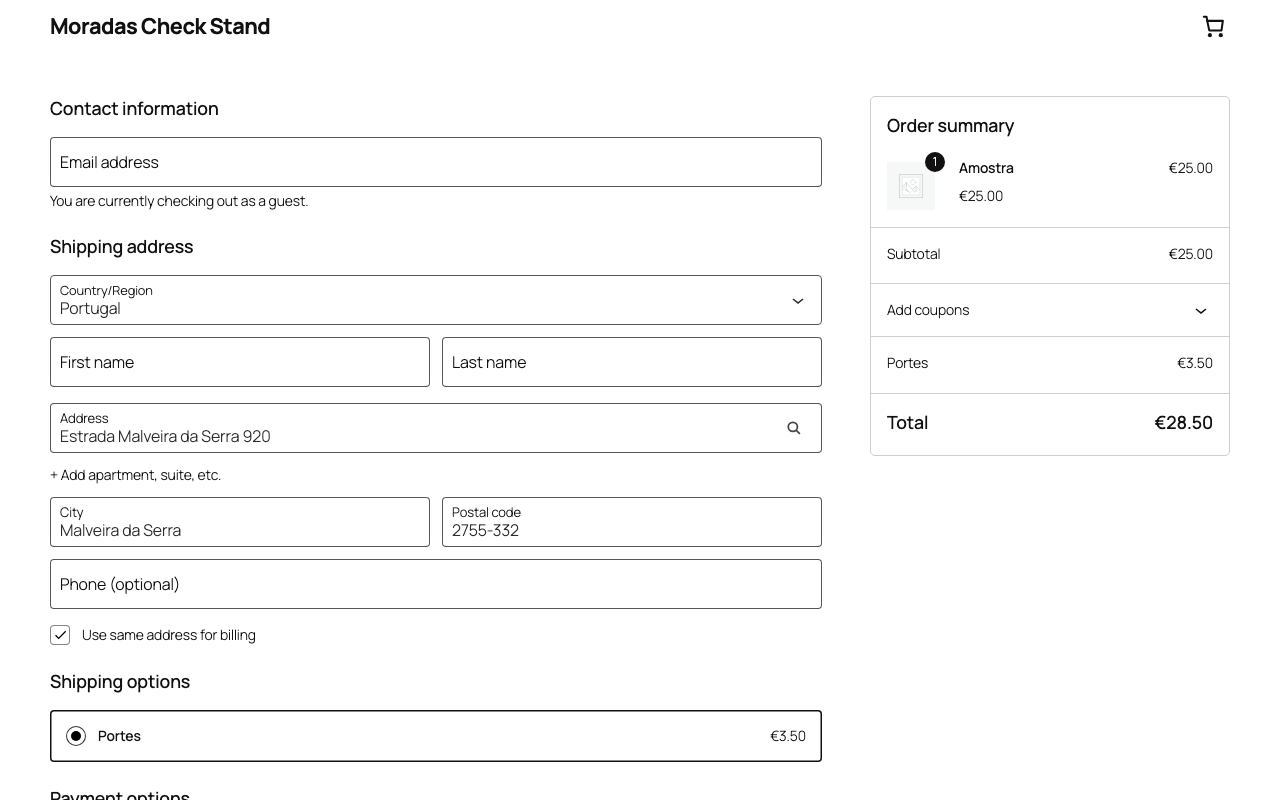
the suggestion says so. - The customer picks one. Street, locality and postal code are filled in, and
every field stays editable.
What you get in the checkout
- One line is enough: “av liberdade lisboa 196” resolves to Avenida da Liberdade, Lisboa, 1250-147.
- The exact CP7 for the door number, not just a code for the street or the town.
- A postal code works as input too: “1000-098” fills in Praça do Chile, Lisboa.
- Forgiving matching: accents are optional (“sao joao”), abbreviations are understood (“av” for Avenida), small typos are corrected.
- Larger towns are ranked first.
- Suggestions only for Portugal: for any other country the checkout is untouched.
- On WooCommerce 9.9 and newer the suggestion list is drawn by WooCommerce itself, so it follows your theme.
- Nothing is added to the order and no extra fields are created: the plugin fills the standard address, city and postcode fields.
Privatsphäre
- No cookies, no tracking, no account.
- While the customer types in the address field, the typed text is sent to the Moradas service at moradas.dev to produce the suggestions (see “External services” below). Nothing is sent from any other page, from the WordPress admin, or when the plugin is activated.
- No name, e-mail, phone number, order or account data is sent.
- The service does not store the typed text; it keeps only hourly aggregate usage counts.
- Each request also names the plugin and its version (for example “wp-woo/0.3.1”). Together with the address of the store’s website, which the browser sends with every request, this lets the service count the stores where the plugin is active. Nothing about the customer is added.
- The bundled widget can report errors to the service; in this plugin that option is switched off.
Kompatibilität
- Both checkouts: the Checkout Blocks (the default checkout) and the classic shortcode checkout. The plugin registers itself as a WooCommerce address autocomplete provider, so the same suggestions appear in both.
- WordPress 6.5 or newer, PHP 7.4 or newer. WooCommerce 9.9 or newer for the block checkout (tested up to 11.2); with older WooCommerce versions the plugin still works in the classic checkout, using its own suggestion list.
- Declares compatibility with High-Performance Order Storage (HPOS) and with the Cart and Checkout blocks.
Free, no API key
The service at https://moradas.dev is public and free, including for commercial
use. There is no key to paste and no account to create. Fair-use limits are
described at https://moradas.dev/docs. Stores that run their own instance of the
service can point the plugin to it under WooCommerce → Settings → Advanced → Moradas.
Portuguese translation included
The plugin’s interface text (the settings, the admin notices and the “enter the
door number” hint in the checkout) ships with a Portuguese (Portugal)
translation. The suggestions themselves are addresses, so they read the same in
any language.
Externe Dienste
This plugin connects to the Moradas address API (https://moradas.dev), a free
public service run by the authors of this plugin, to turn what the customer types
into address suggestions and into the exact postal code. Without this service the
plugin has nothing to suggest.
When it is used: only on the checkout page and only when the country is Portugal,
while the customer types in the address field, and once more when a suggestion is
picked. Nothing is sent when the plugin is activated, in the WordPress admin, or
on any other page.
What is sent: the text typed in the address field (for example
“av liberdade lisboa 196”) and, when a postal code has to be resolved, the
identifier of the chosen street together with the door number. Each request
also names the plugin and its version (for example “wp-woo/0.3.1”); together
with the website address that the browser sends with every request, this lets
the service count the stores where the plugin is active. No name, e-mail, phone
number, order or account data is sent. The requests go from the customer’s
browser straight to the API, without cookies; like any web request, they include
the browser’s IP address and user agent. The service does not store the typed
text and keeps only hourly aggregate usage counts.
Terms of use and usage limits: https://moradas.dev/docs
Privacy policy: https://moradas.dev/privacy
Installation
- Installieren und aktivieren Sie das Plugin.
- Activation switches on WooCommerce → Settings → General → “Address autocomplete”
if your store has never used another address provider. You can turn it off there
at any time. - That is all. Suggestions are active for addresses in Portugal.
The API endpoint can be changed under WooCommerce → Settings → Advanced → Moradas,
for stores that run their own instance of the service.
Änderungsprotokoll
Each request now names the plugin and its version, so that active installations can be counted; no personal data is added.
0.3.1
- Reports the plugin name and version with each request (for example “wp-woo/0.3.1”),
so that we can count active installations. No personal data is added, and no extra
requests are made (see “Privacy” and “External services”). - The bundled address widget (used on the classic checkout when WooCommerce is older
than 9.9) is now version 0.3.1 and sends the same name and version.
0.3.0
- The bundled address widget (used on the classic checkout when WooCommerce is older
than 9.9) is now version 0.3.0. A reply from the service that is not in the expected
format is handled like a network error: the “service temporarily unavailable” message
is shown and the checkout keeps working as a plain form. - Widget 0.3.0 can send anonymous error reports to the service; in this plugin that
option is switched off, so the plugin still makes no requests of its own (see
“External services”). - The example address in this readme now matches what the service returns.
0.2.1
- Fix: no more “translation loading was triggered too early” notice with WP_DEBUG on.
- If WooCommerce is not active, the plugin shows a notice and stays idle.
- Admin notices appear only where they are relevant: the Plugins screen, the Dashboard
(missing WooCommerce) and the WooCommerce settings. - Interface text is now in English, with a Portuguese (Portugal) translation included.
0.2.0
- First public release.
- Works in both the Checkout Blocks and the classic checkout through the official
WooCommerce address autocomplete provider API (WooCommerce 9.9+). - Suggestions show the postal code, or ask for the door number when the street
has more than one. - Activation switches on the WooCommerce “Address autocomplete” setting when no
other address provider is present; deactivation puts it back. - Declares compatibility with HPOS and with the Cart/Checkout blocks.
Screenshots
Für Entwickler
Ist das dein Plugin? Zeigen Sie die Zahlen.
Fügen Sie Ihrer Website, Docs oder GitHub Readme ein Live-Badge hinzu. Es wird von selbst aktualisiert - kein Konto erforderlich.
Best Moradas alternatives
All Address AutoComplete plugins →



Fragen und Antworten
Moradas: quick answers
Gerade Antworten, gezogen von Live WordPress.org Daten.
Quelle: WordPress.org
Is Moradas free?
Yes. Moradas is free to download and use from the official WordPress.org plugin directory.
Is Moradas safe to use in 2026?
Moradas is a solid plugin choice in 2026, with a few things worth checking first. Was last updated 3 weeks ago, and scores 64/100 on our health check.
How many websites use Moradas?
Moradas is active on <10 WordPress websites and has been downloaded 303 times since it launched in October 2026. It was downloaded 190 times in the last 30 days.
Does Moradas work with WordPress 7.1?
Yes. The developer has tested Moradas up to WordPress 7.1.5, the latest release. It requires WordPress 6.5 or newer.
What PHP version does Moradas need?
Moradas requires PHP 7.4 or higher. Most hosts run PHP 8.x today, so it works on any modern WordPress hosting.
When was Moradas last updated?
The latest version, 0.3.1, was released on November 2, 2026 (3 weeks ago).
Who makes Moradas?
Moradas is developed and maintained by moradasdev.
What are the best alternatives to Moradas?
The most popular alternatives to Moradas are Address Autocomplete Anythi… (900+ installs), Address Validation and Auto… (800+ installs) and UK Address Postcode Validat… (700+ installs).
Angetrieben von PageForge
Eine Vorlage und eine Tabelle. Eine echte Seite für jede Suche.
PageForge Verwandelt jede Zeile eines CSV in eine WordPress-Seite mit eigenem Titel, URL, SEO Felder und Schema entworfen. Kostenlos auf WordPress.org.
- CSV und XLSX, plus Google Sheets auf Beruf und Unternehmen
- seinen eigenen Titel, URL, SEO Felder und Schema für jede Seite
- Arbeitet mit dem Blockeditor, Elementor, Divi und Avada
- Kostenlos auf WordPress.org, keine Kreditkarte