


Autocomplete Google places
Google Places address autocomplete for WooCommerce checkout (classic and block) and any form. Auto-fills street, city, state, postcode and country.

Solide Wahl
Autocomplete Google places is a solid plugin choice in 2026, with a few things worth checking first. It runs on 100+ sites, is rated 5/5 and was last updated 2 weeks ago, and scores 75/100 on our health check.
- Aktiv entwickelt — letztes Update vor 2 Wochen
- Getestet mit dem neuesten WordPress (7.1)
- Kleine Benutzerbasis (100+ aktive Installationen)
- Bisher sehr wenige Bewertungen
Wie stapelt es sich?
Side-by-side bei Installationen, Updates, Bewertungen und Support


Tägliche Downloads
Download-Spitzen folgen normalerweise einer neuen Version - jede Website, die automatisch aktualisiert wird, gilt als Download.
Ranglisten
Where Autocomplete Google places stands todayWordPress.org Ranglisten suchen
Live-Position in der Plugin-Suche, Top 100| Stichwort | Position |
|---|---|
| Address AutoComplete | #11 |
| autocomplete | #9 |
| Autocomplete Google Address | #6 |
| google address autocomplete | #6 |
Versionsübernahme
Anteil aktiver Sites pro Release.
Bewertungsaufschlüsselung
★★★★★★★★★★ 5 from 3 reviews
About Autocomplete Google places
From the official readme · v3.4.0Beschreibung
This plugin adds Google Places address autocomplete to your address fields. When a customer starts typing an address and picks a suggestion, the plugin fills the street, city, state, postcode and country fields for them. You only need your own Google API key.
Supported fields:
- WooCommerce classic checkout (billing and shipping addresses).
- WooCommerce block checkout (the default checkout of recent WooCommerce versions).
- WooCommerce My Account addresses.
- Any other form (Contact Form 7, Gravity Forms, Elementor, custom forms) through the “Custom fields” setting, by ID or CSS class.
Highlights:
- Uses Google’s current Places API (New), with an automatic fallback to the legacy Places API for older keys.
- Fast: Google Maps is only loaded when a visitor first clicks an address field. On a WooCommerce store, the plugin’s small script only loads on the checkout and My Account pages.
- Street lines follow each country’s format (“12 Rue de la Paix”, “Hauptstraße 12”).
- Accessible suggestion list (keyboard and screen readers), with the attribution required by Google.
- Country scope (worldwide or up to 5 countries), suggestion type (addresses, cities, regions, businesses) and site language support.
- No jQuery required.
Externe Dienste
This plugin connects to the Google Maps JavaScript API (Places library) to provide address autocomplete. This is required for the plugin to work.
The Google Maps script is only loaded when a visitor focuses a supported address field. Nothing is sent to Google before that. After that, the text the visitor types in the address field is sent to Google to get address suggestions, and the details of the selected address are returned to fill the form. The request includes the API key you configure on the settings page and your site’s language and region. Like any script loaded from Google, the request also reveals the visitor’s IP address and browser information to Google.
- Service provider: Google Maps Platform
- Terms of Service: https://cloud.google.com/maps-platform/terms
- Privacy Policy: https://policies.google.com/privacy
Installation
- Upload the plugin files to the
/wp-content/plugins/autocomplete-google-placesdirectory, or install the plugin through the WordPress Plugins screen directly. - Aktivieren Sie das Plugin über den Bildschirm Plugins in WordPress.
- Open the Google Places admin menu (location-pin icon), enter your Google API key and click Test API key.
- Save. Autocomplete is now active on your address fields.
Änderungsprotokoll
Places API (New) support with automatic fallback, WooCommerce block checkout support, much faster pages (Google Maps loads only when needed) and a fix for French addresses. No action needed; enabling "Places API (New)" on your Google key is recommended.
3.4.0
- New: Places API (New) support, with automatic fallback to the legacy Places API. Keys created since March 2025, which cannot use the legacy API, now work.
- New: “Google Places API” setting (Automatic, New only, Legacy only).
- New: the “Test API key” button checks both Places API (New) and Legacy and says which one works with your key.
- New: WooCommerce block checkout support (billing and shipping).
- Performance: Google Maps is no longer loaded on every page. It loads only when a visitor first focuses an address field, with Google’s recommended asynchronous loading.
- Performance: on WooCommerce stores without custom fields, the plugin’s script only loads on the checkout and My Account pages. The script is deferred and the styles are inline.
- Performance: fewer Google requests (3 characters minimum, short typing pause, billing sessions).
- Fix: French billing addresses were filled as “12,Rue de la Paix Rue de la Paix”. Street lines now follow each country’s format.
- Fix: the country was not selected for countries whose WooCommerce name differs from Google’s (for example “United States (US)”). Countries are now matched by ISO code.
- Fix: selecting an address on the classic checkout now updates the country and state dropdowns and recalculates shipping.
- Fix: the settings page did not load on WordPress 7.1 (React 19).
- Fix: no more conflict or double loading when the theme or another plugin already loads Google Maps.
- Compatibility: tested with WordPress 7.1 and WooCommerce 11.3. Declares compatibility with WooCommerce High-Performance Order Storage and the Cart & Checkout blocks.
- Compliance: the “Google Maps” attribution required by Google is now shown in the suggestion list.
- Security: the API key format is validated, all settings are validated again before output, and the configuration is safely encoded.
- Security: removed leftover code from another platform and the relative include path.
- Accessibility: the suggestion list works with the keyboard and screen readers. Pressing Enter in the list no longer submits the checkout.
3.3.1
- Update – Compatibility with latest WordPress & WooCommerce versions.
3.3.0
- New: custom field targeting now works with dynamically added fields. A MutationObserver detects address inputs that appear after page load (React/Ajax modals, multi-step forms, dynamically rendered checkouts) and attaches autocomplete to them automatically.
- Improved: auto-filled values are now written in a way that React and other controlled-input frameworks register correctly, so the filled address is no longer reverted on the next render.
3.2.0
- New: multilingual support. The autocomplete now follows your WordPress site language and region (e.g. fr_FR), so suggestions and the predictions UI appear in the visitor’s locale.
- New: “Suggestion type” setting. Choose what Google suggests — street addresses (default), addresses & areas, cities only, regions, or businesses & places.
- New: “Custom fields (Form ID / class)” option. Target address inputs on any form (Contact Form 7, Gravity Forms, custom forms) by ID and/or CSS class, separated by commas. When a suggestion is selected, the matched field is filled with the full street address and nearby city and postcode fields are auto-filled when present. This restores and improves the old “Form ID” targeting from the 1.x line.
3.1.0
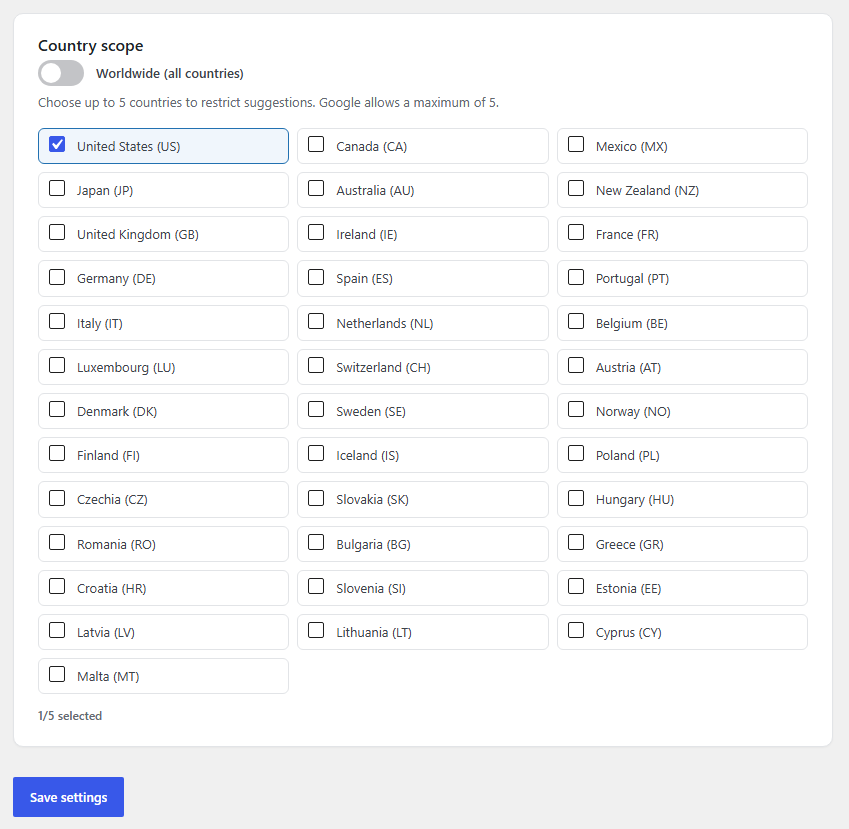
- New: choose the autocomplete country scope from the admin settings. Default is Worldwide (works in all of Europe, USA, Canada, Japan and everywhere else); optionally restrict to up to 5 countries (Google’s maximum).
- New: redesigned admin settings screen built with React (WordPress’ bundled wp.element), including a one-click “Test API key” button that verifies your Google Places key live.
- Changed: replaced the bundled CMB2 library with a lightweight custom settings page (saved via the WordPress Settings API). This removes the vendored library entirely.
3.0.0
- Major release.
- Rewrote the front-end script in modern vanilla JavaScript (ES6); removed the jQuery dependency from the script and its enqueue.
- Security: upgraded the bundled CMB2 library from 2.10.1 to 2.12.0 (addresses CVE-2024-1792) and removed the dead root CMB2 loader.
- Security: removed the hardcoded Google Maps API key fallback; the Maps script now loads only when an API key is configured.
- Security: the Google Maps URL is now built with rawurlencode() and escaped with esc_url_raw().
- Hardening: moved the direct-access guard ahead of all includes, removed unused example files, and added a directory-listing guard to /js.
- Added uninstall cleanup of stored plugin options.
- Compatibility: raised the minimum PHP requirement to 7.4 (required by CMB2 2.12.0); updated “Tested up to”.
Screenshots

Für Entwickler
Ist das dein Plugin? Zeigen Sie die Zahlen.
Fügen Sie Ihrer Website, Docs oder GitHub Readme ein Live-Badge hinzu. Es wird von selbst aktualisiert - kein Konto erforderlich.
Best Autocomplete Google places alternatives
All Address AutoComplete plugins →


Fragen und Antworten
Autocomplete Google places: quick answers
Gerade Antworten, gezogen von Live WordPress.org Daten.
Quelle: WordPress.org
Is Autocomplete Google places free?
Yes. Autocomplete Google places is free to download and use from the official WordPress.org plugin directory.
Is Autocomplete Google places safe to use in 2026?
Autocomplete Google places is a solid plugin choice in 2026, with a few things worth checking first. It runs on 100+ sites, is rated 5/5 and was last updated 2 weeks ago, and scores 75/100 on our health check.
How many websites use Autocomplete Google places?
Autocomplete Google places is active on 100+ WordPress websites and has been downloaded 3,358 times since it launched in April 2022. It was downloaded 483 times in the last 30 days.
Does Autocomplete Google places work with WordPress 7.1?
Yes. The developer has tested Autocomplete Google places up to WordPress 7.1.5, the latest release. It requires WordPress 5.6 or newer.
What PHP version does Autocomplete Google places need?
Autocomplete Google places requires PHP 7.4 or higher. Most hosts run PHP 8.x today, so it works on any modern WordPress hosting.
When was Autocomplete Google places last updated?
The latest version, 3.4.0, was released on November 9, 2026 (2 weeks ago).
Who makes Autocomplete Google places?
Autocomplete Google places is developed and maintained by Kais Chrouda.
What are the best alternatives to Autocomplete Google places?
The most popular alternatives to Autocomplete Google places are Address Autocomplete Anythi… (900+ installs), Address Validation and Auto… (800+ installs) and UK Address Postcode Validat… (700+ installs).
Angetrieben von PageForge
Eine Vorlage und eine Tabelle. Eine echte Seite für jede Suche.
PageForge Verwandelt jede Zeile eines CSV in eine WordPress-Seite mit eigenem Titel, URL, SEO Felder und Schema entworfen. Kostenlos auf WordPress.org.
- CSV und XLSX, plus Google Sheets auf Beruf und Unternehmen
- seinen eigenen Titel, URL, SEO Felder und Schema für jede Seite
- Arbeitet mit dem Blockeditor, Elementor, Divi und Avada
- Kostenlos auf WordPress.org, keine Kreditkarte