


MediaValet – Your Digital Asset Management (DAM)
Connect your MediaValet DAM to WordPress — browse, insert, and serve approved assets from your library via CDN without leaving WordPress.

Mit Vorsicht verwenden
MediaValet works, but test it on a staging site before relying on it in 2026. It runs on 20+ sites and was last updated 3 months ago, and scores 52/100 on our health check.
- Kleine Benutzerbasis (20+ aktive Installationen)
- Bisher sehr wenige Bewertungen
Wie stapelt es sich?
Side-by-side bei Installationen, Updates, Bewertungen und Support



Tägliche Downloads
Download-Spitzen folgen normalerweise einer neuen Version - jede Website, die automatisch aktualisiert wird, gilt als Download.
Ranglisten
Where MediaValet stands todayWordPress.org Ranglisten suchen
Live-Position in der Plugin-Suche, Top 100| Stichwort | Position |
|---|---|
| cdn | >100 |
| DAM | #12 |
| digital asset management | #19 |
| media | >100 |
| mediavalet | #1 |
Versionsübernahme
Anteil aktiver Sites pro Release.
About MediaValet
Aus der offiziellen Readme · V1.0.6Beschreibung
The MediaValet for WordPress plugin connects your WordPress site directly to your MediaValet DAM (digital asset management). Built on the modern Unify platform, it enables content teams to search, browse, and insert approved assets from MediaValet without ever leaving the WordPress editor. The plugin streamlines your content workflow with instant access to your full media library, rich metadata, and CDN-powered dynamic asset transformations.
Hauptmerkmale
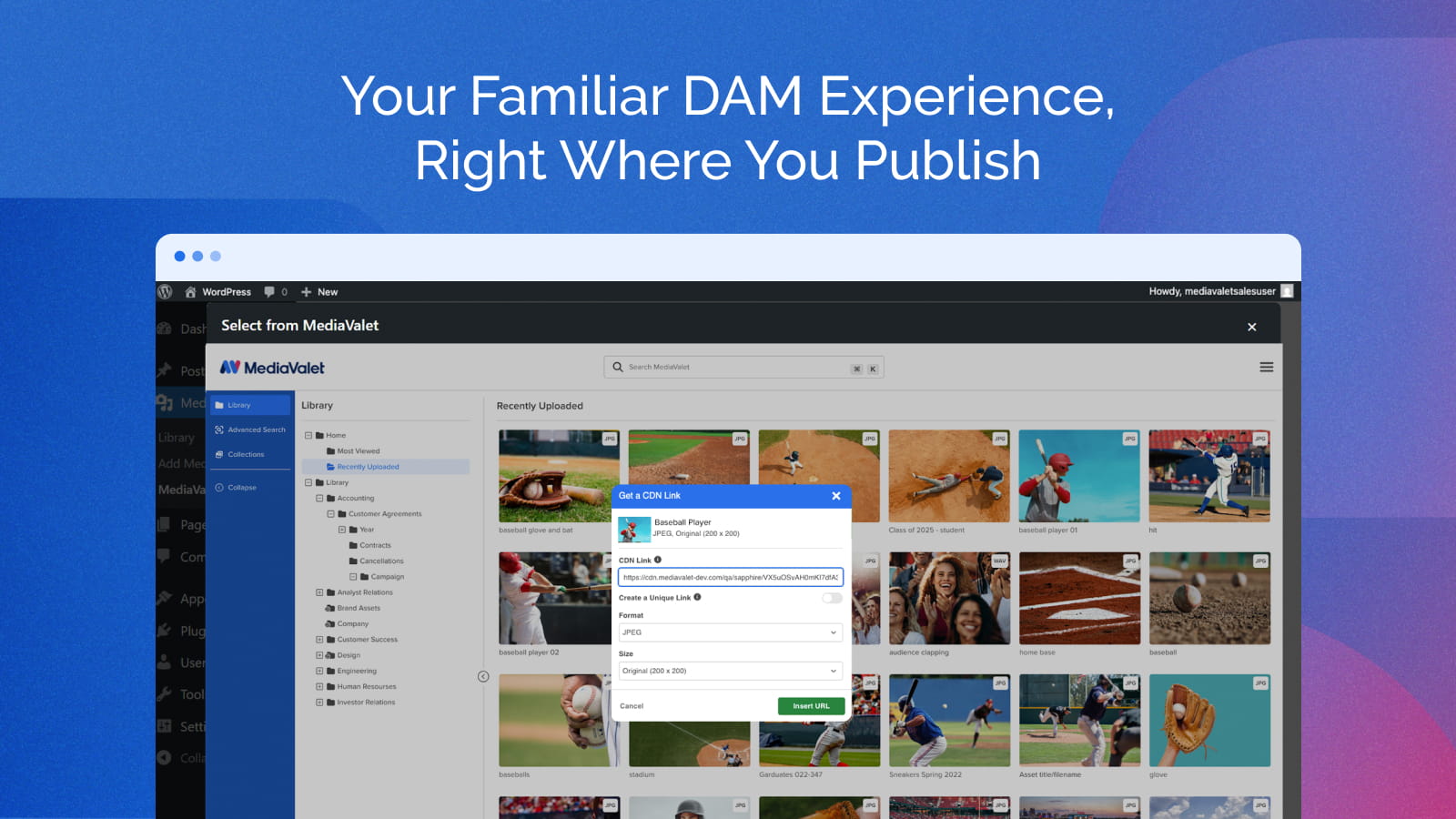
- MediaValet Asset Picker embedded in WordPress – Search, filter, preview, and select assets from your full MediaValet library without leaving the WordPress editor.
- CDN delivery with dynamic image transformations – Insert CDN-optimised image links with on-the-fly transformations: resize, automatic format selection, and freeform cropping.
- CDN delivery with video transformations – Insert MediaValet videos as CDN or embed links and keep their playback settings — autoplay, mute, loop, hide controls, and background playback — applied everywhere the video renders: the Media Library, the editor, and the published post or page.
- Automatic metadata transfer – Alt text, title, and expiry dates are automatically pushed to WordPress on asset insertion, keeping your content accessible and compliant.
- Built on Unify – Powered by MediaValet’s modern Unify integration platform for improved reliability, maintainability, and a consistent experience.
Benefits
- Eliminate constant tab switching — work directly inside WordPress.
- Easily access the approved digital assets instantly from MediaValet.
- Transform and optimize assets on the fly before publishing.
- Reduce manual errors by using only approved, centralized assets.
- Maintain consistent branding across every page and post.
- Empower content teams with a seamless DAM-to-CMS experience.
- Built on MediaValet’s Unify platform for a modern, reliable integration.
Bedarf
- A MediaValet account
- WordPress account with any of the Contributors, Authors, Editors or Administrators Role
- WordPress 5.0 oder höher
- PHP 7.4 oder höher
External Service
This plugin connects to the MediaValet platform (mediavalet.com) to provide asset browsing, CDN link generation, and media synchronization. When using the plugin, the following data is sent to MediaValet servers:
- Your WordPress user ID and email address (for authentication with your MediaValet account)
- Your WordPress site URL (to establish the connection)
- Asset metadata when inserting or syncing media
This data is transmitted over HTTPS. By using this plugin, you agree to the MediaValet Terms of Service and Privacy Policy.
Konfiguration
After activating the plugin, no API keys or OAuth credentials are required.
Wie man benutzt
1. Add a CDN asset without downloading
Use this when you want the asset to be served directly from the MediaValet CDN without storing a local copy.
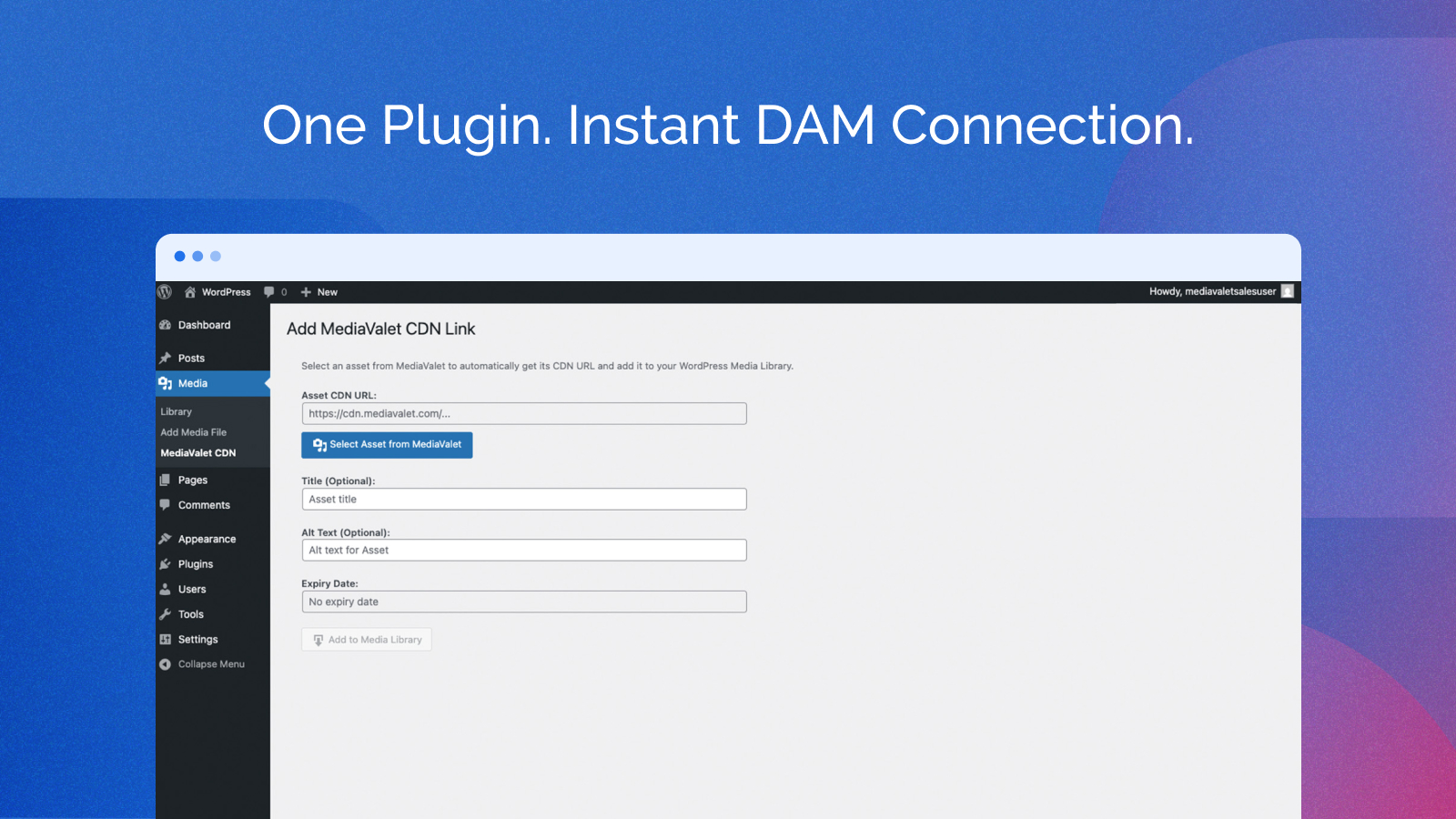
- Go to Media > MediaValet CDN in the admin sidebar
- Click Select Asset from MediaValet and login with MediaValet account
- Browse Your Library — To select an asset, navigate through your library and hover over the desired file. Click on the [+] icon (labeled “Insert as CDN Link”). This will open the Get CDN Link popup. From there, choose the required format and select the appropriate size. Finally, click on “Insert CDN Link” to complete the process.
- The CDN URL, title, alt text, and expiry date are filled in automatically
- Optionally edit the title and alt text
- Click Add to Media Library — the asset is added to Library in WordPress and served via CDN
2. Insert assets in the Editor
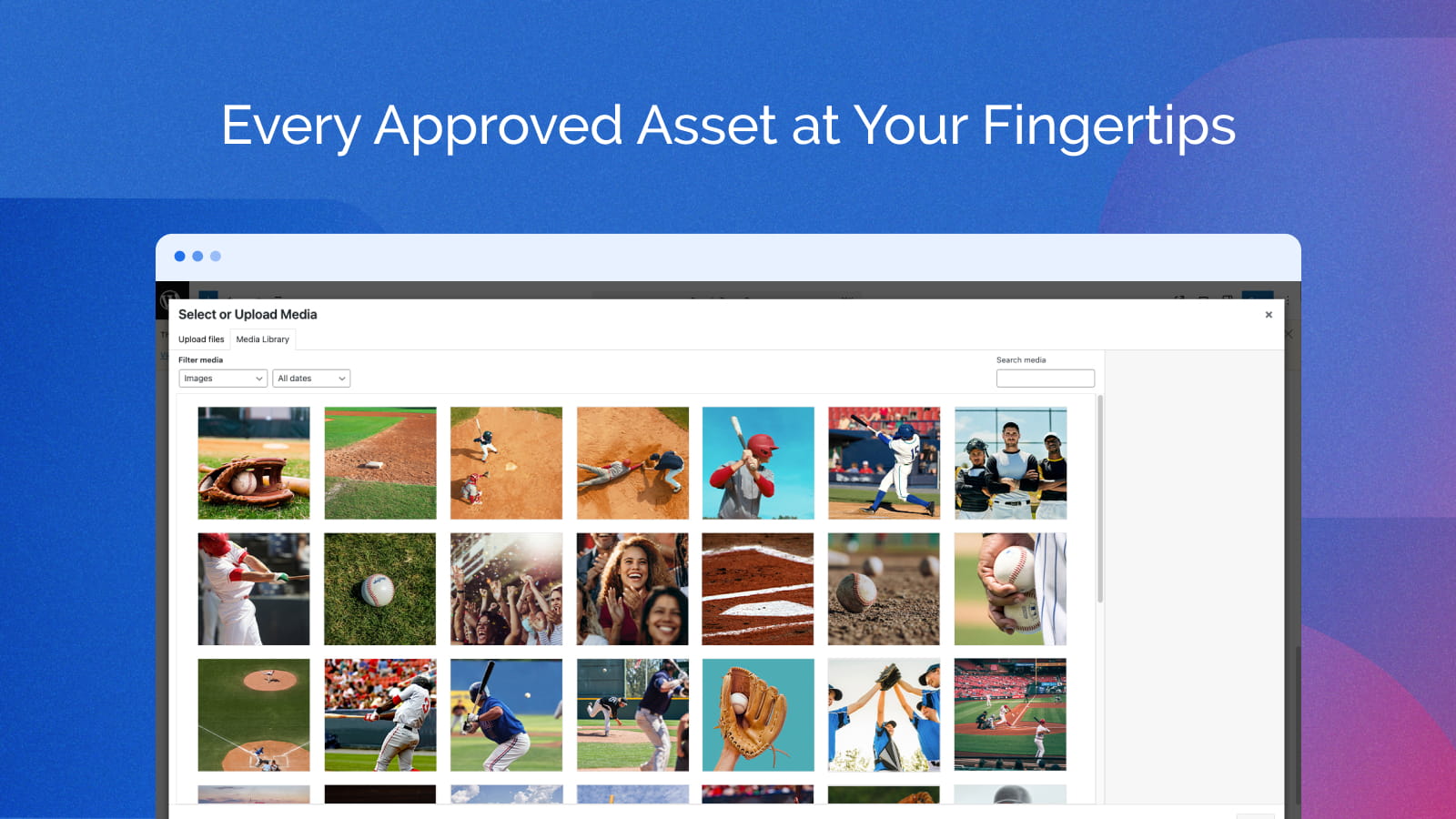
- Open or create a post/page using the Editor
- Choose the file from MediaLibrary which was uploaded from MediaValet to WordPress.
- The asset is inserted into your post
3. Manage CDN assets in Media Library
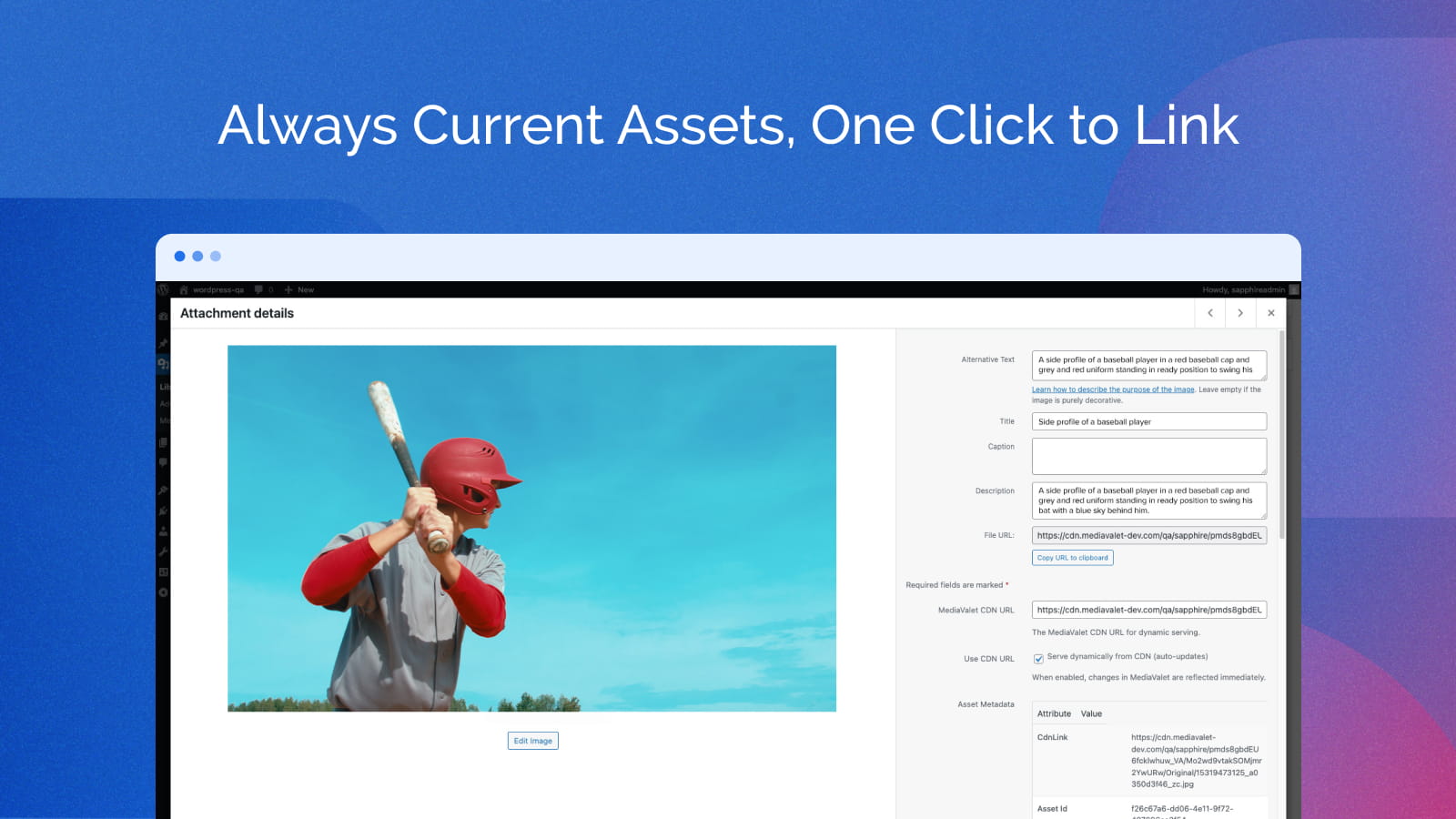
After inserting a CDN asset you can manage it from Media > Library:
- Use CDN URL toggle — switch between serving the file from MediaValet CDN (dynamic) or a local WordPress copy (static)
- CDN URL field — view or edit the CDN URL directly
- Re-sync from CDN — re-download the latest version of the asset from MediaValet
4. Work with MediaValet videos
Videos behave like any other MediaValet asset, with playback handled for you:
- Select a video in the MediaValet picker and choose the playback options you want (autoplay, mute, loop, hide controls, or the background preset) while generating the link
- Click Add to Media Library — the video is added along with its MediaValet preview frame, which is used as the Media Library thumbnail and as the video poster image
- Insert the video into a post or page using the standard WordPress video block or
[video]shortcode
Your playback settings are applied wherever the video renders — the Media Library preview, the editor, and the published page. Two rules are enforced automatically, because browsers require them:
- Autoplay always plays muted — browsers block unmuted autoplay
- Hiding the player controls also turns on autoplay, so the video never appears as a frozen still with no way to start it
When the player’s own controls are hidden, a small Stop / Unmute overlay appears on hover so visitors still have a way to silence or stop the video.
Unterstützen
For help with installation or configuration, visit our support resources:
- Support Page: MediaValet WordPress Plugin Guide
- Email: support@mediavalet.com
- WordPress.org Forum: Plugin Support Forum
Installation
Method 1: Install directly from WordPress Admin (Recommended)
- Log in to your WordPress admin panel at
https://yourdomain.com/wp-admin - Navigate to Plugins → Add New
- In the search bar (top right), type MediaValet
- Locate the MediaValet – Digital Asset Management for WordPress plugin and click Install Now
- Once installed, click Activate
Method 2: Manual Upload
- Download the plugin zip from the WordPress Plugin Directory
- In your WordPress admin, navigate to Plugins → Add New
- Click Upload Plugin at the top of the page
- Click Choose File, select the downloaded
.zipfile, and click Install Now - Once installed, click Activate Plugin
After Activation
- Navigate to Media → MediaValet CDN in the admin sidebar
- Click Select Asset from MediaValet and log in with your MediaValet account
- Browse your library, select an asset, and click Add to Media Library
Note: No API keys or OAuth credentials are required. Authentication is handled automatically via your MediaValet account.
Änderungsprotokoll
Minor Enhancements
1.0.6
Unified endpoint
* Change: Minor enhancements
1.0.5
Video transformations in the Media Library and in posts
- Feature: video playback settings — autoplay, mute, loop, hide controls, and the background preset — are now carried through from the MediaValet link and applied wherever the video renders in WordPress
- Feature: videos inserted into posts and pages honour those settings in both the Gutenberg video block and the [video] shortcode — MediaValet embed links render through the MediaValet player, direct CDN links render as a native HTML5 video
- Feature: autoplay is automatically muted, and hiding the player controls automatically enables playback, so a video is never left as a still frame the visitor cannot start
- Feature: a Stop / Unmute overlay appears on hover for videos whose native player controls are hidden
- Feature: the MediaValet preview frame is now used as the video’s poster image in posts and as its thumbnail in the Media Library grid and list views, replacing the generic file-type icon
- Fix: fatal error when rendering MediaValet embed videos (Shaka player) via the [video] shortcode or Gutenberg video block
- Fix: Media Library “Attachment Details” modal now shows a playable player instead of a “Format(s) not supported” error for MediaValet embed videos
- Fix: closing the Attachment Details modal now stops an embed video, instead of leaving it playing audio in the background
- Fix: portrait videos no longer stretch far past the viewport in the Attachment Details preview, the editor, or the published page
- Fix: asset picker postMessage origin check now correctly matches when the Unify UI is fronted by a Cloudflare Worker
1.0.4
- Fix: switched Unify UI endpoint to production (wordpress-app.mediavalet.com)
1.0.3
- Feature: CDN images now support auto-optimized format selection, crop, and resize transformations via MediaValet CDN
- Feature: unsupported audio formats (WMA, AIFF, APE, RealAudio) now show a clear, actionable error message instead of failing silently
- Fix: attachment details panel in Media Library now only shows MediaValet fields for MediaValet assets — locally uploaded files are unaffected
- Fix: filename is now correctly populated in the Media Library panel for CDN-only assets (was blank)
- Fix: broken CDN image now shows a filename notice matching standard WordPress behaviour instead of clearing alt text to empty
- Fix: CDN re-sync now correctly handles deleted/broken asset signals
- Fix: Escape key now closes the picker modal; success dialog Escape continues to work after picker is closed
- Fix: “Add to Media Library” button icon alignment corrected
1.0.2
- Fix: picker spinner now appears immediately on click in all browsers including incognito/private mode
- Fix: iframe loads after modal renders — spinner is always visible before network activity starts
- Fix: re-opening picker after first load is instant with no redundant reload
1.0.1
- Performance: removed unnecessary CDN HEAD request on asset insert, significantly reducing insert time
- Fix: spinner now appears immediately when adding asset to Media Library
Screenshots
Für Entwickler
Ist das dein Plugin? Zeigen Sie die Zahlen.
Fügen Sie Ihrer Website, Docs oder GitHub Readme ein Live-Badge hinzu. Es wird von selbst aktualisiert - kein Konto erforderlich.
Best MediaValet alternatives
All cdn plugins →




Fragen und Antworten
MediaValet: quick answers
Gerade Antworten, gezogen von Live WordPress.org Daten.
Quelle: WordPress.org
Is MediaValet free?
Yes. MediaValet is free to download and use from the official WordPress.org plugin directory.
Is MediaValet safe to use in 2026?
MediaValet works, but test it on a staging site before relying on it in 2026. It runs on 20+ sites and was last updated 3 months ago, and scores 52/100 on our health check.
How many websites use MediaValet?
MediaValet is active on 20+ WordPress websites and has been downloaded 795 times since it launched in April 2026. It was downloaded 131 times in the last 30 days.
Does MediaValet work with WordPress 7.1?
MediaValet is officially tested up to WordPress 7.0.9, while the latest release is 7.1.5. It may still work, but try it on a staging site first.
What PHP version does MediaValet need?
MediaValet requires PHP 7.4 or higher. Most hosts run PHP 8.x today, so it works on any modern WordPress hosting.
When was MediaValet last updated?
The latest version, 1.0.6, was released on August 22, 2026 (3 months ago).
Who makes MediaValet?
MediaValet is developed and maintained by MediaValet.
What are the best alternatives to MediaValet?
The most popular alternatives to MediaValet are W3 Total Cache (800K+ installs), SpeedyCache (500K+ installs) and Breeze Cache (300K+ installs).
Angetrieben von PageForge
Eine Vorlage und eine Tabelle. Eine echte Seite für jede Suche.
PageForge Verwandelt jede Zeile eines CSV in eine WordPress-Seite mit eigenem Titel, URL, SEO Felder und Schema entworfen. Kostenlos auf WordPress.org.
- CSV und XLSX, plus Google Sheets auf Beruf und Unternehmen
- seinen eigenen Titel, URL, SEO Felder und Schema für jede Seite
- Arbeitet mit dem Blockeditor, Elementor, Divi und Avada
- Kostenlos auf WordPress.org, keine Kreditkarte