


Advanced Media Offloader – Offload Media to Amazon S3, Cloudflare R2, DigitalOcean Spaces & More
Offload WordPress media to Amazon S3, Cloudflare R2, DigitalOcean Spaces & more. Save server space, serve files via CDN, speed up your site.

Sichere Auswahl
Yes — Advanced Media Offloader is a safe, well-maintained plugin to use in 2026. It runs on 8K+ sites, is rated 4.7/5 and was last updated 2 weeks ago, and scores 91/100 on our health check.
- Loved by users — 4.7/5 from 49 reviews
- Aktiv entwickelt — letztes Update vor 2 Wochen
- Getestet mit dem neuesten WordPress (7.1)
- Responsive support — 90% of recent threads resolved
- Momentum — downloads up 79.9% vs the previous 30 days
- Benötigt PHP 8.1 oder neuer
Wie stapelt es sich?
Side-by-side bei Installationen, Updates, Bewertungen und Support



Tägliche Downloads
Download-Spitzen folgen normalerweise einer neuen Version - jede Website, die automatisch aktualisiert wird, gilt als Download.
Ranglisten
Where Advanced Media Offloader stands todayWordPress.org Ranglisten suchen
Live-Position in der Plugin-Suche, Top 100| Stichwort | Position |
|---|---|
| amazon s3 | #5 |
| cdn | #27 |
| cloud storage | #15 |
| cloudflare r2 | #1 |
| offload | #1 |
Versionsübernahme
Anteil aktiver Sites pro Release.
Bewertungsaufschlüsselung
★★★★★★★★★★ 4.7 from 49 reviews
About Advanced Media Offloader
From the official readme · v4.7.3Beschreibung
Advanced Media Offloader automatically moves your WordPress Media Library to cloud storage — Amazon S3, Cloudflare R2, DigitalOcean Spaces, Backblaze B2, Wasabi, MinIO, or any S3-compatible service — and serves your files from there.
Your server stays light, your pages load faster, and you never touch your existing content: every media URL is rewritten automatically. Setup takes about five minutes, with no code required.
Why offload your WordPress media?
- Cut hosting costs — stop upgrading your hosting plan just to store images and videos. Cloud storage is far cheaper per GB.
- Speed up your site — serve media from cloud storage or a CDN close to your visitors, instead of your web server.
- Lighter, faster backups — with media in the cloud, your site backups shrink dramatically.
- Zero content changes — URLs are rewritten on the fly; posts, pages, and products keep working exactly as before.
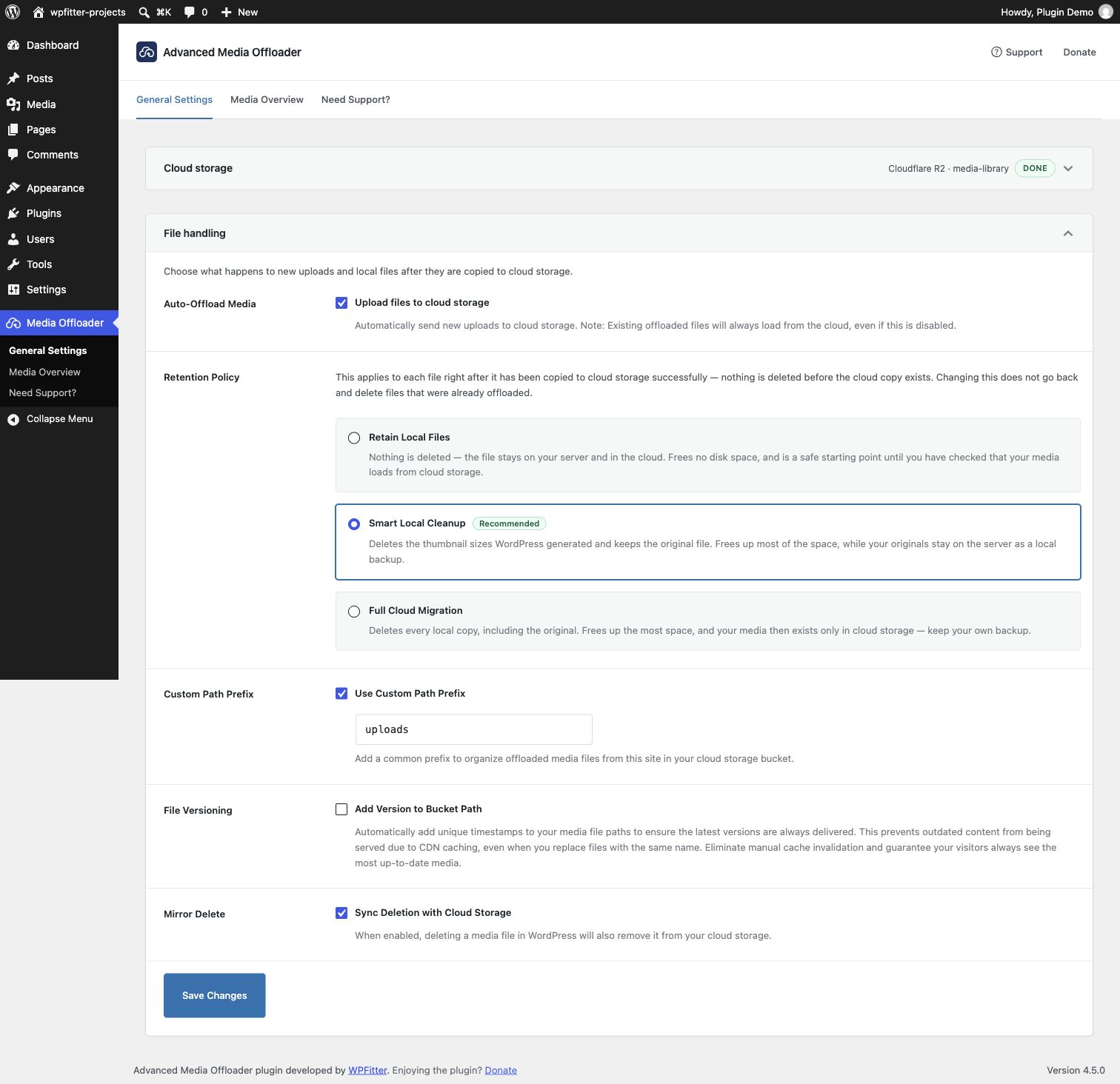
- Stay in control — keep local copies, clean them up smartly, or go fully cloud. You choose the retention policy.
Supported cloud storage providers
- Amazon S3 — The industry standard object storage service
- Cloudflare R2 — S3-compatible storage with zero egress fees
- DigitalOcean Spaces — Simple object storage from DigitalOcean
- Backblaze B2 — Affordable S3-compatible storage with predictable pricing
- Wasabi — Hot cloud storage with predictable pricing
- MinIO — Any S3-compatible storage (MinIO, OVHcloud Object Storage, Scaleway, Linode, Vultr, IBM COS, and more)
Not sure which provider to choose? Check our cloud storage pricing comparison for real-world cost breakdowns.
Wie es funktioniert
- Install and activate the plugin, then open Media Offloader in your WordPress admin.
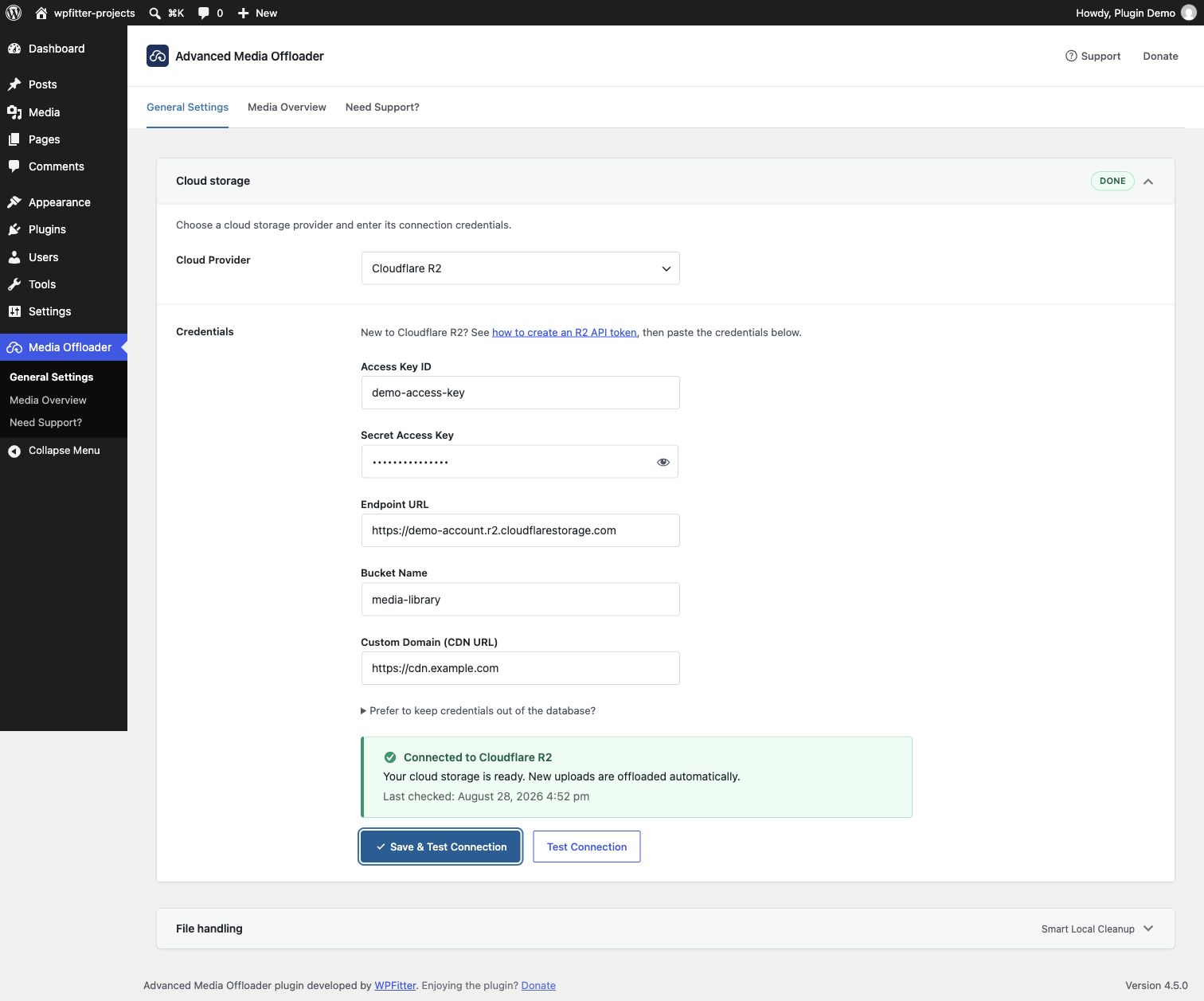
- Connect your cloud storage — pick a provider, enter its credentials, then click Save & Test Connection.
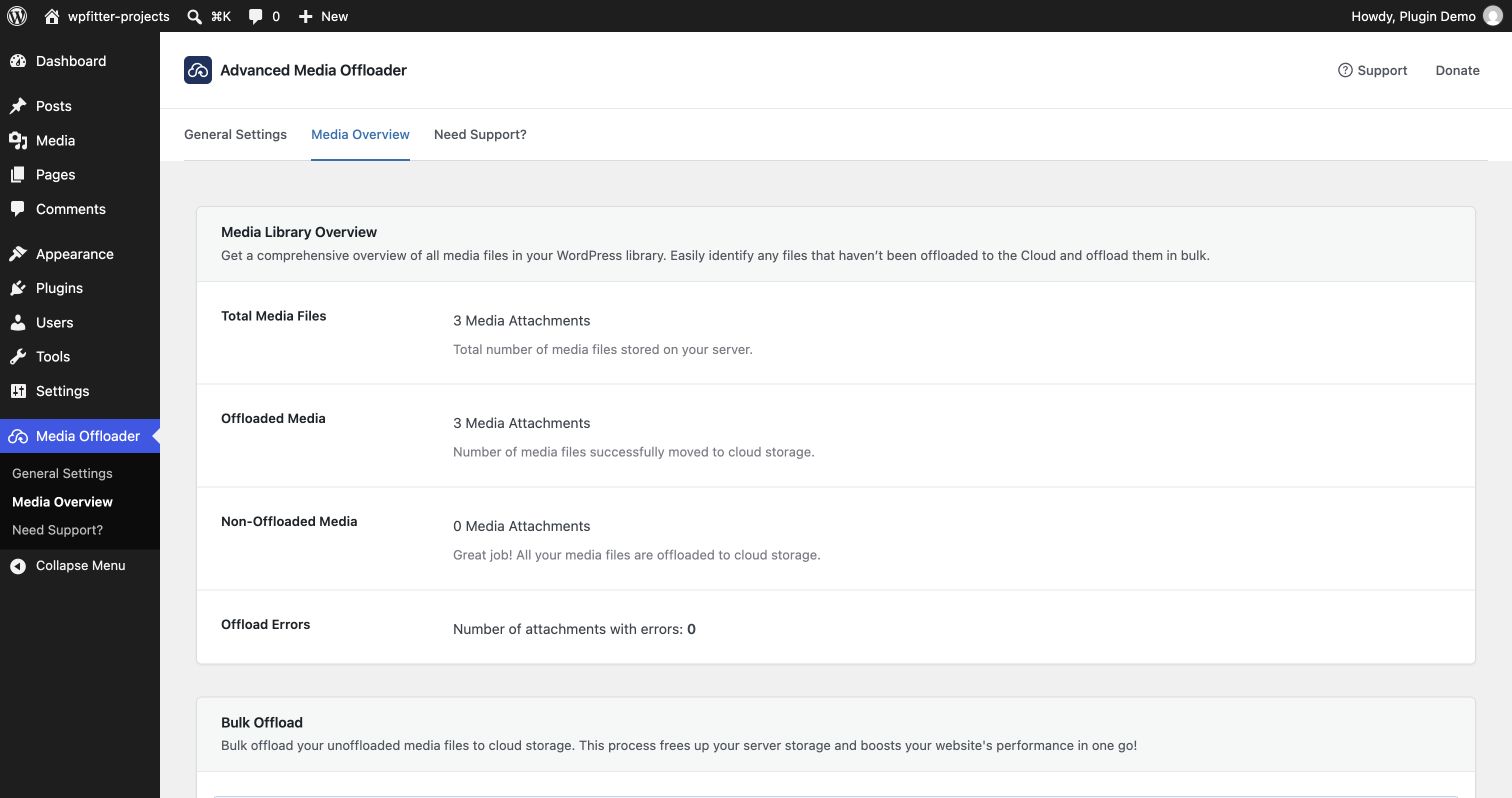
- Offload — new uploads go to the cloud automatically. Move existing files with one click from the Media Overview page.
That’s it. Most sites are fully set up in about five minutes.
Merkmale
- Automatic offloading — every new upload goes straight to your cloud storage.
- Bulk offload existing media — migrate your current Media Library from the Media Overview page, or use WP-CLI (
wp advmo offload) for unlimited, scriptable migrations. (Learn more) - AI assistant and automation ready — check your setup, find failed files, and run offloads from an AI assistant, a script, or the REST API, through the WordPress Abilities API.
- Flexible retention policies — keep local copies (Retain Local Files), free up space while keeping originals as backup (Smart Local Cleanup), or remove all local files (Full Cloud Migration). (Learn more)
- Smart URL rewriting — all media URLs, including every thumbnail size and srcset, are served from the cloud automatically.
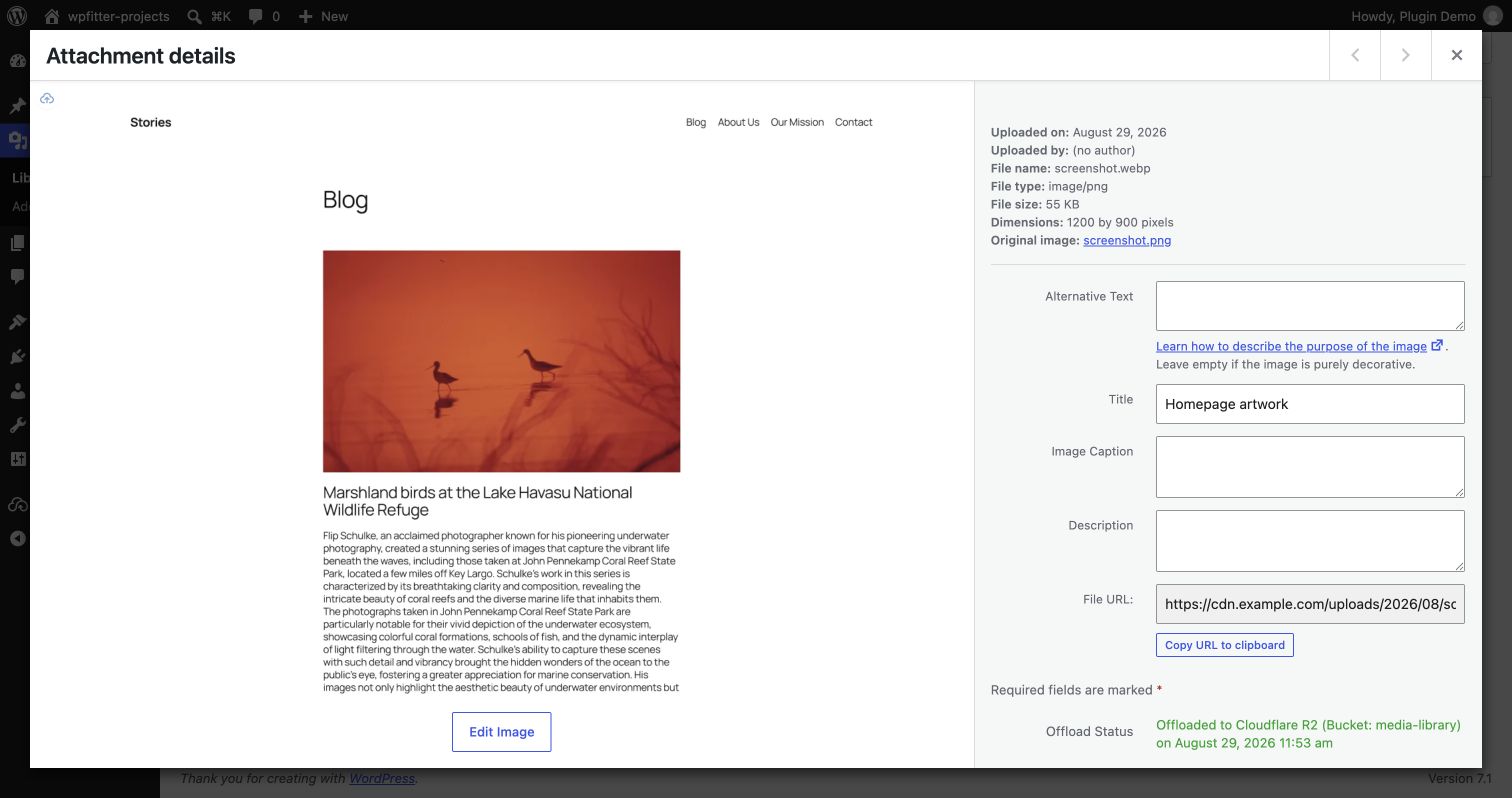
- Offload status at a glance — cloud badges in the Media Library, an offload-status filter, and per-file “Offload Now” and “Retry Offload” buttons.
- Mirror Delete — optionally remove files from cloud storage when you delete them in WordPress.
- Custom path prefix — control exactly where your files live inside your bucket.
- File versioning — add unique timestamps to media paths to prevent stale CDN caches.
- Thumbnail regeneration support — compatible with WP-CLI
wp media regenerateand the Regenerate Thumbnails plugin; regenerated thumbnails offload automatically. Full Cloud Migration temporarily restores the cloud source, regenerates it, and safely removes the local working files afterward.
Works with your favorite plugins
- WooCommerce — product images and WooCommerce-specific image sizes offload and display correctly.
- Page builders — Elementor, Beaver Builder, Visual Composer, and any builder that uses standard WordPress media functions.
- Image optimizers — Modern Image Formats (recommended), Imagify, and EWWW Image Optimizer. Optimized WebP and AVIF files are offloaded alongside the originals. (Learn more)
- WP-CLI — automate offloading in deployment scripts and cron jobs.
Manage your media with AI assistants
Advanced Media Offloader supports the WordPress Abilities API (WordPress 6.9 and later). AI assistants and automation tools can now work with your offloaded media, using an administrator account.
Install the free MCP Adapter plugin and connect an AI assistant that supports MCP (Model Context Protocol, the standard way AI assistants connect to apps), such as Claude or Cursor. Then just ask:
- “Is my cloud storage connected?”
- “How many files are not offloaded yet?”
- “Which files failed to offload, and why?”
- “Start a bulk offload and show me the progress.”
What your assistant can do:
- Check your setup, media counts, and the last connection test
- Check the offload status of specific files
- List files that failed to offload
- Test the connection to your cloud storage
- Offload or re-offload files (up to 20 at a time)
- Start, watch, and cancel bulk offloads
It always uses your saved provider and settings. It cannot change your settings, and it never receives your access keys.
Read the AI Assistant Setup Guide →
Für Entwickler
Advanced Media Offloader is built to be extended: 20+ action and filter hooks let you control what gets offloaded, where it goes, and what happens before and after each step.
Quick example — skip offloading files larger than 5MB:
add_filter('advmo_should_offload_attachment', function($should_offload, $attachment_id) {
    $file = get_attached_file($attachment_id);
    if ($file && filesize($file) > 5 * 1024 * 1024) {
        return false;
    }
    return $should_offload;
}, 10, 2);
View Developer Hooks Documentation →
WordPress Abilities API. The plugin registers 9 abilities in the advmo-media category: advmo/get-status, advmo/get-attachment-status, advmo/list-offload-errors, advmo/get-bulk-offload-status, advmo/test-connection, advmo/offload-attachments, advmo/reoffload-attachments, advmo/start-bulk-offload, and advmo/cancel-bulk-offload. Run them from PHP, the REST API (/wp-json/wp-abilities/v1/abilities/{name}/run), or any MCP client.
$result = wp_get_ability('advmo/get-attachment-status')
    ->execute(['attachment_ids' => [123, 456]]);
View Abilities API Documentation →
Under the hood, the plugin uses the official AWS SDK for PHP, namespace-isolated with PHP-Scoper so it never conflicts with other plugins that bundle the same SDK.
Pro version coming soon
We’re working on Advanced Media Offloader Pro with premium features such as private media files with secure, authenticated access. Follow wpfitter.com to be the first to know when it launches.
Installation
Setup takes about five minutes and requires no code changes.
- Install the plugin from Plugins → Add New (search for “Advanced Media Offloader”), or upload the plugin files to
/wp-content/plugins/advanced-media-offloader/. - Aktivieren Sie das Plugin über das „Plugins“-Menü in WordPress.
- Go to Media Offloader in the admin menu, choose your cloud provider, and enter its credentials.
- Click Save & Test Connection to save and verify your credentials.
- New uploads are now offloaded automatically. Offload your existing media from the Media Overview tab.
Advanced (optional): define credentials in wp-config.php
The settings page is the quickest way to configure the plugin — no code required. Alternatively, you can define your credentials as constants in wp-config.php using the examples below. Constants take priority over credentials saved in the admin and lock the corresponding fields. This keeps secrets out of the database — useful for version-controlled or multi-environment setups.
Note: Domain and endpoint URLs will automatically be prefixed with https:// if you don’t include it, but we recommend always including the full URL for clarity.
Amazon S3 Configuration
define('ADVMO_AWS_KEY', 'your-access-key');
define('ADVMO_AWS_SECRET', 'your-secret-key');
define('ADVMO_AWS_BUCKET', 'your-bucket-name');
define('ADVMO_AWS_REGION', 'your-bucket-region');
define('ADVMO_AWS_DOMAIN', 'your-domain-url');
Cloudflare R2 Configuration
define('ADVMO_CLOUDFLARE_R2_KEY', 'your-access-key');
define('ADVMO_CLOUDFLARE_R2_SECRET', 'your-secret-key');
define('ADVMO_CLOUDFLARE_R2_BUCKET', 'your-bucket-name');
define('ADVMO_CLOUDFLARE_R2_DOMAIN', 'your-domain-url');
define('ADVMO_CLOUDFLARE_R2_ENDPOINT', 'your-endpoint-url');
DigitalOcean Spaces Configuration
define('ADVMO_DOS_KEY', 'your-access-key');
define('ADVMO_DOS_SECRET', 'your-secret-key');
define('ADVMO_DOS_BUCKET', 'your-bucket-name');
define('ADVMO_DOS_DOMAIN', 'your-domain-url');
define('ADVMO_DOS_ENDPOINT', 'your-endpoint-url');
Backblaze B2 Configuration
define('ADVMO_BACKBLAZE_B2_KEY', 'your-application-key-id');
define('ADVMO_BACKBLAZE_B2_SECRET', 'your-application-key');
define('ADVMO_BACKBLAZE_B2_BUCKET', 'your-bucket-name');
define('ADVMO_BACKBLAZE_B2_REGION', 'your-bucket-region');
define('ADVMO_BACKBLAZE_B2_DOMAIN', 'your-domain-url');
define('ADVMO_BACKBLAZE_B2_ENDPOINT', 'your-endpoint-url');
Wasabi Configuration
define('ADVMO_WASABI_KEY', 'your-access-key');
define('ADVMO_WASABI_SECRET', 'your-secret-key');
define('ADVMO_WASABI_BUCKET', 'your-bucket-name');
define('ADVMO_WASABI_REGION', 'your-bucket-region');
define('ADVMO_WASABI_DOMAIN', 'your-domain-url');
MinIO Configuration
Use this for any storage that supports the S3 API via a custom endpoint (e.g., MinIO, OVHcloud Object Storage, Scaleway, Linode, Vultr, IBM COS). Select this if your provider isn’t listed separately.
define('ADVMO_MINIO_KEY', 'your-access-key');
define('ADVMO_MINIO_SECRET', 'your-secret-key');
define('ADVMO_MINIO_BUCKET', 'your-bucket-name');
define('ADVMO_MINIO_DOMAIN', 'your-domain-url');
define('ADVMO_MINIO_ENDPOINT', 'your-endpoint-url');
define('ADVMO_MINIO_PATH_STYLE_ENDPOINT', false); // Optional. Set to true if your MinIO server requires path-style URLs (most self-hosted MinIO setups). Default is false.
define('ADVMO_MINIO_REGION', 'your-bucket-region'); // Optional. Set your MinIO bucket region if needed. Default is 'us-east-1'.
Änderungsprotokoll
Fixes AI assistants connected through the WordPress MCP Adapter, which could not check status, test the connection, or start a bulk offload.
4.7.3
- Fixed: AI assistants connected through the WordPress MCP Adapter could not check the plugin status or bulk offload progress, test the cloud connection, or start a bulk offload. These requests now work.
4.7.2
- Fixed: Version 4.7.1 could cause a fatal error and prevent access to the site and WordPress admin when WooCommerce or another plugin using Action Scheduler was active.
4.7.1
- Fixed: Offloading existing images with Imagify or EWWW could leave local copies behind under Smart Local Cleanup or Full Cloud Migration. Cleanup now follows the selected policy once the optimizer is idle.
- Fixed: Optimized images and their WebP/AVIF versions could be missed when optimization finished during an offload, or when EWWW WebP generation was off. The current files are now uploaded before local cleanup.
- Fixed: Failed uploads or local cleanup after optimization could stop retrying after 24 hours. Failed attempts now remain pending so cleanup can finish after the problem is resolved.
This update applies to future offloads. Images already offloaded with local files left behind are not cleaned up automatically.
Optimize existing images before offloading if you want optimized cloud copies. When no optimizer job is queued or running, Smart Local Cleanup or Full Cloud Migration can remove local files before a future optimization.
Developer note: Custom cleanup filters should also handle the new existing_media context for existing-library offloads.
4.7.0
- Added: Support for the WordPress Abilities API (WordPress 6.9 and later). AI assistants, scripts, and other tools can now check media status, test the cloud connection, offload or re-offload files, and start or cancel bulk offloads. Only administrators can use these actions. Offloading follows your retention policy.
- Improved: Bulk offloads are more reliable. Starting a bulk offload again joins the run already in progress, interrupted work picks up where it stopped, and the progress bar and Cancel button stay correct after you reload the page.
- Improved: An upload and the cleanup of local copies can no longer run on the same file at the same time. This keeps a file from being removed from your server while it is still uploading.
- Fixed: On multisite, all sites shared one bulk offload queue. Each site now has its own queue.
- Fixed: Themes and plugins could not get the attachment ID of an offloaded file from its Custom Domain URL (
attachment_url_to_postid()returned 0). They now get the correct ID. - Fixed: When you re-offloaded a file, failed uploads of its Imagify or EWWW WebP/AVIF versions were not reported. They now show as errors, so you can find and retry them.
- Fixed: Files stored at the top level of a bucket (not in a folder) could not be re-offloaded. They can now be re-offloaded without moving them into a folder.
4.6.0
- Fixed: Images could break when no Custom Domain was set and Smart Local Cleanup or Full Cloud Migration was on. Local files were deleted while the site still served them. Now they are kept until you set a Custom Domain.
- Fixed: A saved cloud provider that is no longer available (for example after removing the add-on that added it) took the whole site down. The plugin now keeps running and the settings page tells you to choose a provider again.
- Fixed: SVG files from plugins like SVG Support could break. On Amazon S3 new ones were stored under the wrong key, and on Cloudflare R2 and MinIO a cloud-only SVG could not be read and was requested again on every page load, which slowed pages down.
- Fixed: Lazy-load placeholders in images (for example Avada’s) were turned into broken cloud URLs.
- Added: Developers can extend the plugin with the new
advmo_register_providersandadvmo_loadedactions, and storage providers added with theadvmo_cloud_providersfilter can now be selected. The plugin now starts onplugins_loaded. Code that usesadvmo()->containerkeeps working.
4.5.2
- Security: Restricted individual media offloading to users who can edit the selected attachment.
- Improved: The production package now passes Plugin Check without errors.
- Fixed: Resolved thumbnail regeneration errors now clear after a successful retry, while unrelated errors stay visible.
Screenshots
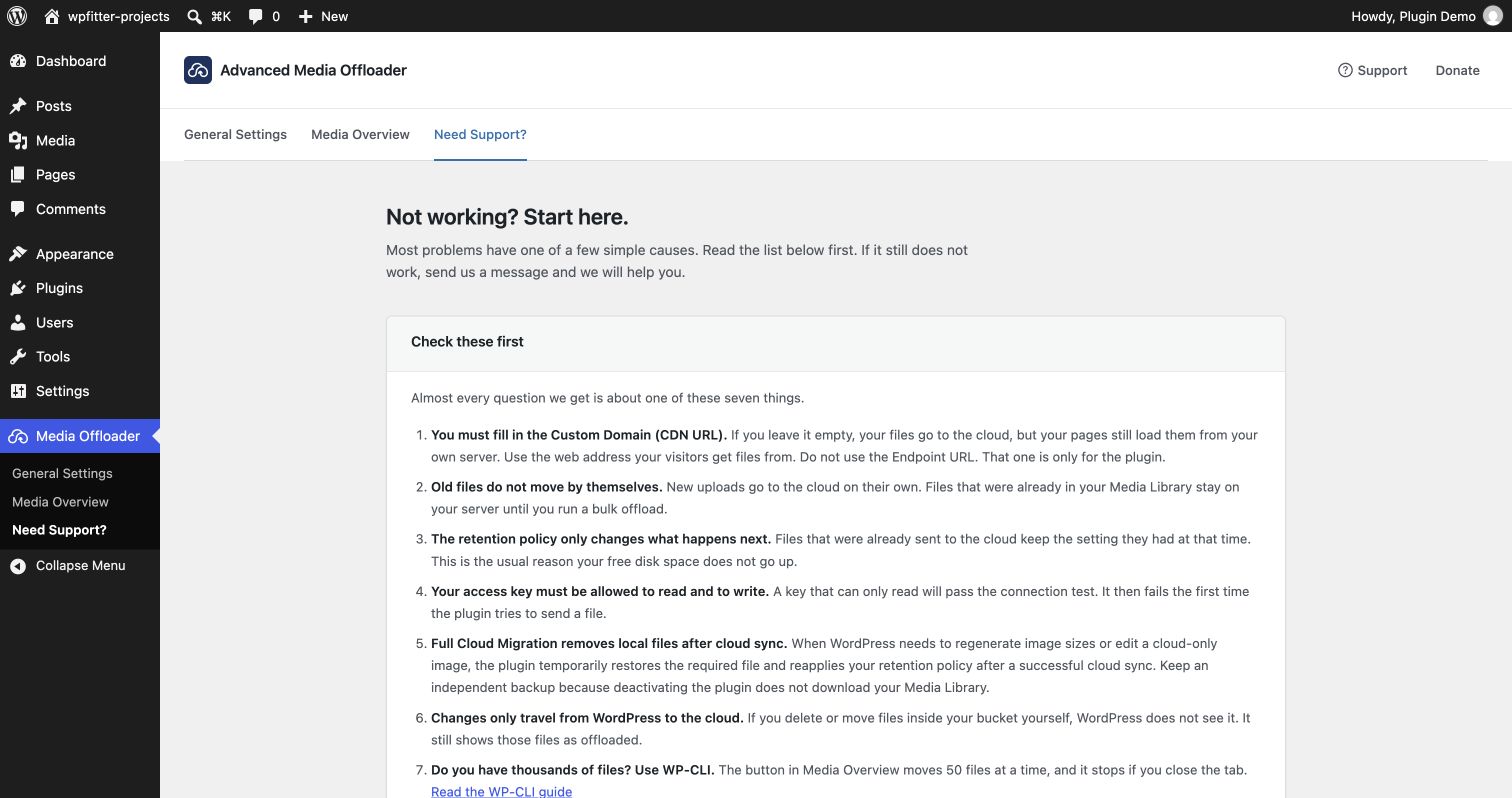
Für Entwickler
Ist das dein Plugin? Zeigen Sie die Zahlen.
Fügen Sie Ihrer Website, Docs oder GitHub Readme ein Live-Badge hinzu. Es wird von selbst aktualisiert - kein Konto erforderlich.
Best Advanced Media Offloader alternatives
All amazon s3 plugins →





Fragen und Antworten
Advanced Media Offloader: quick answers
Gerade Antworten, gezogen von Live WordPress.org Daten.
Quelle: WordPress.org
Is Advanced Media Offloader free?
Yes. Advanced Media Offloader is free to download and use from the official WordPress.org plugin directory.
Is Advanced Media Offloader safe to use in 2026?
Yes — Advanced Media Offloader is a safe, well-maintained plugin to use in 2026. It runs on 8K+ sites, is rated 4.7/5 and was last updated 2 weeks ago, and scores 91/100 on our health check.
How many websites use Advanced Media Offloader?
Advanced Media Offloader is active on 8K+ WordPress websites and has been downloaded 97,745 times since it launched in June 2024. It was downloaded 16,525 times in the last 30 days.
Does Advanced Media Offloader work with WordPress 7.1?
Yes. The developer has tested Advanced Media Offloader up to WordPress 7.1.5, the latest release. It requires WordPress 5.6 or newer.
What PHP version does Advanced Media Offloader need?
Advanced Media Offloader requires PHP 8.1 or higher. Most hosts run PHP 8.x today, so it works on any modern WordPress hosting.
When was Advanced Media Offloader last updated?
The latest version, 4.7.3, was released on November 8, 2026 (2 weeks ago).
Who makes Advanced Media Offloader?
Advanced Media Offloader is developed and maintained by Masoud Golchin.
What are the best alternatives to Advanced Media Offloader?
The most popular alternatives to Advanced Media Offloader are WP Offload Media Lite for A… (30K+ installs), Offload Media (1K+ installs) and Static Porter (100+ installs).
Angetrieben von PageForge
Eine Vorlage und eine Tabelle. Eine echte Seite für jede Suche.
PageForge Verwandelt jede Zeile eines CSV in eine WordPress-Seite mit eigenem Titel, URL, SEO Felder und Schema entworfen. Kostenlos auf WordPress.org.
- CSV und XLSX, plus Google Sheets auf Beruf und Unternehmen
- seinen eigenen Titel, URL, SEO Felder und Schema für jede Seite
- Arbeitet mit dem Blockeditor, Elementor, Divi und Avada
- Kostenlos auf WordPress.org, keine Kreditkarte