


Media Sweep – WordPress Media Cleaner
Clean up your WordPress Media Library by finding and removing unused media. Scan, preview, then sweep away orphaned files to keep your site fast.

Solide Wahl
Media Sweep is a solid plugin choice in 2026, with a few things worth checking first. It runs on 1K+ sites, is rated 3.8/5 and was last updated 5 days ago, and scores 66/100 on our health check.
- Aktiv entwickelt – letztes Update vor 5 Tagen
- Getestet mit dem neuesten WordPress (7.1)
- Momentum — downloads up 134.1% vs the previous 30 days
Wie stapelt es sich?
Side-by-side bei Installationen, Updates, Bewertungen und Support



Tägliche Downloads
Download-Spitzen folgen normalerweise einer neuen Version - jede Website, die automatisch aktualisiert wird, gilt als Download.
Ranglisten
Where Media Sweep stands todayWordPress.org Ranglisten suchen
Live-Position in der Plugin-Suche, Top 100| Stichwort | Position |
|---|---|
| Aufräumen | #84 |
| files | >100 |
| images | >100 |
| library | >100 |
| media | #49 |
Versionsübernahme
Anteil aktiver Sites pro Release.
Bewertungsaufschlüsselung
★★★★★★★★★★ 3.8 from 11 reviews
About Media Sweep – WordPress Media Cleaner
From the official readme · v1.4.0Beschreibung
Media Sweep: The Ultimate WordPress Media Library Cleaner
Media Sweep is a powerful WordPress plugin designed to help you reclaim valuable server space by identifying and safely removing unused media files from your WordPress site. Whether you’re dealing with orphaned attachments, forgotten uploads, or files left behind by themes and plugins, Media Sweep provides a comprehensive solution to keep your media library clean and organized.
Perfect for bloggers, agencies, e-commerce sites, and any WordPress website looking to optimize storage space and improve site performance.
🚀 Key Benefits:
✅ Reclaim Server Space – Remove unused files and free up valuable storage
✅ Improve Site Performance – Faster backups and reduced server load
✅ Safe & Reversible – Files moved to trash folder, not permanently deleted
✅ Smart Detection – Advanced algorithms identify truly unused files
✅ Batch Operations – Process multiple files efficiently
✅ Detailed Analytics – Comprehensive scan reports and file insights
✅ AI Assistant Ready – Audit scans and preview cleanups from Claude or Cursor over MCP; deleting stays off by default
🎯 Core Features
🔍 Dual Scan Modes
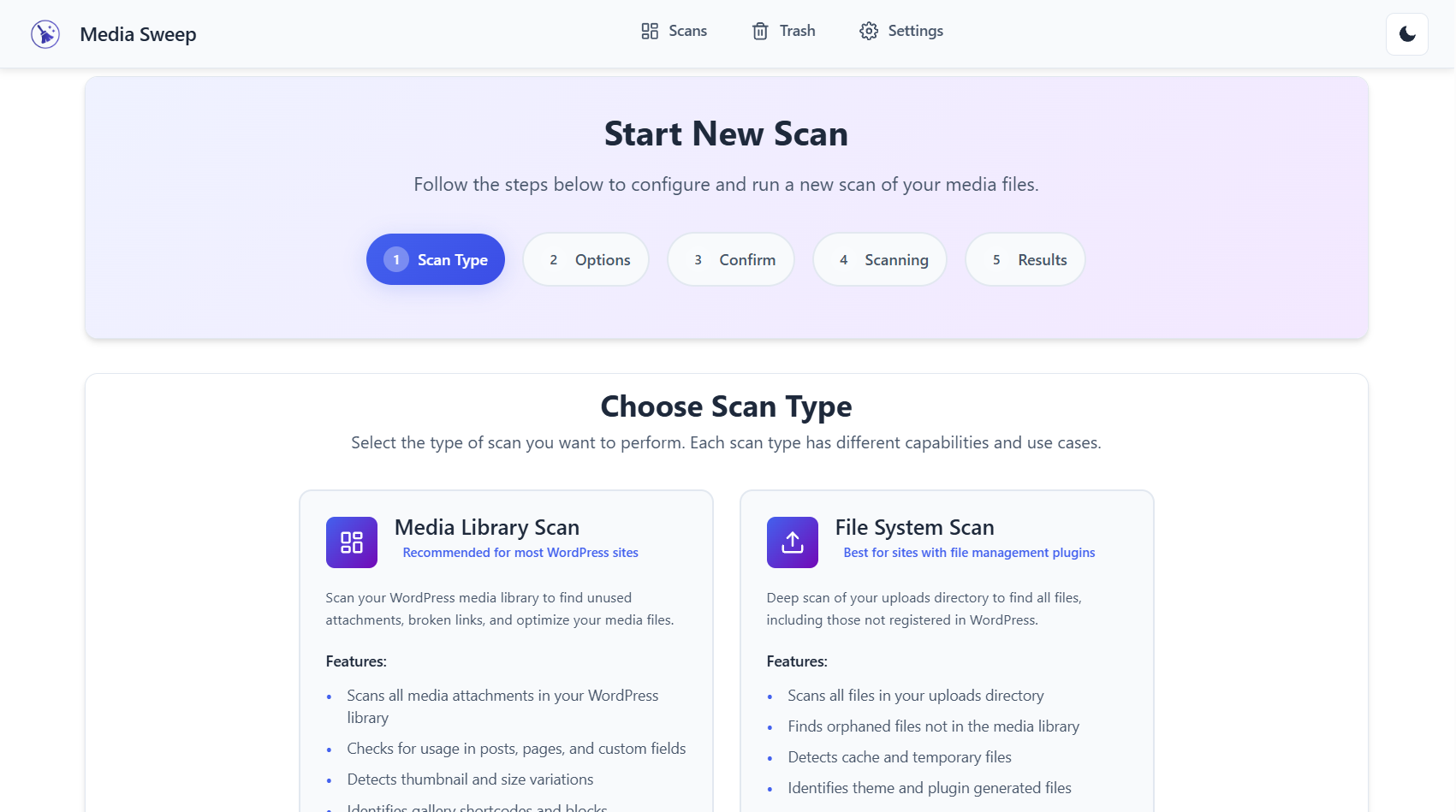
Media Library Scan
* Scans all media attachments in your WordPress library
* Checks for usage in posts, pages, and custom fields
* Detects thumbnail and size variations
* Identifies gallery shortcodes and blocks
* Fast and efficient for large media libraries
* Recommended for most WordPress sites
File System Scan
* Deep scan of your uploads directory
* Finds orphaned files not in the media library
* Detects cache and temporary files
* Identifies theme and plugin generated files
* Comprehensive but may take longer to complete
* Best for sites with file management plugins
📊 Smart File Detection
- Usage Analysis – Checks posts, pages, custom fields, and widgets
- Database Scanning – Searches content for file references
- Shortcode Detection – Identifies gallery and media shortcodes
- Block Analysis – Scans Gutenberg blocks for media usage
- Plugin Integration – Detects files used by popular plugins
- Theme Assets – Identifies theme-related media files
🗂️ Advanced File Management
- Status Classification – Files categorized as In Use, Unused, or Orphaned
- Bulk Actions – Select and process multiple files at once
- Smart Filtering – Filter by file type, status, date, and directory
- Search Functionality – Quickly find specific files
- Preview Mode – View files before taking action
- Detailed File Info – Size, type, usage locations, and more
🛡️ Safety Features
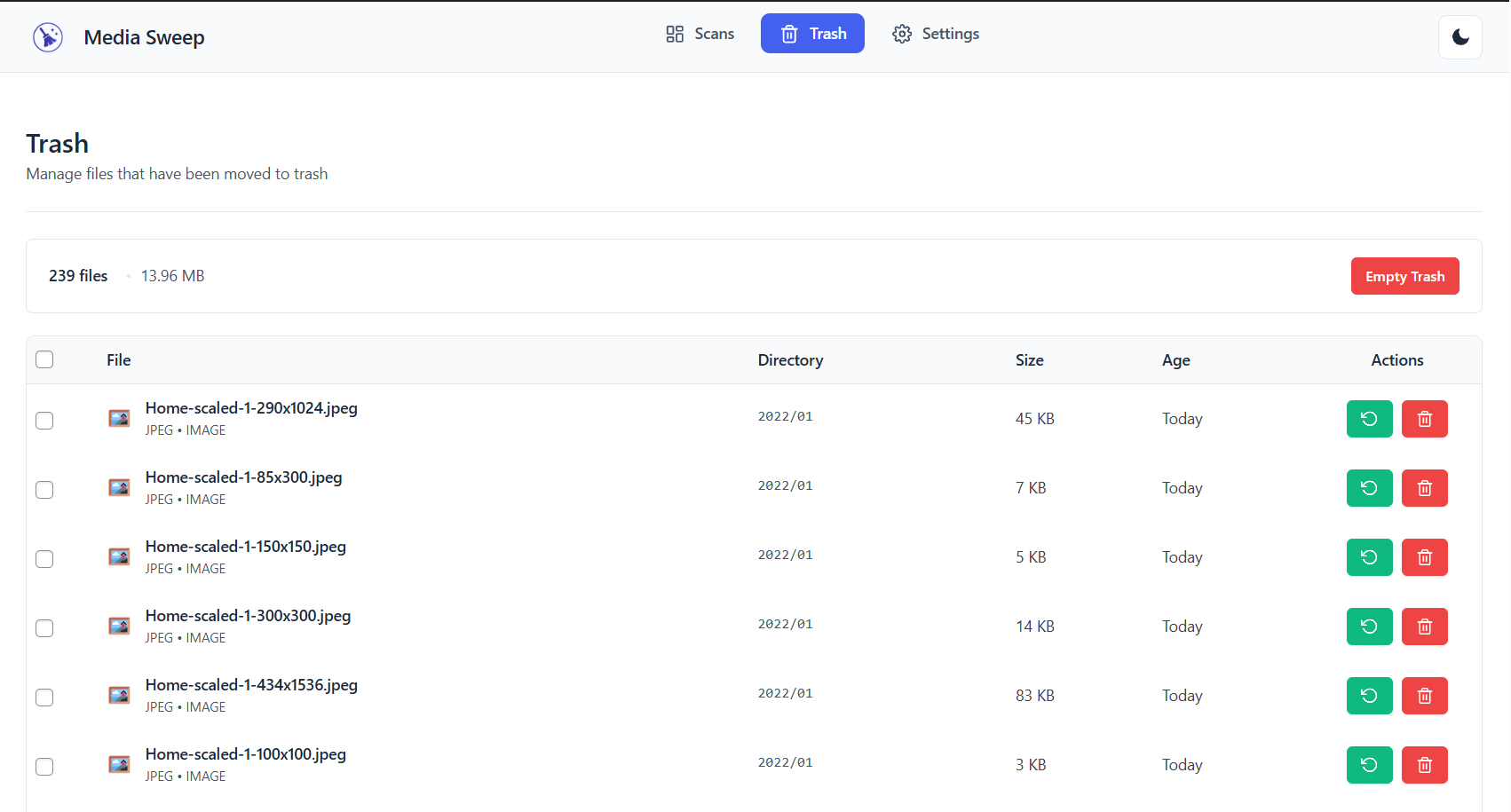
- Trash System – Files moved to secure trash folder, not deleted
- Restore Capability – Easily restore accidentally removed files
- Backup Integration – Works with popular backup plugins
- Progress Monitoring – Real-time scan progress with pause/resume
- System Resources – Intelligent resource management prevents timeouts
- Rollback Protection – Safe operations with detailed logging
📈 Comprehensive Analytics
- Scan History – Track all previous scans and results
- Storage Statistics – See exactly how much space you’ve reclaimed
- File Breakdown – Detailed analysis by file type and status
- Usage Patterns – Understand your media library usage
- Performance Metrics – Scan duration and processing statistics
🚀 Easy 3-Step Process
Step 1: Choose Scan Type
* Select Media Library or File System scan based on your needs
* Configure advanced options for thorough analysis
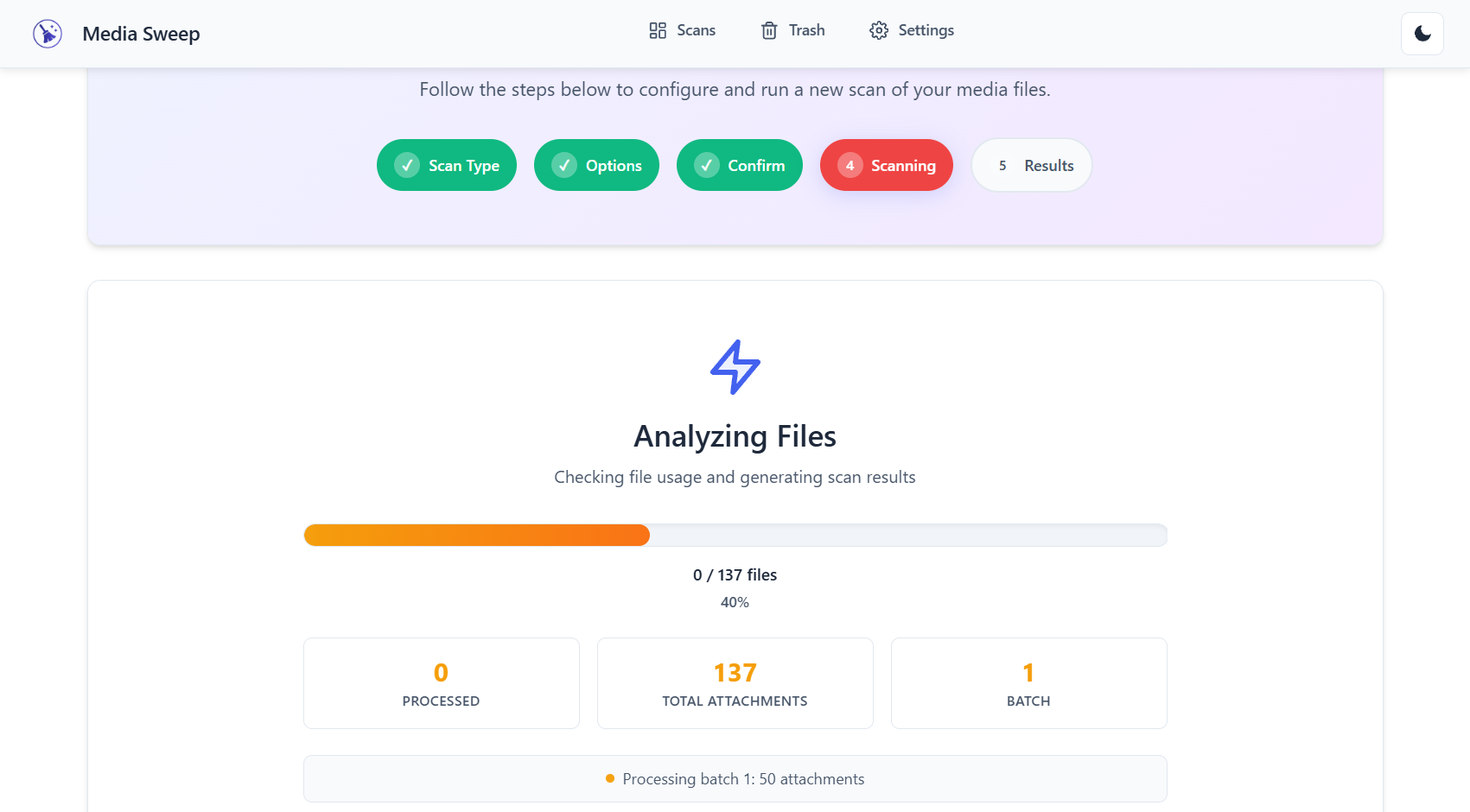
Step 2: Run the Scan
* Watch real-time progress as Media Sweep analyzes your files
* Pause and resume scans as needed without losing progress
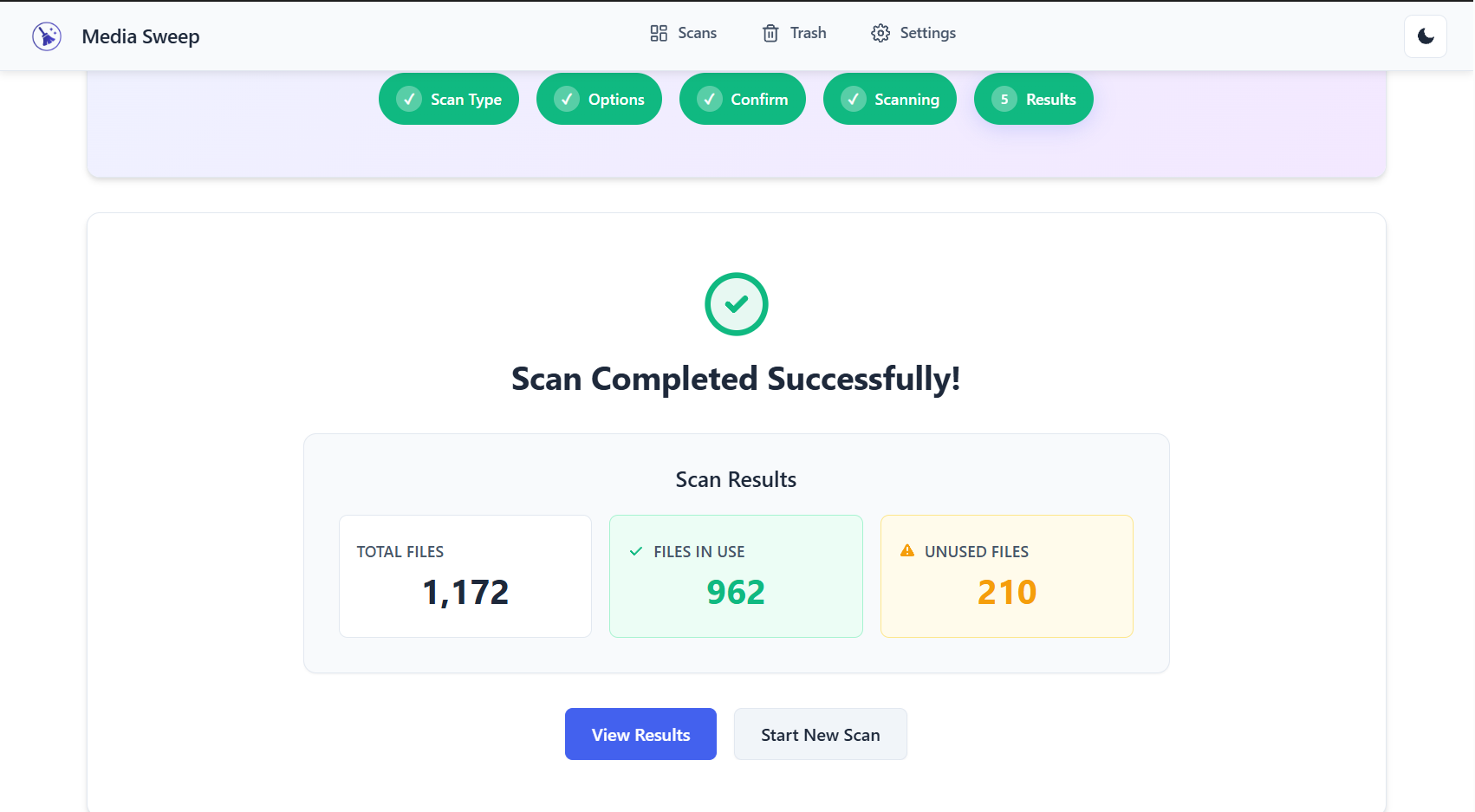
Step 3: Review & Clean
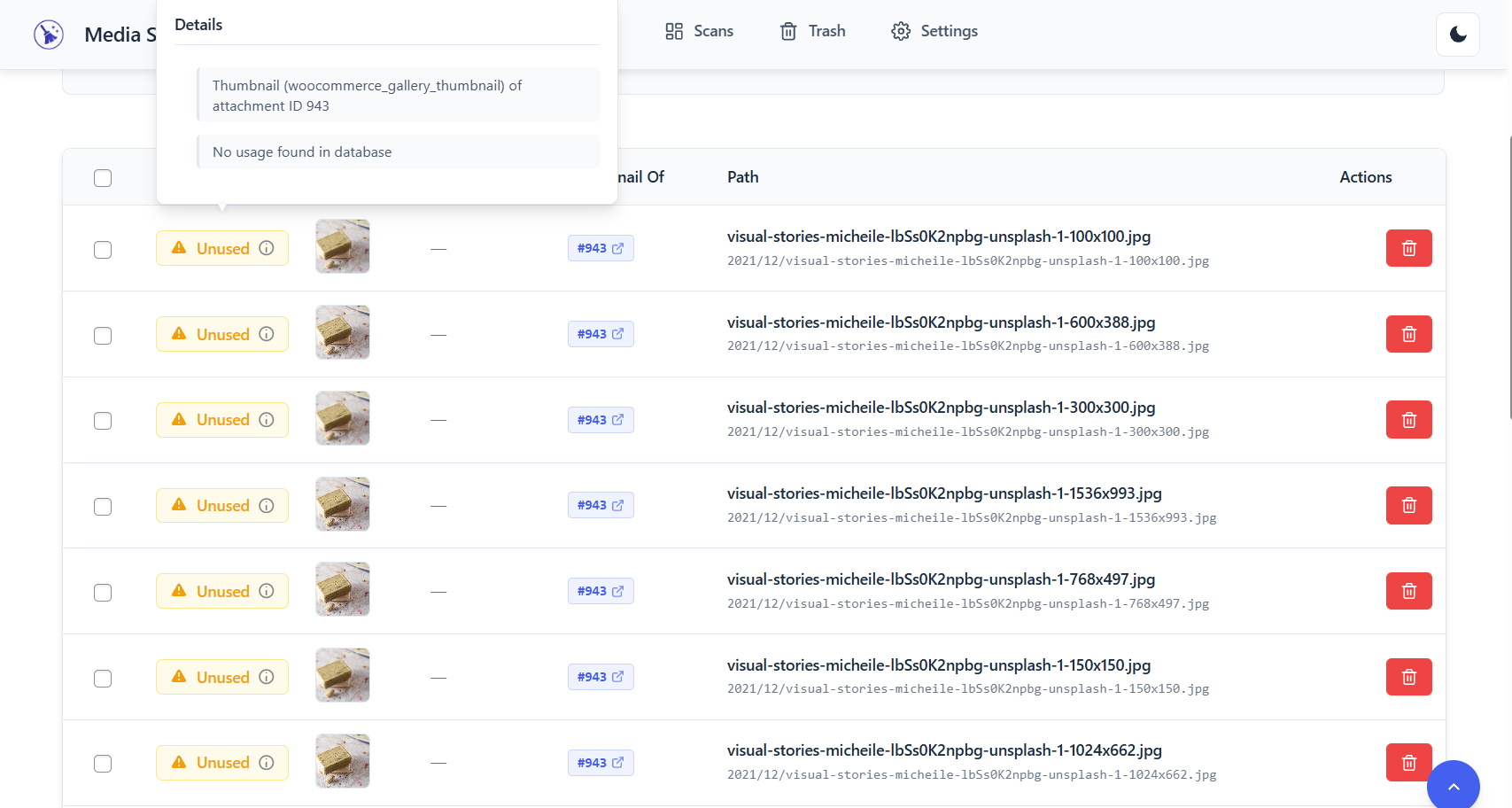
* Browse detected files with detailed information
* Use bulk actions to efficiently process multiple files
* Restore files from trash if needed
🔧 Advanced Configuration
- Scan Options – Deep scan, thumbnail inclusion, custom field checking
- File Type Filters – Focus on specific file types (images, documents, etc.)
- Directory Exclusions – Skip specific folders during scans
- Performance Settings – Adjust batch sizes and resource limits
- Automation Rules – Set up automatic cleanup schedules (planned for future versions)
🤖 Works with AI Assistants (Claude and Cursor via MCP)
Media Sweep registers its scan, report and cleanup operations with the WordPress Abilities API, which is part of WordPress core since 6.9. Install the free MCP Adapter plugin from the WordPress project and MCP clients that sign in with a WordPress Application Password (Claude Desktop, Claude Code, Cursor) can audit your Media Library in plain English. Verified with Claude Code.
What an AI assistant can do:
- Start a Media Library scan, run it to the end and read the counts: in use, unused, orphaned
- List past scans and check the progress of a running one
- List the files a scan found, with path, size, type and verdict
- Explain why a file counts as in use, naming the post, custom field or option that references it
- Preview a cleanup before anything moves: how many files, how much space, how many attachments and thumbnails it would touch
- See what is in the trash and how much space it holds
- Check your server’s headroom and get a recommended batch size
- Read the two settings that arm automatic deletion, so it can warn you they are on
- Put files found on disk but missing from the library back into the Media Library
“Scan the Media Library and tell me how much space the unused files take.”
“Why is hero-2019.jpg marked as in use?”
“Preview a cleanup of the unused images from the last scan and show me the numbers.”
What it deliberately cannot do:
- Delete files over MCP. Deletion is off by default; you can opt in with your own code. Even then, a delete needs a confirmation token minted by a preview of the exact file list, in-use files are always skipped, and the originals go to the Media Sweep trash like any other sweep.
- Empty the trash, delete a single trash file, purge old trash, delete scan records, change a file’s verdict or change settings. None of these are exposed to agents at all, so the site always keeps an undo.
- Run a File System scan. That one stays in wp-admin.
- Act as anyone but an administrator. Every operation checks the administrator capability, and a filter can require more than that, never less.
What you need: WordPress 6.9 or newer, the free MCP Adapter plugin (not bundled with Media Sweep and not required), and a WordPress Application Password for a dedicated admin user (Users > Profile > Application Passwords). WP-CLI works on the same machine. Nothing changes for sites that skip this: on older WordPress, or without the adapter, Media Sweep runs exactly as before, and nothing leaves your server.
💡 Perfect For
- Content Creators – Bloggers and publishers with large media libraries
- Web Agencies – Managing multiple client sites efficiently
- E-commerce Sites – Cleaning up product images and assets
- Membership Sites – Optimizing user-generated content
- Portfolio Sites – Managing large image collections
- News Sites – Handling high-volume media uploads
Unterstützen
Need help with Media Sweep? We’re here to assist!
- Support Forum: WordPress.org support forum
- Feature Requests: Submit ideas and suggestions
- Bug Reports: Report issues for quick resolution
Externe Dienste
Media Sweep can connect to WPCreatix’s own service at https://connect.wpcreatix.com (usage data and newsletter, both opt-in).
Nothing is sent unless you click one of these buttons. Skip sends nothing.
- Allow (usage data): your site address, your WordPress, PHP and plugin versions, the plugins and themes you use, and rounded usage counts, plus your name and email for product news, tips and offers. Usage data is sent once a week and when a WPCreatix plugin is activated, updated or removed; your name and email only once. Never your content, customers, orders or passwords.
- Subscribe (newsletter): the email you enter, with proof of the signup. Every email has an unsubscribe link.
- Submit and deactivate (feedback): the reason you pick, your note, and your email only if you tick the box.
On the Plugins screen, the Opt out or Opt in link next to Deactivate lets you turn sharing off or on, see what is sent, or delete your site’s data at any time.
Terms: https://wpcreatix.com/terms-and-conditions/
Privacy policy: https://wpcreatix.com/privacy-policy/
Privatsphäre
Scans, cleanups and the trash all run locally on your server, and your files and media never leave it. Media Sweep contacts an outside service only in the cases listed under External services.
Credits
Media Sweep is crafted with ❤️ by the WPCreatix team. We’re passionate about creating tools that help WordPress users optimize and maintain their websites efficiently.
Special thanks to the WordPress community for their continuous feedback and support in making this plugin better.
Installation
Automatic Installation (Recommended)
- Go to Plugins > Add New in your WordPress admin
- Search for “Media Sweep”
- Click “Install Now” and then “Activate”
- Navigate to Media Sweep in your admin menu to get started
Manuelle Installation
- Download the plugin ZIP file
- Upload to
/wp-content/plugins/media-sweep/ - Activate through the Plugins menu in WordPress
- Access Media Sweep from your admin dashboard
Loslegen
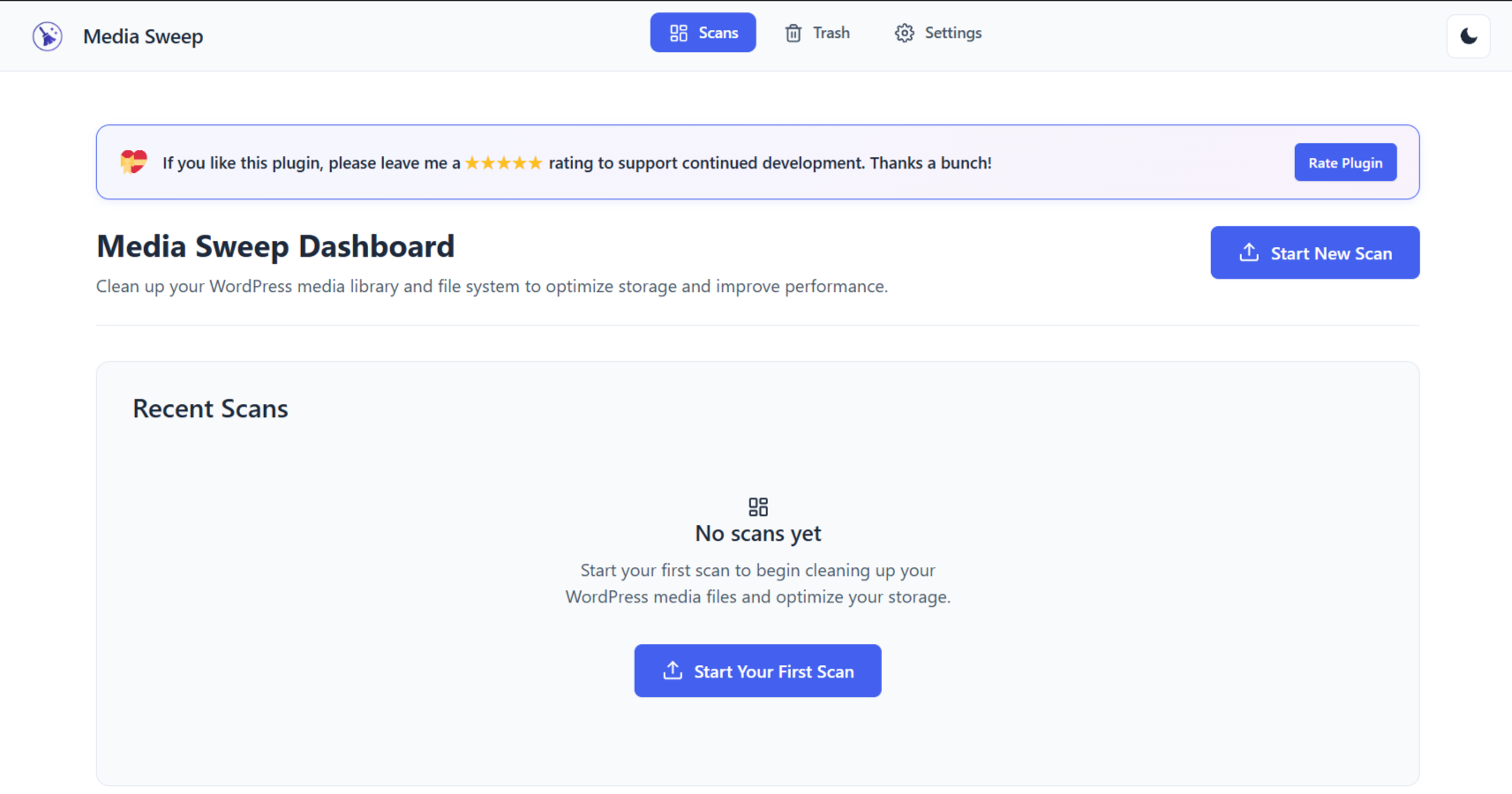
- Visit Media Sweep > Dashboard
- Click “Start New Scan”
- Choose your scan type and options
- Let Media Sweep analyze your files
- Review results and clean up unused files
Änderungsprotokoll
Improved detection for WooCommerce stores, themes and page builders, and a Trash that restores files exactly as they were.
1.4.0
- Improved: detection of images used by WooCommerce, themes, page builders and custom fields.
- Improved: restoring from Trash brings a file back exactly as it was.
- New: files that may still be needed, such as images uploaded to a product, are marked “Needs a look” and left out of bulk actions.
- New: find duplicate files, old image sizes and leftover resized copies.
- Improved: scans run smoothly on shared hosting and on large sites.
1.3.2
- Changed: usage data sharing is now a small Opt out / Opt in link on the Plugins screen.
1.3.1
- Improved: the optional usage-data screen.
1.3.0
- New: the first time you open Media Sweep, an optional screen asks whether you want to share usage data with us: your site address, your WordPress, PHP and plugin versions, and the plugins and themes you use. Nothing is sent unless you click Allow. The settings page shows exactly what is sent, lets you turn it off, and deletes your site’s data on request.
- New: an optional newsletter signup box on the plugin’s own pages. It sends nothing unless you click Subscribe.
- New: when you deactivate the plugin you can tell us why. “Skip and deactivate” sends nothing.
1.2.1
- Fixed: on sites running close to their PHP memory limit, deleting files did nothing – single delete showed no message and bulk delete stayed at 0%. Deletion no longer counts memory used by WordPress and other plugins against itself, and always makes progress.
1.2.0
- New: WordPress Abilities API support — AI agents and MCP clients can run scans and read findings and the trash. Sweeping files is off MCP by default and needs a preview-minted confirmation; emptying the trash is never exposed.
- Fixed: an image referenced only by ID in a plugin or theme option (for example the WooCommerce placeholder image) was reported as unused and offered for deletion.
Screenshots
Für Entwickler
Ist das dein Plugin? Zeigen Sie die Zahlen.
Fügen Sie Ihrer Website, Docs oder GitHub Readme ein Live-Badge hinzu. Es wird von selbst aktualisiert - kein Konto erforderlich.
Best Media Sweep alternatives
All cleanup plugins →





Fragen und Antworten
Media Sweep: quick answers
Gerade Antworten, gezogen von Live WordPress.org Daten.
Quelle: WordPress.org
Is Media Sweep free?
Yes. Media Sweep is free to download and use from the official WordPress.org plugin directory.
Is Media Sweep safe to use in 2026?
Media Sweep is a solid plugin choice in 2026, with a few things worth checking first. It runs on 1K+ sites, is rated 3.8/5 and was last updated 5 days ago, and scores 66/100 on our health check.
How many websites use Media Sweep?
Media Sweep is active on 1K+ WordPress websites and has been downloaded 14,429 times since it launched in October 2025. It was downloaded 3,896 times in the last 30 days.
Does Media Sweep work with WordPress 7.1?
Yes. The developer has tested Media Sweep up to WordPress 7.1.5, the latest release. It requires WordPress 6.6 or newer.
What PHP version does Media Sweep need?
Media Sweep requires PHP 7.4 or higher. Most hosts run PHP 8.x today, so it works on any modern WordPress hosting.
When was Media Sweep last updated?
The latest version, 1.4.0, was released on November 21, 2026 (5 days ago).
Who makes Media Sweep?
Media Sweep is developed and maintained by WPCreatix.
What are the best alternatives to Media Sweep?
The most popular alternatives to Media Sweep are WP-Sweep (100K+ installs), Simple Revisions Delete (10K+ installs) and Delete Duplicate Posts (10K+ installs).
Angetrieben von PageForge
Eine Vorlage und eine Tabelle. Eine echte Seite für jede Suche.
PageForge Verwandelt jede Zeile eines CSV in eine WordPress-Seite mit eigenem Titel, URL, SEO Felder und Schema entworfen. Kostenlos auf WordPress.org.
- CSV und XLSX, plus Google Sheets auf Beruf und Unternehmen
- seinen eigenen Titel, URL, SEO Felder und Schema für jede Seite
- Arbeitet mit dem Blockeditor, Elementor, Divi und Avada
- Kostenlos auf WordPress.org, keine Kreditkarte