


Optimize Images Resizing
If you were ever annoyed about the way WordPress handles images resizing, this is a plugin for you.

Mit Vorsicht verwenden
Optimize Images Resizing works, but test it on a staging site before relying on it in 2026. It runs on 5K+ sites, is rated 4.6/5 and was last updated 9 years ago, and scores 44/100 on our health check.
- Loved by users — 4.6/5 from 45 reviews
- Momentum — downloads up 38.4% vs the previous 30 days
- Kein Update in 8 Jahren
- Only tested up to WordPress 4.7 (latest is 7.1)
Wie stapelt es sich?
Side-by-side bei Installationen, Updates, Bewertungen und Support



Tägliche Downloads
Download-Spitzen folgen normalerweise einer neuen Version - jede Website, die automatisch aktualisiert wird, gilt als Download.
Ranglisten
Where Optimize Images Resizing stands todayWordPress.org Ranglisten suchen
Live-Position in der Plugin-Suche, Top 100| Stichwort | Position |
|---|---|
| Aufräumen | >100 |
| images | >100 |
| media | >100 |
| Optimieren | >100 |
| resizing | >100 |
Versionsübernahme
Anteil aktiver Sites pro Release.
Bewertungsaufschlüsselung
★★★★★★★★★★ 4.6 from 45 reviews
About Optimize Images Resizing
From the official readme · v1.4.1Beschreibung
If you were ever annoyed about the way WordPress handles images resizing, this is a plugin for you.
What this plugin does is it optimizes the image handling in such a way that images are resized only when they are actually needed. What that means is that if your plugins/theme define a lot of image sizes, none of them will be generated on the image upload (like they would be usually), but only if they are actually requested in that size.
Resizing is done only once, images are later normally served by WordPress, so there is no performance hit.
Plugin also includes a method for removing all of the previously generated image sizes (useful when you install this plugin on a site with a lot of existing media).
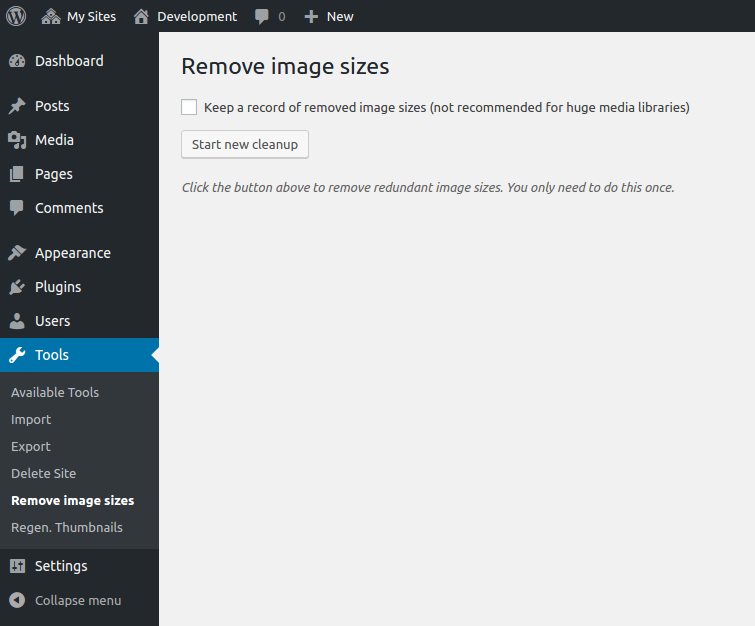
TO REMOVE image sizes generated prior to activating the plugin, visit the ‘Tools -> Remove image sizes’ and use the button to perform the cleanup.
Other than that, you don’t need to do anything, plugin works silently in the background.
To sum up:
- Resize images only when needed
- Clean up existing images sizes
- No performance hit
- Free up your hosting space
Installation
- Upload
optimize-images-resizingfolder to the/wp-content/plugins/directory - Aktivieren Sie das Plugin über das „Plugins“-Menü in WordPress
- (optional) Visit ‘Tools -> Remove image sizes’ to clean up your media folder
- ???
- Profit
Änderungsprotokoll
1.4.1
- Fix a 1.4.0 PHP bug.
1.4.0
- Move plugin to the Tools menu.
- Add support for resuming image sizes removing.
- Declare WordPress 4.7 compatibility.
1.3.0
- Improve the plugin UI and UX by providing a more meaningful feedback (plugin will now tell you how many images it removed exactly and show the list of files that got removed).
- Introduce WP-CLI support (props @charlesLF).
- Fix issues with the plugin localization support.
- Declare WordPress 4.5 compatibility.
1.2.1
- Declare WordPress 4.4 compatibility.
1.2.0
- Improve performance by returning the correct response after image is resized.
- Improve performance by returning response immediately if image size is already found.
- Avoid removing image sizes that are added via ‘image_size_names_choose’ filter (they get generated anyway on the Media screen).
1.1.0
- Improve the process of removing unwanted image sizes on image upload (props @bcole808)
Screenshots

Für Entwickler
Ist das dein Plugin? Zeigen Sie die Zahlen.
Fügen Sie Ihrer Website, Docs oder GitHub Readme ein Live-Badge hinzu. Es wird von selbst aktualisiert - kein Konto erforderlich.
Best Optimize Images Resizing alternatives
All cleanup plugins →





Fragen und Antworten
Optimize Images Resizing: quick answers
Gerade Antworten, gezogen von Live WordPress.org Daten.
Quelle: WordPress.org
Is Optimize Images Resizing free?
Yes. Optimize Images Resizing is free to download and use from the official WordPress.org plugin directory.
Is Optimize Images Resizing safe to use in 2026?
Optimize Images Resizing works, but test it on a staging site before relying on it in 2026. It runs on 5K+ sites, is rated 4.6/5 and was last updated 9 years ago, and scores 44/100 on our health check.
How many websites use Optimize Images Resizing?
Optimize Images Resizing is active on 5K+ WordPress websites and has been downloaded 100,831 times since it launched in June 2014. It was downloaded 980 times in the last 30 days.
Does Optimize Images Resizing work with WordPress 7.1?
Optimize Images Resizing is officially tested up to WordPress 4.7.40, while the latest release is 7.1.5. It may still work, but try it on a staging site first.
When was Optimize Images Resizing last updated?
The latest version, 1.4.1, was released on November 28, 2017 (9 years ago).
Who makes Optimize Images Resizing?
Optimize Images Resizing is developed and maintained by OriginalEXE.
What are the best alternatives to Optimize Images Resizing?
The most popular alternatives to Optimize Images Resizing are WP-Sweep (100K+ installs), Simple Revisions Delete (10K+ installs) and Delete Duplicate Posts (10K+ installs).
Angetrieben von PageForge
Eine Vorlage und eine Tabelle. Eine echte Seite für jede Suche.
PageForge Verwandelt jede Zeile eines CSV in eine WordPress-Seite mit eigenem Titel, URL, SEO Felder und Schema entworfen. Kostenlos auf WordPress.org.
- CSV und XLSX, plus Google Sheets auf Beruf und Unternehmen
- seinen eigenen Titel, URL, SEO Felder und Schema für jede Seite
- Arbeitet mit dem Blockeditor, Elementor, Divi und Avada
- Kostenlos auf WordPress.org, keine Kreditkarte