

IntentDeep Virtual Files – AI-Ready: Robots.txt, Security.txt, Ads.txt, LLMS.txt
Create robots.txt, ads.txt, security.txt, llms.txt & JSON files with AI-ready content generation (ChatGPT, Claude, Gemini) at any path. No FTP needed.

Mit Vorsicht verwenden
IntentDeep Virtual Files works, but test it on a staging site before relying on it in 2026. It runs on 30+ sites, is rated 5/5 and was last updated 9 months ago, and scores 46/100 on our health check.
- Kleine Benutzerbasis (30+ aktive Installationen)
- Bisher sehr wenige Bewertungen
- Nur getestet bis WordPress 6.9 (letzt ist 7.1)
Wie stapelt es sich?
Side-by-side bei Installationen, Updates, Bewertungen und Support



Tägliche Downloads
Download-Spitzen folgen normalerweise einer neuen Version - jede Website, die automatisch aktualisiert wird, gilt als Download.
Ranglisten
Where IntentDeep Virtual Files stands todayWordPress.org Ranglisten suchen
Live-Position in der Plugin-Suche, Top 100| Stichwort | Position |
|---|---|
| AI-Content-Generator | >100 |
| ChatGPT | >100 |
| llms.txt | #51 |
| robots.txt | #35 |
| SEO | >100 |
Versionsübernahme
Anteil aktiver Sites pro Release.
Bewertungsaufschlüsselung
★★★★★★★★★★ 5 from 1 reviews
About IntentDeep Virtual Files
Aus der offiziellen Readme · V1.0.1Beschreibung
Virtual Files lets you create and manage robots.txt, ads.txt, app-ads.txt, security.txt, llms.txt, RSS feeds, and JSON files directly from your WordPress dashboard. These files can be created at any path depth (yoursite.com/robots.txt, yoursite.com/.well-known/security.txt, yoursite.com/llms.txt, yoursite.com/api/data.json) and behave just like physical files, but are stored in your database—no FTP access required.
🤖 AI-Ready Content Generation
Connect your own AI models to generate, improve, and analyze virtual file content. Use ChatGPT, Claude, Gemini, Grok, Qwen, GLM, and 30+ other AI models. Simply add your API key and create perfect robots.txt, proper ads.txt files, compliant security.txt, AI-friendly llms.txt, and more—all with AI assistance. Attach posts, pages, or products as context for more relevant generation.
The Problem
Managing robots.txt, ads.txt, app-ads.txt, security.txt, llms.txt, .well-known files, and other server files traditionally requires FTP access, correct file permissions, and manual directory creation. For managed hosting or multiple sites, this becomes a maintenance nightmare.
The Solution
Virtual Files eliminates these hassles by storing everything in your WordPress database while serving content as if files physically exist at any path on your server. No FTP, no server access, no directory creation, no permission headaches.
With AI-ready integration, you can now connect your favorite AI models to:
– Generate new files from natural language descriptions
– Improve existing content with AI suggestions
– Analyze files for errors, security risks, and optimization opportunities
🔥 Top Use Cases
SEO & AI Optimization
– Create and edit your robots.txt instantly to control crawler access
– Generate llms.txt to guide AI crawlers (ChatGPT, Claude, Perplexity)
– Test different configurations without file uploads
– Control how AI tools index and cite your content
Monetization & Security
– Add your ads.txt or app-ads.txt for Google AdSense compliance
– Publish a security.txt file to define your security policy (RFC 9116 standard)
– Approve inventory and boost revenue with proper ads.txt management
Developers & API
– Host .well-known/security.txt, .well-known/apple-app-site-association
– Create nested API endpoints (api/v1/data.json, api/config.json)
– Serve static configuration files at any path for headless WordPress setups
– No need to create physical directories – paths are virtual
Managed Hosting
– Perfect for WP Engine, Kinsta, Flywheel where FTP is limited
– No need to contact support for simple file changes
– Complete control from WordPress dashboard
Security & Performance
Enterprise-Grade Security:
– All content sanitized to prevent XSS attacks
– PHP code execution protection
– Nonce verification on all operations
– Role-based permission checks
– Database-backed redundancy (included in WordPress backups)
Zero File Permission Issues:
No chmod, no chown, no permission denied errors. Everything managed through WordPress capabilities.
Performance Optimized:
– Smart caching (Pro) for up to 10x faster delivery
– Minimal database queries
– Automatic cache invalidation on updates
– No file system overhead
🤖 AI-Powered Features
Connect 30+ AI Models
– ChatGPT (GPT-5.2, GPT-5 Mini, GPT-4o)
– Claude (Claude Opus 4.6, Claude Sonnet 4.6, Claude Haiku 4.6)
– Gemini (Gemini 3.1 Pro Preview, Gemini 3 Flash Preview, Gemini 2.5 Flash)
– DeepSeek (DeepSeek-V3, DeepSeek-R1)
– Grok, Qwen, GLM, Kimi, and 30+ more
– Connect via OpenAI, OpenRouter, Anthropic, or Google APIs – add your keys and pay providers directly
– Switch between models anytime
– No markup on AI costs
AI Content Generation
– Generate: Create new files from natural language prompts
– Improve: Enhance existing content with AI suggestions and fixes
– Analyze: Get detailed explanations of your code, identify errors, and receive optimization suggestions
– Context-Aware: Attach up to 3 posts, pages, or products as context for more relevant generation
– Streaming Responses: Watch AI generate content in real-time
– Quick Prompts: Pre-built templates for common files (robots.txt, ads.txt, security.txt, llms.txt, JSON-LD)
– History: All AI generations saved automatically with one-click restore
AI Use Cases
– Generate proper robots.txt with custom rules and directives
– Build valid ads.txt or app-ads.txt files for AdSense compliance
– Generate security.txt following RFC 9116 standard
– Create llms.txt for AI crawler instructions (latest AI SEO trend)
– Build .well-known/* files for standards compliance
– Create app-ads.txt files for mobile app monetization
– Build JSON-LD schema markup for SEO
– Generate RSS feeds and custom XML configurations
– Fix syntax errors in existing code
– Analyze code for security vulnerabilities
– Get AI suggestions for content optimization
Kostenlose Versionsfunktionen
✅ Basic File Types
Create virtual files with these extensions:
– TXT – Plain text files (robots.txt, ads.txt, security.txt, llms.txt)
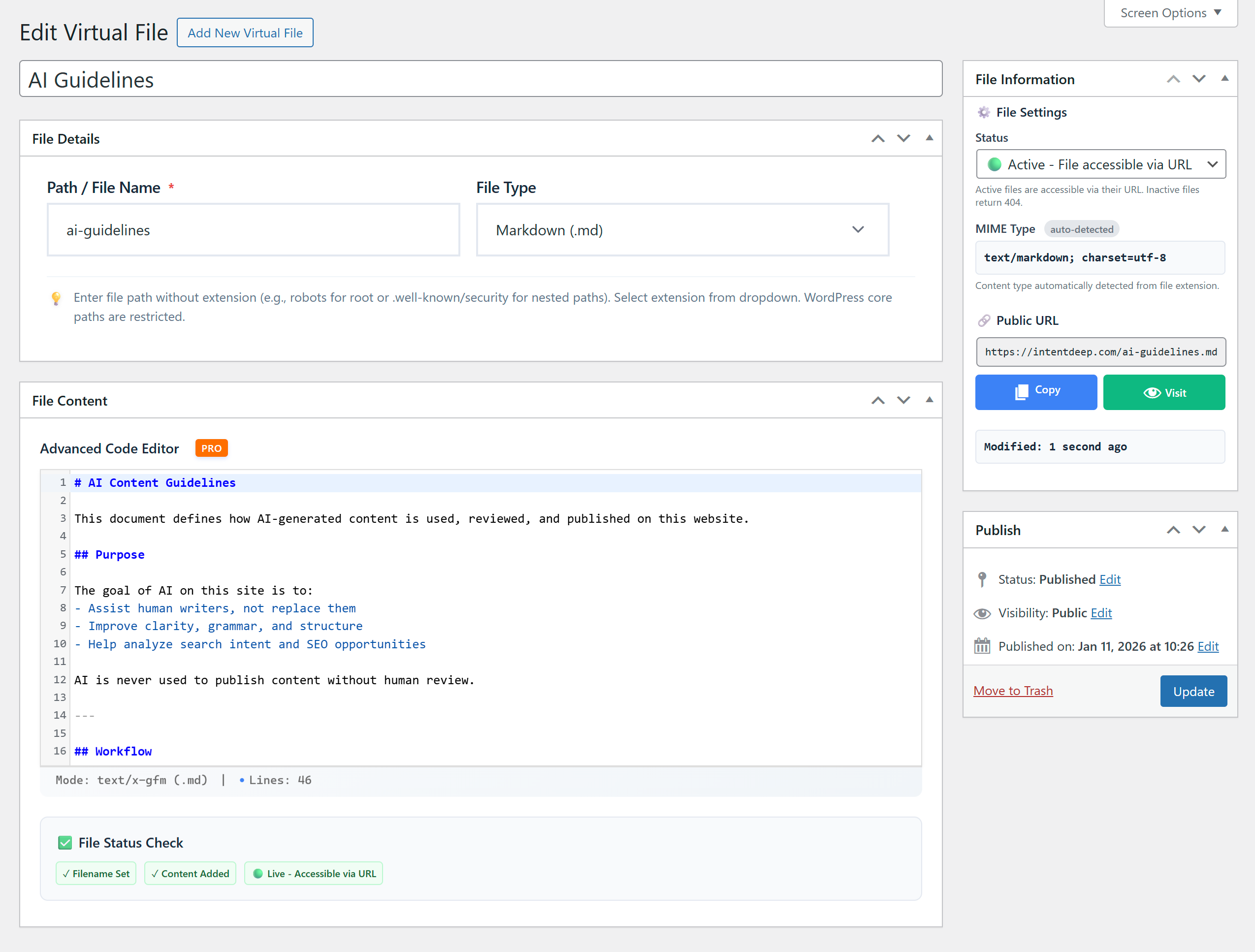
– MD – Markdown documents
– JSON – API endpoints and data files
✅ Smart File Management
– Intuitive admin interface for creating and editing files
– Filter by extension for easy file organization
– File status control (Active/Inactive)
– Support for any path depth (root, subdirectories, .well-known)
– Real-time file preview
– Automatic MIME type detection
– Clean URLs (yoursite.com/path/to/file.txt)
✅ SEO-Ready
– Perfect for robots.txt management
– Custom ads.txt and app-ads.txt support
– .well-known directory support (security.txt, etc.)
– Direct URL access for search engines
– No redirect or rewrite delays
✅ Developer-Friendly
– Simple text editor for quick edits
– Character encoding support (UTF-8)
– Direct content serving (no overhead)
– WordPress REST API compatible
✅ Performance Optimized
– Lightweight database storage
– Minimal server resources
– Fast content delivery
– No file permission issues
✅ Free Version Limits
– Up to 5 active files (inactive files don’t count)
– Upgrade to Pro for unlimited files
Pro Version – Unlock Advanced Features
🤖 AI-Ready Content Generation
– Connect 30+ AI models: ChatGPT, Claude, Gemini, Grok, Qwen, GLM, and more
– Generate, improve, and analyze content with AI
– Attach posts, pages, or products as context
– Real-time streaming responses
– Quick prompt templates for common files
– AI generation history with restore functionality
– BYOK: Bring Your Own API Key – you pay providers directly, no markup
🚀 Premium File Types
Expand beyond basics with:
– XML – RSS feeds, custom XML files, and structured data
– CSV – Data exports and imports
– YAML – Configuration files (.yml and .yaml both supported)
– RSS – Custom RSS feeds
– LOG – Log file serving
💻 Advanced Code Editor
– Syntax highlighting for all file types
– Line numbers for easy navigation
– Multiple themes (light/dark modes)
– Auto-close brackets and smart indentation
– Line wrapping for better readability
– Comment toggle with keyboard shortcuts
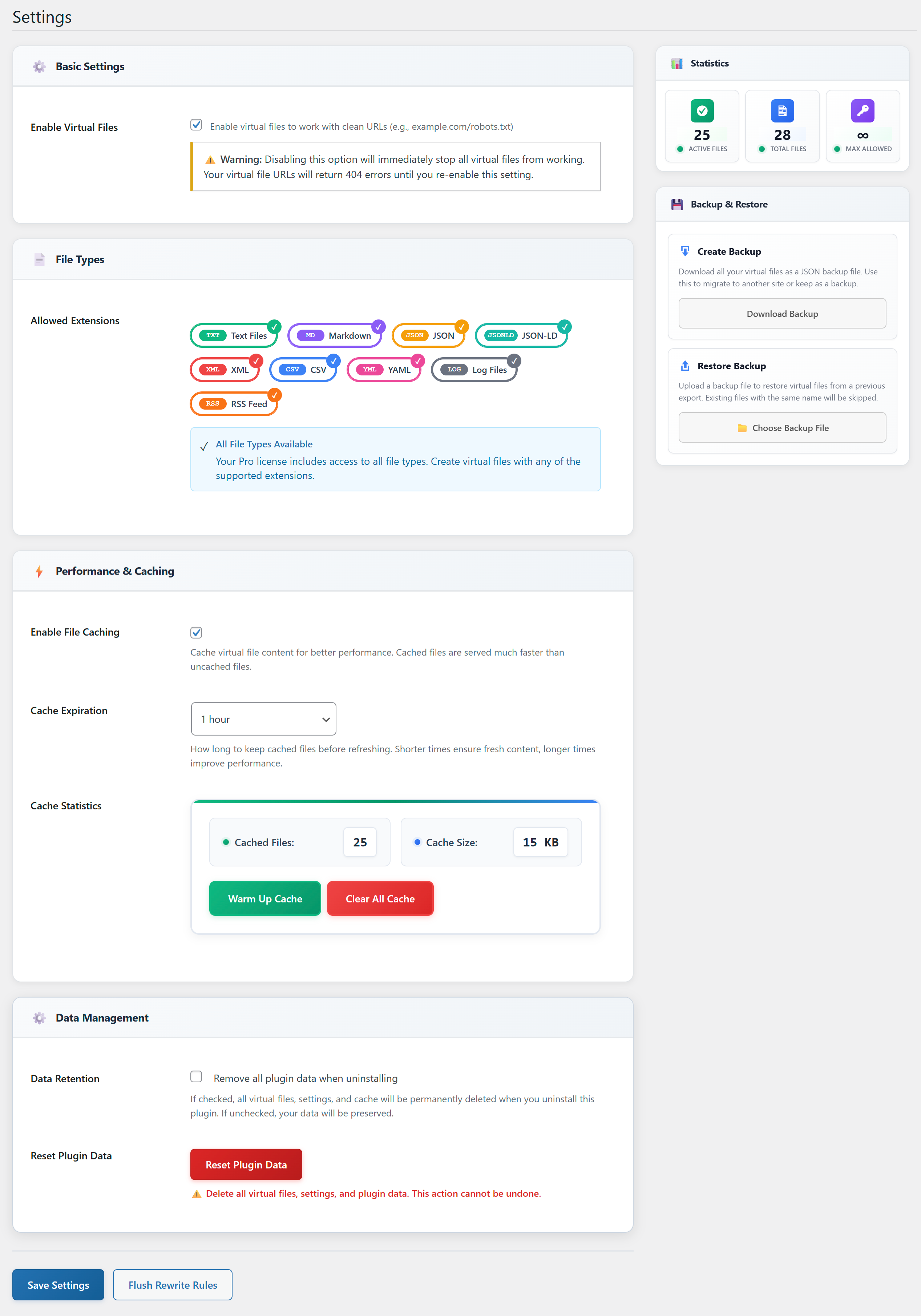
⚡ Performance Caching
– Smart file caching with configurable TTL
– Cache warm-up for all active files
– Automatic cache invalidation on updates
– Cache statistics dashboard
– Up to 10x faster file delivery
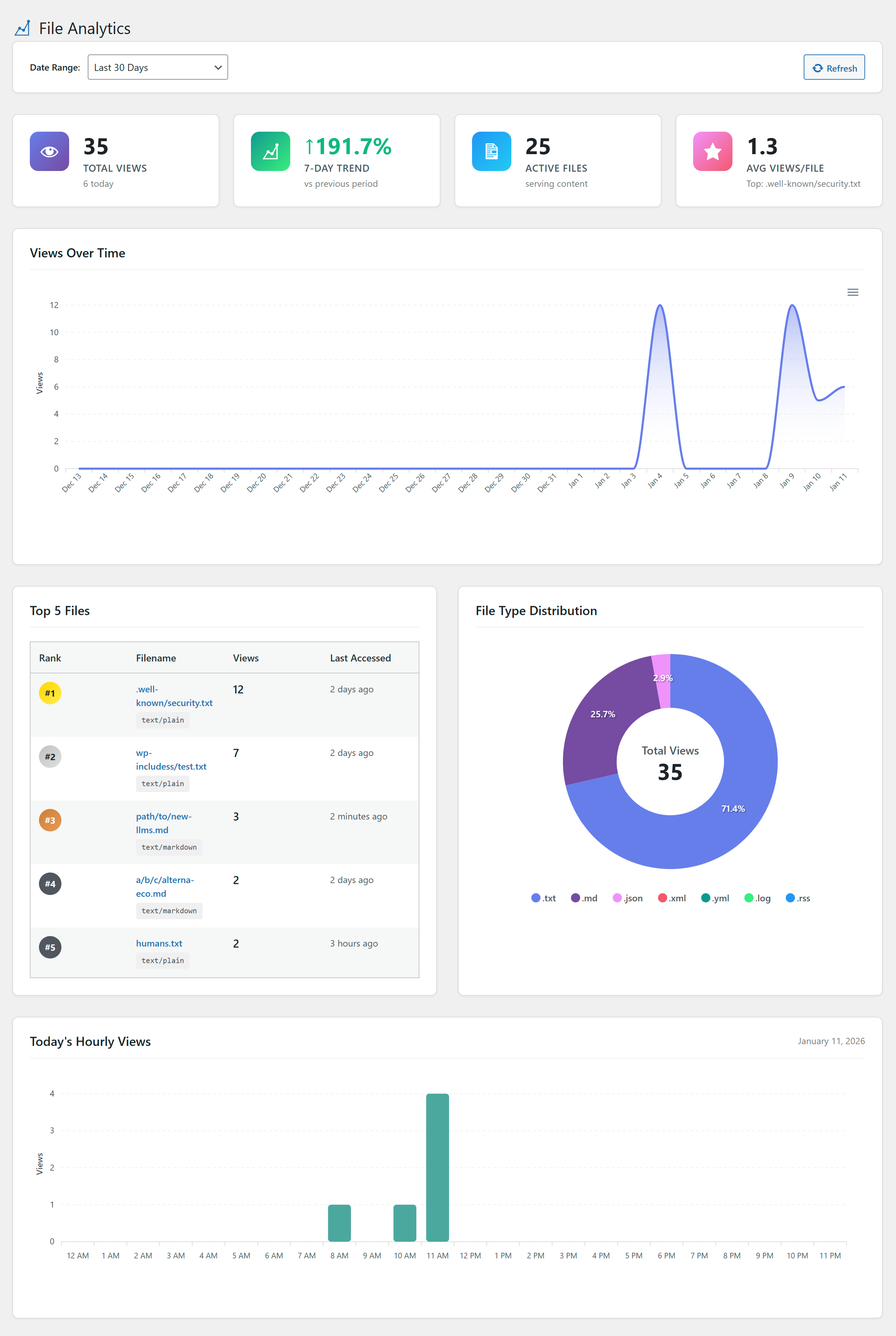
📊 Analytics & Insights
– Access tracking for each file
– View counts and statistics
– Last accessed timestamps
– File size monitoring
– Performance metrics
📦 Import/Export
– Backup all files as JSON
– Bulk import from backup files
– Duplicate detection prevents conflicts
– Migration-ready for site transfers
– Version control friendly
🔄 Unlimited Files
– No file limits (Free version: 5 active files max)
– Create unlimited virtual files
🎨 Enhanced UI/UX
– Modern, clean interface
– File status indicators
– Quick copy URL buttons
– One-click file activation
– Accessibility ready
Free vs Pro Comparison
Free Version Includes:
✅ TXT, MD, JSON file types
✅ Up to 5 active virtual files
✅ Simple text editor
✅ Any path depth support (.well-known, subdirectories)
✅ Active/Inactive status control
✅ Database-driven file storage
Pro Version Adds:
🤖 AI-ready content generation (Generate, Improve, Analyze)
🤖 Connect 30+ AI models: ChatGPT, Claude, Gemini, Grok, Qwen, GLM, and more
🤖 Bring Your Own API Key – full control, no markup on costs
🤖 Context-aware generation with post/page attachment
🤖 Real-time streaming AI responses
🚀 Unlimited virtual files (no 5-file limit)
🚀 Premium file types: XML, CSV, YAML (.yml/.yaml), RSS, LOG
🚀 Advanced code editor with syntax highlighting
🚀 Smart file caching (up to 10x faster delivery)
🚀 Analytics dashboard with access tracking
🚀 Import/Export functionality for backups
🚀 Priority email support
Upgrade to Pro | 7-Day Trial Available
What Makes Virtual Files Different?
No File System Access Required
Manage everything from your WordPress dashboard. No FTP, no server access, no permission headaches.
Virtual Directories – No Physical Folders
Create files at any path (.well-known/security.txt, api/data.json) without creating physical directories. Paths are virtual and work instantly.
Database-Driven Reliability
Your files are backed up with your database. No lost files due to server issues or migrations.
Version Control Friendly
Files live in database, not Git repos. Keep your repository clean and focused on code.
Instant Updates
Change content and it’s live immediately. No file uploads, no caching delays (with proper cache invalidation).
Try Pro Risk-Free
7-Day Trial. Experience advanced features before committing.
Upgrade to Pro | Documentation | Support
Störungssuche
Virtual file returns 404
- Go to Settings → Permalinks and click “Save Changes” to flush rewrite rules
- Verify file status is set to “Active” in Virtual Files dashboard
- Check that no physical file exists with the same name
- Ensure permalinks are enabled (required for virtual routing)
Changes don’t appear immediately
- Clear site cache (if using WP Rocket, W3 Total Cache, etc.)
- Clear browser cache (Ctrl+F5 or Cmd+Shift+R)
- Pro users: Check cache TTL settings in Virtual Files → Settings
- Verify file is set to “Active” status
Conflicts with existing physical files
Virtual files take precedence over physical files with the same name. To serve physical files instead:
– Set virtual file status to “Inactive”, OR
– Delete the virtual file from the dashboard
Datenschutzerklärung
Virtual Files does not collect, store, or transmit any personal data. All file content is stored locally in your WordPress database.
AI Features: When using AI-powered features (Generate, Improve, Analyze), your prompts and any attached context are sent to the AI provider you’ve configured in settings. Virtual Files does not store or analyze this data beyond what’s necessary for the generation. Each AI provider has its own privacy policy and data handling practices that you should review.
The Pro version may connect to our licensing server only for license validation.
Unterstützen
Need help? Have suggestions?
- Free Support: WordPress.org Forums
- Pro Support: Priority Support
- Documentation: Wissensbasis
- Feature Requests: Kontakt
Installation
Quick Start
- Installieren und aktivieren Sie das Plugin
- Go to Virtual Files → Add New
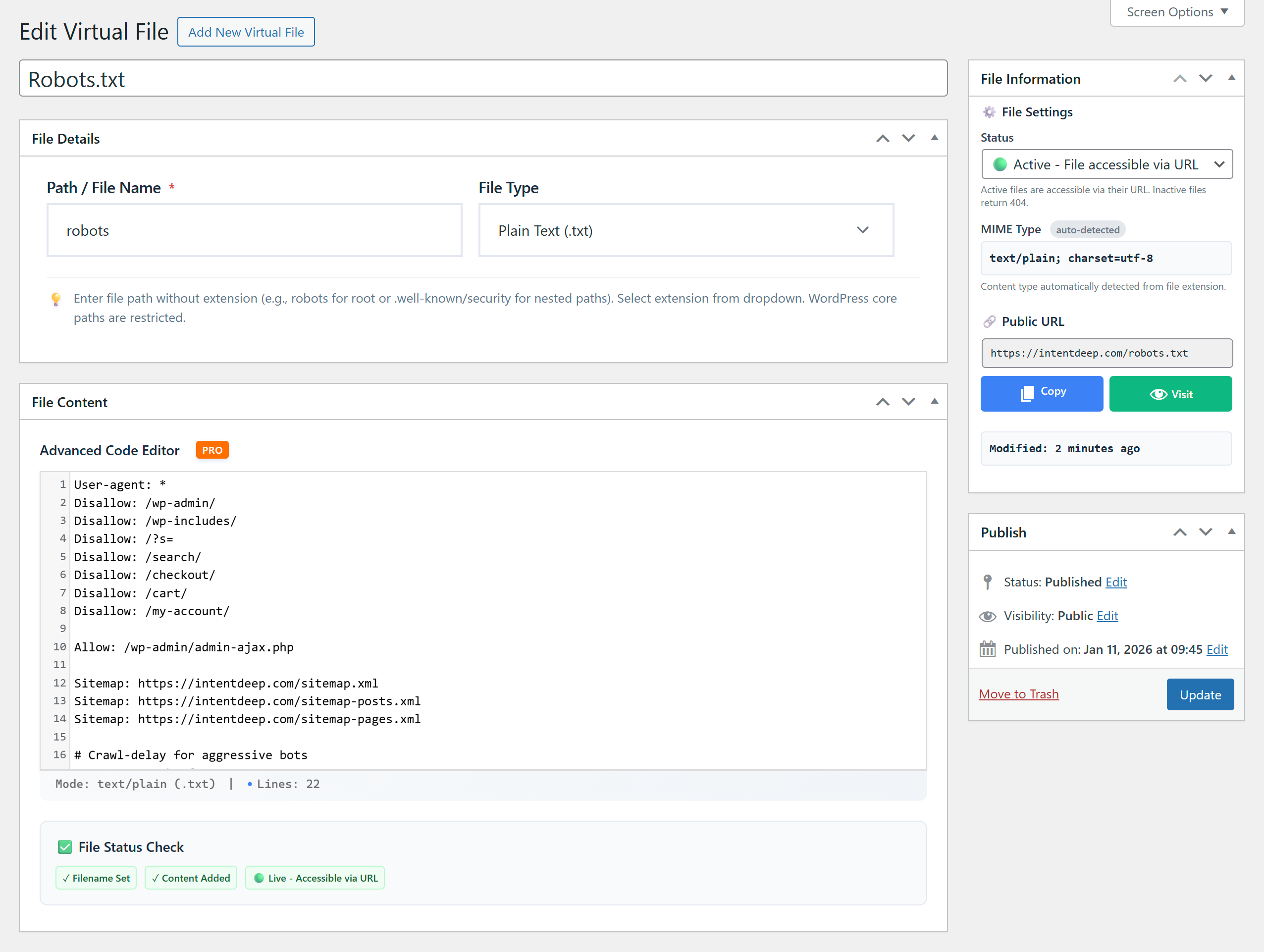
- Create your file (e.g., robots.txt)
- Set status to Active
- Visit
yoursite.com/filename.txt
That’s it! Your virtual file is live.
Automatische Installation
- Log in to your WordPress admin panel
- Navigate to Plugins → Add New
- Search for “Virtual Files”
- Click Install Now and then Activate
Manuelle Installation
- Download the plugin ZIP file
- Navigate to Plugins → Add New → Upload Plugin
- Choose the downloaded file and click Install Now
- Click Activate Plugin
Loslegen
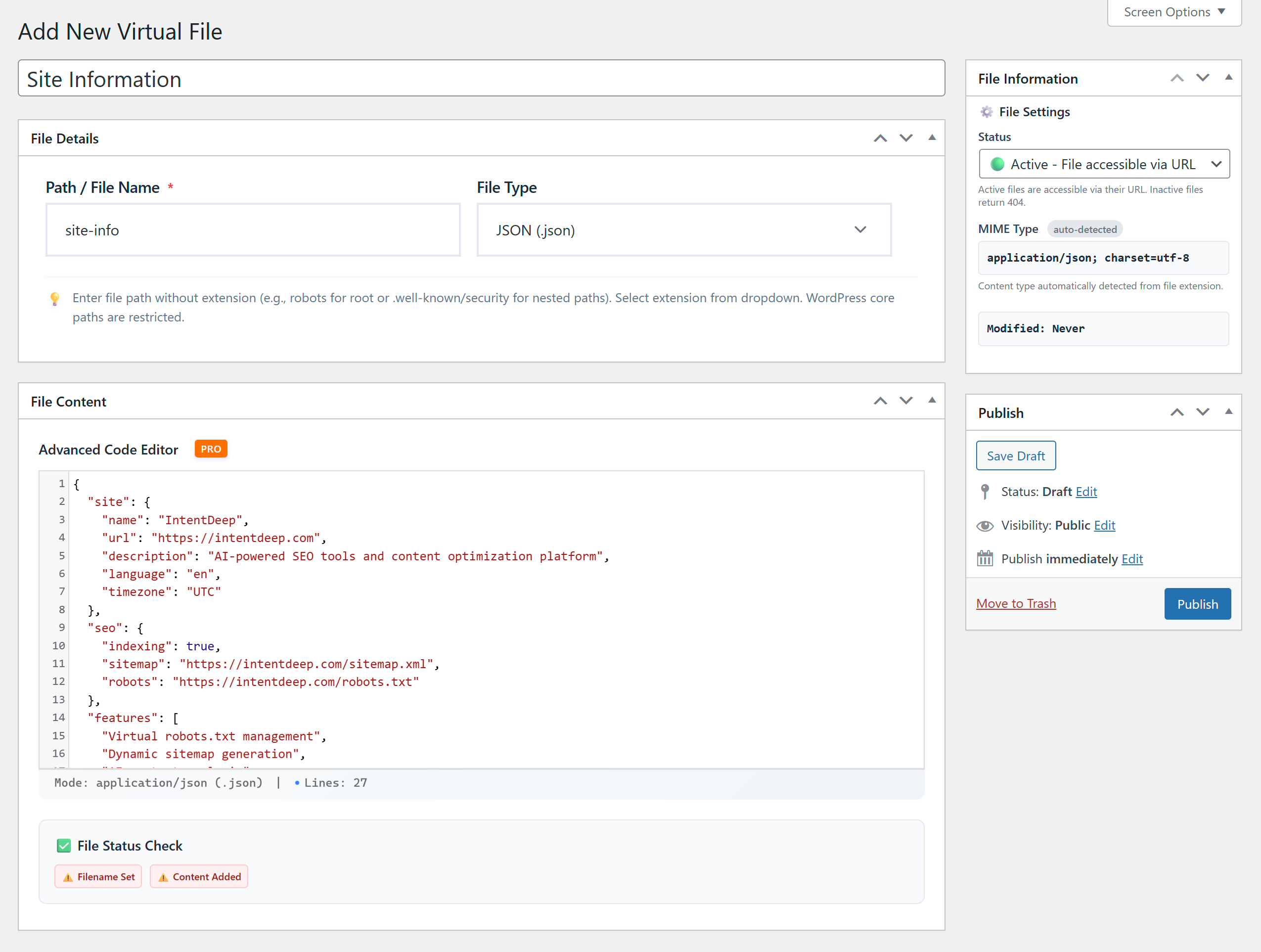
- Go to Virtual Files → Add New in your admin menu
- Enter a filename with optional path:
- Simple: “robots” for robots.txt
- With path: “.well-known/security” for .well-known/security.txt
- Nested: “api/v1/data” for api/v1/data.json
- Select file extension (.txt, .md, .json)
- Add your content
- Set status to Active
- Click Publish
- Access your file at the specified path (yoursite.com/path/to/file.ext)
Änderungsprotokoll
🤖 AI Integration is here! Virtual Files is now AI-ready - connect your own ChatGPT, Claude, Gemini, Grok, DeepSeek, Qwen, or GLM API keys to generate, improve, and analyze virtual files. Attach posts and pages as context, view generation history, and get real-time streaming responses. New Features: - AI-ready content generation (Generate, Improve, Analyze modes) - Connect 30+ AI models including the latest from OpenAI, Anthropic, Google, and DeepSeek - Bring Your Own API Key - full control, no markup on costs - Context-aware generation with post/page attachment - AI generation history with one-click restore - Real-time streaming responses - Quick prompt templates for common files Note on AI features: Available to both Free and Pro users. Add your API key in Virtual Files → Settings. Most providers offer free tiers to get started.
1.0.1
- 🤖 Major Update: AI-Ready Integration
- ✅ AI Content Generation: Generate, improve, and analyze virtual file content with AI
- ✅ Multiple AI Providers: Support for 30+ models including ChatGPT (5.2, 4o), Claude (4.6), Gemini (3.1), and DeepSeek
- ✅ Context-Aware Generation: Attach posts, pages, or products as context
- ✅ Real-Time Streaming: Watch AI generate content live
- ✅ Quick Prompts: Pre-built templates for common files (robots.txt, ads.txt, security.txt, llms.txt)
- ✅ AI History: All generations saved with one-click restore
- ✅ Improved Error Handling: Better UX for missing API keys and errors
- 🎨 UI Improvements: New Generate, Improve, and Analyze buttons
- 🎨 AI History Sidebar: View and restore previous AI generations
- 🎨 Context Search: Search and attach content for better AI results
- 🔒 Security: Enhanced nonce verification and permission checks
1.0.0 – 2025-01-15
- 🎉 Initial WordPress.org release
- ✅ Free: TXT, MD, JSON file support
- ✅ Free: Up to 5 active virtual files
- ✅ Free: Simple text editor with UTF-8 support
- ✅ Free: robots.txt, ads.txt, security.txt, llms.txt management
- ✅ Free: Support for any path depth (root, subdirectories, .well-known)
- ✅ Free: Active/Inactive status control
- ✅ Free: Clean URL serving at any path
- 🚀 Pro: Advanced file types (XML, CSV, YAML with .yml/.yaml, RSS, LOG)
- 🚀 Pro: Syntax-highlighted code editor with multiple themes
- 🚀 Pro: Smart caching system (up to 10x faster delivery)
- 🚀 Pro: Analytics & access tracking dashboard
- 🚀 Pro: Import/Export functionality for backups
- 🚀 Pro: Unlimited virtual files (no 5-file limit)
- 🔒 Security: XSS prevention, PHP injection protection
- 🌍 Translation ready with full i18n support
- ⚡ Performance: Lightweight, minimal database queries
- 🎨 Modern, accessible admin interface
Screenshots
Für Entwickler
Ist das dein Plugin? Zeigen Sie die Zahlen.
Fügen Sie Ihrer Website, Docs oder GitHub Readme ein Live-Badge hinzu. Es wird von selbst aktualisiert - kein Konto erforderlich.
Best IntentDeep Virtual Files alternatives
All AI content generator plugins →





Fragen und Antworten
IntentDeep Virtual Files: quick answers
Gerade Antworten, gezogen von Live WordPress.org Daten.
Quelle: WordPress.org
Is IntentDeep Virtual Files free?
Yes. IntentDeep Virtual Files is free to download and use from the official WordPress.org plugin directory.
Is IntentDeep Virtual Files safe to use in 2026?
IntentDeep Virtual Files works, but test it on a staging site before relying on it in 2026. It runs on 30+ sites, is rated 5/5 and was last updated 9 months ago, and scores 46/100 on our health check.
How many websites use IntentDeep Virtual Files?
IntentDeep Virtual Files is active on 30+ WordPress websites and has been downloaded 2,425 times since it launched in January 2026. It was downloaded 482 times in the last 30 days.
Does IntentDeep Virtual Files work with WordPress 7.1?
IntentDeep Virtual Files is officially tested up to WordPress 6.9.12, while the latest release is 7.1.5. It may still work, but try it on a staging site first.
What PHP version does IntentDeep Virtual Files need?
IntentDeep Virtual Files requires PHP 7.4 or higher. Most hosts run PHP 8.x today, so it works on any modern WordPress hosting.
When was IntentDeep Virtual Files last updated?
The latest version, 1.0.1, was released on February 28, 2026 (9 months ago).
Who makes IntentDeep Virtual Files?
IntentDeep Virtual Files is developed and maintained by IntentDeep.
What are the best alternatives to IntentDeep Virtual Files?
The most popular alternatives to IntentDeep Virtual Files are AutoWP (900+ installs), AI Product Tools for WooCom… (500+ installs) and AI Content Generator For El… (200+ installs).
Angetrieben von PageForge
Eine Vorlage und eine Tabelle. Eine echte Seite für jede Suche.
PageForge Verwandelt jede Zeile eines CSV in eine WordPress-Seite mit eigenem Titel, URL, SEO Felder und Schema entworfen. Kostenlos auf WordPress.org.
- CSV und XLSX, plus Google Sheets auf Beruf und Unternehmen
- seinen eigenen Titel, URL, SEO Felder und Schema für jede Seite
- Arbeitet mit dem Blockeditor, Elementor, Divi und Avada
- Kostenlos auf WordPress.org, keine Kreditkarte