


Easy GPT for WP | AI Content Generator
Easy GPT for WP – AI Content Generator is a cutting-edge WordPress plugin that leverages OpenAI’s GPT technology to automate the creation of engaging and original content. It allows you to generate AI-powered posts…

Mit Vorsicht verwenden
Easy GPT for WP works, but test it on a staging site before relying on it in 2026. It runs on 40+ sites, is rated 3.8/5 and was last updated 5 months ago, and scores 59/100 on our health check.
- Kleine Benutzerbasis (40+ aktive Installationen)
Wie stapelt es sich?
Side-by-side bei Installationen, Updates, Bewertungen und Support



Tägliche Downloads
Download-Spitzen folgen normalerweise einer neuen Version - jede Website, die automatisch aktualisiert wird, gilt als Download.
Ranglisten
Where Easy GPT for WP stands todayWordPress.org Ranglisten suchen
Live-Position in der Plugin-Suche, Top 100| Stichwort | Position |
|---|---|
| AI-Content-Generator | #82 |
| Ai content writer | #36 |
| ai translation | >100 |
| AI writer | #60 |
| article refresher | #1 |
Versionsübernahme
Anteil aktiver Sites pro Release.
Bewertungsaufschlüsselung
★★★★★★★★★★ 3.8 from 6 reviews
About Easy GPT for WP | AI Content Generator
From the official readme · v1.40Beschreibung
Easy GPT for WP – AI Content Generator is a cutting-edge WordPress plugin that leverages OpenAI’s GPT technology to automate the creation of engaging and original content. It allows you to generate AI-powered posts, pages, and WooCommerce products, with seamless integration into your WordPress workflow.
🎯 Don’t have an API key or don’t want to pay?
Try No Cost AI Writer – our 100% free web-based article generator.
You can create articles in batches, export them to your WordPress site, schedule them for later, and even translate your generated content — all without registering or paying anything.
From intelligent SEO optimization and automatic image generation to YouTube video embedding, every element is designed to boost your site’s digital presence and user engagement.
In addition to generating new content, the plugin can automatically refresh existing articles, translate them into other languages using AI (Polylang required), and even moderate and reply to comments automatically to maintain an active and clean community space. It’s a powerful all-in-one content automation toolkit for WordPress.
Now with support for GPT-5.4, GPT-5.2, GPT-5.1, DeepSeek V4, and the latest Gemini 3.1, Gemini 3, and Gemini 2.5 models, you can choose from a wider range of AI providers and generation styles. This gives you greater flexibility, cost control, and access to alternative large language models beyond OpenAI, tailored to your specific needs.
New in version 1.34, Easy GPT for WP – AI Content Generator adds support for OpenAI’s latest GPT-5.1 model and new Gemini models such as Gemini 3 Pro Preview and Gemini 2.5 (Pro, Flash, and Flash Lite). This gives you access to the newest generation of multimodal and high-performance AI models directly from your WordPress dashboard.
New in version 1.19, the plugin introduces AI-powered automatic article translation, enabling seamless multilingual content generation. Fully compatible with the Polylang plugin, this feature allows you to automatically translate existing posts into selected target languages.
You can control how often translations occur, which languages to target, and how images and media are handled—preserve originals, update metadata, or generate new assets. It also supports translating SEO fields, tags, featured images, and embedded YouTube videos.
For categories, the plugin intelligently assigns the corresponding translated versions based on existing Polylang mappings. Categories themselves are not translated automatically, so make sure translated versions already exist for each language.
New in version 1.30, Easy GPT for WP – AI content generator now supports OpenAI’s latest GPT-5 models (gpt-5, gpt-5-mini, gpt-5-nano), giving you access to the newest generation of AI with improved performance, flexibility, and cost-efficient options.
New in version 1.18, Easy GPT for WP – AI content generator now supports OpenAI’s latest models: GPT-4.1, GPT-4.1-mini, and o4-mini, offering more flexibility and cost-efficient generation options tailored to your needs.
New in version 1.14, the Article Refresher feature automatically updates your older posts with improved content, refreshed SEO metadata, regenerated images, and optionally new YouTube videos. You can configure how many articles to refresh per day and set the minimum age. The plugin takes care of the rest, keeping your site fresh and optimized with zero manual effort.
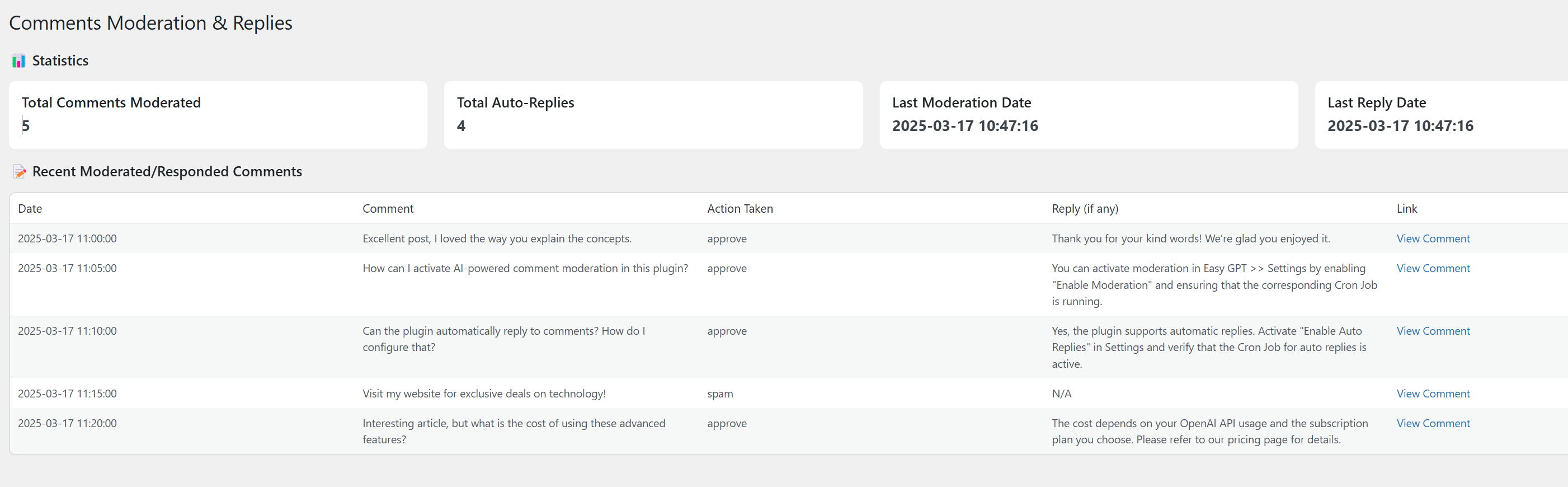
In version 1.12, we’ve further enhanced user engagement by introducing AI-powered comment moderation and automatic comment replies, ensuring your site’s community remains active, well-managed, and free from spam.
Please note:
– OpenAI supports both text and image generation.
– DeepSeek can only be used for text generation. Image generation are not supported.
– Gemini supports both text and image generation.
Hauptmerkmale
- Automate Content Creation: Generate thousands of articles per month effortlessly. Keep your website dynamic and continuously updated without manual effort.
- Intelligent Image Generation: Enhance the visual appeal of your posts with visually appealing images generated by DALL-E.
- Efficient Bulk Operations: Manage content at scale with bulk post creation, allowing for scheduled and consistent updates that maintain your site’s freshness and relevance.
- WooCommerce Product Generation: Automatically create WooCommerce product listings, including titles, descriptions, short descriptions, tags, images, and, in batch mode, prices.
- Automatic Article Refreshing: Keep your existing content relevant and up to date with the automatic article refresher. Define how old articles must be to qualify, how many to refresh per day, and let the plugin handle the updates—content, images, SEO, and YouTube videos included.
- AI-Powered Article Translation: Automatically translate existing posts into selected languages using AI, including SEO fields, tags, images, and embedded videos. Requires the Polylang plugin.
- YouTube Video Integration: Automatically embed relevant YouTube videos in generated articles for enhanced engagement (requires a Google API key).
- SEO & Copywriting: Automatically optimize your content for search engines with integrated support for Yoast SEO, boosting your site’s visibility and organic search rankings.
- Advanced Customization: Adjust the AI’s output by customizing settings like writing style, tone, and content structure to match your specific audience and content goals.
- Automated Text Formatting: Improve readability with automatic text enhancements such as bolds and italics.
- Automatic Category and Tag Assignment: Automatically assign categories and tags from those available on your site to enhance the organization and searchability of your content.
- Automatic Link and Bibliography Insertion: Include hyperlinks and a bibliography section to add credibility and detailed references to your posts.
- AI-Powered Comment Moderation and Automatic Replies: Enhance your site’s interaction by automatically moderating comments and responding to user feedback with AI, ensuring a high-quality discussion environment.
Support and Updates
Our dedicated support team is ready to assist you with any issues or queries. Regular updates ensure compatibility with the latest WordPress releases and OpenAI enhancements, providing you with a reliable and efficient content generation tool.
Externe Dienste
This plugin uses the following external services:
= OpenAI API: To generate content, this plugin connects to the OpenAI API. An OpenAI API key is required for its operation.
= Gemini API (Google AI): To generate content or images using Google’s Gemini models, the plugin connects to the Google AI API. A Google API key is required, and image generation requires billing to be enabled on your account.
= DeepSeek API: For text generation, this plugin connects to the DeepSeek API. A DeepSeek API key is required.
= License Verification: The plugin connects to https://easygptforwp.com to verify the validity of the license.
Installation
- Laden Sie den Ordner
easy-gpt-for-wpin das/wp-content/plugins/-Verzeichnis hoch. - Aktivieren Sie das Plugin über das „Plugins“-Menü in WordPress.
- License Activation: To use Easy GPT for WP – AI Content Generator, you need to activate a license. If it’s your first time using the plugin, you can obtain a free 5-day license without any usage limits. For ongoing use, purchase a license from this link.
- Navigate to the
Easy GPT > Licensesection in your WordPress dashboard. - Enter your license key into the ‘License Key’ field and click ‘Validate’.
- Navigate to the
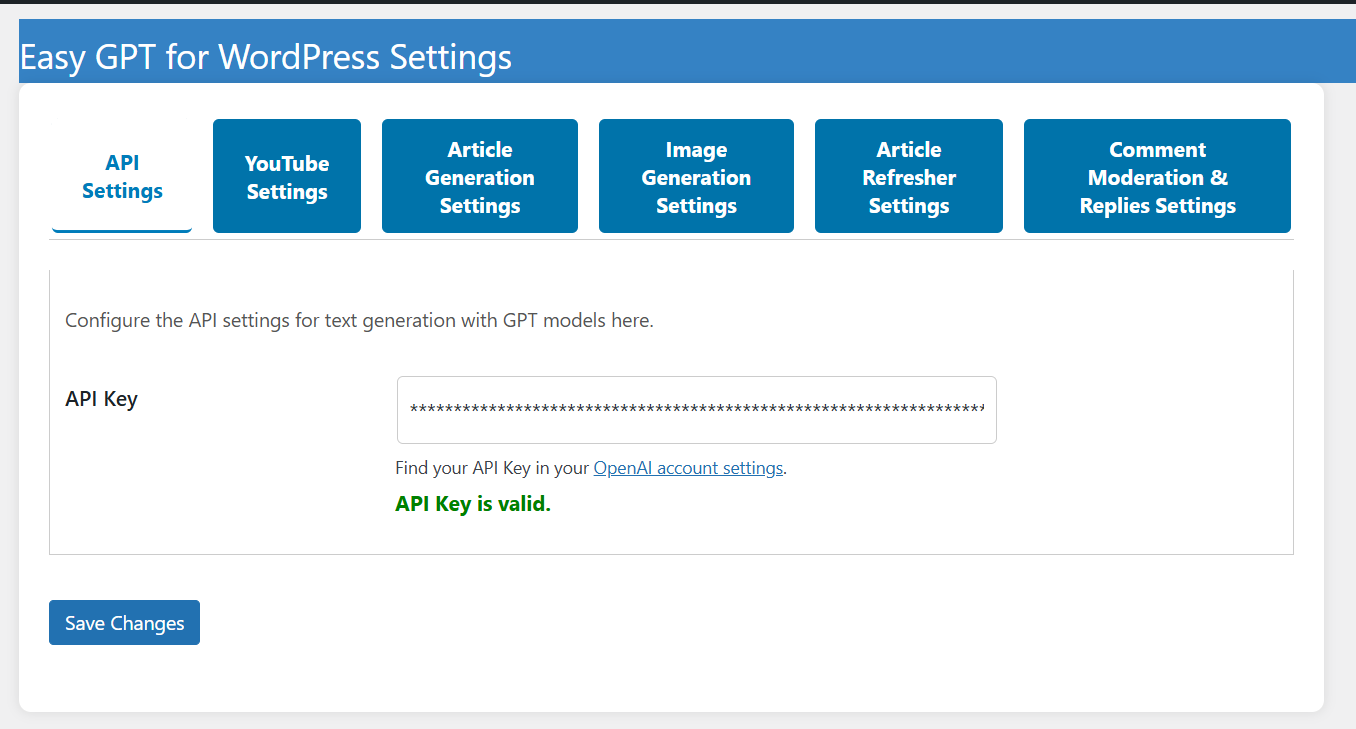
- API Key Configuration: After activating your license, you’ll need to add one or more API keys depending on the provider you want to use.
- OpenAI: If you do not have an API key, you can generate it on the OpenAI platform. OpenAI charges based on usage, so ensure you have funds in your account.
- Gemini (Google AI): You can create an API key on Google AI Studio. Requires a Google account.
- DeepSeek: Create an account and generate your API key at DeepSeek. Usage may require approval.
- Navigate to
Easy GPT > Settings > API Settingsand enter the API key(s) in the corresponding fields, then save the changes.
- YouTube API Configuration (Optional): If you want Easy GPT to automatically include YouTube videos in generated content, you’ll need to configure the YouTube API.
- Go to the Google Cloud Console.
- Create a new project and enable the YouTube Data API v3.
- Generate an API key from APIs & Services > Credentials.
- Restrict the API key to your website for security.
- Copy the API key and enter it in Easy GPT > Settings > YouTube Settings tab > YouTube API Key.
- SEO Compatibility: Easy GPT for WP is compatible with Yoast SEO. Make sure you have Yoast SEO installed and activated to utilize SEO features seamlessly.
- Comment Moderation & Automatic Replies Configuration: To enable the new AI-powered comment moderation and auto-reply features:
- Navigate to
Easy GPT > Settings, go to the Comment Moderation & Replies Settings tab, and enable both the Enable Moderation and Enable Auto Replies options. - Then, go to
Easy GPT > Cron Job Statusto ensure that the respective Cron Jobs for comment moderation and auto replies are running. Each feature requires its own scheduled Cron Job for proper operation.
- Navigate to
- Automatic Article Refreshing: To enable automatic article updating:
- Go to
Easy GPT > Settings, and in the Article Refresher Settings tab, enable the Auto Refresh option. - Set the number of articles to refresh per interval, how old an article must be to be considered, and other preferences like image or SEO updates.
- Then, go to
Easy GPT > Cron Job Statusand verify that the Article Refresher Cron job is active and running properly.
- Go to
- Automatic Article Translation: To enable automatic translation of articles (requires the Polylang plugin):
- Go to
Easy GPT > Settings, and in the Translation Settings tab, enable the Automatic Translation option. - Choose the target languages from the list (languages must already be created in Polylang).
- Select how often translations should run (daily, weekly, or monthly) and how many articles to translate per interval.
- You can also choose how to handle images and YouTube videos in translated content: keep existing assets, update their metadata, or generate new ones.
- Then, go to
Easy GPT > Cron Job Statusand confirm that the Article Translation Cron job is active and scheduled.
- Go to
For more information and additional resources, visit the official website: Easy GPT for WP.
Änderungsprotokoll
1.40
- Fixed an issue where the bulk generation cron job could be automatically rescheduled to run every 5 minutes instead of respecting the interval configured in Cron Job Status.
- Improved cron scheduling so the Batch Generation Cron uses the saved execution interval when restarted.
- Improved cron cleanup when stopping the Batch Generation Cron to prevent duplicate scheduled events from remaining active.
1.39
- Added support for WordPress 7.0.
- Added support for the latest OpenAI text models, including GPT-5.5, GPT-5.5 Pro, GPT-5.4, GPT-5.4 Mini, GPT-5.4 Nano, GPT-5.4 Pro, GPT-5.2, GPT-5.2 Pro, GPT-5.1, GPT-5, GPT-5 Mini, GPT-5 Nano, and GPT-5 Pro.
- Added support for the latest OpenAI image models, including GPT Image 2, GPT Image 1.5, and GPT Image 1 Mini.
- Added support for updated Gemini text and image models, including Gemini 3.5 Flash, Gemini 3.1 Pro Preview, Gemini 3.1 Flash-Lite, Gemini 3.1 Flash Image, Gemini 3.1 Flash-Lite Image, Gemini 3 Pro Image, and Gemini 2.5 Flash Image.
- Added model pricing information to the plugin options so text and image generation costs can be estimated more accurately.
- Improved bulk generation editing, allowing text provider, text model, temperature, image provider, image model, image size, and image quality to be updated from the bulk generation editor.
- Improved individual bulk article editing, allowing prompt, keywords, text model settings, image model settings, and publishing schedule to be updated per article.
- Improved bulk generation error messages so API errors, unavailable models, and image generation failures are shown more clearly in the bulk generation list.
- Improved image generation handling for newer OpenAI image models that return base64 image data instead of image URLs.
- Marked legacy DALL-E image models more clearly in the model selector.
1.38
- Added support for OpenAI GPT-5.4 models: gpt-5.4, gpt-5.4-mini, gpt-5.4-nano, and gpt-5.4-pro.
- Added support for DeepSeek V4 models: deepseek-v4-flash and deepseek-v4-pro.
- Added support for new Gemini models, including Gemini 3.1 Pro Preview, Gemini 3.1 Flash-Lite Preview, Gemini 3.1 Flash Image Preview, Gemini 3 Pro Image Preview, and Gemini 2.5 Flash Image.
- Added optional auto-restart settings for cron jobs, allowing selected cron tasks to be restored automatically if they stop unexpectedly.
1.37
- Allow changing bulk generation publishing mode (draft, publish, schedule) after creation.
- Added ability to edit individual pending tasks (prompt, keywords and publishing plan).
- Minor fixes and improvements.
1.36
- Added support for OpenAI GPT-5.2
1.35
- Tested and confirmed compatibility with WordPress 6.9.
- Minor internal improvements and general stability fixes.
Screenshots





Für Entwickler
Ist das dein Plugin? Zeigen Sie die Zahlen.
Fügen Sie Ihrer Website, Docs oder GitHub Readme ein Live-Badge hinzu. Es wird von selbst aktualisiert - kein Konto erforderlich.
Best Easy GPT for WP alternatives
All AI content generator plugins →




Fragen und Antworten
Easy GPT for WP: quick answers
Gerade Antworten, gezogen von Live WordPress.org Daten.
Quelle: WordPress.org
Is Easy GPT for WP free?
Yes. Easy GPT for WP is free to download and use from the official WordPress.org plugin directory.
Is Easy GPT for WP safe to use in 2026?
Easy GPT for WP works, but test it on a staging site before relying on it in 2026. It runs on 40+ sites, is rated 3.8/5 and was last updated 5 months ago, and scores 59/100 on our health check.
How many websites use Easy GPT for WP?
Easy GPT for WP is active on 40+ WordPress websites and has been downloaded 6,785 times since it launched in November 2024. It was downloaded 701 times in the last 30 days.
Does Easy GPT for WP work with WordPress 7.1?
Easy GPT for WP is officially tested up to WordPress 7.0.9, while the latest release is 7.1.5. It may still work, but try it on a staging site first.
What PHP version does Easy GPT for WP need?
Easy GPT for WP requires PHP 7.3 or higher. Most hosts run PHP 8.x today, so it works on any modern WordPress hosting.
When was Easy GPT for WP last updated?
The latest version, 1.40, was released on July 1, 2026 (5 months ago).
Who makes Easy GPT for WP?
Easy GPT for WP is developed and maintained by nachomd.
What are the best alternatives to Easy GPT for WP?
The most popular alternatives to Easy GPT for WP are AutoWP (900+ installs), AI Product Tools for WooCom… (500+ installs) and AI Content Generator For El… (200+ installs).
Angetrieben von PageForge
Eine Vorlage und eine Tabelle. Eine echte Seite für jede Suche.
PageForge Verwandelt jede Zeile eines CSV in eine WordPress-Seite mit eigenem Titel, URL, SEO Felder und Schema entworfen. Kostenlos auf WordPress.org.
- CSV und XLSX, plus Google Sheets auf Beruf und Unternehmen
- seinen eigenen Titel, URL, SEO Felder und Schema für jede Seite
- Arbeitet mit dem Blockeditor, Elementor, Divi und Avada
- Kostenlos auf WordPress.org, keine Kreditkarte