

Cool Timeline (Horizontal & Vertical Timeline)
Showcase your story or company history, events, and roadmap in an interactive timeline using the powerful Cool Timeline plugin.

Sichere Auswahl
Yes — Cool Timeline (Horizontal & Ver… is a safe, well-maintained plugin to use in 2026. It runs on 20K+ sites, is rated 4.7/5 and was last updated 3 days ago, and scores 93/100 on our health check.
- Bewährt auf 20.000 aktiven Standorten
- Loved by users — 4.7/5 from 334 reviews
- Aktiv entwickelt – letztes Update vor 3 Tagen
- Getestet mit dem neuesten WordPress (7.1)
Wie stapelt es sich?
Side-by-side bei Installationen, Updates, Bewertungen und Support


Tägliche Downloads
Download-Spitzen folgen normalerweise einer neuen Version - jede Website, die automatisch aktualisiert wird, gilt als Download.
Ranglisten
Where Cool Timeline (Horizontal &… stands todayWordPress.org Ranglisten suchen
Live-Position in der Plugin-Suche, Top 100| Stichwort | Position |
|---|---|
| history | #17 |
| Horizontal Timeline | #2 |
| roadmap | #8 |
| timeline | #2 |
| vertical timeline | #1 |
Versionsübernahme
Anteil aktiver Sites pro Release.
Bewertungsaufschlüsselung
★★★★★★★★★★ 4.7 from 334 reviews
About Cool Timeline (Horizontal & Vertical Ti…
From the official readme · v5.0.1Beschreibung
Horizontal & Vertical Timeline, History Timeline Slider
Cool Timeline is an advanced WordPress plugin that helps you easily create timeline sliders for your website. You can use it to display your company’s history, product roadmaps, personal stories, or key events in a vertical layout.
Using Cool Timeline, you can create timeline stories in two ways:
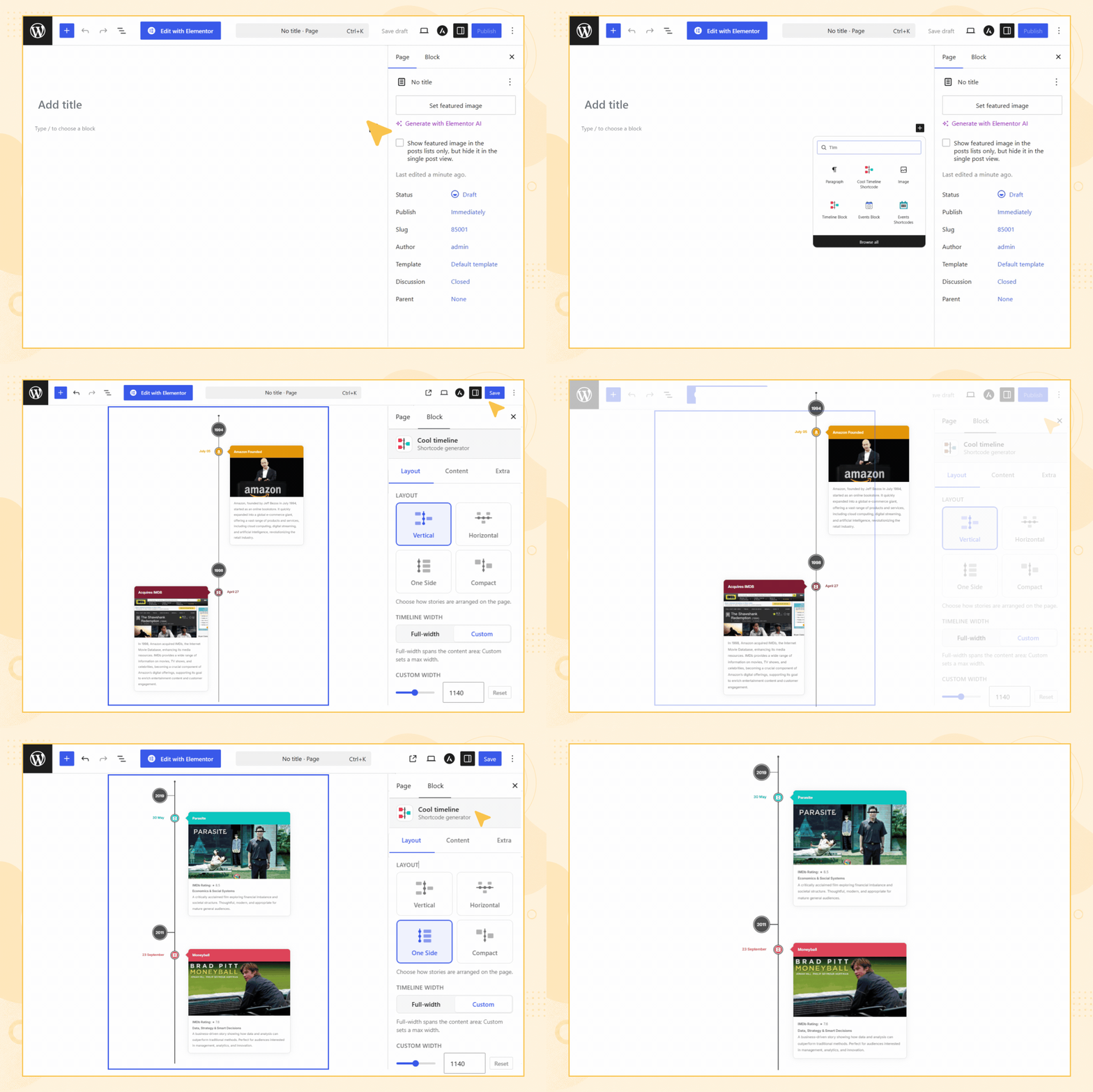
- Gutenberg Timeline Block: Add and manage timeline stories easily using the built-in block in the WordPress editor. Great for showing steps, events, or roadmaps with a clean design.
- Shortcode-Based Classic Timelines: Using the classic editor? Just add a simple shortcode to display your timeline on any page or post and customize it the way you like.
- Bricks Builder Story Timeline: Add the dedicated Story Timeline element directly inside Bricks Builder. Create stories, add media, configure layouts, and styling without coding.
Check Free Version Demos | Pro Demos | Buy Pro
Hauptmerkmale
- Timeline Slider: Display your stories in a stunning vertical or horizontal timeline layout.
- Gutenberg and Classic Editor Support: Create timelines easily using the Gutenberg block or a simple shortcode. This works with both new and classic WordPress editors.
- Bricks Builder Support: Create and customize story timelines directly inside Bricks Builder using the dedicated Story Timeline element.
- Smart Shortcode Generator: Use shortcodes to display timeline slider anywhere on your site without needing the code.
- Cool Timeline Shortcode:
[cool-timeline layout=”default” skin=”default” date-format=”F j” icons=”YES” show-posts=”20″ order=”DESC” story-content=”full”]
- Cool Timeline Shortcode:
- Works with Page Builders: Compatible with popular page builders like Gutenberg, WPBakery, Bricks Builder and Classic Editor. Elementor and Divi users can also create timelines with additional plugins.
- ASC/DESC Order: Arrange your timeline stories in ascending or descending order as needed.
- Customizable Description: Choose to show either a summary or the full description for each timeline story, depending on how much detail you want to present.
- Story Order (ASC / DESC): Sort your stories in ascending (oldest to newest) or descending (newest to oldest) order based on your timeline.
- Date Format: Choose from various date formats to display your timeline stories according to your requirements.
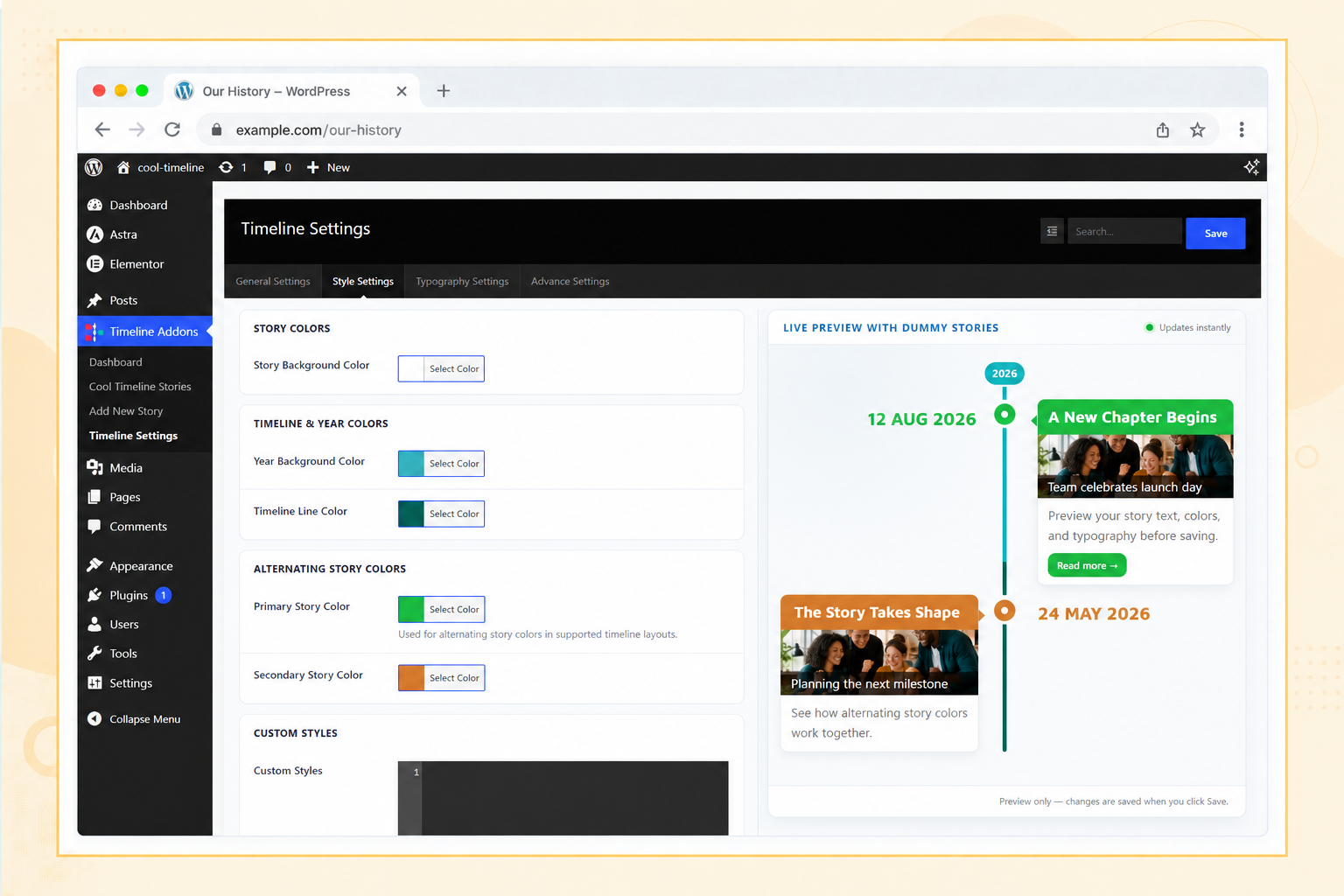
- Customizable Colors & Fonts: Change colors, fonts, and styles to fit your brand or website design.
- Pagination: Set how many stories you want to display per page to easily manage multiple timelines.
- Icons or Dots: Highlight events using custom icons or simple dots to visually distinguish each story on the timeline.
- Content Alignment: Align your timeline content left, right, or center to match your website’s style and improve readability.
- Multiple Timelines: Create and manage several timeline sliders on one site, like company history, product updates, or personal stories.
- Animation Effects: Add subtle animations to your timeline items as they appear, making the overall experience more interactive and engaging.
Where can you use the Cool Timeline?
- Company History Showcase: Display your company’s growth and key milestones in a timeline format.
- Event Highlights: Present a timeline of events for conferences, seminars, or special occasions.
- Product Launch Timeline: Highlight the different stages and key dates leading up to a product or service launch.
- Personal Journey: Share your personal story, career progression, or life journey using a timeline.
- Project Roadmap: Create a visual timeline of project phases, deadlines, and achievements.
- Achievements and Awards: Showcase significant accomplishments, recognitions, and awards over time.
- Nonprofit or Charity Timeline: Present the key initiatives and impact of your nonprofit organization through a timeline.
- Portfolio Showcase: Display your work history or project portfolio in chronological order.
- Historical Events Documentation: Document important historical events or milestones in a timeline.
- School or Educational Timeline: Highlight significant academic events, school history, or student progress.
- Wedding or Family Timeline: Capture important family milestones like weddings, anniversaries, or life events.
- Event Planning: Outline and share a detailed timeline for upcoming events or project plans.
- Real Estate Development: Display the various stages of a property’s development from start to completion.
- Startup Journey: Share your startup’s timeline, from idea conception to growth and scaling phases.
- Sports Achievements: Highlight key moments and accomplishments in an athlete’s or team’s career.
Cool Timeline Pro Features
Upgrading to the Cool Timeline Pro plugin unlocks the advanced features like access to multiple layouts, including Horizontal layout, Category-Based Timelines, Ajax Load More, Multimedia ( images, videos & slideshow), and more:
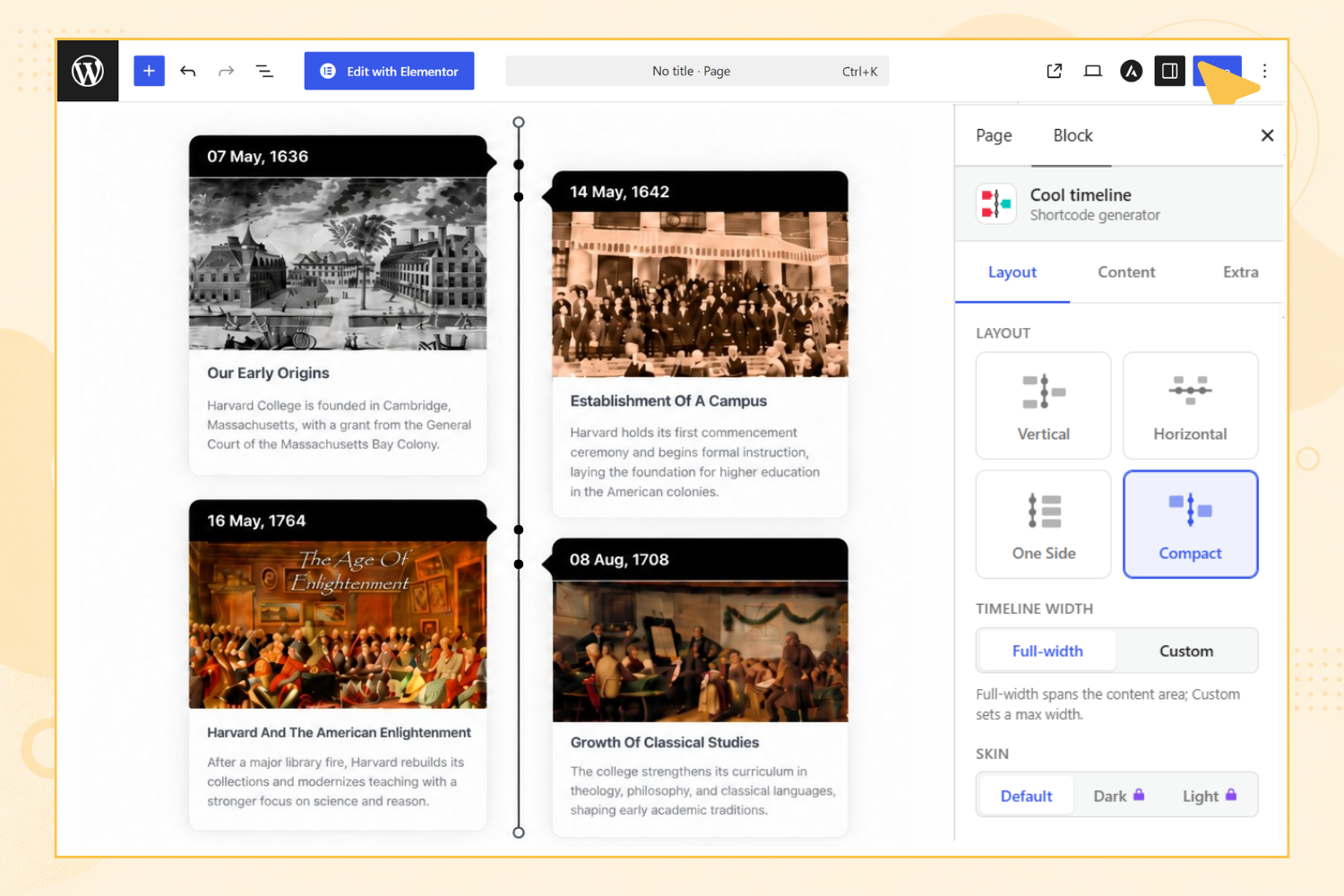
- Timeline Slider Designs: Cool Timeline Pro offers 4 layout types
- Vertical Timeline
- Vertical Compact Timeline
- Vertical One-Side Timeline
- Horizontal Timeline
Each with 6+ design styles like Classic, Modern, Elegant, etc., and 3 skins (Light, Dark, Colorful). Check All Demos.
- Advance Customization: Set different colors for each timeline story, making your timeline more visually interesting.
- Add Images & Videos: Make your timeline stories more interactive by adding images, videos, and slideshows.
- Multiple Timelines: Create and manage several timelines on one site, like company history, product updates, or personal stories.
- Smart Shortcode Generator: Use shortcodes to display timelines anywhere on your site without needing to code.
- Works with Page Builders: Compatible with popular page builders like Gutenberg, WPBakery, Bricks Builder and Classic Editor. Elementor and Divi users can also create timelines with additional plugins.
- Custom Labels: Use labels instead of dates for events, such as process steps or historical periods like AD/BC.
- Category Filters: Add filters so users can sort timeline stories by category.
- Blog Post Timeline: Display your blog posts in a timeline layout, highlighting your content by date.
- Ajax Load More & Pagination: Add pagination and “load more” buttons to easily manage timelines with many stories.
- Scrolling Navigation: Add scrolling navigation to let users move through long timelines more quickly.
- Custom Icons: Replace default dots with icons or custom images to make your timeline more personalized.
- HTML/Links Support: Add “Read More” links or custom HTML in timeline stories to guide users to full content or other pages.
- Customizable Date Formats: Choose from various date formats to display your timeline stories as you like.
- Animation Effects: Add animation effects to your timelines to make them more engaging for visitors.
- Premium Support: Get dedicated support as a Pro user for any help or questions.
Check Our Other Timeline Plugins
- Timeline Widget For Elementor: Showcase your company history, product roadmap, and personal journey in vertical & horizontal layout directly inside Elementor. View Demo
- Timeline Block For Gutenberg: Create interactive timelines directly within the WordPress Block Editor to display step-by-step tutorials, a company’s history, and a product roadmap. View Demo
- Timeline Builder: Create a small timeline inside the Gutenberg block editor using a vertical or horizontal timeline. View Demo
- Timeline Module Pro For Divi: Showcase your personal story or company history using stunning vertical or horizontal timelines directly inside the Divi Builder. View Demo
Use of 3rd Party Services: This plugin connects to the Cool Plugins API to display information about related plugins inside the dashboard. It also offers optional usage tracking and optional feedback submission on deactivation. Data is sent only after explicit user consent. No hidden tracking is performed, and no frontend visitor or site user data is collected. For more details, please review our Data Usage Policy, TOS, and Privacy Policy.
Installation
Certainly! Here are the improved installation steps and guidelines for the Cool Timeline plugin:
3 Ways To Install Cool Timeline
1. Automatically Install via WordPress Admin Panel
- Open your WordPress admin panel.
- Navigate to Plugins > Add New.
- In the search bar, type ‘Cool Timeline’.
- Locate the Cool Timeline plugin from the search results.
- Click the Install Now button.
- Once the installation is complete, click the Activate button to enable the plugin on your website.
2. Install via Zip File
- Download the Cool Timeline plugin from the WordPress plugin directory.
- Save the downloaded zip file to your computer.
- Open your WordPress admin panel.
- Navigate to Plugins > Add New.
- Click the Upload Plugin button.
- Select the downloaded zip file and click Install Now.
- Once the installation is complete, click the Activate Plugin button to enable Cool Timeline.
3. Install the Plugin via FTP
- Download the Cool Timeline plugin zip file from the WordPress plugin directory.
- Extract the zip file on your computer.
- Open your FTP manager (e.g., FileZilla).
- Connect to your website’s server.
- Navigate to the wp-content/plugins directory.
- Upload the extracted Cool Timeline folder (not the zip file) to this directory.
- After uploading is done, go to your WordPress admin panel.
- Navigate to Plugins and find Cool Timeline in the list.
- Click the Activate button to enable the plugin.
Änderungsprotokoll
Fixed: Fixed PHP error.
Version 5.0.1 | 17 Nov 2026
- Improved: Password-protected story visibility handling in shortcode.
- Fixed: WPBakery image issue.
- Fixed: Editor side default icon issue.
Version 5.0.0 | 21 Oct 2026
- Major Design Enhancement: Completely refreshed Gutenberg timeline block design with modern aesthetics, refined card layouts, typography, spacing, cards, icons, images, and borders.
- Responsive Design: Optimized block timeline layouts and readability across desktop, tablet, and mobile devices.
- Compatibility & Migration: Seamlessly integrated Gutenberg block designs with the design migration system, allowing users to upgrade to the new design or keep the legacy design.
- Fixed: Resolved stories page blank gap and float clearing issues in the admin area.
- Improvements: Enhanced code quality and standards compliance across plugin files for PHPCS and WordPress Plugin Check.
Version 4.1.0 | 15 Oct 2026
- Major Design Enhancement: Completely refreshed timeline bricks design with modern styling, improved layouts, typography, spacing, cards, icons, images, and enhanced customization options.
- Responsive Design: Optimized timeline layouts and readability across desktop, tablet, and mobile devices.
- Fixed: Various bugs.
- Improved: Dashboard interface and usability.
Version 4.0.0 | 21 Sep 2026
- Added: Initial integration with Bricks Builder.
- Major Design Enhancement: Completely refreshed timeline design with modern styling, improved layouts, typography, spacing, cards, icons, images, and enhanced customization options.
- Responsive Design: Optimized timeline layouts and readability across desktop, tablet, and mobile devices.
- Compatibility: Enhanced compatibility with WordPress themes, page builders, existing timelines, and custom styling. Existing shortcodes and timeline content continue to work without migration.
- Performance: Optimized CSS structure for better frontend performance and future design enhancements.
- Improvements: Review notice design for a better user experience.
Version 3.4.1 | 03 Sep 2026
- Improved: Review notice and feedback form design for a better user experience.
Version 3.4.0 | 28 July 2026
- New: Introduced a“Get Started”onboarding page for a smoother setup experience.
- New: Added a guided sample timeline demo creation flow to help users get started quickly.
- Removed: Removed the legacy dashboard and replaced it with the new onboarding experience.
- Improved: Simplified the initial setup process with a quick-start demo.
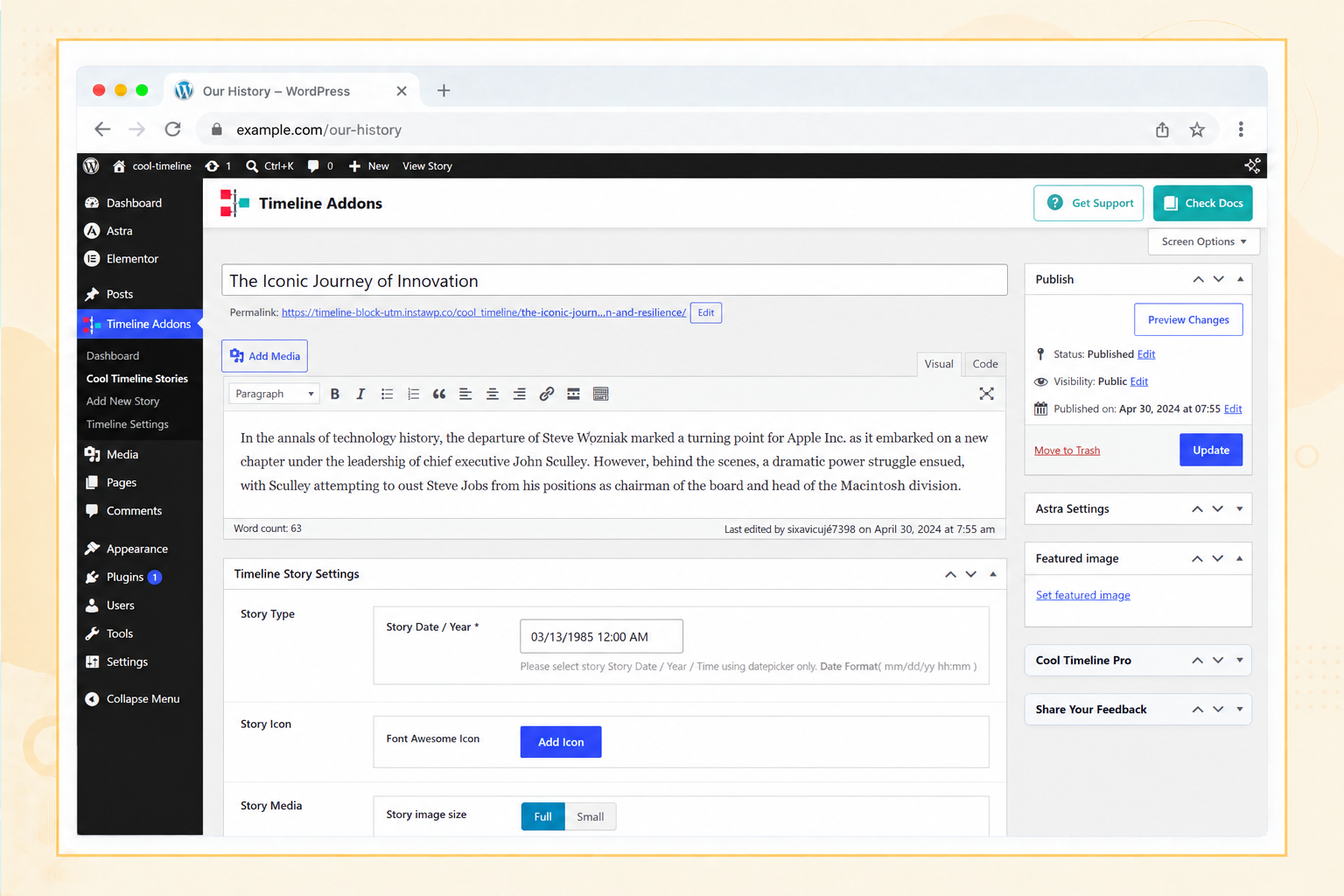
Screenshots
Für Entwickler
Ist das dein Plugin? Zeigen Sie die Zahlen.
Fügen Sie Ihrer Website, Docs oder GitHub Readme ein Live-Badge hinzu. Es wird von selbst aktualisiert - kein Konto erforderlich.
Best Cool Timeline (Horizontal & V… alternatives
All history plugins →



Fragen und Antworten
Cool Timeline (Horizontal & Vertica…: quick answers
Gerade Antworten, gezogen von Live WordPress.org Daten.
Quelle: WordPress.org
Is Cool Timeline (Horizontal & Ver… free?
Yes. Cool Timeline (Horizontal & Ver… is free to download and use from the official WordPress.org plugin directory.
Is Cool Timeline (Horizontal & Ver… safe to use in 2026?
Yes — Cool Timeline (Horizontal & Ver… is a safe, well-maintained plugin to use in 2026. It runs on 20K+ sites, is rated 4.7/5 and was last updated 3 days ago, and scores 93/100 on our health check.
How many websites use Cool Timeline (Horizontal & Ver…?
Cool Timeline (Horizontal & Ver… is active on 20K+ WordPress websites and has been downloaded 1,143,974 times since it launched in November 2015. It was downloaded 30,098 times in the last 30 days.
Does Cool Timeline (Horizontal & Ver… work with WordPress 7.1?
Yes. The developer has tested Cool Timeline (Horizontal & Ver… up to WordPress 7.1.5, the latest release. It requires WordPress 5.6 or newer.
What PHP version does Cool Timeline (Horizontal & Ver… need?
Cool Timeline (Horizontal & Ver… requires PHP 5.6 or higher. Most hosts run PHP 8.x today, so it works on any modern WordPress hosting.
When was Cool Timeline (Horizontal & Ver… last updated?
The latest version, 5.0.1, was released on November 17, 2026 (3 days ago).
Who makes Cool Timeline (Horizontal & Ver…?
Cool Timeline (Horizontal & Ver… is developed and maintained by Narinder Singh.
What are the best alternatives to Cool Timeline (Horizontal & Ver…?
The most popular alternatives to Cool Timeline (Horizontal & Ver… are WP Activity Log (300K+ installs), Simple History (300K+ installs) and Timeline Widget For Element… (70K+ installs).
Angetrieben von PageForge
Eine Vorlage und eine Tabelle. Eine echte Seite für jede Suche.
PageForge Verwandelt jede Zeile eines CSV in eine WordPress-Seite mit eigenem Titel, URL, SEO Felder und Schema entworfen. Kostenlos auf WordPress.org.
- CSV und XLSX, plus Google Sheets auf Beruf und Unternehmen
- seinen eigenen Titel, URL, SEO Felder und Schema für jede Seite
- Arbeitet mit dem Blockeditor, Elementor, Divi und Avada
- Kostenlos auf WordPress.org, keine Kreditkarte