

Booking Calendar Contact Form
Booking calendar form with a start and end date, or a single date option. Perfect for hotels, houses and services. PayPal payment integration included

Sichere Auswahl
Yes — Booking Calendar Contact Form is a safe, well-maintained plugin to use in 2026. It runs on 500+ sites, is rated 3.6/5 and was last updated 1 week ago, and scores 80/100 on our health check.
- Aktiv entwickelt — letztes Update vor 1 Woche
- Getestet mit dem neuesten WordPress (7.1)
- Momentum — downloads up 300.4% vs the previous 30 days
- Kleine Benutzerbasis (500+ aktive Installationen)
Wie stapelt es sich?
Side-by-side bei Installationen, Updates, Bewertungen und Support



Tägliche Downloads
Download-Spitzen folgen normalerweise einer neuen Version - jede Website, die automatisch aktualisiert wird, gilt als Download.
Ranglisten
Where Booking Calendar Contact Fo… stands todayWordPress.org Ranglisten suchen
Live-Position in der Plugin-Suche, Top 100| Stichwort | Position |
|---|---|
| booking | #60 |
| Buchungskalender | #26 |
| booking form | #36 |
| reservation | #62 |
| reservation form | #17 |
Versionsübernahme
Anteil aktiver Sites pro Release.
Bewertungsaufschlüsselung
★★★★★★★★★★ 3.6 from 32 reviews
About Booking Calendar Contact Form
From the official readme · v1.2.71Beschreibung
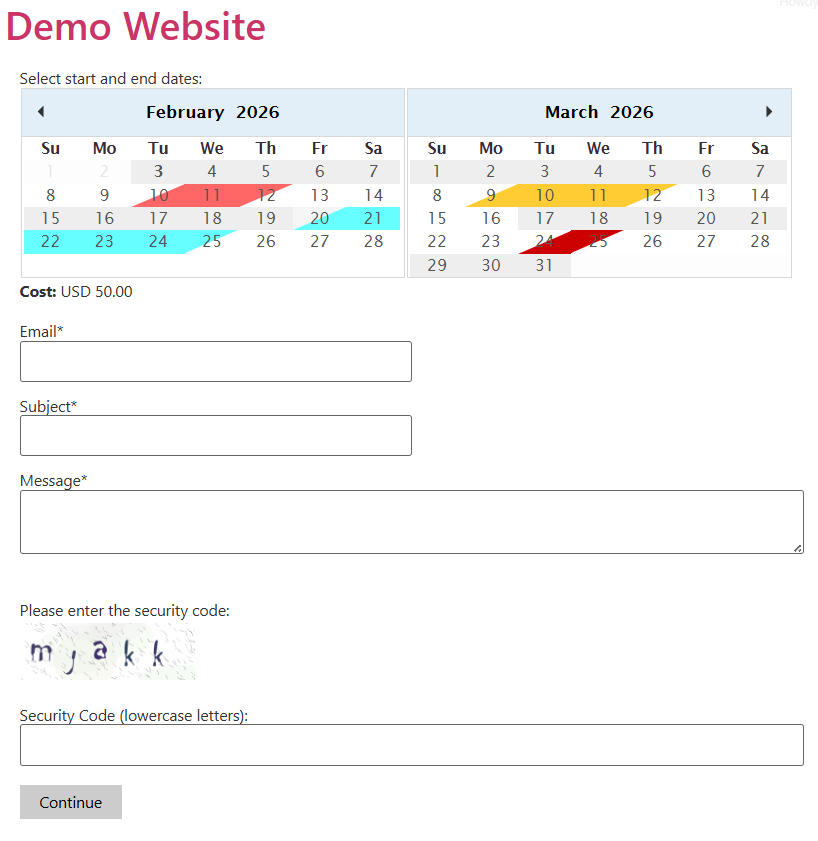
The Booking Calendar Contact Form plugin allows you to create a powerful and flexible booking form for your WordPress website. Easily create a reservation form with a booking calendar where users can select start and end dates (such as check-in and check-out) or single dates.
It is the ideal solution for hotels, property rentals, service providers, and anyone needing to accept bookings and payments online. The built-in PayPal integration (which is SCA-ready) allows you to securely process payments for reservations.
The reservation calendar is completely optional, so you can also use the plugin to create a general-purpose contact form or payment form.
🌟 Key Features of the Free Version
- PayPal Integration: Securely accept payments for your bookings. Fully compatible with SCA (Strong Customer Authentication) / PSD2.
- Reservation Calendar: Allow users to select:
- Start and end dates (e.g., check-in / check-out)
- A single date
- Flexible Booking Types: Supports full-day bookings (the entire day is blocked) or partial-day bookings (hotel-style, where check-out and check-in can happen on the same day).
- AI-Assisted Booking Replies: Reply directly to customer reservations from the Bookings List using a built-in AI assistant to draft polite, context-aware email responses in seconds, with all sent replies automatically logged in the booking record.
- Modern Administration Interface: Intuitive, tabbed settings dashboard, manual booking entry screen, and one-click shortcode publishing wizard.
- Availability Management: Optional date verification prevents double-booking by automatically blocking dates as they are reserved.
- Seasonal Pricing: Configure different prices for specific date ranges (e.g., high season, low season, holidays).
- Flexible Pricing Rules: Define prices based on the number of days selected (e.g., weekly rates, 3-day specials) or add length-of-stay supplements.
- Fixed-Length Bookings: Enforce specific booking durations (e.g., weekly-only bookings).
- Responsive & Mobile-Optimized: The form and calendar look and work great on all devices and screen sizes.
- Bookings Management & Export: Search, filter, export to CSV, or print a list of all bookings from your WordPress dashboard.
- iCal Export Link: Easily export your bookings to external calendars such as Google Calendar, Apple Calendar, Airbnb, and more.
- Configurable Emails: Customize the notification emails sent to the administrator and the confirmation emails sent to the customer.
- Customizable Messages: Configure all validation messages, button labels, and date format settings.
- Block Dates: Mark holidays or specific dates as unavailable with a single click.
- Built-in Anti-Spam: Includes a customizable CAPTCHA security image to protect your booking form.
- Multi-User Support: Assign a calendar to a specific WordPress user (e.g., an editor) so they can manage their own bookings.
- Calendar Styling: Includes multiple color presets and a built-in custom CSS/JavaScript editor.
A Flexible Solution for Any Website
- Hotel & Room Booking: Use the partial-day booking mode to manage hotel, inn, or B&B reservations.
- House & Apartment Rentals: Use the full-day booking mode for vacation homes, cabins, or equipment rentals.
- Service Bookings: Allow clients to book multi-day or single-day services, classes, or events.
- General Payment Form: Disable the calendar to create a simple contact or payment form connected directly to PayPal.
Note: Payments processed through the plugin are SCA-ready (Strong Customer Authentication) and compliant with the EU Revised Payment Services Directive (PSD2).
Looking for More Features?
This free version is packed with essential features, and our Commercial Versions unlock even more capabilities:
- Full Visual Form Builder: Unlock all field types, conditional logic (show/hide fields based on selections), file uploads, and multi-page forms.
- Two-Way iCal Sync: Synchronize with external calendars (Google Calendar, Airbnb, Booking.com, etc.) to both import and export availability.
- Flexible Payment Options: Allow customers to choose between “Pay Now” or “Pay Later,” plus integrate additional payment gateways.
- Coupons & Discount Codes: Offer promotional codes and special discounts.
- Optional Services & Add-Ons: Let customers select extra items or services (e.g., breakfast, cleaning, parking) that automatically update the total price.
For more details on the commercial versions, please visit the plugin’s website.
Language Support
The Booking Calendar Contact Form plugin is compatible with all character sets and supports translation through standard PO/MO files located in the /languages/ folder.
The following translations are included out of the box:
- Afrikaans (af)
- Albanian (sq)
- Arabic (ar)
- Armenian (hy_AM)
- Azerbaijani (az)
- Basque (eu)
- Belarusian (be_BY)
- Bosnian
- Bulgarian
- Catalan (ca)
- Central Kurdish (ckb)
- Chinese (China) (zh_CN)
- Chinese (Taiwan) (zh_TW)
- Croatian (hr)
- Czech (cs_CZ)
- Danish (da_DK)
- Dutch (nl_NL)
- Englisch
- Esperanto (eo_EO)
- Estonian (et)
- Finnish (fi)
- French (fr_FR)
- Galician (gl_ES)
- Georgian (ka_GE)
- German (de_DE)
- Greek (el)
- Hebrew (he_IL)
- Hindi (hi_IN)
- Hungarian (hu_HU)
- Indonesian (id_ID)
- Italian (it_IT)
- Japanese (ja)
- Korean (ko_KR)
- Latvian (lv)
- Lithuanian (lt_LT)
- Macedonian (mk_MK)
- Malay (ms_MY)
- Malayalam (ml_IN)
- Norwegian (nb_NO)
- Persian (fa_IR)
- Polish (pl_PL)
- Portuguese (Brazil) (pt_BR)
- Portuguese (Portugal) (pt_PT)
- Romanian (ro_RO)
- Russian (ru_RU)
- Serbian (sr_RS)
- Slovak (sk_SK)
- Slovene (sl_SI)
- Spanish (es_ES)
- Swedish (sv_SE)
- Tamil (ta)
- Thai (th)
- Turkish (tr_TR)
- Ukrainian (uk)
- Vietnamese (vi)= Bookings List & AI-Assisted Replies =
Accessible via the Bookings List button on the calendar management screen.
- Search & Filter: Filter reservations by calendar, keyword, date range, or sort order, and export the filtered results to CSV or print them.
- Reply with AI Assistance: Click the Reply button on any booking to open the email reply modal. You can write a manual message or provide brief instructions (e.g., “Confirm the reservation and let them know check-in is at 2 PM”) and click Generate with AI to draft a polished response in the customer’s language.
- Automatic Reply Logging: Every reply sent from the Bookings List is automatically appended to the booking’s description with a timestamp for your records.
Troubleshoot Area
Located below the booking calendars list.
Important: Only change these settings if you experience script conflicts with third-party plugins/themes or character encoding issues.
- Script Load Method: Switch to “Direct” if the booking calendar does not appear on the public website. Otherwise, keep the default “Classic” setting.
- Character Encoding: Update the database table collation if special or non-Latin characters display incorrectly in forms or emails. Note: You may need to re-enter affected text after updating this setting.
Booking Duration Limits (Global)
- Minimum Nights: Bookings must be equal to or longer than this value.
- Maximum Nights: Bookings cannot exceed this value.
Price Supplements
Apply automatic price adjustments based on the length of the stay.
- Supplement for bookings between X and Y nights: Adds a one-time fee (or discount) for bookings falling within the specified night range.
General Calendar Settings
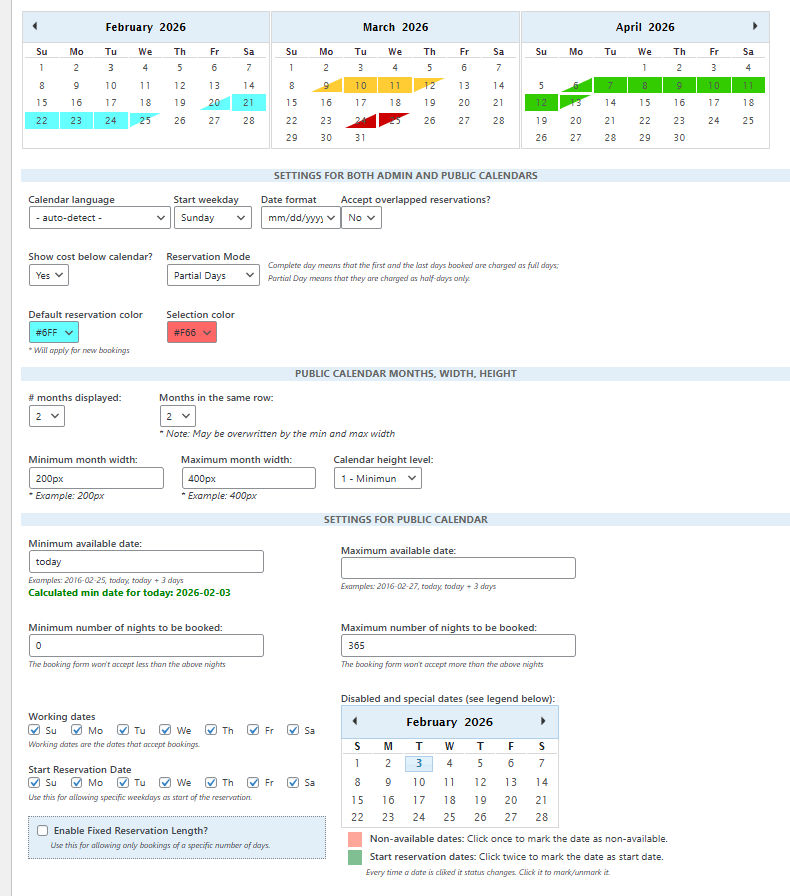
Settings applicable to both admin and public views:
- Calendar Pages: Number of months to display simultaneously.
- Calendar Language: Automatically detects the visitor’s browser/site language, or allows you to select a fixed language manually.
- Start Weekday: Sets the first day of the week (e.g., Sunday or Monday).
- Date Format: Choose between
mm/dd/yyyyordd/mm/yyyy. - Accept Overlapped Reservations: Setting this to “No” prevents double-booking (recommended).
- Reservation Mode: “Complete Days” charges the first and last days booked as full days. “Partial Days” charges them as half-days (ideal for hotel check-in/check-out).
Public Calendar Settings
Settings specific to the customer-facing calendar:
- Min/Max Available Date: Limits the selectable date range (e.g.,
2026-12-31,today, ortoday + 3 days). - Working Dates: Define which days of the week accept bookings (useful for disabling weekends or specific closing days).
- Disabled and Special Dates: Click specific dates on the mini-calendar to mark them as unavailable (e.g., holidays).
- Fixed Reservation Length: Restrict bookings to a specific duration (details below).
Fixed Reservation Length
Enable this option to require bookings to span an exact number of days (e.g., strictly 7-day rentals).
- Fixed Length (days): The required duration of the booking.
- Start Reservation Date: Restrict check-ins to specific weekdays (e.g., Mondays only).
- Disabled and Special Dates: When fixed mode is active, click twice on specific dates in the mini-calendar to mark valid start dates (useful for scheduled tours or courses).
Note: In fixed-length mode, customers only select their start date; the end date is calculated automatically.
Form Builder
The visual form builder included in the free version supports the most frequently used field types (“Single Line Text”, “Email”, “Text-area”, and “Acceptance Checkbox”). Commercial versions unlock the full set of field types, conditional logic, and multi-page forms.
Submit Button
Customize the Submit, Previous, and Next button labels.
- Styling: Use the CSS class
.pbSubmit. You can add custom CSS rules using the Customize CSS Styles editor on the main calendar list page. - Advanced: See the FAQ for ready-to-use CSS samples: https://bccf.dwbooster.com/faq#q82
Validation Texts
Translate or customize the error messages shown when form validation fails.
Price Configuration
Define your booking pricing structure:
- Currency: PayPal currency code (e.g., USD, EUR, GBP, CAD, AUD, JPY).
- Default Request Cost (per day): The standard daily rate.
- Total Request Cost for Specific # of Days: Overrides the daily rate with a fixed package price for specific booking lengths.
- Deposit Payment: Optionally charge only a percentage or fixed deposit amount at PayPal checkout.
- Seasons Configuration: Define custom daily rates and multi-day package prices for specific date ranges. Season prices override the default request cost.
PayPal Payment Configuration
- Enable PayPal: The free version supports On/Off. Commercial versions also support optional PayPal payments (allowing customers to choose between “Pay Now” or “Pay Later”).
- PayPal Email: The PayPal account email address that receives payments.
- Product Name: The item name displayed on the PayPal checkout page.
- Return URL (Success): The URL customers are redirected to after a successful payment (also used as the “Thank You” page when PayPal is disabled).
- Return URL (Cancel): The URL customers are redirected to if they cancel payment at PayPal.
- PayPal Language: Sets the language of the PayPal checkout screen.
- Taxes: Enter a percentage to apply tax at PayPal (e.g.,
10for 10%). - Discount Codes: (Commercial only) Create promotional codes to apply price reductions.
Optional Services/Items Field
Available in commercial versions. Create selectable add-on services or items with associated costs (e.g., Breakfast, Parking, Airport Transfer).
Notification Settings for Administrator(s)
Configure the alert email sent to the administrator when a booking is submitted:
- Notification “From” Email: The sender address used for outgoing notifications.
- Send Notification to Email: One or more comma-separated email addresses that receive booking alerts.
- Subject/Content: Customize the email subject and body. Keep the
%INFORMATION%tag to automatically insert the booking details.
Email Copy to User (Auto-Reply)
Configure the confirmation email sent to the customer:
- Email Field on the Form: Select which form field captures the customer’s email address.
- Subject/Content: Customize the confirmation message. Keep the
%INFORMATION%tag to insert the booking details.
Captcha Verification
Configure built-in anti-spam protection:
- Use Captcha Verification?: Enable or disable the CAPTCHA security code.
- Dimensions & Characters: Set the image width, height, and character count.
- Font Size & Styling: Customize the min/max font size, noise level, background color, border color, and font style with a live preview.
Installation
To install Booking Calendar Contact Form, follow these steps:
- Download and unzip the plugin archive.
- Upload the
booking-calendar-contact-formfolder to your/wp-content/plugins/directory (or install it directly via Plugins > Add New in WordPress). - Activate the Booking Calendar Contact Form plugin through the Plugins menu in WordPress.
- Configure your calendar and booking form settings under Booking Calend. Contact Form in the WordPress admin menu.
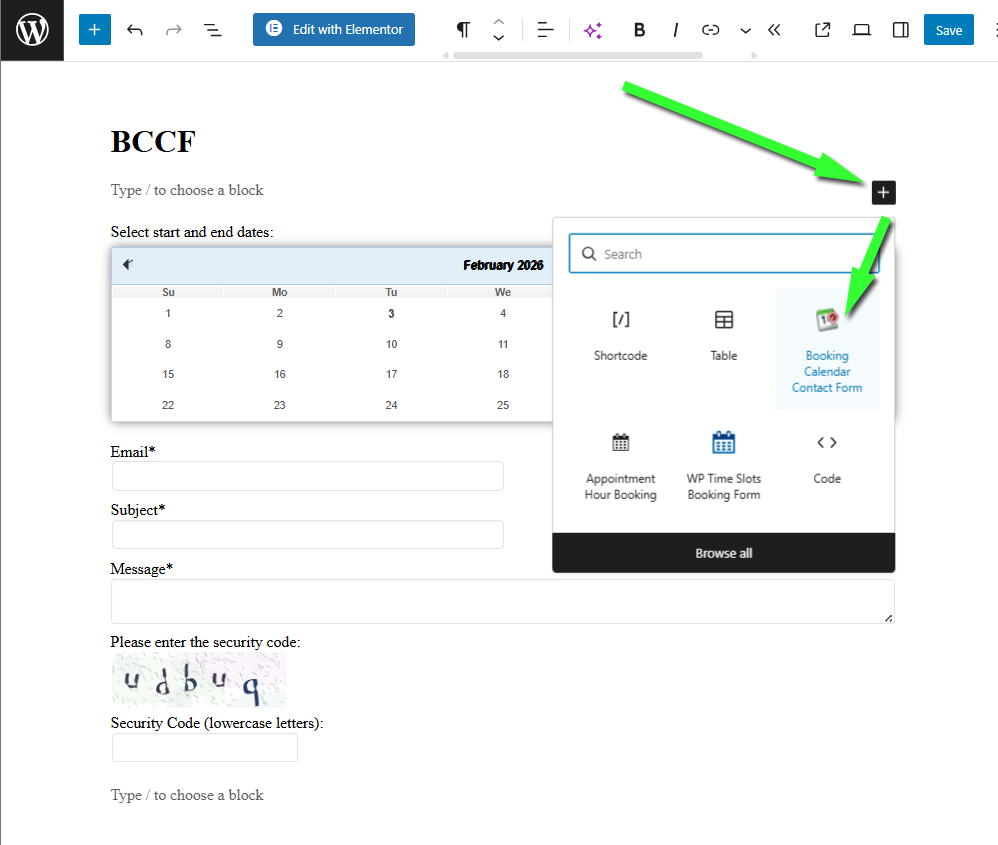
- Publish the booking form on any page or post using the Booking Calendar Contact Form Gutenberg block, the built-in Publish Wizard, or the shortcode
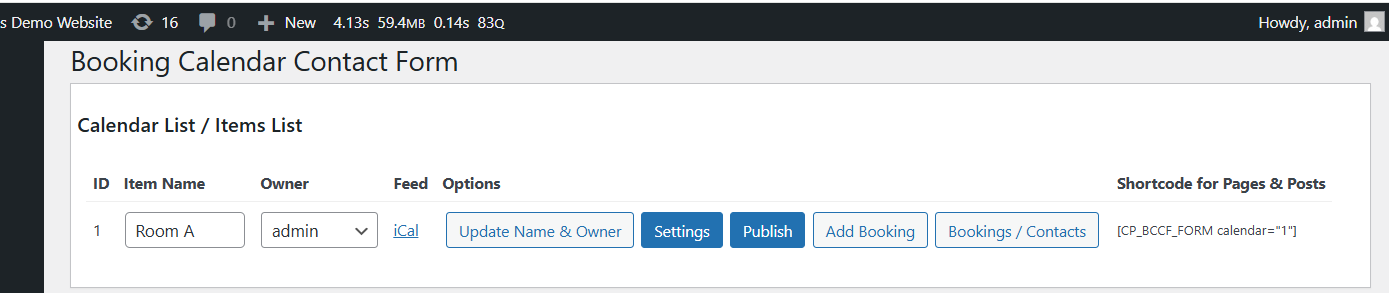
[CP_BCCF_FORM calendar="1"].
Änderungsprotokoll
New IPN Logs feature Important Upgrade Note: Because PayPal IPNs always send the PRIMARY account email as "receiver_email", forms using a secondary PayPal email address will reject IPNs until updated to your primary PayPal email
1.0.1
- Interface modifications
- Fix for iCal format bug (the events weren’t marked as all-day events)
- Compatible with the latest WP and jQuery versions
- Replaced YUI calendar with a jQuery calendar
- Added support for weekly bookings
- New language translations
- Several bug fixes and new features for deposit payments
- Fixed encoding issues at PayPal
- Fixed bug in the address of the corner images for partial days mode
- CSS styles updates to avoid conflicts with theme styles
- New options for customizing the emails
- New feature for applying taxes
1.0.2
- Compatible with the latest WordPress versions
- New language translations
- Fixed bugs in the language translations
- Interface updates
- Fixed warning that appeared with PHP safe mode restrictions
- Sanitized GET parameters used in queries
- Fixed issue with the site home URL in WP with folders in non-default locations
- Fixed bug in the URL generated for the IPN under HTTPS connections
1.0.3
- Fixed bug in the function that generates the URL for the IPN notification
- Update for SQL issues – sanitized values
- Update to make the IPN work over SSL connections
- Fixed bug in email processing
- Updates to minimize conflicts with third-party themes and plugins
1.0.4
- New feature to show/hide the calculated cost below the calendar
- CSS update to avoid conflicts with the new WP default theme
- Compatible with the latest WordPress 4.2.2 version
1.0.5
- Fixed notice warning in inactive feature
- Fixed bug in date calculation
- Fixed IPN address under SSL connections
- CSS update to fix the floating dialog height
- Fixed conflict of captcha image with zlib library
- Fixed bug in the path calculated for the admin area
- Translations updated
- Verbesserte Sicherheit
- Compatible with the latest WordPress 4.2.3
1.0.6
- Modification to prevent conflicts with zlib
- Update to the heading tags for the new WP version
- Fixed bug in IE 11
- Update to translations
- Implemented better submission process
- Compatible with the latest WordPress 4.3
Screenshots

Für Entwickler
Ist das dein Plugin? Zeigen Sie die Zahlen.
Fügen Sie Ihrer Website, Docs oder GitHub Readme ein Live-Badge hinzu. Es wird von selbst aktualisiert - kein Konto erforderlich.
Best Booking Calendar Contact Form alternatives
All booking plugins →





Fragen und Antworten
Booking Calendar Contact Form: quick answers
Gerade Antworten, gezogen von Live WordPress.org Daten.
Quelle: WordPress.org
Is Booking Calendar Contact Form free?
Yes. Booking Calendar Contact Form is free to download and use from the official WordPress.org plugin directory.
Is Booking Calendar Contact Form safe to use in 2026?
Yes — Booking Calendar Contact Form is a safe, well-maintained plugin to use in 2026. It runs on 500+ sites, is rated 3.6/5 and was last updated 1 week ago, and scores 80/100 on our health check.
How many websites use Booking Calendar Contact Form?
Booking Calendar Contact Form is active on 500+ WordPress websites and has been downloaded 230,127 times since it launched in February 2013. It was downloaded 2,951 times in the last 30 days.
Does Booking Calendar Contact Form work with WordPress 7.1?
Yes. The developer has tested Booking Calendar Contact Form up to WordPress 7.1.5, the latest release. It requires WordPress 3.0.5 or newer.
When was Booking Calendar Contact Form last updated?
The latest version, 1.2.71, was released on November 18, 2026 (1 week ago).
Who makes Booking Calendar Contact Form?
Booking Calendar Contact Form is developed and maintained by codepeople.
What are the best alternatives to Booking Calendar Contact Form?
The most popular alternatives to Booking Calendar Contact Form are Booking for Appointments an… (90K+ installs), Online Scheduling and Appoi… (60K+ installs) and Simply Schedule Appointments (50K+ installs).
Angetrieben von PageForge
Eine Vorlage und eine Tabelle. Eine echte Seite für jede Suche.
PageForge Verwandelt jede Zeile eines CSV in eine WordPress-Seite mit eigenem Titel, URL, SEO Felder und Schema entworfen. Kostenlos auf WordPress.org.
- CSV und XLSX, plus Google Sheets auf Beruf und Unternehmen
- seinen eigenen Titel, URL, SEO Felder und Schema für jede Seite
- Arbeitet mit dem Blockeditor, Elementor, Divi und Avada
- Kostenlos auf WordPress.org, keine Kreditkarte