


Animated Blocks on Scroll
Add scroll based animations to WordPress Gutenberg blocks.

Mit Vorsicht verwenden
Animated Blocks on Scroll works, but test it on a staging site before relying on it in 2026. It runs on 2K+ sites, is rated 5/5 and was last updated 6 months ago, and scores 44/100 on our health check.
- Momentum – Downloads um 52,4% gegenüber den letzten 30 Tagen
- Nur getestet bis WordPress 6.9 (letzt ist 7.1)
Wie stapelt es sich?
Side-by-side bei Installationen, Updates, Bewertungen und Support



Tägliche Downloads
Download-Spitzen folgen normalerweise einer neuen Version - jede Website, die automatisch aktualisiert wird, gilt als Download.
Ranglisten
Where Animated Blocks on Scroll stands todayWordPress.org Ranglisten suchen
Live-Position in der Plugin-Suche, Top 100| Stichwort | Position |
|---|---|
| animation | >100 |
| css animations | #19 |
| Gutenberg | >100 |
| Reveal | #19 |
| scroll | #25 |
Versionsübernahme
Anteil aktiver Sites pro Release.
Bewertungsaufschlüsselung
★★★★★★★★★★ 5 from 8 reviews
About Animated Blocks on Scroll
From the official readme · v1.1.6Beschreibung
Add scroll based animations to WordPress Gutenberg blocks.
Merkmale
- Choose from 76 cross-browser CSS3 animations or add your own
- Preview animations in the editor
- Adjust the animation duration, delay, scroll threshold, and offset
- Apply animation controls directly to regular Gutenberg blocks
- Show or hide animation controls for regular blocks from Settings > Animated Blocks
- Replay the selected dropdown animation from the editor inspector
Einstellungen
- Duration: The speed of the animation in milliseconds.
- Delay: How many milliseconds to wait before animating the element.
- Threshold: Add animation when x% of the element enters the screen.
- Start with opacity 0: Set the element to opacity 0 when the page loads. The option works for elements transitioning to 100% opacity through CSS.
- Offset Top (available in the block’s advanced settings): Number of pixels to offset the animated block from the top of the page. Useful when a page has a fixed top navigation bar.
- Show animation controls on all blocks: Enable or disable animation controls for regular Gutenberg blocks. When disabled, blocks that already have saved animation settings keep showing the controls until those settings are cleared.
- Class name “ab-animation-end” is added to the animated block after the CSS animation has ended. This class name can be used to add custom styles.
Bedarf
PHP 5.6+ is recommended, WordPress 5.0+, and Gutenberg must be active.
Dokumentation
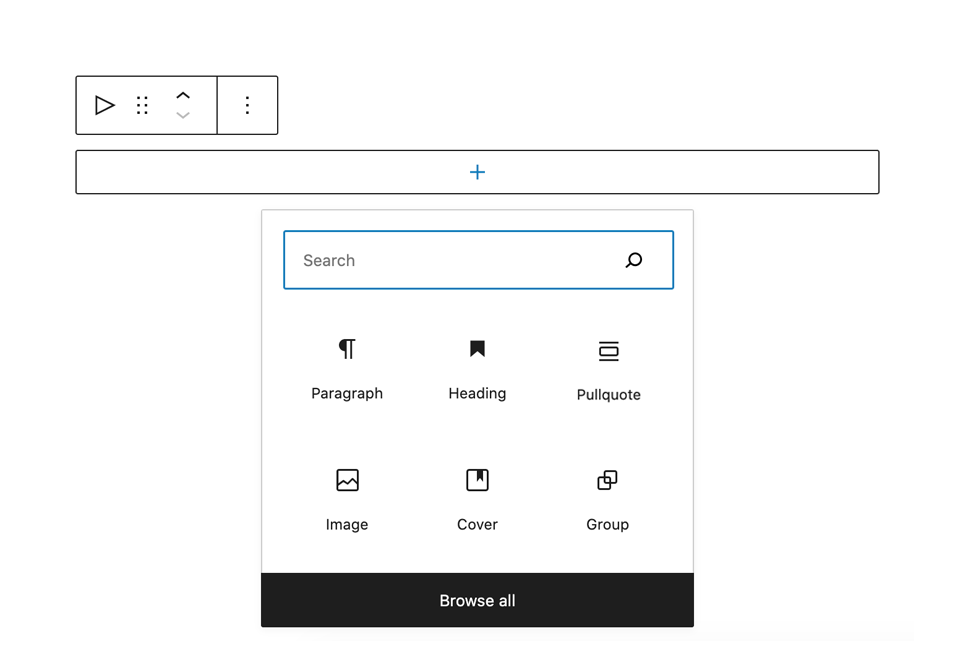
Select a Gutenberg block and open the block settings sidebar to find the Animations panel. Choose an animation from the dropdown, optionally add a custom animation class, and adjust duration, delay, threshold, opacity, and offset settings. The selected animation classes are added when the block enters the viewport.
Animation controls can be disabled globally from Settings > Animated Blocks by turning off “Show animation controls on all blocks”. When that option is disabled, blocks that already have saved animation settings will keep showing the animation panel until those settings are cleared.
You can also use the Animated Block container from the Design block group. Animated Block is a parent block that lets you nest as many blocks as you want and apply the same animation settings to the whole container.
If you need a custom effect, enter your own CSS class name in the Custom animation field and load the matching CSS in your theme or plugin.
Änderungsprotokoll
1.0.0
First release of the plugin.
1.0.3
Animation settings in individual blocks by extending the block API is no longer supported in the plugin. The InnerBlocks component was implemented, enabling nested block content and more flexibility. Select “Animated Block” from the “Layout Elements” group and add whatever content blocks you’d like. Select Animated Block to see animation settings.
1.0.4
Updated enqueue function to work on WordPress 5.0
1.0.5
Updated/fixed animation previews in the editor.
Class “ab-end” is now added to elements when a CSS animation is completed.
1.0.6
Fixed jQuery warning
Updated for the latest WordPress version
1.1.0
Tested for WordPress 5.9
Added block.json
Added animation duration option
Added offset option (available in the block’s Advanced settings)
Fixed animation opacity issues
Renamed class ab-hidden to ab-is-hidden
Renamed class ab-end to ab-animation-end
Screenshots




Für Entwickler
Ist das dein Plugin? Zeigen Sie die Zahlen.
Fügen Sie Ihrer Website, Docs oder GitHub Readme ein Live-Badge hinzu. Es wird von selbst aktualisiert - kein Konto erforderlich.
Best Animated Blocks on Scroll alternatives
All animation plugins →





Fragen und Antworten
Animated Blocks on Scroll: quick answers
Gerade Antworten, gezogen von Live WordPress.org Daten.
Quelle: WordPress.org
Is Animated Blocks on Scroll free?
Yes. Animated Blocks on Scroll is free to download and use from the official WordPress.org plugin directory.
Is Animated Blocks on Scroll safe to use in 2026?
Animated Blocks on Scroll works, but test it on a staging site before relying on it in 2026. It runs on 2K+ sites, is rated 5/5 and was last updated 6 months ago, and scores 44/100 on our health check.
How many websites use Animated Blocks on Scroll?
Animated Blocks on Scroll is active on 2K+ WordPress websites and has been downloaded 32,243 times since it launched in May 2018. It was downloaded 759 times in the last 30 days.
Does Animated Blocks on Scroll work with WordPress 7.1?
Animated Blocks on Scroll is officially tested up to WordPress 6.9.12, while the latest release is 7.1.5. It may still work, but try it on a staging site first.
What PHP version does Animated Blocks on Scroll need?
Animated Blocks on Scroll requires PHP 7.0 or higher. Most hosts run PHP 8.x today, so it works on any modern WordPress hosting.
When was Animated Blocks on Scroll last updated?
The latest version, 1.1.6, was released on May 16, 2026 (6 months ago).
Who makes Animated Blocks on Scroll?
Animated Blocks on Scroll is developed and maintained by Virgildia.
What are the best alternatives to Animated Blocks on Scroll?
The most popular alternatives to Animated Blocks on Scroll are Blocks Animation: CSS Anima… (90K+ installs), Greenshift (70K+ installs) and UiCore Animate (40K+ installs).
Angetrieben von PageForge
Eine Vorlage und eine Tabelle. Eine echte Seite für jede Suche.
PageForge Verwandelt jede Zeile eines CSV in eine WordPress-Seite mit eigenem Titel, URL, SEO Felder und Schema entworfen. Kostenlos auf WordPress.org.
- CSV und XLSX, plus Google Sheets auf Beruf und Unternehmen
- seinen eigenen Titel, URL, SEO Felder und Schema für jede Seite
- Arbeitet mit dem Blockeditor, Elementor, Divi und Avada
- Kostenlos auf WordPress.org, keine Kreditkarte