


Aldono – Product Options for WooCommerce
Add WooCommerce product options, product add-ons and custom product fields before add to cart.

Solide Wahl
Aldono is a solid plugin choice in 2026, with a few things worth checking first. It runs on 10+ sites, is rated 5/5 and was last updated 2 days ago, and scores 73/100 on our health check.
- Aktiv entwickelt — Letztes Update vor 2 Tagen
- Getestet mit dem neuesten WordPress (7.1)
- Momentum — downloads up 50.5% vs the previous 30 days
- Kleine Benutzerbasis (10+ aktive Installationen)
- Bisher sehr wenige Bewertungen
- Benötigt PHP 8.1 oder neuer
Wie stapelt es sich?
Side-by-side bei Installationen, Updates, Bewertungen und Support


Tägliche Downloads
Download-Spitzen folgen normalerweise einer neuen Version - jede Website, die automatisch aktualisiert wird, gilt als Download.
Ranglisten
Where Aldono stands todayWordPress.org Ranglisten suchen
Live-Position in der Plugin-Suche, Top 100| Stichwort | Position |
|---|---|
| custom product fields | >100 |
| extra fields | >100 |
| Product Addons | >100 |
| Product options | >100 |
| WooCommerce | >100 |
Versionsübernahme
Anteil aktiver Sites pro Release.
Bewertungsaufschlüsselung
★★★★★★★★★★ 5 from 1 reviews
About Aldono – Product Options for WooCommerce
From the official readme · v1.6.5Beschreibung
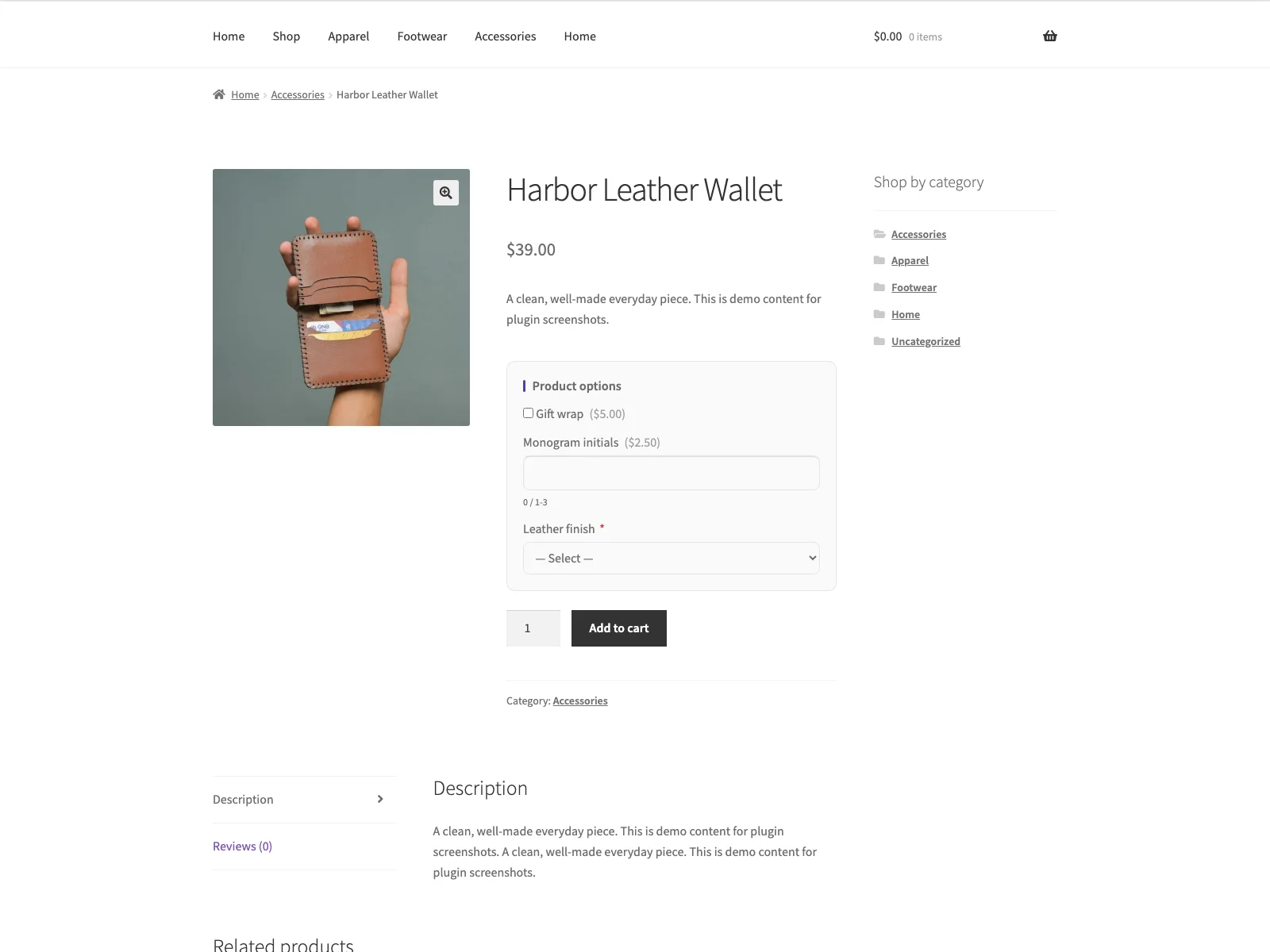
Aldono lets store owners offer WooCommerce product options, product add-ons and custom product fields that customers pick before adding a product to the cart: gift wrapping, an engraving message, an extended warranty or a colour choice.
For each product you define a list of add-ons in the WooCommerce product editor. Every add-on has a label, a field type, an optional required flag, an optional price, and optional help text.
- Field types, a text line, a multi-line textarea, a number, a date picker, a checkbox, a select drop-down, or a group of radio buttons.
- Text limits, set minimum and maximum character lengths for text and textarea product options.
- Checked input, a number must be numeric, a date must be a real calendar date, and a select or radio must post one of its own choices.
- Date limits, a date field can set the earliest and the latest day a customer can pick, in days from today (for example from 2 to 30 days ahead). The date picker greys out the other days and add to cart refuses them.
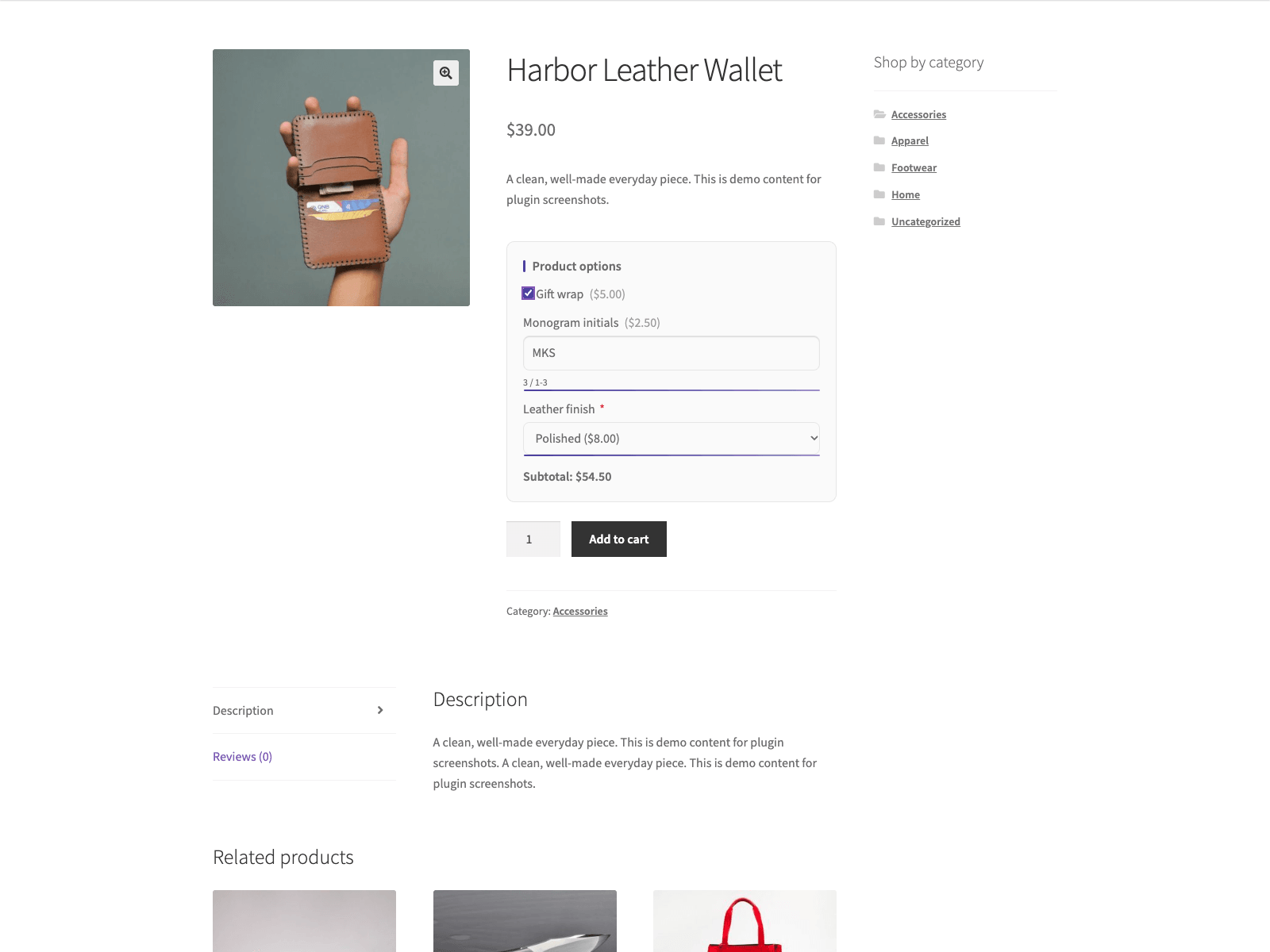
- Price deltas, give an add-on (or each select or radio choice) a price; the amount is added to the cart line total automatically. Taxes apply to it like to the product, and the price beside each option is shown the way your store displays prices, including or excluding tax.
- Help text, an optional description under each option’s label, and an optional placeholder inside empty text, textarea and number fields.
- Live subtotal, the product page shows the line total (product price plus chosen options, times the quantity) as the cart will display it, updated as options, quantity and variations change.
- Free or paid, leave the price at zero for free options such as a personalised message.
- Cart & order display, the customer’s choices appear in the cart, at checkout, and on the order.
- Display settings, choose the group heading, show or hide option prices, toggle the required-field asterisk, and wrap the options in a bordered card, all from the Add-Ons settings page.
Add-on definitions are stored as standard product meta, no custom database tables, so the plugin itself stays small and fast.
Settings live under WooCommerce > Add-Ons. Removing the plugin cleans up its own options; your per-product definitions are kept as product meta so re-installing restores them.
The code is developed in the open at github.com/wppoland/aldono, that’s the place to report a bug or suggest a field type you’d like to see.
Aldono Pro
Aldono Pro is a separate paid plugin that extends Aldono.
Included in Aldono:
- Field types
- Text limits
- Paid and free options
- Field validation
- Price adjustment
Aldono Pro adds:
- Conditional logic
- Front-end hiding
- Server-side validation
- File uploads
- Quantity-based options
- Swatches
- Per-option inventory
The free edition is not a trial and its features stay available without a time limit.
- Aldono Pro – plogins.com/aldono-pro/
- Compare editions and pricing – plogins.com/aldono-pro/pricing/
- PRO documentation – plogins.com/aldono-pro/docs/
Externe Dienste
Aldono does not connect to any external services. It sends no data off your site and loads no remote scripts, fonts or trackers, its admin and storefront CSS/JS are served from the plugin folder on your own server. Your add-on definitions are stored as product meta (_addons_definitions) and the display settings in a single option (addons_settings), all kept in your WordPress database.
Übersetzungen
Aldono is fully translatable and ships the aldono.pot template. Translations are delivered by WordPress.org language packs from translate.wordpress.org, which is where Polish, German and Spanish are being contributed; the package itself carries no compiled translation files.
Installation
- Upload the plugin to
/wp-content/plugins/aldono, or install via Plugins > Add New. - Activate it. WooCommerce must be active.
- Edit a product, open the Add-Ons tab in the Product data panel, and add your options.
Änderungsprotokoll
Security release. Default installations are exposed only to forged add-to-cart requests carrying add-on values. Update, nothing else to do.
1.6.5
- Fixed: the live subtotal counts an add-on’s own quantity when Aldono Pro sets one, so it matches the cart.
- Fixed: in the product editor, the row text input styles no longer stretch inputs an add-on stacks in a column (Aldono Pro’s rule value field was 12rem tall).
1.6.4
- The radio group title stays inside the options card on Storefront.
- Product data: the price and min/max fields keep a visible label once filled, and “Required” no longer slides into the WooCommerce label column.
1.6.3
- Plugins list shows a shortcut to the settings screen.
1.6.2
- Changed: dark styling follows the theme’s color scheme instead of the visitor’s operating system, so widgets stay light on light themes; older browsers keep the previous behaviour.
1.6.1
- Changed: every option row now keeps a fixed internal id across saves (nothing changes on screen). Aldono Pro uses it so a conditional rule keeps pointing at the same option when other options are added or removed.
1.6.0
- Fixed: “Order again” in My Account put the product back without its options, and a product with a required option could not be reordered at all. The options of the old order now come back, at today’s prices; one that no longer exists is left out, and a required option added since then has to be picked again.
- Changed: on a product page with options, the Stripe and WooPayments express pay buttons (Apple Pay, Google Pay, WooPay) are hidden. They add the product without the options form, so choices were lost and a required option was skipped. The buttons still show in the cart and at checkout.
Screenshots


Für Entwickler
Ist das dein Plugin? Zeigen Sie die Zahlen.
Fügen Sie Ihrer Website, Docs oder GitHub Readme ein Live-Badge hinzu. Es wird von selbst aktualisiert - kein Konto erforderlich.
Best Aldono alternatives
All custom product fields plugins →Fragen und Antworten
Aldono: quick answers
Gerade Antworten, gezogen von Live WordPress.org Daten.
Quelle: WordPress.org
Is Aldono free?
Yes. Aldono is free to download and use from the official WordPress.org plugin directory.
Is Aldono safe to use in 2026?
Aldono is a solid plugin choice in 2026, with a few things worth checking first. It runs on 10+ sites, is rated 5/5 and was last updated 2 days ago, and scores 73/100 on our health check.
How many websites use Aldono?
Aldono is active on 10+ WordPress websites and has been downloaded 1,074 times since it launched in September 2026. It was downloaded 605 times in the last 30 days.
Does Aldono work with WordPress 7.1?
Yes. The developer has tested Aldono up to WordPress 7.2, the latest release. It requires WordPress 6.5 or newer.
What PHP version does Aldono need?
Aldono requires PHP 8.1 or higher. Most hosts run PHP 8.x today, so it works on any modern WordPress hosting.
When was Aldono last updated?
The latest version, 1.6.5, was released on November 27, 2026 (2 days ago).
Who makes Aldono?
Aldono is developed and maintained by WPPoland (Mariusz Szatkowski).
What are the best alternatives to Aldono?
The most popular alternatives to Aldono are WC Fields Factory (7K+ installs), Extend Product Options for… (100+ installs) and Luma Product Fields (10+ installs).
Angetrieben von PageForge
Eine Vorlage und eine Tabelle. Eine echte Seite für jede Suche.
PageForge Verwandelt jede Zeile eines CSV in eine WordPress-Seite mit eigenem Titel, URL, SEO Felder und Schema entworfen. Kostenlos auf WordPress.org.
- CSV und XLSX, plus Google Sheets auf Beruf und Unternehmen
- seinen eigenen Titel, URL, SEO Felder und Schema für jede Seite
- Arbeitet mit dem Blockeditor, Elementor, Divi und Avada
- Kostenlos auf WordPress.org, keine Kreditkarte