


WpStream – Live Streaming, Video on Demand, Pay Per View
WpStream is a Video Streaming Plugin that lets you broadcast live events and helps you sell tickets or recordings via WooCommerce.

Escolha segura
Yes — WpStream is a safe, well-maintained plugin to use in 2026. It runs on 3K+ sites, is rated 4.8/5 and was last updated 2 weeks ago, and scores 82/100 on our health check.
- Loved by users — 4.8/5 from 78 reviews
- Desenvolvido ativamente — última atualização 2 semanas atrás
Como ele se acumula?
Lado a lado em instalações, atualizações, avaliações e suporte



Downloads diários
Os picos de download geralmente seguem uma nova versão — cada site que atualiza automaticamente é um download.
Rankings
Where WpStream stands todayWordPress.org Classificações de pesquisa
Posição ao vivo na pesquisa de plugins, top 100| Palavra chave | Posição |
|---|---|
| live shopping | #10 |
| live streaming | #1 |
| pay per view | #1 |
| video streaming | #2 |
| Video-On-Demand | #1 |
Adoção da versão
Compartilhamento de sites ativos por lançamento.
Divisão de classificação
★★★★★★★★★★ 4.8 from 78 reviews
About WpStream
From the official readme · v4.15.1Descrição
Live stream on your WordPress website and make recordings available for replay. The plugin is free, and the WpStream streaming service starts with a free trial that needs no credit card.
WpStream lets you broadcast from your browser or streaming software such as OBS, with viewers watching on your own site. Add live services, shows, matches, classes, or events to the website you already manage. Offer free viewing or sell access through WooCommerce.
WpStream handles video delivery through its streaming service. Your WordPress site hosts the pages and viewing experience; it does not have to serve the live video traffic from your web hosting account.
Free plugin, separate streaming service
The WpStream plugin is free to install. To use WpStream’s live streaming and cloud video services, connect a WpStream account. A free trial is available to test the service; paid streaming plans are separate from the plugin.
Plans have allowances for broadcasting, viewing, and recording storage. Free-to-view means your audience does not pay to watch; it does not mean the streaming service is free. See the current plans and resource allowances before choosing a plan.
WooCommerce is optional for free-to-view broadcasts. Pay-per-view requires WooCommerce. The documented recurring-subscription setup also requires the separately purchased WooCommerce Subscriptions extension.
Broadcast from your browser or streaming software
Go live on your website using your browser and webcam, or connect an external encoder that supports a custom RTMP destination, such as OBS Studio, Wirecast, or Larix.
For a basic webcam broadcast on an existing WordPress site, setup can take three minutes or less. Allow extra time for payment setup, custom page layouts, or configuring an external encoder.
Create a live channel, choose your broadcast method, and share the channel page with your audience. You can also place the player inside an existing page.
Record live streams and publish replays
Record a live broadcast or upload a video file, then publish it as video on demand. Give viewers a place to catch up on a missed service, watch a previous match, or revisit a class.
Offer recordings free to watch, sell individual videos, or include them in a subscription with the required WooCommerce setup.
Sell access with WooCommerce when you need it
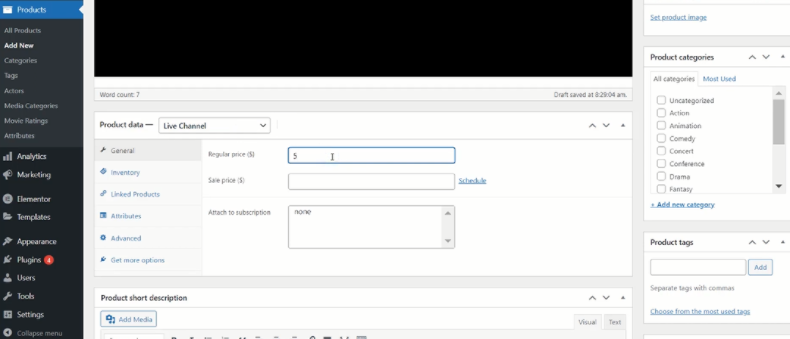
Sell access to live streams and recorded videos through your WordPress site’s WooCommerce checkout.
- Pay-per-view: sell access to an individual live stream or video with WooCommerce.
- Subscriptions: offer recurring access with WooCommerce and WooCommerce Subscriptions. See the subscription setup guide.
- Free viewing: publish broadcasts and videos without asking viewers to purchase access.
Choose your branding and viewing access
Add your own logo to the player and choose how live streams and videos appear on your site.
For private events, you can use a password-protected viewing page. For paid access, use the WooCommerce options above.
Read more about WpStream’s approach to content rights.
Add players and video lists to your pages
Each live channel and on-demand video has its own page. To place a player elsewhere, use the WpStream Player block, Elementor or WPBakery element, or shortcode.
Use channel and video lists to help viewers find current broadcasts and available recordings. See the player and listing documentation.
Let approved users broadcast without admin access
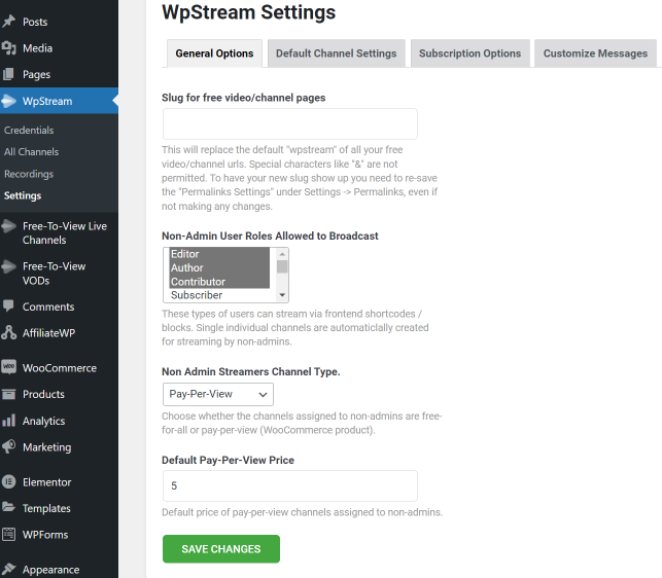
If other people broadcast on your site, configure which non-admin user roles are allowed to stream. Add the front-end broadcasting controls to their pages so they can start a broadcast without access to the WordPress admin dashboard.
See the front-end broadcasting documentation for setup.
Optional: Hello WpStream theme
You do not need to switch to Hello WpStream to use the plugin. If you are building a new video website, the Hello WpStream theme provides a starting point designed for WpStream.
Getting started and support
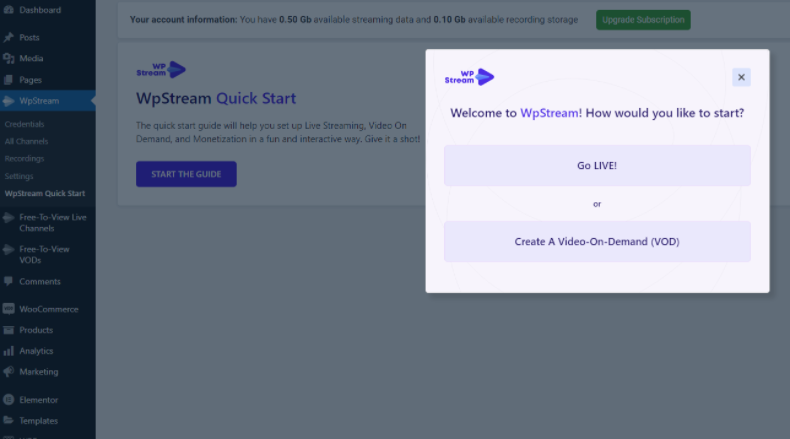
Use the getting-started documentation and video tutorials to set up your first broadcast. For questions or troubleshooting, visit the plugin support forum.
CONNECT WITH US
Instalação
- Review our comprehensive tutorials here https://wpstream.net/category/getting-started/
- Install and enable the plugin from https://downloads.wordpress.org/plugin/wpstream.zip or by searching for ‘WpStream’ in your plugin install page
- Sign up with WpStream and get your credentials
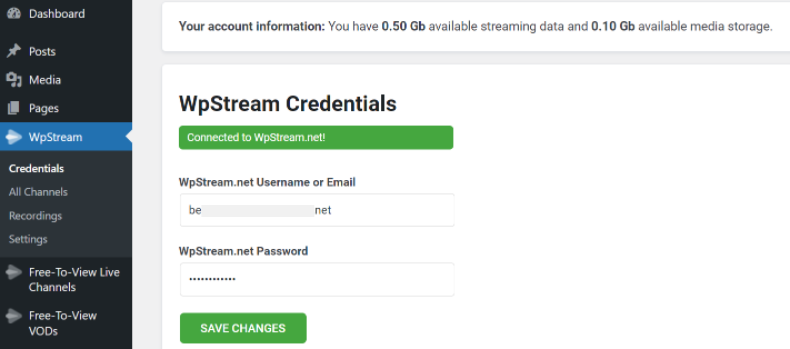
- Open “WpStream” in your WordPress admin and sign in with your WpStream account, or create one there
- (Optional) Install and activate WooCommerce if you need to create pay-per-view products
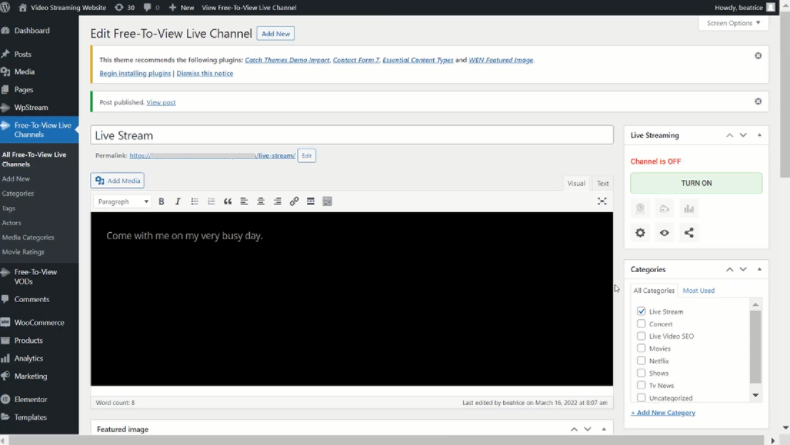
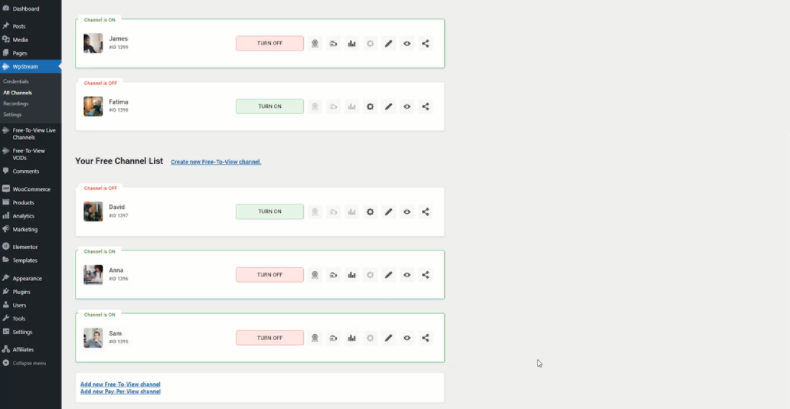
- Go to WpStream, All Channels and click “New channel”. Choose who can watch: free to watch, or pay per view with WooCommerce
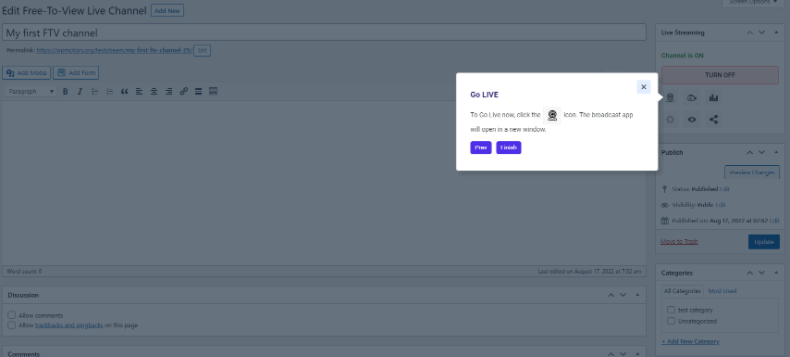
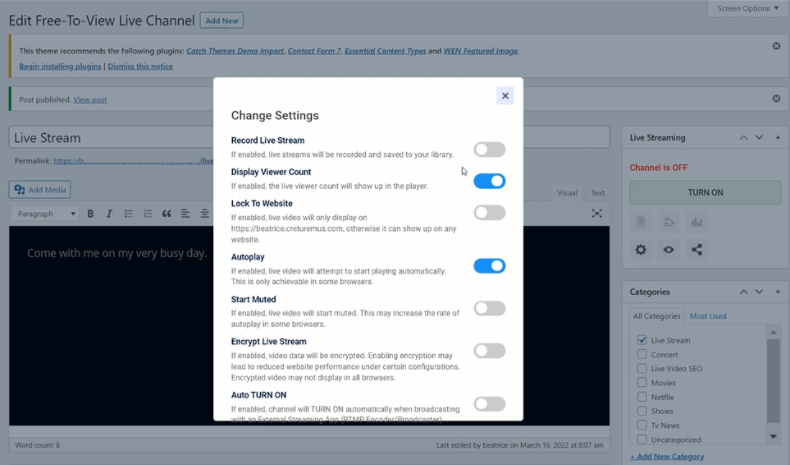
- Click “Broadcast” on the channel. Press “Start Broadcast” to go live from your browser camera, or choose “Streaming software” to get the RTMP address and stream key for OBS, vMix, Larix or another streaming app
- Live video is available on the live channel page shortly after you start your broadcast
Log de Changes
4.15.1
- Fix – A customer who cancels a subscription keeps watching until the paid period ends, instead of losing access the moment they cancel
- Fix – The owner of a paid channel or video, and editors, can watch it without buying it
- Fix – Live events sold as variable subscriptions now show the player on their product page
- Fix – The browser broadcaster can reconnect after a long broadcast, instead of failing once the page session expires
- Fix – With several players on one page, each player’s trailer, play and mute buttons control that player, not the first one on the page
4.15
- Added – Redesigned WpStream admin. All Channels and All Videos are one content library with image tiles, row menus and in-row editing; each row keeps one main action, Broadcast for a channel and View for a video. Recordings are merged into All Videos, and “Publish as video” opens New Video with the recording selected
- Added – New channel and New video open a single creation workspace with a “Who can watch?” choice (free to watch, pay per view, subscription plan). Publish explains what is still missing while it is disabled, and a draft is kept for the browser session
- Added – The browser broadcaster is now part of the plugin. It opens from the Broadcast button on its own admin page, as a block under the title in the block editor and after the title in the classic editor, and shows a loading message until the tool is ready
- Added – The broadcaster stats show NA when off air, Loading while waiting for data and real values once the channel is on air. Start Broadcast is offered again after the encoder stops, without a reload
- Added – One video source component on New Video, the product editor and the block editor: source first, then upload, recording or URL, preview and captions. Upload requirements and the maximum size are always visible
- Added – An “Unused media files” page lists every file in the cloud account with search, status filter, sort and paging
- Added – The admin header shows usage meters for the account and warns at 80% and 95% used
- Added – Redesigned Settings page: tabs in a white card, labels above fields, a live URL preview for the slug fields, the price field only for paid content, Save always visible, and Recent Logs paged 20 per page
- Added – The WpStream page opens on the account connection card with Sign in and Create an account tabs; the Live streaming and Video on demand cards unlock once the account is connected
- Fix – Captions show on the hosted video player. The plugin now serves a video’s captions file with the header the player needs and points the player at it
- Fix – The Streaming software panel shows the RTMP address and stream key of a channel that is not running, including the first channel of a new install; it previously read “No channel selected”
- Fix – Pressing Start Broadcast again after a page refresh or a cancelled startup reuses the channel that is still running instead of failing with “Failed to turn channel ON”
- Fix – On a site served over plain http the broadcaster says that browser broadcasting needs https and that streaming software still works, instead of sitting on “Starting” until “Broadcast startup timed out”
- Fix – A camera that fails at startup reports the camera error at once instead of after the two-minute timeout
- Fix – The “Enable camera & microphone” button sizes to its label instead of filling the preview area
- Fix – Customers get a plain sentence when a video download is refused or fails, instead of a raw code or an endless “please wait”
- Fix – Saving channel defaults in Basic Streaming keeps them, custom messages no longer gain backslashes, Settings refuse invalid slugs and an incomplete Global Subscription Mode with an error, and a failed save is reported
- Fix – A failed free-to-paid switch restores the item, “Attach to subscription” can be cleared, refreshing after Publish no longer creates a duplicate, and in Global Subscription Mode an existing pay-per-view item stays editable
- Fix – A refused sign-in no longer replaces the saved account, and the registration consent is checked on the server
- Fix – Deleting a cloud file confirms on the row and shows failures, downloads start from one click, trashed rows can be restored but not edited, and lists are hidden while the account is disconnected
- Removed – Onboarding telemetry: the wizard, demo import, start-streaming and broadcaster no longer send events to click.wpstream.net
- Changed – WordPress.org listing copy: tags, FAQ, screenshot captions and installation steps rewritten; duplicate changelog block and old typos removed
4.14.3
- Fix – Paid videos and encrypted free videos play again in the hosted player. Since 4.14.2 the plugin asked the WpStream service for the player’s embed key with the storage-prefixed video path instead of the file name, so no key was issued and every such video showed “The player is temporarily unavailable”
4.14.2
- Security – The hosted player’s embed keys are now issued by the WpStream service instead of being computed inside the plugin. The plugin previously shipped the signing secret, which let anyone build a key that bypassed a channel’s domain lock and session validation. Keys are cached per channel and video and refreshed whenever the channel settings change
- Fix – The live player’s encryption flag now comes from the same service answer as its embed key, so a channel whose settings failed to sync no longer gets a key and player URL that disagree
- Fix – When the WpStream service cannot issue an embed key the page shows a “player temporarily unavailable” notice instead of a player that cannot start
- Removed – The unused lookup against the retired rest-baker.wpstream.net host, its WPSTREAM_REST_API constant and the wpstream_server_id_cache_ttl filter. Nothing in the plugin called it and the host no longer exists
- Fix – A subscription plan can be bought again after the customer’s subscription was cancelled or expired. Add to Cart is now hidden only while the customer holds an active subscription to that plan; one-off purchases (paid videos, channels, bundles) keep hiding it once bought
- Fix – The Recordings uploader accepts several video files at once, selected or dropped, and sends them one after another. Each file has its own progress row; a failed file keeps its row with the reason while the rest continue. Previously a second file dropped during an upload started in parallel and the two uploads shared one progress state
- Fix – Compatibility with Paid Memberships Pro and other plugins that add fields to the product editor. While rendering its own fields the plugin left WordPress pointing at the last subscription product, so fields rendered after them (for example the PMPro “Membership Product” dropdown) showed and then saved that subscription’s value instead of the edited product’s
4.14.1
- Fix – Sites without Elementor no longer see a “WpStream Elementor requires Elementor” warning on every admin page. Elementor is an optional integration; the warning was reinstated by mistake in 4.14.0 and is now removed. Sites that run an outdated Elementor or PHP version still get their version warning
4.14.0
- Fix – Tooltips on the last icon row of the Live Streaming sidebar box were cut off on WooCommerce product edit pages; the box no longer clips them
- Fix – The channel ON/OFF button in the sidebar box now sizes to its content instead of a fixed height
- Fix – Multipart VOD uploads are capped at 1000 parts and the real upload error is shown when a part fails
- Security – Dashboard file uploads are now validated on the server: the uploaders accept only the allowed image, video and PDF types (profile pictures are limited to images) and reject oversized files, instead of trusting the browser to filter file types. Previously a crafted request could store other file types
- Security – Deleting an uploaded file now follows a single consistent rule across every dashboard endpoint: only the file’s owner (or a user permitted to delete it) can remove it, deletions are limited to genuine media attachments, and a missing or invalid request is handled safely without a PHP error or exposing the owner’s account id
- Security – An uploaded file can no longer be attached to a post the uploader is not allowed to edit
- Security – Saving WpStream settings and Default Channel Settings now requires administrator permissions; previously these admin actions accepted a valid form token alone. The generic settings saver is also limited to known plugin settings and can no longer be used to overwrite the stored WpStream API credentials
- Fix – Saving the Default Channel Settings no longer clears the site-wide “Use Sessions with Encryption” option; settings the form does not send are now preserved instead of being overwritten
- Security – The video player no longer executes callback strings from its configuration (eval removed). The theater-mode buttons now announce mode changes via a wpstream:theater-mode browser event (detail: action “enter”/”leave” and the player element id) that site code can listen for on the player element or document
- Security – Removed a leaked internal test harness from the player controls script; it called debug endpoints that are not part of the plugin and reflected URL parameters into the page unescaped (potential cross-site scripting)
- Security – Added CSRF (nonce) verification to admin actions that previously accepted forged requests: saving WpStream credentials, the one-click plugin update, dismissing admin notices, and downloading or deleting cloud recordings
- Security – Added CSRF (nonce) verification to logged-in front-end actions: the Watch Later toggle (which previously accepted any value as a “nonce”), the legacy dashboard attachment-delete endpoint, and the BuddyBoss channel-select and timeline-player actions
- Security – Posting a live player to the BuddyBoss timeline now requires owning the channel; previously any logged-in user could post any channel’s player
- Fix – Attachment-delete endpoints compared the owner id with the wrong type and always refused valid requests; the ownership check now works as intended
- Removed – The built-in beta live chat has been removed entirely: the [wpstream_chat] shortcode, the WpStream Chat Elementor and WPBakery elements, the chat template, and the bundled chat libraries (chat client, SockJS, emojione, linkify, material UI). Live chat is provided by the Better Messages integration in the Hello WpStream theme. Pages still containing the old shortcode render it as plain text and can simply remove it
- Removed – Dropping the bundled chat libraries also removes their outdated third-party code (old jQuery/jQuery UI builds, SockJS 0.3) from the public site, shrinking the plugin’s attack surface and page weight
- Fix – Deactivating the plugin no longer deletes the stored WpStream API credentials, so a temporary deactivation (conflict testing, auto-deactivation after an error) keeps the account connected
- Added – Uninstalling the plugin now removes the stored credentials, cached authentication tokens, and scheduled cleanup events
- Removed – The beta low-latency player has been retired: the [wpstream_player_low_latency] shortcode, its “WpStream Player – Low Latency” Elementor and WPBakery elements, and the bundled OvenPlayer library are gone. Low latency remains a channel setting – use the standard [wpstream_player] / WpStream Player element, which plays low-latency channels. Pages still containing the old shortcode render it as plain text and can simply switch to [wpstream_player]
Capturas de tela

Para desenvolvedores
Este é o seu plugin? Mostre os números.
Adicione um crachá ao vivo ao seu site, Documentos ou Readme do GitHub. Ele é atualizado por conta própria - nenhuma conta necessária.
Best WpStream alternatives
All live shopping plugins →


FAQ
WpStream: quick answers
Respostas diretas, extraídas de dados ao vivo WordPress.org.
Fonte: WordPress.org
Is WpStream free?
Yes. WpStream is free to download and use from the official WordPress.org plugin directory.
Is WpStream safe to use in 2026?
Yes — WpStream is a safe, well-maintained plugin to use in 2026. It runs on 3K+ sites, is rated 4.8/5 and was last updated 2 weeks ago, and scores 82/100 on our health check.
How many websites use WpStream?
WpStream is active on 3K+ WordPress websites and has been downloaded 473,120 times since it launched in December 2017. It was downloaded 6,971 times in the last 30 days.
Does WpStream work with WordPress 7.1?
WpStream is officially tested up to WordPress 7.0.9, while the latest release is 7.1.5. It may still work, but try it on a staging site first.
What PHP version does WpStream need?
WpStream requires PHP 7.1 or higher. Most hosts run PHP 8.x today, so it works on any modern WordPress hosting.
When was WpStream last updated?
The latest version, 4.15.1, was released on November 18, 2026 (2 weeks ago).
Who makes WpStream?
WpStream is developed and maintained by wpstream.
What are the best alternatives to WpStream?
The most popular alternatives to WpStream are Live Shopping & Shoppable V… (300+ installs), WP Live-Shopping Caroussel (10+ installs) and SaleAssist Live Video Engag… (<10 installs).
Alimentado por PageForge
Um modelo e uma planilha. Uma página real para cada pesquisa.
PageForge Transforma cada linha de um CSV em uma página WordPress com seu próprio título, URL, SEO campos e esquema, construído no layout que você já desenhou. Gratuito em WordPress.org.
- CSV e XLSX, mais Google Sheets em Profissional e Empresarial
- Seu próprio título, URL, SEO campos e esquema para cada página
- Funciona com o editor de blocos, Elementor, Divi e Avada
- Gratuito em WordPress.org, sem cartão de crédito