


External Store for Shopify
Show products and collections from your Shopify store on your WordPress site with simple shortcodes. Fast, cached and secure.

Escolha sólida
External Store for Shopify is a solid plugin choice in 2026, with a few things worth checking first. It runs on 2K+ sites, is rated 3.4/5 and was last updated 1 day ago, and scores 77/100 on our health check.
- Desenvolvido ativamente — última atualização 1 dia atrás
- Testado com as últimas WordPress (7.1)
- Momentum — downloads up 257.4% vs the previous 30 days
- Baixa classificação até agora — 3,4/5 de apenas 5 avaliações
Como ele se acumula?
Lado a lado em instalações, atualizações, avaliações e suporte



Downloads diários
Os picos de download geralmente seguem uma nova versão — cada site que atualiza automaticamente é um download.
Rankings
Where External Store for Shopify stands todayWordPress.org Classificações de pesquisa
Posição ao vivo na pesquisa de plugins, top 100| Palavra chave | Posição |
|---|---|
| ecommerce | >100 |
| products | >100 |
| shopify | #3 |
| Shortcode | >100 |
| store | #37 |
Adoção da versão
Compartilhamento de sites ativos por lançamento.
Divisão de classificação
★★★★★ ★★★★★ 3.4 de 5 comentários
About External Store for Shopify
From the official readme · v1.7.1Descrição
Display products and collections from your Shopify store on your WordPress website with simple shortcodes. Responses from the Shopify Storefront API are cached, so your pages stay fast.
Recursos gratuitos
- Product grid and collection shortcodes with search filter
- Responsive grid with configurable columns, sorting and price display
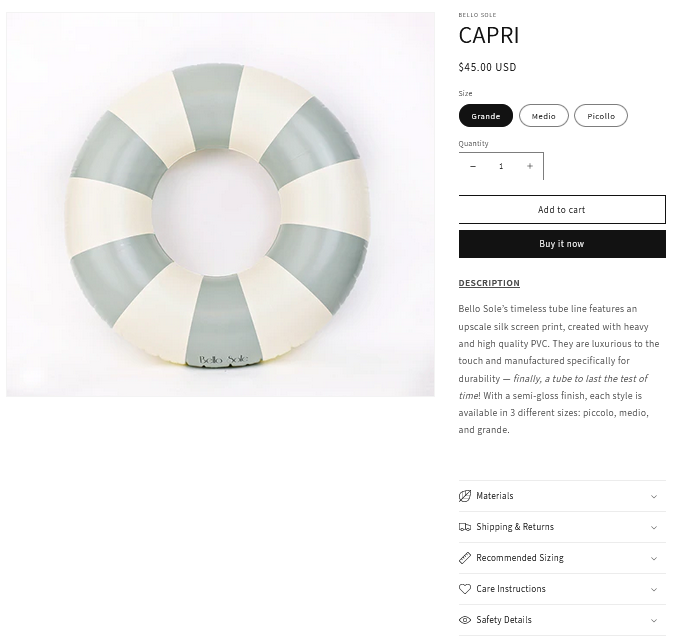
- Single product page with gallery, price, sale price and sold out label
- Product structured data (JSON-LD) for better search results
- Built-in cache for fast pages, plus a Clear cache button
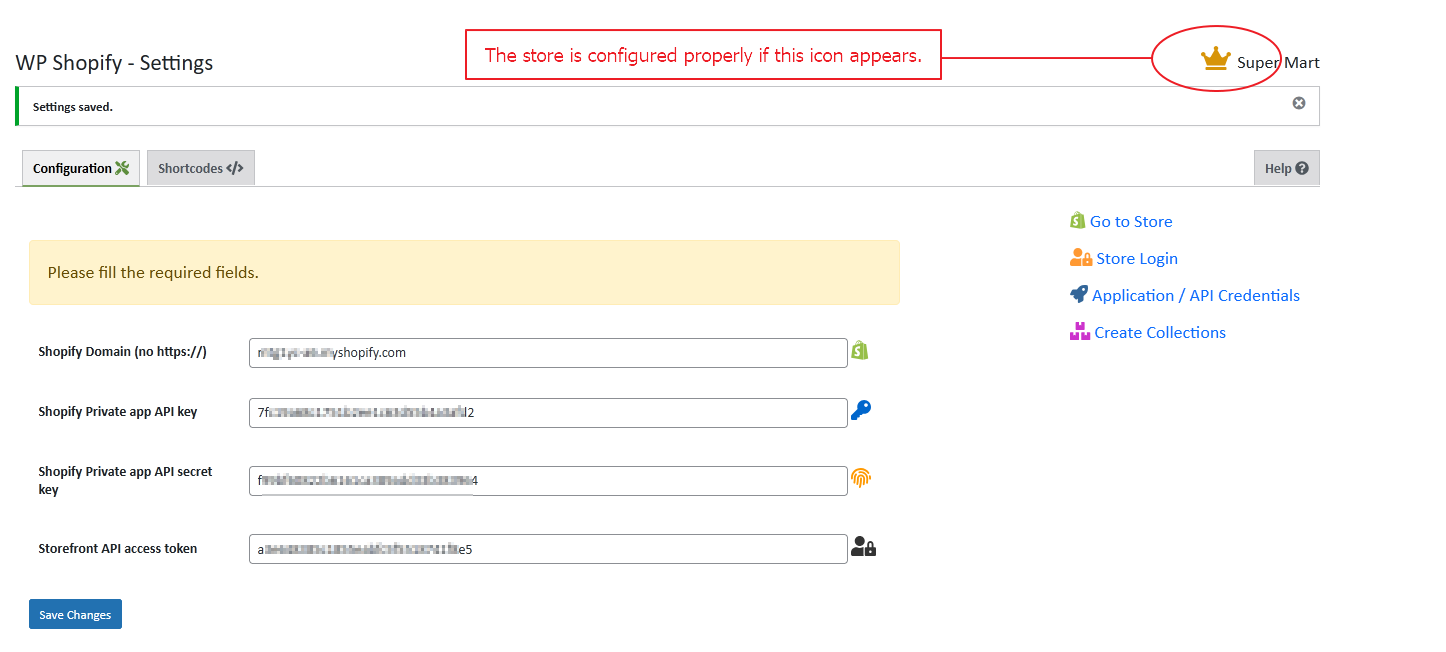
- Test connection, shortcode generator and one-click disconnect in the settings
- Secrets are never printed back into the settings page
- Accessible, translatable and lazy loaded images
Premium features (plug and play)
If the pro folder exists, the premium features switch on automatically. If it does not exist, the free version keeps working exactly as before.
- JS cart drawer with variant and quantity support, live cart counter and checkout button
- Quick “Add to cart” buttons inside the product grid
- Sale badges and list / cards layouts
[wp-shopify-related]related product recommendations[wp-shopify-cart-button]cart button anywhere- Premium product templates
New attributes in 1.7.0
[wp-shopify type="products" columns="4" sort="title" reverse="yes" show-price="yes"]
Sort values: title, price, newest, best-selling (collections also support manual and default).
Como funciona
- Set up the Storefront API access in Shopify as described under Installation.
- Create two new pages on your WordPress website:
-
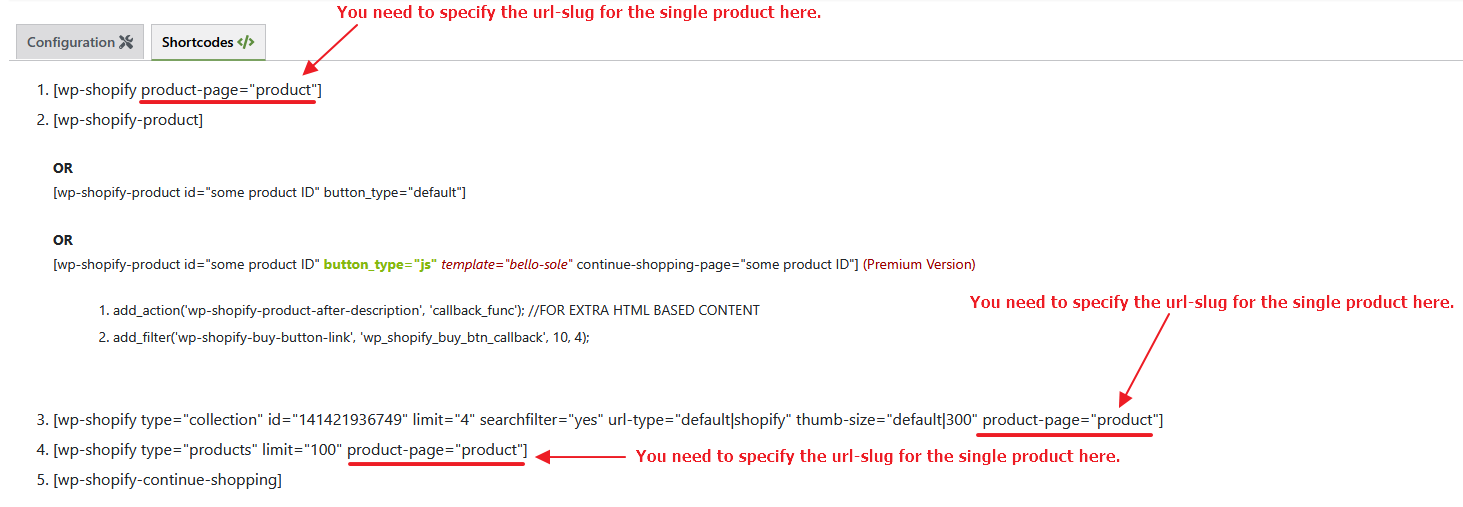
Page 1: set the permalink to shopify (or products, shop, catalogue etc.) and add the code [wp-shopify type=”products” limit=”100″ url-type=”default”]
-
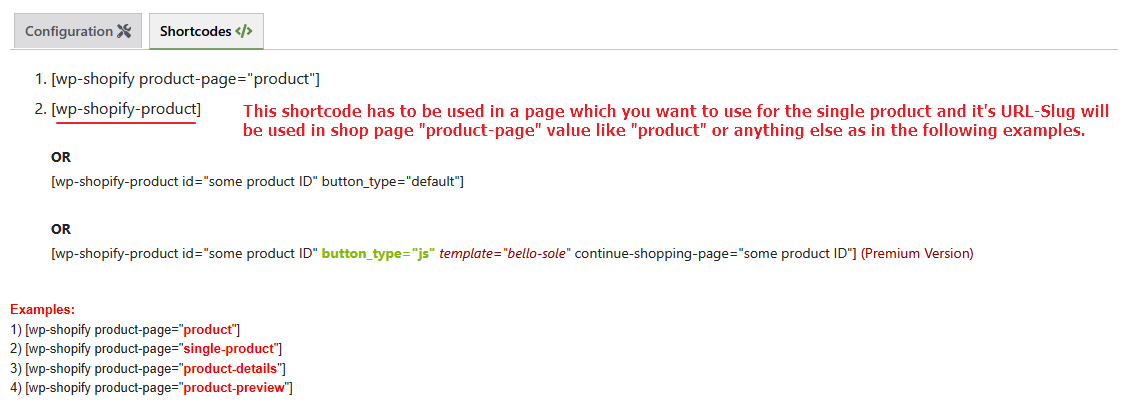
Page 2: set the permalink to exactly “product” (no “s” at the end) and insert the code [wp-shopify-product]. This is the page where single products are shown on your website.
- Adjust the layout of the pages with CSS if you like.
Instalação
This is a two-part setup: first configure your Shopify store, then install the plugin on your WordPress site.
In your Shopify admin:
- Log in to your Shopify admin.
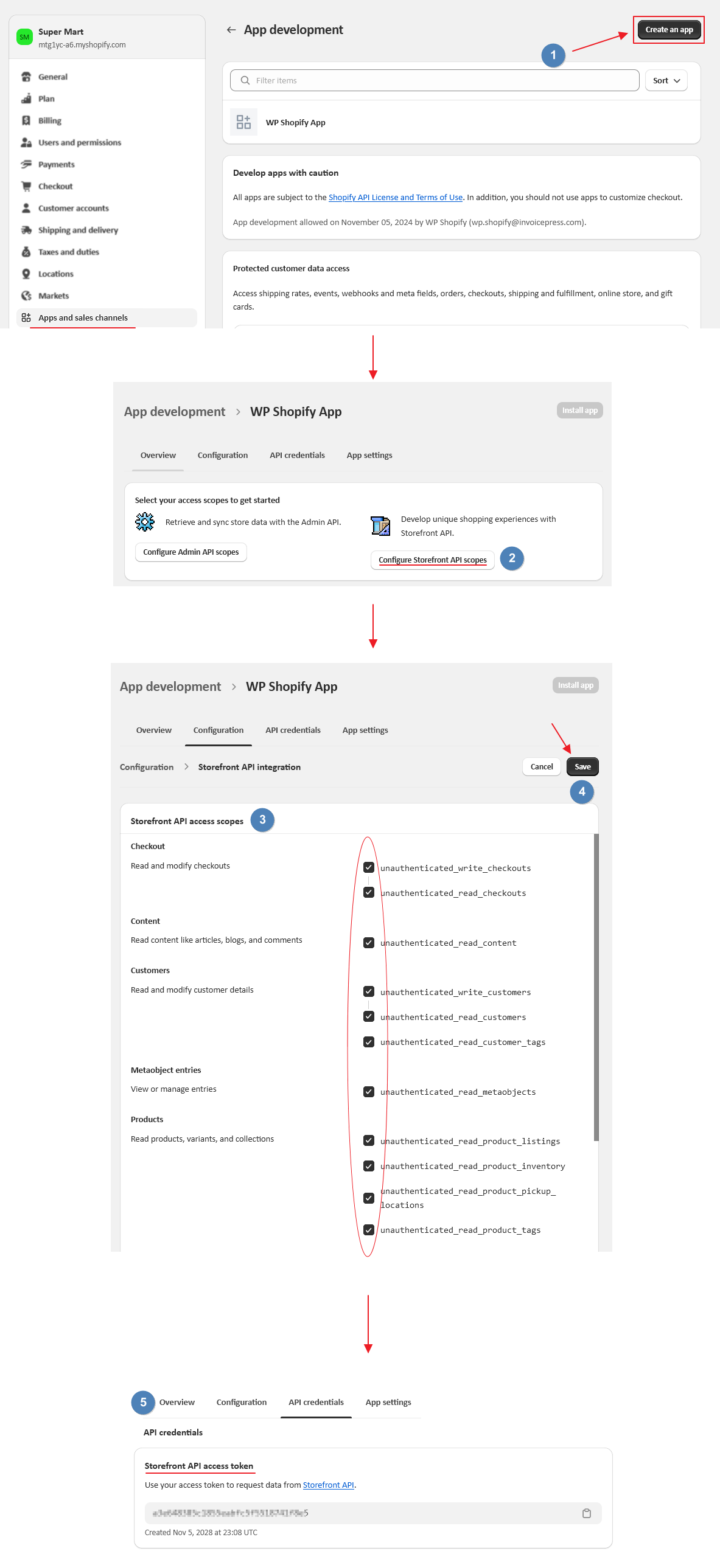
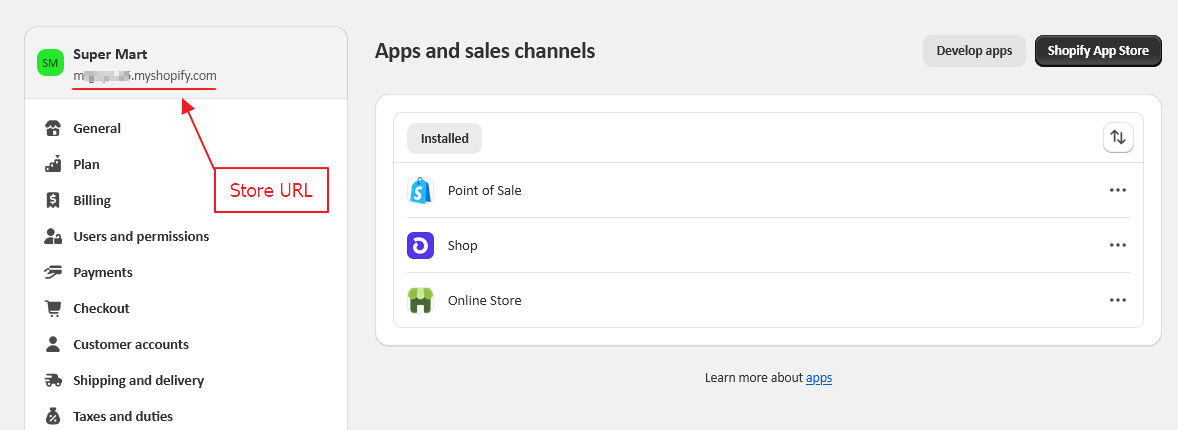
- Go to Apps and sales channels > Develop apps and create an app (for example “Product Display”).
- Configure the Storefront API integration and give it read access to products, variants and collections.
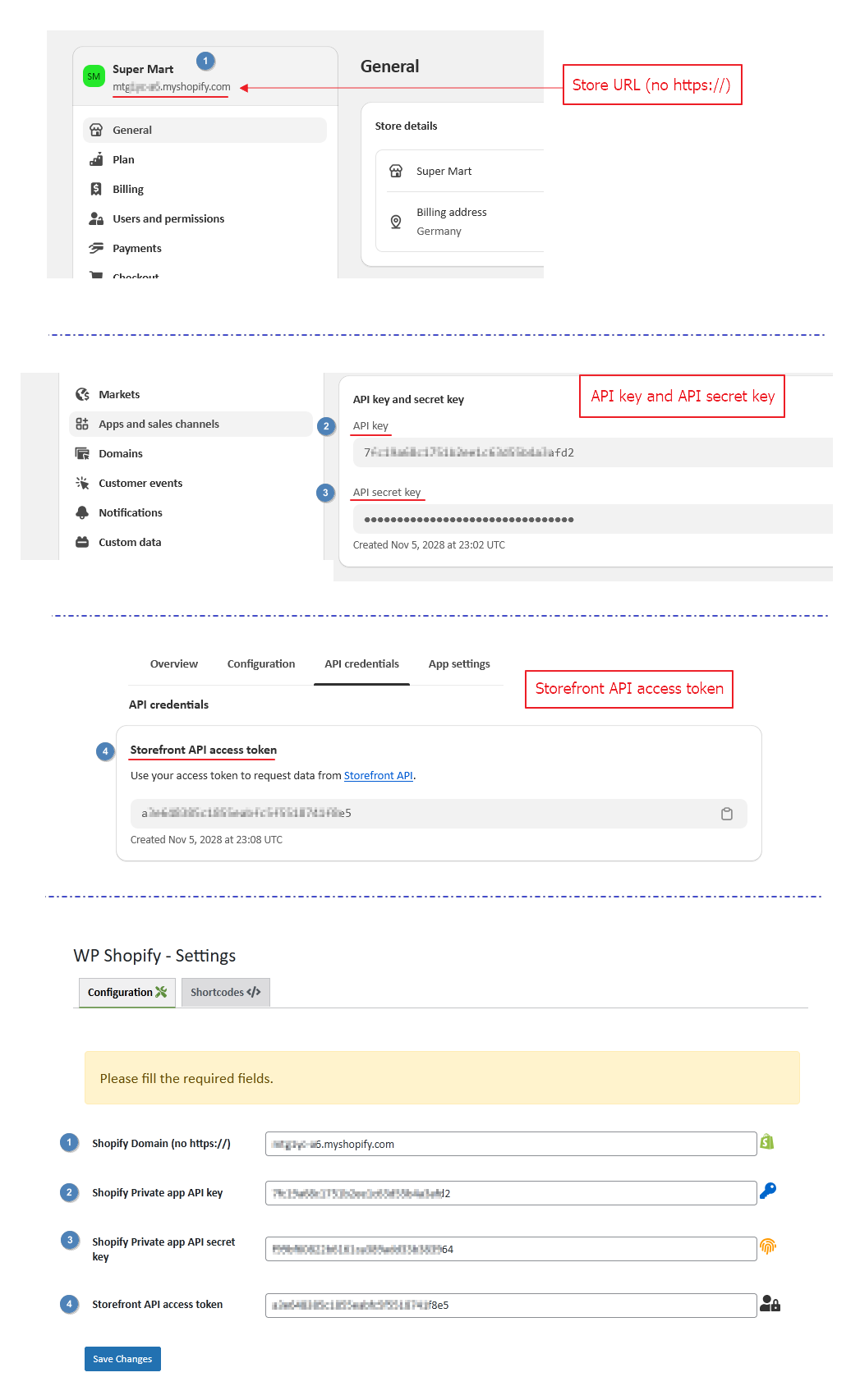
- Install the app and note the Storefront API access token, API key and API secret key.
Install the plugin as usual (Plugins > Add New in your WordPress admin, or upload the zip), then follow these steps:
- In your WordPress admin, do the following:
– In Plugins->Installed Plugins, click the “Activate” link under External Store for Shopify.
– In Settings > External Store for Shopify, enter your Shopify URL and API credentials.
To show a specific product, use the shortcode [wp-shopify-product] with the parameter “id” as a self-closing tag. For example, to show product 617935406:
[wp-shopify-product id=”617935406″]
The id is shown in the URL when you edit the product in your Shopify admin.
Log de Changes
Clearer plugin description, tags and setup instructions. No functional changes, safe to update.
1.7.1
- Improvement: Reworded the readme description, installation and setup instructions.
- Improvement: Updated the readme tags to shopify, ecommerce, products, shortcode and store.
- Improvement: Shorter, clearer short description (under 150 characters).
1.7.0
- Security: Storefront API requests are now built from validated values only (numeric ids, whitelisted sort keys), which removes the GraphQL injection risk from the product id in the URL.
- Security: All shortcode output is escaped, settings are sanitized and validated, secret fields are no longer printed into the settings page and AJAX actions require the manage_options capability.
- Security: The Shopify domain is validated (no IPs or paths), API calls use the WordPress HTTP API and the hard-coded session cookie was removed.
- Security: The debug helper is limited to administrators with WP_DEBUG enabled.
- New: Response cache with a configurable duration and a Clear cache button.
- New: Tools tab with Test connection, status information and Disconnect.
- New: Shortcode generator on the settings page.
- New: columns, sort, reverse and show-price shortcode attributes.
- New: Compare-at (sale) price, sold out label and Product structured data (JSON-LD).
- New: Optional price formatting in the website language.
- New: Search filter now shows a message when nothing matches and works with several lists on one page.
- New (Premium): Cart drawer with variant and quantity support, quick add buttons, sale badges, list / cards layouts, [wp-shopify-related] and [wp-shopify-cart-button].
- Improvement: Responsive CSS grid, lazy loaded images, scripts and styles load only where needed, versioned assets for proper browser caching.
- Improvement: Storefront API updated, deprecated fields removed, premium /pro folder is loaded after the core so it works as a clean add-on.
- Improvement: The gallery thumbnail switch on the single product page now works on the front end.
- Compatibility: Tested with WordPress 7.1. Requires WordPress 5.8 and PHP 7.4.
- Cleanup: Plugin data (settings and cache) is removed when the plugin is deleted.
1.6.0
- Security: Hardened premium template inclusion against potential Local File Inclusion (LFI) risks by adding sanitize_file_name(), strict whitelist validation, and fallback to ‘default’ template in shortcode handler. [22/02/2026 / Thanks to patchstack / timomangcut & @ratputin]
- Improvement: Enhanced input sanitization in shortcode attributes for better overall security and reliability.
- Compatibility: Tested with latest WordPress and Shopify API changes.
1.5.9
- New: Limit attribute default value fix. [01/09/2025 / Thanks to Maryam KJ]
1.5.8
- New: Plugin name updated for users convenience. [26/08/2025 / Thanks to WordPress Plugins Team]
1.5.7
- New: product-page attribute added. [12/08/2025 / Thanks to Christopher Hutchins]
Capturas de tela


Para desenvolvedores
Este é o seu plugin? Mostre os números.
Adicione um crachá ao vivo ao seu site, Documentos ou Readme do GitHub. Ele é atualizado por conta própria - nenhuma conta necessária.


Best External Store for Shopify alternatives
All ecommerce plugins →





FAQ
External Store for Shopify: quick answers
Respostas diretas, extraídas de dados ao vivo WordPress.org.
Fonte: WordPress.org
Is External Store for Shopify free?
Yes. External Store for Shopify is free to download and use from the official WordPress.org plugin directory.
Is External Store for Shopify safe to use in 2026?
External Store for Shopify is a solid plugin choice in 2026, with a few things worth checking first. It runs on 2K+ sites, is rated 3.4/5 and was last updated 1 day ago, and scores 77/100 on our health check.
How many websites use External Store for Shopify?
External Store for Shopify is active on 2K+ WordPress websites and has been downloaded 103,415 times since it launched in April 2018. It was downloaded 3,006 times in the last 30 days.
Does External Store for Shopify work with WordPress 7.1?
Yes. The developer has tested External Store for Shopify up to WordPress 7.1.5, the latest release. It requires WordPress 5.8 or newer.
What PHP version does External Store for Shopify need?
External Store for Shopify requires PHP 7.4 or higher. Most hosts run PHP 8.x today, so it works on any modern WordPress hosting.
When was External Store for Shopify last updated?
The latest version, 1.7.1, was released on November 28, 2026 (1 day ago).
Who makes External Store for Shopify?
External Store for Shopify is developed and maintained by Fahad Mahmood.
What are the best alternatives to External Store for Shopify?
The most popular alternatives to External Store for Shopify are WooCommerce (7M+ installs), Popup Builder & Popup Maker… (1M+ installs) and WooCommerce PayPal Payments (700K+ installs).
Alimentado por PageForge
Um modelo e uma planilha. Uma página real para cada pesquisa.
PageForge Transforma cada linha de um CSV em uma página WordPress com seu próprio título, URL, SEO campos e esquema, construído no layout que você já desenhou. Gratuito em WordPress.org.
- CSV e XLSX, mais Google Sheets em Profissional e Empresarial
- Seu próprio título, URL, SEO campos e esquema para cada página
- Funciona com o editor de blocos, Elementor, Divi e Avada
- Gratuito em WordPress.org, sem cartão de crédito