


Bootstrap Blocks
Bootstrap Gutenberg Blocks for WordPress. This plugin adds Bootstrap components and layout options as Gutenberg blocks.

Escolha sólida
Bootstrap Blocks is a solid plugin choice in 2026, with a few things worth checking first. It runs on 10K+ sites, is rated 5/5 and was last updated 6 months ago, and scores 73/100 on our health check.
- Comprovado em escala em sites ativos de mais de 10 mil
- Loved by users — 5/5 from 28 reviews
Como ele se acumula?
Lado a lado em instalações, atualizações, avaliações e suporte



Downloads diários
Os picos de download geralmente seguem uma nova versão — cada site que atualiza automaticamente é um download.
Rankings
Where Bootstrap Blocks stands todayWordPress.org Classificações de pesquisa
Posição ao vivo na pesquisa de plugins, top 100| Palavra chave | Posição |
|---|---|
| blocos | #16 |
| bootstrap | #1 |
| Gutenberg | >100 |
Adoção da versão
Compartilhamento de sites ativos por lançamento.
Divisão de classificação
★★★★★★★★★★ 5 from 28 reviews
About Bootstrap Blocks
Do Readme oficial · V6.0.1Descrição
Bootstrap Gutenberg Blocks for WordPress. This plugin adds Bootstrap components and layout options as Gutenberg blocks.
Recursos
- Supports Bootstrap v5 and v4
- Support for CSS grid (experimental)
- Fully customizable with filters
- Configuration via option page or programmatically with constants
- Block templates can be overwritten in your theme
The full documentation of this plugin can be found on GitHub: https://github.com/tschortsch/bootstrap-blocks-wordpress-plugin#readme
Available Blocks
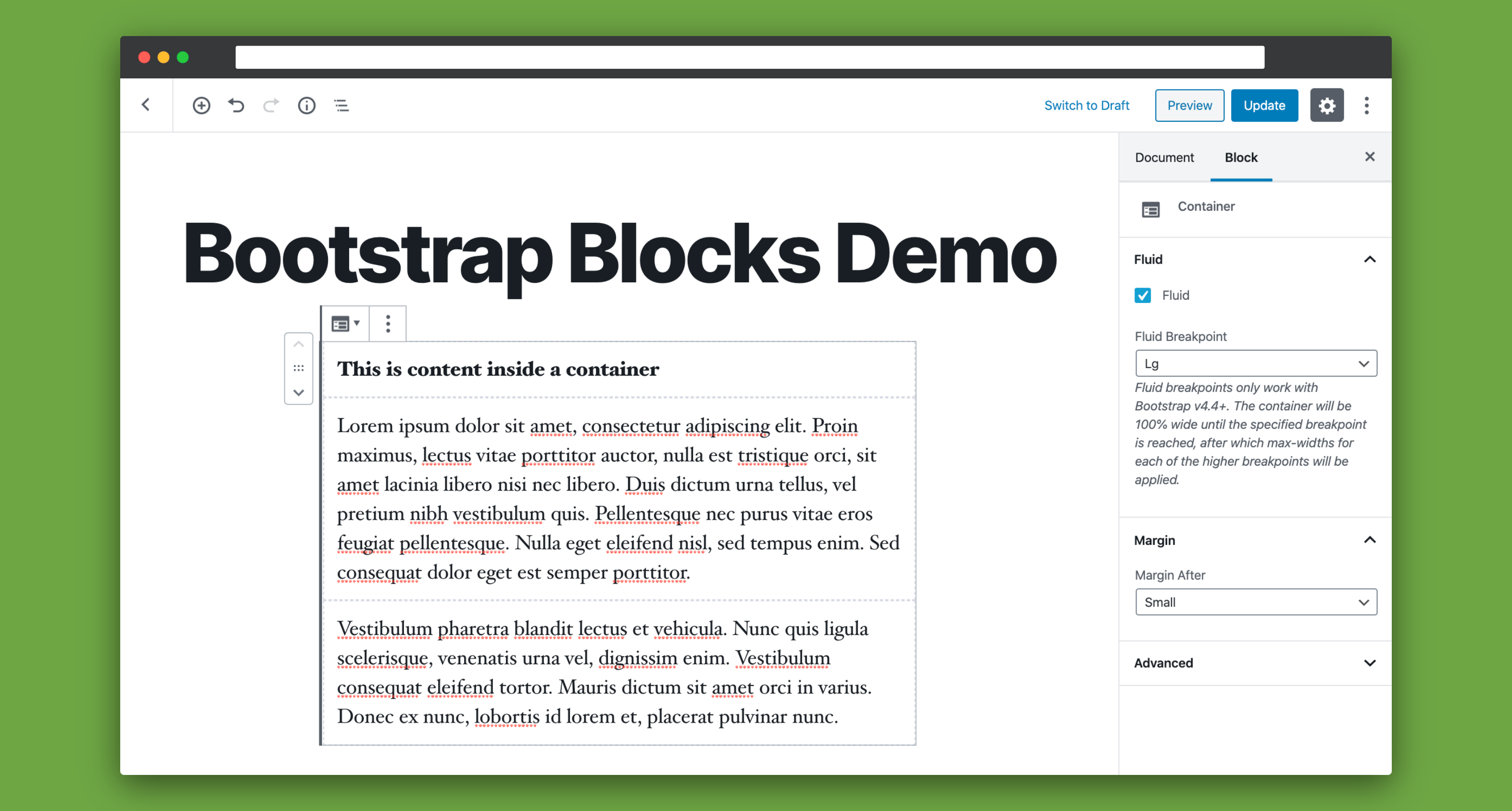
Container
Options:
- Fluid: If enabled the container will use the full available width, spanning the entire width of the viewport.
- Fluid Breakpoint: Used to enable responsive containers. This feature only works with Bootstrap v4.4+. The container will use 100% of the width until the specified breakpoint is reached, after which the defined max-widths will apply for each of the higher breakpoints.
- Margin After: Define a margin which should be added after the container.
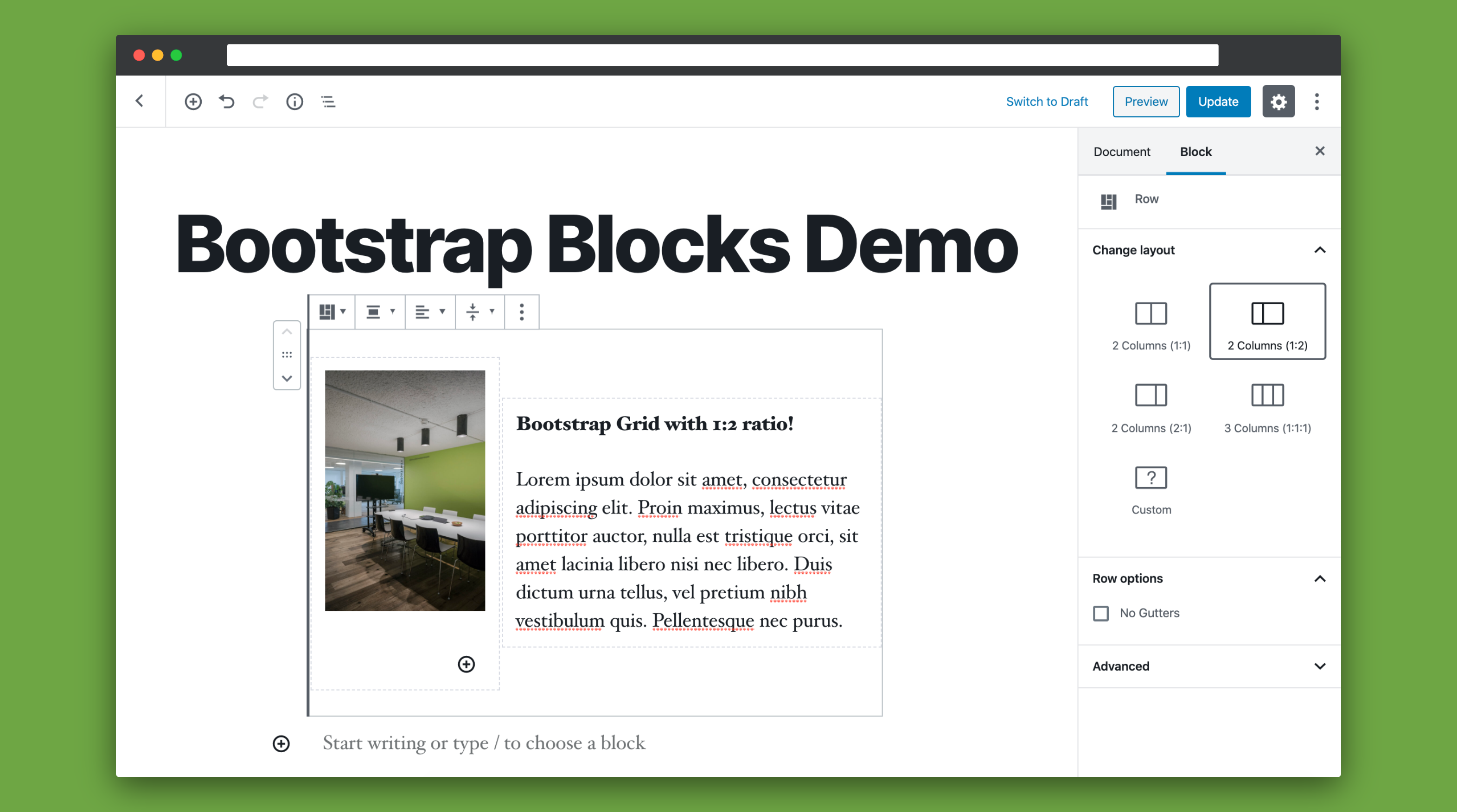
Linha
Options:
- Template: Choose from a predefined template for the inner
columnblocks. - No Gutters: Disable gutters between columns.
- Alignment: Horizontal alignment of inner
columnblocks. - Vertical Alignment: Vertical alignment of inner
columnblocks. - Editor stack columns: Displays stacked columns in the editor to enhance readability of block content.
- Horizontal Gutters: Size of horizontal gutters.
- Vertical Gutters: Size of vertical gutters.
- CSS Grid Gutters: Size of gutters when CSS grid is used.
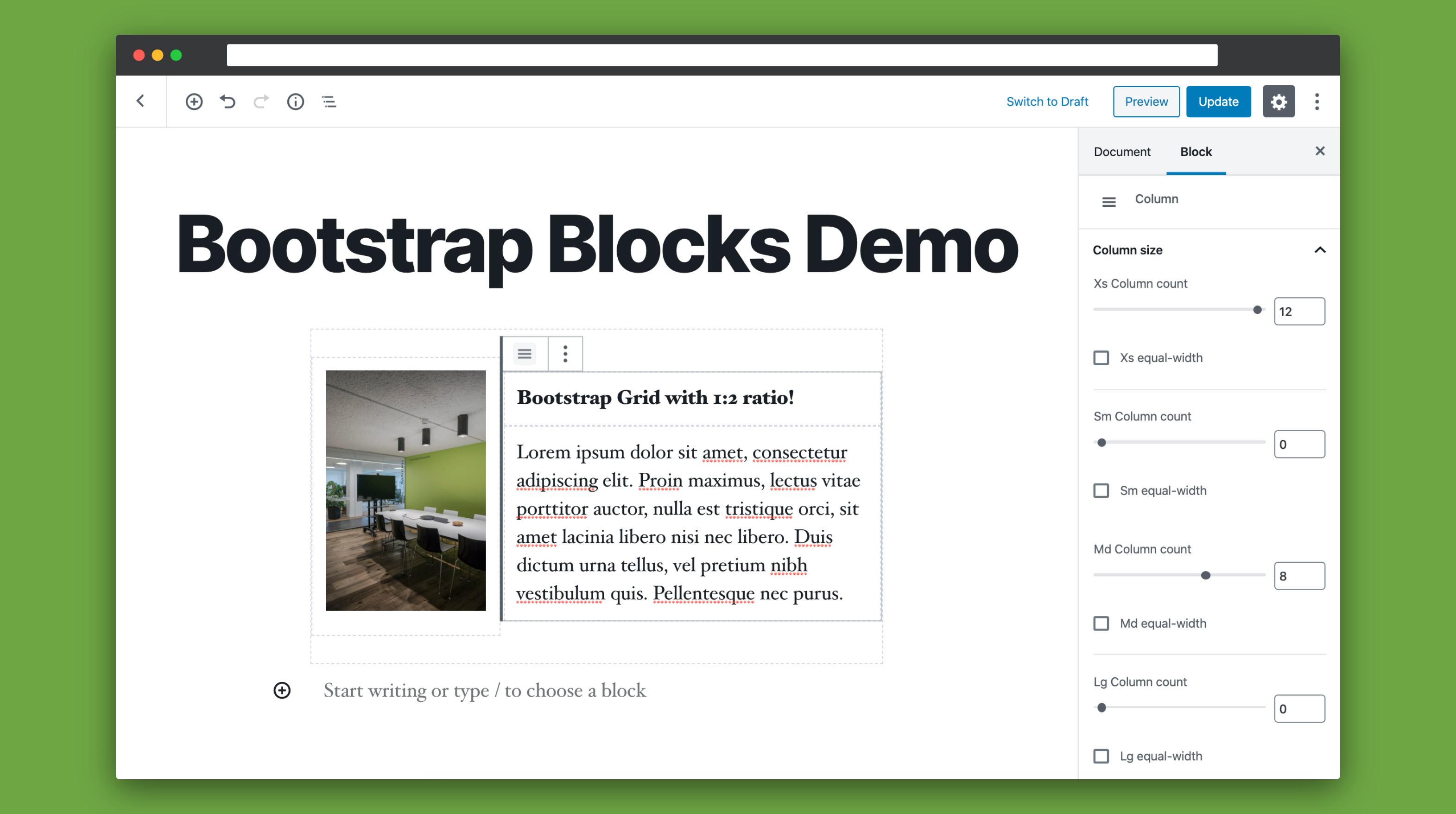
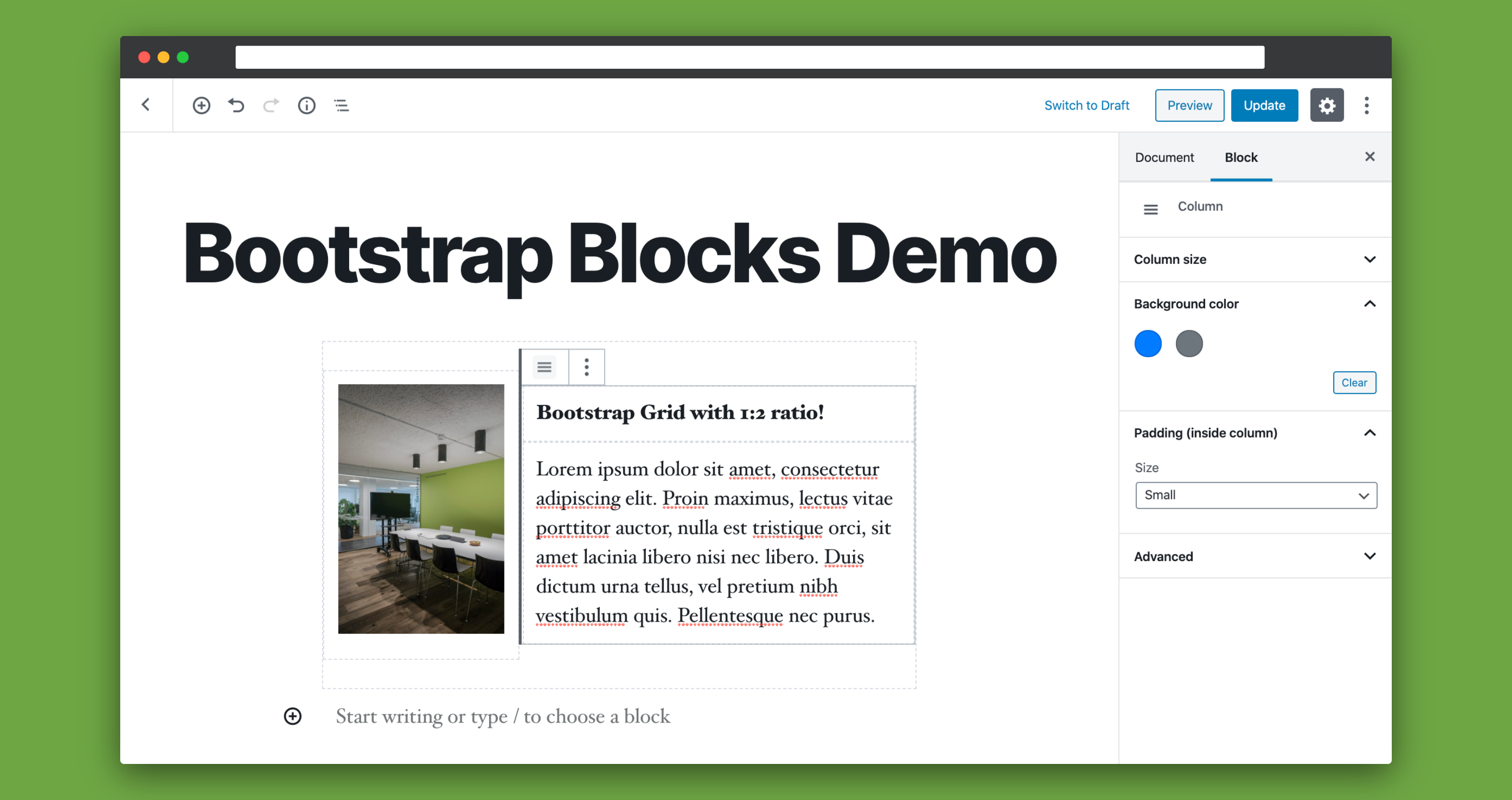
Coluna
Options:
- Sizes for all breakpoints (xxl, xl, lg, md, sm, xs): How much space the column should use for the given breakpoint.
- Equal width for all breakpoints (xxl, xl, lg, md, sm, xs): If enabled column will spread width evenly with other columns.
- Background Color: Set background color to column.
- Content vertical alignment: Align content vertically in column. This option is only needed if a background color is set. Otherwise use the Alignment option of the outer
rowblock. - Padding: Define padding inside the column.
Button
Options:
- Style: Choose the styling of the button.
- Open in new tab: Choose if link should be opened in a new tab.
- Rel: Set rel attribute of the link.
- Alignment: Horizontal alignment of the button.
Supported Bootstrap versions
This plugin supports Bootstrap v4 and v5.
The version can be selected in the plugin settings (Settings > Bootstrap Blocks) or by defining the WP_BOOTSTRAP_BLOCKS_BOOTSTRAP_VERSION constant in the wp-config.php file:
- Bootstrap 4:
define( 'WP_BOOTSTRAP_BLOCKS_BOOTSTRAP_VERSION', '4' ); - Bootstrap 5 (default):
define( 'WP_BOOTSTRAP_BLOCKS_BOOTSTRAP_VERSION', '5' );
Possible values right now are '4' or '5'. By default Bootstrap version 5 is selected.
CSS Grid
The CSS grid (supported with Bootstrap >= 5.1.0) can be enabled in the plugin settings (Settings > Bootstrap Blocks) or by defining the WP_BOOTSTRAP_BLOCKS_ENABLE_CSS_GRID constant in the wp-config.php file:
eg. define( 'WP_BOOTSTRAP_BLOCKS_ENABLE_CSS_GRID', true );
When the CSS grid is enabled the row and the column blocks will use custom templates for the rendering process:
- Row:
row-css.grid.php - Column:
column-css-grid.php
The support is still experimental since it’s also marked as experimental in the Bootstarp library. Please read the official Bootstrap documentation to get more information on how to use it.
Bootstrap library
Please be aware that this plugin does not include the Bootstrap library in your website. You need to do this by yourself. We decided not to include the library so that you can modify Bootstrap to your own needs before loading it.
You’ll find an example how to include it in your theme’s functions.php in the documentation.
Modelos
All blocks are implemented as dynamic blocks. This makes it possible to overwrite the template of a block in your theme.
To overwrite a block template create a folder called wp-bootstrap-blocks/ in your theme directory. You can copy the original template from wp-bootstrap-blocks/src/templates/<blockname>.php as a starting point and adjust it to your needs.
Requisitos
- WordPress >= 5.0
- PHP >= 5.6
Further Information
- Documentation: https://github.com/tschortsch/bootstrap-blocks-wordpress-plugin#readme
- WordPress Plugin: https://wordpress.org/plugins/wp-bootstrap-blocks
- GitHub Repository: https://github.com/tschortsch/bootstrap-blocks-wordpress-plugin
- Changelog: https://github.com/tschortsch/bootstrap-blocks-wordpress-plugin/releases
- Issue tracker: https://github.com/tschortsch/bootstrap-blocks-wordpress-plugin/issues
Instalação
- Upload the
wp-bootstrap-blocksdirectory into the/wp-content/plugins/directory - Activate the plugin through the
Pluginsmenu in WordPress - Start adding blocks from the
Bootstrap Blockscategory
Log de Changes
Lançamento inicial.
6.0.1
- [COMPATIBILITY] Tested up to WordPress 7.0.
- [COMPATIBILITY] Removed compatibiltiy for WordPress versions < 6.8 and PHP versions < 7.4
Previous release 6.0.0 was missing some files.
5.2.1
- [COMPATIBILITY] Tested up to WordPress 6.8.
5.2.0
- [COMPATIBILITY] Tested up to WordPress 6.4.
- [DEVELOPMENT] Migrate E2E tests to Playwright.
5.1.0
- [CHANGE] Renamed
colorattribute of thestyleOptionsfor the button block tobgColor. Additionally addedtextColorattribute to be able to change the text color of the button in the editor as well. If you are modifying thestyleOptionsvia thewpBootstrapBlocks.button.styleOptionsJavaScript filter please add the according colors to your style objects. - [FIX] Remove usage of deprecated
IconButtoncomponent (will be removed in WordPress 6.2).
5.0.0
Starting with this version the plugin only supports WordPress versions >= 5.3.
This step was needed to be able to catch up with the current development practices and remove a lot of deprecations.
- Breaking Change [CHANGE] The default Bootstrap version is now
5.x. Please check in the settings if your using the appropriate version of Bootstrap after updating to this release. - [COMPATIBILITY] Dropped support for WordPress < 5.3. Please update your website if you still would like to receive updates for this plugin.
- [FEATURE] Added block.json meta files to describe and register blocks (supported in WordPress >= 5.8).
- [CHANGE] Rewrite all blocks to functional components.
4.3.1
NOTICE: Version 4.x of the plugin will be the last version to support WordPress versions lower than 5.3.
If you’re on a lower version of WordPress think about updating it if you still would like receive updates for this plugin.
- [FIX] Apply default color to button if
colorattribute is missing instyleOptions.
Capturas de tela
Para desenvolvedores
Este é o seu plugin? Mostre os números.
Adicione um crachá ao vivo ao seu site, Documentos ou Readme do GitHub. Ele é atualizado por conta própria - nenhuma conta necessária.
Best Bootstrap Blocks alternatives
Plugins de todos os blocos →





FAQ
Bootstrap Blocks: quick answers
Respostas diretas, extraídas de dados ao vivo WordPress.org.
Fonte: WordPress.org
Is Bootstrap Blocks free?
Yes. Bootstrap Blocks is free to download and use from the official WordPress.org plugin directory.
Is Bootstrap Blocks safe to use in 2026?
Bootstrap Blocks is a solid plugin choice in 2026, with a few things worth checking first. It runs on 10K+ sites, is rated 5/5 and was last updated 6 months ago, and scores 73/100 on our health check.
How many websites use Bootstrap Blocks?
Bootstrap Blocks is active on 10K+ WordPress websites and has been downloaded 210,213 times since it launched in March 2019. It was downloaded 2,606 times in the last 30 days.
Does Bootstrap Blocks work with WordPress 7.1?
Bootstrap Blocks is officially tested up to WordPress 7.0.9, while the latest release is 7.1.5. It may still work, but try it on a staging site first.
What PHP version does Bootstrap Blocks need?
Bootstrap Blocks requires PHP 7.4 or higher. Most hosts run PHP 8.x today, so it works on any modern WordPress hosting.
When was Bootstrap Blocks last updated?
The latest version, 6.0.1, was released on May 23, 2026 (6 months ago).
Who makes Bootstrap Blocks?
Bootstrap Blocks is developed and maintained by tschortsch.
What are the best alternatives to Bootstrap Blocks?
The most popular alternatives to Bootstrap Blocks are Spectra Legacy (1M+ installs), Kadence Blocks (600K+ installs) and Extendify (500K+ installs).
Alimentado por PageForge
Um modelo e uma planilha. Uma página real para cada pesquisa.
PageForge Transforma cada linha de um CSV em uma página WordPress com seu próprio título, URL, SEO campos e esquema, construído no layout que você já desenhou. Gratuito em WordPress.org.
- CSV e XLSX, mais Google Sheets em Profissional e Empresarial
- Seu próprio título, URL, SEO campos e esquema para cada página
- Funciona com o editor de blocos, Elementor, Divi e Avada
- Gratuito em WordPress.org, sem cartão de crédito