


Empilhável – Construtor de Páginas Gutenberg Blocos
Stackable is the ultimate trusted block plugin you’ve been waiting for. Build dynamic websites with our powerful yet lightweight custom WordPress blocks, global design system, ready-made designs, global settings, and…

Escolha sólida
Stackable is a solid plugin choice in 2026, with a few things worth checking first. It runs on 100K+ sites, is rated 4.9/5 and was last updated 1 month ago, and scores 77/100 on our health check.
- Comprovado em escala em mais de 100 mil sites ativos
- Loved by users — 4.9/5 from 522 reviews
- Testado com as últimas WordPress (7.1)
Como ele se acumula?
Lado a lado em instalações, atualizações, avaliações e suporte


Downloads diários
Os picos de download geralmente seguem uma nova versão — cada site que atualiza automaticamente é um download.
Rankings
Where Stackable stands todayWordPress.org Classificações de pesquisa
Posição ao vivo na pesquisa de plugins, top 100| Palavra chave | Posição |
|---|---|
| blocos | #15 |
| Gutenberg | #7 |
| gutenberg blocks | #6 |
| Construtor de páginas | #26 |
| wordpress blocks | #12 |
Adoção da versão
Compartilhamento de sites ativos por lançamento.
Divisão de classificação
★★★★★★★★★★ 4.9 from 522 reviews
About Stackable
From the official readme · v3.20.3Descrição
The Ultimate Companion to the WordPress Block Editor
Stackable is the ultimate trusted block plugin you’ve been waiting for. Build dynamic websites with our powerful yet lightweight custom WordPress blocks, global design system, ready-made designs, global settings, and advanced customization options all whilst boasting speedy performance. Have the confidence to easily design professional websites that stand out using a new page building experience for Gutenberg – the WordPress Block Editor.
Transform Gutenberg into a Page Builder.
Stackable is the all-in-one block plugin for creating stunning websites by transforming the WordPress Block Editor into a Page Builder. Stackable has helped thousands of bloggers, merchants, marketers, designers and web development professionals make the most out of the WordPress Block Editor through fast, powerful and intuitive features.
Global Design System
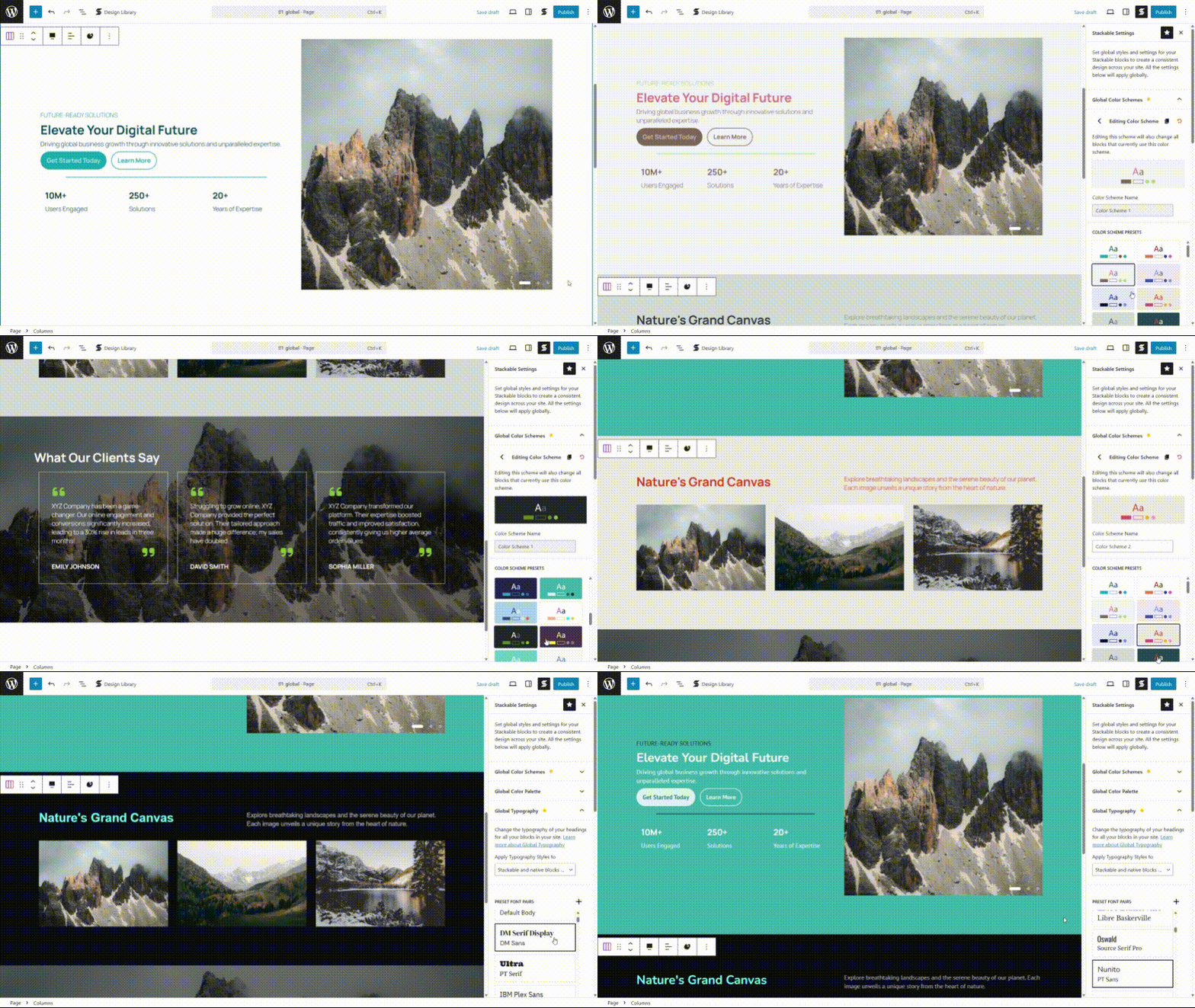
Design faster and more efficiently with our global controls, which make designing in one place and applying it to your entire site a breeze.
- Inherit styles from your Block Theme
- Theme.json
- Pattern Library
- Full Page Templates
- Global Design System
- Global Color Schemes
- Global Typography
- Global Spacing, Borders, Buttons and Icons
Ready Made Designs & Patterns
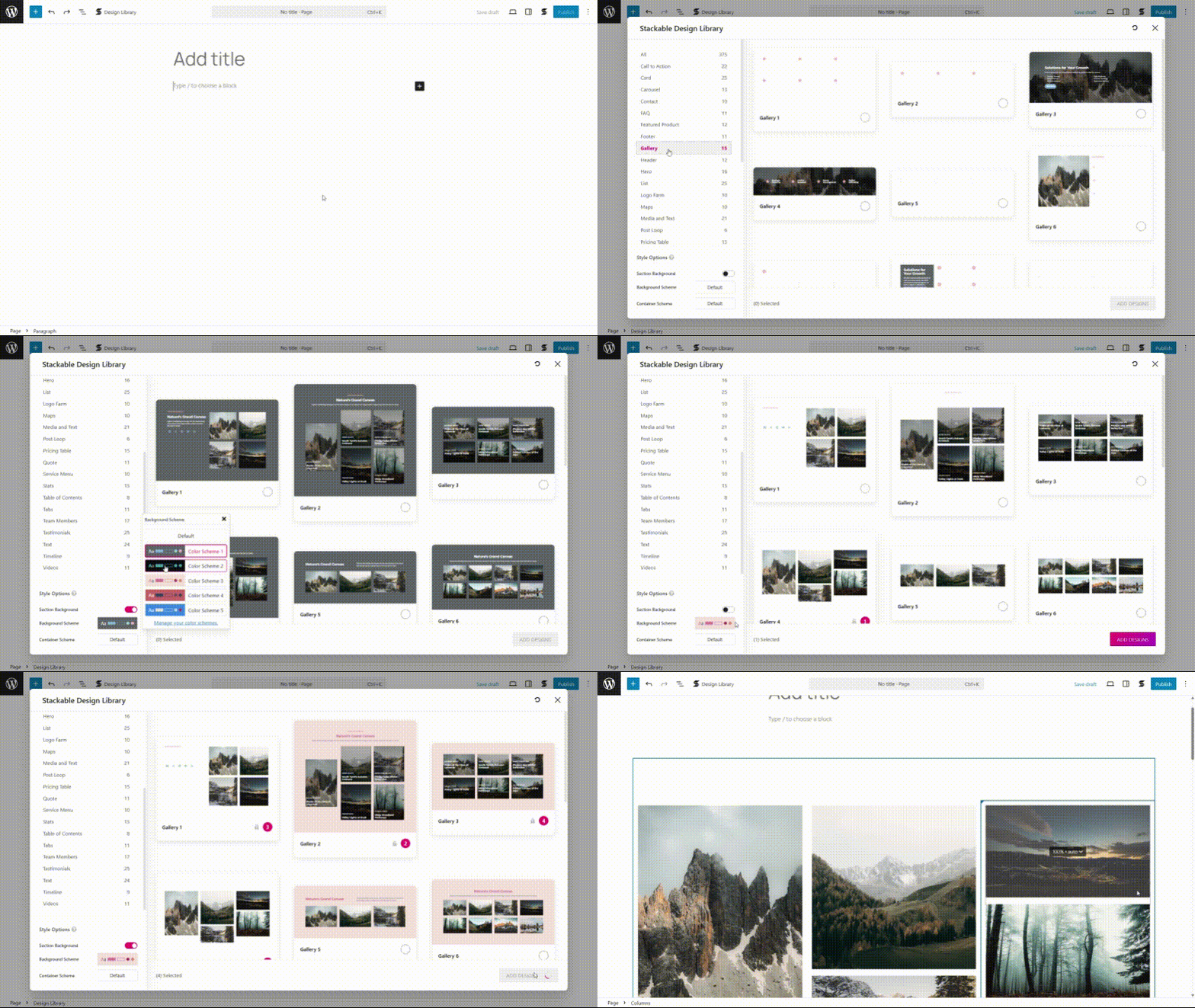
Enjoy an impressive Design Library to jumpstart your designing process. Never start from scratch and design like a pro with the help of our stunning and professionally-made designs and templates.
- Hundreds of ready-made designs
- Dozens of ready-made page templates
- Designs that inherit the styles of your block theme
- Dozens of block layouts
- Various shape separator designs
Powerful Custom Blocks
Get 42 flexible custom WordPress blocks that are feature-rich and look good out of the box, and provide a robust foundation for any website even without a single line of code.
You can choose which of these blocks you need, depending on your workflow. You can also disable blocks if you don’t need them.
Essential Blocks
- Advanced Columns Block — View Block
- Advanced Heading Block – View Block
- Advanced Text Block – View Block
- Advanced Image Block
- Icon List Block — View Block
- Button Block — View Block
- Icon Button Block
- Icon Block — View Block
Special Blocks
- Carousel Block – View Block
- Horizontal Scroller Block – View Block
- Tabs Block – View Block
- Countdown Block – View Block
- Timeline Block – View Block
- Table of Contents Block – View Block
- Posts Block — View Block
- Image Box Block — View Block
- Video Popup Block — View Block
- Progress Circle Block — View Block
- Progress Bar Block — View Block
- Accordion Block — View Block
- Map Block — View Block
- Icon Label Block
- Social Buttons Block
- Card Block — View Block
- Count Up Block — View Block
- Number Box Block — View Block
- Notification Block — View Block
- Expand / Show More Block — View Block
- Separator Block — View Block
- Subtitle Block
- Price Block
- Divider Block
- Spacer Block
Section Blocks
- Hero Block — View Block
- Call to Action Block — View Block
- Feature Block — View Block
- Feature Grid Block — View Block
- Pricing Box Block — View Block
- Icon Box Block
- Testimonial Block — View Block
- Team Members Block — View Block
- Blockquote Block — View Block
Page Builder-like Design Options
Turn the WordPress Block Editor into a page builder. Fine-tune your creations with a wide range of familiar web design options.
- Block Theme & Theme.json Support
- Global Design System
- Multiple Block Layouts
- Flexbox Controls
- Image and Video Lightbox
- Save Block Defaults
- Customize block hover styles
- Block Background and Image Color Settings
- Block Typography Settings
- Image Shapes and Settings
- Advanced Gradient Color Picker
- Advanced Icon Options
- Advanced Column and Spacing Settings
- Global Colors & Typography Settings
- Responsiveness
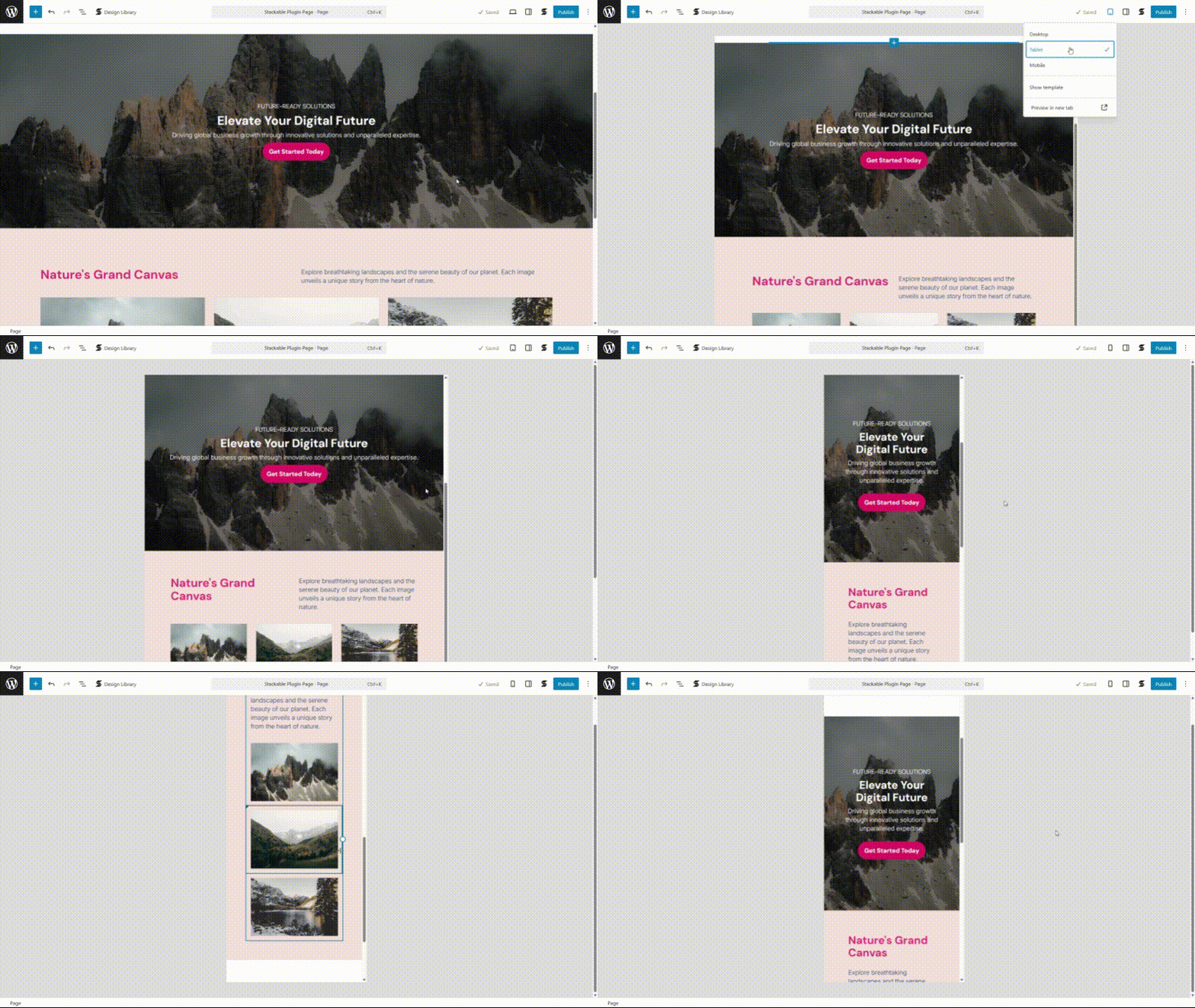
- Tablet and Mobile Column Arrangement
- Live Responsive Editing
- Ability to tweak designs for Tablet and Mobile views
- Specify how Columns collapse in Tablet and Mobile
- Hide / Show Specific Blocks on Desktop, Tablet or Mobile
- Custom Tablet and Mobile breakpoints
- Custom
data-*attributes
Fast Page Loading Speed
Optimize your website’s performance, and get lightning fast page loading to make your site visitors stay. Have the chance to maximize your page speed insights and achieve high Core Web Vitals and higher SEO rankings.
- Loads the smallest file size possible of CSS and JS files in the frontend, ~ only 7.8kb total
- Adds almost no PHP server overhead for fast page loads
- Zero Bloat, no jQuery, no dependencies
- Optimized page loading with focus on Core Web Vitals
- Responsive image loading for faster browsing speeds in mobile devices
- Compatible with Optimization Plugins and use optimization techniques such as combining CSS and JS files and minification
Integrations & Compatibility
Make your page building experience more well-rounded by using other popular tools. We’ve seamlessly integrated with these essential third-party plugins and tools:
- WPML
- Weglot
- Bloco
- Toolset
- Fonte incrível
- Google Fonts
- see our full list of integrations and compatibility
Premium Features
Take web designing to the next level. Stackable Premium helps you unlock the full potential of the WordPress Block Editor with awesome advanced features that will give you the ability to create high-end websites.
Dynamic Content (Premium)
Create dynamic WordPress websites that cater to the specific interests of visitors.
- Dynamic content
- Fully customize your query loops
- Site Custom Fields
- Conditionally display blocks
More Integrations (Premium)
In premium, you get more integrations.
- WooCommerce
- ACF
- Metabox
- JetEngine
Agency Tools (Premium)
Cater to more clients effectively and efficiently with our Agency Tools, which were specially made for web design professionals.
- Block CSS Customizer
- Role Manager
Motion Effects (Premium)
Add animations that will bring your site to life and make it more visually engaging.
- Scroll Animations
- Entrance Animations
- Transform & Transition Effects
More Blocks (Premium)
- Load More Block (for the Blog Posts Block)
- Pagination Block (for the Blog Posts Block)
News Article Updates
- v3.20 Saved Patterns and a Faster Design Library
- v3.19 Full Page Templates, Style Guide and Onboarding Tour
- v3.18 Global Block Styles
- v3.17 New Design Library
- v3.16 Theme.json Support, Global Value Presets, Type Scale
- v3.15 Global Design System
- v3.14 Icon Library & Granular Plugin Settings
- v3.13 Improved Stackable Server Performance
- v3.12 WooCommerce Integration and Enhanced Color, Gradient and Opacity Settings
- v3.11 New Timeline Block
- v3.10 New Tabs Block
- v3.9 New Carousel Block
- v3.8 New Stackable UI
- v3.7 New Horizontal Scroller and Countdown Blocks
- v3.6 New Progress Circle and Progress Bar Blocks
- v3.5 No Bloat & Improved Performance
- v3.4 Map Block
- v3.3 Saving Block Defaults
- v3.2 Table of Contents Block
- v3.1 Wireframes
- v3.0 How To Shift From Version 2 to Version 3
- v2.17 Custom Attributes and Optimization
- v2.16 Clickable Containers and Pagination
- v2.15 Introducing Dynamic Content
- v2.14 Copy and Paste Block Styles
- v2.13 UI Kits, Borders & Improved Performance
- v2.12 Better User Interface and User Experience
- v2.11 Introducing Global Colors and Global Typography
- v2.10 Better Responsive Controls, Better List Block Icons and Low-Highlight Effect
- v2.9 Live Responsive Editing
- v2.8 Role Manager for Gutenberg
- v2.7 New Icon Block, Amazing Icons and Font Awesome Pro
- v2.6 New Advanced Blocks and Load More Blog Posts Button
- v2.5 Better Onboarding for First Time Users
- v2.4 Introducing the Advanced Columns & Grid Block
- v2.3 Introducing the Design Library and New Block Designs
- v2.2 Welcome Video, Better Separators and Auto-Block Recovery
- v2.1 Help Video Snippets and Auto-Expand Settings
- v2.0 Version 2 is Out!
Learn More About Stackable – Page Builder Gutenberg Blocks & Designs
- Read our documentation and tutorials
- Visit our site wpstackable.com
- Subscribe to our newsletter
Enjoying Stackable Blocks?
- Join the Stackable Community in Facebook
- Follow us in Twitter @wpstackable
- Leave us a rating
** Those marked with asterisks are part of Stackable Premium
Instalação
Requisitos mínimos
You’ll need WordPress version 6.8.1 or higher for this to work.
Log de Changes
3.20.3
- New: Stackable controls now support the block editor’s Responsive Styles option #3760
- Fixed: Editor – responsive preview follows the block theme’s custom tablet and mobile breakpoints #3755
- Fixed: Hero block – content alignment now applies to the whole block #3739
- Fixed: Design Library – opens when Show Template is enabled #3737
- Fixed: Timeline block – text alignment works on tablet and mobile #3738
3.20.2
- Fixed: Dynamic Content – custom date formats display correctly instead of HTML #3754
- Fixed: Dynamic Content – auto-detected custom fields now load on the frontend #3750
- Fixed: Columns block – mobile content alignment now applies in the editor #3752
3.20.1
- Fixed: Block editor error when editing templates with styled Stackable blocks #3747
3.20.0
v3.20 Saved Patterns and a Faster Design Library
- New: Design Library – save and manage your own patterns (Premium) #3629
- New: Settings – default to theme margins for Heading blocks #3673
- New: Settings – default icon for Icon List block #3674
- Change: Dynamic Content – optimized PHP memory usage #1986
- Fixed: Design Library – faster previews and smoother browsing #3629
- Fixed: Editor – Safari responsive preview no longer freezes #3726
- Fixed: Yoast SEO – analysis highlighting works with Stackable blocks #3727
- Fixed: Icon List – improved Widgets screen performance #3728
- Fixed: Tabs block – Separator blocks now display correctly #3713
- Fixed: WooCommerce – product duplicates keep block attributes intact #3731
- Fixed: Design Library – no longer shows blank on fetch errors #3732
- Fixed: Custom CSS – no validation error after switching to Free #3734
3.19.10
- Change: Added input masking to Google API Key settings field #3714
- Fixed: Better Yoast plugin compatibility #3715
- Fixed: Blocks not reflecting the latest saved value in the frontend #3715
- Fixed: MailPoet – fixed compatibility with default Stackable text block #3718
- Fixed: Feature grid block – fixed justified columns #3717
- Fixed: Hardened deprecated block defaults endpoints #3725
3.19.9
- Fixed: Tablet and mobile preview styles now apply correctly in WP 7.0 #3711
- Fixed: Columns block – column justify now working when column wrapping is enabled #3703
- Fixed: Horizontal scroller – fixed first click handling issues #3697
- Fixed: Carousel – fixed JS error encountered with infinite scroll #3695
- Fixed: Tour – First Stackable tour closes right away #3699
- Fixed: Motion effects – fixed scroll position issue if there is a video near the top of the page #401
- Fixed: Image box – button group overlap #3706
- Fixed: Icon block – custom SVG can be not visible in the editor #3707
Capturas de tela
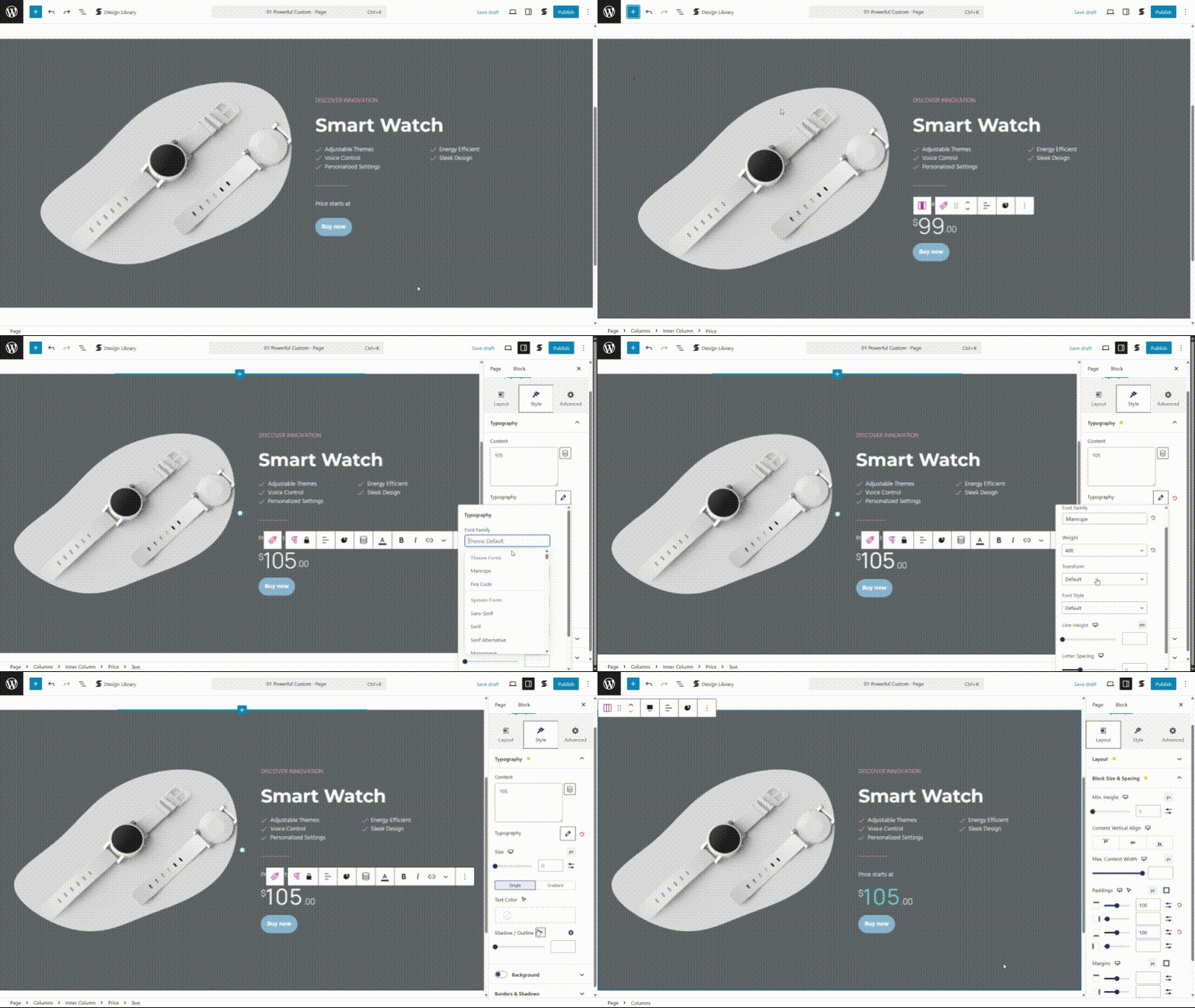
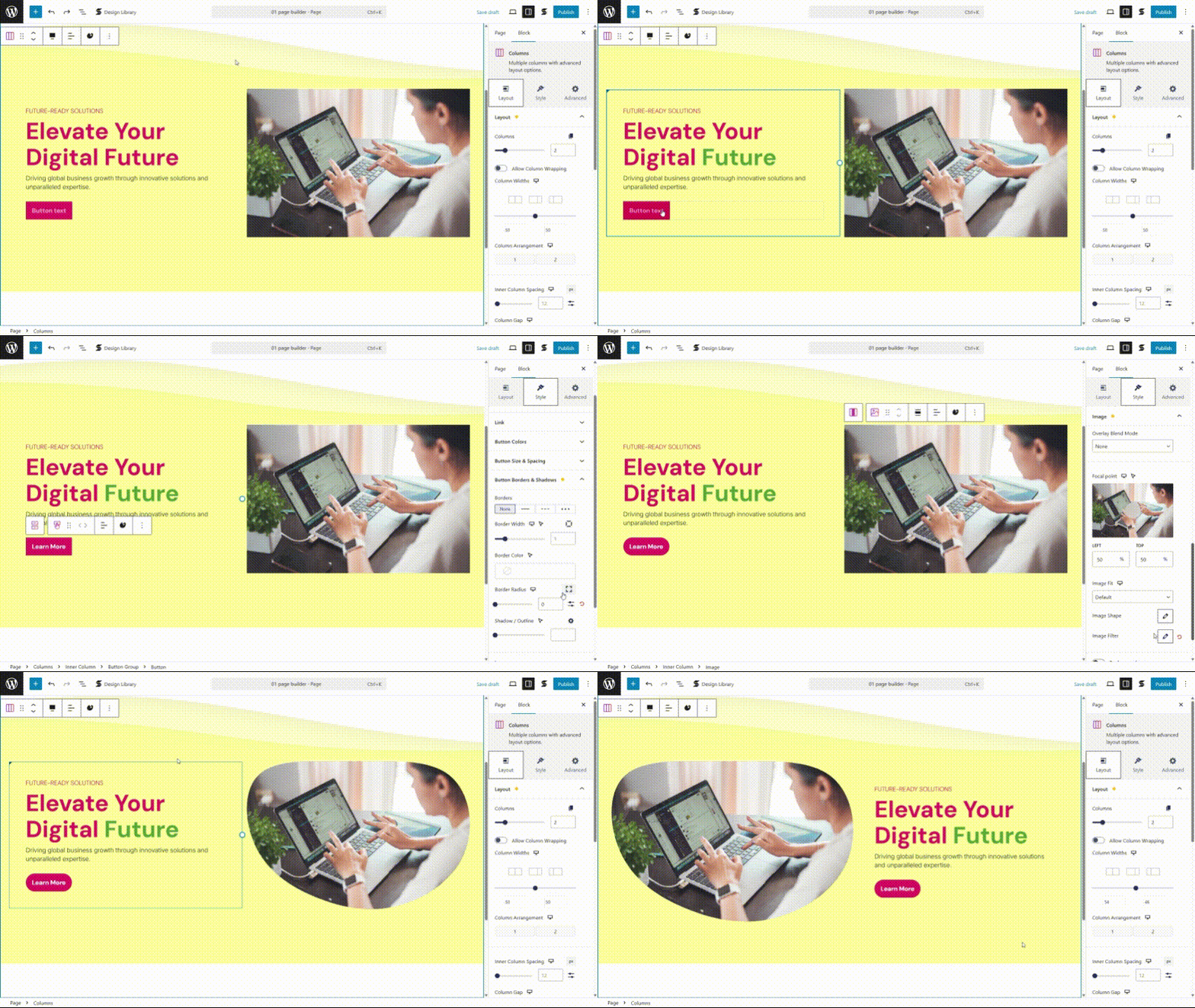
Para desenvolvedores
Este é o seu plugin? Mostre os números.
Adicione um crachá ao vivo ao seu site, Documentos ou Readme do GitHub. Ele é atualizado por conta própria - nenhuma conta necessária.
Best Stackable alternatives
Plugins de todos os blocos →





FAQ
Stackable: quick answers
Respostas diretas, extraídas de dados ao vivo WordPress.org.
Fonte: WordPress.org
Is Stackable free?
Yes. Stackable is free to download and use from the official WordPress.org plugin directory.
Is Stackable safe to use in 2026?
Stackable is a solid plugin choice in 2026, with a few things worth checking first. It runs on 100K+ sites, is rated 4.9/5 and was last updated 1 month ago, and scores 77/100 on our health check.
How many websites use Stackable?
Stackable is active on 100K+ WordPress websites and has been downloaded 5,749,198 times since it launched in February 2018. It was downloaded 37,677 times in the last 30 days.
Does Stackable work with WordPress 7.1?
Yes. The developer has tested Stackable up to WordPress 7.1.5, the latest release. It requires WordPress 6.9.3 or newer.
What PHP version does Stackable need?
Stackable requires PHP 7.4 or higher. Most hosts run PHP 8.x today, so it works on any modern WordPress hosting.
When was Stackable last updated?
The latest version, 3.20.3, was released on October 13, 2026 (1 month ago).
Who makes Stackable?
Stackable is developed and maintained by Benjamin Intal.
What are the best alternatives to Stackable?
The most popular alternatives to Stackable are Spectra Legacy (1M+ installs), Kadence Blocks (600K+ installs) and Extendify (500K+ installs).
Alimentado por PageForge
Um modelo e uma planilha. Uma página real para cada pesquisa.
PageForge Transforma cada linha de um CSV em uma página WordPress com seu próprio título, URL, SEO campos e esquema, construído no layout que você já desenhou. Gratuito em WordPress.org.
- CSV e XLSX, mais Google Sheets em Profissional e Empresarial
- Seu próprio título, URL, SEO campos e esquema para cada página
- Funciona com o editor de blocos, Elementor, Divi e Avada
- Gratuito em WordPress.org, sem cartão de crédito