


Vitrin Touch
Amazon-style, mobile-first swipeable sliders for WordPress & WooCommerce, with a tile-based editor, live preview, and product cards.

Escolha sólida
Vitrin Touch is a solid plugin choice in 2026, with a few things worth checking first. Is rated 5/5 and was last updated 3 months ago, and scores 62/100 on our health check.
- Base de usuários pequenas (<10 instalações ativas)
- Muito poucos comentários até agora
Como ele se acumula?
Lado a lado em instalações, atualizações, avaliações e suporte



Downloads diários
Os picos de download geralmente seguem uma nova versão — cada site que atualiza automaticamente é um download.
Rankings
Where Vitrin Touch stands todayWordPress.org Classificações de pesquisa
Posição ao vivo na pesquisa de plugins, top 100| Palavra chave | Posição |
|---|---|
| carousel | >100 |
| controle deslizante | >100 |
| slideshow | >100 |
| swipe | >100 |
| WooCommerce | >100 |
Divisão de classificação
★★★★★ ★★★★★ 5 de 1 comentários
About Vitrin Touch
Do Readme oficial · v1.0.0Descrição
Vitrin Touch lets you build beautiful, mobile-first swipeable sliders — just like the carousel on Amazon’s mobile homepage — using an intuitive, tile-based editor with real-time previews.
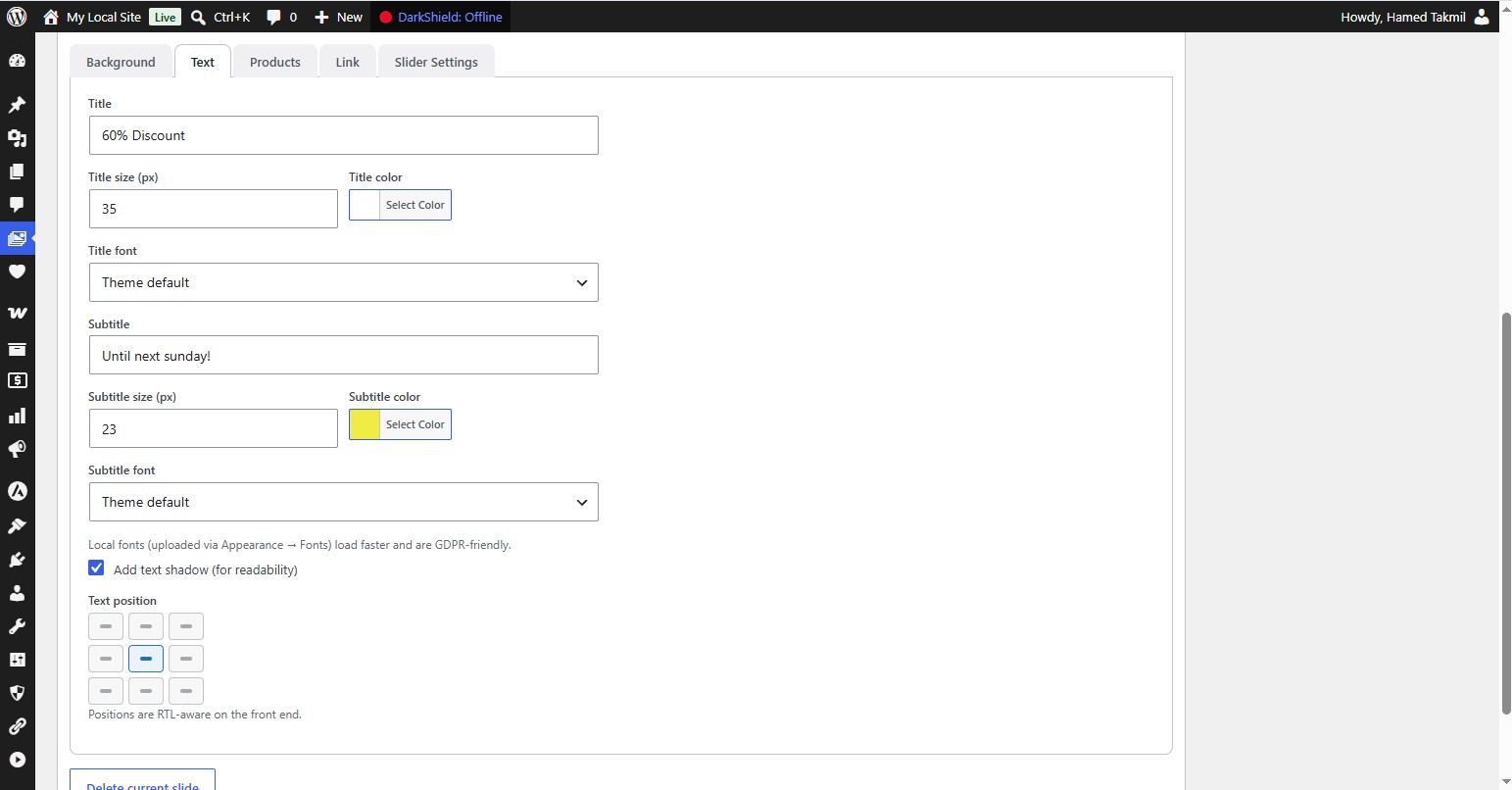
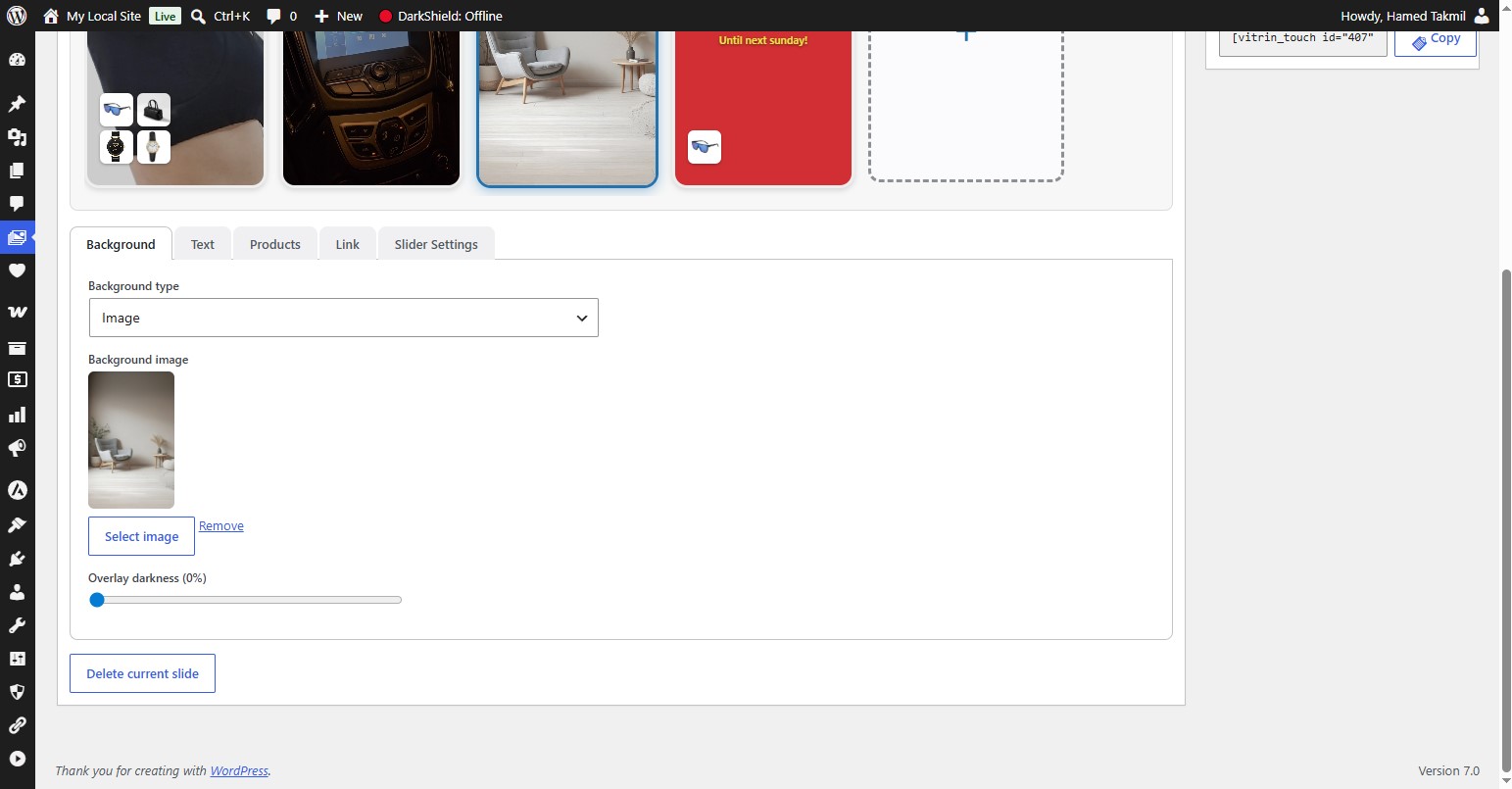
Each slide can have a color, image, or short video background, custom title & subtitle (with fonts, sizes, colors, shadows and 9 RTL-aware positions), up to four WooCommerce product thumbnails with automatic discount badges, and a clickable link for the whole slide.
The front-end uses pure CSS scroll-snap (no heavy JavaScript libraries), so it’s fast, smooth, and dependency-free. Assets load only on pages where a slider actually appears.
Key Features
- Tile-based builder — click a dashed “+” tile to add slides; drag to reorder.
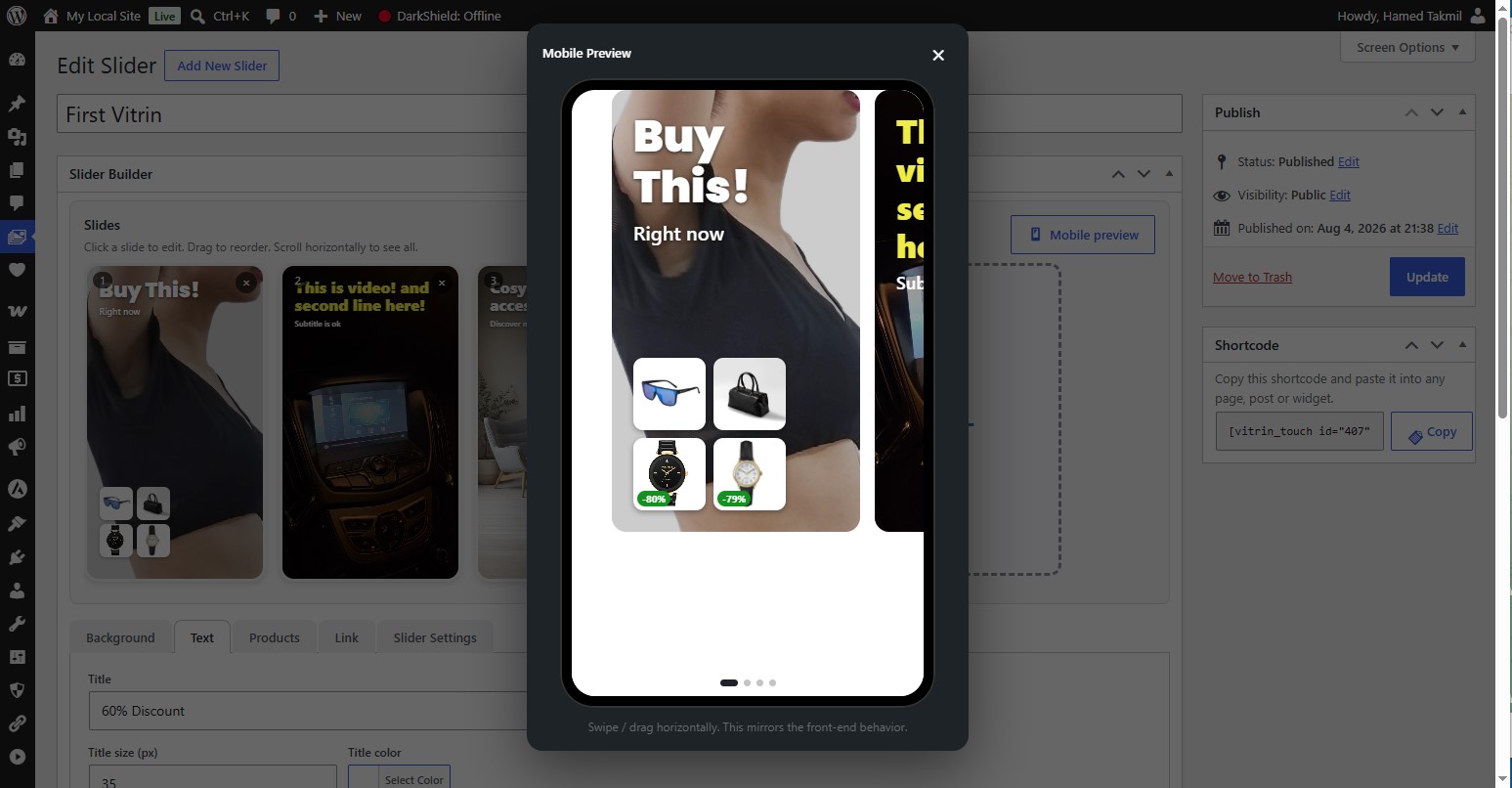
- Live previews — see each slide update in real time, plus a full Mobile Preview with real swipe and “next-slide peek”.
- Backgrounds — solid color, image, or looping muted MP4 video (with a small play/pause button on the front end).
- Text styling — title & subtitle with per-slide font (Google Fonts or locally uploaded), size, color, optional shadow, and a 9-point position grid.
- RTL-aware — logical positioning that works correctly in both LTR and RTL sites.
- WooCommerce — attach up to 4 products per slide, shown as thumbnails with automatic discount badges. Product thumbnails link to their product pages; the rest of the slide uses the slide link.
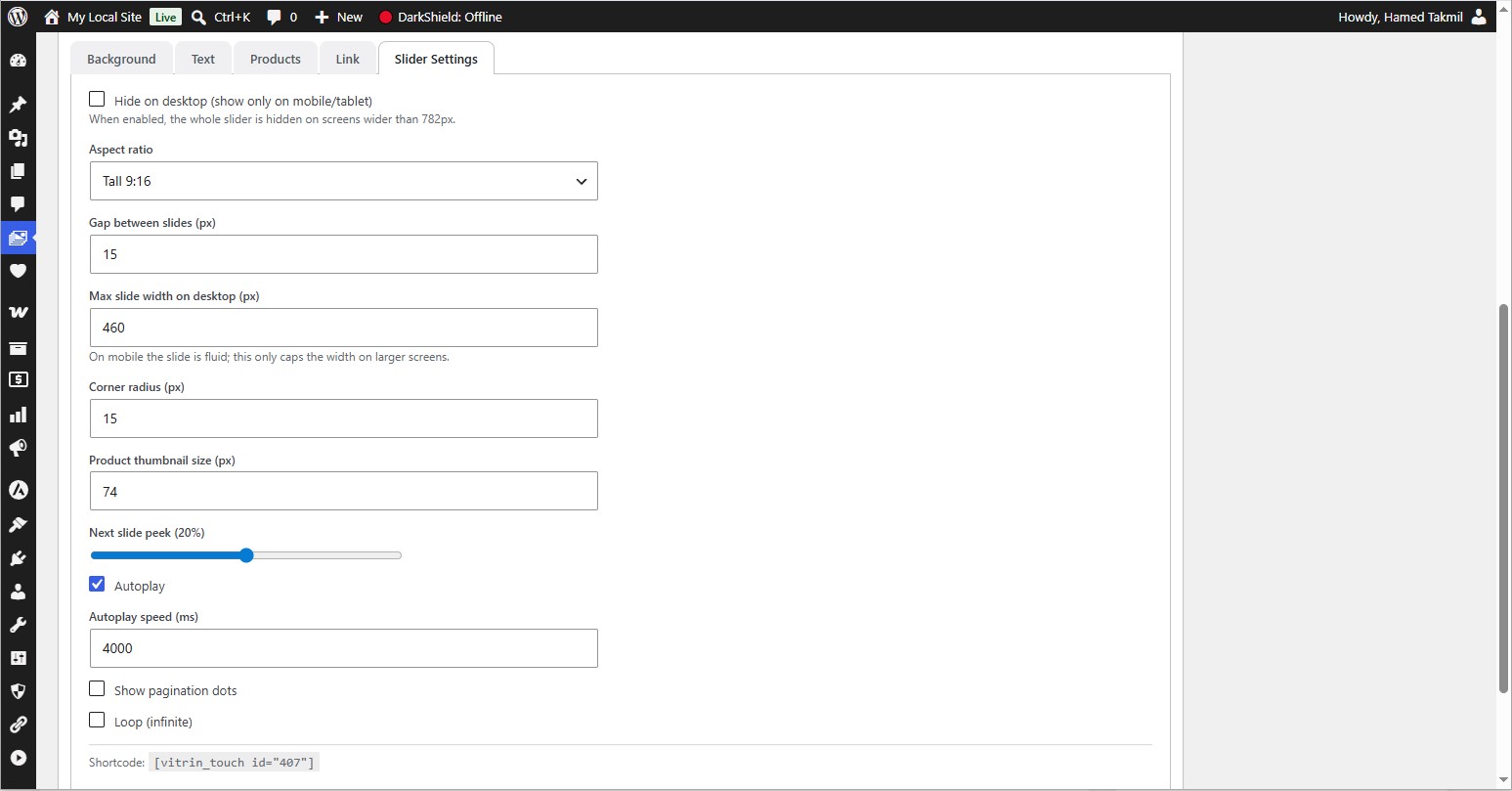
- Slider settings — aspect ratio (portrait presets), gap, next-slide peek, corner radius, max width on desktop, product thumbnail size, pagination dots, autoplay (with speed), and infinite loop.
- Fonts — curated Google Fonts (including Persian families like Vazirmatn & Estedad) or self-hosted fonts via the WordPress Font Library.
- Performance — conditional asset loading, no external JS dependency, and automatic cache purging for popular caching plugins.
- Translation-ready — full
.potincluded; all strings are translatable and RTL-ready. Compatible with Polylang / WPML. - Developer-friendly — clean, namespaced, PSR-4-style architecture with plenty of hooks and filters, ready for a Pro add-on.
Uso
- Go to Vitrin Touch → Add New Slider.
- Click the dashed “+” tile to create a slide.
- Set the background, text, fonts, products and link.
- Use Mobile Preview to test swipe & peek.
- Adjust global options under Slider Settings.
- Publish, then copy the shortcode from the sidebar box.
-
Paste the shortcode into any page or post:
[vitrin_touch id=”123″]
Replace 123 with your slider’s ID (also shown in the sliders list table).
Instalação
- Upload the
vitrin-touchfolder to/wp-content/plugins/, or install the ZIP via Plugins → Add New → Upload Plugin. - Ative o plugin através do menu plugins em WordPress.
- Go to Vitrin Touch in the admin sidebar to create your first slider.
- (Optional) Install WooCommerce to enable product thumbnails and discount badges.
- (Optional) Upload custom fonts via Appearance → Fonts to use self-hosted fonts.
Log de Changes
Initial release of Vitrin Touch.
1.0.0
- Lançamento inicial.
- Tile-based editor with live previews and a Mobile Preview modal.
- Color / image / video backgrounds with overlay and video play/pause.
- Title & subtitle with fonts, sizes, colors, shadow and 9-point RTL-aware positioning.
- WooCommerce integration: up to 4 products per slide with automatic discount badges.
- Slider settings: ratio, gap, peek, corner radius, max width, product size, dots, autoplay, loop.
- Google Fonts + WordPress Font Library (local) support.
- Conditional asset loading and caching-plugin compatibility.
- Global settings page, About & Help page, and optional data removal on uninstall.
- Fully translation-ready (.pot included) and RTL-ready.
Capturas de tela
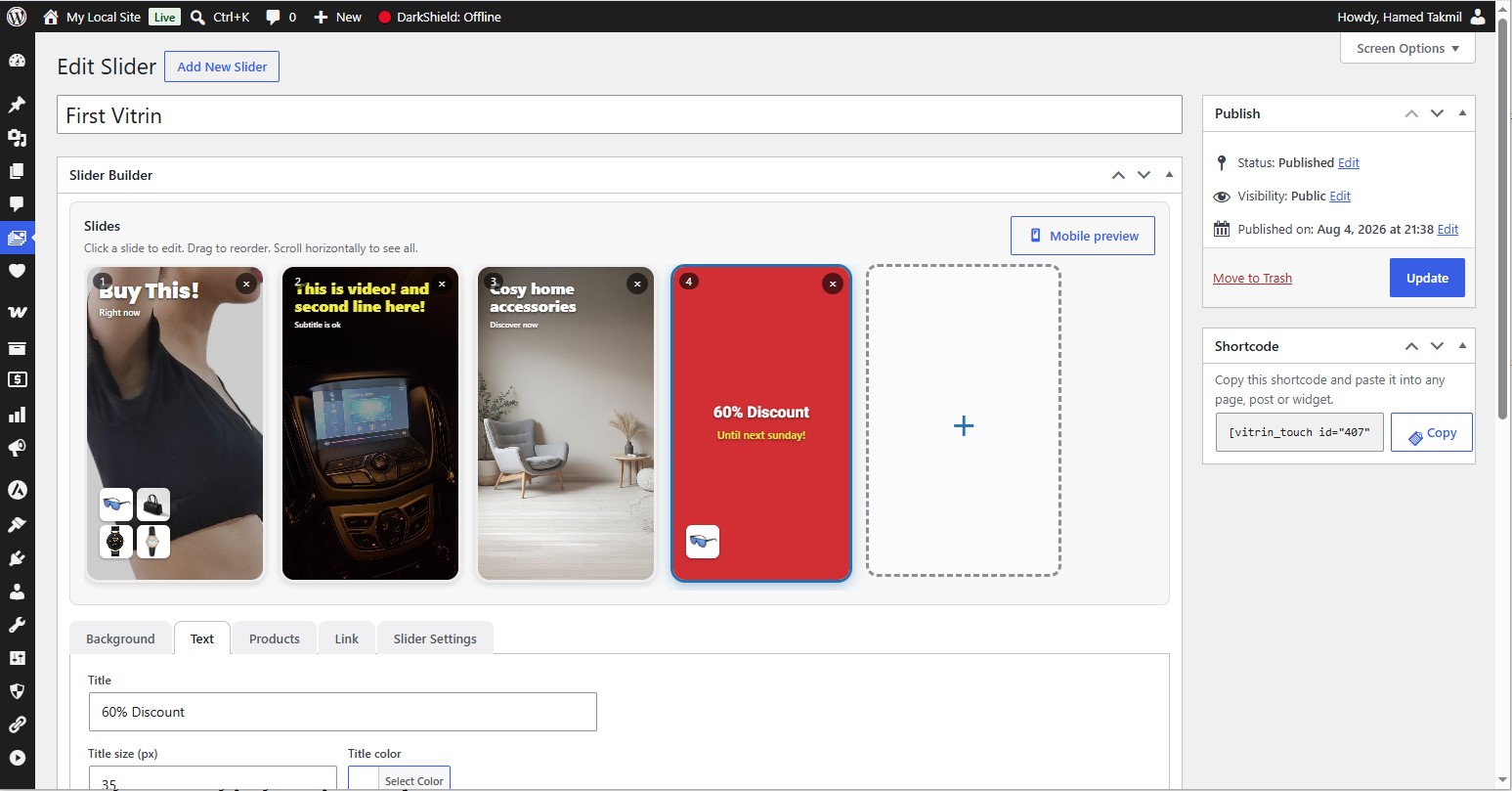


Para desenvolvedores
Este é o seu plugin? Mostre os números.
Adicione um crachá ao vivo ao seu site, Documentos ou Readme do GitHub. Ele é atualizado por conta própria - nenhuma conta necessária.
Best Vitrin Touch alternatives
All carousel plugins →





FAQ
Vitrin Touch: quick answers
Respostas diretas, extraídas de dados ao vivo WordPress.org.
Fonte: WordPress.org
Is Vitrin Touch free?
Yes. Vitrin Touch is free to download and use from the official WordPress.org plugin directory.
Is Vitrin Touch safe to use in 2026?
Vitrin Touch is a solid plugin choice in 2026, with a few things worth checking first. Is rated 5/5 and was last updated 3 months ago, and scores 62/100 on our health check.
How many websites use Vitrin Touch?
Vitrin Touch is active on <10 WordPress websites and has been downloaded 312 times since it launched in August 2026. It was downloaded 63 times in the last 30 days.
Does Vitrin Touch work with WordPress 7.1?
Vitrin Touch is officially tested up to WordPress 7.0.9, while the latest release is 7.1.5. It may still work, but try it on a staging site first.
What PHP version does Vitrin Touch need?
Vitrin Touch requires PHP 7.4 or higher. Most hosts run PHP 8.x today, so it works on any modern WordPress hosting.
When was Vitrin Touch last updated?
The latest version, 1.0.0, was released on August 23, 2026 (3 months ago).
Who makes Vitrin Touch?
Vitrin Touch is developed and maintained by Hamed Takmil.
What are the best alternatives to Vitrin Touch?
The most popular alternatives to Vitrin Touch are Shortcodes Ultimate (400K+ installs), AI-Powered Carousel, Slider… (60K+ installs) and Carousel Slider Block for G… (50K+ installs).
Alimentado por PageForge
Um modelo e uma planilha. Uma página real para cada pesquisa.
PageForge Transforma cada linha de um CSV em uma página WordPress com seu próprio título, URL, SEO campos e esquema, construído no layout que você já desenhou. Gratuito em WordPress.org.
- CSV e XLSX, mais Google Sheets em Profissional e Empresarial
- Seu próprio título, URL, SEO campos e esquema para cada página
- Funciona com o editor de blocos, Elementor, Divi e Avada
- Gratuito em WordPress.org, sem cartão de crédito