


Zoho ZeptoMail
Zoho ZeptoMail (formerly TransMail) Plugin helps you to configure your ZeptoMail account in your WordPress site, to send notification emails from your website. It is recommended to use authorized servers for sending…

Escolha sólida
Zoho ZeptoMail is a solid plugin choice in 2026, with a few things worth checking first. It runs on 5K+ sites, is rated 5/5 and was last updated 2 months ago, and scores 75/100 on our health check.
- Testado com as últimas WordPress (7.1)
- Muito poucos comentários até agora
Como ele se acumula?
Lado a lado em instalações, atualizações, avaliações e suporte



Downloads diários
Os picos de download geralmente seguem uma nova versão — cada site que atualiza automaticamente é um download.
Rankings
Where Zoho ZeptoMail stands todayWordPress.org Classificações de pesquisa
Posição ao vivo na pesquisa de plugins, top 100| Palavra chave | Posição |
|---|---|
| #29 | |
| mailer | #22 |
| phpmailer | #5 |
| transactional email | #31 |
| wp_mail | #11 |
Adoção da versão
Compartilhamento de sites ativos por lançamento.
Divisão de classificação
★★★★★ ★★★★★ 5 de 4 comentários
About Zoho ZeptoMail
From the official readme · v3.3.4Descrição
Zoho ZeptoMail for WordPress
Zoho ZeptoMail (formerly TransMail) Plugin helps you to configure your ZeptoMail account in your WordPress site, to send notification emails from your website.
It is recommended to use authorized servers for sending transactional/ notification emails from websites, instead of using generic hosting servers. It is possible to misuse unauthorized and unauthenticated configuration and harm the reputation of your domain/ website when using generic servers.
This plugin can help to ensure that the transactional emails are sent from your account using ZeptoMail API’s and do not end up in the Spam.
PRE-REQUISITES
- A ZeptoMail Account
- A self-hosted WordPress site
- PHP 5.6 or later
ADVANTAGES OF ZeptoMail PLUGIN
- ZeptoMail plugin has customized the PHPMailer’s code library, used in WordPress for sending email.
- By using ’wp_mail’ function of WordPress, ZeptoMail plugin handles the custom send mail action anywhere from the entire site, without having to change/ configure at every occurrence.
- Zoho ZeptoMail advantage:
— Inbox placement
— Fast delivery
— Email segmentation
— Failed delivery logs
How is email sent using the plugin?
You can configure multiple ZeptoMail Agents in the plugin using their associated send mail tokens. You can use the Send Mail token of the Agents in your ZeptoMail account to send transactional emails from your site using ZeptoMail API.
ZeptoMail PLUGIN PARAMETERS
- Hosted region :The domain where your Zoho Account data resides.
- Email format :Emails from the plugin will be sent in the chosen format by default.
- From Name :The name that will be shown as the display name while sending all emails from your website.
- From Email Address :The email address that will be used to send all the outgoing transactional emails from your website.
- Send mail token :Send mail token generated in the ZeptoMail Agent you wish to configure in WordPress.
- Logs limit : Once the number of logs reaches the configured limit, the older logs will be deleted.
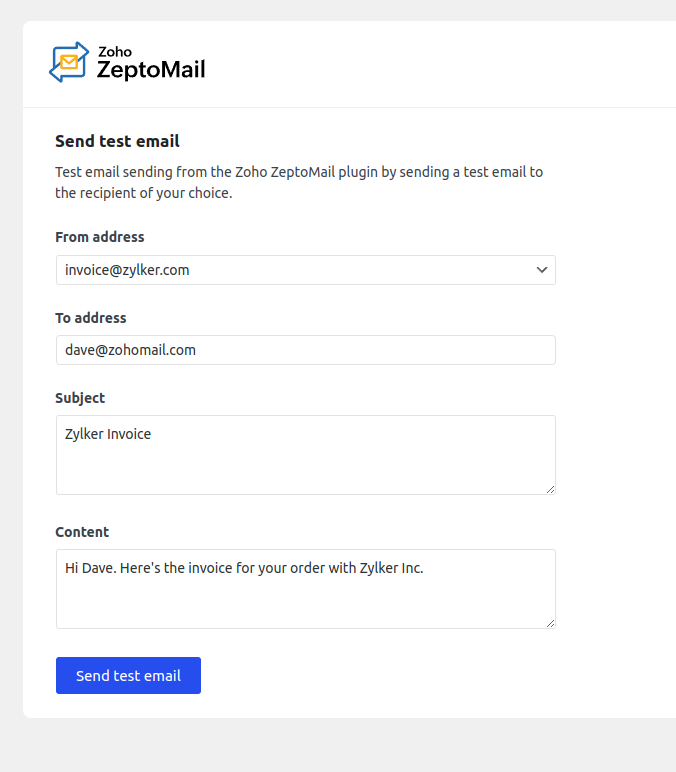
ZeptoMail PLUGIN TEST EMAIL
After configuration, you can test the plugin. Navigate to the ZeptoMail plugin – Test Email page in your Website settings.
– From address : The from email address using which you want to send the test email.
– To : Email address of the recipient.
– Subject : Subject of the email.
– Content :The message or body of the email.
For in detail instructions on how to set up ZeptoMail plugin, visit ZeptoMail plugin page .
Note :
Sending emails through ZeptoMail is subjective to our Usage Policy restrictions. Please refer to our Usage Policy details here.
Instalação
1) Login to your self-hosted WordPress account and navigate to the ZeptoMail plugin Account Configuration page.
2) From the Domain section, pick the region where your ZeptoMail account is hosted.
3) Login to your ZeptoMail account and access the relevant Agent .
4) Copy your existing Send Mail token or generate a new one from the SMTP & API Info section.
5) Enter the Send Mail token in the plugin configuration page.
6) Enter the From Email Address and From Name .
7) Select the default Email Format you wish to send your transactional emails in.
6) Click Save and test configuration .
7) Once the configuration is saved, the Plugin will be able to send emails from your website using ZeptoMail.
Log de Changes
none
1.0.1
- Handled replyTo error in WooCommerce cases
1.0.2
- Handled email address field
1.0.3
- Sanitizing to address
1.0.4
- Updated FAQs
2.0.0
- TransMail is now ZeptoMail, bug fix on warning messages
2.0.1
- Tested with WordPress 5.8
Capturas de tela


Para desenvolvedores
Este é o seu plugin? Mostre os números.
Adicione um crachá ao vivo ao seu site, Documentos ou Readme do GitHub. Ele é atualizado por conta própria - nenhuma conta necessária.
Best Zoho ZeptoMail alternatives
All mail plugins →





FAQ
Zoho ZeptoMail: quick answers
Respostas diretas, extraídas de dados ao vivo WordPress.org.
Fonte: WordPress.org
Is Zoho ZeptoMail free?
Yes. Zoho ZeptoMail is free to download and use from the official WordPress.org plugin directory.
Is Zoho ZeptoMail safe to use in 2026?
Zoho ZeptoMail is a solid plugin choice in 2026, with a few things worth checking first. It runs on 5K+ sites, is rated 5/5 and was last updated 2 months ago, and scores 75/100 on our health check.
How many websites use Zoho ZeptoMail?
Zoho ZeptoMail is active on 5K+ WordPress websites and has been downloaded 80,989 times since it launched in August 2020. It was downloaded 1,710 times in the last 30 days.
Does Zoho ZeptoMail work with WordPress 7.1?
Yes. The developer has tested Zoho ZeptoMail up to WordPress 7.1.5, the latest release. It requires WordPress 4.8 or newer.
What PHP version does Zoho ZeptoMail need?
Zoho ZeptoMail requires PHP 5.6 or higher. Most hosts run PHP 8.x today, so it works on any modern WordPress hosting.
When was Zoho ZeptoMail last updated?
The latest version, 3.3.4, was released on September 28, 2026 (2 months ago).
Who makes Zoho ZeptoMail?
Zoho ZeptoMail is developed and maintained by Zoho Mail.
What are the best alternatives to Zoho ZeptoMail?
The most popular alternatives to Zoho ZeptoMail are Flamingo (800K+ installs), MW WP Form (200K+ installs) and Kadence WooCommerce Email D… (90K+ installs).
Alimentado por PageForge
Um modelo e uma planilha. Uma página real para cada pesquisa.
PageForge Transforma cada linha de um CSV em uma página WordPress com seu próprio título, URL, SEO campos e esquema, construído no layout que você já desenhou. Gratuito em WordPress.org.
- CSV e XLSX, mais Google Sheets em Profissional e Empresarial
- Seu próprio título, URL, SEO campos e esquema para cada página
- Funciona com o editor de blocos, Elementor, Divi e Avada
- Gratuito em WordPress.org, sem cartão de crédito