


Zoho ZeptoMail
Zoho ZeptoMail (formerly TransMail) Plugin helps you to configure your ZeptoMail account in your WordPress site, to send notification emails from your website. It is recommended to use authorized servers for sending…

Choix solide
Zoho ZeptoMail is a solid plugin choice in 2026, with a few things worth checking first. It runs on 5K+ sites, is rated 5/5 and was last updated 2 months ago, and scores 75/100 on our health check.
- Testé avec le dernier WordPress (7.1)
- Très peu de critiques jusqu'à présent
Comment s'accumule-t-il ?
Côte à côte sur les installations, les mises à jour, les évaluations et le support



Téléchargements quotidiens
Les pics de téléchargement suivent généralement une nouvelle version - chaque site qui met à jour automatiquement compte comme un téléchargement.
Classements
Where Zoho ZeptoMail stands todayWordPress.org Classements de recherche
Position en direct dans la recherche de plugins, Top 100| Mot-clé | Position |
|---|---|
| courrier | #29 |
| mailer | #22 |
| phpmailer | #5 |
| Courriel transactionnel | #31 |
| wp_mail | #11 |
Adoption de version
Part de sites actifs par version.
Répartition des notes
★★★★★ ★★★★★ 5 sur 4 avis
About Zoho ZeptoMail
From the official readme · v3.3.4Description
Zoho ZeptoMail for WordPress
Zoho ZeptoMail (formerly TransMail) Plugin helps you to configure your ZeptoMail account in your WordPress site, to send notification emails from your website.
It is recommended to use authorized servers for sending transactional/ notification emails from websites, instead of using generic hosting servers. It is possible to misuse unauthorized and unauthenticated configuration and harm the reputation of your domain/ website when using generic servers.
This plugin can help to ensure that the transactional emails are sent from your account using ZeptoMail API’s and do not end up in the Spam.
PRE-REQUISITES
- A ZeptoMail Account
- A self-hosted WordPress site
- PHP 5.6 or later
ADVANTAGES OF ZeptoMail PLUGIN
- ZeptoMail plugin has customized the PHPMailer’s code library, used in WordPress for sending email.
- By using ’wp_mail’ function of WordPress, ZeptoMail plugin handles the custom send mail action anywhere from the entire site, without having to change/ configure at every occurrence.
- Zoho ZeptoMail advantage:
— Inbox placement
— Fast delivery
— Email segmentation
— Failed delivery logs
How is email sent using the plugin?
You can configure multiple ZeptoMail Agents in the plugin using their associated send mail tokens. You can use the Send Mail token of the Agents in your ZeptoMail account to send transactional emails from your site using ZeptoMail API.
ZeptoMail PLUGIN PARAMETERS
- Hosted region :The domain where your Zoho Account data resides.
- Email format :Emails from the plugin will be sent in the chosen format by default.
- From Name :The name that will be shown as the display name while sending all emails from your website.
- From Email Address :The email address that will be used to send all the outgoing transactional emails from your website.
- Send mail token :Send mail token generated in the ZeptoMail Agent you wish to configure in WordPress.
- Logs limit : Once the number of logs reaches the configured limit, the older logs will be deleted.
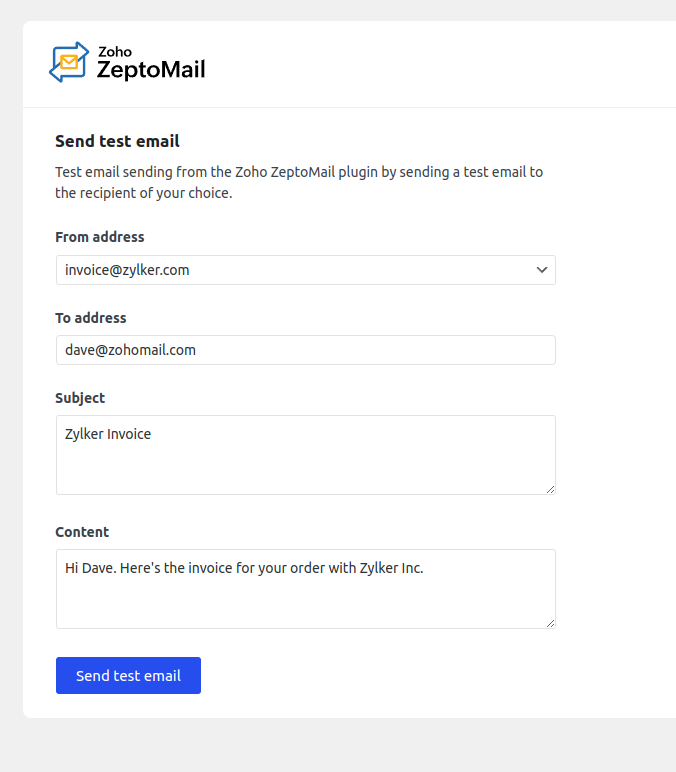
ZeptoMail PLUGIN TEST EMAIL
After configuration, you can test the plugin. Navigate to the ZeptoMail plugin – Test Email page in your Website settings.
– From address : The from email address using which you want to send the test email.
– To : Email address of the recipient.
– Subject : Subject of the email.
– Content :The message or body of the email.
For in detail instructions on how to set up ZeptoMail plugin, visit ZeptoMail plugin page .
Note :
Sending emails through ZeptoMail is subjective to our Usage Policy restrictions. Please refer to our Usage Policy details here.
Installation
1) Login to your self-hosted WordPress account and navigate to the ZeptoMail plugin Account Configuration page.
2) From the Domain section, pick the region where your ZeptoMail account is hosted.
3) Login to your ZeptoMail account and access the relevant Agent .
4) Copy your existing Send Mail token or generate a new one from the SMTP & API Info section.
5) Enter the Send Mail token in the plugin configuration page.
6) Enter the From Email Address and From Name .
7) Select the default Email Format you wish to send your transactional emails in.
6) Click Save and test configuration .
7) Once the configuration is saved, the Plugin will be able to send emails from your website using ZeptoMail.
Journal de modifications
none
1.0.1
- Handled replyTo error in WooCommerce cases
1.0.2
- Handled email address field
1.0.3
- Sanitizing to address
1.0.4
- Updated FAQs
2.0.0
- TransMail is now ZeptoMail, bug fix on warning messages
2.0.1
- Tested with WordPress 5.8
Captures d'écran


Pour les développeurs
Est-ce votre plugin ? Montrez les chiffres.
Ajoutez un badge en direct à votre site, docs ou github readme. Il se met à jour par lui-même - aucun compte n'est nécessaire.
Best Zoho ZeptoMail alternatives
All mail plugins →





FAQ
Zoho ZeptoMail: quick answers
Réponses directes, extraites des données en direct WordPress.org.
Source : WordPress.org
Is Zoho ZeptoMail free?
Yes. Zoho ZeptoMail is free to download and use from the official WordPress.org plugin directory.
Is Zoho ZeptoMail safe to use in 2026?
Zoho ZeptoMail is a solid plugin choice in 2026, with a few things worth checking first. It runs on 5K+ sites, is rated 5/5 and was last updated 2 months ago, and scores 75/100 on our health check.
How many websites use Zoho ZeptoMail?
Zoho ZeptoMail is active on 5K+ WordPress websites and has been downloaded 80,989 times since it launched in August 2020. It was downloaded 1,710 times in the last 30 days.
Does Zoho ZeptoMail work with WordPress 7.1?
Yes. The developer has tested Zoho ZeptoMail up to WordPress 7.1.5, the latest release. It requires WordPress 4.8 or newer.
What PHP version does Zoho ZeptoMail need?
Zoho ZeptoMail requires PHP 5.6 or higher. Most hosts run PHP 8.x today, so it works on any modern WordPress hosting.
When was Zoho ZeptoMail last updated?
The latest version, 3.3.4, was released on September 28, 2026 (2 months ago).
Who makes Zoho ZeptoMail?
Zoho ZeptoMail is developed and maintained by Zoho Mail.
What are the best alternatives to Zoho ZeptoMail?
The most popular alternatives to Zoho ZeptoMail are Flamingo (800K+ installs), MW WP Form (200K+ installs) and Kadence WooCommerce Email D… (90K+ installs).
Propulsé par PageForge
Un modèle et une feuille de calcul. Une vraie page pour chaque recherche.
PageForge transforme chaque ligne d'un CSV en une page WordPress avec son propre titre, URL, SEO et schéma, construit sur la mise en page que vous Déjà conçu. Gratuit sur WordPress.org.
- CSV et XLSX, plus Google Sheets sur les professionnels et les entreprises
- Son propre titre, URL, SEO champs et schéma pour chaque page
- Fonctionne avec l'éditeur de blocs, Elementor, Divi et Avada
- Gratuit sur WordPress.org, pas de carte de crédit