


SupportCandy – Helpdesk, Support Ticket System & AI Chatbot
Free WordPress helpdesk & support ticket system with AI chatbot, AI reply assistant, unlimited tickets and agents, Elementor and Gutenberg blocks.

Escolha segura
Yes — SupportCandy is a safe, well-maintained plugin to use in 2026. It runs on 10K+ sites, is rated 4.9/5 and was last updated 1 week ago, and scores 94/100 on our health check.
- Comprovado em escala em sites ativos de mais de 10 mil
- Loved by users — 4.9/5 from 289 reviews
- Desenvolvido ativamente — última atualização 1 semana atrás
- Testado com as últimas WordPress (7.1)
- Momentum — downloads de 40,3% em relação aos 30 dias anteriores
Como ele se acumula?
Lado a lado em instalações, atualizações, avaliações e suporte



Downloads diários
Os picos de download geralmente seguem uma nova versão — cada site que atualiza automaticamente é um download.
Rankings
Where SupportCandy stands todayWordPress.org Classificações de pesquisa
Posição ao vivo na pesquisa de plugins, top 100| Palavra chave | Posição |
|---|---|
| chatbot | #13 |
| customer support | #15 |
| helpdesk | #3 |
| Support Ticket | #3 |
| ticket system | #3 |
Adoção da versão
Compartilhamento de sites ativos por lançamento.
Divisão de classificação
★★★★★★★★★★ 4.9 from 289 reviews
About SupportCandy
From the official readme · v3.5.6Descrição
THE SIMPLE, SECURE AND FEATURE-RICH SUPPORT TICKETING SYSTEM PLUGIN FOR YOUR WORDPRESS SITE.
Click here to visit our official website.
SupportCandy is a self-hosted WordPress helpdesk and support ticket system. Manage customer support, tickets and agents from your WordPress dashboard, with unlimited tickets, agents and customers, and no per-agent fees.
Never miss a customer question. Our 24/7 AI Chatbot Agent answers inquiries from your own content and seamlessly escalates unknown issues to support tickets.
Empower your agents to resolve issues faster and deliver consistent, on-brand support with AI-driven summaries, draft generation, and response polishing.
SupportCandy is a versatile, feature-packed help desk and ticket management plugin, with features comparable to SaaS solutions such as Zendesk, Help Scout or Freshdesk, but running entirely on your own WordPress site.
Follow this getting started guide, or use the quick setup wizard, and be ready to support your customers within a few minutes!
Why SupportCandy?
- Free and unlimited – unlimited tickets, agents, customers, tags, categories and statuses.
- Self-hosted – you own your system and your data. No external ticketing service is required.
- AI built in – AI chatbot and AI assistant included in the free version (bring your own OpenAI or Google Gemini API key).
- Works with your site – Gutenberg blocks, Elementor widgets, shortcodes, and a customizable appearance that matches your theme.
- Multilingual – 20+ bundled translations and compatible with WPML and Polylang.
- Fast – scripts load only on pages that use SupportCandy.
- Extensible – REST API v2 and 25 Pro add-ons such as Email Piping, WooCommerce, Workflows, SLA and Reports.
SELF-HOSTED CUSTOMER SUPPORT BACKED BY UNPARALLELED TECHNICAL SUPPORT
While we prioritize technical support for our paid users, we are committed to assisting each and every customer promptly. Moreover, we offer best-in-class customer support and maximum features in our free version, setting us apart from others in the industry.
In addition to ticket management, you can assign multiple specific permission levels to agents and customers. Gain access to detailed reports concerning your customers, agents, and the overall productivity of your customer support desk. By navigating through the ticket view, you can gain a comprehensive 360-degree perspective of your customers, including their past tickets, purchase history, membership levels, and more. Armed with this wealth of customer data alongside their queries, you can accomplish much more.
AI Assistant & Chatbot :
A 24/7 AI Chatbot Agent that answers questions directly from your content (AI Training) and automatically creates support tickets for everything else.
Empower your agents to resolve issues faster and deliver consistent, on-brand support with AI-driven summaries, draft generation, and response polishing.
AI features use your own OpenAI or Google Gemini API key. You choose the provider in the AI settings, and you pay the provider directly for usage.
Key capabilities include:
* AI Training – Train the AI on your WordPress posts and pages (any post type), URLs and uploaded files so answers come from your own knowledge base.
* Chatbot Agent – Answers visitor questions 24/7, checks the status of an existing ticket, filters out spam, and creates a support ticket when it cannot resolve a question. Includes an auto-popup, a greeting bubble and an overlay message that you can configure.
* Chatbot Sessions – Review every chatbot conversation in a split view and search by conversation text and visitor details.
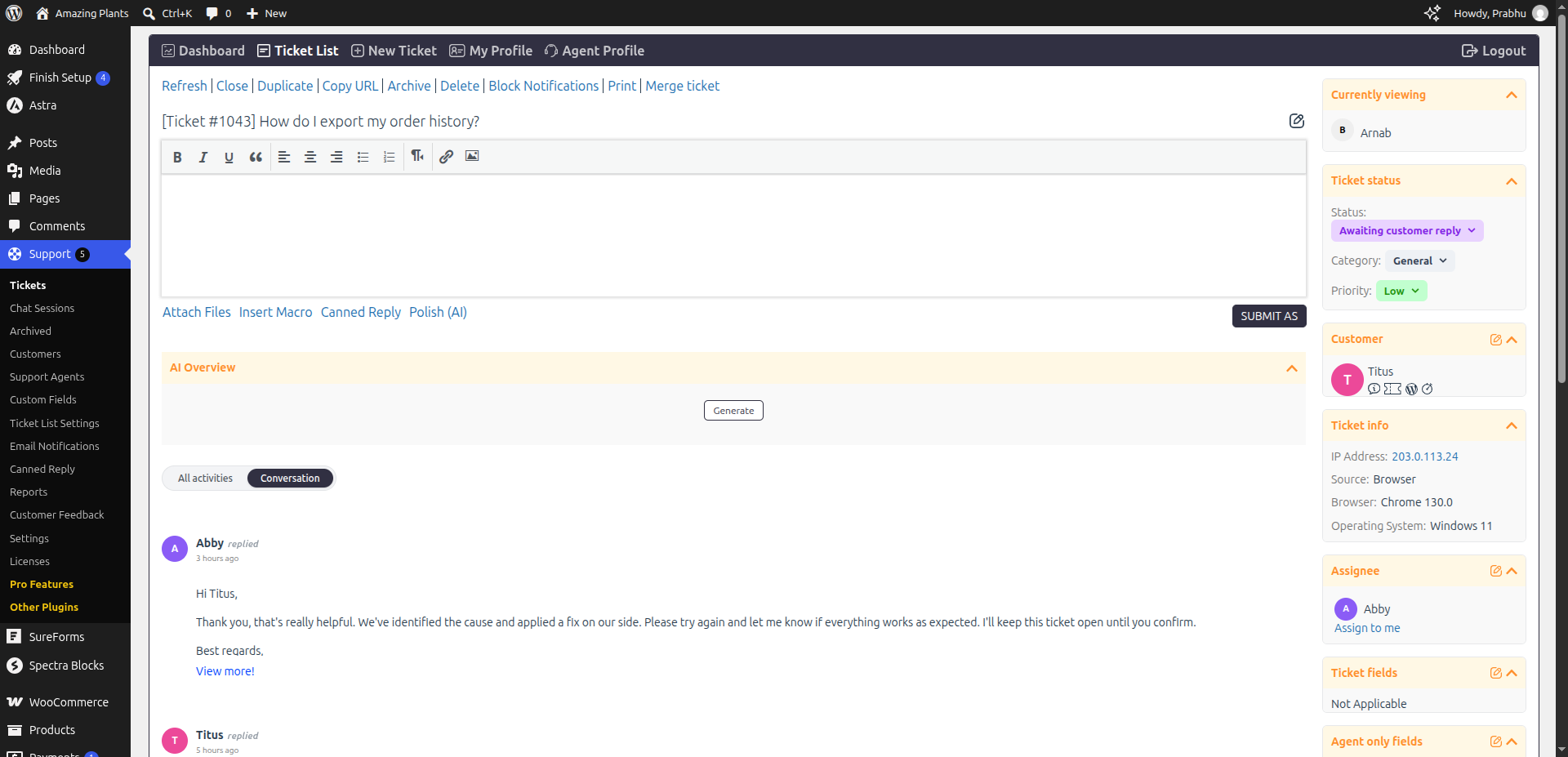
* Ticket Summary – Instantly generate a concise summary of long or complex tickets, helping agents quickly understand the issue without reading the entire conversation.
* Auto Draft – Let the AI draft a reply based on the ticket thread, so agents start from a ready answer.
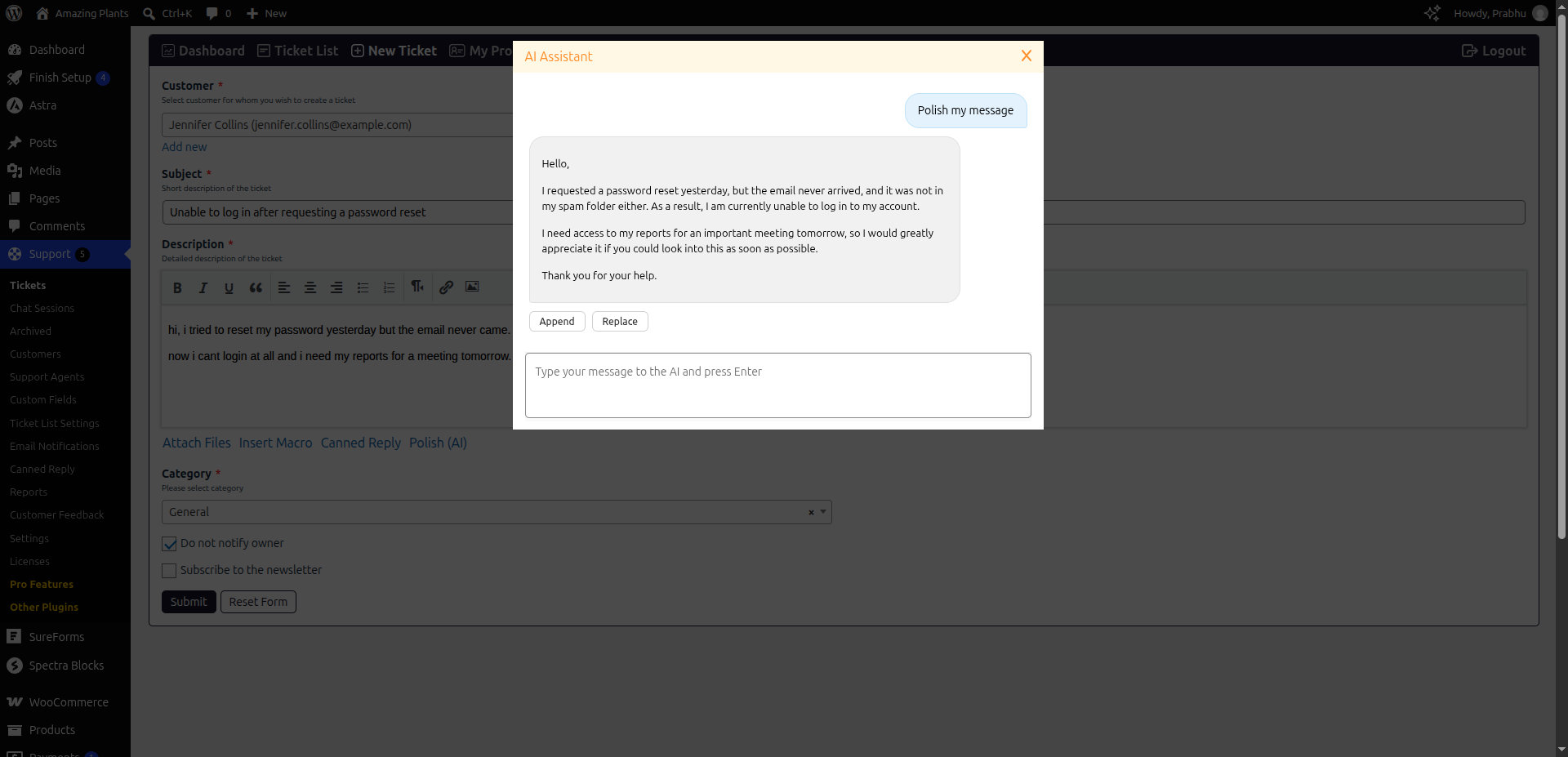
* Polish Agent Replies – Draft quickly and let the Polish (AI) button refine your grammar, tone, and clarity. The AI automatically analyzes the entire ticket thread for context, ensuring every response is pinpoint accurate. You can continue to provide follow-up prompts to tweak the suggestion until you’re satisfied, then simply click Replace or Append to the editor.
* Polish on the Ticket Form – Polish the ticket description on the create ticket form before submitting.
* Custom AI Prompts – Administrators can define custom prompt instructions from the settings panel. The AI will follow these instructions while polishing replies, allowing you to align responses with your brand voice and support guidelines.
Key features :
- AI Chatbot Agent trained on your own content
- AI Assistant: ticket summary, auto draft and polish
- OpenAI and Google Gemini support (bring your own API key)
- Unlimited number of tickets
- Unlimited number of agents and agent roles
- Unlimited number of customers
- Unlimited tags, categories, and custom statuses
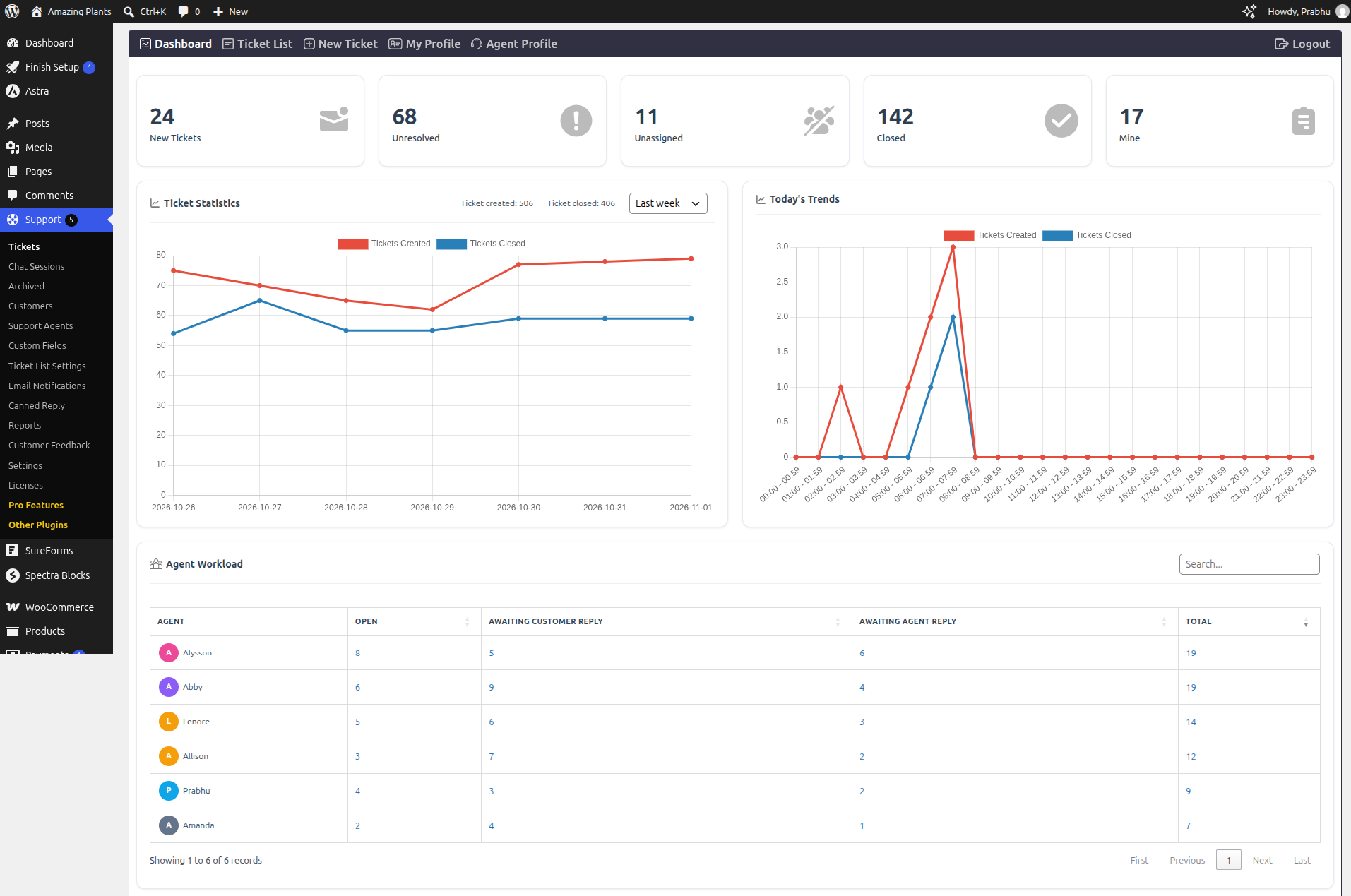
- Dashboard for agents with cards and widgets
- Activity logs for administrators
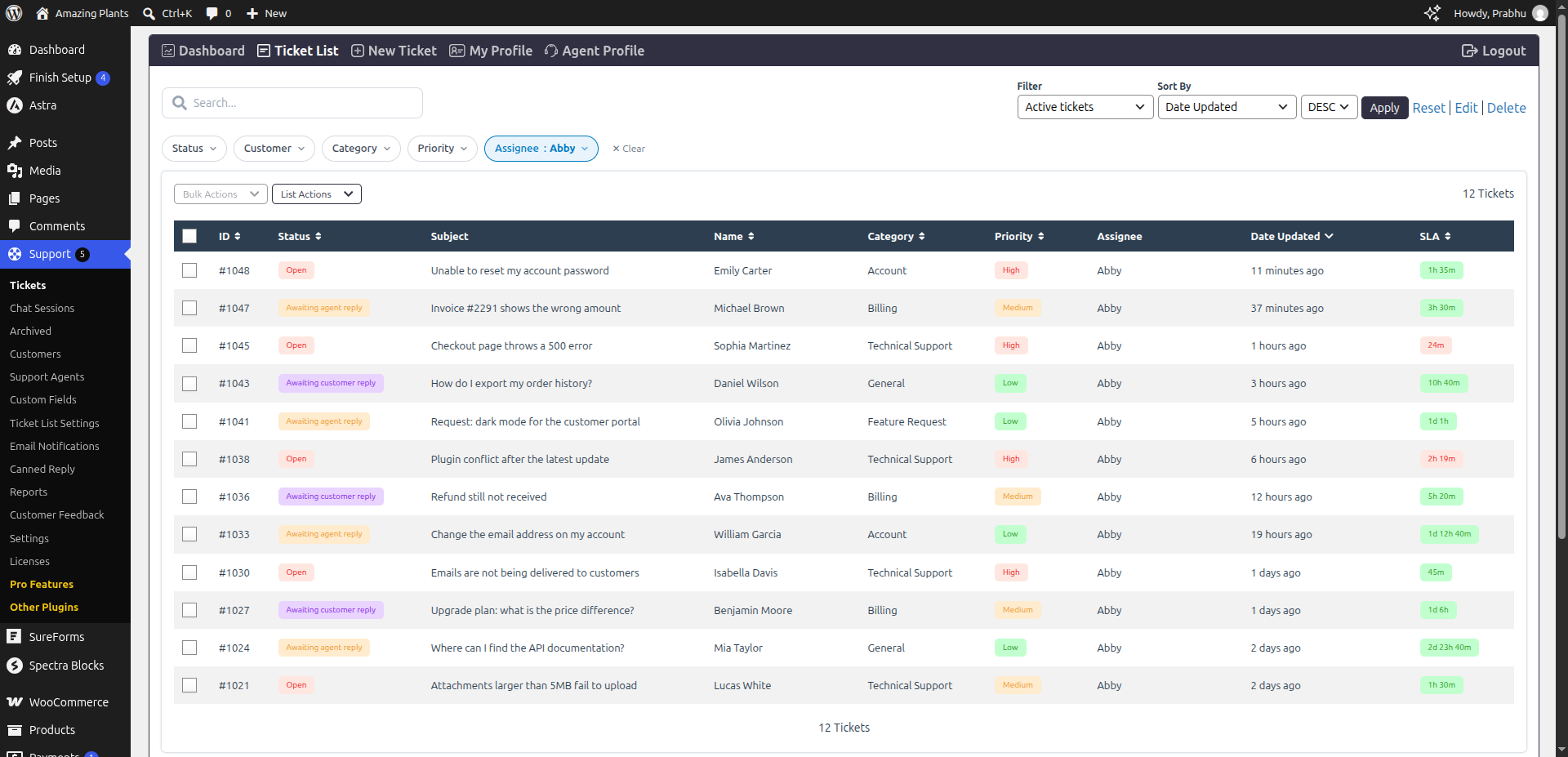
- Advanced custom filter and search functionality
- Saved filters for customers and agents, and agent quick filter on the ticket list
- Bulk actions: change status, assign agents, add tags, archive and delete tickets
- Ticket archive
- Gutenberg blocks and Elementor widgets for SupportCandy shortcodes
- Shortcodes for Agent Portal/Customer Portal: [supportcandy], [wpsc_create_ticket], [wpsc_open_ticket], [wpsc_my_profile], [wpsc_agent_profile] and [wpsc_unresolved_ticket_count]
- Private notes for internal communication of agents
- Agents can create a ticket on the customer’s behalf
- Agent Collision to avoid repetitive messages and confusion
- 15 Custom field types
- User Registration
- Ticket fields for additional information about ticket
- Agent-only fields to keep internal data of the ticket
- Customer fields to store information about the customer across the tickets
- Additional recipients (CC) on tickets
- Ticket source, browser, OS and IP address captured automatically
- Guest tickets
- Guest can also see their ticket list using OTP Login (One Time Password)
- Rich-text editor (customizable)
- Email notifications with template preview and test send
- Working hours, exceptions, holidays and agent leaves
- Spam protection with Google reCAPTCHA or Cloudflare Turnstile
- GDPR Compatibility with data retention and deletion feature
- Terms & Conditions checkbox in the ticket form
- Macros or placeholders for ticket fields
- Unlimited File Attachment to ticket and reply. Manage allowed file types.
- REST API v2 for tickets, customers, agents, categories, priorities, statuses and attachments
- Customizable Appearance to match up with your theme
- Compatible with WPML and Polylang, 20+ bundled translations
- Loads scripts only on pages that use SupportCandy for faster page speed
- Quick setup wizard
- Auto delete closed tickets
Pro Features :
- Email Piping – Create and reply to tickets directly from your email inbox using Basic IMAP, Gmail or Microsoft Exchange.
- WooCommerce Integration – Let customers select orders and products in the ticket form, show order history and total spent to agents, and add a support tab and help button to the My Account page.
- Canned Reply – Save and reuse frequently used responses with macros. Administrators can create public canned replies for all agents.
- Assign Agent Rules – Automatically assign agents or agent groups to new tickets based on conditions you define.
- SLA (Service Level Agreement) – Calculate ticket due dates from SLA policies and show the remaining time in the ticket list and on each ticket.
- Satisfaction Survey – Collect customer ratings and feedback after a ticket is closed, with customizable survey emails.
- Automatic Close Tickets – Close inactive tickets after a set period, with warning emails sent to customers first.
- Usergroup – Allow a group of users to access each other’s tickets.
- Agentgroup – Create agent groups or teams, assign tickets to them, and let supervisors manage assignments within the group.
- Schedule Tickets – Automatically create recurring tickets for routine tasks on a schedule you define.
- Knowledgebase Integrations – Insert knowledge base articles into replies. Works with BetterDocs, Knowledgebase by UnboundStudio and more.
- FAQ Integrations – Integrate popular FAQ plugins like Ultimate FAQ and Arconix FAQ.
- Export Tickets – Export tickets to CSV for reporting and other purposes.
- Reports – Auto-generated reports for ticket statistics, response delays, ticket closing delays and more, with filters for custom fields and survey ratings.
- Timer – Let agents log time on tickets, with optional auto-start and a widget that shows time spent to customers.
- Print Ticket – Print tickets or save them as PDF, with customizable header, footer and body templates.
- EDD Integration – Let customers select Easy Digital Downloads orders and products in the ticket form and let agents view them in the ticket.
- Gravity Forms Integration – Create multiple ticket forms with Gravity Forms and map their fields to SupportCandy automatically.
- Private Credentials – Let customers share sensitive information securely in tickets, with encrypted storage and optional automatic deletion after the ticket is closed.
- Slack Integration – Get instant notifications in your Slack channel and reply directly from a Slack thread.
- Workflows – Automate ticket assignments, status updates and more with triggers, conditions and actions, either automatically or manually.
- Productivity Suite – Boost ticket management productivity with a set of add-on tools for your support team.
- LMS Integrations – Let customers choose their course when creating a ticket and let agents see course details. Supports LifterLMS, Tutor LMS and LearnPress.
- Email Marketing Tools Integration – Connect SupportCandy with MailChimp, GetResponse and Brevo to subscribe users during registration or ticket creation.
- Webhooks – Send real-time notifications to other systems on events such as ticket creation, closure and agent assignment.
Who is it for?
- Helpdesk and customer support teams
- Technical support and trouble tickets
- SaaS and software companies, including software release lifecycle management
- WooCommerce and Easy Digital Downloads stores
- Online course and membership sites (LMS)
- Agencies and freelancers supporting multiple clients
- Service request management and customer relations
- Hotel, real estate and company service desks
- To-do list management
Support & Documentation
Our Other Plugins
- PSM Multi Currency Switcher & Currency Converter for WooCommerce – Offer your customers a seamless multi-currency shopping experience. This plugin automatically updates exchange rates, detects your customer’s currency by their location, and provides robust switching options so you can sell around the world with ease.
- PSM Request a Quote for WooCommerce – Allow customers to request a quote for WooCommerce products with ease.
Instalação
Using The WordPress Dashboard
- Navigate to the ‘Add New’ in the plugins dashboard
- Search for SupportCandy
- Click ‘Install Now’
- Activate the plugin on the plugin dashboard
Uploading in WordPress Dashboard
- Download
supportcandy.zipfrom this page - Navigate to the ‘Add New’ in the plugins dashboard
- Navigate to the ‘Upload’ area
- Select
supportcandy.zipfrom your computer - Click ‘Install Now’
- Activate the plugin in the Plugin dashboard
Using FTP
- Download
supportcandy.zipfrom this page - Extract the
supportcandydirectory to your computer - Carregue o diretório
supportcandypara o diretório/wp-content/plugins/ - Activate the plugin in the Plugin dashboard
This plugin is almost plug and play! Use the quick setup wizard after activation, or follow this getting started guide for basic installation instructions.
Log de Changes
3.5.6 (November 17, 2026)
- Fix: Fixed status dropdown closing on touch devices
- Fix: Resolved attachment upload issues in replies
- Fix: Improved UI on smaller screens
- Fix: Fixed license deactivation on non-200 responses
- Fix: Corrected attachment filenames in browser opening mode
3.5.5 (November 03, 2026)
- New: Agent quick filter on the ticket list
- New: Gutenberg blocks for SupportCandy shortcodes
- New: Elementor widgets for SupportCandy shortcodes
- New: Email template preview, test send
- New: Automatic “Load scripts” mode to load scripts only on pages using SupportCandy (choose All Pages if a shortcode is in a header, footer or sidebar)
- New: AI polish for the ticket description on the create ticket form
- New: Split view for AI chatbot sessions with search by conversation text and visitor details
- New: Back button now works in the agent workspace
- New: Docs button added to the settings header
- New: Live plain-English summary in condition builders
- New: Improved assignee and ticket status widget
- New: Shorter setup wizard
- New: “Show activity logs” toggle on open ticket
- New: Guest ticket submission enabled by default for new installs
- New: GDPR and T&C consent options disabled by default for new installs
- New: Updated Portuguese translations
- Fix: Wrong “Create as” value on open ticket
- Fix: Frontend login error handling
- Fix: Admin CSS hiding the search field in other plugins
- Fix: Cron events not rescheduled correctly based on interval
- Fix: Fatal error on ratings REST routes in free version
- Fix: Guest ticket status lookup in the chatbot now requires the ticket’s email address
- Fix: Deleted tickets are visible only to agents in REST API
- Fix: Missing authorization checks for ticket access in thread handling
- Fix: Missing authorization checks for ticket archive restore
- Fix: Guest uploads and attachment access secured
- Fix: REST API validation and permissions for agents and custom fields hardened
- Fix: Faster loading with SVG icons loaded on demand
- Fix: Updated Chart.js library to 3.9.1
- Fix: Report and dashboard date ranges could shift by a day depending on the timezone
- Fix: “Last Quarter” dashboard filter picked the wrong year in January to March
- Fix: Security fixes (Reported by Sangho Lee)
3.5.4 (September 28, 2026)
- New: Added onboarding wizard for new installs
- New: Added chatbot overlay message
- Fix: Improved dashboard performance
- Fix: Fixed email attachment link access
- Fix: Improved AI training data processing
- Fix: Addressed security issues
3.5.3 (September 01, 2026)
- New: Added custom chatbot prompt instructions
- New: Added “Last Reply” ticket condition
- New: Added sorting to ticket list headers
- New: Added sorting handle for form fields
- Fix: Cloned agent roles missing permissions
- Fix: Fixed View More/Less link functionality
- Fix: Custom field attachments missing from notifications
- Fix: Preserved links in chatbot replies
- Fix: Fixed chatbot button display on mobile
- Fix: Skipped near-empty records during ai training synchronization
- Fix: Prevented raw JSON from appearing in chatbot
- Fix: Addressed security vulnerability issue
3.5.2 (August 11, 2026)
- New: Added chatbot auto-popup setting
- Fix: Addressed security vulnerability issue
3.5.1 (July 30, 2026)
- New: Added AI assistant features (polish, draft, summary) as part of this core product for free.
- New: Introduced chatbot agent feature
- Fix: Auto-archive closed tickets setting not working
- Fix: Customer ticket count not updating
- Fix: Agent collision widget shows names with avatars
- Fix: WPML pages issue with custom script loading
- Fix: Ticket list search not working
Capturas de tela




Para desenvolvedores
Este é o seu plugin? Mostre os números.
Adicione um crachá ao vivo ao seu site, Documentos ou Readme do GitHub. Ele é atualizado por conta própria - nenhuma conta necessária.
Best SupportCandy alternatives
All chatbot plugins →





FAQ
SupportCandy: quick answers
Respostas diretas, extraídas de dados ao vivo WordPress.org.
Fonte: WordPress.org
Is SupportCandy free?
Yes. SupportCandy is free to download and use from the official WordPress.org plugin directory.
Is SupportCandy safe to use in 2026?
Yes — SupportCandy is a safe, well-maintained plugin to use in 2026. It runs on 10K+ sites, is rated 4.9/5 and was last updated 1 week ago, and scores 94/100 on our health check.
How many websites use SupportCandy?
SupportCandy is active on 10K+ WordPress websites and has been downloaded 572,147 times since it launched in August 2018. It was downloaded 15,247 times in the last 30 days.
Does SupportCandy work with WordPress 7.1?
Yes. The developer has tested SupportCandy up to WordPress 7.1.5, the latest release. It requires WordPress 5.6 or newer.
What PHP version does SupportCandy need?
SupportCandy requires PHP 7.4 or higher. Most hosts run PHP 8.x today, so it works on any modern WordPress hosting.
When was SupportCandy last updated?
The latest version, 3.5.6, was released on November 17, 2026 (1 week ago).
Who makes SupportCandy?
SupportCandy is developed and maintained by PSM Plugins.
What are the best alternatives to SupportCandy?
The most popular alternatives to SupportCandy are AI Agent by SiteGround (1M+ installs), AI Engine (90K+ installs) and Tidio (70K+ installs).
Alimentado por PageForge
Um modelo e uma planilha. Uma página real para cada pesquisa.
PageForge Transforma cada linha de um CSV em uma página WordPress com seu próprio título, URL, SEO campos e esquema, construído no layout que você já desenhou. Gratuito em WordPress.org.
- CSV e XLSX, mais Google Sheets em Profissional e Empresarial
- Seu próprio título, URL, SEO campos e esquema para cada página
- Funciona com o editor de blocos, Elementor, Divi e Avada
- Gratuito em WordPress.org, sem cartão de crédito