


StreamSera – Live Radio Player & Station Manager
Live radio player and station manager for WordPress: Icecast, Shoutcast and HLS streams with now playing, station pages, blocks and widgets.

Escolha sólida
StreamSera is a solid plugin choice in 2026, with a few things worth checking first. It runs on 10+ sites and was last updated 3 weeks ago, and scores 66/100 on our health check.
- Desenvolvido ativamente — última atualização 3 semanas atrás
- Testado com as últimas WordPress (7.1)
- Pequena base de usuários (10+ instalações ativas)
- Muito poucos comentários até agora
Como ele se acumula?
Lado a lado em instalações, atualizações, avaliações e suporte



Downloads diários
Os picos de download geralmente seguem uma nova versão — cada site que atualiza automaticamente é um download.
Rankings
Where StreamSera stands todayWordPress.org Classificações de pesquisa
Posição ao vivo na pesquisa de plugins, top 100| Palavra chave | Posição |
|---|---|
| icecast | #13 |
| Live Stream | >100 |
| radio | >100 |
| Radio station | #17 |
| shoutcast | #14 |
Adoção da versão
Compartilhamento de sites ativos por lançamento.
About StreamSera
From the official readme · v0.1.0Descrição
StreamSera puts your radio station on your own website. Add your stream, design a player in your colors and place it anywhere – no code needed. Listeners see the song that’s playing, and you manage every station from one screen in your WordPress admin.
It works with the stream you already have: Icecast, Shoutcast, HLS and MPEG-DASH, from hosts such as AzuraCast, Radio.co, Zeno.FM or your own server.
Quick tour
Station manager
Run one station or a whole network from one place.
- Every station at a glance. See what each station is playing, how many people are listening (when your server reports it), which streams are on air and which need attention.
- Find and tidy up fast. Search by name, genre or city, filter by on air, needs attention or drafts, and publish, duplicate, move to draft or delete several stations at once.
- Backup streams. Give a station extra stream addresses; players switch over when the main one drops. Check any stream from the editor with one click.
- Song titles from the right place. StreamSera detects your server type and reads now playing from Icecast and Shoutcast status pages, or from inside the stream itself for hosts without a status page.
- Live status your way. Mark a station live or off air by hand, with a message for listeners.
- See where it’s used. Each station shows which players use it, and its page, card and now-playing shortcodes are ready to copy.
A player that looks like your station
- 5 layouts – card, hero, compact, a single “Listen live” button and a station shelf – and 5 styles in light, dark or following the visitor’s device.
- Your brand – colors, logo, font and rounded corners, with only the parts you want shown. You hear your real stream while you design it.
- Station switcher – let listeners change channel inside one player.
- Off-air fallback – loop a standby track or show a message like “Back on Monday at 8” until the live stream returns.
- Phone friendly – lock-screen and headset media controls where supported, and the player remembers each listener’s volume.
- Accessible – keyboard controls, screen-reader labels, dark mode and right-to-left language support.
Pages your listeners can bookmark
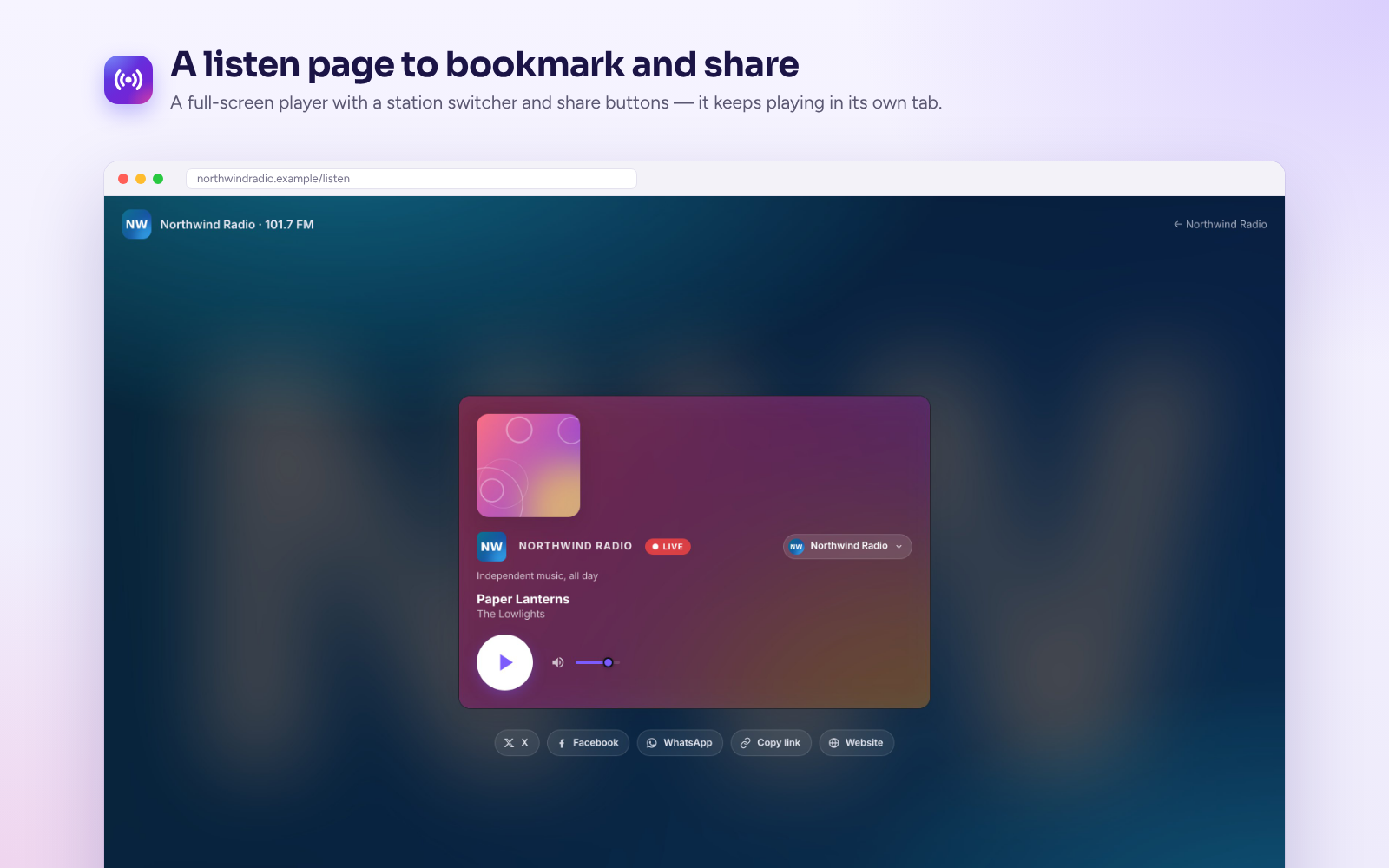
- Listen page – a full-screen player with share buttons and a station switcher. It opens in its own tab, so the music keeps playing while visitors browse your site.
- Station pages and directory – every station gets its own page, and a directory lists them all with search and genre filters.
- External players – playlist links (.m3u and .pls) for apps such as VLC.
- On-air graphics – a transparent now-playing overlay for OBS and vMix, and a plain-text feed for studio screens and signage.
- Share anywhere – paste a station page link into another WordPress site and it shows the player.
Works with your site
- Block editor – Player, Now playing, Listen button, Station and Station list blocks, plus ready-made patterns for a hero player, a sidebar box and a station landing page.
- Page builders – native widgets and modules for Elementor, Divi 4 and Divi 5; a Player element for Beaver Builder and Bricks; shortcodes for Breakdance, Oxygen and any other builder.
- Shortcodes and classic widgets –
[streamsera id="12"],[streamsera_now_playing],[streamsera_listen_button],[streamsera_station]and[streamsera_stations]. - Any theme, classic or block, on single sites and multisite networks.
Easy to run
- Setup wizard – paste your stream link and get a working station and player in a few minutes.
- Dashboard – which stations are on air, what’s playing and what to set up next, with notices when something needs attention (for example a stream that won’t play on a secure site).
- Light on your stream server – your website checks what’s playing on a timer (every 15 seconds by default) and shares it with every listener, instead of every visitor asking your server.
- Export and import – move stations, players and settings to another site.
- Private by default – no WPSera analytics, no listener tracking, no cookies of its own. See External services and Privacy below.
Who it’s for
Internet and community radio, college and student stations, station networks with several channels, DJs and live shows, churches, mosques and community groups broadcasting live, and venues or event organizers with an audio stream.
Need more?
StreamSera Pro adds a show schedule with hosts, song requests and shout-outs, private listening statistics, a sticky player that can keep playing across pages, playlists and podcasts, recently played tracks, artwork lookup and more. Everything described above is free.
For developers: WP-CLI commands (wp streamsera), a REST API, PHP filters and a JavaScript API. See the FAQ for details.
Serviços externos
StreamSera does not call any service run by WPSera. It connects only to the services listed below.
1. Your stream server (the radio station’s streaming host)
- What it is and why: the Icecast, Shoutcast, HLS or DASH server whose stream addresses you enter for each station. It is needed to play the stream and to show the current song and listener count.
- When and what is sent:
- When a visitor presses play, the visitor’s browser requests the stream (and, for HLS/DASH, the media segments and timing address named in the stream’s manifest). The stream server receives the visitor’s IP address, browser user agent and normal request headers.
- About once a minute for each published station (while Keep it fresh when nobody listens is on, the default), while listeners are playing a station, and when you press “Detect” in the station editor, your WordPress server requests the stream’s status page or reads the first few kilobytes of the stream to get the song title. With Keep it fresh when nobody listens turned off, this only happens while someone is listening. The stream server receives your website server’s IP address and normal request headers. No visitor data is sent.
- Terms and privacy: the stream server is chosen by you and run by you or your streaming provider (for example AzuraCast, Radio.co, Zeno.FM or your own Icecast server), so its own terms of service and privacy policy apply. Check them with your provider.
2. Share buttons (X, Facebook, WhatsApp)
- What it is and why: the listen page and station pages show plain links that let a visitor share the page.
- When and what is sent: nothing is loaded from these sites when the page loads. Only when a visitor clicks a share link does their browser open the service, which receives the shared page address and title and the visitor’s normal browser data.
- X: terms of service, privacy policy.
- Facebook (Meta): terms of service, privacy policy.
- WhatsApp: terms of service, privacy policy.
All plugin scripts, styles and icons are served from your own site. The bundled hls.js and dash.js libraries contain web addresses such as XML namespace identifiers (for example http://schemas.xmlsoap.org/soap/envelope/); these are names inside the code and are never requested. dash.js’s default time server (time.akamai.com) is turned off; clock sync uses the stream’s own manifest or server.
The optional “Powered by StreamSera” link on players is off by default and only appears if you turn it on in Settings.
Privacidade
StreamSera does not record listeners: it stores no IP addresses, user names or cookies of its own, and keeps no listening statistics. To show what’s playing, your site caches metadata reported by your stream server. Stream providers and your hosting server may independently keep request logs.
StreamSera keeps a few listener preferences in the browser’s local storage, such as the volume. None of it is sent to your server or anyone else.
Créditos
StreamSera bundles these open-source libraries:
Instalação
- In your WordPress admin go to Plugins → Add New Plugin, search for “StreamSera” and click Install Now, then Activate. Or upload the
streamserafolder to/wp-content/plugins/and activate it on the Plugins screen. - After activation the setup wizard opens. Paste your stream URL: StreamSera checks it, detects the server type and creates your first station and player.
- To do it by hand: go to StreamSera → Stations, add a station with its stream URL, then StreamSera → Players to design a player in the builder.
- Add the player to a page with the StreamSera Player block, a page-builder widget or the shortcode shown in the builder (for example
[streamsera id="12"]), or turn on the listen page under StreamSera → Settings → General.
Requisitos
- WordPress 6.6 or newer, PHP 7.4 or newer.
- A stream URL from an Icecast, Shoutcast, HLS or DASH server. If your site runs on HTTPS, the stream should be HTTPS too, otherwise browsers block it.
Capturas de tela




Para desenvolvedores
Este é o seu plugin? Mostre os números.
Adicione um crachá ao vivo ao seu site, Documentos ou Readme do GitHub. Ele é atualizado por conta própria - nenhuma conta necessária.
Best StreamSera alternatives
All icecast plugins →




FAQ
StreamSera: quick answers
Respostas diretas, extraídas de dados ao vivo WordPress.org.
Fonte: WordPress.org
Is StreamSera free?
Yes. StreamSera is free to download and use from the official WordPress.org plugin directory.
Is StreamSera safe to use in 2026?
StreamSera is a solid plugin choice in 2026, with a few things worth checking first. It runs on 10+ sites and was last updated 3 weeks ago, and scores 66/100 on our health check.
How many websites use StreamSera?
StreamSera is active on 10+ WordPress websites and has been downloaded 304 times since it launched in November 2026. It was downloaded 308 times in the last 30 days.
Does StreamSera work with WordPress 7.1?
Yes. The developer has tested StreamSera up to WordPress 7.1.5, the latest release. It requires WordPress 6.6 or newer.
What PHP version does StreamSera need?
StreamSera requires PHP 7.4 or higher. Most hosts run PHP 8.x today, so it works on any modern WordPress hosting.
When was StreamSera last updated?
The latest version, 0.1.0, was released on November 7, 2026 (3 weeks ago).
Who makes StreamSera?
StreamSera is developed and maintained by WPSera.
What are the best alternatives to StreamSera?
The most popular alternatives to StreamSera are StreamCast (1K+ installs), Shoutcast Icecast HTML5 Rad… (900+ installs) and Radio Player Page (300+ installs).
Alimentado por PageForge
Um modelo e uma planilha. Uma página real para cada pesquisa.
PageForge Transforma cada linha de um CSV em uma página WordPress com seu próprio título, URL, SEO campos e esquema, construído no layout que você já desenhou. Gratuito em WordPress.org.
- CSV e XLSX, mais Google Sheets em Profissional e Empresarial
- Seu próprio título, URL, SEO campos e esquema para cada página
- Funciona com o editor de blocos, Elementor, Divi e Avada
- Gratuito em WordPress.org, sem cartão de crédito