


Scriberry
Scriberry writes your blog posts in your brand's voice and publishes the ones you approved — on the dates you picked. SEO and GEO.

Use com cautela
Scriberry works, but test it on a staging site before relying on it in 2026. Was last updated 2 months ago, and scores 60/100 on our health check.
- Testado com as últimas WordPress (7.1)
- Base de usuários pequenas (<10 instalações ativas)
- Muito poucos comentários até agora
Como ele se acumula?
Lado a lado em instalações, atualizações, avaliações e suporte



Downloads diários
Os picos de download geralmente seguem uma nova versão — cada site que atualiza automaticamente é um download.
Rankings
Where Scriberry stands todayWordPress.org Classificações de pesquisa
Posição ao vivo na pesquisa de plugins, top 100| Palavra chave | Posição |
|---|---|
| ai blog | >100 |
| content automation | >100 |
| Agendamento de conteúdo | >100 |
| SEO | >100 |
About Scriberry
From the official readme · v2026.2.0Descrição
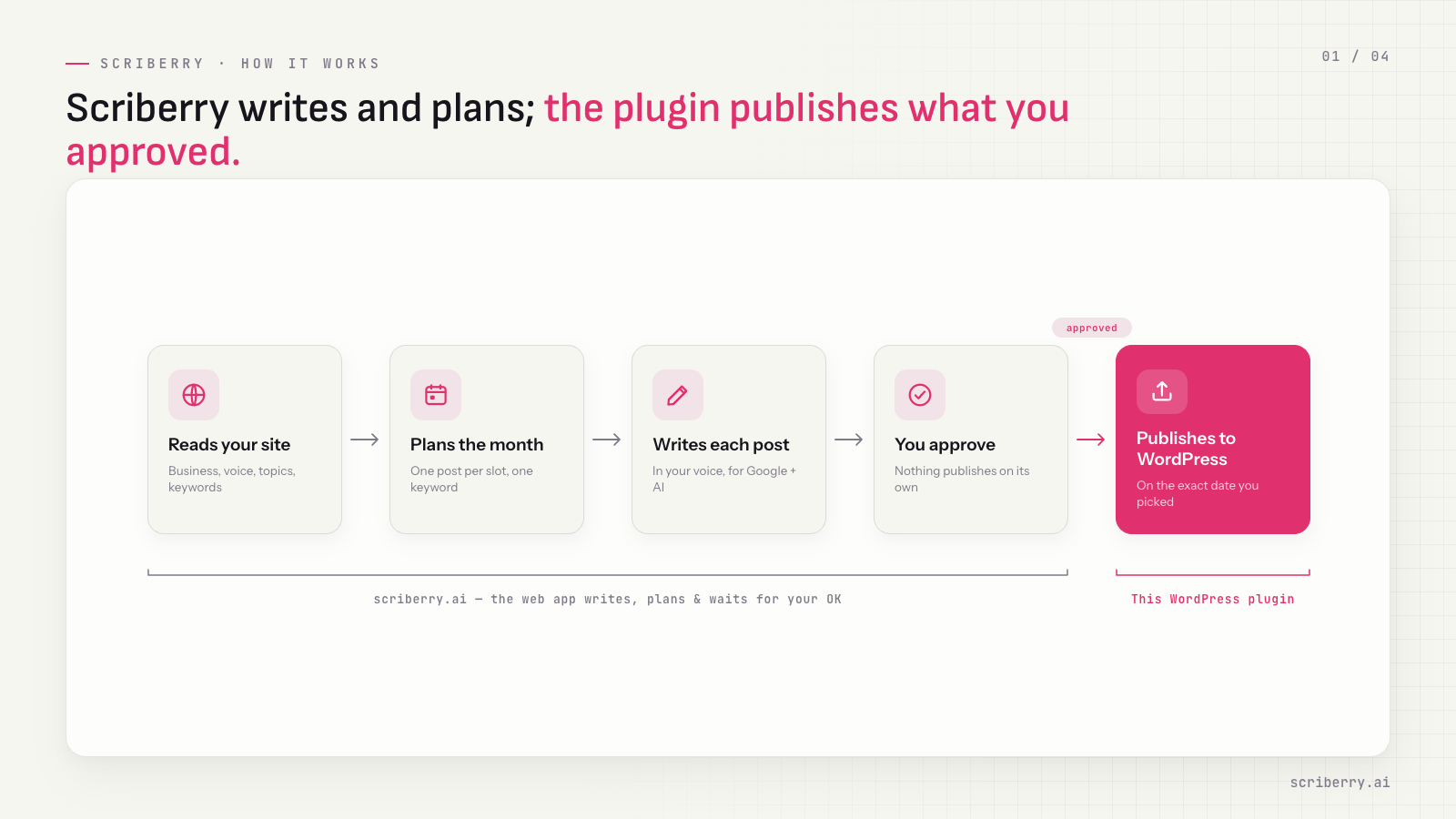
Scriberry is a web app that writes the posts for your business blog. This plugin is the last step — when you approve a post in Scriberry, the plugin publishes it on your WordPress on the date you picked. No logging into the dashboard on publish day, no copy-pasting drafts, no calendar reminders.
Scriberry publishes only what you have already approved. Each post is written in your site’s voice, because Scriberry reads your site first — your business, your tone, your topics, your language — before it writes a word.
Scriberry writes for both fronts of search: Google and Bing on one side, ChatGPT, Perplexity, Gemini, and Claude on the other. Being cited inside an AI answer is the new front door to your site, and Scriberry treats it as a first-class outcome. The slow, compounding kind of SEO — one post a week, on the keywords you chose, in the voice your readers already recognise.
What Scriberry does for your blog
- Reads your website to learn your business, your voice, your topics, and your keywords.
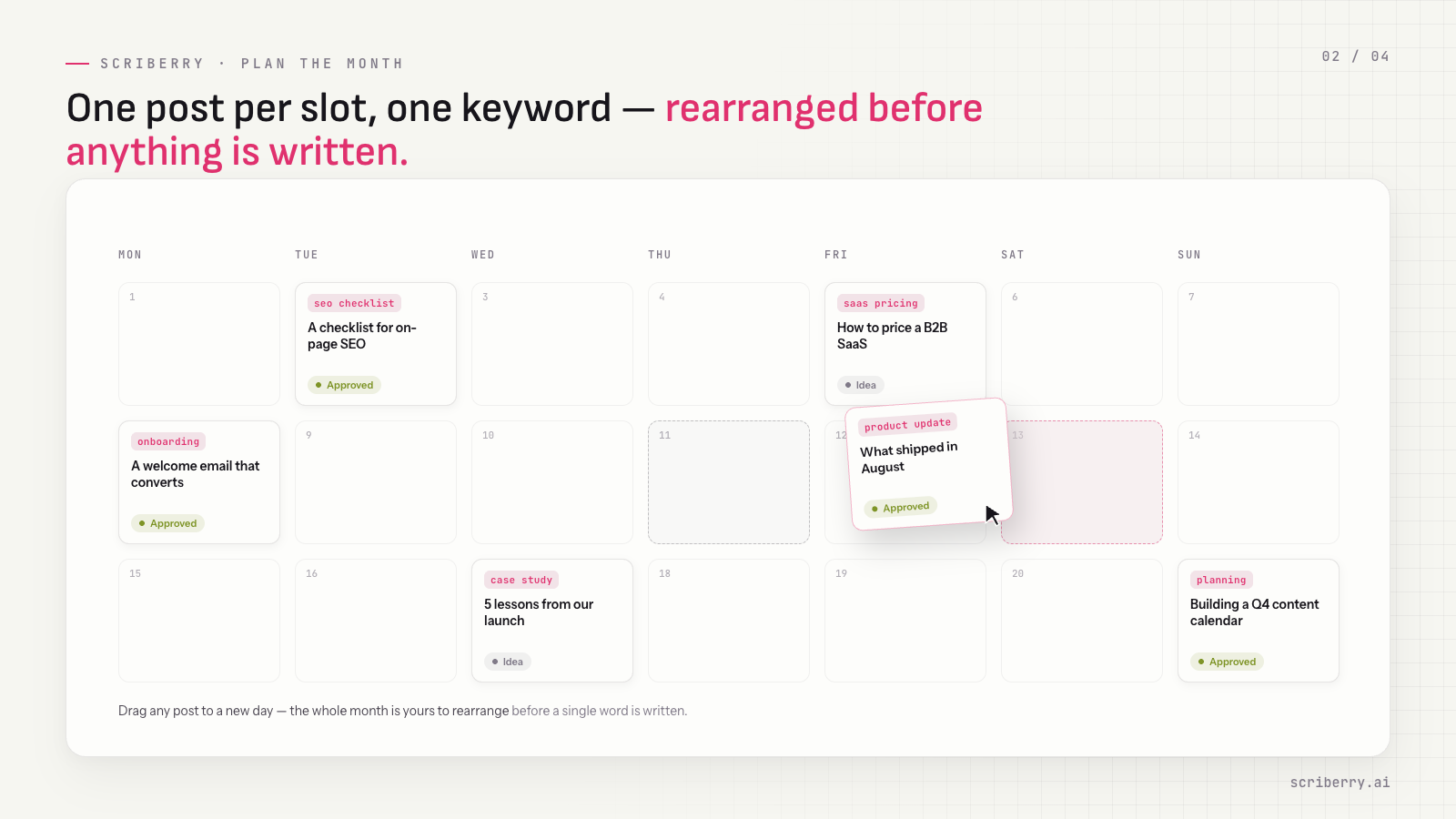
- Suggests post ideas for the upcoming month — one per planned publication slot, against a specific keyword.
- Proposes a publication schedule you can rearrange before anything is written.
- Writes each post in your voice, with images, against the keyword for that slot.
- Shows an SEO score on every draft and lets you request AI-assisted edits — a paragraph, a section, an image — until it reads right.
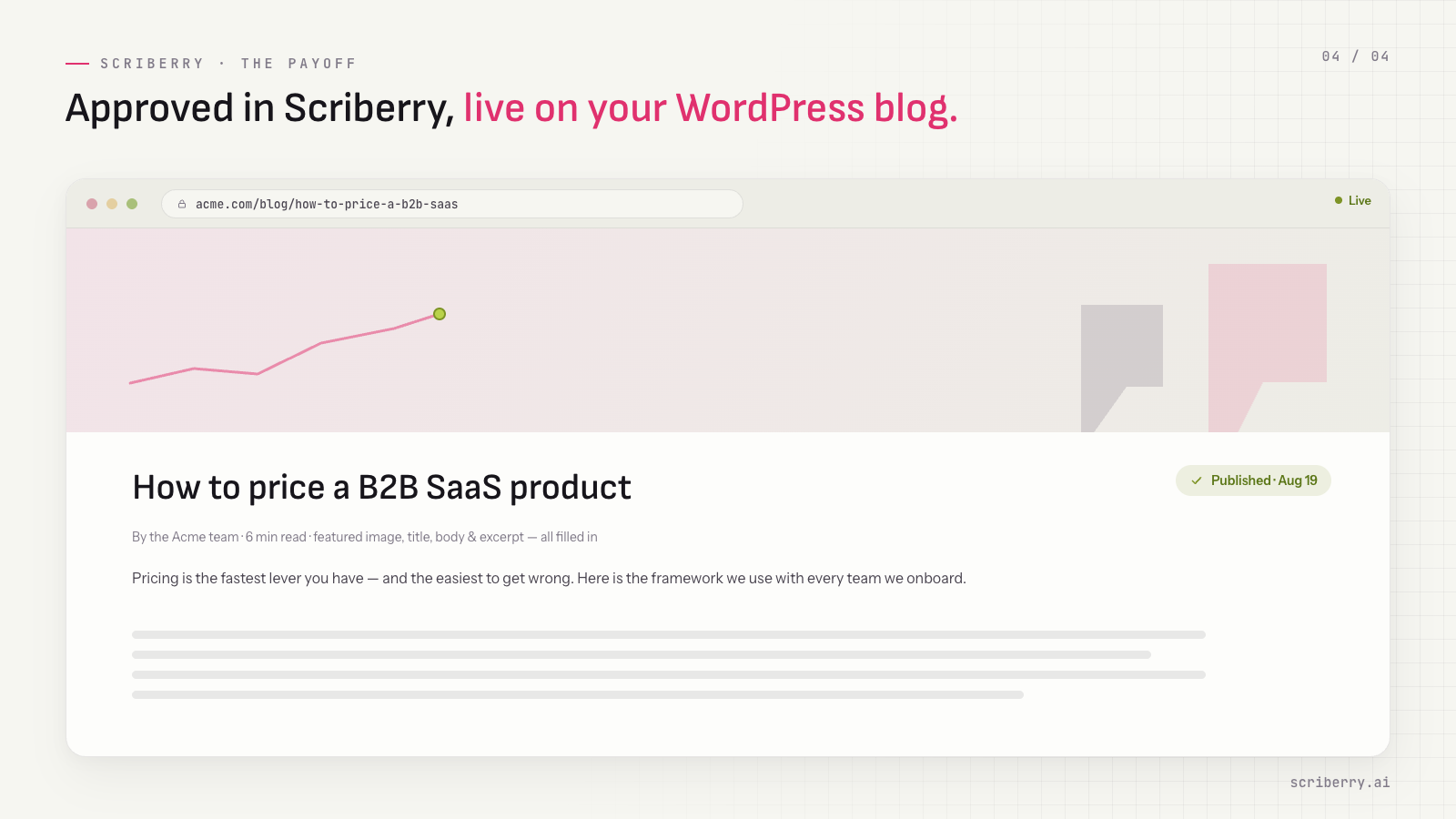
- Publishes the approved post to your WordPress on the date you picked.
What this plugin does
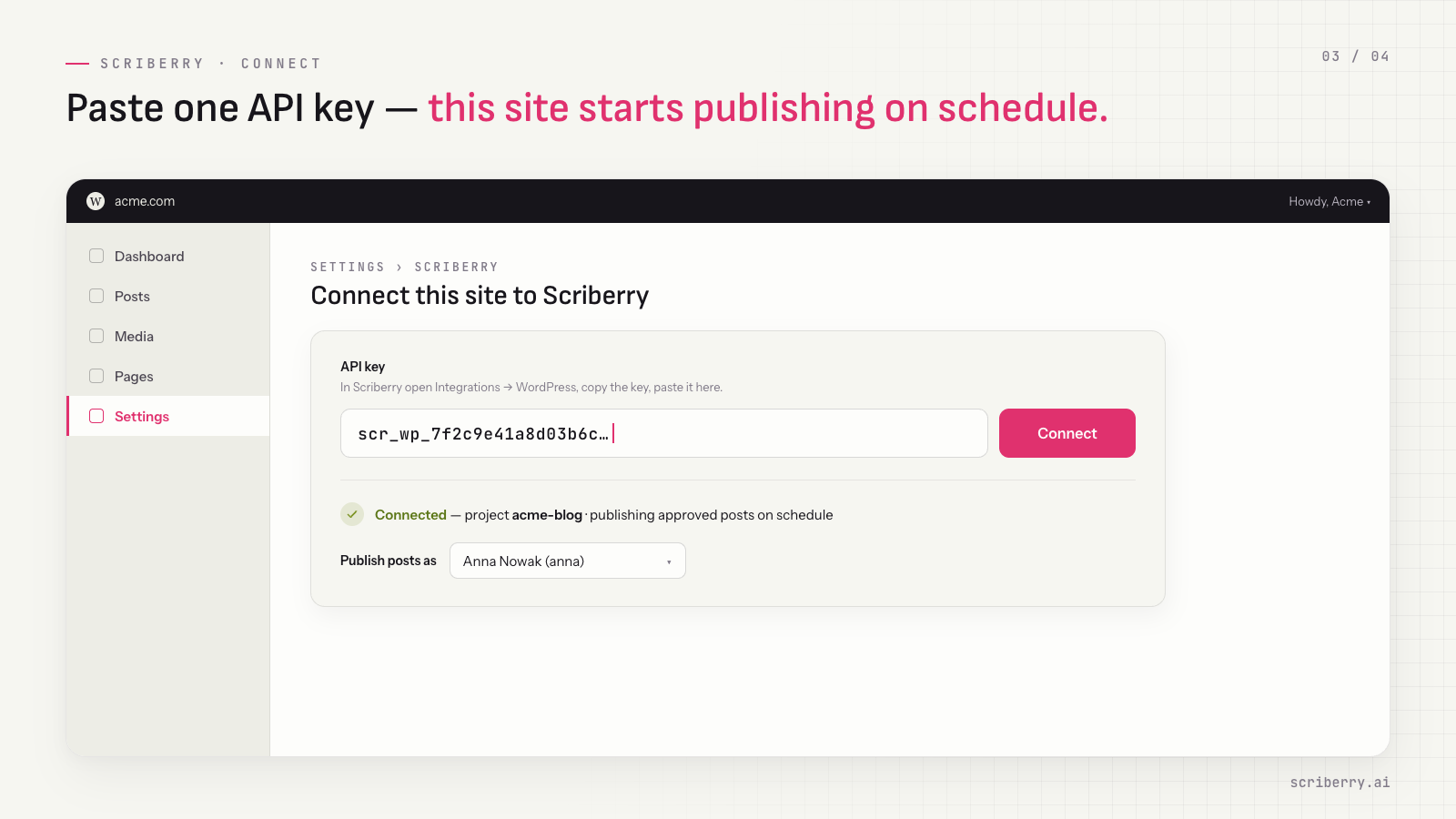
- Connects your WordPress to one Scriberry project with an API key you paste once.
- Checks Scriberry hourly for posts due today.
- Publishes approved posts as standard WordPress posts — title, body, excerpt, featured image, and the author you choose.
- Runs in the background through WP-Cron. No webhook to set up, no inbound traffic to your site.
- Talks to Scriberry over HTTPS only. Outbound traffic from your WordPress — nothing reaches into your admin from the outside.
You’ll need a Scriberry account
Sign up at https://scriberry.ai. The first three posts are written as a demo before you decide whether to keep publishing — no subscription required to see what Scriberry produces for your site.
If you keep going, one monthly subscription covers every site under your account, billed together on a single date. Add a second WordPress site later and it joins the same monthly bill on a prorated basis.
Privacidade
This plugin relies on Scriberry, a third-party service operated at https://scriberry.ai. To publish your approved posts, the plugin sends and receives data over HTTPS to api.scriberry.ai. Using it requires a Scriberry account, and your use of that service is governed by its terms and privacy policy:
- Terms of Service: https://scriberry.ai/terms
- Privacy Policy: https://scriberry.ai/privacy
What crosses the wire:
- Outbound — your project’s API key (it authenticates every request), an hourly request for posts due today, and a snapshot of your blog’s tag and category lists so Scriberry can pick relevant tags and a category for each post.
- Inbound — titles, bodies, excerpts, and featured images for posts you have already approved in Scriberry.
The plugin does not send any data about your site’s visitors or administrators, and it does not register any public endpoints on your WordPress.
Instalação
- Install and activate the plugin from the WordPress plugin directory, or upload the plugin folder to
/wp-content/plugins/. - Open Settings → Scriberry in your WordPress admin.
- Sign in at https://scriberry.ai, open the project you want to connect, go to Integrations → WordPress, and copy the API key.
- Paste the key into the plugin’s settings page, check the user posts are published as (it starts as you), and click Connect.
From here on, the plugin checks hourly for posts scheduled on your Scriberry project and publishes them on the dates you approved. Nothing needs to be exposed publicly — the plugin only makes outbound HTTPS requests, which means it works on shared hosting and behind a firewall without any extra configuration.
Log de Changes
Required update: earlier versions can no longer sync with Scriberry. Category mapping is removed; Scriberry picks categories automatically. You can now choose the author of published posts.
2026.2.0
- Scriberry now picks each post’s category from your blog’s categories, just like tags. Topic-to-category mapping is gone: pasting the key is the whole setup. Posts without a fitting category land in your WordPress default category.
- New required setting: the author of published posts, prefilled with the administrator who activated the plugin.
- Images inside the post body are now served from your Media Library instead of Scriberry’s servers.
- Deleting the plugin removes its settings, including the API key.
- Talks to the new Scriberry connector API. Earlier plugin versions stop syncing — update to keep publishing.
2026.1.0
- Initial release. Pairing with a Scriberry project via a one-time code. Hourly WP-Cron sync of approved posts. Publishes posts with title, body, excerpt, and featured image.
Capturas de tela
Para desenvolvedores
Este é o seu plugin? Mostre os números.
Adicione um crachá ao vivo ao seu site, Documentos ou Readme do GitHub. Ele é atualizado por conta própria - nenhuma conta necessária.
Best Scriberry alternatives
All ai blog plugins →



FAQ
Scriberry: quick answers
Respostas diretas, extraídas de dados ao vivo WordPress.org.
Fonte: WordPress.org
Is Scriberry free?
Yes. Scriberry is free to download and use from the official WordPress.org plugin directory.
Is Scriberry safe to use in 2026?
Scriberry works, but test it on a staging site before relying on it in 2026. Was last updated 2 months ago, and scores 60/100 on our health check.
How many websites use Scriberry?
Scriberry is active on <10 WordPress websites and has been downloaded 355 times since it launched in August 2026. It was downloaded 73 times in the last 30 days.
Does Scriberry work with WordPress 7.1?
Yes. The developer has tested Scriberry up to WordPress 7.1.5, the latest release. It requires WordPress 5.6 or newer.
What PHP version does Scriberry need?
Scriberry requires PHP 7.4 or higher. Most hosts run PHP 8.x today, so it works on any modern WordPress hosting.
When was Scriberry last updated?
The latest version, 2026.2.0, was released on October 8, 2026 (2 months ago).
Who makes Scriberry?
Scriberry is developed and maintained by scriberry.
What are the best alternatives to Scriberry?
The most popular alternatives to Scriberry are Outrank (1K+ installs), Lovarank (10+ installs) and RankPeak (<10 installs).
Alimentado por PageForge
Um modelo e uma planilha. Uma página real para cada pesquisa.
PageForge Transforma cada linha de um CSV em uma página WordPress com seu próprio título, URL, SEO campos e esquema, construído no layout que você já desenhou. Gratuito em WordPress.org.
- CSV e XLSX, mais Google Sheets em Profissional e Empresarial
- Seu próprio título, URL, SEO campos e esquema para cada página
- Funciona com o editor de blocos, Elementor, Divi e Avada
- Gratuito em WordPress.org, sem cartão de crédito