


RioVizual — Table Blocks for Comparison, Pricing and Pros & Cons
RioVizual is the all-in-one Gutenberg table plugin designed for creating comparison tables, pricing tables, and pros & cons boxes directly in the block editor.

Escolha sólida
RioVizual is a solid plugin choice in 2026, with a few things worth checking first. It runs on 1K+ sites, is rated 4.6/5 and was last updated 5 months ago, and scores 69/100 on our health check.
- Momentum — downloads up 40.4% vs the previous 30 days
Como ele se acumula?
Lado a lado em instalações, atualizações, avaliações e suporte



Downloads diários
Os picos de download geralmente seguem uma nova versão — cada site que atualiza automaticamente é um download.
Rankings
Where RioVizual stands todayWordPress.org Classificações de pesquisa
Posição ao vivo na pesquisa de plugins, top 100| Palavra chave | Posição |
|---|---|
| blocos | >100 |
| comparison table | #16 |
| pricing table | #25 |
| table | #49 |
| Table Builder | #54 |
Adoção da versão
Compartilhamento de sites ativos por lançamento.
Divisão de classificação
★★★★★★★★★★ 4.6 from 12 reviews
About RioVizual
Do Readme oficial · v3.0.2Descrição
RioVizual is the all-in-one Gutenberg table plugin designed for creating comparison tables, pricing tables, and pros & cons boxes directly in the block editor.
It allows you to drag and drop elements to build customizable, responsive & SEO-friendly tables with multiple columns and rows. With advanced styling and formatting options, RioVizual helps enhance user engagement and boost conversion.
Get Pro | View Table Builder Demo | View Pricing Table Demo | View Pros & Cons Demo | Read Documentation
RioVizual Blocks (More Coming Soon!)
RioVizual includes the following highly customizable Gutenberg blocks:
-
Table Builder Block: Create fully customizable and responsive tables with drag-and-drop functionality in the Gutenberg editor. (Learn More)
-
Pricing Table Block: Easily compare pricing plans for your products or services with customizable pricing tables. (Learn More)
-
Pros & Cons Block: Highlight the benefits and drawbacks of products or services with attractive pros and cons tables. (Learn More)
With RioVizual, you can also access a library of pre-designed table templates, streamlining the process of creating stunning comparison tables, pricing tables, and pros & cons boxes in the Gutenberg block editor.
Why You Should Use RioVizual?
Easy Drag-and-Drop Interface: Create comparison tables, pricing tables, and pros & cons boxes in minutes with Gutenberg.
No Coding Skills Needed: Build professional, customizable tables without any coding knowledge.
Extensive Template Library: Choose from 50+ pre-designed templates for quick table creation.
Fully Responsive Design: Ensure tables look great on all devices, from desktop to mobile.
Advanced Customization Options: Customize fonts, colors, borders, and more to match your website’s design.
Optimized for Performance and SEO: Built with clean, optimized code and structured data support.
RioVizual Table Builder Block Includes
-
Drag-and-drop table builder specifically for the Gutenberg block editor.
-
12 versatile table elements (text, image, button, list, icon, shortcode, media & text, icon list, icon button, dual button, star rating, divider) to create dynamic tables in WordPress. (More elements coming soon!)
-
29 pre-designed table templates to jumpstart your table creation process.
-
Right-click options for adding, deleting, copying, cutting, pasting, duplicating, and moving elements.
-
Comprehensive cell manipulation: insert, delete, copy, cut, paste, and more for rows and columns.
-
Design flexibility: style cells and elements individually or in groups.
-
Dynamic cell type adjustment: switch between body, header, or footer cells with ease.
-
Fully responsive design: make tables adapt to different screen sizes automatically.
-
Improved mobile viewing: make tables scrollable or stackable for smaller screens.
-
Customizable cell width: set fixed or flexible widths for all cells.
-
Freeze options: lock the first row or column for better navigation.
-
Cell merging and splitting: merge multiple cells into one or split them back while preserving content.
-
HTML tag customization: switch cell tags between “td” and “th.”
-
Multi-cell selection: use Ctrl to select multiple cells or Shift for selecting a range.
-
Extensive border settings: choose from different border types (solid, dotted, dashed, double, groove, ridge, inset, outset) for each cell.
RioVizual Pricing Table Block Includes
-
25 pre-designed pricing table templates for quick deployment.
-
Responsive column controls for adaptable and mobile-friendly layouts.
-
Flexible row and column management: easily add, delete, or duplicate rows and columns.
-
7 core elements: title, price, features, star rating, divider, media and call-to-action button for compelling pricing tables.
-
Ribbon settings with two preset design options for highlighting offers.
-
Equal column height adjustment to ensure a uniform look.
-
Right-click functionality for quick manipulation of elements (add, delete, copy, cut, paste, duplicate, move).
-
Multi-cell selection for bulk operations.
-
Automatic mobile responsiveness for flawless performance on any device.
-
Custom styling options: personalize each element with global or custom design settings.
-
Pricing Toggle
-
Icon support, Tooltip, Badge with features element
-
Original price, Price Suffix support, Dynamic Price Slider with pricing element
-
Media(img/icon) support with title element.
-
Icon support with button element.
-
Background image support for column.
-
Featured column support.
-
3 more style for ribbon.
RioVizual Pros & Cons Block Includes
-
13 pre-designed templates to easily create pros and cons boxes.
-
Built-in Pros and Cons Schema support to enhance SEO.
-
Icon customization for a personalized look.
-
Customization for box, title, and body.
-
Flexible styling: customize the box, title, and body to match your design.
-
Mobile support: optimized for vertical boxes on small screens.
-
Header and Body Item Icon Placement
-
Title Separator for header
-
Flexible Header Positioning
-
Enable Stripe on Body Items
-
Advanced Border Styles with 8 Stunning Design Pattern
-
Extra Design Flexibility in Style Options
Creating Tables in the Gutenberg Block Editor Has Never Been Easier
Creating tables like comparison tables, pricing tables, and pros & cons tables with a WordPress table plugin has never been easier. With RioVizual, it only takes 4 simple steps:
- Step 1 – Add a RioVizual Block
To insert a table into a WordPress post or page, simply add the desired RioVizual block from the Gutenberg block editor.
- Step 2 – Provide Table Contents
Choose to create a table from scratch or use one of the pre-made layouts by entering your table contents.
- Step 3 – Customize Your Table
Customize the table’s columns, colors, fonts, and other settings to match your design preferences. Make adjustments as needed to create a table that perfectly suits your needs.
- Step 4 – Publish Your Table
Once you’re satisfied with the table’s design, click “Publish” or “Update” to make it live on your post or page.
Helpful Resources
- How to Create a Comparison Table in WordPress Gutenberg Block Editor?
- How to Create a Pricing Table in WordPress Gutenberg Block Editor?
- How to Create a Pros & Cons Table in WordPress Gutenberg Block Editor?
Love RioVizual?
Instalação
Installing the RioVizual plugin is quick and easy. Follow these steps:
- Install the plugin using one of these options:
- From the WordPress Admin Panel: Go to Plugins -> Add New, search for “RioVizual,” and click the Install button.
- Manually via WordPress Admin Panel: Download the ZIP file from the WordPress plugins repository. Go to Plugins -> Add New -> Upload Plugin, select the downloaded ZIP file, and upload it.
- Manually via FTP: Download the ZIP file, extract it, and upload the extracted folder to the /wp-content/plugins/ directory of your WordPress installation using an FTP client.
- Once installed, activate the plugin through the Plugins menu in WordPress.
- You’re all set! Begin creating tables with RioVizual in the Gutenberg block editor.
Log de Changes
Lançamento inicial
3.0.2 – 28 June 2026
- Security: Hardened REST endpoints, bulk actions, and CSS output
- Fixed: Minor bugs
3.0.1 – 23 May 2026
- Added: Support for WordPress Version 7
3.0.0 – 05 January 2026
- Introduced: Breadcrumb Navigation in Table Builder Block and Pricing Table Block
- Introduced: Show / Hide component popup in Style Tabs for all elements
- Introduced: Link/Unlink Style Settings in Pros and Cons Block for Quick and Easy Design Access
- Added: Move Column Left/Right Settings in Pricing Table Block
- Added: Global Style panel access button in block control bar and top of inspector panel for table builder and pricing table
- Added: New Initial Design template in Pros and Cons Block
- Added: Table Settings Button in Pros and Cons Block
- Added: Icon Rotation Setting
- Added: Button Size Control Settings
- Added: Spacing Support for Price in Pricing Table Block
- Improved: Settings Panel appearance in inspector panel on user click event
- Improved: Separate Global Style Settings Panel
- Improved: New UI for some Settings Components
- Improved: Bring essential settings on elements general tab for quick design
- Improved: Reset Button appearance only with table selection
- Improved: Bring Row selection panel with each column for quick access in Pricing Table Block
- Improved: New Column Control settings in Pricing Table Block
- Improved: Dashboard UI
- Removed: Global Style Tab from each elements style tab panel
- Removed: delete and add options from block editor control bar in table builer and pricing table block
- Removed: Column and Row add/delete options from block editor table settings context menu
- Removed: Some design settings component from some elements custom style tab panel to bring them upfront
- Removed: Quick delete icon from column and row selection in table builder
- Removed: Outline tab, search option, duplicate, delete, export table options from Dashboard Table Create Panel
- Fixed: Equal Column Height issues on frontend
- Fixed: Minor bugs in style setting
2.3.4 – 17 December 2025
- Improved: Security and PHP coding standards (PHPCS compliance)
- Improved: Prefixed all classes, functions, and variables to prevent conflicts
- Improved: Proper escaping of output and dynamic handling of URLs, paths, and plugin version
- Fixed: Minor bugs and performance issues
2.3.3 – 09 December 2025
- Added: Support for WordPress 6.9
2.3.2 – 10 August 2025
- Fixed: Plugin conflict with Riovizual and other third-party plugins.
- Fixed: CSS styling issues in various third-party page builder editors.
Capturas de tela
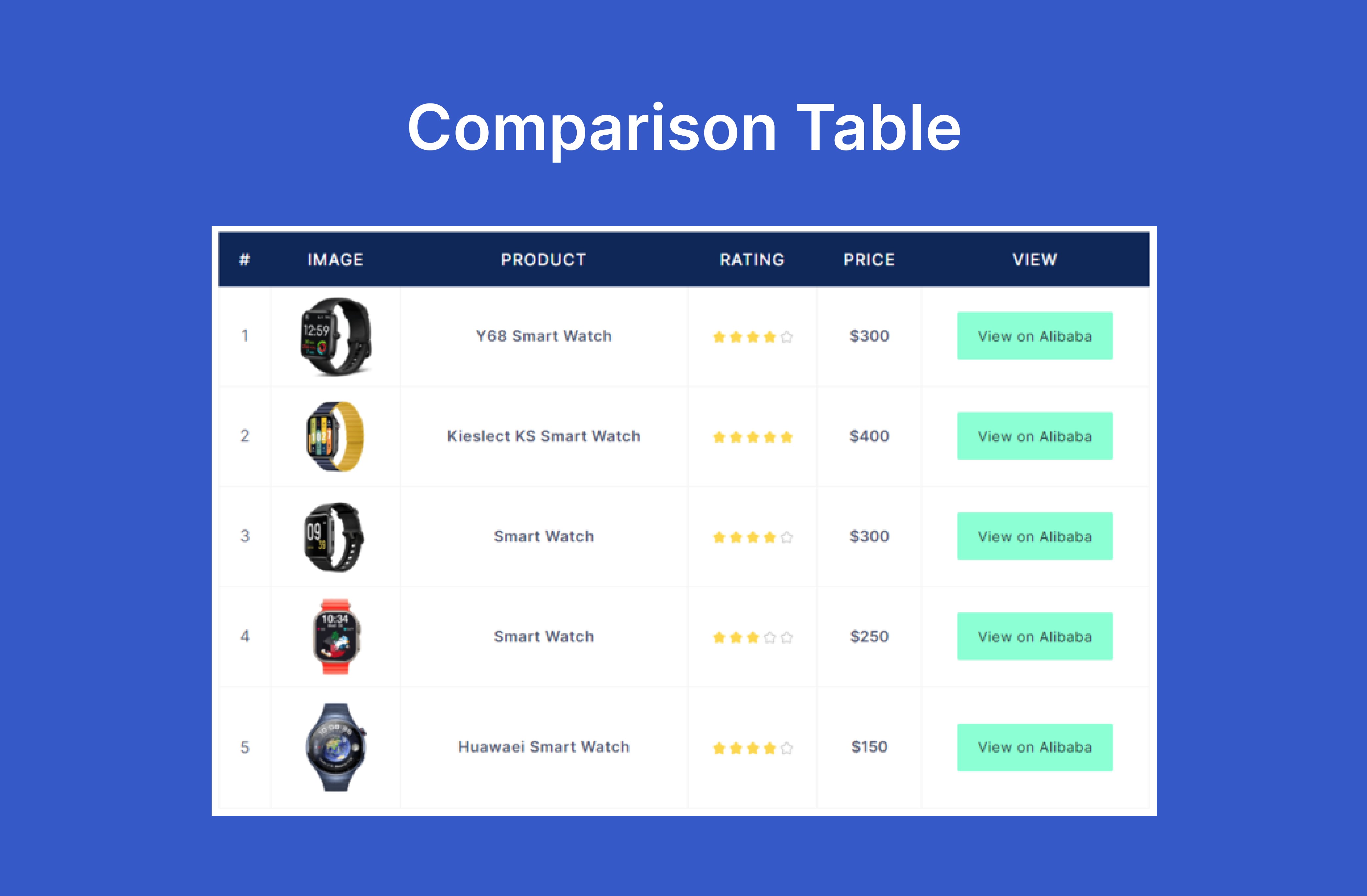


Para desenvolvedores
Este é o seu plugin? Mostre os números.
Adicione um crachá ao vivo ao seu site, Documentos ou Readme do GitHub. Ele é atualizado por conta própria - nenhuma conta necessária.
Best RioVizual alternatives
Plugins de todos os blocos →





FAQ
RioVizual: quick answers
Respostas diretas, extraídas de dados ao vivo WordPress.org.
Fonte: WordPress.org
Is RioVizual free?
Yes. RioVizual is free to download and use from the official WordPress.org plugin directory.
Is RioVizual safe to use in 2026?
RioVizual is a solid plugin choice in 2026, with a few things worth checking first. It runs on 1K+ sites, is rated 4.6/5 and was last updated 5 months ago, and scores 69/100 on our health check.
How many websites use RioVizual?
RioVizual is active on 1K+ WordPress websites and has been downloaded 32,516 times since it launched in May 2023. It was downloaded 667 times in the last 30 days.
Does RioVizual work with WordPress 7.1?
RioVizual is officially tested up to WordPress 7.0.9, while the latest release is 7.1.5. It may still work, but try it on a staging site first.
What PHP version does RioVizual need?
RioVizual requires PHP 7.4 or higher. Most hosts run PHP 8.x today, so it works on any modern WordPress hosting.
When was RioVizual last updated?
The latest version, 3.0.2, was released on June 28, 2026 (5 months ago).
Who makes RioVizual?
RioVizual is developed and maintained by wprio.
What are the best alternatives to RioVizual?
The most popular alternatives to RioVizual are Spectra Legacy (1M+ installs), Kadence Blocks (600K+ installs) and Extendify (500K+ installs).
Alimentado por PageForge
Um modelo e uma planilha. Uma página real para cada pesquisa.
PageForge Transforma cada linha de um CSV em uma página WordPress com seu próprio título, URL, SEO campos e esquema, construído no layout que você já desenhou. Gratuito em WordPress.org.
- CSV e XLSX, mais Google Sheets em Profissional e Empresarial
- Seu próprio título, URL, SEO campos e esquema para cada página
- Funciona com o editor de blocos, Elementor, Divi e Avada
- Gratuito em WordPress.org, sem cartão de crédito