


Purgify – Clear Cache, Transients & Database
Clear all caches in one click, clear transients, and purge individual database rows by key, from the admin toolbar or Tools → Purgify.

Escolha sólida
Purgify is a solid plugin choice in 2026, with a few things worth checking first. It runs on 20+ sites, is rated 5/5 and was last updated 1 month ago, and scores 70/100 on our health check.
- Testado com as últimas WordPress (7.1)
- Base de usuários pequenas (mais de 20 instalações ativas)
- Muito poucos comentários até agora
Como ele se acumula?
Lado a lado em instalações, atualizações, avaliações e suporte



Downloads diários
Os picos de download geralmente seguem uma nova versão — cada site que atualiza automaticamente é um download.
Rankings
Where Purgify stands todayWordPress.org Classificações de pesquisa
Posição ao vivo na pesquisa de plugins, top 100| Palavra chave | Posição |
|---|---|
| esconderijo | >100 |
| clear cache | #38 |
| banco de dados | >100 |
| Purge | #88 |
| transient | #13 |
Adoção da versão
Compartilhamento de sites ativos por lançamento.
Divisão de classificação
★★★★★ ★★★★★ 5 de 1 comentários
About Purgify
From the official readme · v1.1.0Descrição
Purgify – Clear Cache, Transients & Database gives you one place to clear every cache on your site, clear WordPress transients, and purge leftover database rows (temporary settings, plugin caches, test data) without opening phpMyAdmin.
It has three tools:
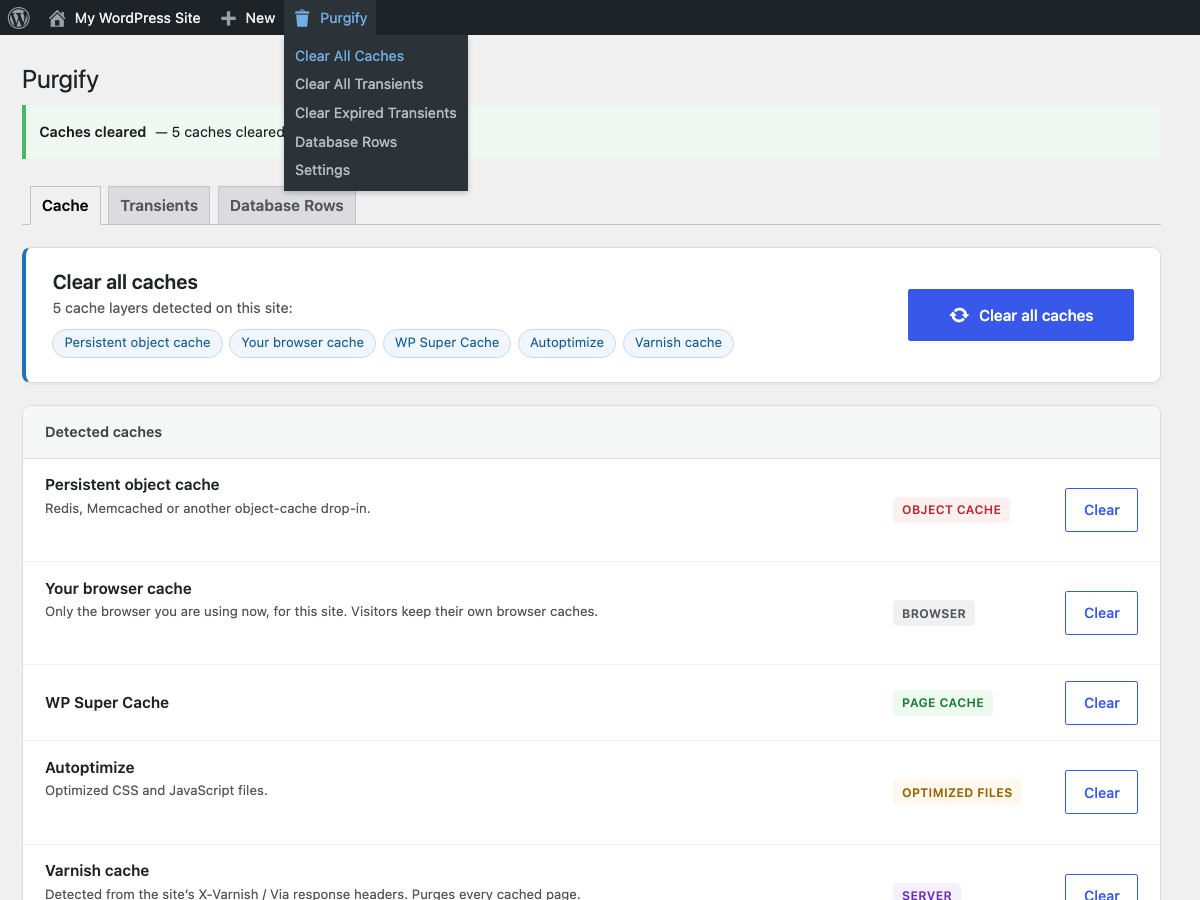
- Cache clear detects the cache layers on your site (page cache plugins, object cache, hosting cache, optimized CSS/JS, your browser) and clears them all with one click, or one at a time.
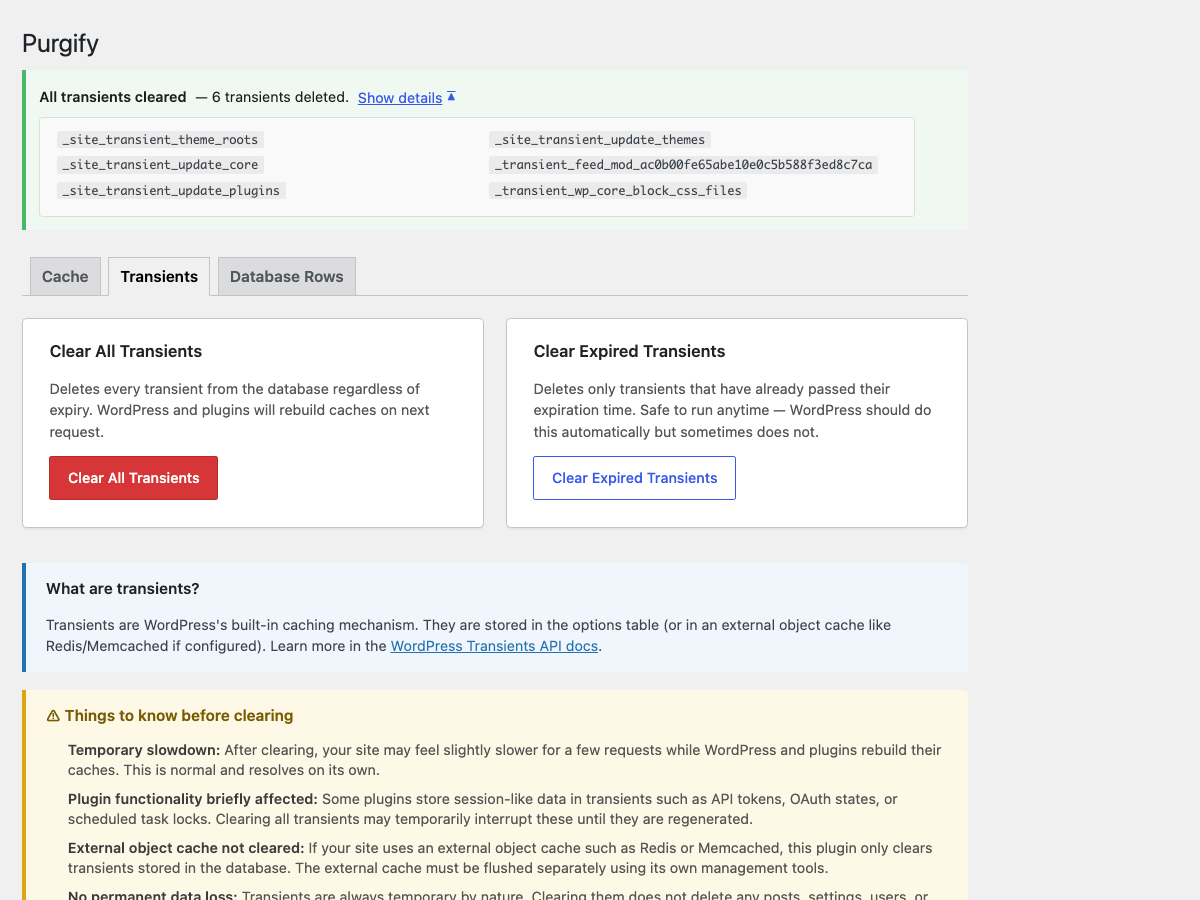
- Transient purge clears all transients or only expired ones, then lists every key it deleted.
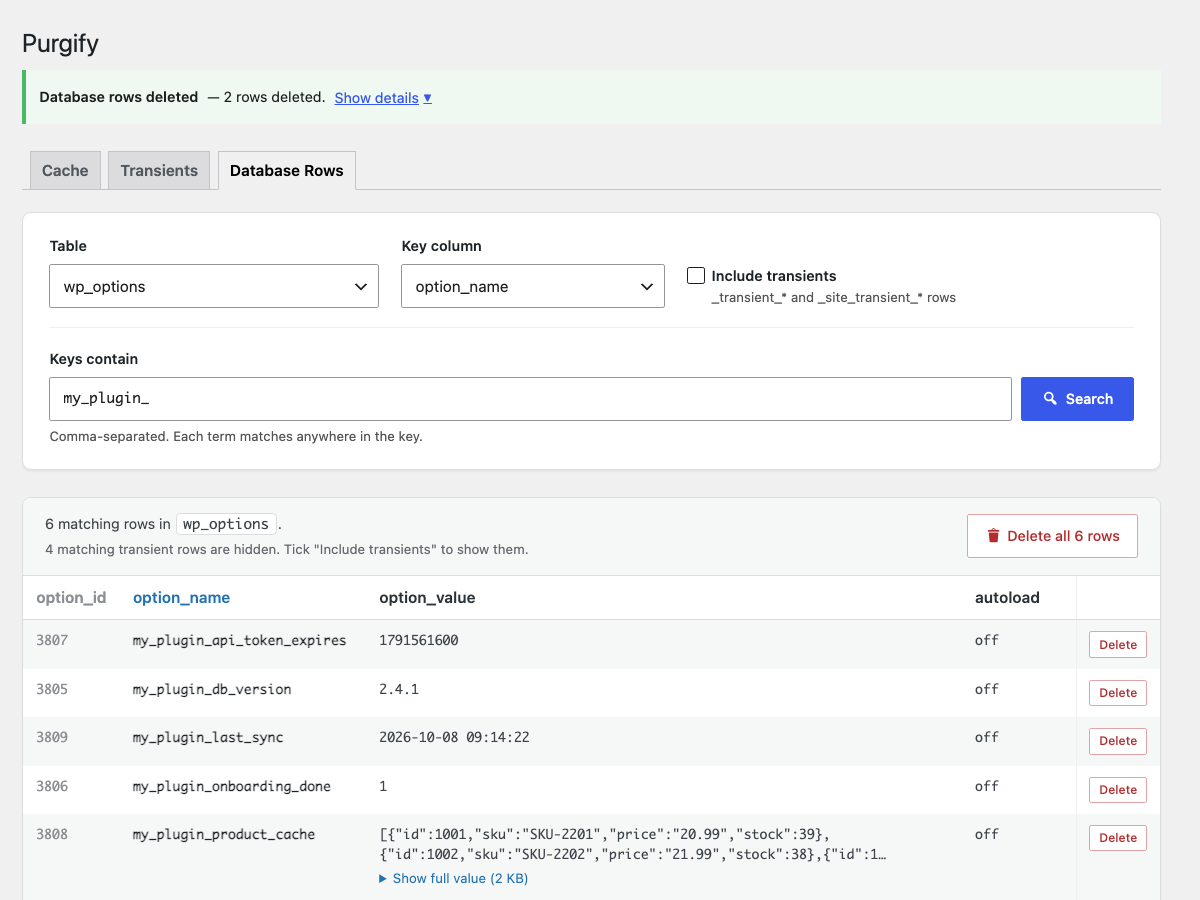
- Database purge finds rows in any of your site’s tables whose key contains your search terms, shows them like phpMyAdmin, and lets you delete them one at a time or all at once. It’s ideal for resetting a plugin’s temporary settings or caches while you test a feature again and again.
Recursos
- Admin Toolbar menu — clear all caches, clear transients or open the database purge from any admin screen or front-end (if logged in as admin) with one click.
- Tools page (
Tools → Purgify) — tabs for Cache (the default), Transients and Database Rows, with built-in guidance. - Cache clear (
Tools → Purgify → Cache) — shows every cache layer detected on your site with one “Clear all caches” button and a Clear button per layer. Purgify calls each plugin’s own clear function, so nothing is deleted behind the plugin’s back. Supported:- Page cache plugins: WP Super Cache, W3 Total Cache, WP Rocket, LiteSpeed Cache, WP Fastest Cache, Cache Enabler, Breeze, WP-Optimize, Hummingbird, Comet Cache, Swift Performance, FlyingPress.
- Hosting, CDN and server caches: Varnish (detected automatically from the response headers), SiteGround Speed Optimizer, WP Engine, Pantheon, Cloudflare, Proxy Cache Purge (Varnish), Nginx Helper, PHP OPcache.
- Object cache: Redis, Memcached or any persistent object-cache drop-in.
- Optimized files: Autoptimize, Elementor generated CSS.
- Your own browser’s cache for the site (via the
Clear-Site-Dataheader). - Developers can add more with the
purgify_cache_providersfilter.
- Transient purge (
Tools → Purgify → Transients) — after clearing, an admin notice tells you exactly how many transients were deleted, with an expandable list of every key that was removed. Two clear modes:- Clear All — removes every transient regardless of expiry.
- Clear Expired — removes only transients whose expiry time has passed (safe, routine cleanup).
- Database purge (
Tools → Purgify → Database Rows) — pick a table (defaults to the options table), enter comma-separated key fragments, and see every matching row with all its columns. Delete rows one at a time or all shown rows at once.- Searches match anywhere in the key (
LIKE %term%) and show at most 100 rows. Deletes are limited to the rows shown, so there is no way to empty a table. - Transient rows are left out of searches unless you tick “Include transients”, and the results say how many were hidden.
- Only this site’s tables (with the WordPress table prefix) are listed.
- Core options that WordPress needs (site URL, active plugins, theme, user roles and similar) are protected and cannot be deleted.
- Object caches are cleared for deleted options and post, user, term and comment meta, so WordPress stops using the old values straight away.
- Your last search is remembered, so a repeat test cycle is one click from the toolbar.
- Searches match anywhere in the key (
- Nonce-protected actions — all actions are protected against CSRF, and every delete asks for confirmation.
- Translations ready — ships with translations for Spanish, French, German, Portuguese (Brazil), and Italian.
- Lightweight — no external dependencies, no database tables, no settings. The only saved data is each user’s last Database Rows search and a few short-lived transients, all removed on uninstall.
When should I clear transients?
- After updating plugins or themes whose caches are stale.
- When debugging unexpected cached content.
- As routine maintenance to keep the options table clean (use Clear Expired).
- After migrating or restoring a database.
When should I clear caches?
- After changing a theme, plugin settings or CSS, when visitors still see the old version.
- After deploying code changes (also clears PHP OPcache).
- When an optimization plugin serves stale combined CSS or JavaScript.
When should I purge database rows?
- To reset a plugin’s saved settings, onboarding flags or caches so you can test its first-run behaviour again.
- To remove leftover options or meta from plugins you have already deleted.
- To clear a stuck flag or lock that a plugin stored in the options table.
Privacidade
This plugin does not collect, store, or transmit any personal data, and it does not contact any third-party service.
To detect and clear a Varnish cache, Purgify sends HTTP requests only to your own site: one request to your homepage (repeated at most every 12 hours) to read its cache headers, and a PURGE request when you clear the cache. When you clear caches, the cache plugins you have installed (for example Cloudflare) may contact their own services, exactly as they do when you use their own clear buttons.
Instalação
- Upload the
purgifyfolder to/wp-content/plugins/. - Activate the plugin through Plugins → Installed Plugins.
- Use the Purgify menu in the admin toolbar from any screen, or go to Tools → Purgify.
Log de Changes
Adds one-click cache clearing for popular cache plugins and hosts, and a database purge to find and delete individual database rows by key.
1.1.0
- New: Cache clear (
Tools → Purgify → Cache, and “Clear All Caches” in the admin toolbar). Detects and clears 24 cache layers, including WP Super Cache, W3 Total Cache, WP Rocket, LiteSpeed Cache, WP Fastest Cache, Cache Enabler, Breeze, WP-Optimize, Hummingbird, Swift Performance, FlyingPress, SiteGround, Varnish, WP Engine, Pantheon, Cloudflare, Proxy Cache Purge, Nginx Helper, Autoptimize, Elementor CSS, persistent object caches, PHP OPcache and your browser cache. Clear them all at once or one at a time. - New: Database purge (
Tools → Purgify → Database Rows). Search any of the site’s tables by comma-separated key fragments, review the matching rows with all their columns, and delete them one at a time or all shown rows at once (up to 100 per search). - New: “Include transients” option for database searches. Transient rows are hidden by default, and the results say how many were left out.
- New: Essential core options (site URL, home, active plugins, theme, user roles, database version) are protected from deletion.
- New: Object caches are cleared for deleted options and post, user, term and comment meta, so old values are not served from cache.
- New: “Database Rows” link in the admin toolbar menu, which opens your last search.
- Changed: Plugin renamed to “Purgify – Clear Cache, Transients & Database”. The Tools page now opens on the Cache tab.
- Improved: Translations updated for Spanish, French, German, Portuguese (Brazil) and Italian, including strings that were previously untranslated.
- Improved: Admin CSS and JS are versioned by file time, so browsers never keep stale styles after an update.
- Fixed: The “Show details” arrow in the result notice now points up when the list is expanded.
- Tested up to WordPress 7.1.
1.0.1
- Fixed: Plugin name header special character causing incorrect activation status in Add Plugins screen.
- Improved: Toolbar actions now redirect back to the originating page instead of always going to settings.
- Improved: Added icon and banner assets.
1.0.0
- Lançamento inicial.
Capturas de tela
Para desenvolvedores
Este é o seu plugin? Mostre os números.
Adicione um crachá ao vivo ao seu site, Documentos ou Readme do GitHub. Ele é atualizado por conta própria - nenhuma conta necessária.
Best Purgify alternatives
Todos os plugins de cache →



FAQ
Purgify: quick answers
Respostas diretas, extraídas de dados ao vivo WordPress.org.
Fonte: WordPress.org
Is Purgify free?
Yes. Purgify is free to download and use from the official WordPress.org plugin directory.
Is Purgify safe to use in 2026?
Purgify is a solid plugin choice in 2026, with a few things worth checking first. It runs on 20+ sites, is rated 5/5 and was last updated 1 month ago, and scores 70/100 on our health check.
How many websites use Purgify?
Purgify is active on 20+ WordPress websites and has been downloaded 583 times since it launched in June 2026. It was downloaded 111 times in the last 30 days.
Does Purgify work with WordPress 7.1?
Yes. The developer has tested Purgify up to WordPress 7.1.5, the latest release. It requires WordPress 5.6 or newer.
What PHP version does Purgify need?
Purgify requires PHP 7.4 or higher. Most hosts run PHP 8.x today, so it works on any modern WordPress hosting.
When was Purgify last updated?
The latest version, 1.1.0, was released on October 17, 2026 (1 month ago).
Who makes Purgify?
Purgify is developed and maintained by Deepak Rajpal.
What are the best alternatives to Purgify?
The most popular alternatives to Purgify are WP Super Cache (1M+ installs), WP Fastest Cache (1M+ installs) and WP-Optimize (1M+ installs).
Alimentado por PageForge
Um modelo e uma planilha. Uma página real para cada pesquisa.
PageForge Transforma cada linha de um CSV em uma página WordPress com seu próprio título, URL, SEO campos e esquema, construído no layout que você já desenhou. Gratuito em WordPress.org.
- CSV e XLSX, mais Google Sheets em Profissional e Empresarial
- Seu próprio título, URL, SEO campos e esquema para cada página
- Funciona com o editor de blocos, Elementor, Divi e Avada
- Gratuito em WordPress.org, sem cartão de crédito