


WP-Optimize – Cache, compacte imagens, Minify & Clean Database para aumentar a velocidade e o desempenho da página
Get caching and more with this powerful cache plugin. Cache, optimize images, clean your database and minify for maximum performance.

Escolha segura
Yes — WP-Optimize is a safe, well-maintained plugin to use in 2026. It runs on 1M+ sites, is rated 4.8/5 and was last updated 2 days ago, and scores 95/100 on our health check.
- Um dos plugins mais usados na web: 1M+ sites ativos
- Loved by users — 4.8/5 from 2,617 reviews
- Desenvolvido ativamente — última atualização 2 dias atrás
- Testado com as últimas WordPress (7.1)
- Suporte responsivo — 86% dos tópicos recentes resolvidos
Como ele se acumula?
Lado a lado em instalações, atualizações, avaliações e suporte



Downloads diários
Os picos de download geralmente seguem uma nova versão — cada site que atualiza automaticamente é um download.
Rankings
Where WP-Optimize stands todayWordPress.org Classificações de pesquisa
Posição ao vivo na pesquisa de plugins, top 100| Palavra chave | Posição |
|---|---|
| esconderijo | #5 |
| caching | #3 |
| image cache | #2 |
| minify | #1 |
| performance cache | #2 |
Adoção da versão
Compartilhamento de sites ativos por lançamento.
Divisão de classificação
★★★★★★★★★★ 4.8 from 2,617 reviews
About WP-Optimize
From the official readme · v4.7.1Descrição
MORE THAN A CACHING PLUGIN
WP-Optimize is trusted by more than 1 million WordPress website owners to boost performance and reduce page load times to improve your site’s user experiences and SERP rankings in Google.
It does this in four clever ways:
1. It caches your site
Caching is the process of storing a temporary HTML version of your site on the server so it can be retrieved more quickly for the user.
It’s a sure-fire way to ensure web pages load at lightning-fast speed. Turn it on in just one click.
2. It compresses images
Large images can really impact page speed load times. WP-Optimize makes it easy to identify and compress images to your preferred lossy / lossless settings in a couple of clicks.
3. It cleans the database
Your WordPress database stores everything that you need, plus some things that you don’t. WP-Optimize cleans and optimizes the database to speed up your site and save server resources.
4. It minifies
On top of its three main features, WP-Optimize Cache also has the more advanced minification feature.
Together with caching, minification dramatically improves performance and page speed load time.
1. CACHE YOUR SITE
Turn on caching in just one click:
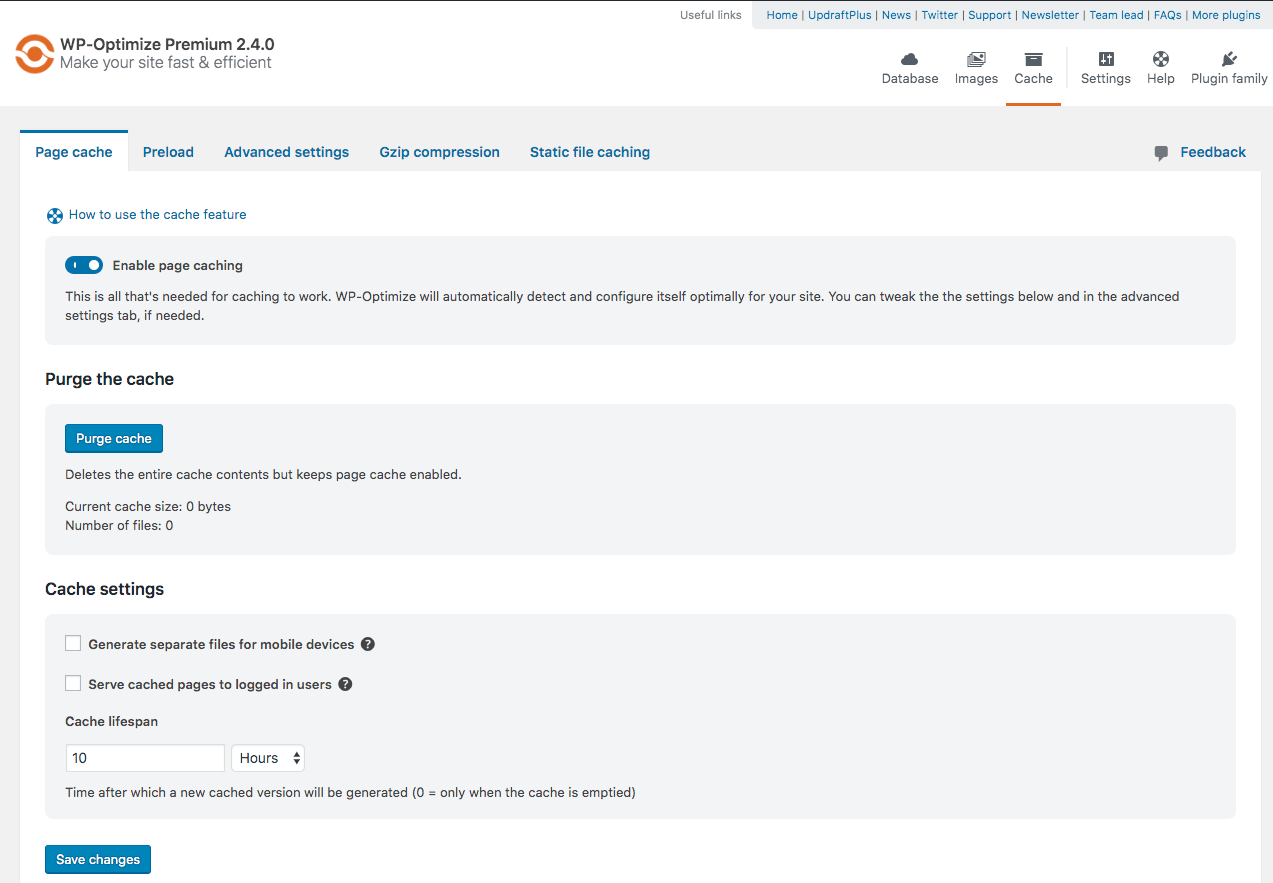
WP-Optimize automatically and optimally configures itself for your WordPress site. Turn it on in one-click or refine its settings if you prefer.
More cache features:
-
Cache preloading: This feature emulates a visit to your site, meaning cached files are served straight away, speeding up your site from the very first visit.
-
GZIP Compression: When the server isn’t configured to do so, WP-Optimize delivers HTML, CSS and JS files to the user’s browser as smaller, compressed files, reducing the size of pages and style sheets by up to 90%!
-
Preload key requests: Recommended by Google to improve page speed times. Critical resources (things like font files) get loaded first, so the page loads much faster [Premium].
Use cache settings to:
-
Serve cached content to logged in users: Turn this on if content stays the same for logged in users (or turn on and exclude URLs where content does change e.g. my account areas).
-
Exclude content from cache: Exclude by URL, conditional tags, browser agent strings or list cookies that should prevent caching when set (advanced user settings).
-
Deliver device-specific cache: Serve separate cache files to desktop and mobile devices . This ensures that responsive features e.g. desktop and mobile menus are cached separately and served correctly.
-
User per role cache: Useful if your website delivers different content to different user roles. e.g. an e-commerce site that displays different content to resellers or consumers [Premium].
-
User specific cache: Serves separate cache files to individual users. Useful for websites with personalised content e.g. Learning management systems [Premium].
-
Cache purging permissions: Select which user roles are allowed to purge the cache e.g. admin only or perhaps a ‘teacher’ role in an LMS setting only [Premium].
2. COMPRESS IMAGES
-
Lossy or lossless compression options: Choose between maximum space saving, best image quality or somewhere in-between.
-
WebP conversion: Recommended by Google, WebP can achieve up to 34% smaller file sizes compared to JPEG and up to 26% compared to PNG.
-
Auto-compress: Check a box and every new image you upload will automatically be compressed to your preferred lossy / lossless settings.
-
Bulk compression: Compress every existing image on your site with the press of a button.
-
Restore original: Gone too far? Revert images back to their original in one click.
-
Retain EXIF image data: Check a box to retain EXIF image data during compression.
-
Lazy Load: Webpages load much faster by loading web parts gradually, when they’re needed vs simultaneous loading of everything, all at once [Premium].
-
Delete orphaned images: Identify and delete unused images from your WordPress website, saving disk space [Premium].
-
Delete unused image sizes: WordPress creates multiple sizes for every uploaded image causing the uploads folder to become bloated. Scan for image sizes not in use and remove them to save further disk space [Premium].
3. CLEAN AND OPTIMIZE THE DATABASE
Cleans-up database tables, post revisions, auto draft posts, trashed posts, spam, trashed comments and more. Choose what to optimize or it’s one click to clean out the lot.
-
Schedule clean-ups: So you can set and forget. Choose from daily, weekly, fortnightly or monthly.
-
Flexible clean-up schedules: You may wish to optimize database tables more frequently than you remove unapproved comments (for example). Choose the specific time and day when tasks should run [Premium].
-
Retain a set number of weeks’ data during clean-ups: Just in case you need to retrieve something.
-
Back up before clean-ups: If you delete something you shouldn’t, restore it in a couple of clicks with UpdraftPlus.
-
Power tweak – Turbo boost for WooCommerce: Unique to WP-Optimize, this power tweak boosts performance by replacing a slow query in WooCommerce with two much more efficient queries. E-commerce sites transacting high numbers of orders stand to gain here [Premium].
-
Power tweak – Boost performance by indexing the postmeta table: This unique power tweak works by allowing the WordPress postmeta table to be indexed, improving performance [Premium].
4. MINIFY AND COMBINE HTML, CSS AND JAVASCRIPT
-
Minify in just one click: Minifies HTML, JavaScript and CSS. Toggle on or off or customise each one under ‘settings’.
-
Customise minification: Minify only (removing unnecessary code e.g line breaks and white spacing) or minify and merge. Apply the same or different settings to HTML, CSS and JavaScript.
-
Asynchronous loading: Choose non-critical CSS and JavaScript files to load in the background and independently of other resources e.g. analytics or pixel scripts. Loading asynchronously eliminates render blocking and improves page speed.
-
Exclude files from being minified: Specify CSS and JavaScript files to exclude from minification.
-
Optimize fonts: Optimize Font Awesome and Google Fonts. Inline the font files, inherit from CSS settings or load CSS / Javascript asynchronously instead.
-
Preload assets: WP-Optimize visits each web page on your site so the code is minified and preloaded for real life users, right from their very first visit.
-
Preload key requests: Recommended by Google to improve page speed times. Critical resources (things like font files) get loaded first, so the page loads much faster.
WHY WP-OPTIMIZE?
- It’s brought to you by TeamUpdraft, the team behind the world’s most trusted backup, migration and restoration plugin.
- It’s easy to use.
- It packs a punch for a free plugin.
WP-Optimize brings the best cache and optimization technology together into one single, seamless plugin to make your WordPress site fast, lean and efficient.
PREMIUM FEATURES AT A GLANCE
Our free version of WP-Optimize Cache is great, but we also have an even more powerful Premium version with extra features that offer the ultimate in freedom and flexibility:
- Multisite Support: extends database optimisations so they function for multiple WordPress sites at a time. If you manage more than one website, you will need WP-Optimize Cache Premium.
- Flexibility and Control: gives you the power to optimize select individual tables or a particular combination of tables on one or more WordPress websites, rather than having to optimize all database tables.
- Deleting unused and unwanted images: removes orphaned images from your WordPress site, plus images of a certain, pre-defined size.
- Sophisticated Scheduling: offers a wide range of options for scheduling automatic optimization. Specify an exact time and run clean-ups daily, weekly, fortnightly or monthly and perform any number of additional once off optimizations.
- Seamless Graphical User Interface: for superb clarity in scheduling and managing of multi-site optimizations.
- WP-CLI support: provides a way to manage optimizations from command-line interface if you have lots of sites
- Lazy Loading: load only the images and part of a web-page when it is visible to the user so they can see something very quickly.
- Optimization Preview: gives users the ability to preview, select and remove data and records available for optimization from the database.
- Preload key requests: preload assets such as web fonts and icon fonts, as recommended by Google PageSpeed Insights.
- Premium support – caching is one of the most complex things you can do for a website, so premium support offers you peace of mind there’s someone to talk quickly to if you need any technical answers or help configuring the optimizations of cache settings for your website.
Traduções
Translators are welcome to contribute to the plugin. Please use the WordPress translation website.
Instalação
There are 3 different ways to install WP-Optimize Cache, as with any other wordpress.org plugin.
Using the WordPress dashboard
- Navigate to the ‘Add New’ in the plugins dashboard
- Search for ‘WP-Optimize’
- Click ‘Install Now’
- Activate the plugin on the Plugin dashboard
Uploading in WordPress Dashboard
- Download the latest version of this plugin from https://wordpress.org/plugins/wp-optimize/
- Navigate to the ‘Add New’ in the plugins dashboard
- Navigate to the ‘Upload’ area
- Select the zip file (from step 1.) from your computer
- Click ‘Install Now’
- Activate the plugin in the Plugin dashboard
Using FTP
- Download the latest version of this plugin from https://wordpress.org/plugins/wp-optimize/
- Unzip the zip file, which will extract the wp-optimize directory to your computer
- Upload the wp-optimize directory to the /wp-content/plugins/ directory in your web space
- Activate the plugin in the Plugin dashboard
Log de Changes
4.7.1: A lot of tweaks and fixes - a recommended update for all
4.7.1 – 06/Nov/2026
- FEATURE: Minify – Added Burst Statistics as an analytics option next to Google Analytics, installed from WordPress.org with one click
- FIX: Added spacing between Minify cache action buttons to match the previous layout
- FIX: Admin bar cache menu renders unstyled for non-admin roles with cache purge permissions on the frontend
- FIX: Corrected the typo from “Aproximate time to finish” to “Approximate time to finish”
- FIX: Duplicate logging destination issue
- FIX: Fixed issues with the wpo_prune_cache_logs and wpo_page_cache_schedule_preload cron events
- FIX: Gzip detection UI fixes
- FIX: Minify – Fixed issue with excluding CSS files from processing
- FIX: Premium – Fixed the non-working “View Details” link
- FIX: Preserve LCP settings during plugin deactivation
- FIX: Prevented PHP warnings when scheduled optimizations are no longer available
- FIX: Remove wpo_version option from the database when deleting the plugin
- FIX: Resolved Dashboard Overview page link navigation issues
- SECURITY: Fixed an SQL injection vulnerability (exploitation requires a logged-in malicious admin user (requires a malicious super-admin on multisite) who did not otherwise have the ability to run SQL, e.g. cannot install or edit plugins). Thanks to Duc Manh for disclosing this defect.
- TWEAK: Black Friday promotion notice
- TWEAK: Correct singular and plural labels in Media and File Optimisation dashboard modules
- TWEAK: Mobile view layout issue on Dashboard Overview page
- TWEAK: Static browser cache enhancements
- TWEAK: Tooltip initialization on Media Library and Edit Media pages, resolved tooltip jump and post-AJAX re-init, corrected smush popup close button layout
4.7.0 – 16/Sep/2026
- FEATURE: Dashboard overview showing a summary of all WP-Optimize modules (cache, images, minification, and database), including active status, savings, and quick links to manage each area
- FEATURE: Load tables in batches when there are too many tables to load in a single request
- FIX: Added missing optimizations for auto optimizations cron
- FIX: Fix removal of cache settings and related cron events on plugin deactivation and reactivation
- FIX: Fixed inconsistent UI in the Minify status tab, and removed duplicate tooltips
- FIX: Fixed the association of the wp_e_submissions_actions_log table with its plugin
- FIX: LCP – Preserve original cached HTML when removing the LCP observer script fails instead of returning an empty string
- FIX: PHPStan issues WPO_WP_Kses_Compatibility class
- FIX: Permissions issues for adminbar menu items
- FIX: Registered image sizes not showing on multisite
- FIX: Removed extra spacing in the Wipe settings section
- FIX: WP_CACHE constant warning in debug.log
- FIX: WP_Optimize_Utils::get_file_path() does not handle URLs with query parameters
- REFACTOR: WPO_Page_Builder_Compatibility class
- REFACTOR: WPO_Webp_Convert_Image_Task class
- TWEAK: Added data- attributes support for older wordpress versions
- TWEAK: Cache – Browser cache settings updated for better compatibility
- TWEAK: Cache – Improved browser cache detection
- TWEAK: Disabling Show avatars no longer leaves gravatars hosted locally in the background
- TWEAK: Improved GZIP detection
- TWEAK: Improved the Purge Page Cache and Purge Minify Cache admin bar functionality
- TWEAK: Premium – Improved UX for Unused CSS Removal
- TWEAK: Premium – Index Post Meta Table power tweak now correctly indexes all subsites postmeta tables in a Multisite network and tracks last-run status per site
- TWEAK: Premium Auto LCP writes the gzip cache variant atomically via a temporary file and rename, matching how the HTML cache file is patched
- TWEAK: Rename
as_typetoasset_typein the LCP beacon request for clarity
4.6.1 – 29/Jul/2026
- FIX: CSS exclusions added via Minify -> Advanced -> Exclude are now saved on separate lines, preventing invalid exclusion entries
- FIX: Fixed compatibility issue with the WooCommerce multi-currency plugin
- FIX: Incorrect WebP browser detection for Firefox users
- FIX: Misaligned UI issue in minify admin pages
- FIX: Mobile UI issues
- FIX: Prevent caching pages when a WooCommerce cart has content
- FIX: UI freezes when restoring a compressed image
- REFACTOR: Use WP_Optimize_Utils::get_url_without_cache_purge_params() for admin bar links
- REFACTOR: WPO_KD_Submissions_Compatibility class
- REFACTOR: WP_Optimize_Server_Compatibility class
- REFACTOR: WPO_Polylang_Compatibility class
- TWEAK: Clear cached local Google Fonts statistics when the CSS font file is downloaded
- TWEAK: Create a new class named WP_Optimize_UpdraftCentral_Commands to group UpdraftCentral specific commands, currently including methods for retrieving and updating WP-Optimize settings
- TWEAK: Removed deprecated UpdraftCentral commands from WP_Optimize_Commands class
- TWEAK: Removed unused phpseclib dependency from composer
- TWEAK: Smush post meta keys are prefixed with
_and now is multisite compatible
4.6.0 – 06/Jul/2026
- FEATURE: Premium – Automatically preloads the page’s Largest Contentful Paint (LCP) element to improve initial load speed and perceived performance
- FIX: Cache – Fixed an issue related to cache setting saving
- FIX: Fixed a UI issue in WooCommerce variation products when Automatically preload content after it is purged is enabled
- FIX: Fixed browser caching issue where admin pages were cached
- FIX: Mobile UI issue
- FIX: Notice Dismissal issue
- FIX: Usage of htmlspecialchars()
- REFACTOR: Code from can_purge_cache() method moved to WP_Optimize_Utils::current_user_can_purge_cache()
- REFACTOR: Fix WordPress Security check errors and warnings on admin page
- REFACTOR: Make
is_edit_modea static method and avoid duplication - REFACTOR: Optimized WP_Optimize_Database_Information::get_table_plugin() method
- TWEAK: Added method to check current user has the capability
- TWEAK: Added methods to retrieve and save essential WP-Optimize toggleable settings for UpdraftCentral
- TWEAK: Disable and hide the “Speed up WooCommerce ‘Get total spent’ query” Power Tweak when it’s no longer relevant
- TWEAK: Handle race conditions in font downloading and optimize cache stats storage
- TWEAK: Improved image grid action button visibility to accommodate WordPress 7.0 button styling changes
- TWEAK: Matched response styles when purging via the admin bar
- TWEAK: Premium – Handle empty orders in WooCommerce Total Spent Power Tweak feature
- TWEAK: Premium – Improved hash logic for the Unused CSS Removal feature
- TWEAK: Prevent unwanted cache growth caused by crawlers or preload bots
- TWEAK: UI changes to match WordPress 7.0
- TWEAK: Unschedule all WP-Optimize cron jobs on deactivation in multisite
- TWEAK: WP_Optimize_Power_Tweaks class method deactivate bug fixed related to the array_diff function
4.5.5 – 05/Jun/2026
- TWEAK: Update the bundled common-libs version
4.5.4 – 25/May/2026
- FIX: WebP image compression breaking in some cases
- REFACTOR: Avoid instantiating PHPSQLParser on each call in WPO_DB_Table_Analysis
- REFACTOR: Class WPO_WebP_Convert
- REFACTOR: Make markup readable in
tables-body.phptemplate - REFACTOR: Refactored duplicated cache_admin_bar logic by centralizing it in the admin class and removing redundant implementations.
- REFACTOR: Removed unused
WPO_Htaccess_Capabilitiesclass - REFACTOR: WPO_Activation class
- REFACTOR: WPO_Uninstall class
- REFACTOR: WPO_WebP_Alter_HTML class
- REFACTOR: WPO_WebP_Self_Test class
- REFACTOR: WPO_WebP_Test_Run class
- REFACTOR: WPO_WebP_Utils class
- REFACTOR: WPO_Webp_Task_Manager class
- REFACTOR: WP_Optimize_WebP class
- REFACTOR: WP_Optimize_WebP_Images class
- TWEAK: Added an additional check to prevent SplFileInfo::getSize() RuntimeException in WP_Optimize_Utils::get_folder_stats()
- TWEAK: All in One SEO plugin compatibility issue
- TWEAK: Cache – Inconsistent REST cache filenames due to query parameter order
- TWEAK: Cache – Set the purge old cache cron schedule based on the Cache lifespan setting
- TWEAK: Ensure parsed result is an array in WPO_DB_Table_Analysis::get_query_table()
- TWEAK: Exclude GIF from being converted to WebP with
wpo_webp_convert_compressed_imagescron job - TWEAK: Optimized
wpo_username_from_cookies()to avoid repeated database queries per request - TWEAK: Precheck for existing WebP format of file before running WebP conversion
- TWEAK: Remove redundant code that is not reachable.
- TWEAK: Resolved edge cases in CapoJS
Capturas de tela
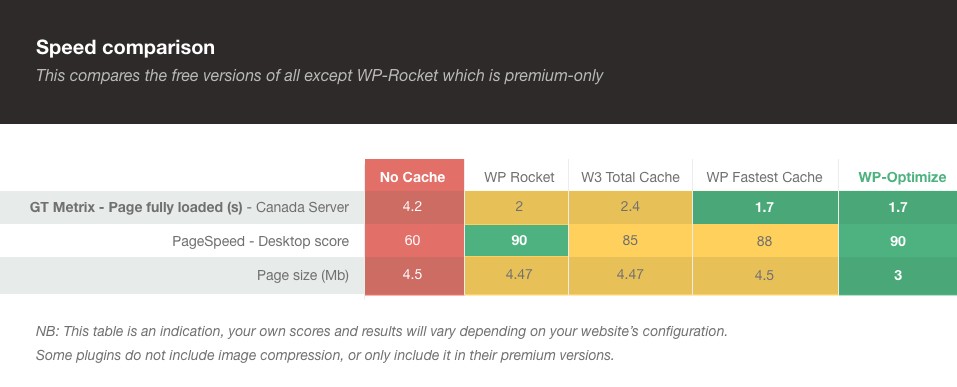
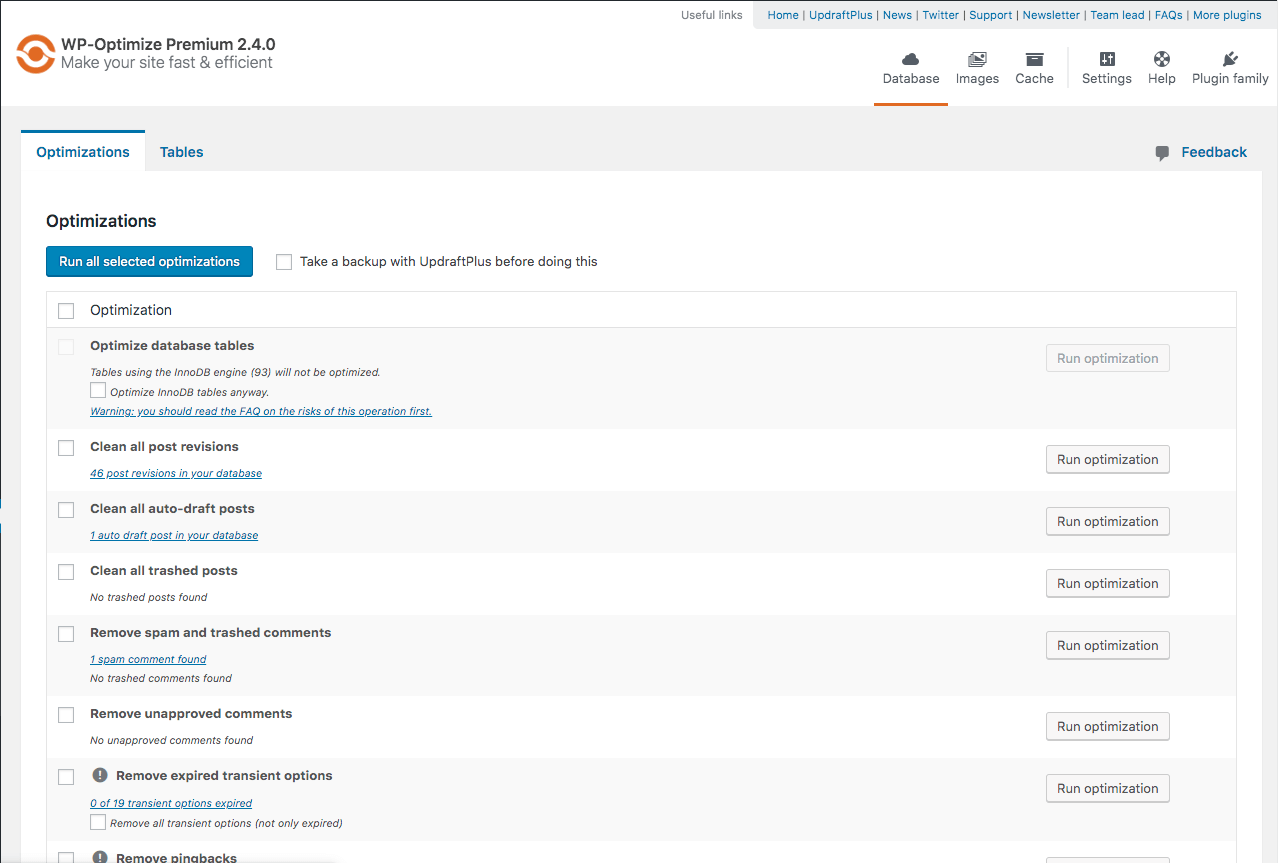
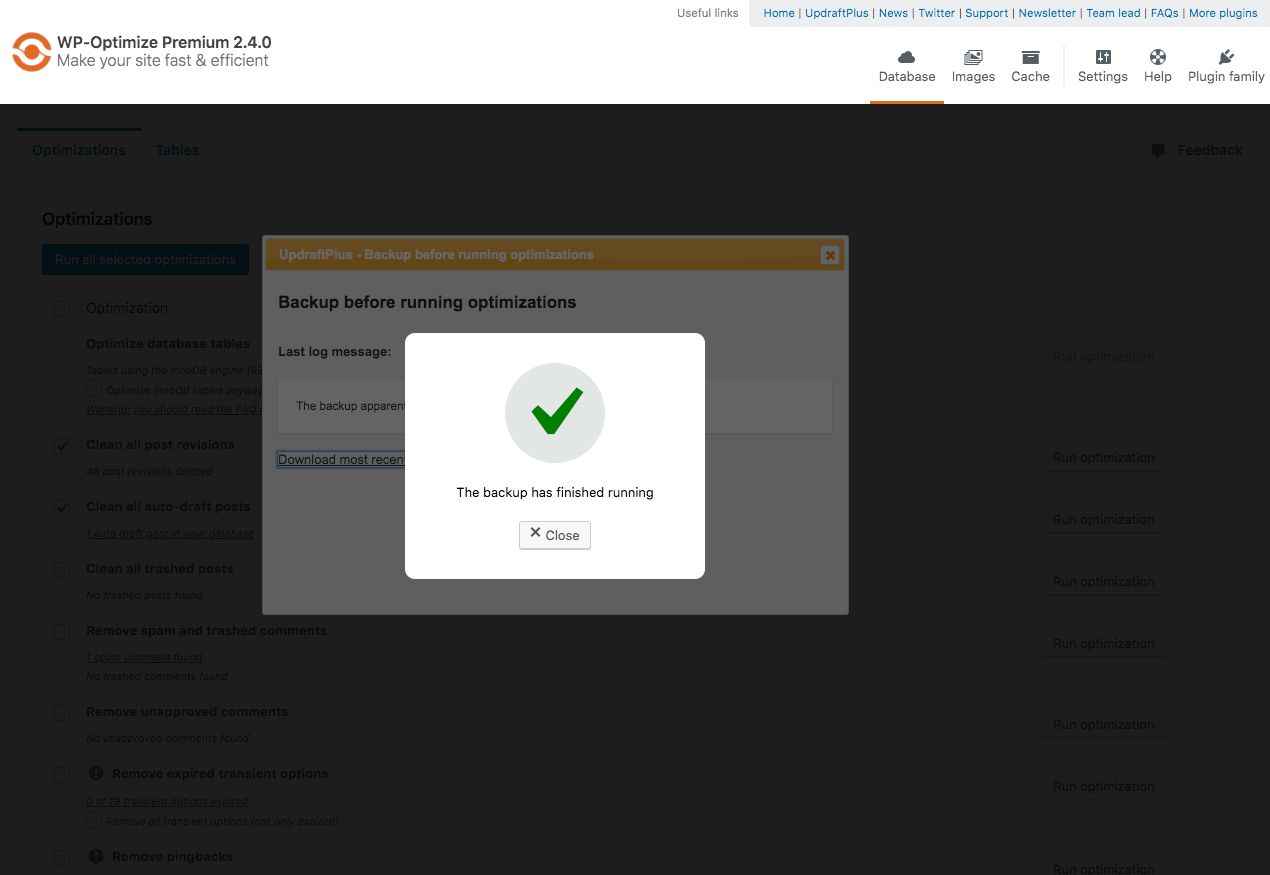
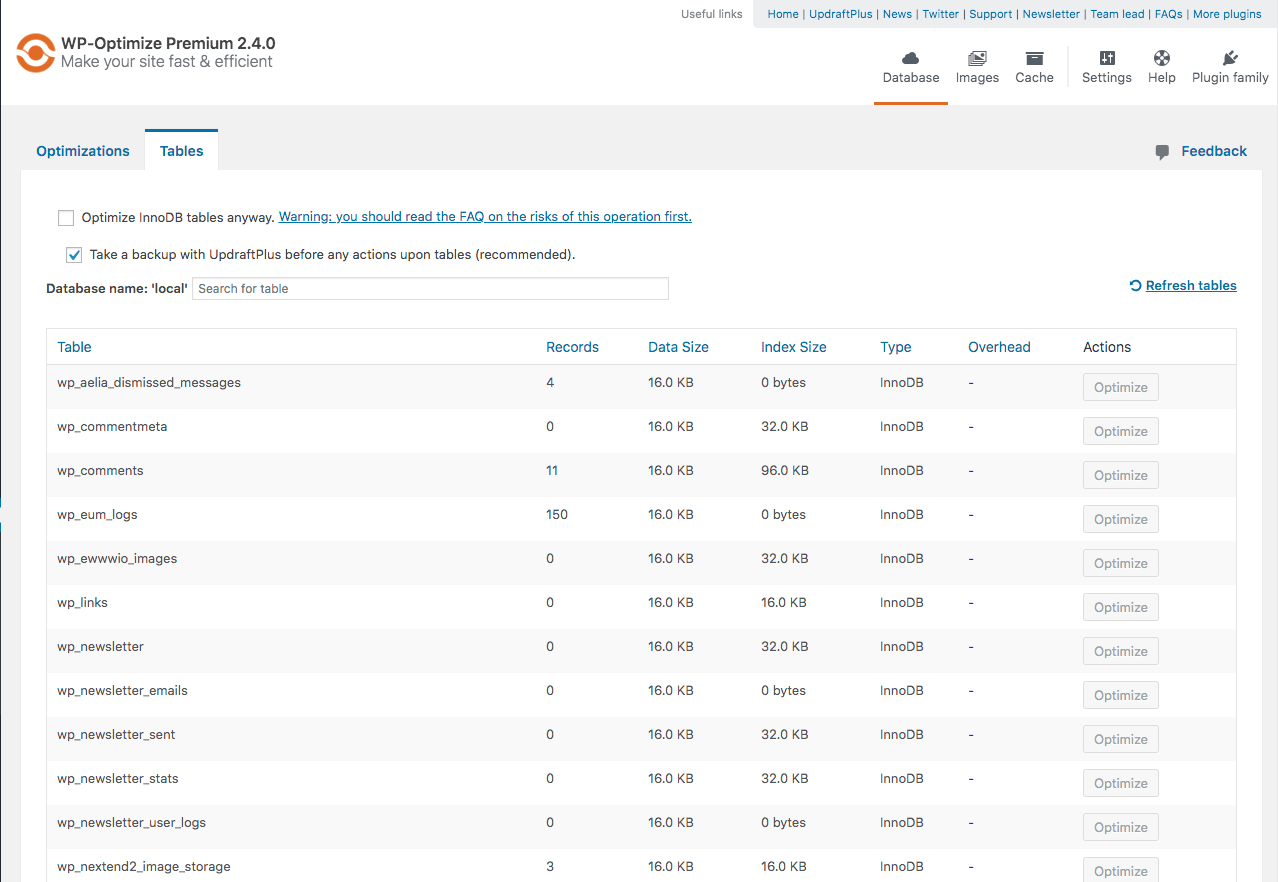

Para desenvolvedores
Este é o seu plugin? Mostre os números.
Adicione um crachá ao vivo ao seu site, Documentos ou Readme do GitHub. Ele é atualizado por conta própria - nenhuma conta necessária.
Best WP-Optimize alternatives
Todos os plugins de cache →



FAQ
WP-Optimize: quick answers
Respostas diretas, extraídas de dados ao vivo WordPress.org.
Fonte: WordPress.org
Is WP-Optimize free?
Yes. WP-Optimize is free to download and use from the official WordPress.org plugin directory.
Is WP-Optimize safe to use in 2026?
Yes — WP-Optimize is a safe, well-maintained plugin to use in 2026. It runs on 1M+ sites, is rated 4.8/5 and was last updated 2 days ago, and scores 95/100 on our health check.
How many websites use WP-Optimize?
WP-Optimize is active on 1M+ WordPress websites and has been downloaded 61,106,293 times since it launched in January 2009. It was downloaded 746,693 times in the last 30 days.
Does WP-Optimize work with WordPress 7.1?
Yes. The developer has tested WP-Optimize up to WordPress 7.2, the latest release. It requires WordPress 4.9 or newer.
What PHP version does WP-Optimize need?
WP-Optimize requires PHP 7.2 or higher. Most hosts run PHP 8.x today, so it works on any modern WordPress hosting.
When was WP-Optimize last updated?
The latest version, 4.7.1, was released on November 18, 2026 (2 days ago).
Who makes WP-Optimize?
WP-Optimize is developed and maintained by David Anderson / Team Updraft.
What are the best alternatives to WP-Optimize?
The most popular alternatives to WP-Optimize are WP Super Cache (1M+ installs), WP Fastest Cache (1M+ installs) and SpeedyCache (500K+ installs).
Alimentado por PageForge
Um modelo e uma planilha. Uma página real para cada pesquisa.
PageForge Transforma cada linha de um CSV em uma página WordPress com seu próprio título, URL, SEO campos e esquema, construído no layout que você já desenhou. Gratuito em WordPress.org.
- CSV e XLSX, mais Google Sheets em Profissional e Empresarial
- Seu próprio título, URL, SEO campos e esquema para cada página
- Funciona com o editor de blocos, Elementor, Divi e Avada
- Gratuito em WordPress.org, sem cartão de crédito