


Print, PDF & Email by PrintFriendly
The #1 Print, PDF, Email button. Stylish, full featured, customizable. Add custom header, footer, and more.

Escolha sólida
Print, PDF & Email by PrintFrie… is a solid plugin choice in 2026, with a few things worth checking first. It runs on 20K+ sites, is rated 3.8/5 and was last updated 23 hours ago, and scores 73/100 on our health check.
- Comprovado em escala em mais de 20 mil sites ativos
- Actively developed — last update 23 hours ago
- Testado com as últimas WordPress (7.1)
- Momentum — downloads up 255.4% vs the previous 30 days
Como ele se acumula?
Lado a lado em instalações, atualizações, avaliações e suporte



Downloads diários
Os picos de download geralmente seguem uma nova versão — cada site que atualiza automaticamente é um download.
Rankings
Where Print, PDF & Email by Print… stands todayWordPress.org Classificações de pesquisa
Posição ao vivo na pesquisa de plugins, top 100| Palavra chave | Posição |
|---|---|
| o email | #79 |
| #19 | |
| pdf button | #7 |
| #7 | |
| print button | #4 |
Adoção da versão
Compartilhamento de sites ativos por lançamento.
Divisão de classificação
★★★★★★★★★★ 3.8 from 237 reviews
About Print, PDF & Email by PrintFriendly
From the official readme · v5.5.15Descrição
Recursos
PrintFriendly is used by millions of people everyday to help them save paper and ink when they print and generate PDFs (Good for the environment and peoples wallet!).
- Print, PDF, and email.
- Stylish, highly polished, intuitive UI/UX that end-users love.
- Editable Preview – change text/image size, and delete to save even more paper and ink.
- PDF – clickable links and custom paper sizes (A4 or Letter).
- Reliable & Fast – Since 2009 we’ve optimized and improved.
- Compatible with social share plugins like Social Snap, Hubbub (formerly Social Pug), NovaShare, Shareaholic
Benefits For Publishers
- Automatically detects page content so you don’t have to create print.css.
- Professional: highly polished, stable, and supported.
- Works on HTTP, HTTPS, and password protected sites.
- Customization features (see below)
- Full featured and free forever, supported by ads on printfriendly.com. Optional Print Button Pro keeps readers on your site with no ads.
Customization
- Print, PDF, Email, options can be on or off.
- Custom headers and footers for the print and PDF.
- Button styles to choose, or use your own text and image/button.
- Include a copyright on print and PDF.
- Use your own CSS for complete creative control or the print or PDF page.
- Use the JavaScript or non-JavaScript option.
Free: readers finish on printfriendly.com
The plugin is free to use and fully functional, and we maintain, improve, and support it for everyone.
On the free plan, a reader who clicks your button finishes on printfriendly.com, where we show ads. That is how the free plan is paid for.
No ads are ever added to your own pages.
Print Button Pro: readers stay on your site
With Print Button Pro, the print and PDF preview opens on your own page, with no ads, so readers never leave your site.
$8.25 a month, billed yearly at $99.
Start a 30-day free trial from Settings > Print Friendly & PDF in your WordPress admin: card required, nothing charged today, cancel anytime.
Localized in 30 Languages
PrintFriendly & PDF speaks your language! It detects (based on browser setting) the end-users language and automatically changes language. For example, if your browser is set to Spanish, then PrintFriendly will use Spanish.
A few of our supported languages:
- Danish
- Alemão
- Inglês
- Espanhol
- Estonian
- Francês
- Hebrew
- Croatian
- Hungarian
- Italiano
- Korean
- Lithuanian
- Dutch/Netherlands
- Polonês
- Portuguese
- Slovak
- Slovenian
- Serbian
- Swedish
- Thailand
- Turkish
- Chinese Simplified
- Chinese Traditional
PrintFriendly and PDF is the #1 print optimization technology, as featured in Lifehacker, Mashable & makeuseof.
Give PrintFriendly & PDF a test drive at PrintFriendly.com
GDPR (General Data Protection Regulation)
PrintFriendly Pro is GDPR compliant. Privacy Policy. We are working on making the free version GDPR compliant, but as of today it is not because of stringent cookie consent requirements. If you are an EU publisher, we recommend purchasing a PrintFriendly Pro Subscription for your domain.
Print, PDF, Email Privacy & Data
PDFs are generated on our server; this plugin “phones home”. Also if the end-user shares the page via email, the email is sent by our server.
Our Fundamental Principles:
- We do not sell data. Period.
- We do not share data, unless compelled by the law.
- We do not ask for personal information, unless it’s needed to provide a service.
- We don’t store personal information, unless required for the on-going operation of service.
Specifically, here’s what we do with the data and information:
Page content is not sent or stored on server, except to generate the PDF. After the PDF is generated, we temporarily store the PDF to allow the end-user time to download. After this time has expired, the PDF is permanently deleted.
If you’re using the non-JavaScript option in the plugin, then the preview is generated on our server and temporarily stored in cache for a few minutes. After that time it is permanently deleted.
Email Address & Content get permanently deleted In order to send the email, we need to store the email address and message on our server. After the email has been sent and found not to be a spammer, the email address is permanently deleted.
Server log files get created and deleted. Browsers and Servers pass non-personally-identifying information, such as the browser type, language, referrer, and the date/time. We may use this data to analyze how the service is being used. Non-personally-identifying aggregate data may get published, e.g., by a report on trends in the usage of the service.
Connecting your site to Print Button Pro. Until your site is connected, your WordPress admin sends PrintFriendly one thing: your site’s domain name, to ask whether it already has Pro, the same question your button asks when a reader loads a page. It asks at most once every 12 hours, and only so a site that already pays is not offered Pro. Nothing else is sent until you click to start a trial or connect your site. That click sends your site’s address and the admin email address to printfriendly.com so we can set up your account; you can change either before you sign up. Once connected, the plugin checks your plan with printfriendly.com when you open its settings page, at most once every 12 hours.
Instalação
- Search for PrintFriendly in your WordPress backend and click install, or download the printfriendly.zip file and unzip it.
- If you downloaded the zip, upload the printfriendly folder into wp-content/plugins folder
- Activate the plugin in your WordPress Admin area.
- Select “Settings” to customize button style and placement.
Log de Changes
5.5.15
- Fix: sites that already pay for Print Button Pro, but were never connected inside the plugin, were shown as “Free plan” and offered the free trial on the Dashboard. The plugin now recognises them: the settings page shows Pro, and there is no upgrade notice or Upgrade link.
5.5.14
- New: until a site is connected to Print Button Pro, admins see an Upgrade link next to Settings on the Plugins screen.
- New: a one-time notice on the Dashboard and Plugins screens offers the 30 day free trial. On a new install it waits a week, and each admin can dismiss it for good.
- Docs: the readme explains what changes for your readers with Print Button Pro.
5.5.13
- New: the settings screen now shows your Print Button Pro plan, and you can start a 30 day free trial without leaving WordPress.
- Fix: the bundled select2 library is versioned with the plugin, so updates are no longer held behind browser caches.
5.5.12
- Tested against WordPress 7.1
5.5.11
- Security fix: prevent stored XSS via the Content Position CSS (button alignment) option (CVE-2026-9738).
- Hardening: consistently escape option output across the settings screens.
5.5.10
- Tested against 7.0
Capturas de tela


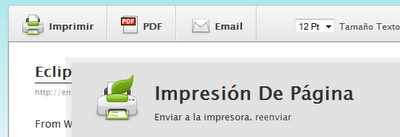
Para desenvolvedores
Este é o seu plugin? Mostre os números.
Adicione um crachá ao vivo ao seu site, Documentos ou Readme do GitHub. Ele é atualizado por conta própria - nenhuma conta necessária.
Best Print, PDF & Email by PrintFr… alternatives
All email plugins →





FAQ
Print, PDF & Email by PrintFriendly: quick answers
Respostas diretas, extraídas de dados ao vivo WordPress.org.
Fonte: WordPress.org
Is Print, PDF & Email by PrintFrie… free?
Yes. Print, PDF & Email by PrintFrie… is free to download and use from the official WordPress.org plugin directory.
Is Print, PDF & Email by PrintFrie… safe to use in 2026?
Print, PDF & Email by PrintFrie… is a solid plugin choice in 2026, with a few things worth checking first. It runs on 20K+ sites, is rated 3.8/5 and was last updated 23 hours ago, and scores 73/100 on our health check.
How many websites use Print, PDF & Email by PrintFrie…?
Print, PDF & Email by PrintFrie… is active on 20K+ WordPress websites and has been downloaded 2,319,981 times since it launched in May 2009. It was downloaded 20,351 times in the last 30 days.
Does Print, PDF & Email by PrintFrie… work with WordPress 7.1?
Yes. The developer has tested Print, PDF & Email by PrintFrie… up to WordPress 7.1.5, the latest release. It requires WordPress 4.9 or newer.
When was Print, PDF & Email by PrintFrie… last updated?
The latest version, 5.5.15, was released on November 19, 2026 (23 hours ago).
Who makes Print, PDF & Email by PrintFrie…?
Print, PDF & Email by PrintFrie… is developed and maintained by Print & PDF by PrintFriendly.
What are the best alternatives to Print, PDF & Email by PrintFrie…?
The most popular alternatives to Print, PDF & Email by PrintFrie… are WP Mail SMTP by WPForms (4M+ installs), MC4WP: Mailchimp for WordPr… (1M+ installs) and Easy WP SMTP (500K+ installs).
Alimentado por PageForge
Um modelo e uma planilha. Uma página real para cada pesquisa.
PageForge Transforma cada linha de um CSV em uma página WordPress com seu próprio título, URL, SEO campos e esquema, construído no layout que você já desenhou. Gratuito em WordPress.org.
- CSV e XLSX, mais Google Sheets em Profissional e Empresarial
- Seu próprio título, URL, SEO campos e esquema para cada página
- Funciona com o editor de blocos, Elementor, Divi e Avada
- Gratuito em WordPress.org, sem cartão de crédito